
Treevizer
Visualize node data structures using Graphviz.
How it works
Treevizer iterates over your datastructure to generate a DOT file and runs Graphviz turn it into an image. The datastructure needs to be built using Nodes.
It also support recursive functions.
Examples
Linked list

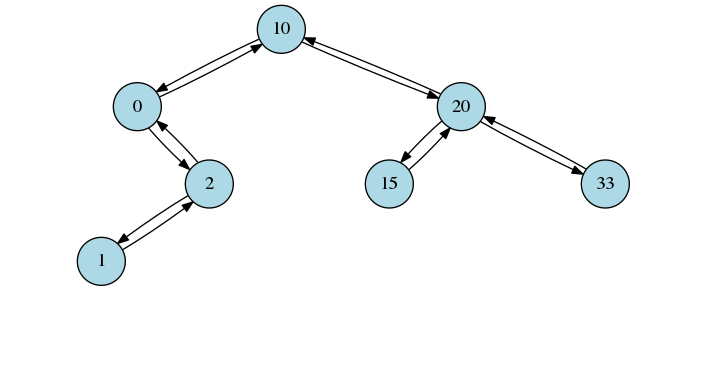
Balanced binary tree
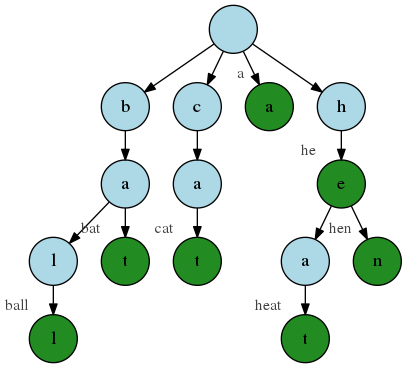
Trie
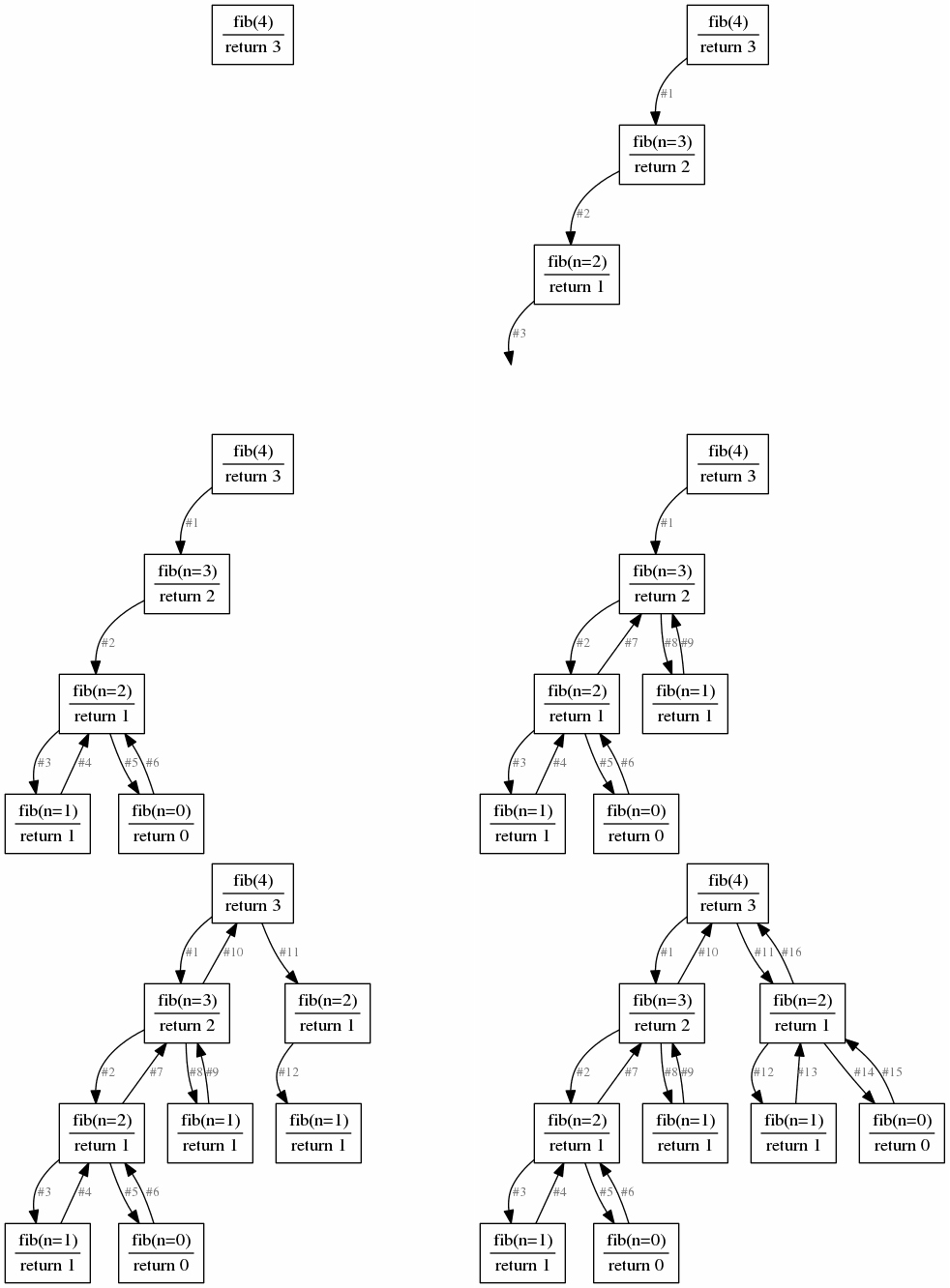
Recursive Fibonacci
Prerequisites
You need to install Graphviz and make sure it is in $PATH.
Cygwin
Graphviz and Pillow need special installation on Cygwin.
Graphviz
Don't install Graphviz in Cygwin, do a windows installation. Otherwise there will be a problem with paths.
Pillow
Pillow is optional, it is only used to create GIFs. If you don't want to create GIFs you don't need to install it.
Don't install Pillow with pip, instead do it with a Cygwin package. Install the Cygwin package python3X-imaging, replace X with your Python version.
Installing
pip install treevizer
Usage
The following structures are supported:
Linked list (ll)
Structure type is called "ll". The config key is called "LinkedList".
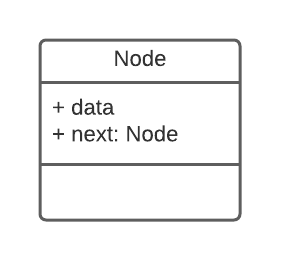
Require a Node class with the attributes that fulfill the following class diagram.
Balanced binary tree (bbt)
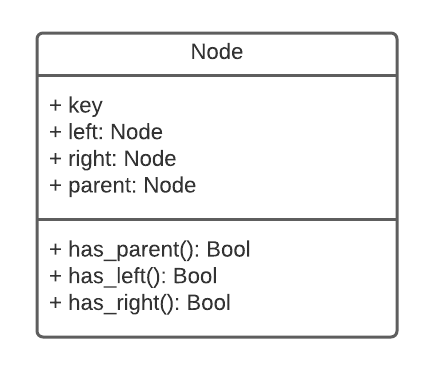
Structure type is called "bbt". The config key is called "BalancedBinaryTree".
Require a Node class with the attributes that fulfill the following class diagram.
Trie (trie)
Structure type is called "trie". The config key is called "Trie".
Require a Node class with the attributes that fulfill the following class diagram.
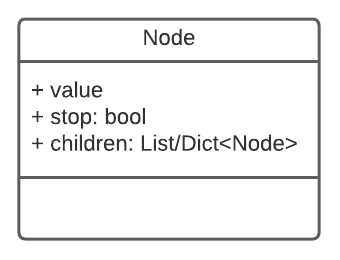
The stop attribute marks if node marks a word (True) or not (False).
Recursion
Decorate your recursive function with recursion_viz. It is possible to decorate multiple functions. Each function is identified by the name of your function when creating the PNG or GIF.
Example
import treevizer

@treevizer.recursion_viz
def a_rec_func():
    a_rec_func()


@treevizer.recursion_viz
def another_rec_func():
    another_rec_func()

a_rec_func()
another_rec_func()

treevizer.recursion_to_png("a_rec_func", dot_path="recursion.dot", png_path="recursion.png")
treevizer.recursion_to_png("another_rec_func", dot_path="rec2.dot", png_path="rec2.png")
To configure the dot language, use "Recursion" as key in the json.
Functions
Structure to DOT file
import treevizer

treevizer.to_dot(root, structure_type="bbt", dot_path="tree.dot")
    """
    Generate DOT file from node structure.

    Parameters
    ----------
    root : Node
        Root node for datastructure
    structure_type : str
        Name of the type of datastructure (default is "bbt")
    dot_path : str
        Path to generated DOT file (default is tree.dot)
    """
Structure to PNG
This also creates a DOT file.
import treevizer

treevizer.to_png(root, structure_type="bbt", dot_path="tree.dot", png_path="tree.png")
    """
    Generate DOT file from node structure and use Graphviz to create image.

    Parameters
    ----------
    root : Node
        Root node for datastructure
    structure_type : str
        Name of the type of datastructure (default is "bbt")
    dot_path : str
        Path to generated DOT file (default is tree.dot)
    png_path : str
        Path to generated png file (default is tree.png)
    """
Recursion to PNG
This also creates a DOT file.
import treevizer

@treevizer.recursion_viz
def a_recusive_function():
    a_recusive_function()


treevizer.recursion_to_png(function_name, dot_path="recursion.dot", png_path="recursion.png")
    """
    Generate DOT file of recursive function calls and use Graphviz to create image.

    Parameters
    ----------
    function_name : str
        Name of your decorated function.
    dot_path : str
        Path to generated DOT file (default is recursion.dot)
    png_path : str
        Path to generated png file (default is recursion.png)
    """
Recursion to GIF
import treevizer

@treevizer.recursion_viz
def a_recusive_function():
    a_recusive_function()


treevizer.recursion_to_gif(function_name, gif_path="recursion.dot", duration=800, loop=0)
    """
    Generate PNG files of recursive function calls and use Pillow to create GIF.

    Parameters
    ----------
    function_name : str
        Name of your decorated function.
    gif_path : str
        Path to generated GIF file (default is recursion.gif)
    duration : int
        duration, in miliseconds, of how long each image will be displayed in the GIF (default is 800)
    loop : int
        how many times the GIF should loop after initial loop. 0 to loop infinitely (default is 0)
    """
DOT file to PNG
import treevizer

treevizer.dot_to_png(dot_path="tree.dot", png_path="tree.png")
    """
    Use Graphviz to create image from a DOT file.

    Parameters
    ----------
    dot_path : str
        Path to your DOT file (default is tree.dot)
    png_path : str
        Path to generated png file (default is tree.png)
    """
Configure
Create .dot.json in root folder to change DOT configuration. Available options can be found in Graphviz documentation.
For example to change color of Nodes in image for balanced binary tree use the following.
# .dot.json
{
    "BalancedBinaryTree": {
        "node": {
            "fillcolor": "green"
        }
    }
}
To change size and shape of nodes and color of edges in Linked list use the following.
# .dot.json
{
    "LinkedList": {
        "node": {
            "shape": "square",
            "width": 1.5
        },
        "edge": {
            "color": "red"
        }
    }
}
To change color of the font on edge labels for recursion.
{
    "Recursion": {
        "edge": {
            "fontcolor": "black"
        }
    }
}
Known Errors/Warnings
Links
License
This project is licensed under the MIT License - see the LICENSE.md file for details
1 maintainer

Metadata
1 maintainer
Release files for treevizer 0.2.5
For a detailed explanation of source distributions (sdists) and built distributions (wheels), please see the package formats documentation.
Built distribution (wheel)
| File | Interpreter | ABI | Platform | Actions Reset |
|---|---|---|---|---|
| treevizer-0.2.5-py3-none-any.whl | Python 3 | none | any | Details for treevizer-0.2.5-py3-none-any.whl |
Release files / treevizer-0.2.5-py3-none-any.whl
| Download URL | treevizer-0.2.5-py3-none-any.whl |
|---|---|
| Size | 16.2 kB |
| Tags | Python 3 |
|
SHA-256 checksum How to use checksums |
9c48b5e189bc3f163a9115bcfc6d72e033e07f2bfaf928f0be62949027057f79
|
|
BLAKE2b-256 checksum How to use checksums |
f99989fc298d87e778d8fa34fb3a64b3d9c7355daa93ba0358ff3f2408fa35c1
|
| Upload date | |
|
Uploaded using Trusted Publishing? What is trusted publishing? |
No |
| Uploaded via |
twine/4.0.2 CPython/3.8.10
|
Security for treevizer 0.2.5
Provenance
Provenance describes where a file came from. On PyPI, provenance is shared via attestations, which provide a verifiable record of the build or publishing details. View details, limitations and caveats.
No provenance found
None of the files in this release were uploaded with provenance metadata.
A note on package security
PyPI is a repository for distributing packages, not a service for auditing them. While third-party security researchers and our staff do their best to detect and remove malicious packages, PyPI cannot guarantee the quality, security or suitability of any given package.
To learn more about protecting yourself from malicious actors, visit our package security documentation.














