
treex
List directory contents as a tree with file and directory metadata
- Copyright (c) 2026 Corey Goldberg
- Development: GitHub
- Releases: PyPI
- License: MIT
About
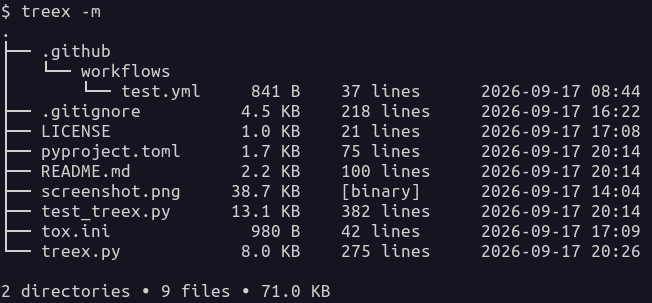
treex is a command-line utility that recursively scans a directory and lists
its contents as a tree along with file and directory metadata.
Features:
- Respects
.gitignorerules when Git is installed - Shows human-readable file sizes
- Shows recursive directory sizes
- Shows line counts for text files
- Identifies binary and unreadable files by type
- Optionally shows modification timestamps
- Optionally includes or excludes files using glob patterns
- Optionally limits the depth of the displayed tree
Status
| Latest Version |

|
| Tests (CI) |

|
| Supported Python Versions |

|
Requirements
- Python 3.10+
- Git 2.0+ (optional)
- UTF-8-compatible terminal
Installation
Install treex from PyPI using your preferred Python package manager:
- pip:
pip install treex-cli - pipx:
pipx install treex-cli - uv:
uv tool install treex-cli
Usage
usage: treex [-h] [--all] [--modified] [--quiet] [--dirs] [--summary]
             [--include PATTERN] [--exclude PATTERN] [--depth DEPTH]
             [directory]

List directory contents as a tree with file and directory metadata.

positional arguments:
  directory              directory to scan (default: current directory)

options:
  -h, --help             show this help message and exit
  --all, -a              show all files, including those ignored by Git
  --modified, -m         show file modification times
  --quiet, -q            don't show file metadata
  --dirs, -d             show directories only
  --summary, -s          show summary only
  --include, -i PATTERN  include files matching a glob pattern
  --exclude, -e PATTERN  exclude files matching a glob pattern
  --depth, -D DEPTH      limit levels displayed below the starting directory
Filtering files
Use --include to display only files that match a glob pattern:
treex --include '*.py'
Use --exclude to hide files that match a glob pattern:
treex --exclude '*.pyc'
Patterns match filenames only, regardless of their location in the directory tree. Matching is case-sensitive. When both options are provided, exclusions take precedence over inclusions.
For example:
treex --include '.py' --exclude 'test_.py'
This displays Python files except those whose filenames begin with test_.
Note: quote glob patterns to prevent the shell from expanding them before
treex receives them.
Limiting tree depth
Use --depth (or -D) to limit how many levels below the starting directory
are displayed:
treex --depth 3
The depth must be at least 1.
Directory sizes and summary totals reflect only files within the limit that pass the include/exclude filters.
Screenshot
1 maintainer

Metadata
1 maintainer
Release files for treex-cli 0.1.12
For a detailed explanation of source distributions (sdists) and built distributions (wheels), please see the package formats documentation.
Source distribution (sdist)
| File | Size | Uploaded | Provenance | |
|---|---|---|---|---|
| treex_cli-0.1.12.tar.gz | 8.4 kB | Without provenance | Details |
Built distribution (wheel)
| File | Interpreter | ABI | Platform | Reset |
|---|---|---|---|---|
| treex_cli-0.1.12-py3-none-any.whl | Python 3 | none | any | Details |
Total release size: 16.6 kB
Release files / treex_cli-0.1.12.tar.gz
| Download URL | treex_cli-0.1.12.tar.gz |
|---|---|
| Size | 8.4 kB |
| Tags | Source |
|
SHA-256 checksum How to use checksums |
7b1ec31ac1e0278717d12ad8de927d45eada54f06d1572496a628dcc1df22939
|
|
BLAKE2b-256 checksum How to use checksums |
1c93d24cc95a5cc3e46cd74706f258d9391712c778ec68c55ca7630093aaad0f
|
| Upload date | |
|
Uploaded using Trusted Publishing? What is trusted publishing? |
No |
| Uploaded via |
twine/7.0.0 CPython/3.15.0
|
Release files / treex_cli-0.1.12-py3-none-any.whl
| Download URL | treex_cli-0.1.12-py3-none-any.whl |
|---|---|
| Size | 8.3 kB |
| Tags | Python 3 |
|
SHA-256 checksum How to use checksums |
0427f355919e927e5aa7224ff1450d09da95e74f3e27cad6e3e83980f006644c
|
|
BLAKE2b-256 checksum How to use checksums |
c0761d02503248a8fcca45142f657f87775459ba99c24186318304218ceaeebf
|
| Upload date | |
|
Uploaded using Trusted Publishing? What is trusted publishing? |
No |
| Uploaded via |
twine/7.0.0 CPython/3.15.0
|
Security for treex-cli 0.1.12
Provenance
Provenance describes where a file came from. On PyPI, provenance is shared via attestations, which provide a verifiable record of the build or publishing details. View details, limitations and caveats.
No provenance found
None of the files in this release were uploaded with provenance metadata.
A note on package security
PyPI is a repository for distributing packages, not a service for auditing them. While third-party security researchers and our staff do their best to detect and remove malicious packages, PyPI cannot guarantee the quality, security or suitability of any given package.














