
trello-track
Track running processes on Trello.
Why?
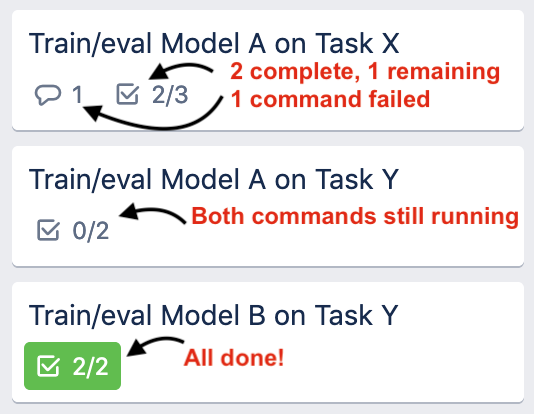
Let's say you're running experiments on several machines. Wouldn't it be nice to have an easy way to see when everything is done and if anything has encountered an error?
trello-track addresses this issue by adding checklist items to a Trello card that are updated
to reflect the progress of a process. You can quickly see at a glance where all your experiments
are at!
Features:
- Command line and python interfaces
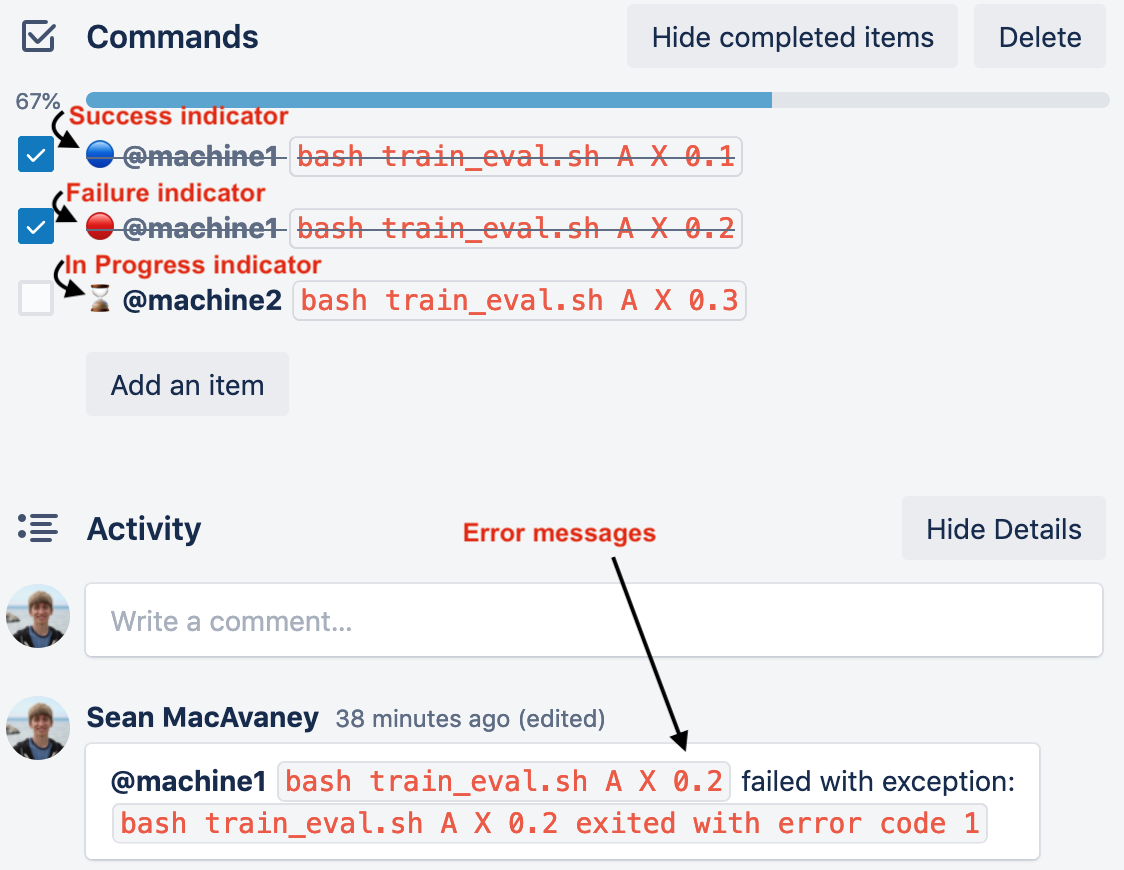
- Task status indicators:
- ⚪ ready
- ⌛ in progress
- 🔵 success
- 🔴 failed
- Error logging
How?
There's two interfaces: a command line interface and a Python interface.
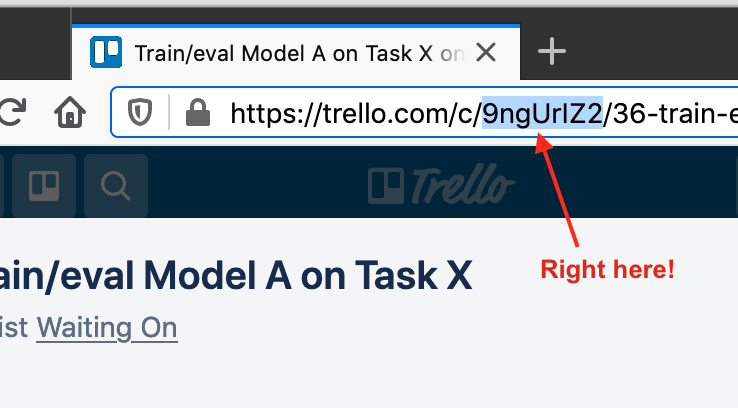
They both take the Trello Card ID. This is easy to pluck out of the URL.
CLI
Format: trello-track [card-id] [command...]
Example: trello-track 9ngUrIZ2 bash train_eval.sh A X 0.1
Python
import trello_track

with trello_track.track('do something', card_id='9ngUrIZ2'):
	foo()
But you probably don't want to hard-code a card ID, do you? You can instead skip the optional parameter and provide it via an environment variable:
TRELLO_CARD=9ngUrIZ2 python ...
You can also queue up a bunch of tasks to run using trello_track.TaskManager:
import trello_track

with trello_track.TaskManager() as tasks:
	tasks.add('foo', foo)
	tasks.add('bar', bar)
	tasks.add('baz', baz)
Authentication
Authentication is done via the Trello API key and token.
You can access your key and generate a token at https://trello.com/app-key.
You then can provide them to your application via the TRELLO_KEY and TRELLO_TOKEN environment
variables, or encoded as json in ~/.trello or ./.trello:
{"key": "XXX", "token": "XXX"}
1 maintainer

Metadata
1 maintainer
Release files for trello-track 0.0.1
For a detailed explanation of source distributions (sdists) and built distributions (wheels), please see the package formats documentation.
Source distribution (sdist)
| File | Size | Uploaded | |
|---|---|---|---|
| trello-track-0.0.1.tar.gz | 3.9 kB | Details |
Built distributions (wheels)
| File | Interpreter | ABI | Platform | Reset |
|---|---|---|---|---|
| trello_track-0.0.1-py3.7.egg | Legacy Egg format | - | - | Details |
| trello_track-0.0.1-py3-none-any.whl | Python 3 | none | any | Details |
Total release size: 23.4 kB
Release files / trello-track-0.0.1.tar.gz
| Download URL | trello-track-0.0.1.tar.gz |
|---|---|
| Size | 3.9 kB |
| Tags | Source |
|
SHA-256 checksum How to use checksums |
abc6f036201a2b2c0123ad5943fae5d3f1f5f646d246777e094850e9103170ba
|
|
BLAKE2b-256 checksum How to use checksums |
02a9b5f59271efd32bc0a7ee522d4c33b2423fff1402be2ea5379a9533732ed2
|
| Upload date | |
|
Uploaded using Trusted Publishing? What is trusted publishing? |
No |
| Uploaded via |
twine/3.2.0 pkginfo/1.5.0.1 requests/2.22.0 setuptools/50.3.0 requests-toolbelt/0.9.1 tqdm/4.46.1 CPython/3.7.9
|
Release files / trello_track-0.0.1-py3.7.egg
| Download URL | trello_track-0.0.1-py3.7.egg |
|---|---|
| Size | 12.4 kB |
| Tags | Egg |
|
SHA-256 checksum How to use checksums |
a8401590b0a1aaa42880ee6e7f7563f8887ac29336311475b1d3e6283eb817f5
|
|
BLAKE2b-256 checksum How to use checksums |
fc483766edb7b5caca799a2cae14dcb65fd46480e614b77e776712383eb30a01
|
| Upload date | |
|
Uploaded using Trusted Publishing? What is trusted publishing? |
No |
| Uploaded via |
twine/3.2.0 pkginfo/1.5.0.1 requests/2.22.0 setuptools/50.3.0 requests-toolbelt/0.9.1 tqdm/4.46.1 CPython/3.7.9
|
Release files / trello_track-0.0.1-py3-none-any.whl
| Download URL | trello_track-0.0.1-py3-none-any.whl |
|---|---|
| Size | 7.1 kB |
| Tags | Python 3 |
|
SHA-256 checksum How to use checksums |
b336947a3b3882635cfbe2b8d26a0bda93dcb5f4bb65b2666453516c8cdf6603
|
|
BLAKE2b-256 checksum How to use checksums |
a564714c9c6d933a948f3f6c6c33dde940d3f398aa37039b62218801b94d1a28
|
| Upload date | |
|
Uploaded using Trusted Publishing? What is trusted publishing? |
No |
| Uploaded via |
twine/3.2.0 pkginfo/1.5.0.1 requests/2.22.0 setuptools/50.3.0 requests-toolbelt/0.9.1 tqdm/4.46.1 CPython/3.7.9
|













