
TrimScript

Edit video by editing the transcript. Runs on your machine. Free and open source. AI edits arrive as suggestions you approve.
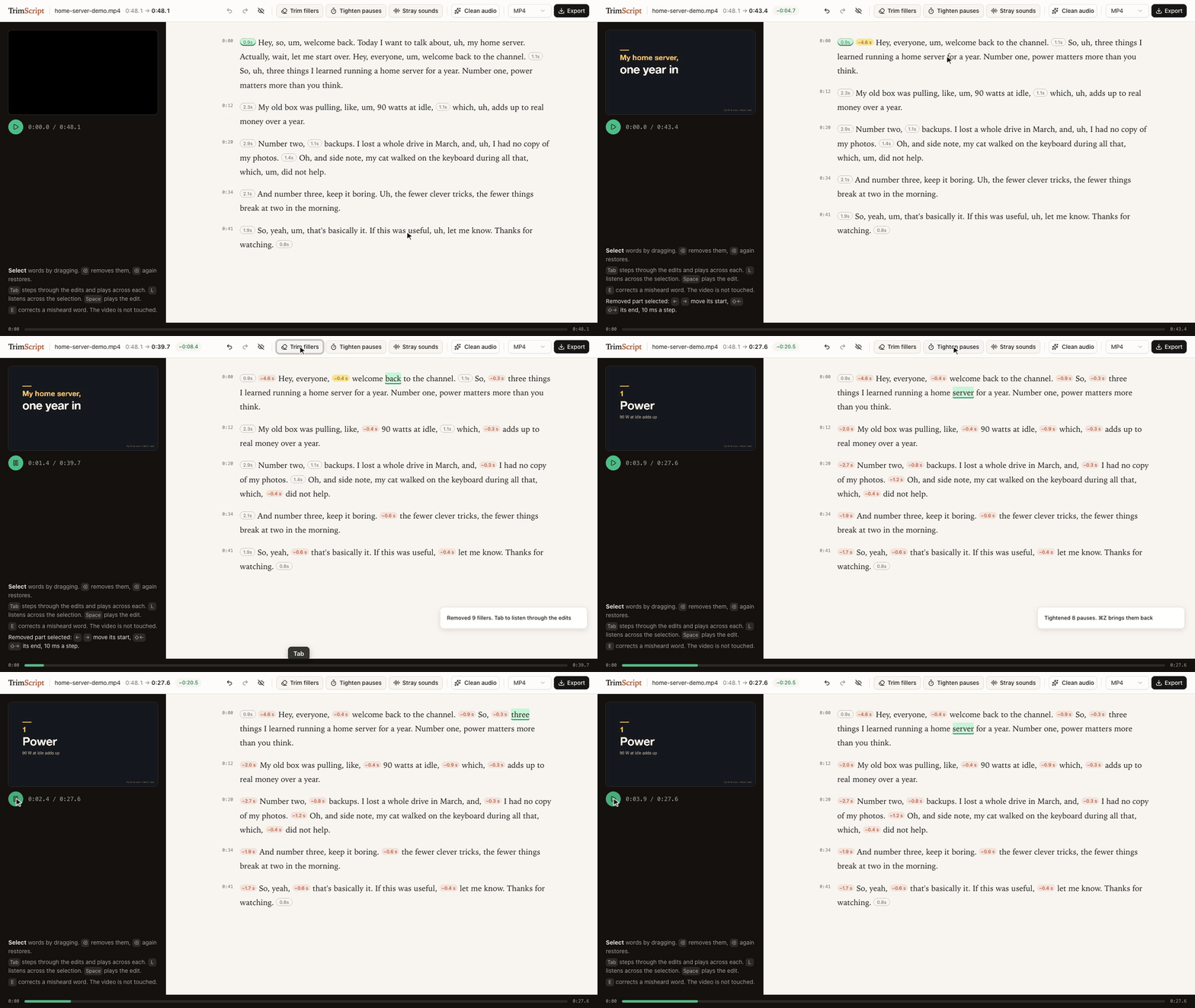
Delete the restarted intro, Trim fillers, Tab through the edits to listen, Tighten pauses: 48.1 s down to 27.6 s. The demo talk is synthetic: script and slides written for this demo, voice generated with Dia.
▶ Watch the 50-second demo: the same edit, then Claude Code suggesting cuts through the MCP server.
uvx --from git+https://github.com/SilverNine/trimscript trimscript open my-video.mp4
Needs uv and ffmpeg (brew install ffmpeg, apt install ffmpeg, winget install ffmpeg). Transcription, editing and export run on your machine: no account, no upload. If you connect a coding agent, that agent (and the model service behind it) reads the transcript.
Status: early. Developed on macOS with Apple Silicon. CI runs every push end to end on macOS, Linux and Windows (transcribe, remove, export); the editor itself has only been used on macOS so far.
What it does
- Transcribes locally with whisper.cpp, prompted to keep every "um" and "uh" instead of tidying them away. English only for now. The first run downloads the model (about 470 MB).
- Delete text, and the video skips it. Select words, press ⌫. The removed part folds into a small label with the seconds it saves, so the page reads like the finished edit. Select the label and press ⌫ to bring it back, or show all removed text with one switch. The preview skips removed parts as it plays.
- Trim fillers removes every um and uh in one go, and Tighten pauses shortens every pause over a second, keeping a little silence. Then press Tab to step through the edits and hear a second and a half on either side of each; ⌫ brings one back, ⌘Z brings them all back.
- Stray sounds jumps to voice between words that has no word in the transcript (a sound the recognizer skipped, a breath, half a word) and plays it. You listen and decide.
- Fine-tune any join by 10 ms with the arrow keys, listening across it each time.
- Clean audio: noise, level, gentle compression and loudness to -14 LUFS in one switch. The recording length never changes.
- Fix misheard words (E) without touching the media. Captions use the corrected text.
- Export MP4, WAV, SRT/VTT captions, or FCPXML to keep editing in Final Cut Pro or DaVinci Resolve with every edit point still adjustable.
- Nothing is destroyed. Your edit is one readable JSON file next to the video. The original file is never modified, and exports never overwrite it.
Use it with your coding agent
TrimScript ships an MCP server, so Claude Code, Codex or any MCP client can read the transcript and propose edits. Agent edits never apply silently: they show up in the open editor as suggestions with a reason, and you decide.
claude mcp add trimscript -- uvx --from git+https://github.com/SilverNine/trimscript trimscript mcp
Then ask things like:
- "In my-video.mp4 I restart the demo halfway through. Suggest removing the first attempt."
- "The speaker's product is called Acme, fix it wherever the transcript misheard it."
Tools: transcribe, get_transcript, suggest_removal, correct_text, list_edits, withdraw, enhance_voice, export.
The same actions are on the command line:
trimscript transcribe talk.mp4
trimscript show talk.mp4 --words      # transcript with item ids
trimscript remove talk.mp4 w120 w188 --reason "repeats the intro"
trimscript fillers talk.mp4            # remove every um and uh
trimscript pauses talk.mp4             # tighten pauses over a second
trimscript accept talk.mp4             # accept the agent's suggestions
trimscript export talk.mp4 -o talk-edit.mp4
Keyboard
| Key | Does |
|---|---|
| drag, Shift+click | select words |
| ⌫ | remove the selection, or restore it if it is already removed |
| Space | play the edit |
| double-click | play from that word |
| Tab / Shift+Tab | next / previous suggestion (or edit, when none wait), and listen across it |
| Enter / Shift+Enter | accept / reject the selected suggestion; a selection accepts every suggestion inside it |
| L | listen across the selection or a removed part |
| ← → / Shift+← → | move the start / end of a selected removed part by 10 ms |
| E | correct the text of the selection |
| ⌘Z / Shift+⌘Z | undo / redo |
How it works
- Every removed part covers a run of transcript items (words, fillers, pauses). The time to remove is derived from the words, so the preview and the export always agree.
- Edit points land midway between words, or keep a little silence when they meet a pause. Recognizers tend to stretch the last word of a sentence over the silence after it; TrimScript pulls word edges back to where the voice actually ends.
- Exports split on whole video frames and slice audio to about a millisecond, so sound never drifts from picture however many edits there are.
- The editor, the CLI and the MCP server all read and write the same project file. Edit from anywhere; the open editor updates live. Undo in the editor only reverts the editor's own change.
Tested on real talks
Three single-speaker talks from 38C3. For each: transcribe, trim fillers, tighten pauses, export with Clean audio on, then transcribe the export again with a larger model (Whisper large-v3-turbo) to check what is left.
| LoRa mesh | ACE up the sleeve | Going Long | |
|---|---|---|---|
| length | 32.9 min | 40.2 min | 36.2 min |
| removed (fillers trimmed, pauses tightened) | 5.2 min | 3.4 min | 6.5 min |
| fillers still heard in the export | 9 | 11 | 31 |
| export length vs. plan | -0.20 s | -0.16 s | -0.10 s |
| loudness | -14.1 LUFS | -14.3 LUFS | -14.3 LUFS |
| transcription | 1.2 min | 1.8 min | 1.7 min |
- 582 fillers trimmed across the three talks; 51 could still be heard after export. Filler counts are what the recognizer heard, not a judgment of any speaker.
- 3.0 to 4.5% of kept words read differently in the second transcript. Most of them sit away from any edit point: two different recognizers hearing jargon differently, not edits clipping words.
- Measured on an M1 Pro. Method and raw numbers: spikes/e2e-real.
Talks: "Building Your First LoRa Mesh Network From Scratch" by WillCrash, "ACE up the sleeve: Hacking into Apple's new USB-C Controller" by stacksmashing, and "Going Long! Sending weird signals over long haul optical networks" by Ben Cartwright-Cox. Recorded by the C3VOC at 38C3 and published on media.ccc.de under CC BY 4.0. The recordings are not part of this repository and were not modified; only measurements are reported. The speakers have not reviewed or endorsed TrimScript.
Scope
Editing recorded speech through its transcript is a long-standing idea, in research since at least Whittaker and Amento's "Semantic Speech Editing" (CHI 2004) and Berthouzoz, Li and Agrawala's "Tools for Placing Cuts and Transitions in Interview Video" (SIGGRAPH 2012), and in many editors since. TrimScript is a small, independent, local take on it for spoken-word recordings: talks, tutorials, podcasts, interviews.
It has no multitrack timeline, screen recorder, voice cloning or collaboration. Export FCPXML when you need a full editor.
Credits
- whisper.cpp and the Whisper small.en weights by OpenAI, MIT, run through pywhispercpp, MIT
- Optional: Parakeet TDT 0.6B v2 by NVIDIA, CC BY 4.0, in the MLX conversion by mlx-community, run through parakeet-mlx, Apache 2.0 (
trimscript[parakeet],--engine parakeet) - noisereduce, MIT
- FFmpeg, called as a separate program and not distributed with TrimScript
- Editor UI: React, shadcn/ui components on Radix UI, Tailwind CSS, Sonner, clsx and tailwind-merge (MIT), class-variance-authority (Apache 2.0), Lucide icons (ISC, some derived from Feather, MIT). Full license texts ship with the package in THIRD_PARTY_NOTICES.md and
src/trimscript/static/THIRD_PARTY_LICENSES.txt. - Demo voice: Dia by Nari Labs, Apache 2.0
Trademarks
Final Cut Pro is a trademark of Apple Inc. DaVinci Resolve is a trademark of Blackmagic Design. Claude Code is a trademark of Anthropic. Codex is a trademark of OpenAI. They are named only to say what TrimScript works with. TrimScript is an independent project and is not affiliated with, sponsored by or endorsed by any of these companies.
License
MIT. See LICENSE.
1 maintainer

Metadata
1 maintainer
Release files for trimscript 0.1.0
For a detailed explanation of source distributions (sdists) and built distributions (wheels), please see the package formats documentation.
Source distribution (sdist)
| File | Size | Uploaded | |
|---|---|---|---|
| trimscript-0.1.0.tar.gz | 224.0 kB | Details |
Built distribution (wheel)
| File | Interpreter | ABI | Platform | Reset |
|---|---|---|---|---|
| trimscript-0.1.0-py3-none-any.whl | Python 3 | none | any | Details |
Total release size: 404.6 kB
Release files / trimscript-0.1.0.tar.gz
| Download URL | trimscript-0.1.0.tar.gz |
|---|---|
| Size | 224.0 kB |
| Tags | Source |
|
SHA-256 checksum How to use checksums |
b25d57123107e06458b64c0fd5a4ac8741cca7c830559d0b96bffef2ba17666a
|
|
BLAKE2b-256 checksum How to use checksums |
ace9d8fb96217eb02ec531e3c5453b66915c82af0653a0f1938ab3bb3da65419
|
| Upload date | |
|
Uploaded using Trusted Publishing? What is trusted publishing? |
Yes |
| Uploaded via |
twine/7.0.0 CPython/3.13.14
|
Provenance
Provenance describes where a file came from. On PyPI, provenance is shared via attestations, which provide a verifiable record of the build or publishing details. View details, limitations and caveats.


PyPI Publish Attestation
PyPI verified that this artifact, at this checksum, originated from the publisher listed below.
Signed by GitHub Actions, verified by PyPI on Oct 10, 2026.
Transparency logRelease files / trimscript-0.1.0-py3-none-any.whl
| Download URL | trimscript-0.1.0-py3-none-any.whl |
|---|---|
| Size | 180.7 kB |
| Tags | Python 3 |
|
SHA-256 checksum How to use checksums |
2e8ac9e9d452e8b498c62dcb4d8089bf52692b3bbf82593d4745c0a23921b7af
|
|
BLAKE2b-256 checksum How to use checksums |
6eec2b6850ab0266d18cc440b84966cd8c05f8938d4ffbe3b1bba5218f7dfd10
|
| Upload date | |
|
Uploaded using Trusted Publishing? What is trusted publishing? |
Yes |
| Uploaded via |
twine/7.0.0 CPython/3.13.14
|
Provenance
Provenance describes where a file came from. On PyPI, provenance is shared via attestations, which provide a verifiable record of the build or publishing details. View details, limitations and caveats.
PyPI Publish Attestation
PyPI verified that this artifact, at this checksum, originated from the publisher listed below.
Signed by GitHub Actions, verified by PyPI on Oct 10, 2026.
Transparency log












