
trinops




Trino query monitoring from the terminal. CLI commands for listing and inspecting queries, a live TUI dashboard, and a progress-tracking library for use in Python scripts.
Installation
Try it without installing:
uvx trinops top
Or install permanently:
pip install trinops
For tqdm progress bars in library usage:
pip install trinops[tqdm]
Quick Start
Point at a cluster and go:
trinops top --server trino.example.com --user myuser
Or configure once and skip the flags:
trinops config init --server trino.example.com --user myuser --auth none --yes
trinops top
Environment variables work too:
export TRINOPS_SERVER=trino.example.com
export TRINOPS_USER=myuser
trinops top
CLI Usage
List queries
# Your recent queries
trinops queries

# All users' queries
trinops queries --query-user all

# Filter by state
trinops queries --state RUNNING

# JSON output (pipe to jq, etc.)
trinops queries --json

# Select specific fields
trinops queries --select query_id,state,user,elapsed_time
Inspect a single query
# Rich formatted detail
trinops query <query-id>

# Full REST API response as JSON
trinops query <query-id> --json

# Select specific fields from the raw response
trinops query <query-id> --select queryId,state,queryStats.elapsedTime,queryStats.peakUserMemoryReservation
Schema search
Cache catalog metadata locally and search across tables and columns:
# Cache a specific catalog
trinops schema refresh --catalog tpch

# Cache all discoverable catalogs
trinops schema refresh --all

# Search for tables
trinops schema search "lineitem"
trinops schema search "order*"

# Search for columns
trinops schema search --columns "customer_id"

# Show table details
trinops schema show tpch.sf1.lineitem

# List cached catalogs
trinops schema list
All schema commands support --json output and --profile for multi-cluster setups.
TUI dashboard
trinops tui
trinops top  # alias
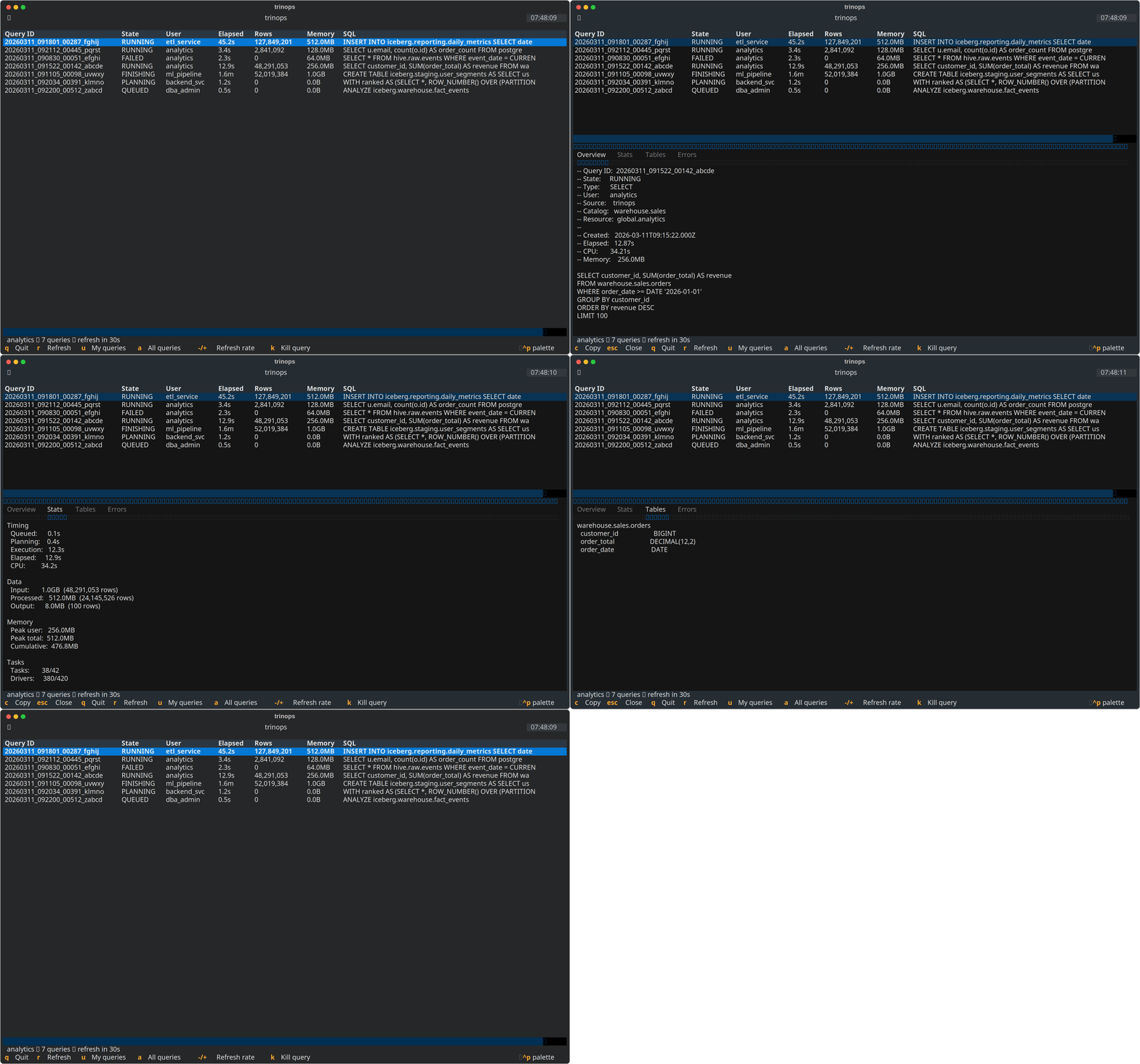
The dashboard shows a live-updating table of queries with sorting, a tabbed detail pane, and configurable refresh interval.
Keybindings:
| Key | Action |
|---|---|
r |
Force refresh |
u |
Toggle user filter |
a |
Show all users |
- / + |
Adjust refresh interval |
Enter |
Open detail pane for selected query |
Escape |
Close detail pane |
k |
Kill selected query (when enabled) |
Tab / Shift+Tab |
Cycle focus between table and detail pane |
q |
Quit |
When the detail pane is open:
| Key | Action |
|---|---|
Up / Down |
Scroll tab content |
Left / Right |
Switch between tabs |
PgUp / PgDn |
Page scroll |
Home / End |
Jump to top/bottom |
c |
Copy current tab content to clipboard |
Click column headers to sort; click again to reverse. Default sort is by Elapsed time, descending.
Configuration
Config file lives at ~/.config/trinops/config.toml:
[default]
server = "trino.example.com"
scheme = "https"
user = "myuser"
auth = "none"
query_limit = 50

[profiles.prod]
server = "trino-prod.example.com:443"
auth = "oauth2"
Manage config from the CLI:
# Set individual values
trinops config set server trino.example.com
trinops config set user myuser
trinops config set query_limit 100

# Configure a named profile
trinops config set server trino-prod:443 --profile prod
trinops config set auth oauth2 --profile prod

# View current config
trinops config show
trinops config show --profile prod
Authentication
Supported methods: none, basic, jwt, oauth2, kerberos.
# Check auth status
trinops auth status

# Run OAuth2 flow
trinops auth login
For basic auth, use password_cmd to fetch credentials from a secret manager (e.g., pass, 1password-cli) rather than storing passwords in the config file. For oauth2, install keyring to cache tokens across sessions.
Library Usage
Wrap a trino cursor or connection to get live progress display during query execution:
import trino
from trinops import TrinoProgress

conn = trino.dbapi.connect(host="trino.example.com", port=443, user="myuser")
cursor = conn.cursor()

with TrinoProgress(cursor) as tp:
    tp.execute("SELECT * FROM catalog.schema.table")
    rows = tp.fetchall()
You can also monitor an already-running query by passing a connection and query ID:
with TrinoProgress(conn, query_id="20260310_143549_08022_abc") as tp:
    tp.start()
    tp.wait()
Claude Code Integration
trinops ships with a Claude Code skill that teaches Claude how to query and inspect Trino cluster activity. If you have trinops installed in a project, Claude can use trinops queries --select and trinops query <id> --select to investigate query performance, find long-running queries, and diagnose failures with minimal context usage.
A Claude Code plugin is also included for marketplace discoverability.
Roadmap
Completed:
Kill query support— cancel running queries from CLI and TUI (#1)Enriched TUI detail— tabbed detail view with overview, stats, tables, and errors (#2)Schema cache and search— cache catalog metadata locally, search tables/columns (#3)
Planned:
- Query plan visualization — render the stage tree from the REST API in both CLI and TUI (#5)
- MCP server — Model Context Protocol server for AI assistant integration (#4)
- Multi-cluster support — switch between profiles in the TUI, unified multi-cluster view (#6)
- Notifications and alerts — desktop notifications and webhooks for long-running queries and failures (#7)
- Worker/node health — cluster node monitoring via
/v1/node(#8)
Requirements
- Python 3.10+
- A running Trino cluster with the REST API accessible
License
1 maintainer

Metadata
1 maintainer
Release files for trinops 0.4.0
For a detailed explanation of source distributions (sdists) and built distributions (wheels), please see the package formats documentation.
Source distribution (sdist)
| File | Size | Uploaded | |
|---|---|---|---|
| trinops-0.4.0.tar.gz | 1.7 MB | Details |
Built distribution (wheel)
| File | Interpreter | ABI | Platform | Reset |
|---|---|---|---|---|
| trinops-0.4.0-py3-none-any.whl | Python 3 | none | any | Details |
Total release size: 1.7 MB
Release files / trinops-0.4.0.tar.gz
| Download URL | trinops-0.4.0.tar.gz |
|---|---|
| Size | 1.7 MB |
| Tags | Source |
|
SHA-256 checksum How to use checksums |
e531acef69b0300daf5783fd41203ff581a42c01a043d5a02848b61ecff07eb4
|
|
BLAKE2b-256 checksum How to use checksums |
8db2667f8d393638c714c4456a0308483f62265a5637b53486d0463ac42da174
|
| Upload date | |
|
Uploaded using Trusted Publishing? What is trusted publishing? |
Yes |
| Uploaded via |
twine/6.1.0 CPython/3.13.7
|
Provenance
Provenance describes where a file came from. On PyPI, provenance is shared via attestations, which provide a verifiable record of the build or publishing details. View details, limitations and caveats.


PyPI Publish Attestation
PyPI verified that this artifact, at this checksum, originated from the publisher listed below.
Signed by GitHub Actions, verified by PyPI on Mar 18, 2026.
Transparency logRelease files / trinops-0.4.0-py3-none-any.whl
| Download URL | trinops-0.4.0-py3-none-any.whl |
|---|---|
| Size | 47.5 kB |
| Tags | Python 3 |
|
SHA-256 checksum How to use checksums |
f21d78e3380a9f427092547f465a0ed2bf6d2375b3567df7ae36528f1698d8cd
|
|
BLAKE2b-256 checksum How to use checksums |
277456b535902fcc1e605564dcdc0ab0a5a2aa5f02b7091ea0ab270d123dc66d
|
| Upload date | |
|
Uploaded using Trusted Publishing? What is trusted publishing? |
Yes |
| Uploaded via |
twine/6.1.0 CPython/3.13.7
|
Provenance
Provenance describes where a file came from. On PyPI, provenance is shared via attestations, which provide a verifiable record of the build or publishing details. View details, limitations and caveats.
PyPI Publish Attestation
PyPI verified that this artifact, at this checksum, originated from the publisher listed below.
Signed by GitHub Actions, verified by PyPI on Mar 18, 2026.
Transparency log













