

A security-first router for LLMs. One OpenAI-compatible endpoint that sends each prompt to the right model, whether local (Ollama), cloud (Claude, GPT, OpenRouter) or legacy, and keeps sensitive prompts on your machine.





Quick start · How it routes · Connect your tools · Security · Docs
Trioditis: Hecate of the three ways, who stands where the road splits and decides who goes where.
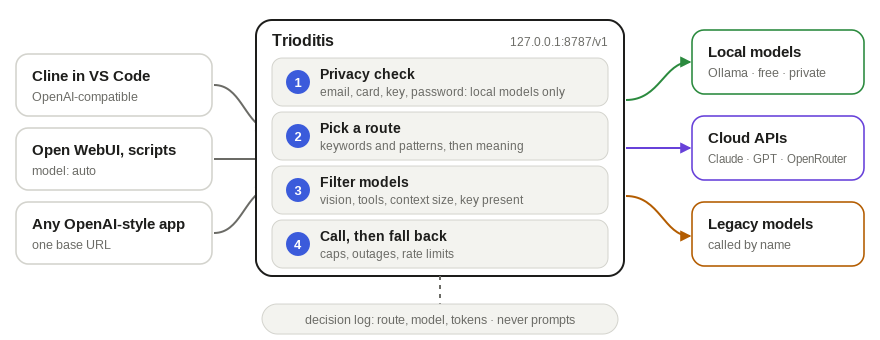
Every prompt reaches the same crossroads here: a local model, a cloud model, or no further.
Why Trioditis
| Private by default | Cost-aware | Small and auditable | Explains itself |
|---|---|---|---|
| Prompts with emails, cards, keys or passwords go to a local model or are rejected. They are never sent to a cloud API by accident. | Daily and monthly caps with automatic local fallback, plus per-provider limits and live spend. | About 3,400 lines and four hash-pinned dependencies. No LiteLLM, no LangChain, no telemetry. | Every response names its route and model. A log records the reasons, with no prompt text. |
Quick start
1. Install Ollama and pull a couple of local models (run it natively, not in Docker):
ollama pull llama3.2:3b && ollama pull qwen2.5-coder:7b && ollama pull nomic-embed-text
2. Install Trioditis with pipx and give it a folder:
pipx install trioditis
trioditis init --dir ~/trioditis     # writes config.yaml and .env there (owner-only); never overwrites
cd ~/trioditis                       # config.yaml, .env and logs/ are read from the current folder
Or from a clone, with every package checked against the lockfile's hashes
pipx installs the newest release of every dependency on the day you run it. The clone installs the exact versions in requirements.txt and refuses any file whose hash differs. From a clone, write python -m trioditis wherever these pages say trioditis.
git clone https://github.com/alexb-joat/trioditis.git && cd trioditis
python3 -m venv .venv && source .venv/bin/activate    # Debian/Ubuntu: sudo apt install python3-venv
pip install --require-hashes --no-deps -r requirements.txt
python -m trioditis init
Windows (PowerShell):
git clone https://github.com/alexb-joat/trioditis.git; cd trioditis
py -3 -m venv .venv; .\.venv\Scripts\Activate.ps1
pip install --require-hashes --no-deps -r requirements.txt
python -m trioditis init
3. Check and run, the same on every system:
trioditis check     # which local models answer, which cloud keys are set
trioditis serve     # http://127.0.0.1:8787/v1, localhost only
With the models from step 1 pulled and no cloud keys yet, check prints:
config OK: 9 models, 4 routes
  local-general            local  ready
  local-coder              local  ready
  local-reasoner           local  not on this server: ollama pull deepseek-r1:8b
  local-vision             local  not on this server: ollama pull llava:7b
  legacy-mistral           local  not on this server: ollama pull mistral:7b
  claude-sonnet            cloud  missing $ANTHROPIC_API_KEY
  claude-haiku             cloud  missing $ANTHROPIC_API_KEY
  claude-opus              cloud  missing $ANTHROPIC_API_KEY
  gpt                      cloud  missing $OPENAI_API_KEY
2 of 9 models confirmed ready; cloud providers are never contacted
4. Try it:
trioditis explain "Why does my python function raise KeyError?"     # shows the decision, calls no model
curl -s http://127.0.0.1:8787/v1/chat/completions -H 'Content-Type: application/json' \
  -d '{"model":"auto","messages":[{"role":"user","content":"Write a regex for UK postcodes"}]}'
Cloud models are optional: add ANTHROPIC_API_KEY, OPENAI_API_KEY or OPENROUTER_API_KEY to .env and they join the routes. A cloud provider without a key is simply skipped.
How a request is routed
- Privacy check. Built-in detectors (emails, card numbers, IBANs, API keys, private keys, passwords) plus your own keywords and regexes. A hit restricts the request to local models; if none can serve it, it is rejected rather than leaked.
- Pick a route (
code,reasoning,writing,quick, or your own): keyword and pattern signals, the names of the tools a coding agent offers (tool_keywords), then similarity to each route's example prompts using a local embedding model, else the default route. An agent's later turns stay on the route its task started on. - Filter and order models by what the request needs: vision, tool calling, context length, and whether the provider's key is present. A route can keep its listed order or
prefer: cheapest(local first, then by this request's estimated cost) orfastest(median latency of recent calls); a provider that just answered "too many requests" is tried last until its wait is over. - Call the first model and fall back on outage, rate limit, missing model or spending cap. If no model of the route fits, only another route's model or a local one is used, never a model you call by name only.
- Pin the session. Requests with the same
X-Session-Id(oruser) stay on one route, so agents do not switch models mid-task.
Responses carry X-Trioditis-Route and X-Trioditis-Model. POST /v1/route or trioditis explain "…" shows the decision and reasons without calling a model. Clients can bypass routing with model: "route/code" (force a route), model: "legacy-mistral" (call a model directly) or the provider's own id, such as model: "claude-haiku-5-5", which pins an exact version; X-Trioditis-Upstream-Model names the id the provider was sent.
Connect your tools
| Client | Settings |
|---|---|
| Cline (VS Code) | Provider OpenAI Compatible, base URL http://127.0.0.1:8787/v1, model route/code. Full recipe, including local-model context: docs/vscode-cline.md |
| Open WebUI, Odysseus, chat UIs | Add the endpoint http://127.0.0.1:8787/v1 and pick model auto |
| OpenAI SDKs | OpenAI(base_url="http://127.0.0.1:8787/v1", api_key="<your TRIODITIS_API_KEY>") |
Trioditis speaks the OpenAI chat-completions format, which most tools support. Clients that only speak a provider's native API (for example Claude Code) cannot use it yet.
Spending and limits
Every cloud call is checked against your daily and monthly caps first (defaults: $1 a day, $15 a month). Over a cap, the route's local model answers instead, so you get an answer, not a bill. trioditis usage --since 7d --by client shows what each tool spent. Per-provider caps, provider rate-limit and balance readouts, and call history are in docs/spending-and-limits.md. trioditis hardware suggests which local models fit your computer (docs/hardware.md).
Staying current
Each call records why its answer ended, retries and cache use, so trioditis usage --outcomes shows each model's error, cut-off and retry rates with 95% intervals. A daily trioditis refit adds latency and drift charts, and, given a model facts file, names configured models that are deprecated or about to retire and lists new ones worth testing. It changes nothing on its own: docs/staying-current.md. On a subscription, trioditis plan import --claude-code and usage --plan show tokens per model and effort next to how far the plan's meters rose, from counts only, never text (Plan usage).
Security at a glance
| Risk | Control |
|---|---|
| Hijacked dependency | Four direct dependencies, hash-pinned (--require-hashes), pip-audit in CI, Dependabot with a 7-day hold |
| Router exposed to the network | Binds 127.0.0.1; refuses any other bind without a 32+ character API key |
| A web page in your browser reaching the router | Foreign Host (DNS rebinding) or Origin gets 403 and a log line; POST bodies must be JSON |
| Sensitive data sent to the cloud | Detectors force local-only routing or reject |
| Key and prompt leakage | Keys only in environment variables; the client's key is never forwarded; logs hold metadata and a hash, not prompt text |
| Open proxy and SSRF | Upstream URLs come only from config.yaml; no redirects followed |
| Supply chain | Actions pinned to commit SHAs, read-only workflows, CodeQL and dependency review on every pull request |
Report a vulnerability privately via SECURITY.md. The full design and its limits are in docs/security-model.md.
Known limits
- Fallback happens before an answer starts. If a streamed answer breaks halfway, Trioditis does not retry it on another model.
- Every provider is called at its OpenAI-style
/chat/completionsaddress. There are no native Anthropic or Gemini adapters. - No prompt caching for Claude models. Trioditis calls Anthropic at its OpenAI-compatible endpoint, and Anthropic's page for it says "Prompt caching is not supported" (source, read 13 November 2026). For every provider, Trioditis adds no caching settings of its own and records cached tokens only when the provider reports them.
- On Windows, Trioditis does not warn about a
.envthat other users can read, and it does not set the mode of the metrics database. Keep the folder in your user profile (security model). - Only the Linux installer sets up the daily
refitandplan import. On macOS and Windows, run them by hand. - CI does not build the Docker image.
- The router picks the right route about two times in three. On 315 held-out prompts it chose the labelled route for 205 (65.1%, 95% interval 59.7–70.1%) on the example config with local embeddings on, and for 116 (36.8%) with keywords alone. Most misses (65 of 110) go to
quick, the default route, and a miss still gets an answer. The prompts are synthetic and in English; measured 13 November 2026 (method, data and limits). Your own routes give a different number:trioditis eval-routesmeasures it.
Platforms
| Linux (systemd) | macOS (launchd) | Windows 10/11 (Scheduled Task) |
|---|---|---|
| Python 3.11+, CI | Python 3.11+, CI | Python 3.11+, CI |
CI runs the unit tests and a real-server smoke test on all three, on Python 3.11, 3.12 and 3.13. To run in the background or in a hardened container, see docs/deployment.md.
Documentation
- VS Code with Cline · Spending caps and provider limits · Hardware suggestions
- Background service and Docker · Security model ·
config.example.yaml(providers, models, routes, privacy, limits, logging)
See every decision live: Hlidskjalv reads the decision log (route, model, tokens, never prompts) and shows it next to your files, commands and Git history.
Roadmap
- Daily and monthly spending caps with local fallback
- Hardware detection and local-model suggestions
- Routes can prefer the cheapest or fastest model
- Outcome rates per model, a plan-usage ledger and a daily refit
- A small local LLM as an optional classifier for ambiguous prompts
- Learn from feedback: per-route model scores from thumbs up and down
- Cost and latency budgets per route
- Native Anthropic and Gemini adapters (today: their OpenAI-compatible endpoints)
- Per-user keys and rate limits for team use
Contributing
Pull requests are welcome; see CONTRIBUTING.md. Run the checks with pip install --require-hashes --no-deps -r requirements-dev.txt && python -m pytest -q. If Trioditis saves you money or time, the Sponsor button at the top of the repository supports it.
License
MIT. Not affiliated with Anthropic, OpenAI, Ollama, OpenRouter or any model provider; their names refer only to their public APIs.
1 maintainer

Metadata
1 maintainer
Release files for trioditis 0.6.0
For a detailed explanation of source distributions (sdists) and built distributions (wheels), please see the package formats documentation.
Source distribution (sdist)
| File | Size | Uploaded | Provenance | Actions |
|---|---|---|---|---|
| trioditis-0.6.0.tar.gz | 150.8 kB | With provenance | Details for trioditis-0.6.0.tar.gz |
Built distribution (wheel)
| File | Interpreter | ABI | Platform | Actions Reset |
|---|---|---|---|---|
| trioditis-0.6.0-py3-none-any.whl | Python 3 | none | any | Details for trioditis-0.6.0-py3-none-any.whl |
Total release size: 256.4 kB
Release files / trioditis-0.6.0.tar.gz
| Download URL | trioditis-0.6.0.tar.gz |
|---|---|
| Size | 150.8 kB |
| Tags | Source |
|
SHA-256 checksum How to use checksums |
c707b51ebd281ab14024faf73d5aab4266bd40014fb92f6c0b8a78c84d5a67cc
|
|
BLAKE2b-256 checksum How to use checksums |
9e9d238bc86f7dc2c47d2d2b5c09d61f8a2a35a4dc77307e2ea2e102a3487d9b
|
| Upload date | |
|
Uploaded using Trusted Publishing? What is trusted publishing? |
Yes |
| Uploaded via |
twine/7.0.0 CPython/3.13.16
|
Provenance
Provenance describes where a file came from. On PyPI, provenance is shared via attestations, which provide a verifiable record of the build or publishing details. View details, limitations and caveats.


PyPI Publish Attestation
PyPI verified that this artifact, at this checksum, originated from the publisher listed below.
Signed by GitHub Actions, verified by PyPI on Nov 16, 2026.
Transparency logRelease files / trioditis-0.6.0-py3-none-any.whl
| Download URL | trioditis-0.6.0-py3-none-any.whl |
|---|---|
| Size | 105.6 kB |
| Tags | Python 3 |
|
SHA-256 checksum How to use checksums |
c476fa3e046882a5c2cdde3443f7ece8a50ba621c58693e5c57860443e1d1cf0
|
|
BLAKE2b-256 checksum How to use checksums |
8c35eb36fb7370222851be2d549b175de5e0a2de50ea3459fe8368651db3ad97
|
| Upload date | |
|
Uploaded using Trusted Publishing? What is trusted publishing? |
Yes |
| Uploaded via |
twine/7.0.0 CPython/3.13.16
|
Provenance
Provenance describes where a file came from. On PyPI, provenance is shared via attestations, which provide a verifiable record of the build or publishing details. View details, limitations and caveats.
PyPI Publish Attestation
PyPI verified that this artifact, at this checksum, originated from the publisher listed below.
Signed by GitHub Actions, verified by PyPI on Nov 16, 2026.
Transparency logSecurity for trioditis 0.6.0
Provenance
Provenance describes where a file came from. On PyPI, provenance is shared via attestations, which provide a verifiable record of the build or publishing details. View details, limitations and caveats.
Full provenance
Both files in this release have been uploaded with provenance metadata.
Attestation for trioditis-0.6.0.tar.gz
PyPI Publish Attestation
PyPI verified that this artifact, at this checksum, originated from the publisher listed below.
Signed by GitHub Actions, verified by PyPI on Nov 16, 2026.
Transparency logA note on package security
PyPI is a repository for distributing packages, not a service for auditing them. While third-party security researchers and our staff do their best to detect and remove malicious packages, PyPI cannot guarantee the quality, security or suitability of any given package.
To learn more about protecting yourself from malicious actors, visit our package security documentation.














