
简体中文 | English





🔧 trtyolo-export is the official ONNX conversion tool for the TensorRT-YOLO project, providing a simple and user-friendly command-line interface to help you convert already-exported YOLO-family ONNX models into TensorRT-YOLO compatible outputs. The converted ONNX files have pre-registered the required TensorRT plugins (including official and custom plugins, supporting detection, segmentation, pose estimation, OBB, etc.), significantly improving model deployment efficiency.
✨ Key Features
- Comprehensive Compatibility: Supports exported ONNX models from YOLOv3 to YOLO26, as well as model families such as YOLO-World and YOLO-Master, covering object detection, instance segmentation, pose estimation, oriented object detection (OBB), and image classification. See 🖥️ Model Support List for details.
- Built-in Plugins: The converted ONNX files have pre-integrated TensorRT official plugins and custom plugins, fully supporting multi-task scenarios such as detection, segmentation, pose estimation, and OBB, greatly simplifying the deployment process.
- Flexible Configuration: Provides parameter options such as target opset conversion, threshold tuning, maximum detections, and optional
onnxslimsimplification to meet different deployment requirements. - One-Click Conversion: A concise and intuitive command-line interface with automatic model structure detection, no complex configuration required.
🚀 Performance Comparison
| Model | Official export - Latency 2080Ti TensorRT10 FP16 | trtyolo-export - Latency 2080Ti TensorRT10 FP16 |
|---|---|---|
| YOLOv11N | 1.611 ± 0.061 | 1.428 ± 0.097 |
| YOLOv11S | 2.055 ± 0.147 | 1.886 ± 0.145 |
| YOLOv11M | 3.028 ± 0.167 | 2.865 ± 0.235 |
| YOLOv11L | 3.856 ± 0.287 | 3.682 ± 0.309 |
| YOLOv11X | 6.377 ± 0.487 | 6.195 ± 0.482 |
💨 Quick Start
Installation
📦 Recommended Method: Install via pip
In a Python>=3.8 environment, you can quickly install the trtyolo-export package via pip:
pip install trtyolo-export
🔧 Alternative Method: Build from Source
If you need the latest development version or want to make custom modifications, you can build from source:
# Clone the repository (if you don't have a local copy yet)
git clone https://github.com/laugh12321/TensorRT-YOLO

# Enter the project directory (assuming you're already in this directory)
cd TensorRT-YOLO

# Switch to the export branch
git checkout export

# Build and install
pip install build
python -m build
pip install dist/*.whl
Basic Usage
After installation, you can use the conversion functionality through the trtyolo-export command-line tool:
# View installed version
trtyolo-export --version

# View command help information
trtyolo-export --help

# Convert a basic ONNX model
trtyolo-export -i model.onnx -o output/model-trtyolo.onnx
If you need to query the installed version from Python:
python -c "import trtyolo_export; print(trtyolo_export.__version__)"
🛠️ Parameter Description
The trtyolo-export command supports the following parameters:
| Parameter | Description | Default Value | Applicable Scenarios |
|---|---|---|---|
--version |
Show the installed package version and exit | - | Confirm the CLI version in the current environment |
--verbose, --quiet |
Show or hide conversion progress logs | --verbose |
Control CLI logging verbosity |
-i, --input |
Source ONNX file path | - | Required, input must be an existing ONNX file |
-o, --output |
Converted ONNX output path | - | Required, output path must end with .onnx; if it matches the input path, -trtyolo is appended automatically |
--opset |
Target ONNX opset version | Preserve source opset | Convert the converted model to a specific opset before saving |
--max-dets |
Maximum detections | 100 | Control the output size when appending TensorRT NMS plugins |
--conf-thres |
Confidence threshold | 0.25 | Used by plugin-based and NMS-free postprocess outputs |
--iou-thres |
IoU threshold | 0.45 | Used when appending TensorRT NMS plugins |
-s, --simplify |
Run onnxslim after conversion |
False | Slim the converted ONNX model after graph conversion |
📝 Usage Examples
Conversion Examples
# Convert a basic ONNX model
trtyolo-export -i yolov8s.onnx -o output/yolov8s-trtyolo.onnx

# Convert with a target opset
trtyolo-export -i yolov10s.onnx -o output/yolov10s-trtyolo.onnx --opset 12

# Tune TensorRT NMS plugin parameters
trtyolo-export -i yolo11n-obb.onnx -o output/yolo11n-obb-trtyolo.onnx --max-dets 100 --iou-thres 0.45 --conf-thres 0.25

# Simplify the converted ONNX with onnxslim
trtyolo-export -i yolo12n-seg.onnx -o output/yolo12n-seg-trtyolo.onnx -s

# Convert quietly
trtyolo-export --quiet -i model.onnx -o output/model-trtyolo.onnx

# Avoid overwriting the source file
# If -o and -i are the same path, the actual output becomes yolo11n-pose-trtyolo.onnx
trtyolo-export -i yolo11n-pose.onnx -o yolo11n-pose.onnx
TensorRT Engine Construction
The converted ONNX model can be further built into a TensorRT engine using the trtexec tool for optimal inference performance:
# Static batch
trtexec --onnx=model.onnx --saveEngine=model.engine --fp16

# Dynamic batch
trtexec --onnx=model.onnx --saveEngine=model.engine --minShapes=images:1x3x640x640 --optShapes=images:4x3x640x640 --maxShapes=images:8x3x640x640 --fp16

# ! Note: For segmentation, pose estimation, and OBB models, you need to specify staticPlugins and setPluginsToSerialize parameters to ensure correct loading of custom plugins compiled by the project

# YOLOv8-OBB static batch
trtexec --onnx=yolov8n-obb.onnx --saveEngine=yolov8n-obb.engine --fp16 --staticPlugins=/your/tensorrt-yolo/install/dir/lib/libcustom_plugins.so --setPluginsToSerialize=/your/tensorrt-yolo/install/dir/lib/libcustom_plugins.so

# YOLO11-OBB dynamic batch
trtexec --onnx=yolo11n-obb.onnx --saveEngine=yolo11n-obb.engine --fp16 --minShapes=images:1x3x640x640 --optShapes=images:4x3x640x640 --maxShapes=images:8x3x640x640 --staticPlugins=/your/tensorrt-yolo/install/dir/lib/custom_plugins.dll --setPluginsToSerialize=/your/tensorrt-yolo/install/dir/lib/custom_plugins.dll
📊 Conversion Structure
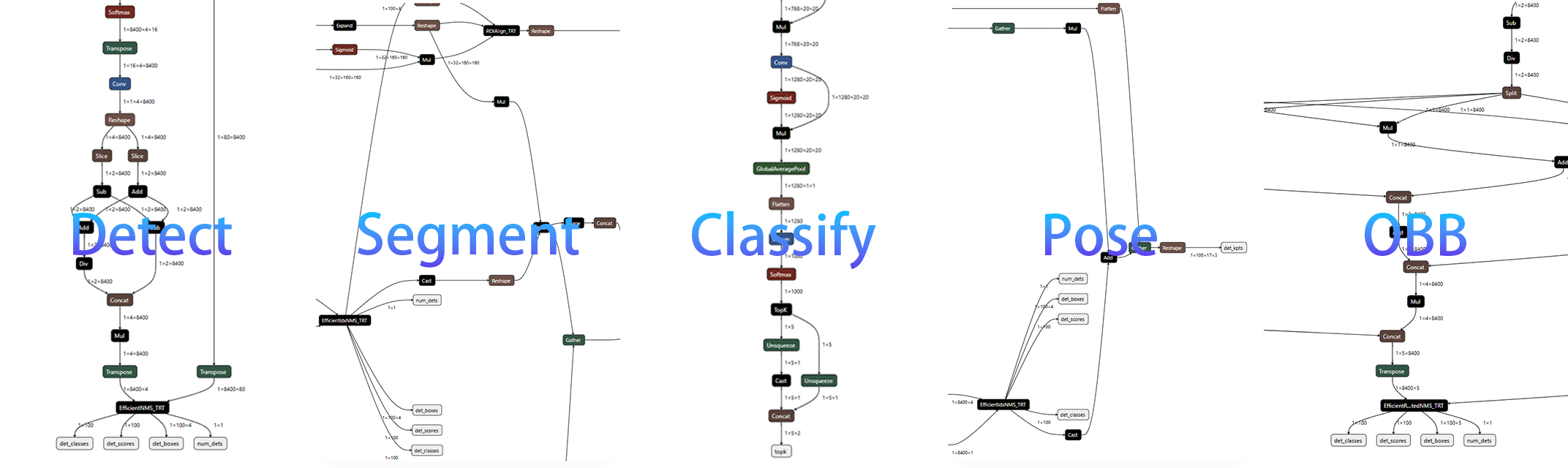
The converted ONNX model structure is optimized for TensorRT inference and integrates corresponding plugins (official and custom). The model structures for different task types are as follows:
🖥️ Model Support List
| YOLO Series | Source Repo | Detect | Segment | Classify | Pose | OBB |
|---|---|---|---|---|---|---|
| YOLOv3 | ultralytics/yolov3 | ✅ | ✅ | ✅ | - | - |
| YOLOv3 | ultralytics/ultralytics | ✅ | - | - | - | - |
| YOLOv5 | ultralytics/yolov5 | ✅ | ✅ | ✅ | - | - |
| YOLOv5 | ultralytics/ultralytics | ✅ | - | - | - | - |
| YOLOv6 | meituan/YOLOv6 | 🟢 | - | - | - | - |
| YOLOv6 | ultralytics/ultralytics | ✅ | - | - | - | - |
| YOLOv7 | WongKinYiu/yolov7 | 🟢 | - | - | - | - |
| YOLOv8 | ultralytics/ultralytics | ✅ | ✅ | ✅ | ✅ | ✅ |
| YOLOv9 | WongKinYiu/yolov9 | 🟢 | ✅ | - | - | - |
| YOLOv9 | ultralytics/ultralytics | ✅ | ✅ | - | - | - |
| YOLOv10 | THU-MIG/yolov10 | ✅ | - | - | - | - |
| YOLOv10 | ultralytics/ultralytics | ✅ | - | - | - | - |
| YOLO11 | ultralytics/ultralytics | ✅ | ✅ | ✅ | ✅ | ✅ |
| YOLO12 | sunsmarterjie/yolov12 | ✅ | ✅ | ✅ | - | - |
| YOLO12 | ultralytics/ultralytics | ✅ | ✅ | ✅ | ✅ | ✅ |
| YOLO13 | iMoonLab/yolov13 | ✅ | - | - | - | - |
| YOLO26 | ultralytics/ultralytics | ✅ | ✅ | ✅ | ✅ | ✅ |
| YOLO-World | ultralytics/ultralytics | ✅ | - | - | - | - |
| YOLOE | THU-MIG/yoloe | ✅ | ✅ | - | - | - |
| YOLOE | ultralytics/ultralytics | ✅ | ✅ | - | - | - |
| YOLO-Master | isLinXu/YOLO-Master | ✅ | ✅ | ✅ | - | - |
Symbol Explanation:
✅meanstrtyolo-exportcan convert and can inference |🟢means the upstream or repository export path can be used directly for inference |-means this task is not provided |❎means not supported
❓ Frequently Asked Questions
1. Why do some models require referring to official export tutorials?
Official repositories for models like YOLOv6, YOLOv7, and YOLOv9 already provide ONNX export functionality with EfficientNMS plugins. If those official ONNX files already satisfy your deployment requirements, you may not need an extra conversion step.
2. Which conversion parameters should be adjusted first?
--max-detslimits the number of final detections produced by appended TensorRT NMS plugins--conf-thresfilters low-confidence predictions in plugin-based and NMS-free outputs--iou-threscontrols overlap suppression when TensorRT NMS plugins are appended-s, --simplifyrunsonnxslim; if your downstream toolchain is sensitive, retry without it--opsetis only needed when your downstream runtime requires a specific ONNX opset version
3. What to do if errors are encountered during the conversion process?
- Ensure that the correct version of dependent libraries is installed in your environment
- Check that the input ONNX file exists and the output path ends with
.onnx - Confirm that the exported ONNX graph you are using is in the support list
- If opset conversion fails, retry without
--opsetor choose a compatible version - For models with custom graph modifications, ensure the exported ONNX structure still matches one of the supported conversion patterns
1 maintainer

Metadata
1 maintainer
Release files for trtyolo-export 2.0.1
For a detailed explanation of source distributions (sdists) and built distributions (wheels), please see the package formats documentation.
Source distribution (sdist)
| File | Size | Uploaded | |
|---|---|---|---|
| trtyolo_export-2.0.1.tar.gz | 66.4 kB | Details |
Built distribution (wheel)
| File | Interpreter | ABI | Platform | Reset |
|---|---|---|---|---|
| trtyolo_export-2.0.1-py3-none-any.whl | Python 3 | none | any | Details |
Total release size: 127.0 kB
Release files / trtyolo_export-2.0.1.tar.gz
| Download URL | trtyolo_export-2.0.1.tar.gz |
|---|---|
| Size | 66.4 kB |
| Tags | Source |
|
SHA-256 checksum How to use checksums |
a42d00589a23a2f2da44f1c7740fbafe7ef160bdebef826e063e65cd29a5d799
|
|
BLAKE2b-256 checksum How to use checksums |
639fe00988828377f17f5a1ff4ba10b77062a2ad7c22f24a933c002e678d5295
|
| Upload date | |
|
Uploaded using Trusted Publishing? What is trusted publishing? |
Yes |
| Uploaded via |
twine/6.1.0 CPython/3.13.7
|
Provenance
Provenance describes where a file came from. On PyPI, provenance is shared via attestations, which provide a verifiable record of the build or publishing details. View details, limitations and caveats.


PyPI Publish Attestation
PyPI verified that this artifact, at this checksum, originated from the publisher listed below.
Signed by GitHub Actions, verified by PyPI on Oct 12, 2026.
Transparency logRelease files / trtyolo_export-2.0.1-py3-none-any.whl
| Download URL | trtyolo_export-2.0.1-py3-none-any.whl |
|---|---|
| Size | 60.7 kB |
| Tags | Python 3 |
|
SHA-256 checksum How to use checksums |
b2241ef95df90a1fbbd1fd1160baa8af03c215ff0e1265381d17aaf68f9b497b
|
|
BLAKE2b-256 checksum How to use checksums |
7b3a697e3c26343da70948c25cc9ffce40359dd1f5cac882a5fa4e00f790cac2
|
| Upload date | |
|
Uploaded using Trusted Publishing? What is trusted publishing? |
Yes |
| Uploaded via |
twine/6.1.0 CPython/3.13.7
|
Provenance
Provenance describes where a file came from. On PyPI, provenance is shared via attestations, which provide a verifiable record of the build or publishing details. View details, limitations and caveats.
PyPI Publish Attestation
PyPI verified that this artifact, at this checksum, originated from the publisher listed below.
Signed by GitHub Actions, verified by PyPI on Oct 12, 2026.
Transparency log













