
Truceptor (Python SDK)
Truceptor — trusted intercept for agent tool calls: preflight allow/deny/escalate; your runtime executes tools after allow.
CLI:
acp up,acp init(alsotruceptor up). Install:pip install truceptor.
Import:
from truceptor import governed_tool, ACPClient. Env vars useACP_*(ACP_INTERCEPTOR_URL, etc.). User data dir stays~/.acp/.
Add governance, approvals, policy enforcement, and execution visibility to AI agents in minutes.
Works with CrewAI, LangGraph, Strands, Google ADK, MCP tools, and custom Python workflows.
Requires: Docker Desktop (Compose v2).
Full integration guide: docs/INTEGRATION.md (setup vs runtime, Rego → Postgres, pip paths, who owns what).
Quick start
Make sure Docker Desktop is already running before you start Truceptor (acp up).
pip install truceptor
acp init          # ~/.acp/policies + ~/.acp/agents.json
acp up            # Open mode (default)
acp dashboard
| Mode | Command |
|---|---|
| Open (default) | acp up |
| Seeded | acp up --register |
| Enforced | AGENT_REGISTRY_ENFORCE=true acp up |
| Check mode | acp mode |
| Step | Command |
|---|---|
| Install | pip install truceptor |
| Initialize policies | acp init |
| Start stack | acp up |
| Open UI | acp dashboard → http://localhost:3090/dashboard/ |
| Stop | acp down |
For a real local integration, the usual sequence is:
acp init- start Docker Desktop
acp upexport ACP_INTERCEPTOR_URL=http://localhost:8080export ACP_BEARER_TOKEN=...- run your governed agent
If Docker is not already running, acp up will fail with Docker daemon / compose connection errors.
What acp init and acp up actually do
| Step | What you get |
|---|---|
acp init |
Creates ~/.acp/policies/ with starter Rego (router.rego, rbac.rego, …) and HOW_TO_ADD_RULES.md. You edit these files — Truceptor does not generate rules from your agent code. |
acp up |
Starts Postgres, OPA, interceptor, dashboard. On startup the interceptor loads your ~/.acp/policies, upserts them into Postgres, and pushes them to OPA. |
| Your agent | Sends only agent_id, tool, action, and context to POST /tool-call — never Rego text. |
After changing any .rego file: acp down && acp up. The dashboard Policies tab is read-only and shows plain-English rule summaries (Rego bundle and Policy Studio policies). Business users can author rules in the Policy Studio tab (Save & activate); compiled Rego lands in the same Postgres policy_versions pipeline.
Policy Studio (dashboard)
| Step | What you get |
|---|---|
| Policy Studio → New rule | Wizard: rule type → configure thresholds → simulate → Save & activate |
| Activate | Compiler writes studio/*.rego + studio_router.rego into policy_versions and syncs OPA |
| Policies tab | Same catalog API — studio policies tagged Policy Studio, engineer modules tagged Rego bundle |
Where your policies live (pip install)
The Python package installs into your virtualenv (.venv). Your editable Rego files do not — they live in your home directory:
| What | Location |
|---|---|
| Installed package (read-only) | .venv/.../site-packages/truceptor/ |
| Your policy folder | ~/.acp/policies/ (created by acp init) |
| Dev JWT keys | ~/.acp/jwt/ |
| Docker runtime bundle | ~/.acp/runtime/<version>/ |
acp init copies starter templates from the package into ~/.acp/policies/. You edit those files for your tools, roles, and allow/deny/escalate rules.
acp up bind-mounts ~/.acp/policies into the interceptor container. On startup Truceptor upserts them into Postgres, then pushes to OPA. Nothing is uploaded from your agent at runtime.
Use a client repo instead of ~/.acp/policies:
export ACP_POLICIES_DIR=/path/to/my-project/policies
acp init && acp up
Two phases: (1) Setup — write Rego, run acp up; (2) Runtime — SDK sends agent_id, tool, action only. See the integration guide.
Why Truceptor?
Most agents call tools, APIs, and other agents directly. Teams then scatter rules across Python, workflows, and frameworks:
if supplier_risk_score > threshold:
    require_human_approval()
That becomes inconsistent, hard to audit, easy to bypass, and duplicated everywhere.
Truceptor centralizes governance outside agent code:
| Capability | What you get |
|---|---|
| Centralized governance | One place for rules, not copy-paste per team |
| Policy enforcement | OPA/Rego evaluates every governed call |
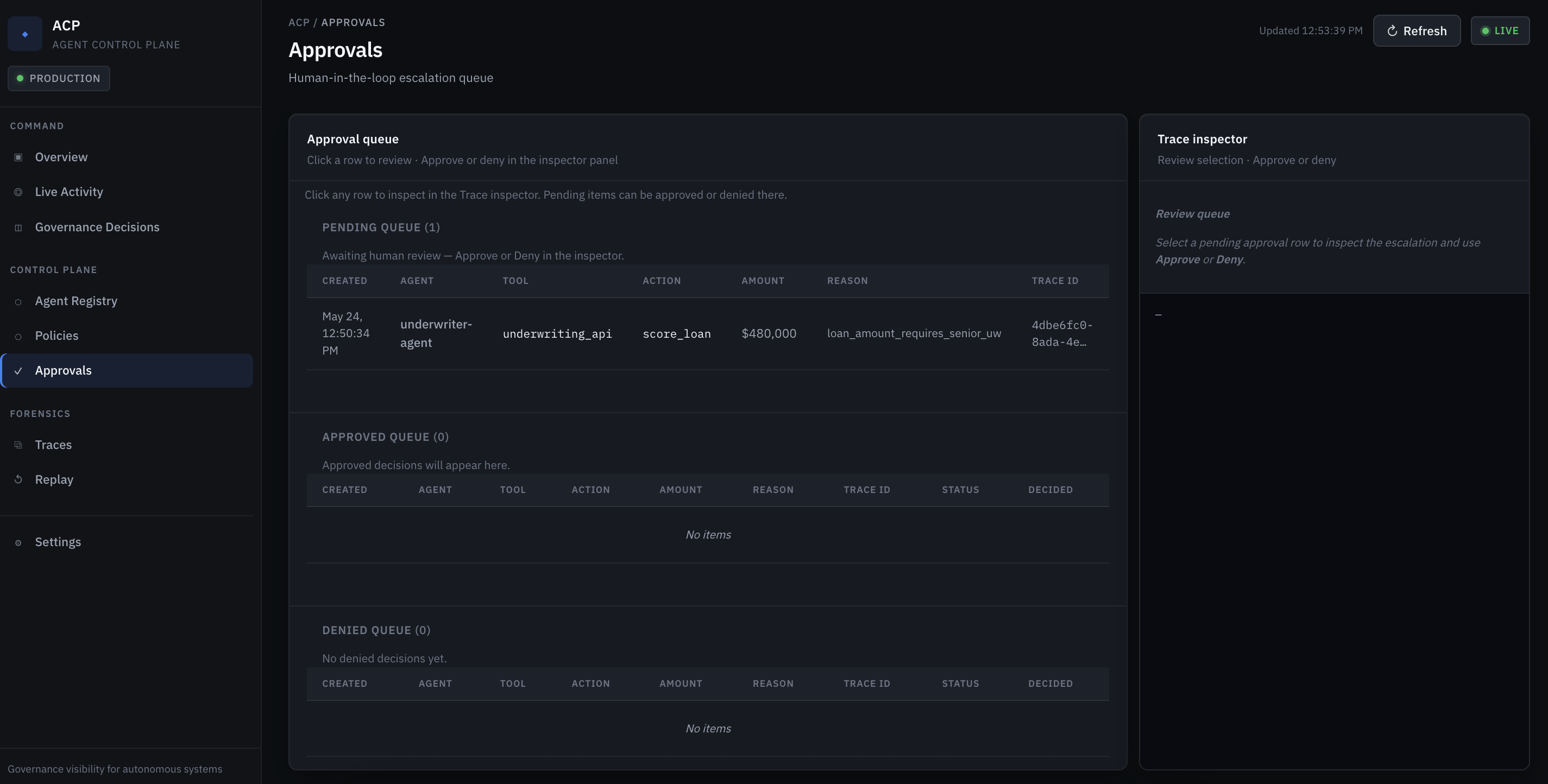
| Approvals | Escalate high-risk actions to humans |
| A2A governance | Governed agent-to-agent calls |
| A2T governance | Governed agent-to-tool calls |
| Audit & visibility | Decisions, traces, registry in one dashboard |
Architecture

Agent runtime -> Truceptor SDK -> Interceptor / Gateway -> OPA / Rego -> allow | deny | escalate -> governed execution

Policy lifecycle (startup): PostgreSQL policy_versions -> interceptor -> PUT /v1/policies -> OPA in-memory cache
Runtime audit: decisions and traces -> PostgreSQL; dashboard reads catalog and forensics from interceptor APIs
SETUP (acp init + acp up)
  ~/.acp/policies/*.rego  ──mount──►  interceptor container
        │
        ▼
  Upsert → Postgres (policy_versions) → push → OPA

RUNTIME (every tool call)
  Agent + SDK  ──POST /tool-call──►  Interceptor  ──►  OPA  ──►  allow | deny | escalate
        (agent_id, tool, action — no Rego in request)
Truceptor sits at the execution boundary:
- agent frameworks keep reasoning and orchestration
- PostgreSQL is the source of truth for Rego policies, audit events, agents, and approvals
- on startup the interceptor loads your
~/.acp/policiesplus built-in platform samples, upserts to Postgres, then syncs to OPA - the interceptor validates identity, routes policy, and records audit traces
- OPA / Rego returns deterministic allow, deny, or escalate decisions against synced rules
- only allowed or approved requests reach tools, APIs, MCP servers, or other agents
Request sequence
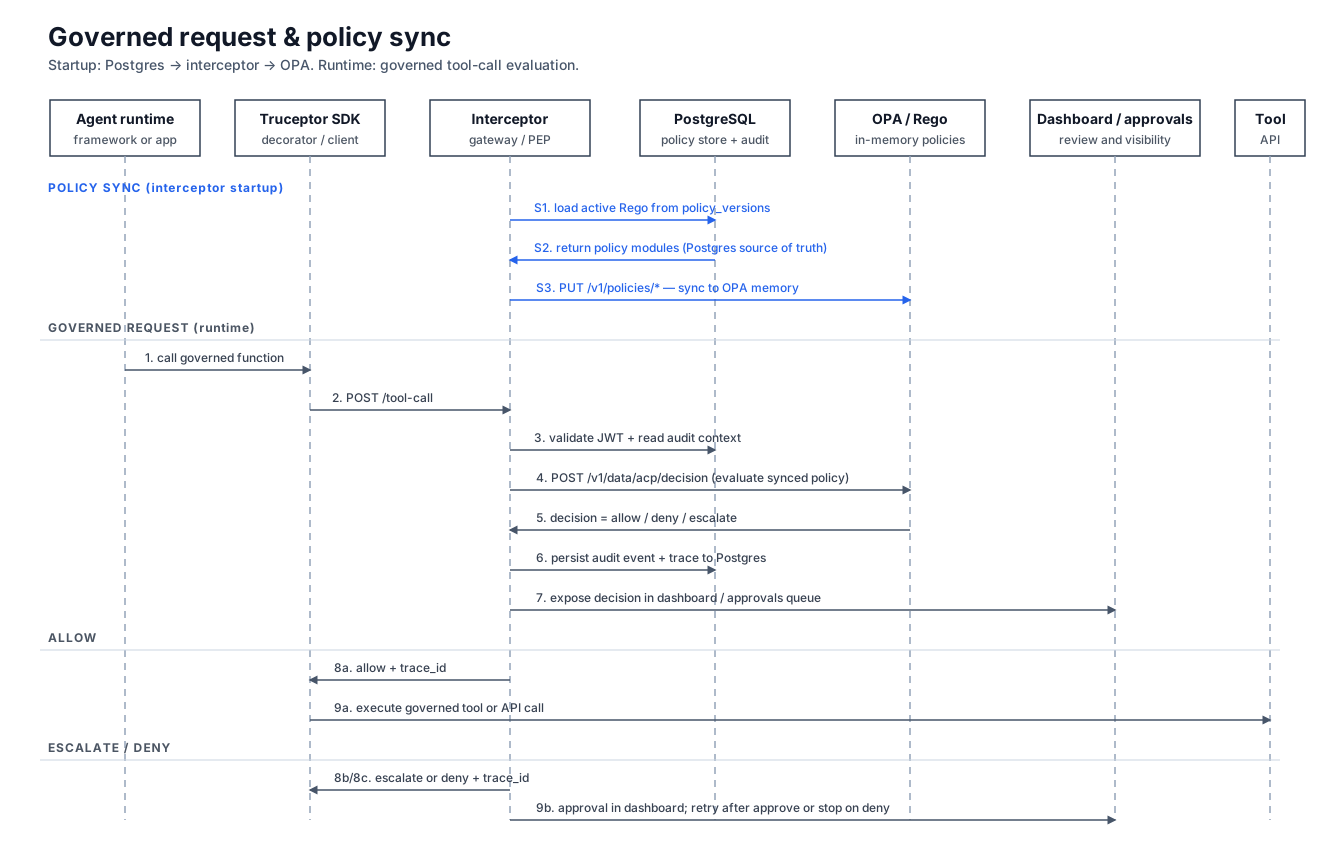
Typical governed flow:
- On interceptor startup: load active Rego from Postgres and sync to OPA via the Policy API
- the agent calls a governed function through the Truceptor SDK
- the interceptor validates JWT identity and normalizes the request
- OPA / Rego evaluates policy for the tool, action, and claims (in-memory rules synced from Postgres)
- Truceptor records the decision in Postgres and exposes it in the dashboard
- the SDK executes only on
allow, waits for review onescalate, and blocks ondeny
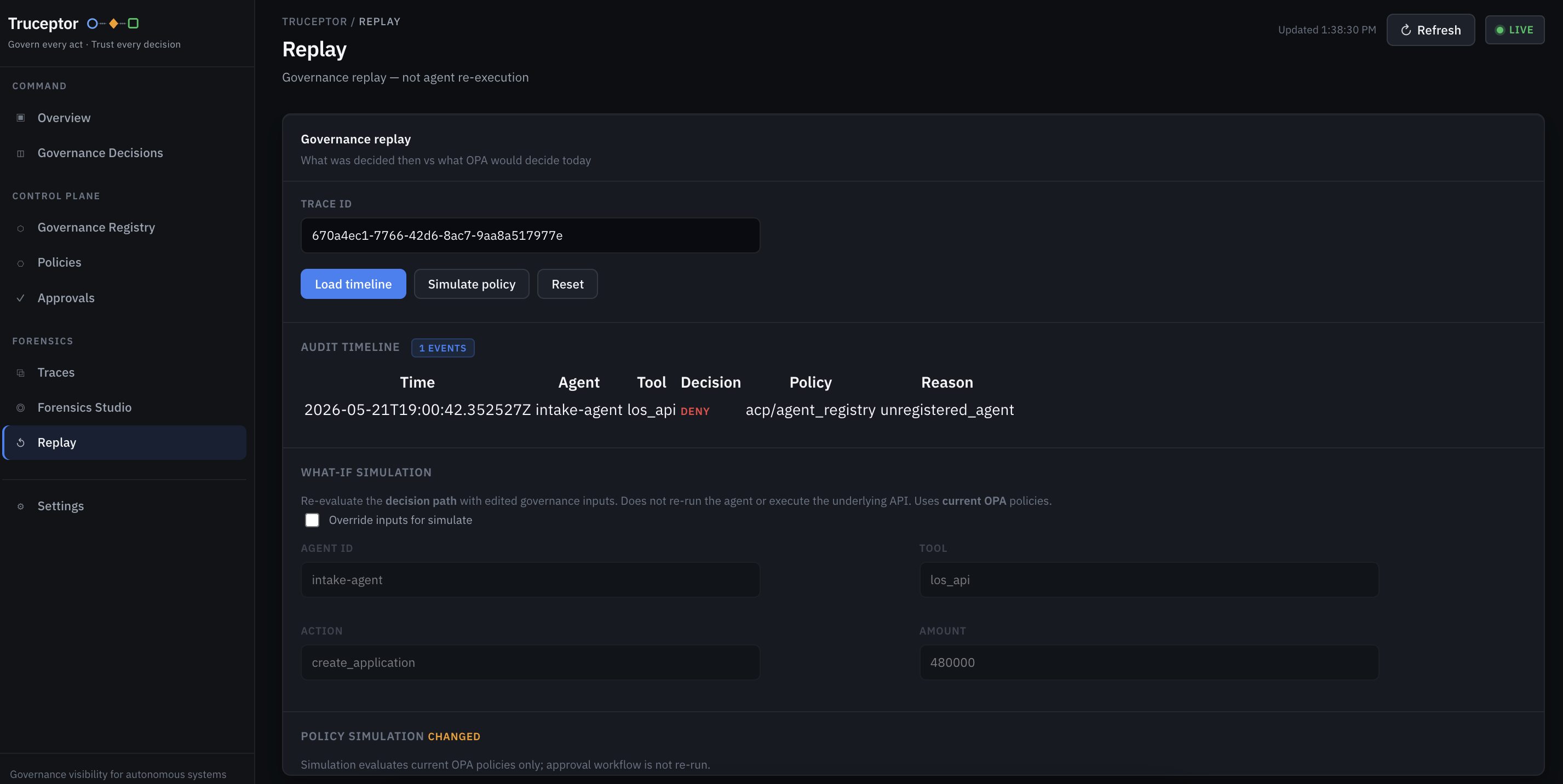
Dashboard
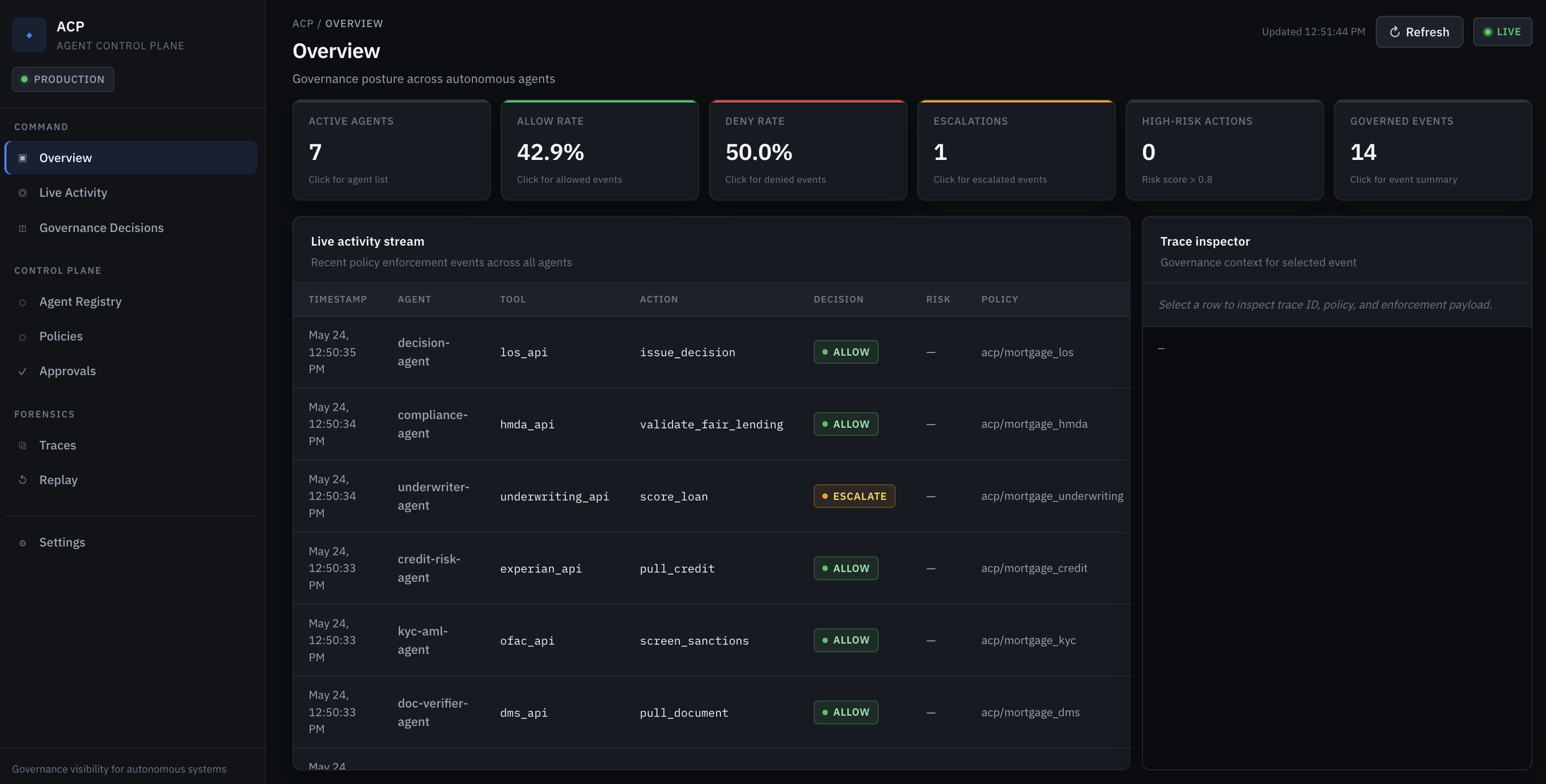
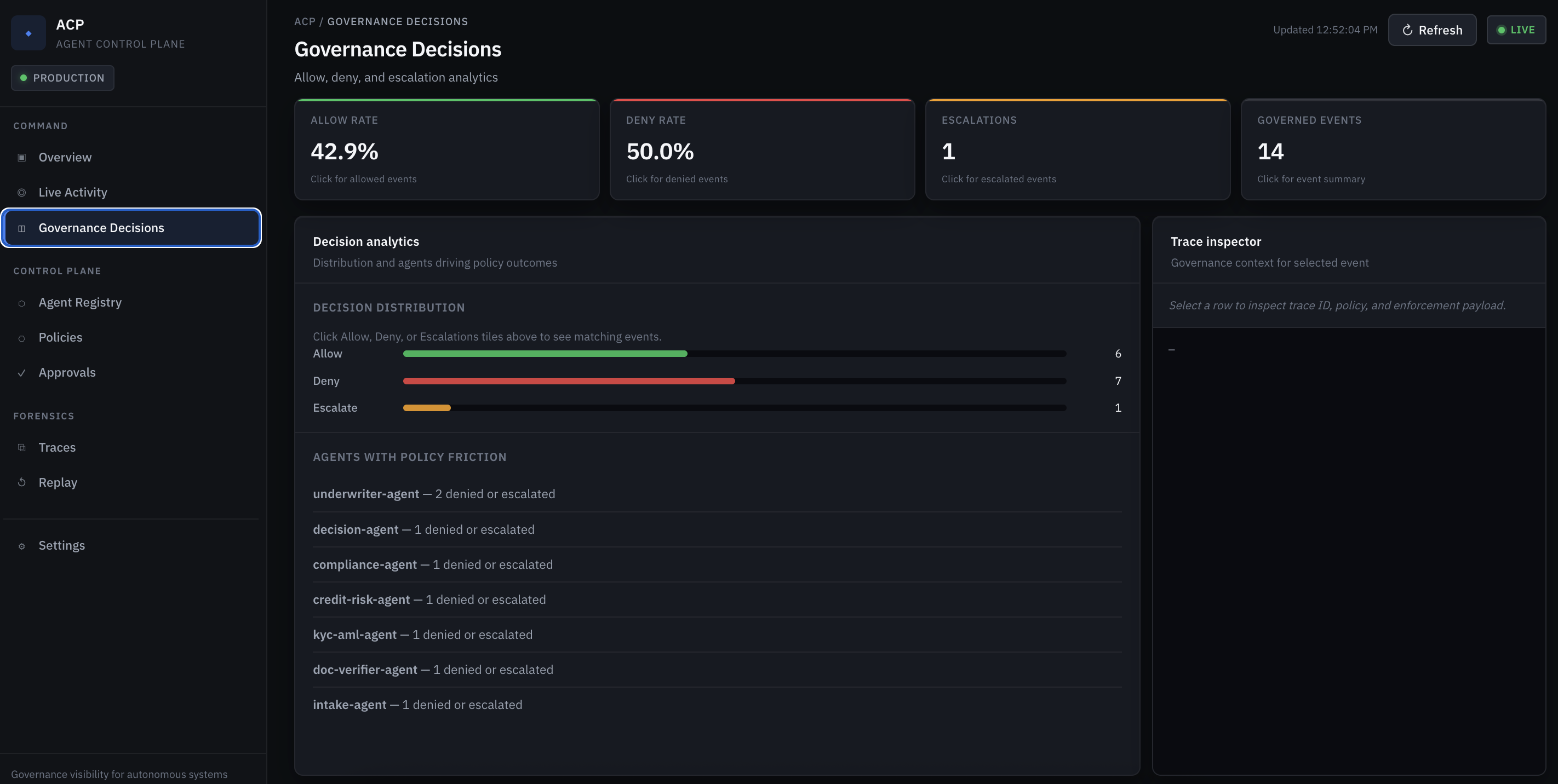
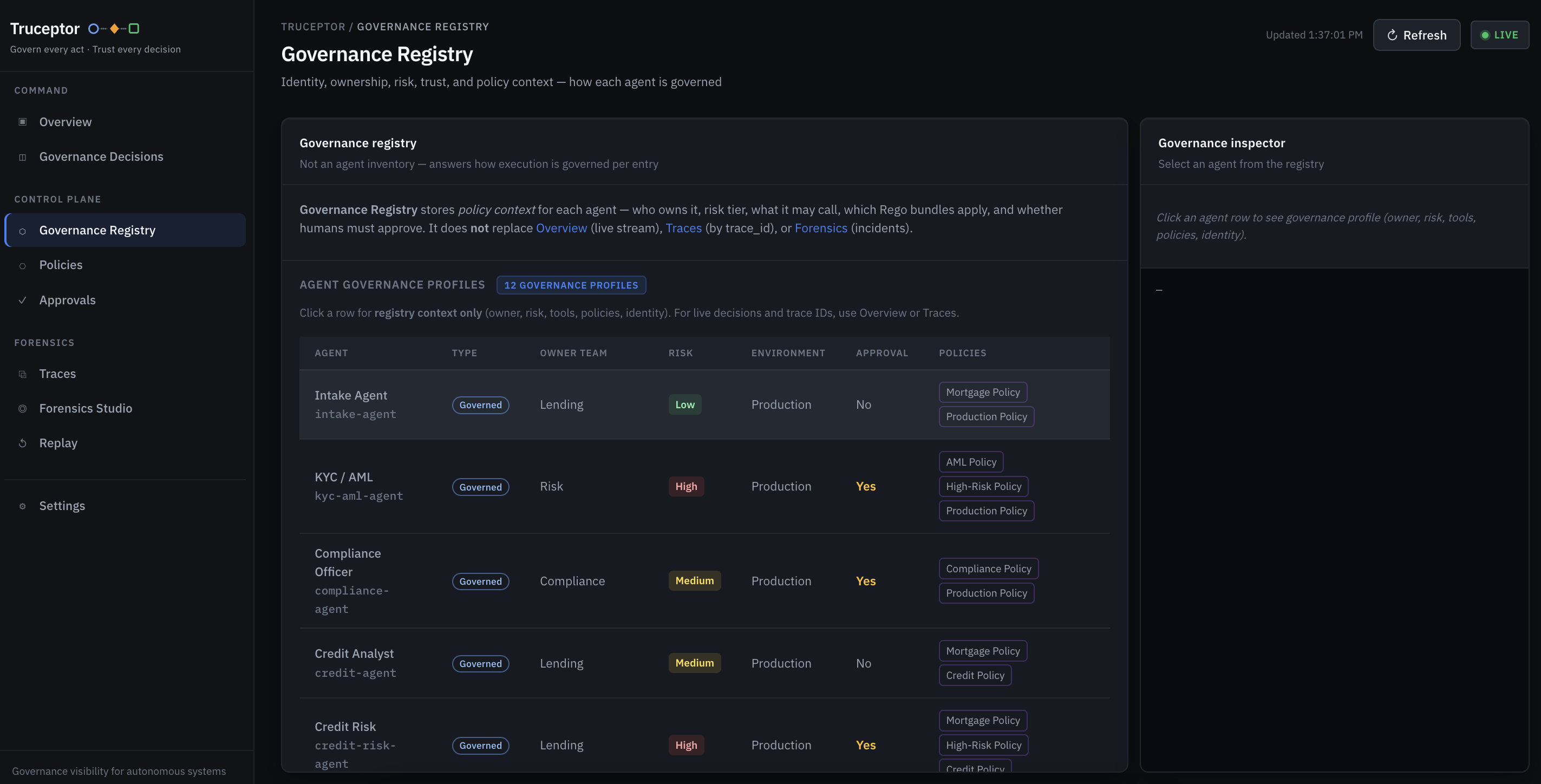
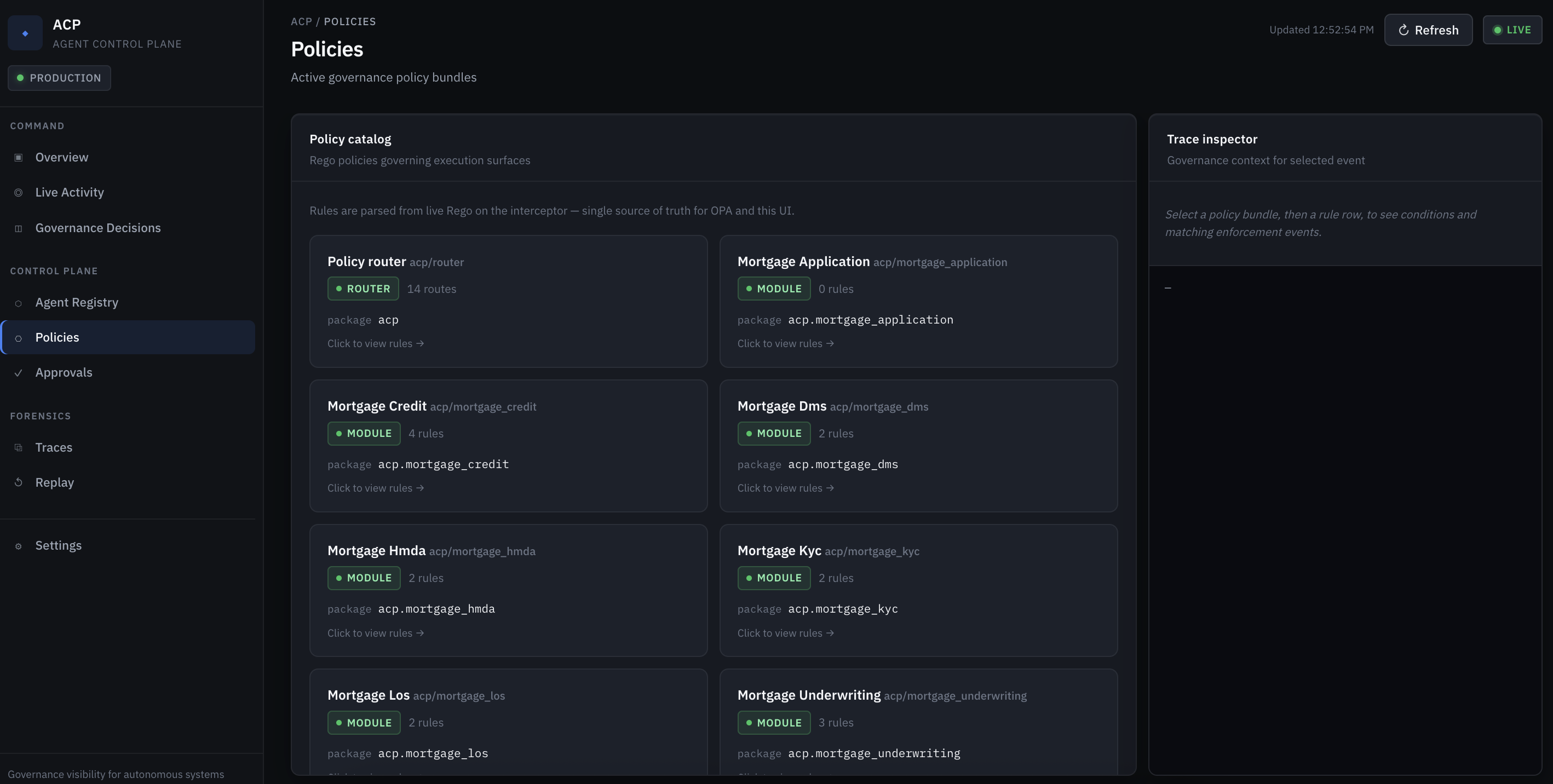
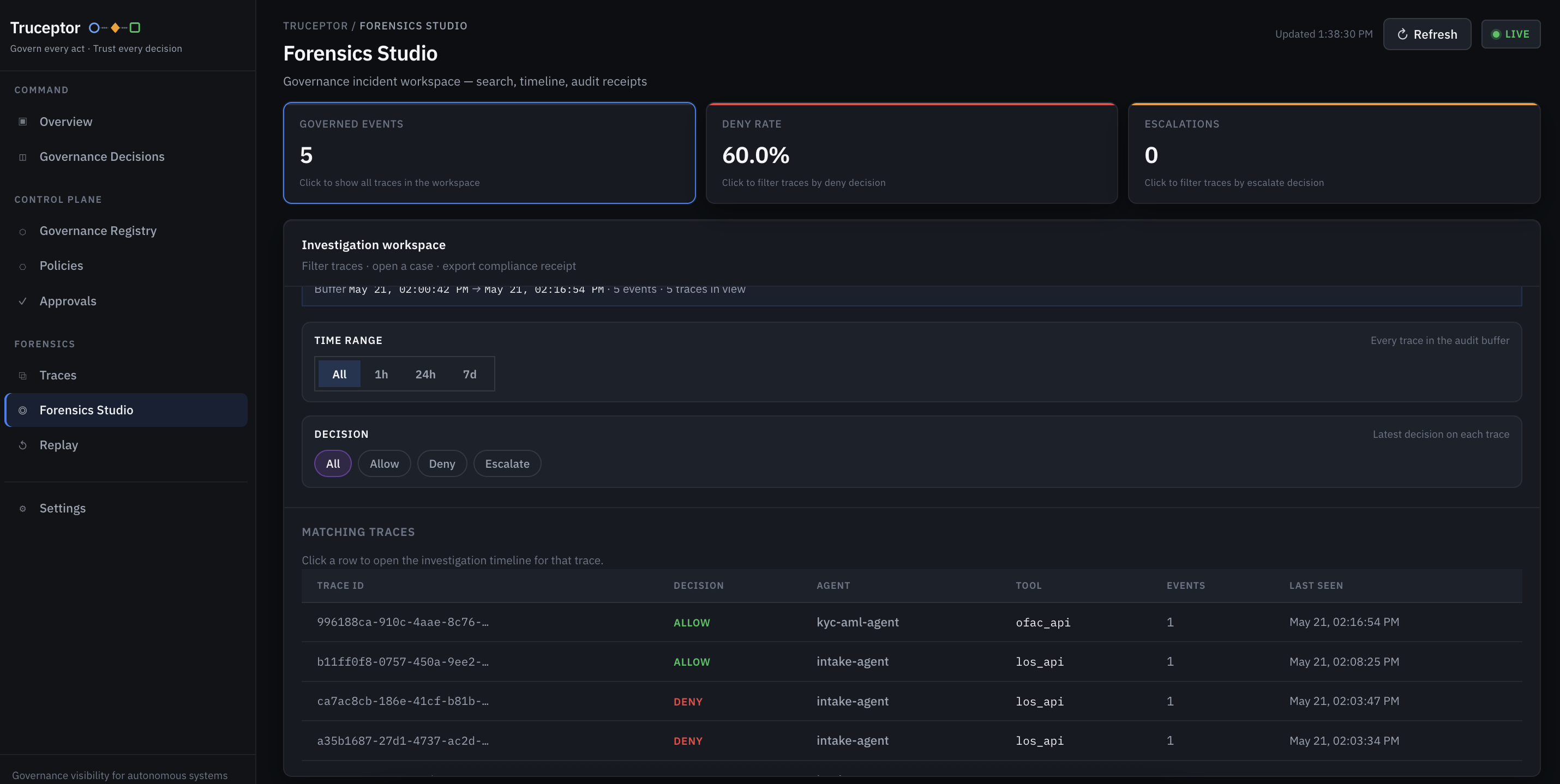
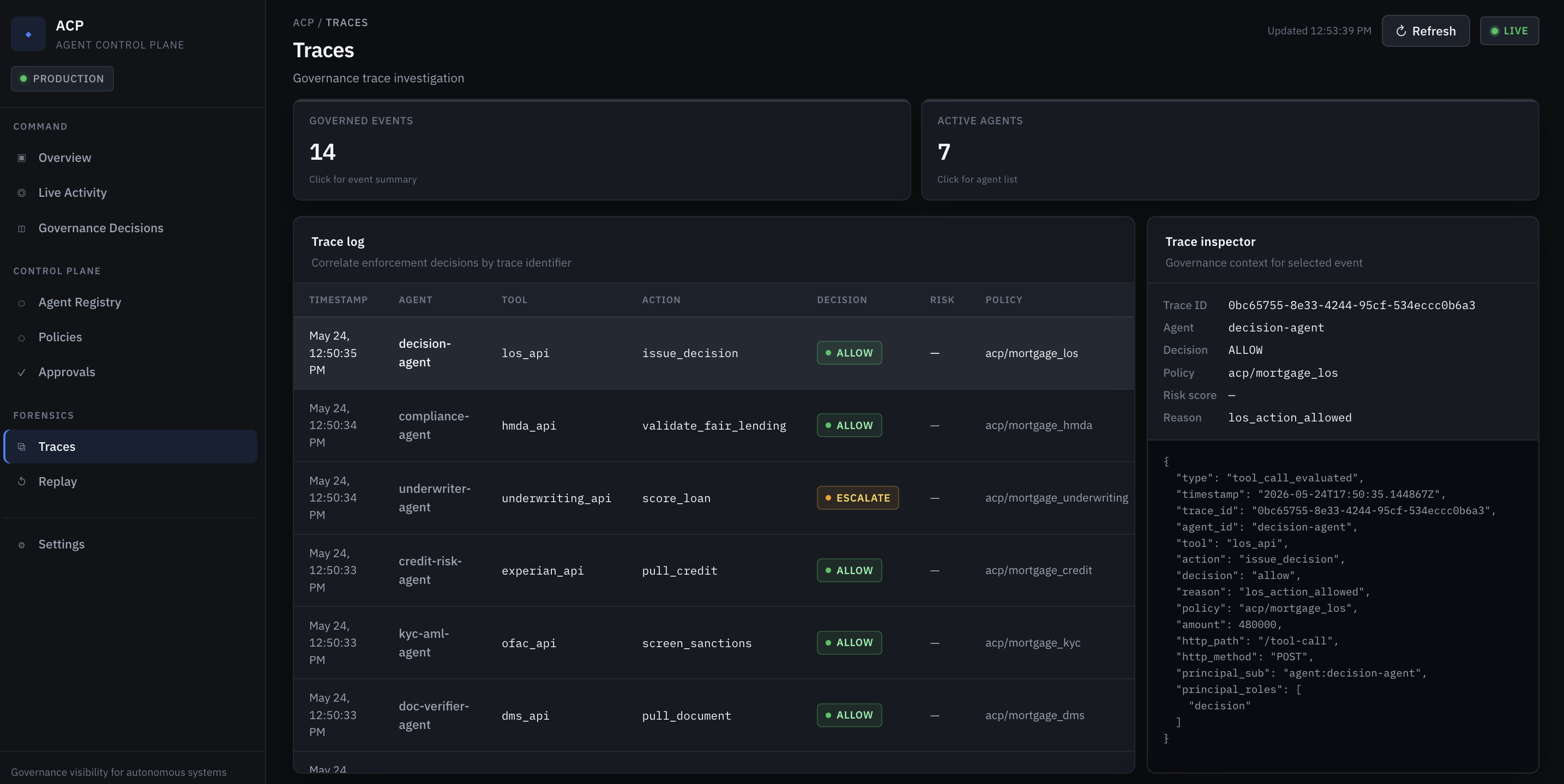
The Truceptor governance dashboard is a core differentiator: live allow/deny/escalate decisions, approvals, agent registry, and policy catalog. Open http://localhost:3090/dashboard/ after acp up.
Overview & activity
Decisions & approvals
Registry & policies
Forensics & replay
Deployment modes
| Mode | How | Best for |
|---|---|---|
| Local | acp up via pip + Docker |
Demos, dev, quickstart |
| SDK | @governed_tool in your agent code |
CrewAI, LangGraph, Strands, custom Python |
| Gateway | Single origin on :3090 (dashboard + API proxy) |
Local unified URL; pattern for prod ingress |
| Cloud / self-hosted | Docker Compose, Kubernetes, ECS/EKS on AWS/Azure/GCP | Team or enterprise rollout |
Local endpoints
| URL | Purpose |
|---|---|
| http://localhost:3090/dashboard/ | Governance dashboard |
| http://localhost:8080 | Interceptor API (/tool-call, /api/v1/*) |
Self-hosted (example)
https://acp.your-company.example
Example: governed tool
Set ACP_INTERCEPTOR_URL and ACP_BEARER_TOKEN before defining a @governed_tool.
The decorator constructs its client at decoration time, so setting those env vars later inside main() is too late.
import os
from truceptor import governed_tool

# Set env vars before decorator evaluation.
os.environ.setdefault("ACP_INTERCEPTOR_URL", "http://localhost:8080")
os.environ.setdefault("ACP_BEARER_TOKEN", "<dev-jwt>")

@governed_tool(
    agent_id="texas-weather-agent",
    tool="weather_api",
    action="read_weather",
)
def get_texas_weather(city: str):
    return {"city": city, "status": "pending_review"}
Truceptor intercepts the call, evaluates policy, then allows, denies, or escalates.
tool="weather_api" is the governed tool id. It does not have to match the Python function name (get_texas_weather). Policy keys on tool, not the Python symbol name.
The JWT agent_id claim must match agent_id="texas-weather-agent" in @governed_tool(...).
Example: policy (Rego)
package acp.policy

allow {
    input.identity.role == "supply-chain-manager"
    input.action.tool == "supplier_approval"
    input.risk_score < 70
}
Edit policies in ~/.acp/policies/ after acp init, then restart with acp down && acp up so the interceptor upserts them into Postgres and syncs to OPA. See HOW_TO_ADD_RULES.md in that folder after init.
Adding a new governed tool
acp init creates starter policy files in ~/.acp/policies/, but you still need to wire new tools into policy yourself.
For a brand-new governed tool, update all of these:
- choose a governed tool id, for example
weather_api - add tool-to-role mapping in
~/.acp/policies/rbac.rego - route the tool in
~/.acp/policies/router.rego - add or reuse a domain policy file such as
weather.rego - mint and export
ACP_BEARER_TOKEN - make sure the JWT
agent_idclaim matches@governed_tool(agent_id=...) - restart:
acp down && acp up(loads Rego into Postgres + OPA) - run the agent
Two valid patterns:
Pattern 1: reuse a governed tool bucket
Use one tool id for multiple Python functions in the same policy domain.
@governed_tool(
    agent_id="texas-weather-agent",
    tool="weather_api",
    action="read_weather",
)
def get_texas_weather(city: str):
    ...
~/.acp/policies/rbac.rego
"weather_api": ["weather"],
~/.acp/policies/router.rego
decision = weather.decision {
    input.tool == "weather_api"
    rbac.decision.decision == "allow"
}
~/.acp/policies/weather.rego
package acp.weather

default decision = {
    "decision": "allow",
    "reason": "weather_action_allowed",
    "policy": "acp/weather",
}

decision = {
    "decision": "deny",
    "reason": "weather_action_not_permitted",
    "policy": "acp/weather",
} {
    not input.action == "read_weather"
    not input.action == "read_weather_batch"
}
Pattern 2: add a brand-new governed tool id
If you want policy to key directly on a new id such as get_texas_weather, add that id to both rbac.rego and router.rego, then route it to the right domain policy file.
If your starter router.rego or rbac.rego references a tool id, make sure the corresponding domain policy file also exists.
Local JWT dev example
Local governed /tool-call requests require a bearer token when JWT auth is enabled. ACP_INTERCEPTOR_URL alone is not enough.
Set:
ACP_INTERCEPTOR_URL=http://localhost:8080ACP_BEARER_TOKEN=<signed-jwt>
If ACP_BEARER_TOKEN is missing, governed calls may fail with 401 Unauthorized / missing bearer token.
One dev-friendly way to mint a token is:
python -m pip install pyjwt cryptography

export ACP_BEARER_TOKEN="$(
python - <<'PY'
from pathlib import Path
import time
import jwt

private_key = (Path.home() / ".acp" / "jwt" / "private.pem").read_text()
token = jwt.encode(
    {
        "sub": "agent:texas-weather-agent",
        "agent_id": "texas-weather-agent",
        "roles": ["weather"],
        "iss": "acp-dev",
        "aud": "acp-interceptor",
        "exp": int(time.time()) + 3600,
    },
    private_key,
    algorithm="RS256",
)
print(token)
PY
)"
Use these claims for local development:
sub=agent:texas-weather-agentagent_id=texas-weather-agentroles=["weather"]iss=acp-devaud=acp-interceptor
agent_id in the JWT must match the agent_id passed to @governed_tool(...).
Example: governance flow
Supply Chain Agent
    → Truceptor validates identity (JWT)
    → OPA evaluates policy
    → Decision: ESCALATE
    → Human approves in dashboard
    → Execution resumes
What Truceptor provides
- Policy enforcement — OPA/Rego (Cedar on roadmap)
- Identity — JWT from Okta, Auth0, Keycloak, or your IdP
- Approvals — human-in-the-loop for risky actions
- Observability — dashboard for decisions, traces, agents, tools
- Agent registry — lightweight catalog of agents and capabilities
- Framework-friendly — keep CrewAI / LangGraph / Strands for reasoning; govern execution here
Philosophy
Orchestration frameworks handle reasoning, planning, and workflows.
Truceptor handles governance, trust, approvals, policy, and auditability.
Reasoning stays autonomous. Execution stays governed.
Roadmap
- Policy Studio — MVP shipped in 0.5.0: Approval, Risk, and Compliance threshold rules via dashboard wizard; compiles to Rego in
policy_versions; human-readable Policies tab for all modules. - Access rules and agent-to-agent rules (Policy Studio)
- Enterprise topology views
- Multi-cloud deployment templates
Release notes
0.5.0
- Breaking (Python import): package directory renamed
acp→truceptor. Usefrom truceptor import governed_tool, ACPClient. CLI unchanged (acp up,acp init); env vars stillACP_*; user dir still~/.acp/. - Policy Studio MVP in bundled interceptor + dashboard: business rules → Rego → same Postgres/OPA pipeline.
- Policies catalog: human-readable rule summaries for engineer-authored and Policy Studio modules.
- Bundled runtime sync excludes monorepo-only
deployments/dev scripts from the PyPI wheel.
0.4.x
- PyPI package
truceptor; integration docs; bundled Docker runtime viaacp up.
License
MIT License
1 maintainer

Metadata
1 maintainer
Release files for truceptor 0.5.0
For a detailed explanation of source distributions (sdists) and built distributions (wheels), please see the package formats documentation.
Source distribution (sdist)
| File | Size | Uploaded | Provenance | Actions |
|---|---|---|---|---|
| truceptor-0.5.0.tar.gz | 166.9 kB | Without provenance | Details for truceptor-0.5.0.tar.gz |
Built distribution (wheel)
| File | Interpreter | ABI | Platform | Actions Reset |
|---|---|---|---|---|
| truceptor-0.5.0-py3-none-any.whl | Python 3 | none | any | Details for truceptor-0.5.0-py3-none-any.whl |
Total release size: 388.6 kB
Release files / truceptor-0.5.0.tar.gz
| Download URL | truceptor-0.5.0.tar.gz |
|---|---|
| Size | 166.9 kB |
| Tags | Source |
|
SHA-256 checksum How to use checksums |
c9fbdf6a4b074f22aec1fb852455f99d23bd8551913cca518dadb7c99b940a64
|
|
BLAKE2b-256 checksum How to use checksums |
00973a4a8e2e366a61477ebbd18e0910a6d7297ca3c6ab88d2f83b1bab520f45
|
| Upload date | |
|
Uploaded using Trusted Publishing? What is trusted publishing? |
No |
| Uploaded via |
twine/6.2.1.dev37+g4f20c0dc3 CPython/3.11.6
|
Release files / truceptor-0.5.0-py3-none-any.whl
| Download URL | truceptor-0.5.0-py3-none-any.whl |
|---|---|
| Size | 221.7 kB |
| Tags | Python 3 |
|
SHA-256 checksum How to use checksums |
a090cae5850259bcf3f5b41405916b93c65df2a74804249eaad0bf37974df30a
|
|
BLAKE2b-256 checksum How to use checksums |
60dda30b6e6852dcb50b7abaa9134aea4bb60b3c68209f1e77195dcf798eec56
|
| Upload date | |
|
Uploaded using Trusted Publishing? What is trusted publishing? |
No |
| Uploaded via |
twine/6.2.1.dev37+g4f20c0dc3 CPython/3.11.6
|
Security for truceptor 0.5.0
Provenance
Provenance describes where a file came from. On PyPI, provenance is shared via attestations, which provide a verifiable record of the build or publishing details. View details, limitations and caveats.
No provenance found
None of the files in this release were uploaded with provenance metadata.
A note on package security
PyPI is a repository for distributing packages, not a service for auditing them. While third-party security researchers and our staff do their best to detect and remove malicious packages, PyPI cannot guarantee the quality, security or suitability of any given package.
To learn more about protecting yourself from malicious actors, visit our package security documentation.














