
SOTA-level agent memory at zero infrastructure cost.
Verified details
These details have been verified by PyPIProject links
GitHub Statistics
Maintainers

Project description

One SQLite file. Zero cloud. One command to set up.






🏆 91.8% on LoCoMo (Pro) · 📦 One SQLite File · ☁️ Zero Cloud · 💰 Zero Infrastructure Cost
Benchmark · Highlights · Edge / Base / Pro · Install · First Run · API
🔬 Benchmark
Tested on LoCoMo, the standard benchmark for conversational memory. 1,540 questions across 10 conversations. All 8 systems share the same answer model, judge, scoring, top-k, and byte-identical answer prompt — only retrieval differs.
Note on charts: the hero banner and the three charts below still show the v0.3.0 single-Pro-tier layout (91.5%). Chart regeneration is tracked for a later release; all numerical claims in the README text and tables reflect the v0.4.0 three-tier scores (90.1 / 91.5 / 91.8%).
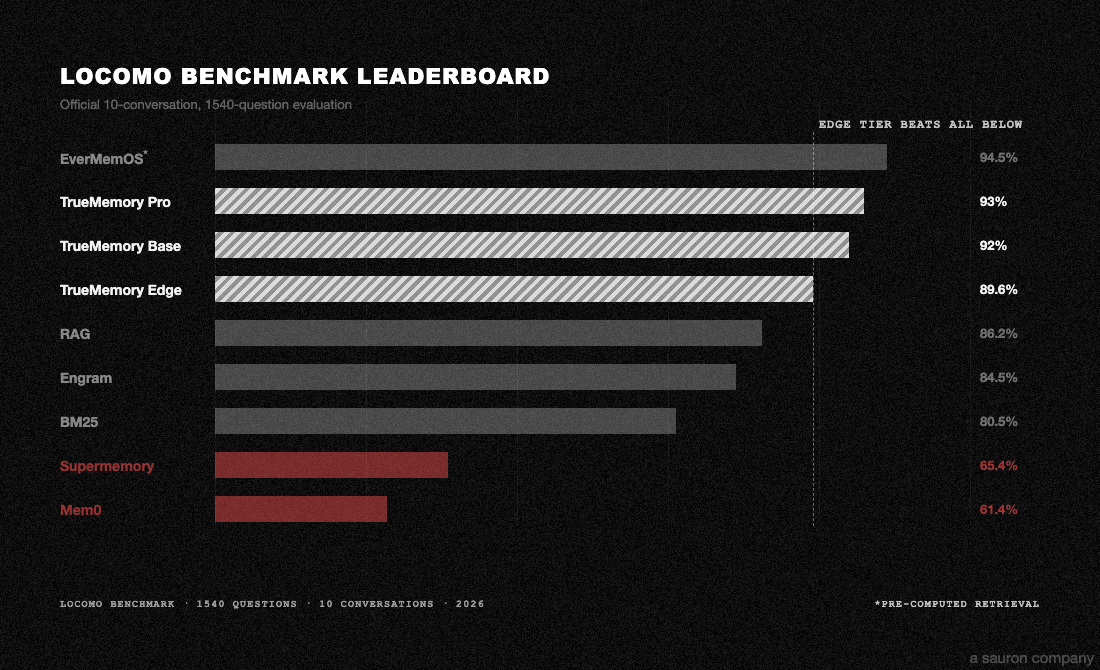
TrueMemory achieves state-of-the-art accuracy for fully-local memory systems at zero ongoing infrastructure cost. Edge and Base run entirely offline with no API keys. Pro adds one small LLM call per query for HyDE query expansion.
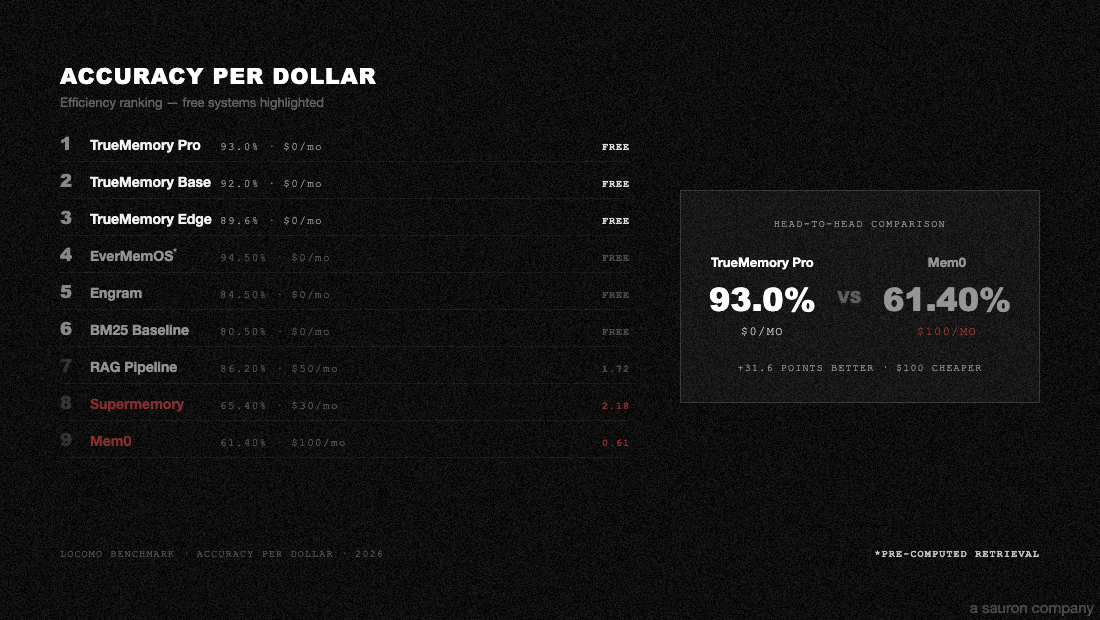
All scores use the same evaluation pipeline: GPT-4.1-mini answer generation, GPT-4o-mini judge (3x majority vote), temperature=0. Zero errors across 12,320 total answers. Scores use a lenient semantic-match judge; rankings are valid across all systems but absolute values are higher than published LoCoMo baselines using strict exact-match. Full methodology and reproduction scripts in benchmarks/.
⚡ Research Highlights
- 30+ percentage points more accurate than Mem0 on LoCoMo (91.8% Pro vs 61.4%)
- 2x more cost-efficient per correct answer than Mem0
- Runs offline on any device with Python 3.10+ and 512MB RAM (Edge tier)
- One SQLite file, zero API keys for Edge and Base tiers. The entire 6-layer system runs offline.
- Within 2.7pp of EverMemOS, the only higher-scoring system — and EverMemOS uses pre-computed retrieval rather than live search at query time.

TrueMemory Pro nearly matches EverMemOS across all 4 question categories. Mem0 collapses on multi-hop reasoning (37.7% vs 90.7%).
🏗️ Edge / Base / Pro
Same features, same 6-layer pipeline. Three tiers trade off install size, hardware, and LoCoMo accuracy. All three use the same retrieval architecture (FTS5 + dense + RRF + cross-encoder reranker); the differences are the embedder, the reranker, and whether HyDE query expansion is used. Base and Pro share an embedder and reranker — only HyDE differs.
| Edge | Base | Pro | |
|---|---|---|---|
| LoCoMo | 90.1% | 91.5% | 91.8% |
| Embedder | Model2Vec potion-base-8M (8M params, 256d) | Qwen3-Embedding-0.6B @ 256d Matryoshka (600M params) | Qwen3-Embedding-0.6B @ 256d Matryoshka (600M params) |
| Reranker | ms-marco-MiniLM-L-6-v2 (22M) | gte-reranker-modernbert-base (149M) | gte-reranker-modernbert-base (149M) |
| HyDE | off | off | on (requires an LLM API key) |
| Runs on | Any machine, CPU only | 4GB+ RAM, CPU or GPU | 4GB+ RAM, CPU or GPU + LLM API key |
| First install | ~30MB | ~1.5GB one-time download | ~1.5GB one-time download |
| Speed | Ultra-fast | Fast | Fast + 1 LLM call/query |
Edge works everywhere. Base is the strongest fully-offline tier. Pro adds HyDE for the highest LoCoMo score.
🚀 Quickstart
Claude Code / Claude Desktop
One command. Works on any Mac or Linux box, even if your system Python is old or missing entirely.
Step 1. Open Terminal:
- Mac: press
Cmd + Space, typeTerminal, pressEnter - Linux: press
Ctrl + Alt + T(or open your distro's terminal app)
Step 2. Paste this one line and press Enter:
curl -LsSf https://raw.githubusercontent.com/buildingjoshbetter/TrueMemory/main/install.sh | sh
Step 3. Wait ~1-2 minutes while it downloads and installs. You'll see progress messages scroll by — that's normal.
Step 4. If Claude Desktop was already open, quit it with Cmd+Q and reopen it (a new chat window is not enough — the config is only read at launch). Then start a new Claude session and TrueMemory walks you through choosing Edge, Base, or Pro on first run.
What this actually does: installs uv (Astral's Python tool manager) if needed, fetches a managed Python 3.12 into
~/.local/share/uv/, installs TrueMemory into an isolated tool environment, and auto-configures Claude Code and Claude Desktop. Your system Python is never touched. No sudo, no venvs, no pip struggle. Uninstall cleanly withuv tool uninstall truememory.
Want to audit the script first? It's ~140 lines of shell, no sudo, stays entirely under
$HOME. Read the source atinstall.sh, or download and inspect locally:curl -LsSf https://raw.githubusercontent.com/buildingjoshbetter/TrueMemory/main/install.sh -o install.sh && less install.sh && sh install.sh.
Want Base or Pro (adds Qwen3 embeddings + gte-reranker + sentence-transformers, ~1.5-2.5GB depending on OS)?
curl -LsSf https://raw.githubusercontent.com/buildingjoshbetter/TrueMemory/main/install.sh | TRUEMEMORY_EXTRAS="gpu,mcp" shThe default install is Edge (~30MB, the CPU-only tier). If you pick Base or Pro during first-run setup, TrueMemory will prompt you to install the extra models. Pro additionally requires an LLM API key at runtime for HyDE. (Linux CPU-only boxes will pull PyTorch's default CUDA wheel, which is larger — ~2.5GB total. Mac installs are closer to ~1.5GB.)
Python library (for developers)
If you're embedding TrueMemory in your own Python project (requires Python 3.10+):
pip install truememory
from truememory import Memory

m = Memory()
m.add("Prefers dark mode and TypeScript", user_id="alex")
m.add("Allergic to peanuts", user_id="alex")

results = m.search("What are Alex's preferences?", user_id="alex")
print(results[0]["content"])
# → "Prefers dark mode and TypeScript"
The database is created automatically at ~/.truememory/memories.db.
🤖 What happens on first run?
Claude forgets you between sessions. TrueMemory fixes that.
On your first session after installing, TrueMemory will:
- Welcome you and show your current version
- Ask Edge / Base / Pro — you choose your accuracy tier
- Optionally accept an API key — required for Pro (HyDE query expansion via Anthropic, OpenRouter, or OpenAI); optional for Edge and Base
- Show you how it works — with example prompts to try
After setup, TrueMemory runs automatically. It stores what you tell it and recalls it in future sessions — no manual work needed.
Make it automatic (optional)
Copy CLAUDE.md.example to your home directory as CLAUDE.md. This tells Claude to store your preferences and recall them without being asked:
cp CLAUDE.md.example ~/CLAUDE.md
Manual setup
If auto-setup doesn't detect your Claude installation, you can configure manually.
Claude Code (if you used the installer above):
claude mcp add truememory -- truememory-mcp
Claude Desktop: add to claude_desktop_config.json (Settings > Developer > Edit Config):
{
  "mcpServers": {
    "truememory": {
      "command": "/Users/YOU/.local/bin/truememory-mcp"
    }
  }
}
Use the absolute path to
truememory-mcp— runwhich truememory-mcpto find it. Claude Desktop (and most non-Claude-Code MCP clients) don't inherit your shell's PATH, so relative commands will silently fail.
No-install alternative (uvx): skip installing TrueMemory entirely and let Claude run it ephemerally. Requires uv to be installed.
{
  "mcpServers": {
    "truememory": {
      "command": "/Users/YOU/.local/bin/uvx",
      "args": ["--python", "3.12", "--from", "truememory[mcp]", "truememory-mcp"]
    }
  }
}
uvx creates a cached environment on first run; subsequent spawns are fast. Good if you want TrueMemory to always be latest-on-PyPI without managing an install.
📖 API
| Method | What it does |
|---|---|
m.add(content, user_id=None) |
Store a memory |
m.search(query, user_id=None, limit=10) |
Search memories |
m.search_deep(query, user_id=None, limit=10) |
Agentic multi-round search (higher latency + LLM cost; best for ambiguous queries) |
m.get(memory_id) |
Get one memory |
m.get_all(user_id=None, limit=100) |
List all memories |
m.update(memory_id, content) |
Update a memory |
m.delete(memory_id) |
Delete a memory |
m.delete_all(user_id=None) |
Delete all |
📊 Full Benchmark Details
Every benchmark script is self-contained and runs on Modal.
- Leaderboard & Reproduction: run any system yourself
- Full Technical Report: per-category breakdowns, latency, cost, hardware
- Evaluation Config: exact models, prompts, parameters
📝 Citation
@software{truememory2026,
  title = {TrueMemory: State-of-the-Art Local-First Agent Memory},
  author = {@Building\_Josh},
  organization = {Sauron},
  year = {2026},
  url = {https://github.com/buildingjoshbetter/TrueMemory},
  version = {0.4.0}
}
⚖️ License
Licensed under Apache 2.0. Free for personal and commercial use.
Project details
Verified details
These details have been verified by PyPIProject links
GitHub Statistics
Maintainers
Release history Release notifications | RSS feed


Download files
Download the file for your platform. If you're not sure which to choose, learn more about installing packages.
Source Distribution
Built Distribution
Filter files by name, interpreter, ABI, and platform.
If you're not sure about the file name format, learn more about wheel file names.
Copy a direct link to the current filters
File details
Details for the file truememory-0.5.0.tar.gz.
File metadata
- Download URL: truememory-0.5.0.tar.gz
- Upload date:
- Size: 222.2 kB
- Tags: Source
- Uploaded using Trusted Publishing? Yes
- Uploaded via: twine/6.1.0 CPython/3.12.9
File hashes
| Algorithm | Hash digest | |
|---|---|---|
| SHA256 |
8aeda55a1937f070665b18e673fa59849af075b1581632e191ebb4db55ca22d5
|
|
| MD5 |
baa3cbee9145b9211a7c63effca8e112
|
|
| BLAKE2b-256 |
eab6e3f01b678cb72bc49ecc9beb5f77e80c9b2517bdffe3b6c30024191905e7
|
Provenance
The following attestation bundles were made for truememory-0.5.0.tar.gz:
Publisher:
publish.yml on buildingjoshbetter/TrueMemory
-
Statement:
-
Statement type:
https://in-toto.io/Statement/v1 -
Predicate type:
https://docs.pypi.org/attestations/publish/v1 -
Subject name:
truememory-0.5.0.tar.gz -
Subject digest:
8aeda55a1937f070665b18e673fa59849af075b1581632e191ebb4db55ca22d5 - Sigstore transparency entry: 1361212989
- Sigstore integration time:
-
Permalink:
buildingjoshbetter/TrueMemory@9b7af17c7d1466897dddca170eb9c85e1badbc1f -
Branch / Tag:
refs/tags/v0.5.0 - Owner: https://github.com/buildingjoshbetter
-
Access:
public
-
Token Issuer:
https://token.actions.githubusercontent.com -
Runner Environment:
github-hosted -
Publication workflow:
publish.yml@9b7af17c7d1466897dddca170eb9c85e1badbc1f -
Trigger Event:
release
-
Statement type:
File details
Details for the file truememory-0.5.0-py3-none-any.whl.
File metadata
- Download URL: truememory-0.5.0-py3-none-any.whl
- Upload date:
- Size: 180.5 kB
- Tags: Python 3
- Uploaded using Trusted Publishing? Yes
- Uploaded via: twine/6.1.0 CPython/3.12.9
File hashes
| Algorithm | Hash digest | |
|---|---|---|
| SHA256 |
0b58f5cd1911e2e9ee4d9258f5b872975418b9dcc295adbefeb8a3c027ee260e
|
|
| MD5 |
5ec11a30d595623b43e5e520c512d6c1
|
|
| BLAKE2b-256 |
c4ab8371d40fa702a6081930b5cbca8c6e329261f1f1d5f9ee851a61085efe89
|
Provenance
The following attestation bundles were made for truememory-0.5.0-py3-none-any.whl:
Publisher:
publish.yml on buildingjoshbetter/TrueMemory
-
Statement:
-
Statement type:
https://in-toto.io/Statement/v1 -
Predicate type:
https://docs.pypi.org/attestations/publish/v1 -
Subject name:
truememory-0.5.0-py3-none-any.whl -
Subject digest:
0b58f5cd1911e2e9ee4d9258f5b872975418b9dcc295adbefeb8a3c027ee260e - Sigstore transparency entry: 1361213012
- Sigstore integration time:
-
Permalink:
buildingjoshbetter/TrueMemory@9b7af17c7d1466897dddca170eb9c85e1badbc1f -
Branch / Tag:
refs/tags/v0.5.0 - Owner: https://github.com/buildingjoshbetter
-
Access:
public
-
Token Issuer:
https://token.actions.githubusercontent.com -
Runner Environment:
github-hosted -
Publication workflow:
publish.yml@9b7af17c7d1466897dddca170eb9c85e1badbc1f -
Trigger Event:
release
-
Statement type:






