
Transparent, Robust & Ultra-Sparse Trees (TRUST™) - Free Version

Project description
trust-free 





Model. Explain. TRUST. All in one Python package, for free.
trust-free is a Python package for fitting interpretable regression models using Transparent, Robust, and Ultra-Sparse Trees (TRUST™) — a new generation of Linear Model Trees (LMTs) with Random-Forest accuracy and intuitive explanations. It is based on my peer-reviewed paper [1], presented at the 22nd Pacific Rim International Conference on Artificial Intelligence (PRICAI 2025) and to appear in Springer Nature (Lecture Notes in Artificial Intelligence).
Here are two 15-second demos showcasing the explain() and compare() methods, which generate automated explanation reports for the famous Medical Insurance Charges dataset from Kaggle:
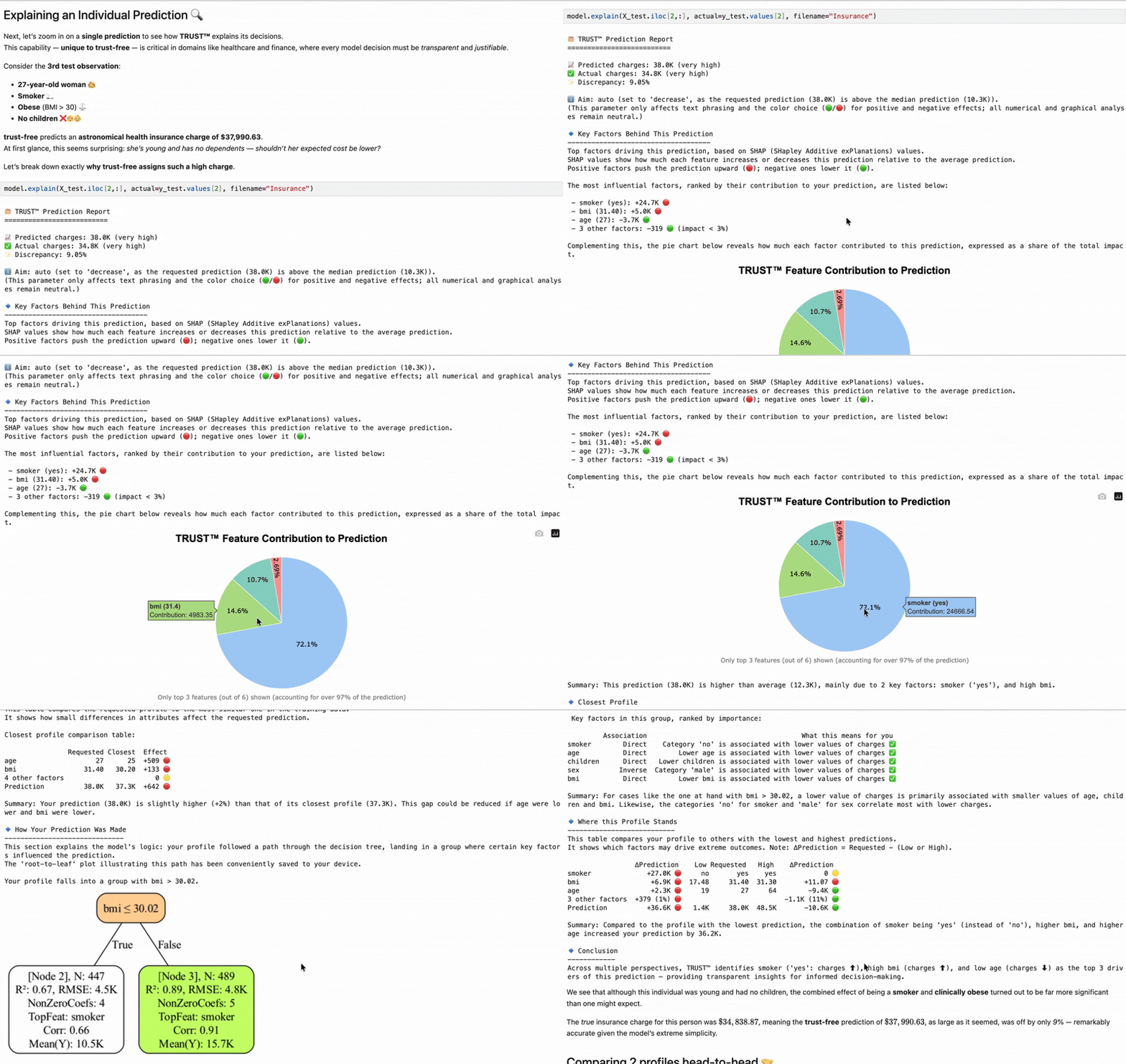
TRUST™’s
explain() method — Straightforward prediction explanations
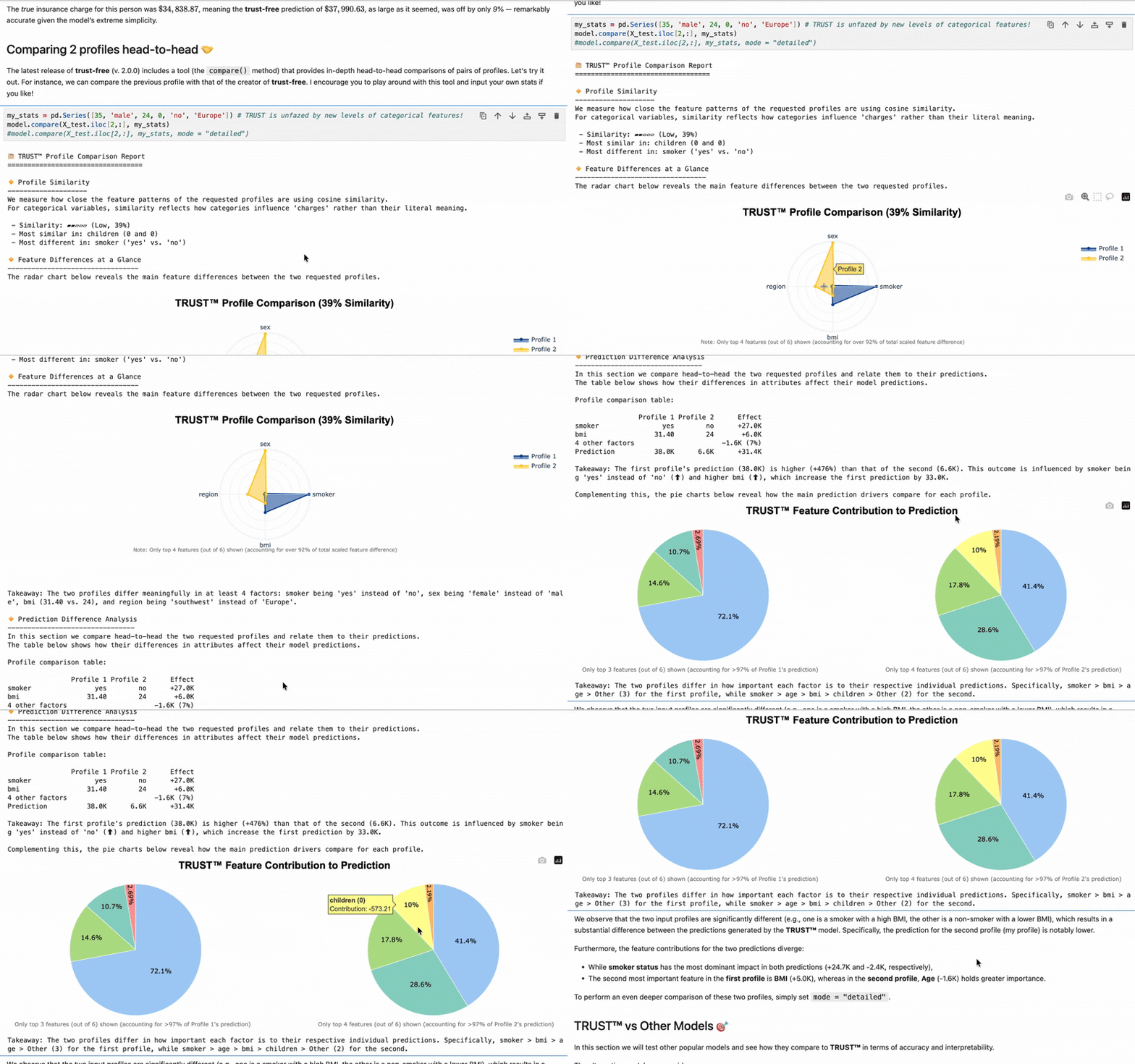
TRUST™’s
compare() method — Comprehensive head-to-head profile comparisons
Proven Performance: Accuracy + Full Interpretability (60 Datasets)
| Model | Test R² ↑ | Interpretable? |
|---|---|---|
| TRUST™ | 0.67 | Yes |
| Random Forest | 0.62 | No |
| Lasso | 0.57 | Yes |
| CART | 0.49 | Yes |
| Node Harvest (NH) | 0.47 | Yes |
| M5' (Linear Model Tree) | 0.36 | Partially* |
In the table above, TRUST™ is the only fully interpretable model statistically above 0.6 test R² across varied benchmark datasets — and 6× sparser than M5' (17 vs 109 coefficients on average).
Source: PRICAI 2025 (Springer LNAI)
Try it now on macOS: pip install trust-free
See full benchmarks in the PRICAI 2025 paper
The package currently supports standard regression and experimental time-series regression tasks. Future releases will also tackle other tasks such as classification.
Note: trust-free is, as its name suggests, a free version, limited to datasets of at most 5,000 rows (instances) and 20 columns (features) — a 'pro' version is under development.
Overview
TRUST™ [1] is a next-generation algorithm based on (sparse) Linear Model Trees (LMTs), which I developed as part of my Ph.D. in Statistics at the University of Wisconsin-Madison. trust-free is the official Python implementation of the algorithm.
LMTs combine the strengths of two popular interpretable machine learning models: Decision Trees (non-parametric) and Linear Models (parametric). Like a standard Decision Tree, they partition data based on simple decision rules. However, the key difference lies in how they evaluate these splits and model the data. Instead of using a simple constant (like the average) to evaluate the goodness of a split, LMTs fit a Linear Model to the data within each node.
This approach means that the final predictions in the leaves are made by a Linear Model rather than a simple constant approximation. This gives Linear Model Trees both the predictive and explicative power of a linear model, while also retaining the ability of a tree-based algorithm to handle complex, non-linear relationships in the data. This way, LMTs can approximate well any Lp function in Lp norm, i.e. can learn almost any function. Importantly, the resulting fitted model is usually compact, making it easier to interpret.
Compared to existing LMT algorithms such as M5 [2], TRUST™ offers unmatched interpretability while approaching the accuracy of black-box models like Random Forests [3] — a combination that is rare in machine learning.
References
[1] Dorador, A. (2025). TRUST: Transparent, Robust and Ultra-Sparse Trees. arXiv:2506.15791.
[2] Quinlan, J.R. (1992). Learning with Continuous Classes. Australian Joint Conference on AI, 343–348.
[3] Breiman, L. (2001). Random Forests. Machine Learning, 45(1), 5–32.
Recognition
-
Featured:
- Data Elixir (Issue 546) (over 60,000 subscribers)
- Data Science Weekly (Issue 616) (over 68,500 subscribers)
- University of Wisconsin - Madison Department of Statistics website (May 2025)
-
Upcoming Talks & Workshops:
- BarcelonaTech, Statistics Department (Dec 2025)
-
Past Talks & Workshops:
- PRICAI 2025 (Nov 2025)
- University of Seville, Minerva AI Lab (Oct 2025)
Summary of Key Advantages
- 🧠 Combines the flexibility of trees and the power of linear models
- ⚡ Outperforms existing LMTs in accuracy, sparsity and overall interpretability
- 🔍 Full explanation of each prediction
- 🪶 Compact models that are easy to understand and visualize
Features in Free Version
- Solves regression tasks (including a currently experimental 'time series mode')
- Interpretable models with accuracy comparable to Random Forests
- Visual tree structure and comprehensive, automatically-generated explanations on demand
- Automatically-generated head-to-head comparisons of profiles of interest
- Multiple variable importance methods (Ghost, Permutation, ALE plots, SHAP values)
- Automatic missing value handling that learns from missingness itself
- Automatic detection of potential overfitting.
- Ability to efficiently use continuous and categorical predictor variables
- Prediction confidence intervals [coming in next release]
- Novel method to warn about risky predictions on the fly [coming in next release]
- Novel in-leaf regression model delivering even further sparsity [coming in next release]
- Lightning fast training [coming in next release]
Additional Features in Pro Version
- No dataset size limits [available in 1st Generation]
- Large Language Model (LLM) integration for enhanced explanations [available in 1st Generation]
- Signed (+/-) variable importance plots [available in 1st Generation]
- Out-Of-Distribution detection [available in 1st Generation]
- Uncertainty quantification for tree splits [planned for 2nd Generation]
- Convenient method to save the trained model [planned for 2nd Generation]
- Automatic document (e.g. pdf) generation for the automatically-generated reports [planned for 2nd Generation]
- Interaction ALE plots [planned for 2nd Generation]
- Automatic model mismatch detection [planned for 2nd Generation]
- Smart feature selection and engineering [planned for 3rd Generation]
- Leaf-conditional (more precise) prediction confidence intervals [planned for 3rd Generation]
- Ultra-fast training mode [planned for 3rd Generation]
What's new in version 2.1.2?
TL;DR: First version with expanded platform compatibility, plus minor improvements in many areas.
2.1.2 (2025-11-21)
- Added:
- Expanded compatibility (new platforms will be sequentially added)
- Axis values in radar chart (compare method).
- Greedy feature order optimization (instead of exhaustive) in radar charts with more than 9 features.
- Pie and radar charts and saved to device in explain and compare method retain feature names when run in Jupyter too.
- Visual cues to convey training performance more easily.
- Automatic detection of potential overfitting.
- Changed:
- Changed prediction logic from recursive to iterative (more efficient).
- Reversed color scheme for bar chart in detailed mode for the compare method.
- Sorted dumbell plot from largest to smallest feature difference in compare method.
- Fixed bug in explain method for rare cases where no feature was statistically relevant.
- More accurate expected time to training completion after cross-validation.
- Swapped cosine similarity for angular similarity in compare() for more intuitive scaling.
- Other minor enhancements in explain() and compare() methods.
Check CHANGELOG.md to see all past release notes.
Installation
You can install this package using pip:
pip install trust-free
📦 Note: The package name on PyPI is
trust-free, but the module you import in Python istrust.
⚙️ This version (2.1.2) is compatible with macOS 11+ with ARM64 architecture (e.g. M1/M2/M3/M4 chips). We are currently working on also making available binaries for Intel macOS, Linux and Windows, in this order.
Sit tight, this is taking off! 🚀
For a fully reproducible development environment with all dependencies, see SETUP.md.
Usage
Here are two basic examples of how to use the TRUST™ algorithm:
from trust import TRUST # note the import name is trust, not trust-free
from sklearn.datasets import make_regression
from sklearn.model_selection import train_test_split
from sklearn.metrics import r2_score, mean_squared_error
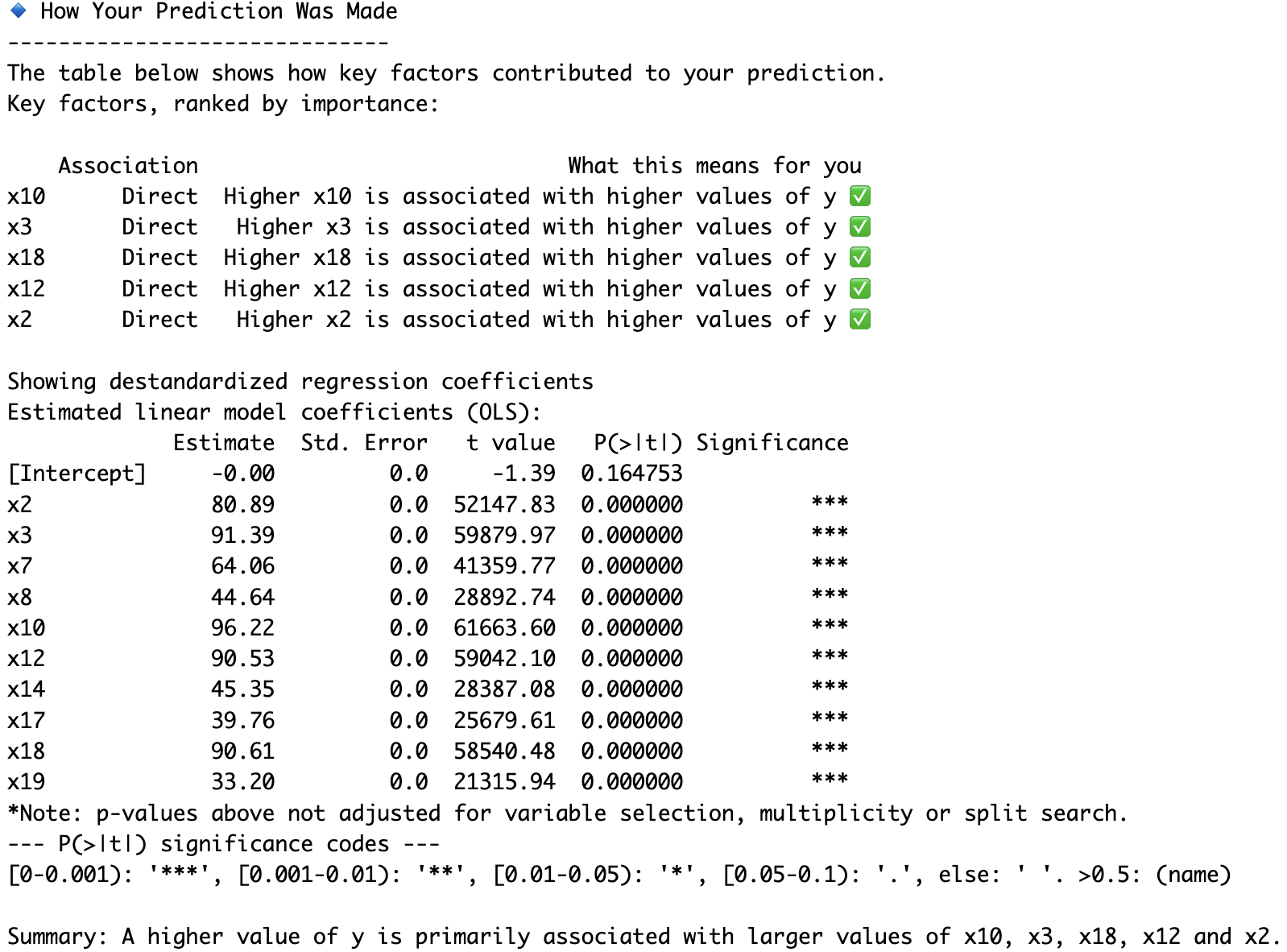
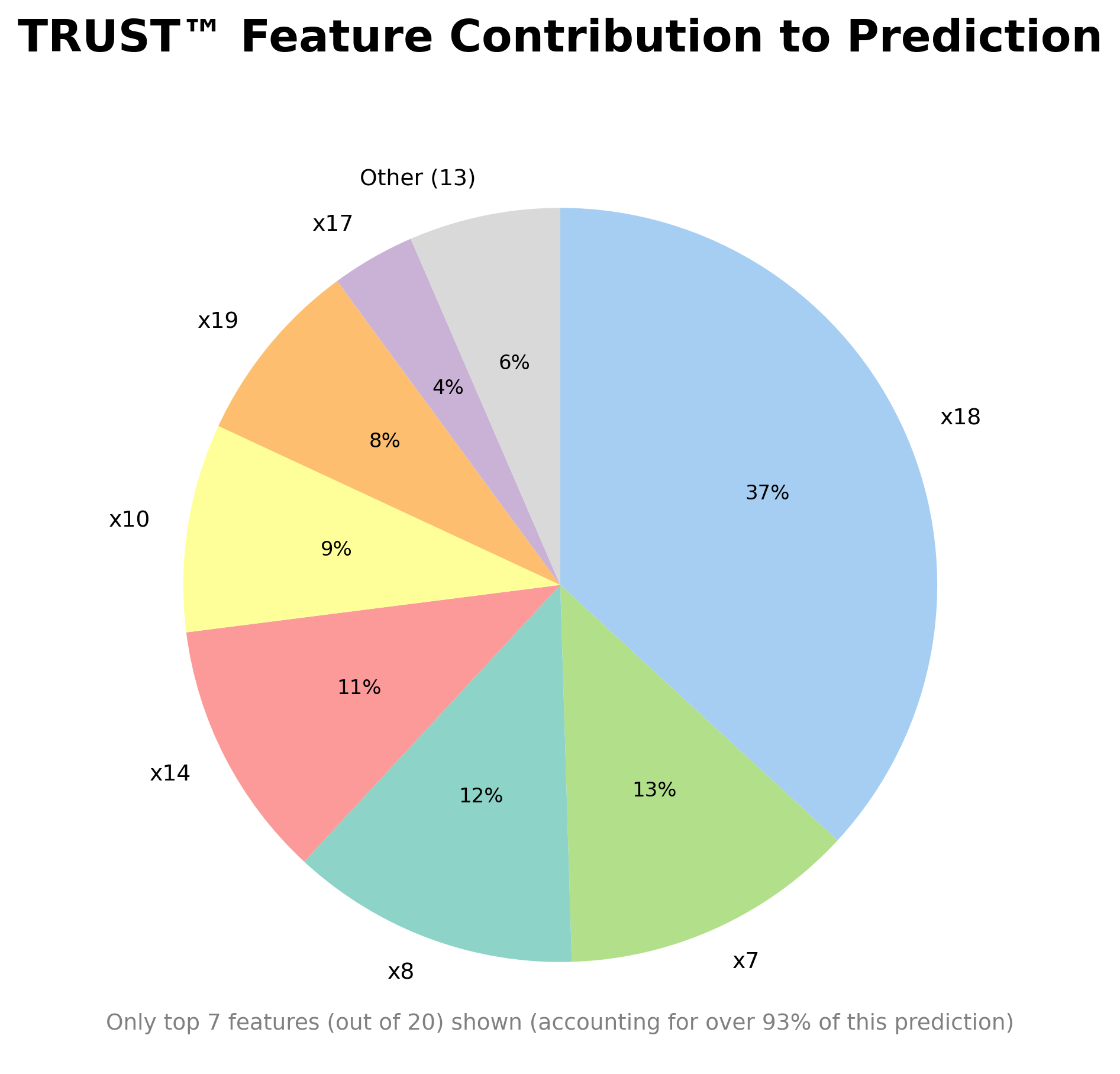
🧪 Example 1: Sparse Synthetic Regression (n=5000, p=20)
X, y, coefs = make_regression(n_samples=5000, n_features=20, n_informative=10, coef=True, noise=0.1, random_state=123)
print(coefs)
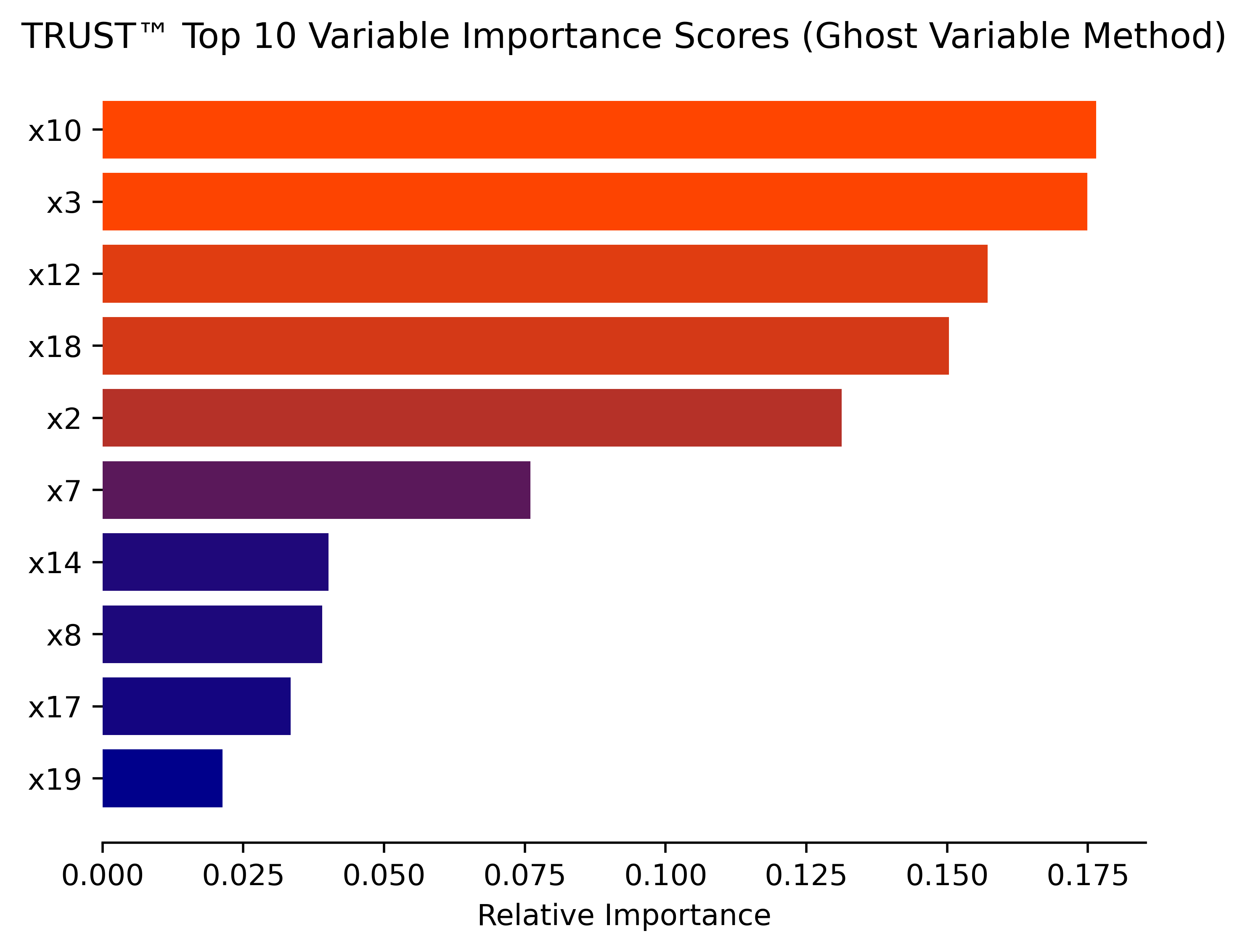
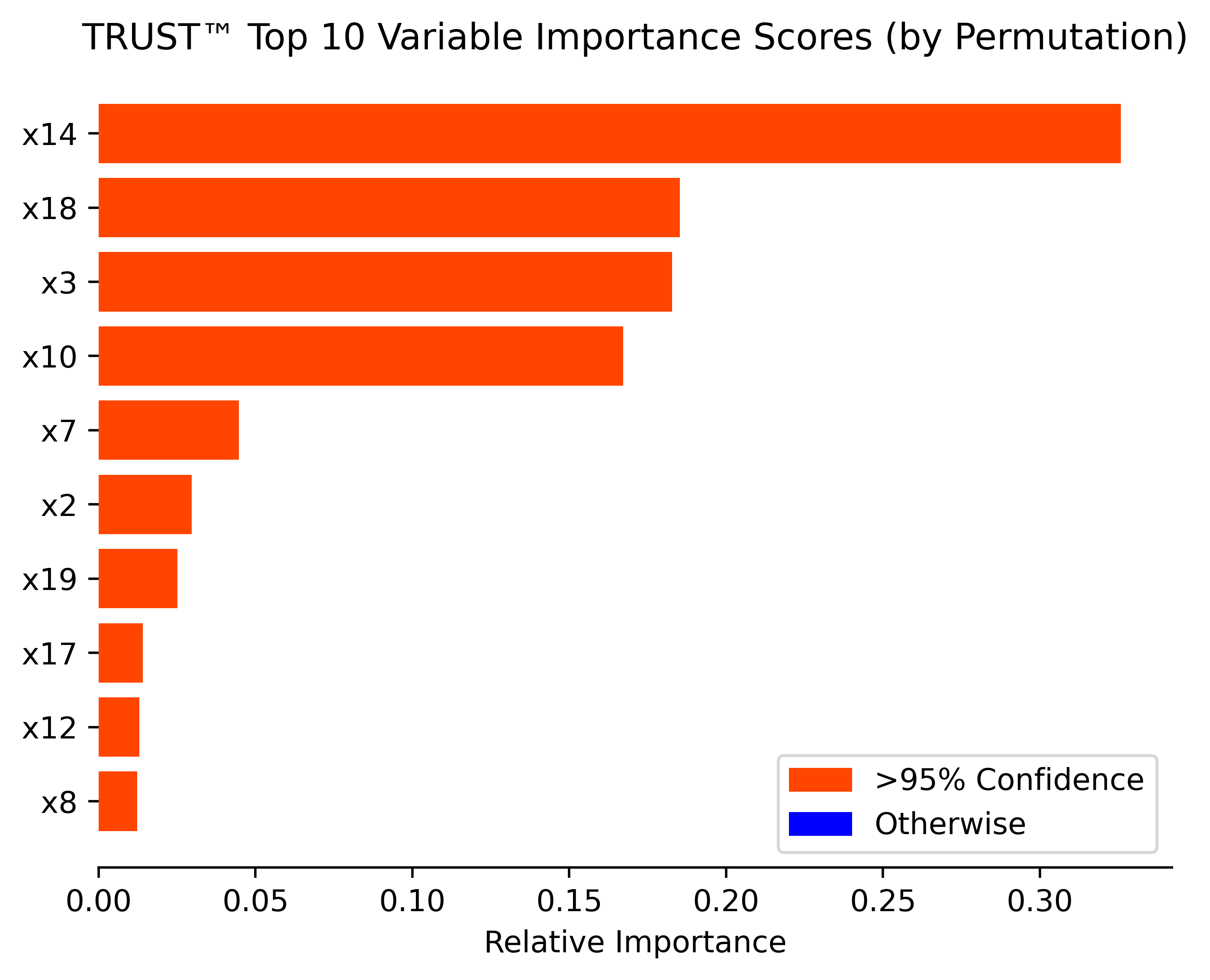
# x2 = 80.9
# x3 = 91.4
# x7 = 64.1
# x8 = 44.6
# x10 = 96.2
# x12 = 90.5
# x14 = 45.3
# x17 = 39.8
# x18 = 90.6
# x19 = 33.2

X_train, X_test, y_train, y_test = train_test_split(X, y, test_size=0.2, random_state=123)
# Instantiate and fit your model
model = TRUST()
model.fit(X_train, y_train)
# Predict and print results
y_pred = model.predict(X_test)
print("Predictions:", y_pred[:5])
print("True y values:", y_test[:5])
print("test R\u00B2:", r2_score(y_test, y_pred))
# Obtain (conditional) variable importance by Ghost method (based on Delicado and Pena, 2023)
model.varImp(X_test, y_test, corAnalysis=True, filename="Synthetic")
# Unconditional variable importance by permutation (with added debiasing and uncertainty quantification steps)
model.varImpPerm(X_test, y_test, R=20, B=20, U=10, filename="Synthetic")
# Obtain prediction explanation for first observation
model.explain(X_test[0,:], mode="detailed", actual=y_test[0], filename="Synthetic")
🩺 Example 2: Diabetes Dataset (n=442, p=10)
import pandas as pd
from sklearn import datasets
from sklearn.preprocessing import LabelEncoder

Diabetes = pd.DataFrame(datasets.load_diabetes().data)
Diabetes.columns = datasets.load_diabetes().feature_names
diab_target = datasets.load_diabetes().target
Diabetes.insert(len(Diabetes.columns), "Disease_marker", diab_target)
Diabetes_X = Diabetes.iloc[:,:-1]
# Binary encoding (0/1) for 'sex'
le = LabelEncoder()
Diabetes_X.loc[:, 'sex'] = le.fit_transform(Diabetes_X['sex']).astype(str)
Diabetes_y = Diabetes.iloc[:,-1]
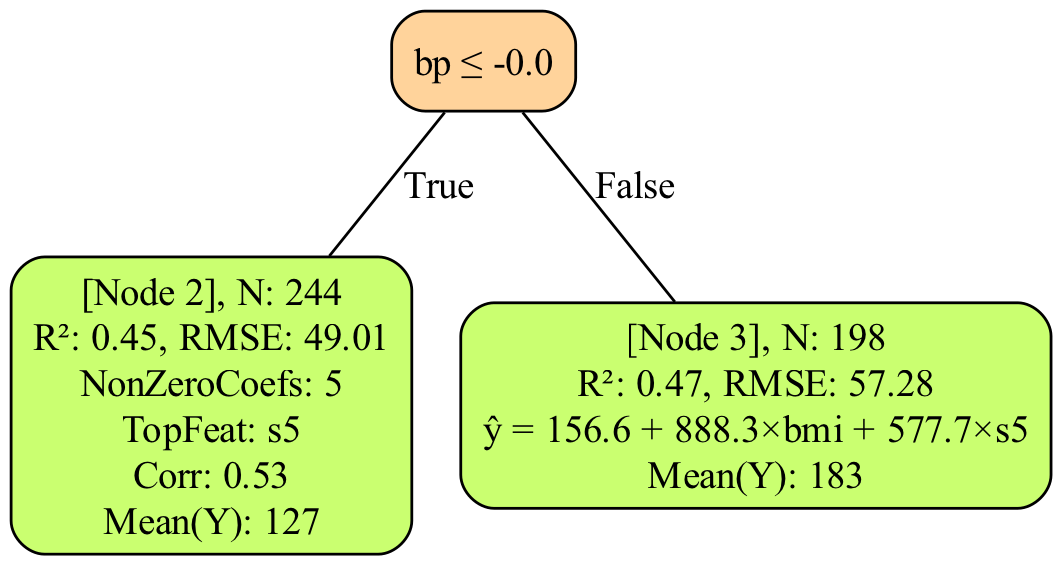
RLT_Diabetes = TRUST(max_depth=1)
RLT_Diabetes.fit(Diabetes_X,Diabetes_y)
y_pred_TRUST = RLT_Diabetes.predict(Diabetes_X)
# Tree plotting requires Graphviz to be installed in your system path
# You can use e.g. Homebrew: brew install graphviz or Conda: conda install -c conda-forge graphviz
RLT_Diabetes.plot_tree("Diabetes") #will save "tree_plot_Diabetes.png" in your working directory
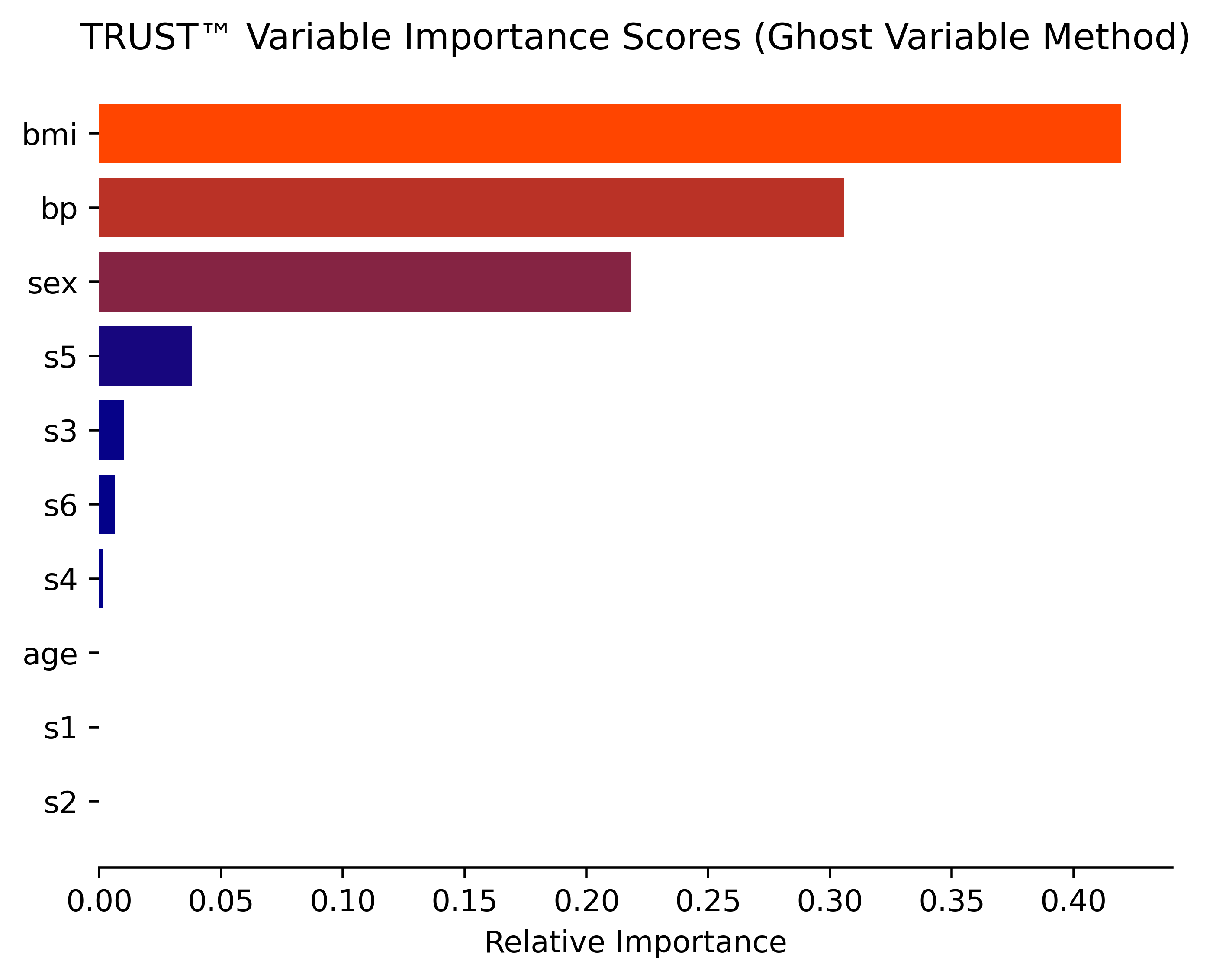
# Obtain variable importance with 2 different methods: Ghost and permutation
RLT_Diabetes.varImp(Diabetes_X, Diabetes_y, corAnalysis=True, filename="Diabetes") #Ghost method
RLT_Diabetes.varImpPerm(Diabetes_X, Diabetes_y, filename="Diabetes") #Permutation method
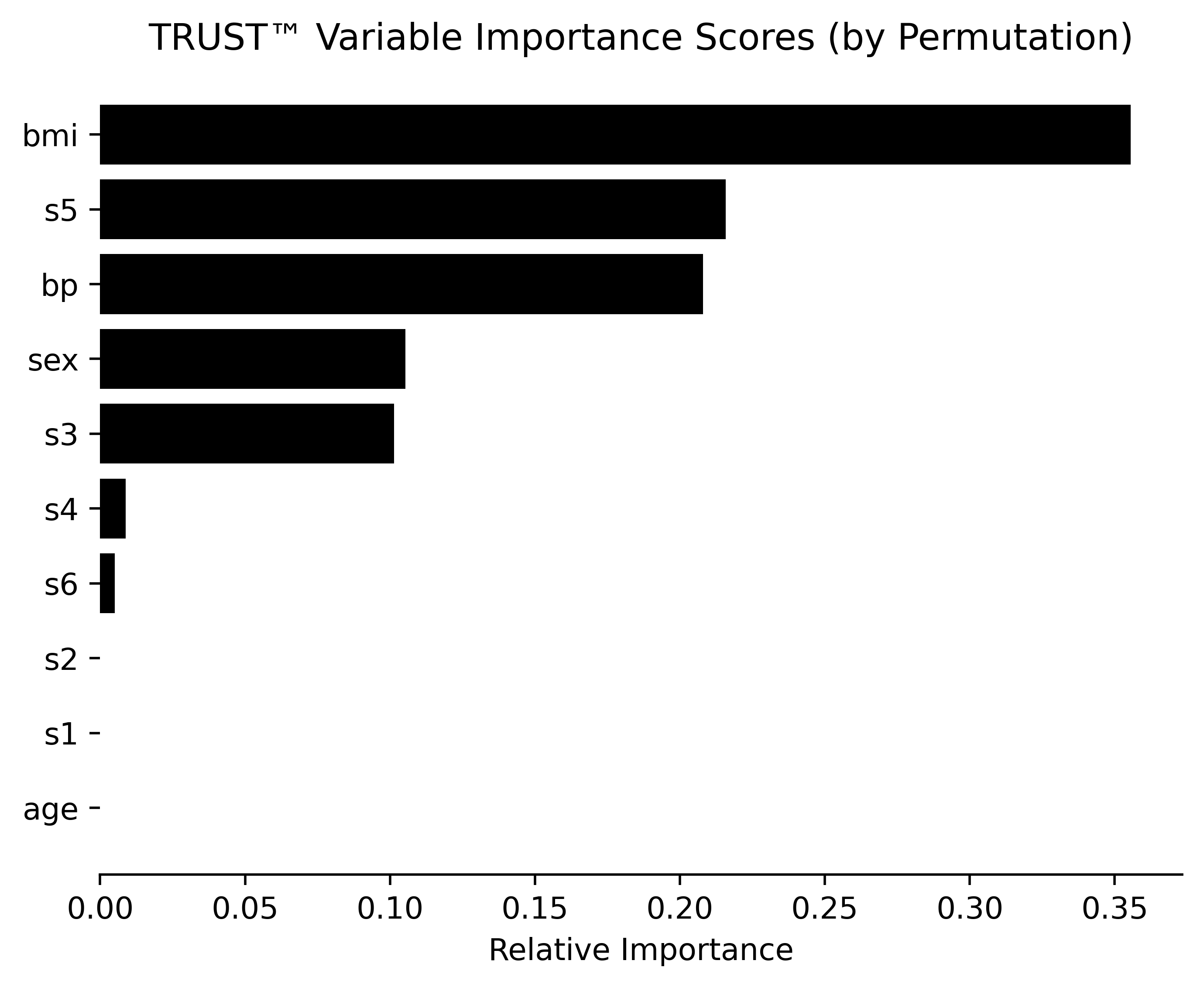
# Obtain prediction explanation for second observation
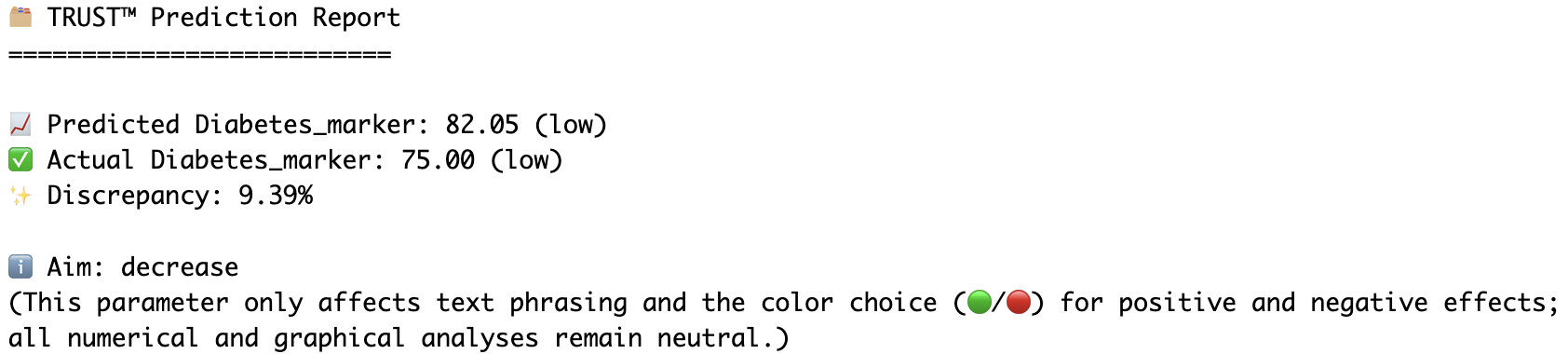
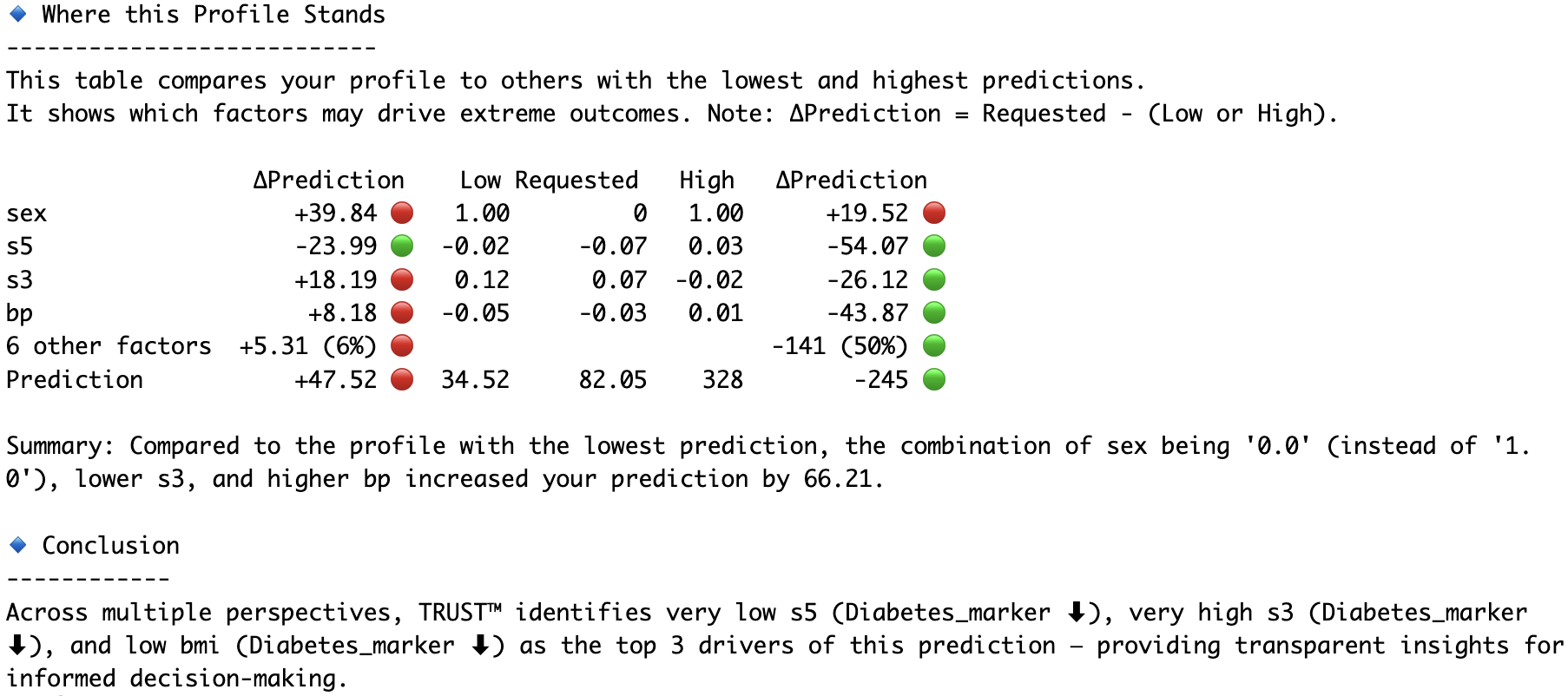
RLT_Diabetes.explain(Diabetes_X.iloc[1,:], aim="decrease", actual=Diabetes_y[1], filename="Diabetes")

# Compare the second and fourth observations head-to-head
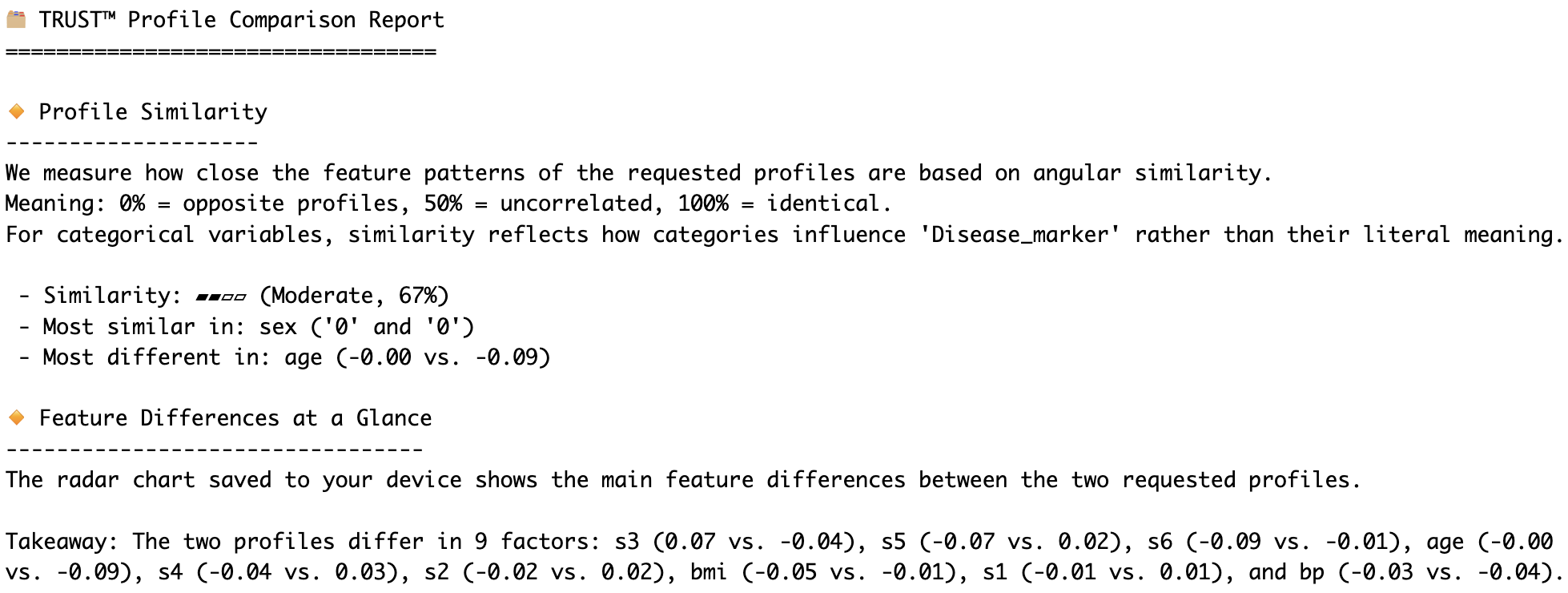
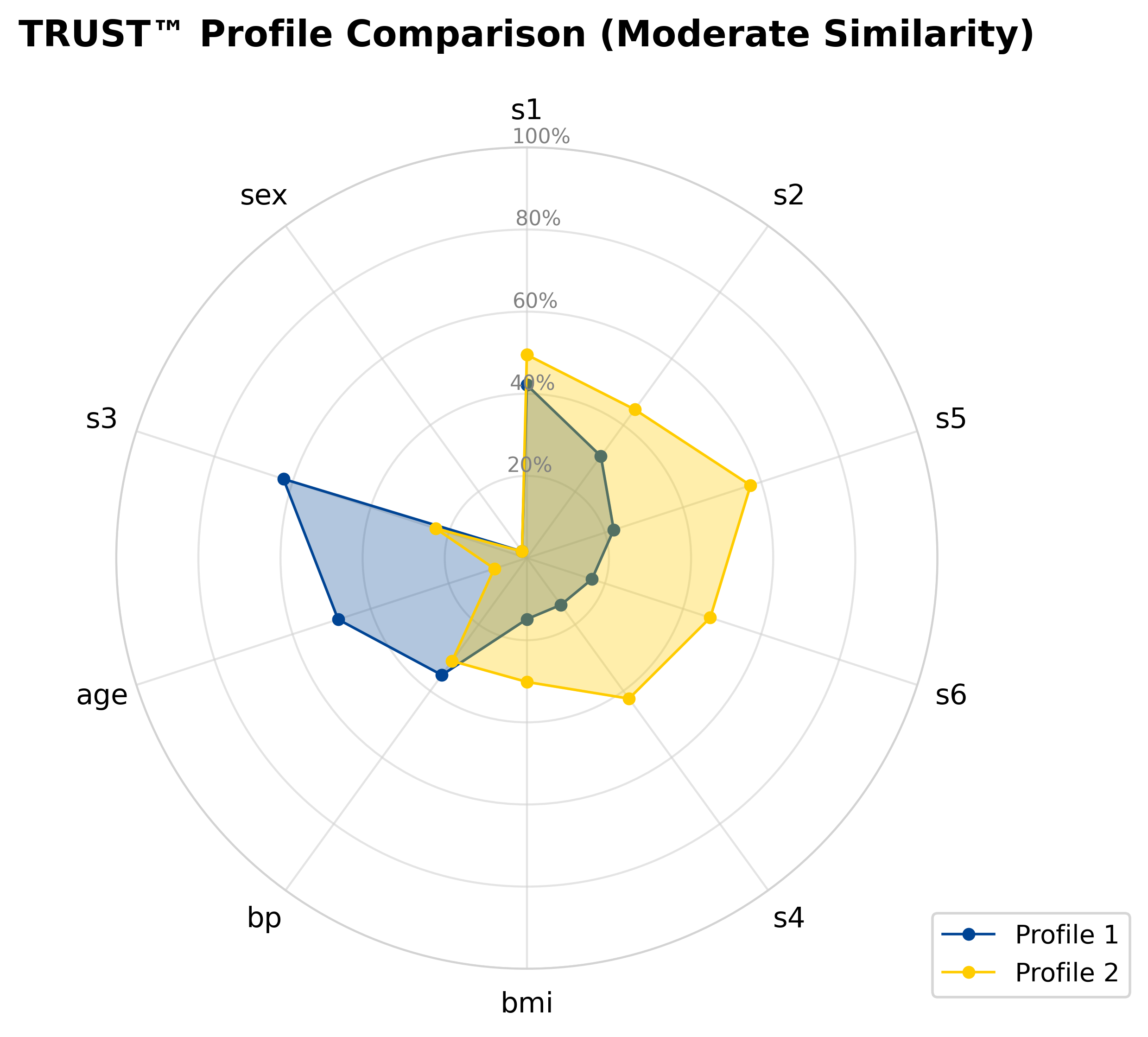
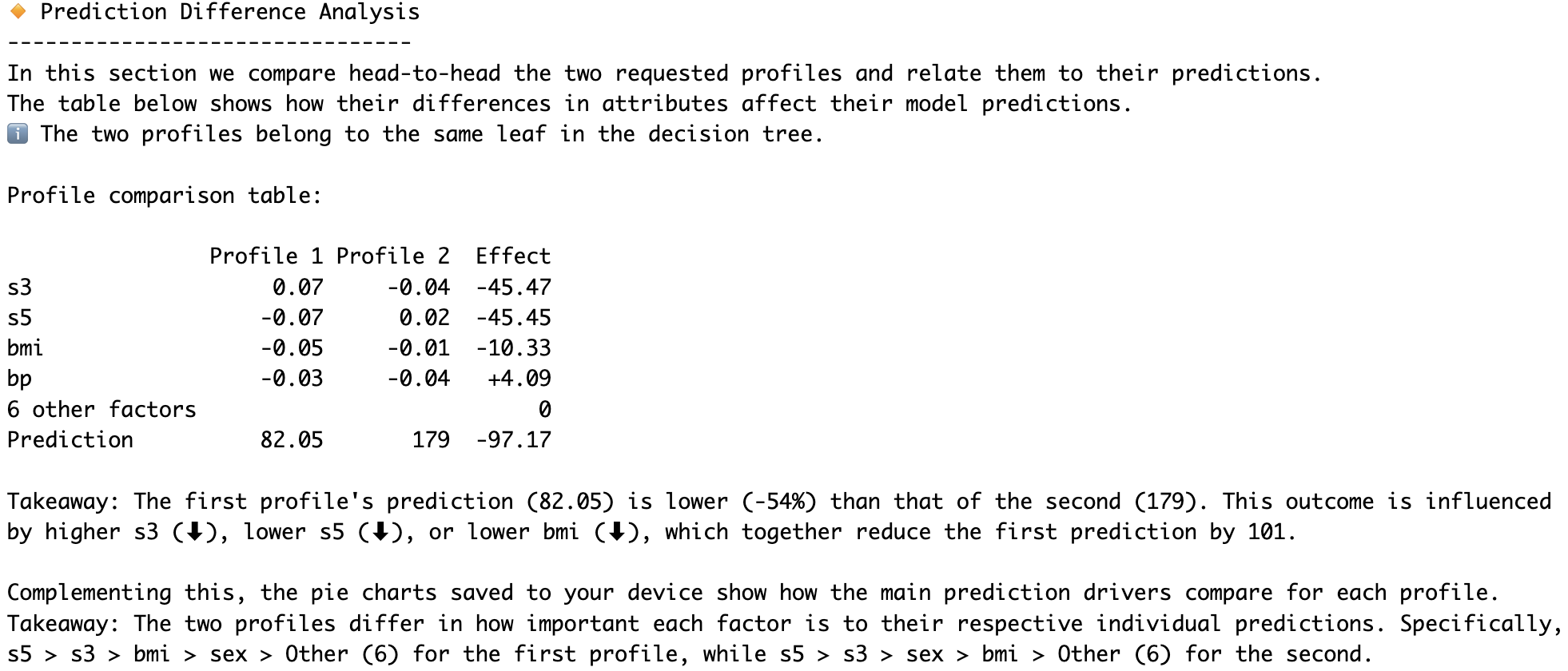
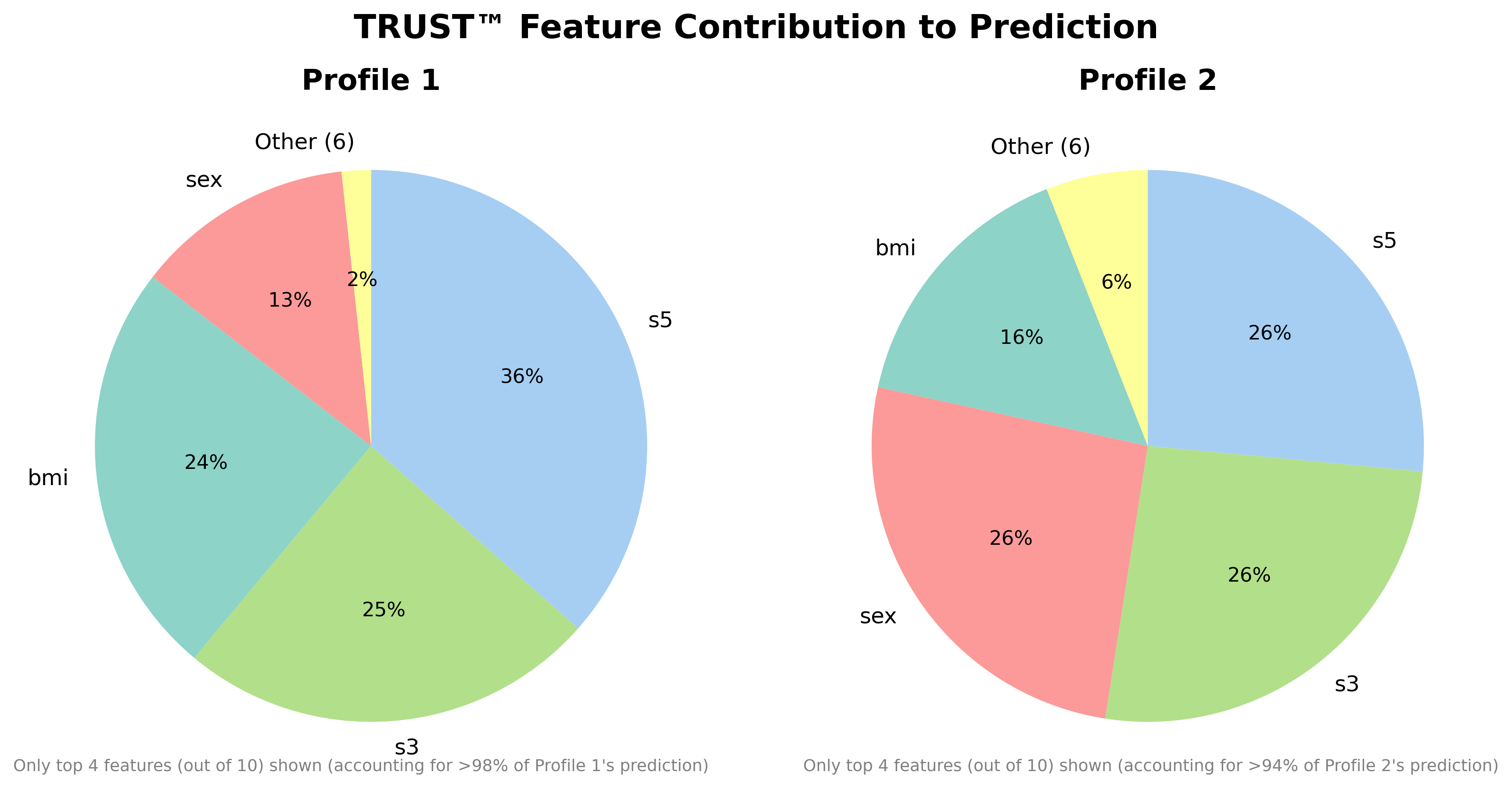
RLT_Diabetes.compare(Diabetes_X.iloc[1,:], Diabetes_X.iloc[3,:], filename="Diabetes")
More Examples on Kaggle Datasets
- Medical Insurance Charges (1.82M views, 360K downloads)
- Life Satisfaction in the EU (own contribution)
License
This software is provided under a Proprietary - Permissive Binary Only license. For detailed terms, please refer to the LICENSE.txt file, which is also included with the distribution.
More Information
For more details, documentation, and information about the full upcoming 'pro' version of the TRUST™ algorithm, please visit our official website:
https://adc-trust-ai.github.io/trust/
Further details about the TRUST™ algorithm can be found in our preprint on arXiv:
https://www.arxiv.org/abs/2506.15791
Copyright © 2025 Albert Dorador Chalar. All rights reserved. TRUST™ is a trademark of Albert Dorador Chalar.
Release history Release notifications | RSS feed


Download files
Download the file for your platform. If you're not sure which to choose, learn more about installing packages.
Source Distributions
Built Distributions
Filter files by name, interpreter, ABI, and platform.
If you're not sure about the file name format, learn more about wheel file names.
Copy a direct link to the current filters
File details
Details for the file trust_free-2.1.2-cp312-cp312-macosx_11_0_arm64.whl.
File metadata
- Download URL: trust_free-2.1.2-cp312-cp312-macosx_11_0_arm64.whl
- Upload date:
- Size: 837.1 kB
- Tags: CPython 3.12, macOS 11.0+ ARM64
- Uploaded using Trusted Publishing? No
- Uploaded via: twine/6.2.0 CPython/3.12.10
File hashes
| Algorithm | Hash digest | |
|---|---|---|
| SHA256 |
a68e5c4968a5426b7ac3bd4ab15010fdeaefe4c61798d0c944b2b42541ab620a
|
|
| MD5 |
1e8abc164871488a6ade515538874084
|
|
| BLAKE2b-256 |
db27f3a11101f69d2c397520c2e10f08a163cee76f1bc77098bbfb15d06875ed
|
File details
Details for the file trust_free-2.1.2-cp312-cp312-macosx_10_13_x86_64.whl.
File metadata
- Download URL: trust_free-2.1.2-cp312-cp312-macosx_10_13_x86_64.whl
- Upload date:
- Size: 1.2 MB
- Tags: CPython 3.12, macOS 10.13+ x86-64
- Uploaded using Trusted Publishing? No
- Uploaded via: twine/6.2.0 CPython/3.12.10
File hashes
| Algorithm | Hash digest | |
|---|---|---|
| SHA256 |
9071c6f6e760fa8c08968c4dff0abbd0a5028f144f2d67a6a0bef0942487c813
|
|
| MD5 |
ae63042b8f2bf11428ef9e9c7733c4b2
|
|
| BLAKE2b-256 |
854024b241db2e63aa7b0fea86c99e2d814e8ab0b96dc2d745225e687c591d40
|
File details
Details for the file trust_free-2.1.2-cp311-cp311-macosx_11_0_arm64.whl.
File metadata
- Download URL: trust_free-2.1.2-cp311-cp311-macosx_11_0_arm64.whl
- Upload date:
- Size: 816.5 kB
- Tags: CPython 3.11, macOS 11.0+ ARM64
- Uploaded using Trusted Publishing? No
- Uploaded via: twine/6.2.0 CPython/3.12.10
File hashes
| Algorithm | Hash digest | |
|---|---|---|
| SHA256 |
d7e3d7a5f6e1d3ee5ec7ea99d7717437012f5191afcfc08008d6aea81519601b
|
|
| MD5 |
c9543f3bb53c3c6af66f00ef650768db
|
|
| BLAKE2b-256 |
e8616a94034564d81f218d50768979d4a95b7bb8f9b9ff9f1181761822878999
|
File details
Details for the file trust_free-2.1.2-cp311-cp311-macosx_10_9_x86_64.whl.
File metadata
- Download URL: trust_free-2.1.2-cp311-cp311-macosx_10_9_x86_64.whl
- Upload date:
- Size: 1.1 MB
- Tags: CPython 3.11, macOS 10.9+ x86-64
- Uploaded using Trusted Publishing? No
- Uploaded via: twine/6.2.0 CPython/3.12.10
File hashes
| Algorithm | Hash digest | |
|---|---|---|
| SHA256 |
ca5fca20fd38467c714252d38991c961cecb4459b9ac20fdfe0b9e74cc85da86
|
|
| MD5 |
c9e737e0a99015f2c608e49a66b7b9a2
|
|
| BLAKE2b-256 |
b1895f043a99c293393527647ec17df81784e2c9b6d4d57a429ac2ab80a4a654
|






