
Analyse transposons expression in single cell data.

Project description
trusTEr - A trusting TE cluster analysis
WARNING : This is a website under development. You probably are in the wrong place!
Version 0.1
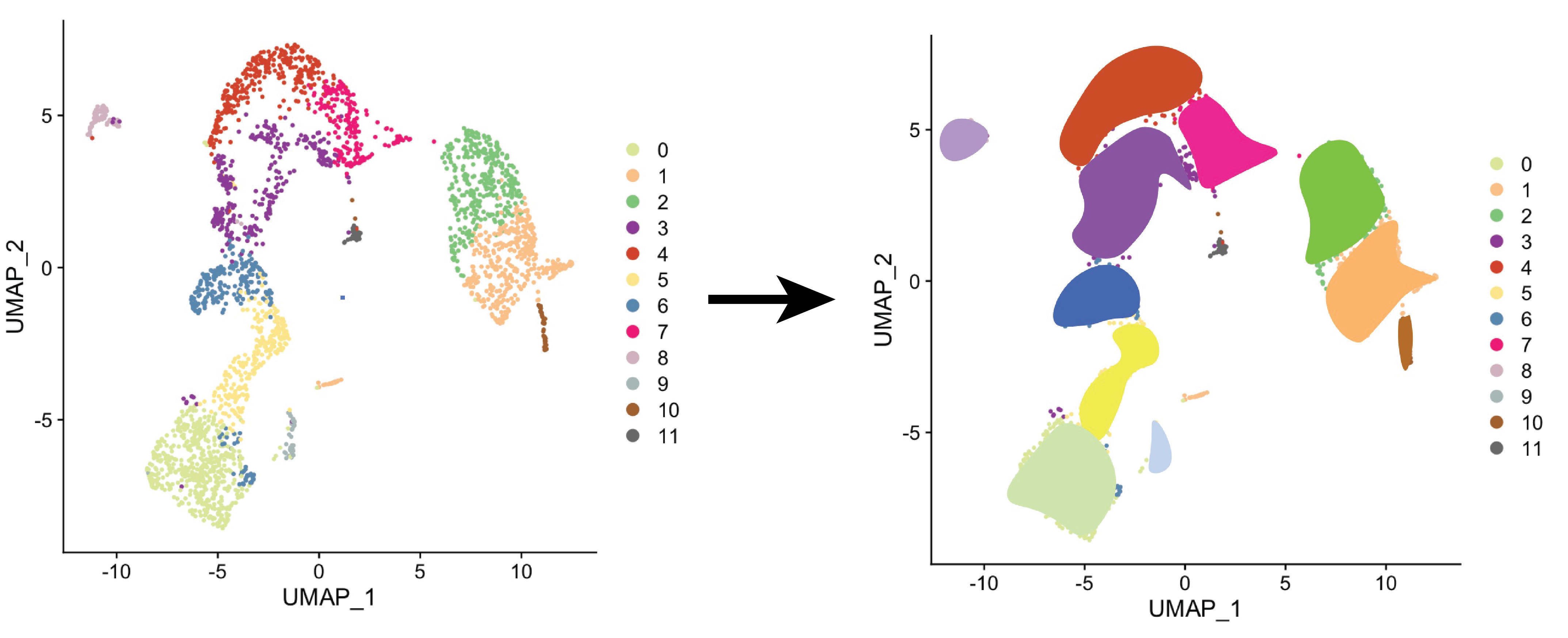
Takes fastq files from 10x single cell RNA sequencing, clusters cells using Seurat, and can be used to produce read count matrices in a cluster level. You can also quantify reads per cluster having predefined clusters.
Requirements
TrusTEr depends on several external software. We provide a Docker container and a conda environment for a quick-start.
TrusTEr requires:
- Cellranger
- R (version 3.6)
- Seurat
- TEtranscripts
- STAR aligner
- subset-bam and bamtofastq from 10x Genomics
- Velocyto
The package has been tested in Unix systems only and supports only SLURM job submissions.
How to install
Just the modules
If you fulfill the requirements, you can install via pip:
pip install truster
With Docker container
With conda environment
Introduction
As single cell technologies haven't developed to the point where we can get the needed sequencing depth to study transposable elements expression, trusTEr seeks produce more reliable results by combining reads from closely related cells to gain information on a cell type level.
Structure
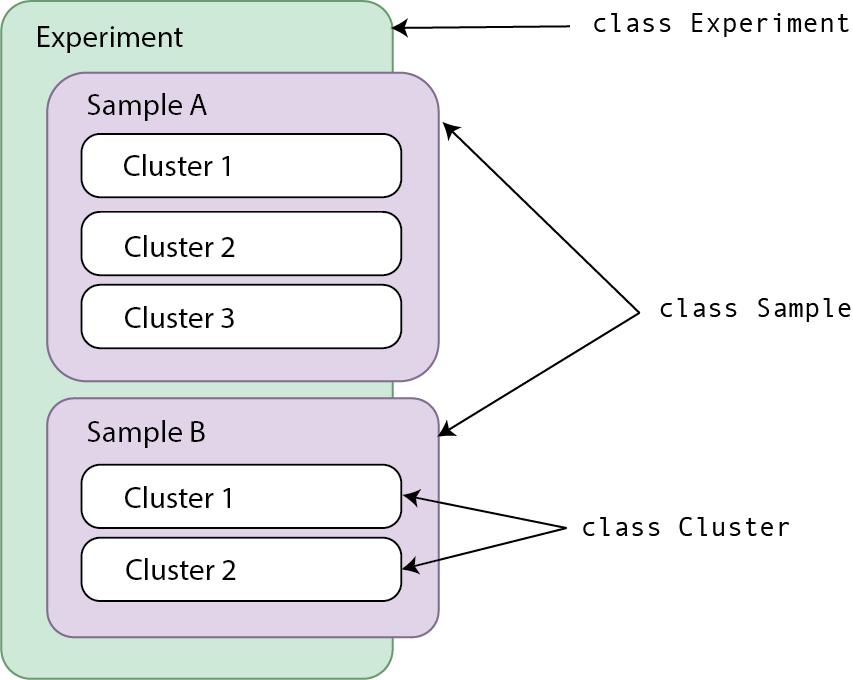
trusTEr uses composition assiciation to relate three main classes:
- Experiment: Includes information about the experiment as a whole. This is the main object you will be working with.
- Name is required, description is optional.
- Register samples by providing a path to its fastq files.
- Sample: Created by giving a path to fastq files
- Name and ID required.
- Cluster: Created by running
getClusters()ormergeSamples()functions (OrsetClustersOutdir()orsetMergeSamplesOutdir()).
Functionality and workflow
This package is meant to be run with the following workflow:
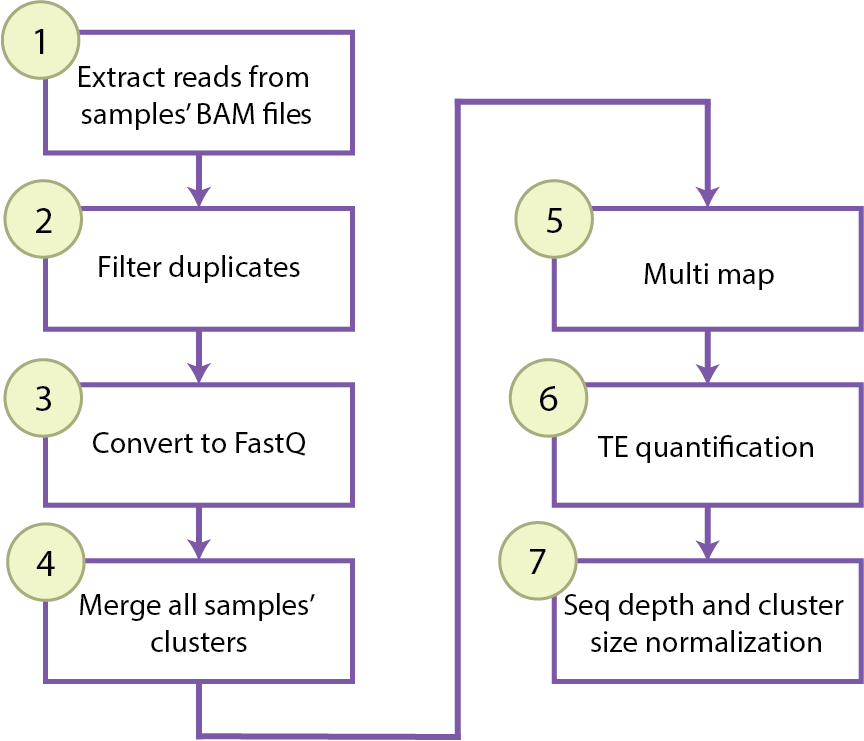
Depending on the object type, you have access to different functions to go through these steps.
Experiment is the main object one would work with. Here you will registerSample() or registerSamplesFromPath().
An object of type Sample has access to step 7 and some handy wrappers to use cellRanger, perform clustering with Seurat and run and plot RNA velocity. These functions can be called for all registered samples from your object of type Experiment (See quantify(), getClustersAllSamples(), velocityAllSamples(), plotVelocityAllSamples()).
The need for the class Experiment is clearer once the user wants to merge samples (See mergeSamples()) or to run the same workflow for all the samples' clusters.
The user won't work directly with an object of type Cluster, but this class includes all the functions needed to go through steps 1-6 of the workflow. Instead of running this pipeline individually for each cluster, one can run the workflow for each cluster of each registered sample using the Experiment function processClusters(mode = "perSample", ...).
One can also partition the workflow and run step by step in all registered samples or in a combined clustering using the transitioning functions of Experiment to call the needed functions in the class Cluster (See tsvToBamClusters(), filterUMIsClusters(), bamToFastqClusters(), concatenateLanesClusters(), mergeClusters(), mapClusters(), TEcountsClusters(), normalizeTECounts()).
You can read the functions documentation and tutorials at https://ra7555ga-s.github.io/truster/
Release history Release notifications | RSS feed


Download files
Download the file for your platform. If you're not sure which to choose, learn more about installing packages.
Source Distribution
Built Distribution
Filter files by name, interpreter, ABI, and platform.
If you're not sure about the file name format, learn more about wheel file names.
Copy a direct link to the current filters
File details
Details for the file truster-0.1.1.tar.gz.
File metadata
- Download URL: truster-0.1.1.tar.gz
- Upload date:
- Size: 6.6 MB
- Tags: Source
- Uploaded using Trusted Publishing? No
- Uploaded via: twine/3.3.0 pkginfo/1.6.0 requests/2.24.0 setuptools/50.3.0.post20201006 requests-toolbelt/0.9.1 tqdm/4.50.2 CPython/3.7.9
File hashes
| Algorithm | Hash digest | |
|---|---|---|
| SHA256 |
36081b7aac1988566b0d42278f77671faabe17725006e56865b0ec5f7374e185
|
|
| MD5 |
fa0da6328867d08d3f6d4f652d45551a
|
|
| BLAKE2b-256 |
cc49e5d89c4b75afc63b9e0adee2d2612ec67568a78aa55654abf7437e04da3c
|
File details
Details for the file truster-0.1.1-py3-none-any.whl.
File metadata
- Download URL: truster-0.1.1-py3-none-any.whl
- Upload date:
- Size: 32.3 kB
- Tags: Python 3
- Uploaded using Trusted Publishing? No
- Uploaded via: twine/3.3.0 pkginfo/1.6.0 requests/2.24.0 setuptools/50.3.0.post20201006 requests-toolbelt/0.9.1 tqdm/4.50.2 CPython/3.7.9
File hashes
| Algorithm | Hash digest | |
|---|---|---|
| SHA256 |
693df70dbe541e883ce008b70604fd8a440642508f261d771d93cc9fa1cd9a1f
|
|
| MD5 |
faf98552e4c1b95ad62f7512ed61d9ca
|
|
| BLAKE2b-256 |
2029ff3dc790a9f932e4e340885d2c750d865aad66b51311baea5635c1a837a1
|






