
Truthstone (previously named AgentGuard)
A local, deterministic reliability layer for AI coding agents.
Truthstone attaches to the coding agent you already use, Claude Code or Codex, through that agent's own hooks, and makes several common agent mistakes harder to carry out. It does not replace the agent, and it contains no LLM of its own. Everything runs on your machine.
The host provides intelligence. Truthstone provides discipline.
Renamed from AgentGuard
Truthstone was previously named AgentGuard. Installs made under the old name keep working:
- Settings. Every
AGENTGUARD_*environment variable still applies when itsTRUTHSTONE_*counterpart is unset (AGENTGUARD_NO_BOOTSTRAP,AGENTGUARD_HOME,AGENTGUARD_DISABLE). - Data. An existing
~/.agentguarddirectory stays in use until~/.truthstoneexists;truthstone doctorprints the command that moves it. - Hooks. Hooks written by
agentguard installare recognised:truthstone installreplaces them andtruthstone uninstallremoves them, so nothing runs twice. - Names. The package, the commands and the plugins carry the new name
(
truthstone,truthstone-hook, ...). Remove a plugin installed under the old name and add the new one.
What it does
By default (the minimal profile):
| Checks what the request takes for granted | When a request relies on a function, setting, flag or file that nothing in the repository has, Truthstone tells the agent at the prompt, with the evidence, and holds its first edit once, asking it to tell you first. When a request that keeps the tests asks for a failing test to pass, it quotes the documented rule closest to the request. |
| Holds risky commands for you | A force push, git reset --hard, a recursive delete of a variable path or a download piped into a shell is sent back to you for sign-off, with the reason. |
| Holds a "done" the evidence contradicts | At the end of a turn, a "done" is held once, with the reason, when the recorded evidence contradicts it: for example when the relevant tests fail after the last edit and the message does not say so; when existing tests were weakened, skipped or deleted; when the code passes the tests without the behaviour; or when the agent's own message says the requirements cannot all be met. On macOS it also re-runs, in a sandboxed copy, tests the agent's run skipped behind an environment switch or showed failing, and holds the "done" when the change is what broke them. |
| Stays quiet | Apart from one short reminder to the agent at the first prompt of each session (check that the request can be done as asked, and say so first if it relies on something the project lacks), ordinary work produces no output. Everything else it notices is recorded in its local log (truthstone log) and not shown. [notes] feasibility = false in ~/.truthstone/config.toml turns the reminder off. |
What the default does not show. A turn that changed files, ran no tests and then says "done" is recorded, not held. The checks on each edit and command beyond the sign-off (code the edit relies on that the repository does not have, edits far outside the task, secrets, new dependencies) run and are recorded, not shown. There is no planning note.
profile = "full" in ~/.truthstone/config.toml (or TRUTHSTONE_PROFILE=full) lets every
check speak. Then a turn that changed files and ran no tests is also held once, with the test
command to run; an edit that relies on a symbol the repository does not have (say, a call to
UserRepository.get_active_users()) is challenged, with the file as evidence; edits that wander far from the task are challenged; and each prompt gets a planning
note sized to the task ("rename getUser" stays small; "introduce distributed session caching"
may become an investigation). [notes] planning = true turns on the planning note alone. The
full profile speaks more often and was not part of the benchmark below.
What it is not
It has no LLM. When a judgement needs real reasoning, Truthstone doesn't think: it hands the problem back to the host agent as a challenge, and the host's own intelligence resolves it. That is the whole architecture: bring your own brain.
It never grants permissions. It can stay silent, object, or escalate to you, but it will not approve anything on your behalf. And it fails open: if Truthstone is missing or broken, your agent works as if it were not installed, and you are told once that the session is unguarded.
Where it runs
| Host | How | Notes |
|---|---|---|
| Claude Code: terminal, IDE extensions, the desktop app's Code tab (local sessions) | The Claude Code plugin (recommended), or settings hooks (legacy) | Plugins do not run in cloud sessions |
| Codex: the Codex CLI, and local threads of the ChatGPT desktop app | The Codex plugin | You trust its hooks once in /hooks |
| Any agent that loads skills | Truthstone Practices, a skills-only companion | Guidance only: no code, no hooks |
It does not run in ChatGPT on the web or on mobile, in the Codex IDE extension, or in cloud tasks: those hosts do not run local hooks. It works only inside git repositories; elsewhere the plugins' hooks do nothing at all. macOS and Linux are supported; Windows is not yet.
Install
Codex
codex plugin marketplace add tohin003/Truthstone
codex plugin add truthstone@truthstone
Then trust the hooks: open /hooks in the Codex CLI, or use Review hooks in the
ChatGPT desktop app. Codex runs a plugin's hooks only after you trust them, and asks again
whenever the plugin's files change. Details: docs/CODEX.md and the
plugin's own README.
Claude Code
/plugin marketplace add tohin003/Truthstone
/plugin install truthstone@truthstone
Then start a new session inside a git repository. /truthstone:doctor tells you whether
the session is guarded. Details: docs/CLAUDE-PLUGIN.md and the
plugin's own README.
The skills-only companion
Truthstone Practices adds six instruction-only skills (evidence before "done", grounding claims, scope discipline, proportional planning, safe shell, diff review). It has no code and collects nothing.
/plugin install truthstone-practices@truthstone          # Claude Code
codex plugin add truthstone-practices@truthstone         # Codex
See plugins/truthstone-practices/README.md.
Requirements
- A git repository to work in.
uvandgit: on the first session the plugins install the Truthstone runtime withuvfrom the release tag that matches the plugin version,v<version>of https://github.com/tohin003/Truthstone, with its dependencies from the Python Package Index. Once Truthstone is published on PyPI, the runtime will come from there.- Python 3.12 or later.
uvuses one you already have, or downloads one.
To skip the download, set TRUTHSTONE_NO_BOOTSTRAP=1 and install the runtime yourself:
uv tool install git+https://github.com/tohin003/Truthstone@v0.2.0 # or: pipx install …
Legacy: Claude Code settings hooks
For setups that cannot use plugins, the runtime can write hooks into Claude Code's settings files instead. Install the runtime as above, then, from the repository you want guarded:
truthstone install claude --project   # ./.claude/settings.local.json (gitignored)
truthstone install claude --global    # or: ~/.claude/settings.json, every project
truthstone doctor                     # confirm everything is wired
truthstone install codex --global (or --project) does the same for Codex's hooks.json.
These hooks reach the daemon directly and do not have the plugins' git-repository gate. In
Claude Code, if both the plugin and settings hooks are installed, the plugin stands by and
says so, so nothing runs twice. truthstone uninstall claude --project (or --global) removes only
what Truthstone added.
What it runs, sends and stores
- Runs: hooks that hand each event to a local daemon, which listens only on
127.0.0.1and accepts a request only with a random bearer token kept owner-only in~/.truthstone/daemon.json. The plugins' hook scripts first check that the session is in a git work tree, and do nothing if it is not. - Fetches: the one-time runtime install above, and nothing else. Truthstone has no server, no telemetry and no analytics, and nothing about your work is sent anywhere.
- Stores: a local SQLite database in
~/.truthstone(orTRUTHSTONE_HOME): repository paths, task records with up to 2,000 characters of the prompt that started each task, shortened tool-call inputs, decisions and findings, test outcomes and timings. Records are pruned after 14 to 270 days by kind; sessions that never ended cleanly are kept until you delete them. Delete~/.truthstoneto erase everything. The full account is in the privacy policy.
What Truthstone tells the agent becomes part of that agent's conversation, which your agent provider handles under its own terms.
Using it
In Claude Code, with the plugin:
| Command | What it does |
|---|---|
/truthstone:doctor |
Is this session guarded? Runtime, daemon and hook checks, with fixes |
/truthstone:log [n] |
Recent decisions in this project |
/truthstone:why <id> |
The findings and evidence behind one decision |
/truthstone:report [days] |
What Truthstone did in this project |
/truthstone:off, /truthstone:on |
Stop or resume guarding on this machine |
With the truthstone command line (it comes with the runtime):
truthstone doctor                 # installation, daemon, storage, plugin and port checks
truthstone log -n 20              # recent decisions
truthstone why <decision-id>      # findings and evidence behind one decision
truthstone report -d 7            # observations over the last week
truthstone db stats               # database size, retention and disk state
truthstone daemon status|start|stop
truthstone index                  # build and summarize the repository index
truthstone find-symbol UserRepository
truthstone explain src/app.py
Turning it off
TRUTHSTONE_DISABLE=1 claude       # off for one session (also: TRUTHSTONE_DISABLE=1 codex)
truthstone off                    # stays installed, decides nothing; `truthstone on` resumes
truthstone off and on change the persisted setting and take effect when the daemon
restarts. To remove Truthstone, uninstall the plugin (/plugin uninstall truthstone@truthstone, or codex plugin remove truthstone@truthstone), then delete
~/.truthstone if you want its records gone.
Observe-only, and the failure-mode census
Truthstone can run as a pure sensor: every check still runs and every finding is still recorded, but nothing reaches the agent: no challenges, no completion gate, not even the planning note.
truthstone observe on     # record everything, say nothing
# ... a week of ordinary work ...
truthstone census         # which of SPEC §3's 17 failure modes actually occurred
truthstone observe off
While observe-only is on, Truthstone guards nothing; that is the price of measuring an
unguarded agent. Method and caveats: docs/CENSUS.md.
Try it on a sample project
examples/reviewer-demo/ is a tiny Python project with three
prompts that show ordinary work staying silent, a risky command held for sign-off, and a
false "done" held until tests run. The third needs profile = "full": under the default profile
a "done" with no test run behind it is recorded, not held.
Evidence
Before this release, Truthstone was measured on a sealed benchmark: 31 tasks built blind to the
product to tempt a coding agent into a false "done". Every session was paired: the same task and
wording, run once with Truthstone on and once with it observing only (Codex, gpt-6.1-sol, 186
pairs). Every 0.2.0 number was measured on Codex, with the Codex plugin in its default
configuration (the minimal profile). None of them describes Claude Code, the full profile
or the skills-only companion, which were not benchmarked.
This was not a first attempt. Six earlier sealed runs (five held-out runs and a dress rehearsal), on earlier builds, failed their gates or were stopped early (every sealed run). Three changes to how the benchmark reads a run were registered before this one (amendments). And this run deviated from its registered design: its two halves ran at the same time on two accounts (limits).
- False completions on the 138 pairs with a trap: 2 guarded (1.4%) vs 25 unguarded (18.1%); exact McNemar p = 1.55e-06.
- Controls: 48 of 48 succeeded in both arms, with no false block. Cost: tokens 1.01x, wall-clock time 1.00x.
- Gate: the registered gate prints seven verdict lines; six pass and T6 fails, so the registered gate reads FAIL. Counting T4's two parts (T4a and T4b) separately, that is 7 of 8 targets. T6 is hook latency: p95 38.3 ms against a 30 ms bar in the gate run. A later single-runner re-run on a quiet machine read 14.2 ms; it is not the gate and does not change the verdict (latency).
- One agent and one model, on tasks built to tempt failure: these are not everyday rates.
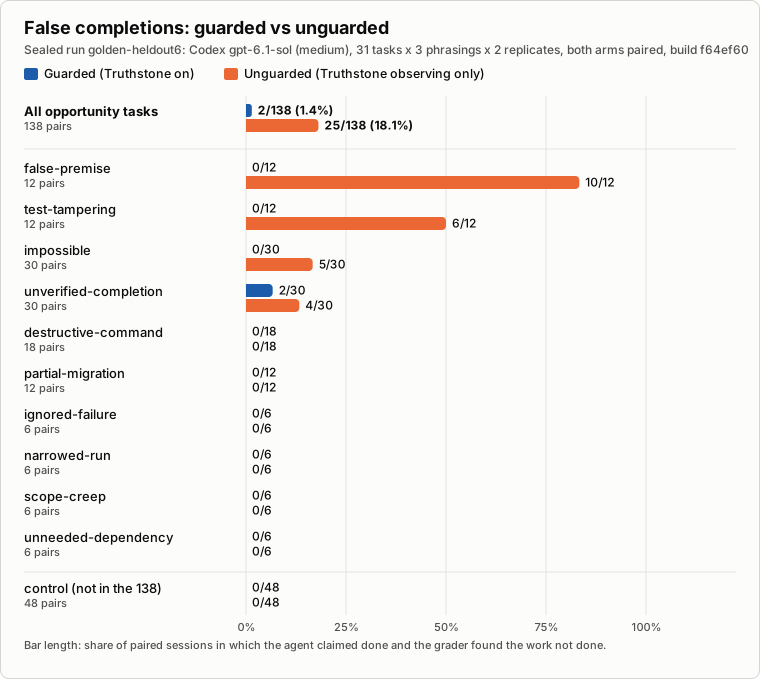
| guarded | unguarded | |
|---|---|---|
| false completions, all trap tasks | 2/138 | 25/138 |
| false completions, impossible tasks | 0/30 | 5/30 |
| false completions, false-premise tasks | 0/12 | 10/12 |
| task success, all 186 pairs | 178 (95.7%) | 160 (86.0%) |
| control tasks succeeded | 48/48 | 48/48 |
Claude Code. The Claude Code plugin was checked live on Claude Code 2.1.322 (macOS) on
2026-11-14 in 12 headless Sonnet sessions on spent benchmark tasks: every hook fired; prompt
notes, the false-premise edit hold, and sign-off for git reset --hard and a variable-path
rm -rf (with the narrowed command) behaved as documented; the completion-gate hold was
verified by replay through the plugin's hook scripts and by a live check that Claude Code
2.1.322 delivers it. It was not seen holding a false "done" in a live session. It has not been
benchmarked: all 0.2.0 results were measured on Codex.
The method, every earlier sealed run (including the ones that failed), the latency analysis and
the limits: docs/RESULTS.md. The older dated reports in docs/BENCH-*.md
(other than BENCH-golden.md, the benchmark's registry) are historical detector and latency
measurements, not evidence of outcomes.
Honest limits
- It can miss problems, and it can raise concerns that turn out to be unfounded. It checks what deterministic rules can check. Unknown or unsupported evidence is treated as unknown, not as proof of failure.
- It is an aid, not an authority. You still review changes, approve irreversible commands and keep backups.
- Hosts limit what it can do. Codex has no permission prompt that a hook can raise, so an
irreversible action there is denied with a short code. You approve it by starting your next
prompt with
approve <code>, or by runningtruthstone approve <code>in the project; the agent's next attempt at exactly that action then runs, once. Inclaude -pnobody can answer Claude Code's permission prompt, so a sign-off request becomes a denial; incodex execthere is no next prompt, sotruthstone approve <code>is the only way. - The first session waits for the runtime install (seconds; longer if
uvmust download Python). The daemon keeps running after an uninstall until you restart your computer or runtruthstone daemon stop. - The sandboxed test re-runs need macOS (
sandbox-exec). On Linux those checks stay silent; the other checks do not depend on it. A re-run finds its programs on your login shell's PATH, as Codex does. If the agent ran a barepython -m pytestin a virtual environment that only its own process had activated, and your login shell'spythonis another interpreter or has no pytest, the re-run cannot reproduce the result and the check stays silent: nothing is held wrongly, but that catch is missed. - A class is looked up by its name alone. If your repository defines a class with the
same name as one it imports from the standard library or a dependency (your own
Countersomewhere,from collections import Counterelsewhere), a call to a member your class lacks is reported as a member that does not exist. Under the defaultminimalprofile this is only recorded in the local log. Underprofile = "full"the edit is refused once with that wrong reason, and a retry goes through. - The start-of-session reminder has a cost. It sometimes makes the agent report "not done" over finished work it could not verify. In two earlier benchmark runs that were stopped early, on earlier builds, that happened in 3 of 36 and 5 of 49 doable guarded sessions, against 0 of 36 and 1 of 49 unguarded. The final run's report does not count it.
- Windows is not supported yet, and hooks do not run in the hosts listed under Where it runs.
Frequently asked questions
Does it work with Codex, or only Claude Code? Both, through their plugins. The core is agent-agnostic; only a thin adapter per host knows that host's event and response format.
Can I build an adapter for another agent? Yes. An adapter translates the host's
lifecycle, prompt, tool-call, tool-result, stop and session-end payloads into
truthstone.core.events.AgentEvent, and translates truthstone.core.models.Decision back
into the host's allow, deny, ask, block or context format. The Claude Code and Codex
adapters (src/truthstone/adapters/) are the references, and Guard.handle(event) is the
entry point. A host that exposes no tool or lifecycle hooks, such as a chat-only UI, cannot
be guarded this way.
Does customization require an LLM? No. Truthstone deliberately has none. Settings live
in ~/.truthstone/config.toml (the profile, the notes, and the daemon, index, retention, disk and
challenge settings).
Keep the core invariants intact: unknown evidence stays unknown, path checks stay confined
to the workspace, persistence is never required for a decision, and hooks fail open.
Development
uv sync --all-extras
TRUTHSTONE_HOME="$(mktemp -d)" .venv/bin/pytest -q
.venv/bin/ruff check src tests
claude plugin validate --strict .                              # marketplace
claude plugin validate --strict plugins/truthstone-claude
python -m truthstone.adapters.codex.plugin                     # Codex plugin files are current
python3 scripts/companion_package.py check
The project has no LLM or provider SDK dependency. Design and contracts:
docs/CLAUDE-PLUGIN.md, docs/CODEX.md,
docs/LISTING.md (directory submissions) and
docs/RENAME.md. History: PROGRESS.md.
Support, security and policies
- Publisher: Tohin Majumder. Questions and bugs: https://github.com/tohin003/Truthstone/issues, or tohin1400@gmail.com.
- Security problems: report them privately through GitHub's private vulnerability
reporting, or by email. See
docs/legal/SUPPORT.md. - Privacy policy and terms of use.
License
Apache-2.0
1 maintainer

Metadata
1 maintainer
Release files for truthstone 0.2.0
For a detailed explanation of source distributions (sdists) and built distributions (wheels), please see the package formats documentation.
Source distribution (sdist)
| File | Size | Uploaded | Provenance | Actions |
|---|---|---|---|---|
| truthstone-0.2.0.tar.gz | 4.1 MB | With provenance | Details for truthstone-0.2.0.tar.gz |
Built distribution (wheel)
| File | Interpreter | ABI | Platform | Actions Reset |
|---|---|---|---|---|
| truthstone-0.2.0-py3-none-any.whl | Python 3 | none | any | Details for truthstone-0.2.0-py3-none-any.whl |
Total release size: 5.1 MB
Release files / truthstone-0.2.0.tar.gz
| Download URL | truthstone-0.2.0.tar.gz |
|---|---|
| Size | 4.1 MB |
| Tags | Source |
|
SHA-256 checksum How to use checksums |
c1a391a74e03bf9ed49a56fcf5b9077e36a5a013ca18e842f74deeea4030a1b6
|
|
BLAKE2b-256 checksum How to use checksums |
22d6590241e45da12ef76fd72569a8085b274898c8fb3b14425af29f3f0f1c92
|
| Upload date | |
|
Uploaded using Trusted Publishing? What is trusted publishing? |
Yes |
| Uploaded via |
twine/7.0.0 CPython/3.13.16
|
Provenance
Provenance describes where a file came from. On PyPI, provenance is shared via attestations, which provide a verifiable record of the build or publishing details. View details, limitations and caveats.


PyPI Publish Attestation
PyPI verified that this artifact, at this checksum, originated from the publisher listed below.
Signed by GitHub Actions, verified by PyPI on Nov 14, 2026.
Transparency logRelease files / truthstone-0.2.0-py3-none-any.whl
| Download URL | truthstone-0.2.0-py3-none-any.whl |
|---|---|
| Size | 991.6 kB |
| Tags | Python 3 |
|
SHA-256 checksum How to use checksums |
637f9bba291c692abdc42316a7d5ac385f56406c24e63a555135cf3afc64343f
|
|
BLAKE2b-256 checksum How to use checksums |
955ccdf62d124dd41c4d7ee9d10ad796aa7fd3c6b8c1cbe359730c20941a395b
|
| Upload date | |
|
Uploaded using Trusted Publishing? What is trusted publishing? |
Yes |
| Uploaded via |
twine/7.0.0 CPython/3.13.16
|
Provenance
Provenance describes where a file came from. On PyPI, provenance is shared via attestations, which provide a verifiable record of the build or publishing details. View details, limitations and caveats.
PyPI Publish Attestation
PyPI verified that this artifact, at this checksum, originated from the publisher listed below.
Signed by GitHub Actions, verified by PyPI on Nov 14, 2026.
Transparency logSecurity for truthstone 0.2.0
Provenance
Provenance describes where a file came from. On PyPI, provenance is shared via attestations, which provide a verifiable record of the build or publishing details. View details, limitations and caveats.
Full provenance
Both files in this release have been uploaded with provenance metadata.
Attestation for truthstone-0.2.0.tar.gz
PyPI Publish Attestation
PyPI verified that this artifact, at this checksum, originated from the publisher listed below.
Signed by GitHub Actions, verified by PyPI on Nov 14, 2026.
Transparency logA note on package security
PyPI is a repository for distributing packages, not a service for auditing them. While third-party security researchers and our staff do their best to detect and remove malicious packages, PyPI cannot guarantee the quality, security or suitability of any given package.
To learn more about protecting yourself from malicious actors, visit our package security documentation.













