





WAM Bridge
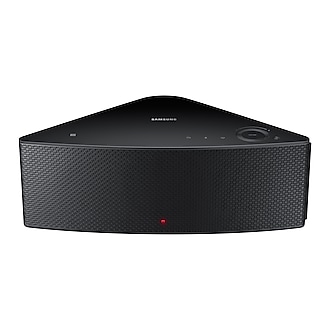
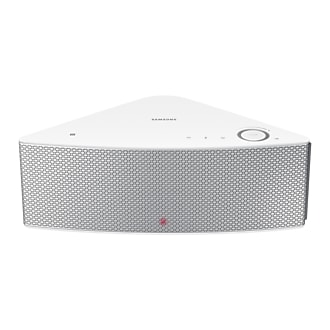
Windows-first bridge for streaming audio over Wi-Fi to Samsung Wireless Audio
Multiroom speakers, including Shape M5 (WAM550/WAM551).
The CLI serves a tokenized local stream and starts it through Samsung's
SetUrlPlayback API. The foobar2000 output component sends whatever foobar is
playing, including internet radio. Finite share/DLNA playback is available
through wambridge-share and foobar's Send to WAM (Share) track context menu,
outside the normal PCM output path. The CLI path is hardware-validated; the
foobar context-menu integration still needs a physical M5 pass.
Everything here was measured against one physical Shape M5 (SPK-WAM550,
firmware WAM550WWB-3117.1). Other models in the family are untested.
Status: working rolling release
Both paths play audio on real hardware. The foobar component passed its full physical checklist on 2026-08-02: a complete 213-second track start to finish at a median 1.00x with every sample between 0.9x and 1.1x, seek, pause and resume, an unattended transition into the next track, internet radio across a 44.1 to 48 kHz switch, and a clean shutdown leaving no FFmpeg or helper behind.
A later full-track M5 recheck on 2026-10-21 did not reproduce that stability on the then-current connection. The older successful run remains historical evidence; see the physical M5 status for the newer failed baseline and what still needs validation.
What works:
- SSDP discovery, saved devices resolved by stable device ID, playback control, custom radio stations and native TuneIn presets from the CLI.
- Android adapter with automatic speaker discovery, Wi-Fi handoff recovery, UPnP renderer, Quick Settings tile and widgets, plus native TuneIn browsing with artwork and speaker-side playback controls.
- foobar2000 2.x x64 output:
f32le → FFmpeg FLAC → local HTTP → speaker. Playback → WAM Bridgewith emergency stop, standby and raw volume steps.- Configuration through
%LOCALAPPDATA%\WAMBridge\foobar.ini.
The one limitation worth knowing before you install
The last end-to-end FLAC measurement was 6.7 seconds, before the host buffer was
cut by another two seconds. On 2026-08-27 the physical M5 stayed stable with
buffer_extra=0: the host queue held about 1.9 s instead of 3.9 s. A fresh
ear-to-clock total has not been measured yet, so the old 6.7 s figure is historical
rather than a claim about current stock behavior.
Earlier clean runs showed a correct host clock and seekbar, but those results do not
establish uninterrupted speaker playback on the current network link. Pause, stop and skip still carry pipeline latency because they act
through the PCM path; with hardware_volume=1, the volume slider is routed to the speaker instead. Lowering
the bitrate makes the speaker prebuffer worse rather than better, and raising it helped by
about a second in the older measurements. The remaining latency-sensitive controls belong
on the speaker's own 55001 command path, which answers in about a second, rather
than to keep shortening the audio path; that work is in progress.
Everything else is documented honestly, including the approaches that failed:
- helper isolation (PR #2) and the output clock (PR #21) are merged,
- manual pacing (PR #4) and the large share experiment (PR #7) are closed, with their measured conclusions kept.
Current architecture, failed approaches and continuation notes are in
docs/DEVELOPMENT_STATUS.md. Measured protocol
facts from a physical SPK-WAM550 are in
docs/WAM_PROTOCOL.md. For the maintained guides,
checklists and publishing instructions, use the documentation index.
Foobar2000 output
Normal rolling release:
latest, rebuilt whenever tested
main moves. It is a regular GitHub Release, not a pre-release. The tag and download links
stay put while the component/APK assets are replaced from the same commit. The displayed
version still comes from version in pyproject.toml; Android versionCode keeps rising
independently for upgrades.
Each rolling release contains:
foo_out_wam.fb2k-component- the foobar2000 outputwambridge-<version>.apk- the signed Android adapter- a source archive
Open the .fb2k-component file with foobar2000 2.x x64, then select:
Preferences → Playback → Output → Samsung M5 (Wi-Fi)
This project is built primarily against one physical M5. The core transport has repeated hardware validation and Android now covers discovery, renderer/radio controls, MediaSession, widgets and speaker-side sleep controls, but other Shape models remain largely untested and some hardware-specific follow-up is still documented. If you own a Shape speaker and were looking for exactly this, read the limitation above and the release notes first.
Configuration, known limitations and the physical checklist are documented in
foobar/README.md.
Requirements
- Python 3.14+
- FFmpeg available in
PATH - computer and speaker reachable in the same LAN
- Windows 10/11 and foobar2000 2.x x64 for the native output component
- Windows Firewall access for the bridge on private networks
Install the CLI
git clone https://github.com/travnie/wambridge.git
cd wambridge
py -m venv .venv
.\.venv\Scripts\Activate.ps1
py -m pip install -e .
Confirm FFmpeg is visible:
ffmpeg -version
Discover speakers
wambridge --discover
Discovery sends repeated SSDP requests through active IPv4 adapters. When old
firmware stays silent, it can fall back to checking Samsung's API on port
55001 in nearby /24 networks.
Useful diagnostics:
wambridge --discover --verbose
wambridge --discover --interface 192.168.1.25
wambridge --discover --no-scan
Saved devices
Save a speaker under an alias instead of relying on its DHCP address:
wambridge --speaker 10.0.0.118 --remember M5
wambridge --list-devices
wambridge --device M5 --probe
wambridge "D:\Music\track.opus" --device M5
The profile stores the stable Samsung device_id and caches the latest working
IP. If the address changes, WAM Bridge searches the LAN for the same device and
updates the profile.
On Windows profiles are stored in:
%LOCALAPPDATA%\WAMBridge\devices.json
The foobar2000 component passes the configured alias to the same helper and profile resolver.
Remove a saved profile:
wambridge --forget M5
Startup volume safety
The tested Shape M5 firmware uses raw API volume steps 0..30. Values above 30
are silently clamped to maximum while still returning success. The current
client has not yet implemented model-aware percentage conversion, so treat
volume arguments as raw M5 steps:
3is approximately 10 percent,6is approximately 20 percent,30is maximum.
Old WAM firmware may jump to a high level while switching to URL playback. WAM Bridge mutes the speaker, starts the stream with 1.5 seconds of silence and then applies the requested bounded step after decoding begins.
Choose a cautious explicit level:
wambridge "D:\Music\track.opus" --device M5 --volume 3
Change only the startup ceiling while preserving quieter current settings:
wambridge "D:\Music\track.opus" --device M5 --max-start-volume 3
Remote control
wambridge --device M5 --status
wambridge --device M5 --set-volume 3
wambridge --device M5 --mute
wambridge --device M5 --unmute
wambridge --device M5 --pause
wambridge --device M5 --play
wambridge --device M5 --stop
wambridge --device M5 --standby
Native providers such as TuneIn use their CPM commands. DLNA uses UIC pause and resume. Samsung URL playback cannot be resumed reliably, so starting the source again creates a new session.
Radio stations
Save a direct HTTP or HTTPS audio stream. Fallback URLs are tried in order:
wambridge --radio-add paradise "https://primary.example/radio.mp3" `
  "https://backup.example/radio.ogg"
wambridge --radio-list
wambridge --radio-play paradise --device M5 --volume 3
wambridge --radio-remove paradise
A station can also carry its TuneIn id. The id is resolved when the station is played, so it follows the broadcaster if the stream address moves - the URLs saved beside it stay as fallbacks for when TuneIn cannot be reached or offers nothing usable:
wambridge --radio-add trojka "http://41.dktr.pl:8000/trojka.ogg" --tunein-id s15984
Station definitions are stored in:
%LOCALAPPDATA%\WAMBridge\stations.json
Import the bundled BBC Radio 1, PR3 Trójka and PR4 Czwórka pack:
wambridge --radio-import top3
wambridge --radio-list
wambridge --radio-play bbc1 --device M5 --volume 3
wambridge --radio-play trojka --device M5 --volume 3
wambridge --radio-play czworka --device M5 --volume 3
These are WAM Bridge stations and do not overwrite the three presets selected by the physical button on the speaker.
Native TuneIn presets
Read and start TuneIn presets already stored by the speaker:
wambridge --device M5 --tunein-list
wambridge --device M5 --tunein-play 0 --volume 3
wambridge --device M5 --tunein-play "Radio Paradise" --volume 3
Preset write commands are available: adjacent my moves were hardware-tested,
but saving, removing and moving into physical slots 0-2 remain unverified. Back up
--tunein-list first; --tunein-remove has no undo:
wambridge --device M5 --tunein-save
wambridge --device M5 --tunein-remove 3
wambridge --device M5 --tunein-move 1 2 0
Android has no equivalent yet; writing presets from the phone still goes through Samsung's own app.
Browsing and searching TuneIn
The whole TuneIn catalogue is reachable without saving anything as a preset.
--tunein-browse walks the tree; a path is the row numbers of the pages above,
separated by slashes. --tunein-search finds a station by name. Both are
paginated, so --tunein-start moves the window.
wambridge --device M5 --tunein-browse
wambridge --device M5 --tunein-browse 1/0
wambridge --device M5 --tunein-search "Radio Paradise"
wambridge --device M5 --tunein-search "jazz" --tunein-start 30
Rows print as index<TAB>kind<TAB>mediaid<TAB>title. The mediaid is the stable
TuneIn station id, so it is what goes into --radio-add --tunein-id; the leading
index only means "this row on this page" and changes as you move.
The speaker keeps the browse cursor itself, so a search leaves it in TuneIn's
search results rather than the catalogue. --tunein-browse notices and steps
back on its own.
Direct playback
wambridge --speaker 192.168.1.50 --probe
wambridge "https://example.net/radio-stream" --speaker 192.168.1.50
wambridge "D:\Music\track.opus" --speaker 192.168.1.50
wambridge "D:\Music\track.ogg" --speaker 192.168.1.50
Use MP3 output when FLAC is unstable on a particular firmware:
wambridge "D:\Music\track.opus" --speaker 192.168.1.50 --format mp3
When exactly one WAM speaker is discovered, --speaker may be omitted.
Notes
- The local URL stream uses HTTP/1.0 without chunked transfer for old-firmware compatibility.
- The URL contains a random session token and exists only while the command is running.
- Do not expose port
55001or a bridge HTTP port to the internet. - The tested M5 does not expose a standard UPnP AVTransport renderer. See the protocol notes before restarting generic UPnP work.
SetUrlPlaybackmay freeze malformed firmware when the served body is not playable audio. The bridge exposes only FFmpeg output and returns404for other paths.
Validate
py -m unittest discover -s tests -v
📰 Mininewsy
- Star History Monthly October 2026 | Execution
- Time for Saudi Clarity on Normalization with Israel
- mergify unlabeled PR #343 in travnie/twojstar
- trvny merged PR #343 in travnie/twojstar
- mergify labeled PR #343 in travnie/twojstar
- Russia, Ukraine agree on ceasefire in embattled town, to hold peace talks next month
💬 Cytat z szuflady
❝E-Mail was invented before Internet. Shocked!!!! ” I also got shocked after hearing this.”❞
Python package / PyPI
The Python CLI is prepared for public release as trvny-wambridge. Build artifacts and Trusted Publishing setup live in PyPI publishing guide. After the first upload to PyPI, install with uv tool install trvny-wambridge; the foobar2000 plugin remains a separate .fb2k-component release.
1 maintainer

Metadata
1 maintainer
Release files for trvny-wambridge 0.0.5
For a detailed explanation of source distributions (sdists) and built distributions (wheels), please see the package formats documentation.
Source distribution (sdist)
| File | Size | Uploaded | Provenance | |
|---|---|---|---|---|
| trvny_wambridge-0.0.5.tar.gz | 165.3 kB | Without provenance | Details |
Built distribution (wheel)
| File | Interpreter | ABI | Platform | Reset |
|---|---|---|---|---|
| trvny_wambridge-0.0.5-py3-none-any.whl | Python 3 | none | any | Details |
Total release size: 275.7 kB
Release files / trvny_wambridge-0.0.5.tar.gz
| Download URL | trvny_wambridge-0.0.5.tar.gz |
|---|---|
| Size | 165.3 kB |
| Tags | Source |
|
SHA-256 checksum How to use checksums |
2644179550890afc282fb05084784e641ffcac85c502aee69635cd4d652b9a36
|
|
BLAKE2b-256 checksum How to use checksums |
f5c08d81d7b0e487c4cc9f5f70c5af4121ad0afbed39594abdac1bd1102def46
|
| Upload date | |
|
Uploaded using Trusted Publishing? What is trusted publishing? |
Yes |
| Uploaded via |
uv/0.13.5 {"installer":{"name":"uv","version":"0.13.5","subcommand":["publish"]},"python":null,"implementation":{"name":null,"version":null},"distro":{"name":"Ubuntu","version":"24.04","id":"noble","libc":null},"system":{"name":null,"release":null},"cpu":null,"openssl_version":null,"setuptools_version":null,"rustc_version":null,"ci":true}
|
Release files / trvny_wambridge-0.0.5-py3-none-any.whl
| Download URL | trvny_wambridge-0.0.5-py3-none-any.whl |
|---|---|
| Size | 110.4 kB |
| Tags | Python 3 |
|
SHA-256 checksum How to use checksums |
9bbc95f638c8406359306f1368ae4e416cb7dae02f830f0593f58c9818e7dc07
|
|
BLAKE2b-256 checksum How to use checksums |
645cda868f45cdd521497fc6e805be677bc22004970326a15d5a88e740cb1adf
|
| Upload date | |
|
Uploaded using Trusted Publishing? What is trusted publishing? |
Yes |
| Uploaded via |
uv/0.13.5 {"installer":{"name":"uv","version":"0.13.5","subcommand":["publish"]},"python":null,"implementation":{"name":null,"version":null},"distro":{"name":"Ubuntu","version":"24.04","id":"noble","libc":null},"system":{"name":null,"release":null},"cpu":null,"openssl_version":null,"setuptools_version":null,"rustc_version":null,"ci":true}
|
Security for trvny-wambridge 0.0.5
Provenance
Provenance describes where a file came from. On PyPI, provenance is shared via attestations, which provide a verifiable record of the build or publishing details. View details, limitations and caveats.
No provenance found
None of the files in this release were uploaded with provenance metadata.
A note on package security
PyPI is a repository for distributing packages, not a service for auditing them. While third-party security researchers and our staff do their best to detect and remove malicious packages, PyPI cannot guarantee the quality, security or suitability of any given package.
To learn more about protecting yourself from malicious actors, visit our package security documentation.













