
trzsz-iterm2
trzsz ( trz / tsz ) is a simple file transfer tools, similar to lrzsz ( rz / sz ), and compatible with tmux.
trzsz-iterm2 is a client tool for trzsz used with iTerm2.


Installation
-
With Python3
sudo python3 -m pip install --upgrade trzsz-iterm2 -
With Homebrew
brew update
brew install trzsz
Configuration
-
Find out the absolute path where
trzsz-iterm2is installed.which trzsz-iterm2Change the
/usr/local/bin/trzsz-iterm2below to the real absolute path oftrzsz-iterm2. -
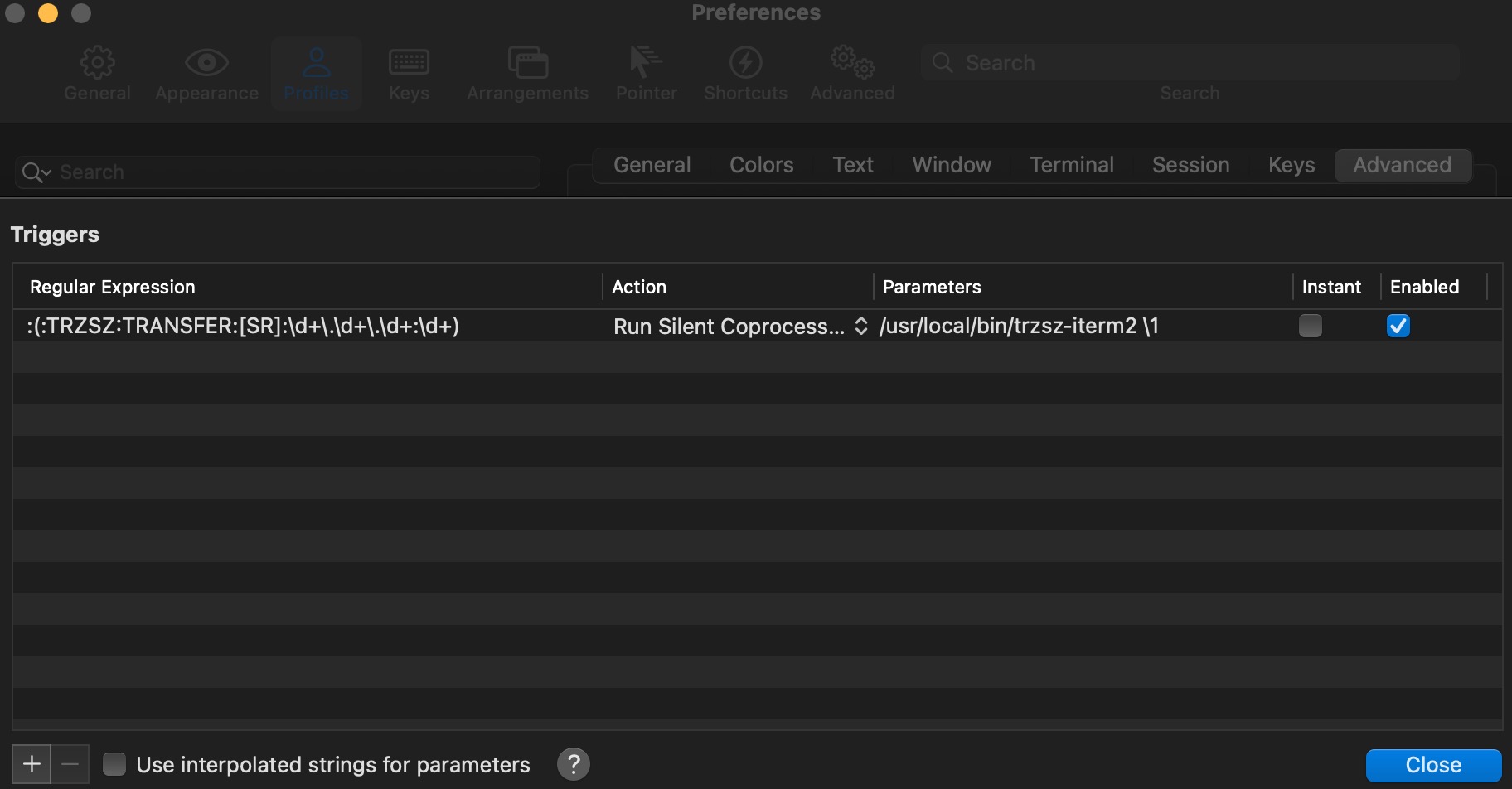
Open
iTerm2 -> Preferences... / Settings... -> Profiles -> (select a profile on the left) -> Advanced -> Triggers -> Edit -> [+]Name Value Note Regular Expression :(:TRZSZ:TRANSFER:[SRD]:\d+\.\d+\.\d+:\d+)No space at the end Action Run Silent Coprocess...Parameters /usr/local/bin/trzsz-iterm2 \1No space at the end Enabled ✅ Checked -
Don't check the
Use interpolated strings for parametersat the bottom. -
The
/usr/local/bin/trzsz-iterm2should be changed to the real absolute path oftrzsz-iterm2. -
Note that the
Triggersshould be configured for eachProfilein use. -
Triggersallows multiple lines, but only shows one line. Make sure don't copy a newline into it.
-
-
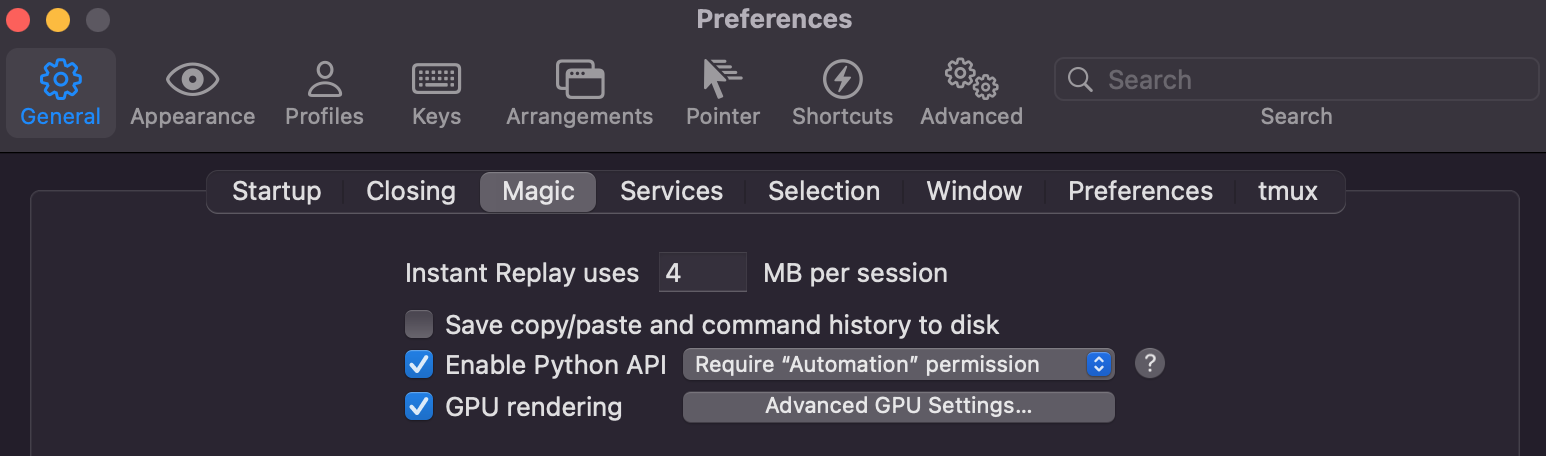
Open
iTerm2 -> Preferences... / Settings... -> General -> Magic, checkEnable Python API. -
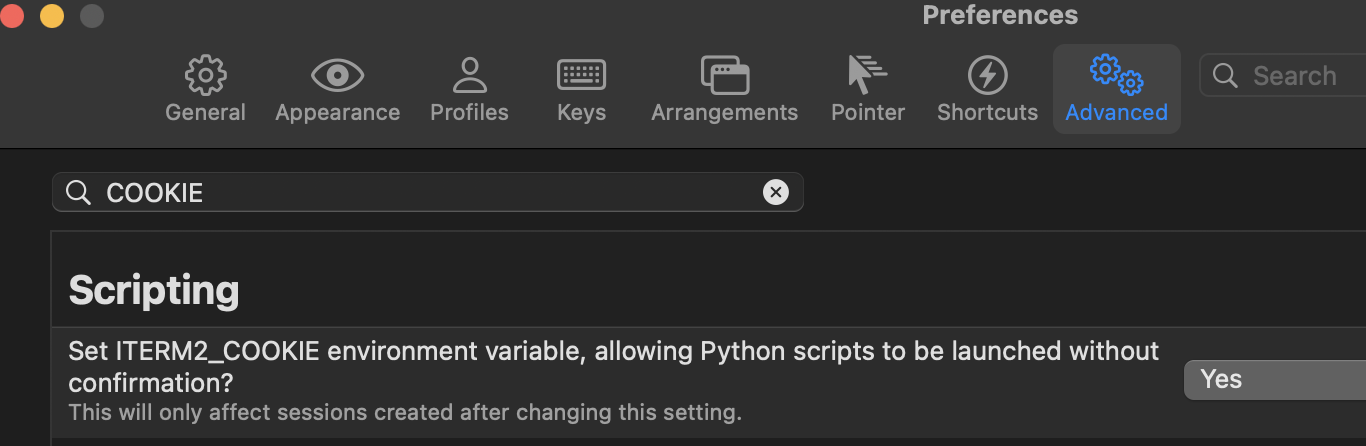
Set
ITERM2_COOKIEenvironment variable for faster startup.Open
iTerm2 -> Preferences... / Settings... -> Advanced, filter byCOOKIE, selectYes.
Progress Bar
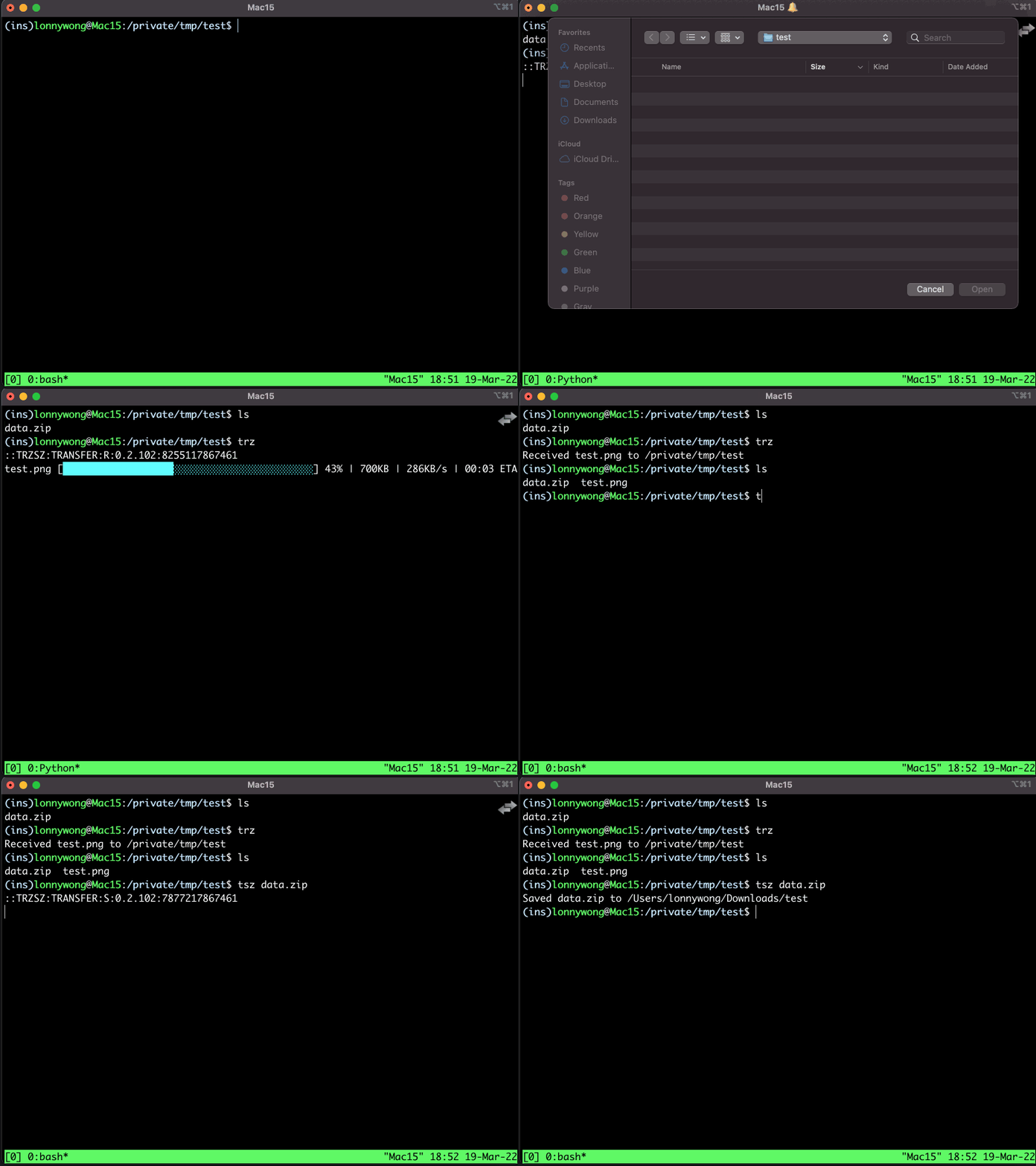
Option 1: The cooler text progress bar
-
Screenshot of text progress bar
-
Upgrade iTerm2 to
Build 3.5.20220503-nightlyor higher. -
Add
-p textto the parameters of iTerm2Trigger./usr/local/bin/trzsz-iterm2 -p text \1Don't forget to change
/usr/local/bin/trzsz-iterm2to the real absolute path oftrzsz-iterm2.
Option 2: The zenity progress bar
-
Screenshot of zenity progress bar
-
Install
zenitybrew install ncruces/tap/zenity
-
If
Mac M1install fails, try to install it withgo:brew install go go install 'github.com/ncruces/zenity/cmd/zenity@latest' sudo cp ~/go/bin/zenity /usr/local/bin/zenity
-
ls -l /usr/local/bin/zenityshould shows thezenityexecutable file or link. If not, create a soft link:sudo ln -sv $(which zenity) /usr/local/bin/zenity
-
If the progress dialog doesn't pop up in front, try upgrade zenity, and don't check
iTerm2 -> Secure Keyboard Entry.
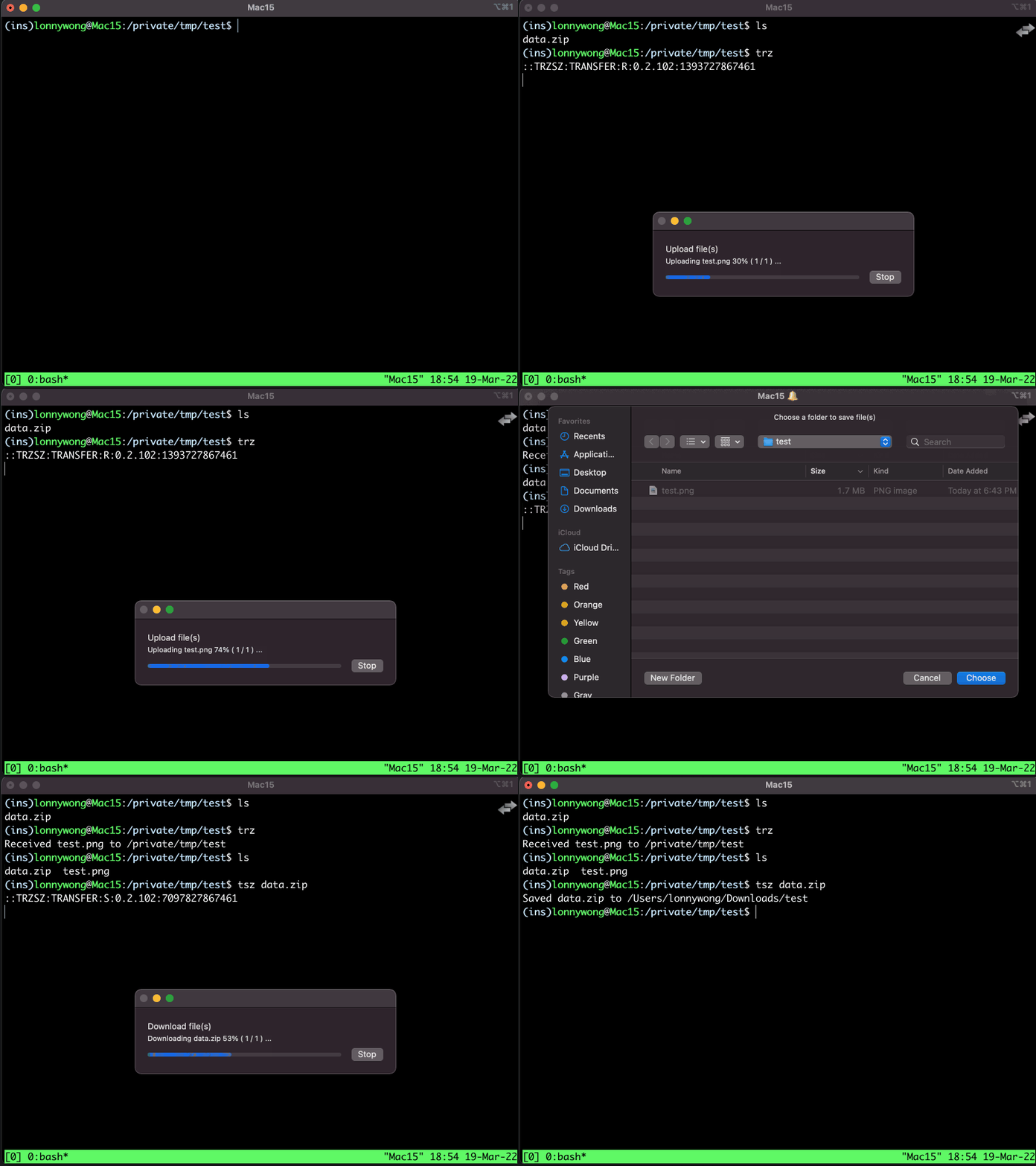
Default save path
If you want to automatically download files to the specified directory instead of asking each time.
e.g.: Automatically download files to /Users/xxxxx/Downloads
-
Using text progress bar, change
/usr/local/bin/trzsz-iterm2 -p text \1to:/usr/local/bin/trzsz-iterm2 -p text -d '/Users/xxxxx/Downloads' \1 -
Using zenity progress bar, change
/usr/local/bin/trzsz-iterm2 \1to:/usr/local/bin/trzsz-iterm2 -p zenity -d '/Users/xxxxx/Downloads' \1
Don't forget to change /usr/local/bin/trzsz-iterm2 to the real absolute path of trzsz-iterm2.
Dragging files and directories to upload
-
Upgrade iTerm2 to
Build 3.5.20220806-nightlyor higher. -
Open
iTerm2 -> Preferences... / Settings... -> Advanced, filter byfiles are dropped into, configure as:/usr/local/bin/trzsz-iterm2 -p text dragfiles \(filenames)
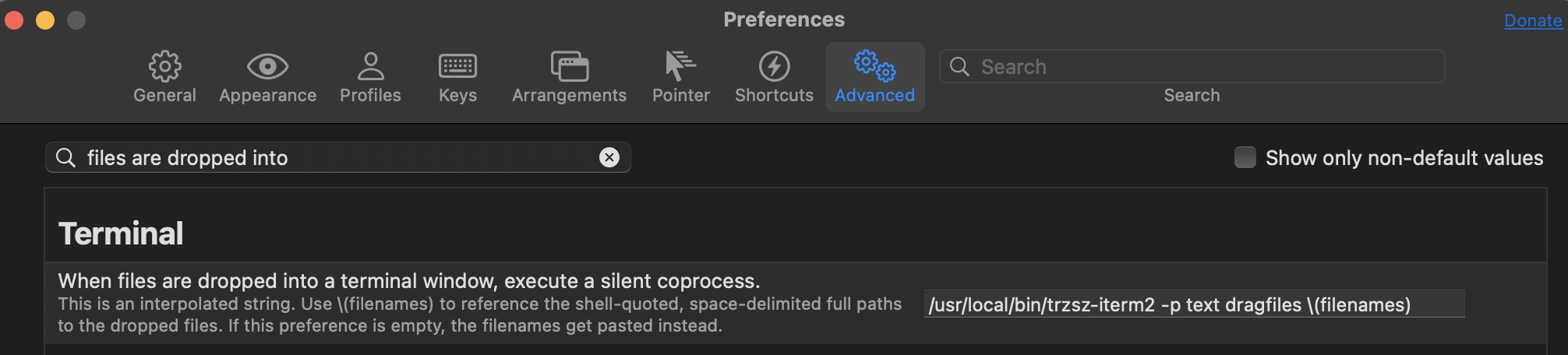
Don't forget to change /usr/local/bin/trzsz-iterm2 to the real absolute path of trzsz-iterm2.
1 maintainer

Metadata
1 maintainer
Release files for trzsz-iterm2 1.1.7
For a detailed explanation of source distributions (sdists) and built distributions (wheels), please see the package formats documentation.
Source distribution (sdist)
| File | Size | Uploaded | |
|---|---|---|---|
| trzsz_iterm2-1.1.7.tar.gz | 20.1 kB | Details |
Built distribution (wheel)
| File | Interpreter | ABI | Platform | Reset |
|---|---|---|---|---|
| trzsz_iterm2-1.1.7-py3-none-any.whl | Python 3 | none | any | Details |
Total release size: 49.1 kB
Release files / trzsz_iterm2-1.1.7.tar.gz
| Download URL | trzsz_iterm2-1.1.7.tar.gz |
|---|---|
| Size | 20.1 kB |
| Tags | Source |
|
SHA-256 checksum How to use checksums |
2d93969c57df4642a92e44bdf960b2b0c5fad07f4111b9045c33b920abccbc41
|
|
BLAKE2b-256 checksum How to use checksums |
41c6a8b16af3a7a2e0b85ceb1d270e4493edb464af7144c8f49a5ade2bf9f45a
|
| Upload date | |
|
Uploaded using Trusted Publishing? What is trusted publishing? |
No |
| Uploaded via |
twine/7.0.0 CPython/3.13.14
|
Release files / trzsz_iterm2-1.1.7-py3-none-any.whl
| Download URL | trzsz_iterm2-1.1.7-py3-none-any.whl |
|---|---|
| Size | 28.9 kB |
| Tags | Python 3 |
|
SHA-256 checksum How to use checksums |
0b04edc756f053b21ec4ff339898c4a47bdda7cfb50acbac45701a33d41c54c5
|
|
BLAKE2b-256 checksum How to use checksums |
efe2cf00b204008a08e3aaccdb7230239663cc87b0dac95c068e017b2332c521
|
| Upload date | |
|
Uploaded using Trusted Publishing? What is trusted publishing? |
No |
| Uploaded via |
twine/7.0.0 CPython/3.13.14
|














