
Time series analysis toolkit with CLI, agents, and Gradio UI
Verified details
These details have been verified by PyPIProject links
GitHub Statistics
Maintainers

Project description
ts-agents



ts-agents is a CLI-first toolkit for time-series analysis and agent-driven
automation. It combines:
- a stable CLI contract for reproducible runs (
ts-agents) - inspectable artifacts instead of chat-only outputs (plots, JSON, reports)
- optional sandboxes for safer execution (
local,subprocess,docker,daytona,modal) - both a Gradio UI (
ts-agents-ui) and tool-driven agents (simple + deep)
It ships with two out-of-the-box demos:
window-classification(synthetic labeled-stream window-size selection + evaluation)forecasting(baseline comparison and report artifacts)
Source-checkout-only datasets such as data/wisdm_subset.csv are documented
separately and are not part of the published wheel.
Start here: Quickstart | Choose your path | Docs site | Distribution guide | Demo walkthroughs | Hosted demo guide
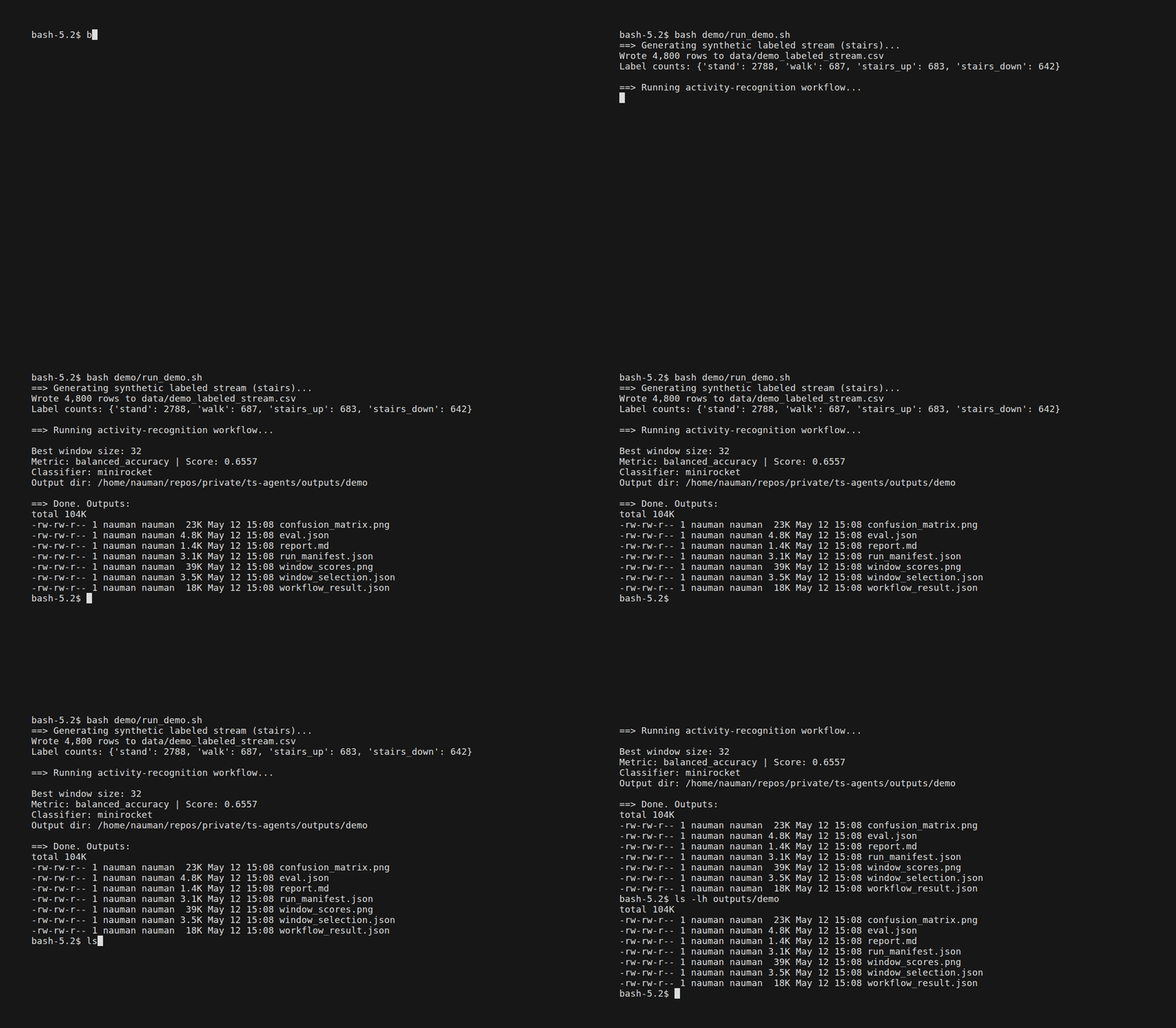
Table of Contents
- Choose your path
- Why ts-agents instead of using statsforecast/sktime/aeon directly?
- Design principles
- Quickstart
- Installation
- CLI usage
- Gradio app
- Sandbox backends
- Guides
- Development
Choose Your Path
1. Run a deterministic demo in under a minute
Use the scripted flows when you want a quick proof that the toolchain works, without requiring an LLM key.
uv sync
uv run ts-agents demo window-classification --no-llm
uv run ts-agents demo forecasting --no-llm
2. Use the CLI on bundled or custom data
Use the CLI when you want reproducible commands, saved artifacts, and easy automation.
ts-agents tool list --bundle demo
ts-agents run stl_decompose_with_data --run Re200Rm200 --var bx001_real
ts-agents demo window-classification --no-llm
3. Launch the UI or prepare a hosted demo
Use the Gradio app for interactive exploration, or the hosted entrypoint for a public manual-mode deployment.
ts-agents-ui
ts-agents-hosted
For hosted deployment details, see Hosted demo guide.
Why ts-agents Instead of Using statsforecast/sktime/aeon Directly?
Those libraries are excellent algorithm/toolkit layers, and ts-agents
intentionally builds on that ecosystem rather than trying to replace it.
Use the underlying libraries directly when:
- you only need one modeling library inside a notebook or a custom pipeline
- you do not need artifacts, tool routing, or sandboxed execution
Use ts-agents when you want:
- a stable CLI contract that works the same across demos, agents, and automation
- artifact-first outputs (plots, JSON, markdown/report assets) instead of chat-only responses
- reusable skills and tool bundles that encode workflow guidance
- optional sandbox backends for isolation, deployment, and heavier workloads
- swappable front ends: CLI, Gradio UI, or custom agent orchestration
Design Principles
- CLI as the stable contract:
ts-agentsis the primary interface for automation and reproducibility. - Framework adapters, not framework lock-in: LangChain/deep-agent wrappers are convenience layers over the same tool registry.
- Artifacts over chat: tools produce inspectable files (plots, JSON, reports), and agents return summaries plus paths.
- Swappable front-ends: CLI agents, custom agents, and Gradio are interfaces around the same core tools.
- Sandboxed execution: backends can isolate dependencies and scale heavier workloads.
Canonical design docs:
docs/philosophy.qmddocs/architecture.qmd
Quickstart
uv sync
uv run ts-agents demo window-classification --no-llm
uv run ts-agents demo forecasting --no-llm
LLM-backed demo/report mode requires OPENAI_API_KEY. Either export it
directly or add it to ~/.env (one KEY=VALUE per line; the app loads this
file automatically and will not overwrite variables already in your shell):
# Option A: export in your shell
export OPENAI_API_KEY=your-key

# Option B: store in ~/.env (loaded automatically)
echo 'OPENAI_API_KEY=your-key' >> ~/.env
uv run ts-agents demo window-classification
The demo writes plots to outputs/demo/ (e.g. window_scores.png).
Installation
Prerequisites:
- Python 3.11, 3.12, or 3.13
- uv
Install from PyPI:
python -m pip install ts-agents
The default install is intentionally all-in-one and pulls a fairly heavy
forecasting/ML stack, including neural backends used by the shipped tool
surface. There is not yet a slim extras-based install profile, so plan for a
full scientific Python environment.
The dependency minimums also intentionally track the currently validated
0.1.1 stack for this alpha release; widening lower-bound compatibility
is a follow-up task rather than part of the initial publish gate.
Run the packaged entrypoints:
ts-agents --help
ts-agents-ui --help
If you are running from a source checkout with uv sync, prefix the CLI
commands below with uv run.
Source checkout setup:
git clone https://github.com/fnauman/ts-agents.git
cd ts-agents
uv sync
Local editable install from a source checkout:
python -m pip install -e .
Publishing setup in this repo targets:
- PyPI package name:
ts-agents - sandbox image:
ghcr.io/fnauman/ts-agents-sandbox
See Distribution guide for the release, PyPI, and GHCR publishing flow.
CLI entrypoints:
- Preferred:
ts-agents ... - Also supported:
python -m ts_agents ... - Gradio UI:
ts-agents-ui - Hosted profile:
ts-agents-hosted
Environment variables
All optional. Set them via export or in ~/.env.
| Variable | Purpose | Default |
|---|---|---|
OPENAI_API_KEY |
LLM agent/demo features | (none — required for LLM mode) |
OPENAI_MODEL |
Model override | gpt-5-mini |
TS_AGENTS_DATA_DIR |
Full dataset path | bundled package data (or repo ./data) |
TS_AGENTS_USE_TEST_DATA |
Use bundled test data | true |
TS_AGENTS_TEST_DATA_FILE |
Override test dataset filename | short_real.csv |
TS_AGENTS_SANDBOX_MODE |
Default sandbox backend | local |
Sandbox-specific environment variables (Docker/Daytona/Modal auth, snapshots,
streaming, and log files) are documented in SANDBOX.md.
Hosted Demo Deployment
The installed package includes a hosted Gradio profile at ts-agents-hosted
intended for public demos such as Hugging Face Spaces. Source-checkout
deployments can still use the root app.py wrapper. It defaults to:
- manual analysis mode (
agentdisabled) - no session persistence
- a public-safe configuration that does not require
OPENAI_API_KEY
See Hosted demo guide for deployment instructions and optional agent-mode configuration.
Distribution
- Package metadata is configured for the
ts-agentsdistribution name. - GitHub Actions includes a PyPI publish workflow for tagged releases.
- GitHub Actions includes a GHCR workflow for publishing the sandbox image built
from
Dockerfile.sandbox. - GitHub release/tag/docs flow is summarized in Distribution guide.
CLI Usage
Discover data and tools
ts-agents data list
ts-agents data vars
ts-agents tool list
ts-agents tool list --bundle demo
Run tools directly
ts-agents run stl_decompose_with_data --run Re200Rm200 --var bx001_real
ts-agents run forecast_theta_with_data --run Re200Rm200 --var bx001_real --param horizon=30
Save output and extract embedded images
ts-agents run forecast_theta_with_data \
  --run Re200Rm200 \
  --var bx001_real \
  --param horizon=30 \
  --save outputs/Re200Rm200/theta.txt \
  --extract-images outputs/Re200Rm200/assets
Agent mode
ts-agents agent run "Find peaks in bx001_real for Re200Rm200"
ts-agents agent run --type deep "Compare forecasting methods for bx001_real"
Demos
# Scripted (no API key required)
ts-agents demo window-classification --no-llm
ts-agents demo forecasting --no-llm

# LLM-backed report mode
ts-agents demo window-classification
ts-agents demo forecasting
Skill mapping for end-to-end demo runs:
demo window-classification->activity-recognitionskilldemo forecasting->forecastingskill
Note: the WISDM example under data/wisdm_subset.csv is a source-checkout
workflow and is not bundled into the published wheel.
Example prompt for Claude Code:
Use the `time-series-activity-recognition` skill. Run `ts-agents demo window-classification --no-llm`, save outputs under `outputs/demo/`, and produce `outputs/reports/REPORT.qmd` plus `outputs/reports/REPORT.pdf`.
Example prompt for Codex:
Use the `forecasting` skill. Run `ts-agents demo forecasting --no-llm`, summarize the outputs, and generate `outputs/reports/REPORT.qmd` plus `outputs/reports/REPORT.pdf`.
For polished deliverables, generate a Quarto report and render to PDF:
quarto render outputs/reports/REPORT.qmd --to pdf
Skills
ts-agents skills list
ts-agents skills validate
ts-agents skills export --all-agents
ts-agents skills export --all-agents --symlink
Canonical skills are intentionally limited to a focused set in skills/.
Agent-specific folders are generated on demand via skills export and are not
tracked in this repository.
Copy vs symlink guidance:
- Use copies (default export mode) for CI, sharing, and cross-platform reliability.
- Use
--symlinkonly for local Unix-like development when you want zero-copy edits.
Gradio App
Run the app:
ts-agents-ui
Useful options:
ts-agents-ui --agent-type deep
ts-agents-ui --no-agent
ts-agents-ui --share
ts-agents-ui --port 8080
Sandbox Backends
Tools run inside a sandbox. Pick one with --sandbox <mode> or set
TS_AGENTS_SANDBOX_MODE.
| Mode | Isolation | Requirements |
|---|---|---|
| local (default) | None (in-process) | — |
| subprocess | Separate Python process | — |
| docker | Container | Docker running; build image first: ./build_docker_sandbox.sh |
| daytona | Cloud sandbox | pip install daytona + DAYTONA_API_KEY (Daytona docs); default bootstrap clones this repo + runs pip install -e |
| modal | Serverless cloud | Source-checkout deployment path: pip install modal, run modal token new (opens browser auth) or set MODAL_TOKEN_ID/MODAL_TOKEN_SECRET, then from the repo root deploy with modal deploy -m ts_agents.sandbox.modal_app --env main --name ts-agents-sandbox |
If the chosen backend is unavailable at runtime the executor falls back to local with a warning.
For full details (env vars, resource limits, networking), see SANDBOX.md.
Guides
- Quickstart:
docs/quickstart.qmd - Demo walkthroughs:
docs/walkthroughs.qmd - Demo scripts:
demo/README.md - Data generation and licensing notes:
data/README.md - Docs home:
docs/index.qmd - Project philosophy:
docs/philosophy.qmd - Architecture:
docs/architecture.qmd - Project roadmap and priorities:
ROADMAP.md - Design philosophy slides (Quarto source):
docs/talks/ts_agents_talk.qmd
Community
- Contributing guide:
CONTRIBUTING.md - Code of Conduct:
CODE_OF_CONDUCT.md
Repository Layout
main.py- Gradio app entrypointts_agents/cli/- CLI parser, command handlers, output helpersts_agents/core/- pure time-series algorithmsts_agents/tools/- tool registry, wrappers, execution/sandbox routingts_agents/agents/- simple and deep agent implementationsts_agents/ui/- Gradio tabs/componentsts_agents/persistence/- cache/session/experiment loggingtests/- unit and CLI testsdata/- sample datasets and data generation/download scriptsskills/- canonical skill definitionsbuild_docker_sandbox.sh+Dockerfile.sandbox- Docker sandbox build assets
Development
Run tests:
uv run python -m pytest -q
Run CLI test suite only:
uv run python -m pytest -q tests/cli
Render docs site locally (Quarto):
quarto render docs
quarto preview docs
License
Project details
Verified details
These details have been verified by PyPIProject links
GitHub Statistics
Maintainers
Release history Release notifications | RSS feed

Download files
Download the file for your platform. If you're not sure which to choose, learn more about installing packages.
Source Distribution
Built Distribution
Filter files by name, interpreter, ABI, and platform.
If you're not sure about the file name format, learn more about wheel file names.
Copy a direct link to the current filters
File details
Details for the file ts_agents-0.1.1.tar.gz.
File metadata
- Download URL: ts_agents-0.1.1.tar.gz
- Upload date:
- Size: 1.9 MB
- Tags: Source
- Uploaded using Trusted Publishing? Yes
- Uploaded via: twine/6.1.0 CPython/3.13.7
File hashes
| Algorithm | Hash digest | |
|---|---|---|
| SHA256 |
db884421f0f517fa4ee0a2d3603f91b35dbda4471fbd7a0c091fca7c3ab7fcc4
|
|
| MD5 |
0c5b2df287f5dfabd61ec4998e74d3be
|
|
| BLAKE2b-256 |
d97c5364905724f38b85b233399b2db48bf43f05dd344c9963d0a7f433f42ecd
|
Provenance
The following attestation bundles were made for ts_agents-0.1.1.tar.gz:
Publisher:
publish-pypi.yml on fnauman/ts-agents
-
Statement:
-
Statement type:
https://in-toto.io/Statement/v1 -
Predicate type:
https://docs.pypi.org/attestations/publish/v1 -
Subject name:
ts_agents-0.1.1.tar.gz -
Subject digest:
db884421f0f517fa4ee0a2d3603f91b35dbda4471fbd7a0c091fca7c3ab7fcc4 - Sigstore transparency entry: 1074883206
- Sigstore integration time:
-
Permalink:
fnauman/ts-agents@74f17e41e3a0e7fbcf86c27fcaa998479ca14627 -
Branch / Tag:
refs/tags/v0.1.1 - Owner: https://github.com/fnauman
-
Access:
public
-
Token Issuer:
https://token.actions.githubusercontent.com -
Runner Environment:
github-hosted -
Publication workflow:
publish-pypi.yml@74f17e41e3a0e7fbcf86c27fcaa998479ca14627 -
Trigger Event:
push
-
Statement type:
File details
Details for the file ts_agents-0.1.1-py3-none-any.whl.
File metadata
- Download URL: ts_agents-0.1.1-py3-none-any.whl
- Upload date:
- Size: 2.0 MB
- Tags: Python 3
- Uploaded using Trusted Publishing? Yes
- Uploaded via: twine/6.1.0 CPython/3.13.7
File hashes
| Algorithm | Hash digest | |
|---|---|---|
| SHA256 |
4822c651ac129392b7b9a3a4a7d6b31281219a002b357139947a8e56bd13bc53
|
|
| MD5 |
ee5360e10de35db1f0029a8c95bf412b
|
|
| BLAKE2b-256 |
47f02c9255cdcd9cc9ce1b06263229dbe956c2f427c776e7f83f6b2750645fe6
|
Provenance
The following attestation bundles were made for ts_agents-0.1.1-py3-none-any.whl:
Publisher:
publish-pypi.yml on fnauman/ts-agents
-
Statement:
-
Statement type:
https://in-toto.io/Statement/v1 -
Predicate type:
https://docs.pypi.org/attestations/publish/v1 -
Subject name:
ts_agents-0.1.1-py3-none-any.whl -
Subject digest:
4822c651ac129392b7b9a3a4a7d6b31281219a002b357139947a8e56bd13bc53 - Sigstore transparency entry: 1074883231
- Sigstore integration time:
-
Permalink:
fnauman/ts-agents@74f17e41e3a0e7fbcf86c27fcaa998479ca14627 -
Branch / Tag:
refs/tags/v0.1.1 - Owner: https://github.com/fnauman
-
Access:
public
-
Token Issuer:
https://token.actions.githubusercontent.com -
Runner Environment:
github-hosted -
Publication workflow:
publish-pypi.yml@74f17e41e3a0e7fbcf86c27fcaa998479ca14627 -
Trigger Event:
push
-
Statement type:






