
Create environment for quants / agents to play.

Project description
TSApiX
:snake: Create environment for Quants / Agents to play.
After installation and some setup, you will get an Environment to test your ideas, to test strategies, and to play. Have Fun!
:clock12: Installation
1. Install Package
[!NOTE] Assume Python environment already established in your working space. If not, please install Python environment first.
pip install tsapix
2. Personalise DataBase Location
Database is a key element for quant environment.
TSApiX come with a default database location, it can be personalised in tsapix/utils.py
at Line 8. Simply assign your target location to the parameter :jigsaw:icloud_froot
3. Initiate Environment
- Open Terminal
- Type
python -m site --user-site, pressEnterto get Python site-pakages location - Type
cd [Python site-pakages location], pressEnter - Type
cd tsapix, pressEnter - Type
python setup.py, pressEnter
4. Personalise Environment Data
As the component of Environment shall be flexible, you can decide which data to be ingested in your environment. Detailed illustration can be found in the following sections.
:clock1: Personalise Environment Data
1. China Market - Price
:jigsaw:HistPX is the primary Class realise data ingestion.
A sample of data ingestion can be found here.
Depending on your target trading strategy, you may only download data suit your time frames.
Supported time frequency and price type settings are the keys of dictionary :jigsaw: kltmapdict and :jigsaw: fqtmapdict in this file.
Example
from tsapix.utils import *
import tsapix.spider.eastmoney as cnsource
from tsapix.tools.taskbase import exe_time_limit, free_memory

import logging
import os
import time

tuiv = read_yaml_file(code_univ_save_path)
tuiv = tuiv[:5] # take 5 tickers for illustration
print("Number of China tickers:", len(tuiv))
single_task_timelmt = 60 * 60 * 10

for a, b in [
    ('d', 'bfq'), # meaning [daily, unadjusted]
    # ('30min', 'bfq'),
    # ('60min', 'bfq'),
]:
    print("Ingesting data @", a, b)
    try:
        with exe_time_limit(single_task_timelmt):
            xobj = cnsource.HistPX(a, b, tickers=tuiv, start="2011-12-31", end=date.today().strftime("%Y-%m-%d"), lmt='1000000')
            xobj.download(chunk_size=200)

            xobj.get_cube_and_save(pairname=f'histpx_{a}_{b}', froot=cube_warehouse_root)
    except Exception as e:
        logging.error(e)
[!WARNING] Current data source of China Market are based on open APIs, pay attention to your ingestion speed. If speed exceed website limit, empty files will be returned.
Current default speed is reasonable for the website but slow, 4000+ tickers need around 4 hours. Be patient.
[!TIP] If you need to ingest data for all the tickers (4000+), leave it to run at spare time. In this case, you may use the environment primarily for backtest.
If you have a subset of tickers, especially if the number is below 200, it can be fast. In this case, you may get live data during trading hours; or you may export the target tickers to your broker's app, where you can get live data in the market open time.
2. China Market - News
Examples of building Apps based on TSApiX wrapped Sina News API can be found here and here.
Example
from tsapix.spider.sina_keyword_screening import *

keyword='特朗普'
_resdict = normal_task_process(
    keyword=keyword, record_target=10, start_page=1, time_limit='2014-03-19 18:38:45')

respd = pd.DataFrame(_resdict).sort_values('id')
respd.head(20)
3. US Market - IBKR
Follow this page to setup IBKR API.
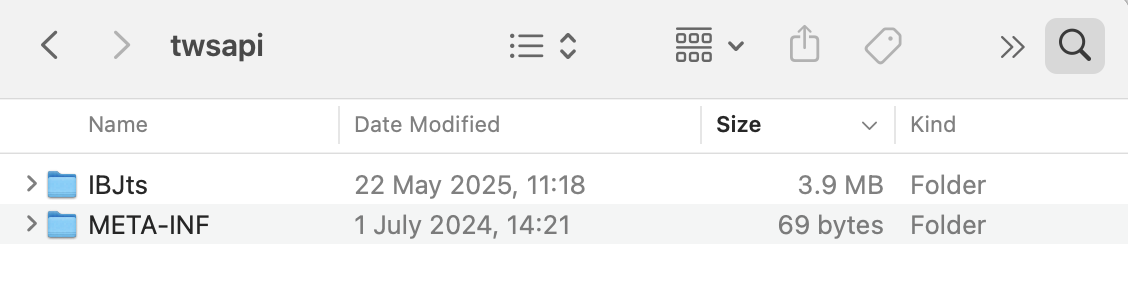
Please put IBJts and META-INF folders under tsapix/ibkr/twsapi
Examples of using TSApiX wrapped IBKR API can be found here and here.
Example
from tsapix.envbase import *
from tsapix.utils import env_db_root
from tsapix.ibkr.qqq import *

app = DataApp()
app.connect("127.0.0.1", 4001, 1)
threading.Thread(target=app.run).start()
time.sleep(5)

ltdlist = [f"{xdt} 16:00:00 US/Eastern" for xdt in [
    (datetime.datetime.today() - datetime.timedelta(x)).strftime("%Y%m%d") for x in range(1, 2)
]]
barsetting = [("1 D", "1 min", "TRADES")]
# barsetting = [("1 D", "5 mins", "TRADES")]

from itertools import product

_reqlist = list(product(ltdlist, barsetting))

paramslog = {}

from tqdm import tqdm

for _req in tqdm(_reqlist):
    _ltd, _bst = _req
    _ltddate = _ltd.split(" ")[0]
    _contract = init_qqq()

    _reqid = app.nextId()
    paramslog[_reqid] = [_ltd, _bst, _ltddate]
    print("Processing", _reqid, paramslog[_reqid])
    app.reqHistoricalData(_reqid, _contract, _ltd, _bst[0], _bst[1], _bst[2], 1, 1, False, [])
:clock2: Maintenance
Database needs to be updated to include new information. You can write a task script and schedule it to run at expected frequency.
:clock3: Load Environment to Play
A sample loading China Market Environment can be found here.
Example
from tsapix.envbase import *
from tsapix.spider.eastmoney import HistPX
from tsapix.dimvals import maps, code_name_mapdict, load_maps, load_histpx_cubes

histpx = load_histpx_cubes([
    ('d', 'bfq'), # Make sure you have downloaded this data in your environment, i.e. daily & unadjusted
])
xobj = histpx['d_bfq']
xpd = xobj['Close']
[!NOTE] China Market structured data were stored as Cube in the environment. It has three dimensions, which are Time, Tickers, and Features (OHLCV etc.). The reason for using this structure is to utilise vectorised computing in Python.
All the environment data are supposed to be stored in Cube based structure for computing performance unless new technology with better perf be discovered / adopted in the future. Currently only China Market was stored in this way.
:clock4: Toolkits for your Play
tsapix==0.0.1 is primarily for environment creation, some basic toolkits have been added. Advanced toolkits have not been purified to publish, they will be added in following versions, these include:
- autoML framework for AI/Machine Learning enthusiasts, easy the process of feature engineering and model selection
- backtest framework to assemble strategy and get historic performance
- perfPannel to track live performance of strategies
- ...
Release history Release notifications | RSS feed


Download files
Download the file for your platform. If you're not sure which to choose, learn more about installing packages.
Source Distribution
Built Distribution
Filter files by name, interpreter, ABI, and platform.
If you're not sure about the file name format, learn more about wheel file names.
Copy a direct link to the current filters
File details
Details for the file tsapix-0.0.2.tar.gz.
File metadata
- Download URL: tsapix-0.0.2.tar.gz
- Upload date:
- Size: 39.0 kB
- Tags: Source
- Uploaded using Trusted Publishing? No
- Uploaded via: twine/6.2.0 CPython/3.11.5
File hashes
| Algorithm | Hash digest | |
|---|---|---|
| SHA256 |
06da377f4fcf7aaea4020e789a0796d11b3aaf7cdcc8656abc311f3197eb7b5e
|
|
| MD5 |
2a5edbb0301f6373f27ee624c5b4bd25
|
|
| BLAKE2b-256 |
a62d32668d4328d730b473bb07c2bce3779e4256df8365a1d037d0399e3552e5
|
File details
Details for the file tsapix-0.0.2-py3-none-any.whl.
File metadata
- Download URL: tsapix-0.0.2-py3-none-any.whl
- Upload date:
- Size: 43.9 kB
- Tags: Python 3
- Uploaded using Trusted Publishing? No
- Uploaded via: twine/6.2.0 CPython/3.11.5
File hashes
| Algorithm | Hash digest | |
|---|---|---|
| SHA256 |
e8f26b265c07cac4d013c17fa6821d5768f0741fc05b09eb68abc3a873e40d51
|
|
| MD5 |
a82875ca5ff10e2963a784c13087d0c4
|
|
| BLAKE2b-256 |
5624e86b4470c5c7cdd7b37241cbfa5bf64d3db228ef5555a67f64ddba8d598f
|






