
Tselora


The execution shadow for intelligent systems.
Tselora is an open-source execution intelligence platform for AI agents. It plugs into an existing agent, observes what actually ran, and reconstructs the execution graph, timeline, node state, causal relationships, retries, loops, parallel branches, and observable decision metadata.
Developers can inspect what happened, understand why execution changed (from structured metadata, not private reasoning), and eventually replay, control, and learn from previous executions.
Tselora is not another agent framework or orchestration runtime. It is a developer / execution-intelligence layer that works with agents you already have.
Python package: tselora 0.1.1 on PyPI (pip install tselora).
v0.1.x scope
This is a local-first execution-intelligence line. It includes:
- Python SDK (
run,@agent/@node/@tool/@llm) - JSONL collector, ProjectionEngine, REST snapshots, live
StatePatchWebSocket tseloraCLI (tselora serve)- Explorer (graph, timeline, node list, inspector, structured Why?, visualization replay) — separate Vite app, not in the wheel
- Optional OpenTelemetry inbound adapter (
tselora[otel]) - Optional LangGraph first-slice inbound adapter (
tselora[langgraph]: compiledStateGraphviaTseloraLangGraphCallbackHandler)
It does not include hosted/cloud Tselora, authentication, a database, runtime control, generic re-execution, or zero-config / zero-touch integration. LangGraph coverage is the locked first slice only. Explorer, examples, and docs are in the source repository.
Install
Python 3.12+. The wheel ships core, sdk, server, adapters, and cli.
pip install tselora
# optional:
pip install "tselora[otel]"
pip install "tselora[langgraph]"
From a clone (needed for Explorer, examples, and development):
git clone https://github.com/Tselora/Tselora.git
cd Tselora
python -m venv .venv
source .venv/bin/activate   # Windows: .venv\Scripts\activate
pip install -e .
# tests / linters / both adapter extras: pip install -e ".[dev]"
Quickstart (5 minutes)
Prerequisites: Python 3.12+. Node.js 20+ and a clone if you want Explorer.
Terminal 1 — local collector (JSONL under .agent-devtools/ unless --data-dir or TSELOA_DATA_DIR):
tselora serve
# equivalent: uvicorn server.collector.app:app --host 127.0.0.1 --port 8000
Terminal 2 — instrumented agent (@tool + run()). Examples are not in the wheel:
TSELOA_COLLECTOR_URL=http://127.0.0.1:8000 python examples/simple_agent.py
Copy the printed run_id. Richer graph (retry / loop / fan-out): python examples/structured_execution.py.
Terminal 3 — Explorer from the repo (not bundled):
cd ui
npm install
npm run dev
Open http://127.0.0.1:5173/runs/{run_id} (or / and paste the run_id). Vite proxies /v1 to the collector on port 8000. Stop tselora serve with Ctrl+C.
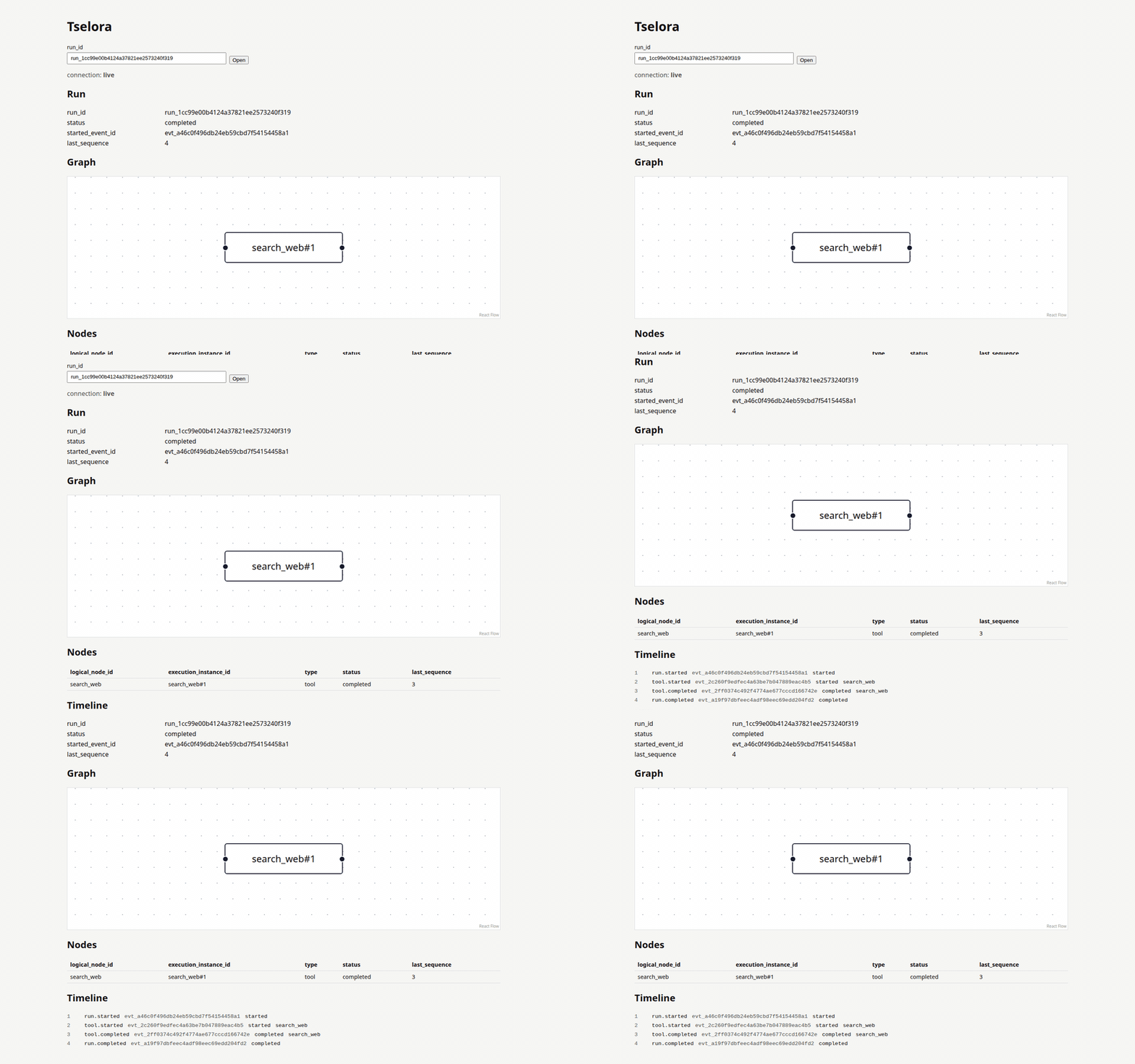
More detail: docs/development/getting-started.md · ui/README.md.
What problem it solves
Agent runs are hard to inspect. Logs are linear. Framework traces mix transport, prompts, and orchestration. When a critic fails, a plan changes, or a node retries, it is often unclear:
- which logical node ran, and which invocation it was
- what caused the next step (
parent_event_id, not “the next log line”) - how fan-out, loops, and retries relate in the graph
- whether a “why” is observable metadata or reconstructed guesswork
Tselora treats execution as an append-only event log plus a canonical projection of that log into graph, timeline, and state.
What Tselora is not
- Not an agent framework, planner, or orchestrator
- Not a replacement for LangGraph, CrewAI, OpenAI Agents SDK, Google ADK, etc.
- Not a chain-of-thought recorder
- Not a generic “re-run any Python agent” debugger in v1
- Not an inference engine, vLLM replacement, generic LLM dashboard, or evaluation product
- Not a cloud control plane, multi-tenant SaaS, or production auth system in v1
Planned capabilities
These are product directions. Only a subset is in v1 scope.
| Capability | Intent | Horizon |
|---|---|---|
| Execution graph | Logical nodes + execution instances; edges from causality | v1 |
| Timeline | Ordered view by per-run sequence |
v1 |
| Node inspection | Status, payload, metadata per instance | v1 |
| Observable “Why?” | Structured decision metadata emitted by the agent | v1 (display) |
| Replay / time travel | Re-project the event log; visualization only | v1 |
| Runtime control | Pause, resume, stop, approve, retry, fork | Future |
| Cross-run experience | Compare runs, historical evidence | Future / experimental |
| Framework adapters | OTEL + LangGraph first slice in v0.1.x; further adapters staged | v0.1.x / later |
Canonical v1 data flow
flowchart TD
  A[Existing agent] --> B[Framework adapters / instrumentation]
  B --> C[Universal Agent Event Protocol]
  C --> D[Local collector]
  D --> E[JSONL event store]
  E --> F[Canonical ProjectionEngine]
  F --> G[Graph]
  F --> H[Timeline]
  F --> I[Run state]
  F --> J[Node state]
  F --> K[REST + WebSocket]
  K --> L[React UI]
The event log is the source of truth. The UI does not invent execution semantics. WebSocket carries state patches after projection, not a second copy of the log as the authority.
Persistence (v1)
No database in v1. Append-only JSONL files:
.agent-devtools/
  runs/
    run_<id>/
      events.jsonl
      metadata.json
      snapshot.json   # optional optimization later; never source of truth
EventStore is an abstraction so JSONL can later be replaced by SQLite/Postgres without changing the event protocol or projection architecture. See docs/architecture/persistence.md and ADR-006.
Repository layout
| Path | Role |
|---|---|
core/ |
Event protocol, projection, context, redaction |
sdk/ |
Emission, batching, transport, decorators |
server/ |
Collector, storage, REST, WebSocket |
adapters/ |
Framework-neutral translations into the protocol |
ui/ |
One-run live React viewer (graph, nodes, timeline) |
cli/ |
Local developer CLI |
docs/ |
Architecture, ADRs, product, development |
examples/ |
Quickstart (simple_agent.py), Week 3 acceptance (structured_execution.py), optional OTEL (otel_spans.py) and LangGraph first-slice (langgraph_stategraph.py) paths |
tests/ |
Invariant-focused tests |
Documentation map
- Product: vision · scope · v1 · roadmap
- Architecture: overview
- Development: getting started · guide · testing
- Contributing: CONTRIBUTING.md
Stack (intended)
Python 3.12+, Pydantic, FastAPI, React, TypeScript, React Flow, WebSockets, argparse CLI (tselora). v1 persistence is JSONL, not SQLite. Explorer is a separate Node/Vite app in ui/.
License
1 maintainer

Release files for tselora 0.1.1
For a detailed explanation of source distributions (sdists) and built distributions (wheels), please see the package formats documentation.
Source distribution (sdist)
| File | Size | Uploaded | |
|---|---|---|---|
| tselora-0.1.1.tar.gz | 1.1 MB | Details |
Built distribution (wheel)
| File | Interpreter | ABI | Platform | Reset |
|---|---|---|---|---|
| tselora-0.1.1-py3-none-any.whl | Python 3 | none | any | Details |
Total release size: 1.2 MB
Release files / tselora-0.1.1.tar.gz
| Download URL | tselora-0.1.1.tar.gz |
|---|---|
| Size | 1.1 MB |
| Tags | Source |
|
SHA-256 checksum How to use checksums |
c18467e9adfbcc7f87575fd526bafc5e95b13a68c811e2e2a9c7bc5c3d552605
|
|
BLAKE2b-256 checksum How to use checksums |
68d7c258f6bb53a9360a3634958df2f144cd6bbf5fa0a816abb8123adc028129
|
| Upload date | |
|
Uploaded using Trusted Publishing? What is trusted publishing? |
No |
| Uploaded via |
twine/7.0.0 CPython/3.13.7
|
Release files / tselora-0.1.1-py3-none-any.whl
| Download URL | tselora-0.1.1-py3-none-any.whl |
|---|---|
| Size | 54.5 kB |
| Tags | Python 3 |
|
SHA-256 checksum How to use checksums |
f8c00d16d45cf3afc68300529761fd8e3305aceab22836b1d4b8047b71a543d2
|
|
BLAKE2b-256 checksum How to use checksums |
ffd607a80326f8c3b717c3a73fee78d39de5b99f5509f1527c3d0e863e43fe94
|
| Upload date | |
|
Uploaded using Trusted Publishing? What is trusted publishing? |
No |
| Uploaded via |
twine/7.0.0 CPython/3.13.7
|














