
tshark-mcp





Ask your AI assistant why a call, an attach or a session failed, and get the answer from
your own pcap, with frame numbers. tshark-mcp is a read-only MCP server: it runs
tshark -r on captures in directories you allow, pairs requests with answers across Diameter,
GTP, SIP/RTP, SIGTRAN, DNS, TCP and TLS, and names the cause codes.
claude mcp add tshark-mcp -- uvx --from tshark-mcp-server tshark-mcp --allow-dir /path/to/pcaps
(needs uv and tshark; other clients below)
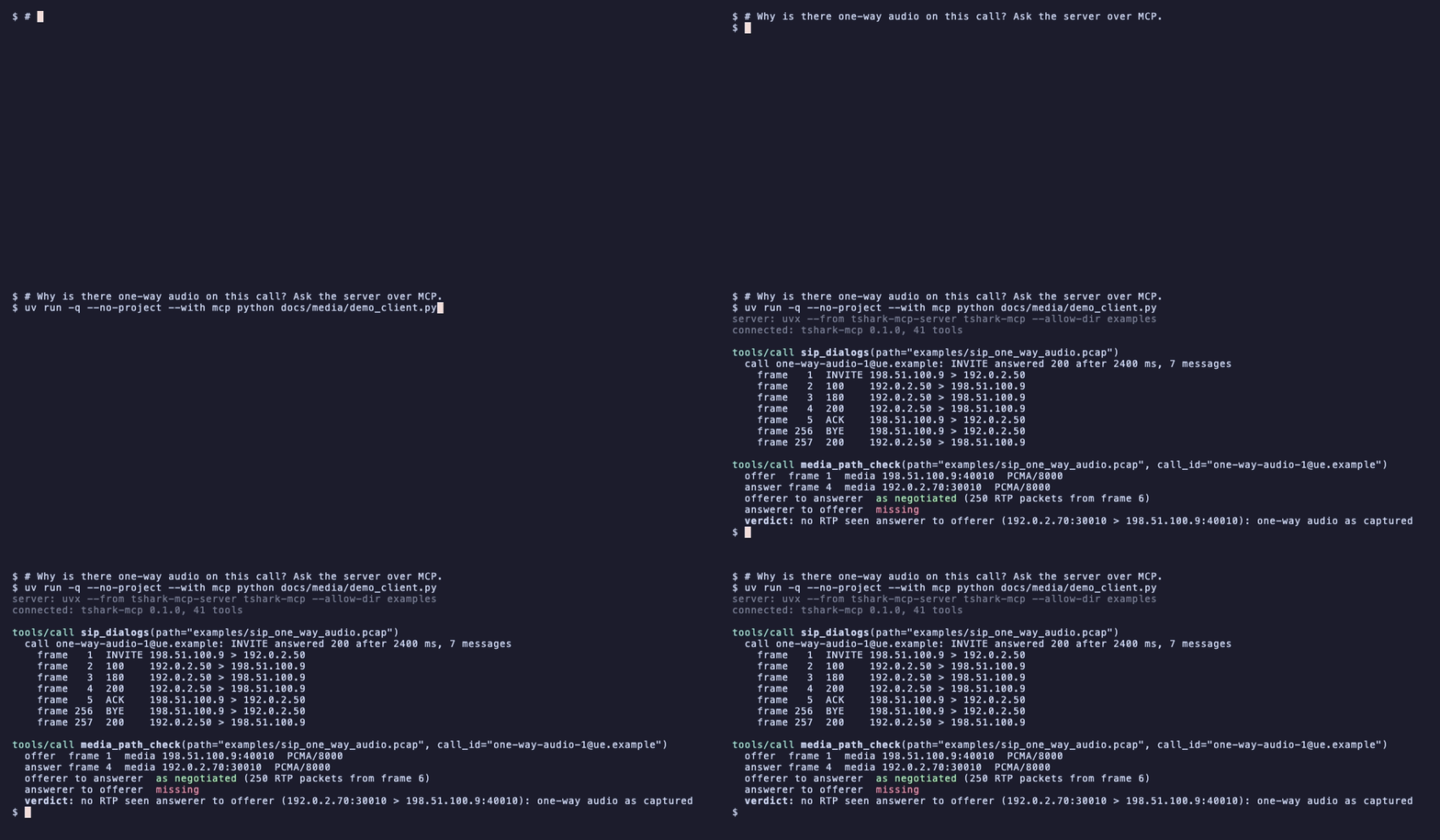
A live session, not a mock-up: an MCP client starts the PyPI package over stdio and calls two tools on examples/sip_one_way_audio.pcap. Recorded with vhs from docs/media/demo.tape.
Why
- Telecom captures need correlation, not grep. A failed attach, a dropped bearer or one-way audio spans Diameter, GTP, SIP, RTP and MAP. The tools pair requests with answers, name the result codes (Diameter 5420, GTP cause 78, Q.850 cause 16) and say what never got a reply.
- An agent with a shell and tshark is a liability. This server can only run
tshark -r <file>on files inside directories you allow, under hard caps on size, packets, output and time. It cannot capture, resolve names or load code, and it writes nothing unless the operator turns onexport_subsetwith--export-dir. - It tells you when the capture itself cannot be trusted: duplicate packets from a SPAN session, bytes the capture missed, cut-short frames, checksum offload, clocks that run backwards.
Install and connect
-
Install tshark (it comes with Wireshark):
brew install --cask wireshark,apt-get install tsharkordnf install wireshark-cli. -
Run the server from PyPI with uv (nothing to install; Python 3.10 or newer):
uvx --from tshark-mcp-server tshark-mcp --allow-dir /path/to/pcaps
Or install it once and use the
tshark-mcpcommand:uv tool install tshark-mcp-serverorpipx install tshark-mcp-server.Requirements: Python 3.10+, tshark 4.0 or newer (tested with 4.2 and 4.6); the
mcp(2.1+) andpydantic(2.12+) packages are installed automatically. The package is published astshark-mcp-server(the PyPI nametshark-mcpbelongs to an unrelated project); the command staystshark-mcp. From a clone:uv tool install .orpipx install ..Or build the container (tshark included, non-root, captures mounted read-only):
docker build -t tshark-mcp ., then usedocker run --rm -i --read-only --tmpfs /tmp --cap-drop ALL --network none -v /path/to/pcaps:/captures:ro tshark-mcpas the server command. -
Connect a client, naming the directory that holds your captures.
Claude Code:
claude mcp add tshark-mcp -- uvx --from tshark-mcp-server tshark-mcp --allow-dir /path/to/pcaps
Or as a Claude Code plugin (the server plus seven investigation skills; needs
uv), which asks for the capture directory and redaction when enabled:/plugin install tshark-mcp --marketplace Kx96xx/tshark-mcpClaude Desktop as an extension:
python mcpb/build.py && npx -y @anthropic-ai/mcpb@2.1.2 pack build/mcpb build/tshark-mcp.mcpb, then openbuild/tshark-mcp.mcpband pick the capture directories.Claude Desktop (
claude_desktop_config.json), Cursor, or any client that starts stdio servers:{ "mcpServers": { "tshark-mcp": { "command": "uvx", "args": ["--from", "tshark-mcp-server", "tshark-mcp", "--allow-dir", "/path/to/pcaps"] } } }
With
uv tool installorpipx, use"command": "tshark-mcp"and drop the first three args.MCP Registry clients (VS Code and the directories that index the registry) find it as
io.github.Kx96xx/tshark-mcp: they run the PyPI package withuvxand ask forTSHARK_MCP_ALLOW_DIRS, the one required setting. Each GitHub release publishes the new version there (server.json).To run it by hand:
tshark-mcp --allow-dir /path/to/pcaps [--allow-dir /more] [--log-file ~/tshark-mcp.jsonl].TSHARK_MCP_ALLOW_DIRS(colon-separated) works instead of the flag. Three small synthetic captures to start with are in examples/.
Found a bug or a wrong answer?
- A wrong or misleading answer: open a Wrong answer issue with the tool call, the output excerpt, what you expected and the plain tshark command that shows it.
- A crash or error: open a Bug issue with the tool call, the error, and your tshark, Python and OS versions.
- A security problem: report it privately through GitHub private vulnerability reporting (SECURITY.md), not in an issue.
- Questions: Discussions.
Never attach a capture with real subscriber data (IMSI, MSISDN, IMEI, IP addresses) to a public
issue. Share the tool call and its output, and if a capture is needed, a minimal synthetic or
anonymised one (--redact ids+ips masks identifiers in the output, not in the file).
What you can ask it
- "Which capture in this directory mentions IMSI 001010123456789, and when?"
- "Why did this subscriber's attach fail?" (Diameter result codes and the AVPs behind them)
- "Was the GTP session created? What cause came back, and which PAA?"
- "What is our ASR to this destination, and did post-dial delay go up?"
- "Why is there one-way audio on this call?"
- "What was the call quality: loss, jitter, MOS?"
- "Why can't this UE register on IMS?" and "Where did the SMS go?"
- "Is this a purge storm? How often is the MME looping?"
- "Where does the failing capture first differ from the working one?"
- "Which DNS resolver is failing, and for which names?"
- "Is the upload slow because of the network, the server or the receiver?"
- "Can I trust the loss numbers in this file at all?"
- "What does Experimental-Result 5420 mean, and which spec section do I quote?"
One real answer, trimmed. The capture is
examples/sip_one_way_audio.pcap: a SIP call where the
called side never sends media. The agent finds the Call-ID with sip_dialogs, then calls:
media_path_check(path="/captures/sip_one_way_audio.pcap", call_id="one-way-audio-1@ue.example")
{
  "offer":  {"message": "INVITE", "media_endpoint": "198.51.100.9:40010", "codecs": ["PCMA/8000", "telephone-event/8000"]},
  "answer": {"message": "200 INVITE", "media_endpoint": "192.0.2.70:30010", "codecs": ["PCMA/8000", "telephone-event/8000"]},
  "directions": [
    {"direction": "offerer to answerer", "expected": "198.51.100.9:40010 > 192.0.2.70:30010",
     "streams": [{"ssrc": "0x6a6a6a6a", "packets": 250, "codec": "PCMA/8000", "first_frame": 6}], "status": "as negotiated"},
    {"direction": "answerer to offerer", "expected": "192.0.2.70:30010 > 198.51.100.9:40010", "streams": [], "status": "missing"}
  ],
  "issues": [{"kind": "one_way_media", "detail": "no RTP seen answerer to offerer (192.0.2.70:30010 > 198.51.100.9:40010): one-way audio as captured"}],
  "verdict": "no RTP seen answerer to offerer (192.0.2.70:30010 > 198.51.100.9:40010): one-way audio as captured"
}
The caller's RTP arrived exactly where the SDP answer asked for it and nothing came back,
so the fault is behind the media gateway, not the caller's NAT or codec. Every row carries
frame numbers (first_frame: 6), so packet_detail can show the packet behind any claim.
More worked examples, one per tool, are in docs/TOOLS.md; a full
investigation of a failed attach is in docs/EXAMPLE.md.
Safety model
- Read-only by construction. The only program started is tshark, from an argv list with
-nand-r, never a shell. Capture, write, export and extension flags are refused before a process exists. tshark gets an empty profile, so no personal Lua script, plugin or extcap loads, and at most two tshark processes run at once. - One write tool, off by default.
export_subsetwrites a filtered subset of a capture to a NEW pcapng file, only when the server was started with--export-dir DIR(a directory outside every--allow-dir), never overwrites, never writes elsewhere and is capped by--export-max-mb(50). Without the flag it refuses every call. - Allowlist and caps. Every path must resolve inside an
--allow-dir. File size (500 MB), packets dissected per call (500), frames read per run (200 000), JSON per call (30 KB) and run time (60 s) are capped; the numbers are configurable, none can be switched off. - Packet text is data, not instructions. Strings copied from packets are cleaned, capped
and named in
untrusted_text_fields. Optional redaction (--redact ids) replaces IMSIs, MSISDNs, IMEIs, SIP users and UE addresses with stable tokens before anything leaves the server.
Transport is stdio only; --transport streamable-http is for local experiments and has no
authentication. Details, the full caps table and the redaction rules: docs/SAFETY.md.
How to report a vulnerability: SECURITY.md.
Tools
Fifty-five tools. Every one returns JSON with a typed outputSchema, pages with limit
and offset, takes start/end to read one time window of a capture (ISO 8601, epoch seconds, "+120s" after the capture start, "-30s" before its end), and returns failures as {"error": {...}} with isError: true and a fix hint. The tool list is
compact by default (159 KB instead of 402 KB at 55 tools); each tool's full schema is the resource schema://tools/<name>, and
--schema-profile full publishes them all. Full arguments, fields and examples: docs/TOOLS.md.
Every tool with limit also takes output="summary" (the summary plus three rows, under 4 KB),
columns (row keys to keep) and max_output_kb (a lower cap for one call); every result says
what it cost in tokens_estimate.
| Tool | One line |
|---|---|
incident_summary |
First call on an unknown capture: ranked findings with evidence frames, confidence and the next call to make |
diff_captures |
Before and after a change: per destination, DNS name and resolver, SNI, HTTP endpoint and TCP server, what appeared, vanished, got worse or better |
throughput_timeline |
Bytes, goodput, retransmissions, window stalls, SYNs, DNS and ICMP per interval; per-stream verdict (loss, receiver, idle, sender) |
tunnels_overview |
GRE, ERSPAN, VXLAN, Geneve, IP-in-IP, IPsec (IKE/ESP), WireGuard, OpenVPN, L2TP and GTP-U tunnels: endpoints, traffic each way, inner protocols, overhead against the MTU, handshake outcome |
export_subset |
Off unless --export-dir: write the packets matching a filter and window to a new pcapng file for a vendor (never overwrites, size-capped, headers_only cuts payloads) |
tls_certificates |
Certificate chains servers sent (TLS 1.2 and older): expiry and days left, SAN against SNI, self-signed, missing or misordered intermediates, weak signatures and keys, OCSP stapling, clients that refused them |
quic_connections |
QUIC / HTTP/3 per connection from the clear headers: version, Retry, Version Negotiation, handshake both ways, 1-RTT both ways, migration, spin-bit RTT, TCP fallback, UDP 443 blocked |
find_identifier |
Which captures in a directory mention an IMSI, MSISDN, IP, Call-ID or Session-Id |
capture_index |
A directory of ring-buffer files in time order: span, packets, holes and overlaps between files, which files cover an incident window |
pcap_info |
Packet count, duration, link type, protocol hierarchy, active limits |
capture_metadata |
pcapng writer, interfaces, snaplen, capture filter and the drop counters tshark cannot show |
capture_quality |
Can loss and timing conclusions be drawn from this file? Verdict with reasons |
conversations |
Top talkers at IP, TCP, UDP, SCTP or Ethernet level |
filter_packets |
Rows of fields for any display filter (the escape hatch) |
packet_detail |
One frame's full dissection, as in Wireshark's details pane |
expert_info |
tshark's expert warnings, errors and malformed packets, with frames |
find_fields |
Search tshark's field names without reading a capture |
check_filter |
Compile a display filter and name its fields without reading a capture |
cause_lookup |
What a Diameter, GTP, PFCP, NAS, S1AP/NGAP, SIP, Q.850, MAP, SCCP, SGsAP or SMS cause means, with the 3GPP/ITU reference |
diameter_peers |
Per Diameter peer: CER/CEA capabilities, watchdog cadence and misses, DPR and restarts, success ratio, routing errors with the realm, Failed-AVP names and RTT per application, with a verdict |
diameter_transactions |
Requests paired with answers, result codes named, RTT, unanswered |
diameter_sessions |
The same grouped by Session-Id, with per-session counts |
diameter_avps |
The AVPs behind each transaction: flags with bit names, Subscription-Data digest, Gy/Rx/Cx/Sh/S13 digests with failed codes explained, full tree; authentication material never returned |
gtp_sessions |
GTPv2-C requests paired with responses across NATs and proxy chains, cause names, PAA |
gtp_ies |
The IEs behind each GTPv2-C transaction: APN, PDN type, QoS, ULI, PCO names, offending IE, likely causes of a reject |
gtpv1_sessions |
GTPv1-C (Gn/Gp) PDP contexts paired, with cause names |
gtp_user_plane |
GTP-U packets, bytes and inner addresses per tunnel |
gtp_tunnel_health |
Inner TCP loss, reordering, MSS/MTU and ICMP per GTP-U tunnel |
pfcp_sessions |
PFCP (N4/Sx) sessions, rejections, reports, usage and peer restarts |
message_rates |
Messages per interval, bursts, storms and subscriber loops with the nodes involved |
dns_transactions |
Queries paired with responses, unanswered ones included, per-server latency, failing names |
tls_handshakes |
Client offer versus server choice, alerts, certificate, outcome per connection |
http_transactions |
HTTP/1.x pairs and HTTP/2 / gRPC streams: status, size, timing; per-endpoint 5xx share and p99 |
response_times |
Network, server and receiver time per TCP flow (HTTP/1, HTTP/2, gRPC) |
tcp_health |
Per-stream loss by location, resets with their likely source, windows, MTU black holes |
tcp_connections |
Every connection attempt: connected, refused, filtered or ICMP-prohibited, who closed it; per destination success rate |
icmp_errors |
Every ICMP/ICMPv6 error by sender, kind and quoted flow: fragmentation needed, rejects, routing loops, lost pings |
sip_dialogs |
Messages grouped by Call-ID with outcome after any challenge |
sip_call_detail |
One call: timings, SDP, Reason headers, who hung up |
call_kpis |
ASR, NER, SER, PDD and ACD per peer, trunk, number prefix, user agent or interval |
call_legs |
Stitch the legs of one call across B2BUAs, SBCs and CSCFs (icid, Session-ID, X- headers, media, number), with a confidence per link, which hop failed and who rewrote the status |
volte_call_chain |
One VoLTE call through SIP, Rx, Gx, GTPv2-C bearer creation, PFCP and RTP: each link's status, the first broken link and a verdict |
sigtran_health |
Why an SS7-over-IP link flapped or a GT is unreachable: SCTP episodes, aborts and heartbeats, M3UA ASP state, DUNA/DAVA outages, SCCP returns and TCAP aborts per association, with a verdict |
sms_delivery |
SMS over MAP and SGs: SRI-for-SM, forwardSM, report, paging and the CP/RP exchange per message, with a verdict (delivered, rejected, absent subscriber, paging failed, no response), content-free |
media_path_check |
SDP-negotiated media against the RTP seen: one-way audio, NAT, 488 |
rtp_streams |
Per-stream loss, jitter, RTCP and an E-model MOS estimate, linked to the call |
dtmf_events |
RFC 4733 and SIP INFO digits in order, checked against the SDP |
ims_registration |
REGISTER flows per UE with a verdict: registered, expired, deregistered, challenge-loop, failed |
sms_over_ims |
Each SMS over IMS with its RP answer and a verdict |
sctp_associations |
Handshake, heartbeats, retransmissions, aborts per association |
sigtran_messages |
M3UA, SCCP, TCAP and MAP with operation names, IMSI and MSISDN |
trace_subscriber |
One timeline for a subscriber across Diameter, GTP, PFCP, MAP and SIP |
nas_procedures |
Attach, TAU, service request, PDN and bearer procedures per UE from S1AP and NAS EPS: outcome, EMM/ESM and S1AP causes named, timing, ciphered messages counted, unanswered paging |
roaming_attach_check |
Why a roamer cannot attach or get a bearer: each attempt's steps, the ULA subscription held against the Create Session, checks and a verdict |
compare_captures |
A working and a failing capture side by side, with the first divergence |
Prompts
Six MCP prompts turn the common investigations into guided workflows: the tool calls in
order, what to cite, when to stop and the shape of the answer. Claude Code shows them as
/mcp__tshark-mcp__<name>. The path arguments complete to capture files under the allowed
directories (at most 50 names per answer, never outside the allowlist).
| Prompt | Arguments | Walks through |
|---|---|---|
one_way_audio |
path, call_id |
media_path_check, sip_call_detail, rtp_streams |
subscriber_cannot_attach |
path, imsi / msisdn, home_plmn |
trace_subscriber, diameter_sessions, roaming_attach_check, gtp_sessions, gtp_ies, cause_lookup |
trust_this_capture |
path |
pcap_info, capture_metadata, capture_quality, expert_info |
working_vs_failing |
path_a, path_b, imsi |
compare_captures, then the protocol tool at the first divergence |
ims_registration_or_sms |
path, imsi / impu / number |
ims_registration, sms_over_ims, sip_dialogs |
slow_data_session |
path, teid / ue_ip |
capture_quality, gtp_user_plane, gtp_tunnel_health, pfcp_sessions, tcp_health |
Redaction
Telecom captures carry IMSIs, MSISDNs, IMEIs, SIP users and UE addresses. Start the server
with --redact ids (or TSHARK_MCP_REDACT=ids), or pass redact="ids" on a call, and those
values come back as stable keyed tokens such as imsi:3f2a9c1b0d that still join across
tools and work as arguments in later calls. ids+ips hides every IP address too. A call can
raise the server's level, never lower it. What is found, what is not, and how the pre-scan
works: docs/SAFETY.md.
Limitations
- No live capture, by design. The server reads files that already exist and nothing else.
- No decryption: IPsec, TLS and ciphered NAS are reported as tshark sees them.
tls_handshakesreads only the clear part of the handshake; after a TLS 1.3 ServerHello its outcome is inferred from the record pattern and says so. - Large captures are slow. tshark reads the whole file for every call; a 500 MB capture with a selective filter takes tens of seconds, so prefer pre-sliced captures.
- Pairing follows what is in the file. A request whose answer was captured on another
interface is
unanswered; one the capture stopped too soon to answer is alsonear_capture_end. How GTP responses are matched across NATs and proxies is in docs/TOOLS.md. - MAP decoding relies on tshark's dissectors; a segmented XUDT whose other segments are missing is reported as segmented, not guessed.
Roadmap
- 5G core: HTTP/2 SBI (Nnrf, Nausf, Nsmf).
- Streaming per-call progress so a long tshark run can be cancelled from the client.
- Optional S1AP/NGAP and NAS summaries with EMM/ESM cause names.
Development
python3 -m venv .venv && . .venv/bin/activate
pip install -e '.[dev]'
pytest
python -m evals            # task-success scenarios over the stdio server (docs/EVALS.md)
The suite is 1076 tests and runs in about a minute; CI runs it on Python 3.10 to 3.13 with
the tshark that Ubuntu 24.04 ships (4.2). Every capture the tests use is synthetic, built by
tests/pcapgen.py at run time with documentation addresses and test identities, and the three
captures under examples/ come from the same generator, so nothing in the repository contains
traffic from a real network (the list of scenarios is in docs/TOOLS.md).
Sixteen task-success scenarios (docs/EVALS.md) check that the right tool answers an
operator's question with the right facts; a model-driven mode is there and off by default.
Conventions for contributors and for agents: CONTRIBUTING.md, AGENTS.md.
Licence
MIT, Copyright (c) 2026 Karl Hulse.
1 maintainer

Metadata
1 maintainer
Release files for tshark-mcp-server 0.2.0
For a detailed explanation of source distributions (sdists) and built distributions (wheels), please see the package formats documentation.
Source distribution (sdist)
| File | Size | Uploaded | Provenance | Actions |
|---|---|---|---|---|
| tshark_mcp_server-0.2.0.tar.gz | 625.5 kB | With provenance | Details for tshark_mcp_server-0.2.0.tar.gz |
Built distribution (wheel)
| File | Interpreter | ABI | Platform | Actions Reset |
|---|---|---|---|---|
| tshark_mcp_server-0.2.0-py3-none-any.whl | Python 3 | none | any | Details for tshark_mcp_server-0.2.0-py3-none-any.whl |
Total release size: 1.1 MB
Release files / tshark_mcp_server-0.2.0.tar.gz
| Download URL | tshark_mcp_server-0.2.0.tar.gz |
|---|---|
| Size | 625.5 kB |
| Tags | Source |
|
SHA-256 checksum How to use checksums |
6b8ee31cf8f1c6cf54941f428cfd68715ed553eb188546a85063287e01256ed7
|
|
BLAKE2b-256 checksum How to use checksums |
e10f52b863ede16f2403cbe1b30aa064c3cb3e2d39e83adf6926656080247f67
|
| Upload date | |
|
Uploaded using Trusted Publishing? What is trusted publishing? |
Yes |
| Uploaded via |
twine/7.0.0 CPython/3.13.16
|
Provenance
Provenance describes where a file came from. On PyPI, provenance is shared via attestations, which provide a verifiable record of the build or publishing details. View details, limitations and caveats.


PyPI Publish Attestation
PyPI verified that this artifact, at this checksum, originated from the publisher listed below.
Signed by GitHub Actions, verified by PyPI on Nov 5, 2026.
Transparency logRelease files / tshark_mcp_server-0.2.0-py3-none-any.whl
| Download URL | tshark_mcp_server-0.2.0-py3-none-any.whl |
|---|---|
| Size | 462.6 kB |
| Tags | Python 3 |
|
SHA-256 checksum How to use checksums |
0ede65dfbc4b5a76a293adfd3cbc551f731434993808944a00e2123ea1ddd6b4
|
|
BLAKE2b-256 checksum How to use checksums |
937d34d58345119ae5c5ee9420327abab33e4273d65e2356c0a2410dc59580db
|
| Upload date | |
|
Uploaded using Trusted Publishing? What is trusted publishing? |
Yes |
| Uploaded via |
twine/7.0.0 CPython/3.13.16
|
Provenance
Provenance describes where a file came from. On PyPI, provenance is shared via attestations, which provide a verifiable record of the build or publishing details. View details, limitations and caveats.
PyPI Publish Attestation
PyPI verified that this artifact, at this checksum, originated from the publisher listed below.
Signed by GitHub Actions, verified by PyPI on Nov 5, 2026.
Transparency logSecurity for tshark-mcp-server 0.2.0
Provenance
Provenance describes where a file came from. On PyPI, provenance is shared via attestations, which provide a verifiable record of the build or publishing details. View details, limitations and caveats.
Full provenance
All 2 files in this release have been uploaded with provenance metadata.
Attestation for tshark_mcp_server-0.2.0.tar.gz
PyPI Publish Attestation
PyPI verified that this artifact, at this checksum, originated from the publisher listed below.
Signed by GitHub Actions, verified by PyPI on Nov 5, 2026.
Transparency logA note on package security
PyPI is a repository for distributing packages, not a service for auditing them. While third-party security researchers and our staff do their best to detect and remove malicious packages, PyPI cannot guarantee the quality, security or suitability of any given package.
To learn more about protecting yourself from malicious actors, visit our package security documentation.














