
A simple CLI commands to try troubleshooting errors with LLMs

Project description
Tshoot
A simple CLI command for troubleshooting errors with LLMs



Documentation: https://di3go-sona.github.io/tshoot/
Source Code: https://github.com/di3go-sona/tshoot
Introduction
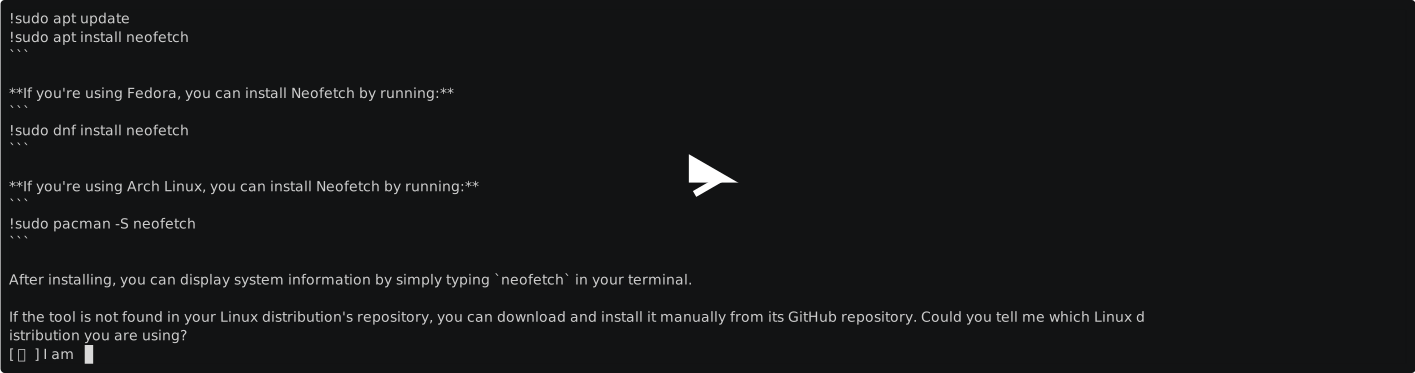
The idea of tshoot is quite simple, by running the command tshoot you'll open a chat session with one of OpenAI's LLMs, you can dialogue with it and at the same time run commands by prefixing the line with !, the command will be executed on your local machine and the output will be displayed in the chat and added to the conversation history.
The main idea is to have a quick way to have your troubleshooting workflow overseen by an AI, potentially retrieving the information you need to solve your problem without any context switch, directly in your terminal.
The philosophy behind this project is to create a tool that should have minimal dependencies and should be easy to install and ready to use.
Installation
You can install tshoot with pip:
pip install tshoot
Development Setup
The project is packaged and shipped with Hatch. The following scripts are installed in your virtual environment:
hatch run docs-buildhatch run docs-servehatch run linthatch run lint-checkhatch run testhatch run test-cov-xml
Run unit tests
You can run all the tests with:
hatch run test
Format the code
Execute the following command to apply linting and check typing:
hatch run lint
Serve the documentation
You can serve the Mkdocs documentation with:
hatch run docs-serve
It'll automatically watch for changes in your code.
Contributing
Every contribution that is in synch with the package philosofy is more than welcome, feel free to open an issue or submit a pull request.
License
This project is licensed under the terms of the MIT license.
Release history Release notifications | RSS feed

Download files
Download the file for your platform. If you're not sure which to choose, learn more about installing packages.
Source Distribution
Built Distribution
Filter files by name, interpreter, ABI, and platform.
If you're not sure about the file name format, learn more about wheel file names.
Copy a direct link to the current filters
File details
Details for the file tshoot-0.1.0.tar.gz.
File metadata
- Download URL: tshoot-0.1.0.tar.gz
- Upload date:
- Size: 8.4 kB
- Tags: Source
- Uploaded using Trusted Publishing? No
- Uploaded via: python-httpx/0.25.1
File hashes
| Algorithm | Hash digest | |
|---|---|---|
| SHA256 |
4edd20c4776f26ebc57bc77d607ff128bd9df336fbfd05633e4ba281a56d1d93
|
|
| MD5 |
4e5867613e53172bb0920422b85d4b2b
|
|
| BLAKE2b-256 |
121437923bd4c2855a4785f7eb1de81088b95ef6a757303749462b14dcd98d82
|
File details
Details for the file tshoot-0.1.0-py3-none-any.whl.
File metadata
- Download URL: tshoot-0.1.0-py3-none-any.whl
- Upload date:
- Size: 11.0 kB
- Tags: Python 3
- Uploaded using Trusted Publishing? No
- Uploaded via: python-httpx/0.25.1
File hashes
| Algorithm | Hash digest | |
|---|---|---|
| SHA256 |
e4cfc3d26d8f82128325c20084a78b2dadc588bd78a4a309cf3f6eb7692ca58d
|
|
| MD5 |
a506cf61b78649c868fbed70cd056b5b
|
|
| BLAKE2b-256 |
5f1a199165b9f29437eb2c8f00796e3772ae9745493da542923f5333e50d3e58
|






