




TSProto
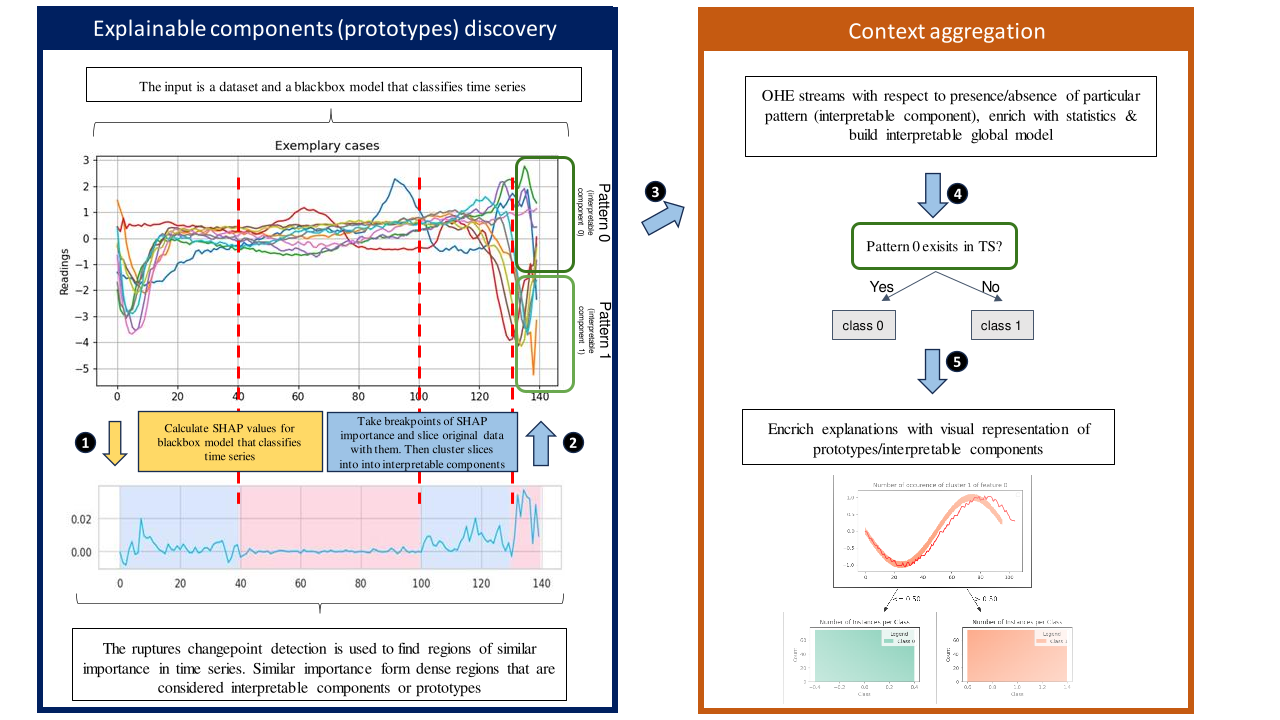
Post-host prototype-based explanations with rules for time-series classifiers.
Key features:
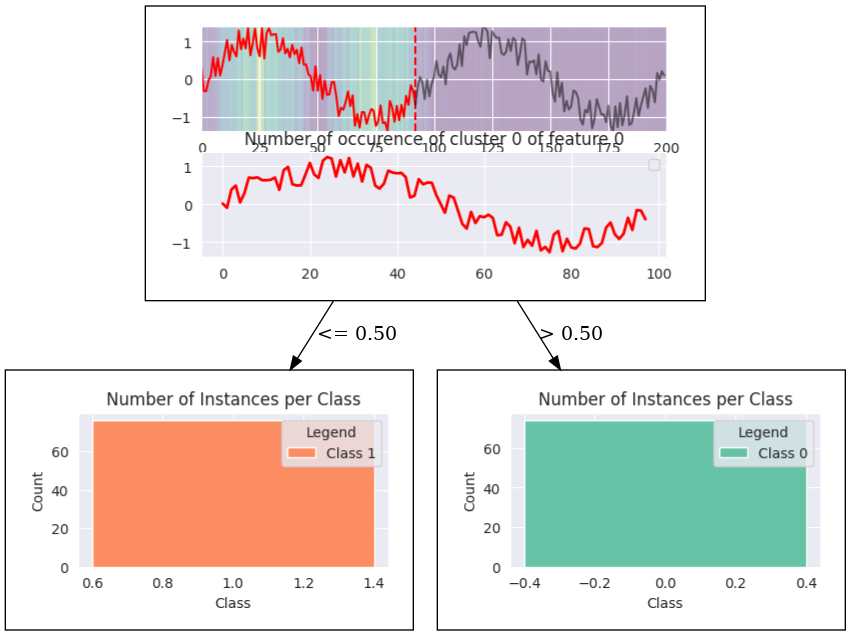
- Extracts interpretable prototype for any black-box model and creates a decision tree, where each node is constructed from the visual prototype
- Integrated with SHAP explainer, as a backbone for extraction of interpretable components (However, SHAP can be replaced with any other feature-importance method)
Install
TSProto can be installed from either PyPI or directly from source code from this repository.
To install form PyPI:
pip install tsproto
To install from source code:
git clone https://github.com/sbobek/tsproto
cd tsproto
pip install .
Usage
For full examples on two illustrative cases go to:
- Example of extracting sine wave prototype and explaining class with existence ora absence of a prototype: Jupyter Notebook
- Example of extracting sine wave as a prototype end explaining class by difference in frequency of a prototype Jupyter Notebook
The basic usage of the TSProto assuming you have your model trained is straightforward:
from tsproto.models import *
from tsproto.utils import *

#assuming that trainX, trainy and model are given

pe = PrototypeEncoder(clf, n_clusters=2, min_size=50, method='dtw',
                      descriptors=['existance'],
                      jump=1, pen=1,multiplier=2,n_jobs=-1,
                      verbose=1)

trainX, shapclass = getshap(model=model, X=trainX, y=trainy,shap_version='deep',
                        bg_size = 1000,  absshap = True)

#The input needs to be a 3D vector: number of samples, lenght of time-series, number of dimensions (features)
trainXproto = train.reshape((trainX.shape[0], trainX.shape[1],1))
shapclassXproto = shapclass.reshape((shapclass.shape[0], shapclass.shape[1],1))

ohe_train, features, target_ohe,weights = pe.fit_transform(trainXproto,shapclassXproto)

im  = InterpretableModel()
acc,prec,rec,f1,interpretable_model = im.fit_or_predict(ohe_train, features,
                        target_ohe,
                        intclf=None, # if intclf is given, the funciton behaves as predict,
                        verbose=0, max_depth=2, min_samples_leaf=0.05,
                        weights=None)
After the Interpretable model has been created it now can be visualised.
# Visualize model
from  tsproto.plots import *

ds_final = ohe_train.copy()
dot = export_decision_tree_with_embedded_histograms(decision_tree=interpretable_model,
                                              dataset=ds_final,
                                              target_name='target',
                                              feature_names=features,
                                              filename='synthetic',
                                              proto_encoder=pe, figsize=(6,3))

from IPython.display import SVG, Image
Image('synthetic.png')
Cite this work
More details on how the TSProto works and evaluation benchmarks can eb found in the following paper:
Comming soon
1 maintainer

Metadata
1 maintainer
Release files for tsproto 0.3.0
For a detailed explanation of source distributions (sdists) and built distributions (wheels), please see the package formats documentation.
Source distribution (sdist)
| File | Size | Uploaded | Provenance | Actions |
|---|---|---|---|---|
| tsproto-0.3.0.tar.gz | 24.4 kB | Without provenance | Details for tsproto-0.3.0.tar.gz |
Built distribution (wheel)
| File | Interpreter | ABI | Platform | Actions Reset |
|---|---|---|---|---|
| tsproto-0.3.0-py3-none-any.whl | Python 3 | none | any | Details for tsproto-0.3.0-py3-none-any.whl |
Total release size: 47.9 kB
Release files / tsproto-0.3.0.tar.gz
| Download URL | tsproto-0.3.0.tar.gz |
|---|---|
| Size | 24.4 kB |
| Tags | Source |
|
SHA-256 checksum How to use checksums |
6d96839062861057c43e841c9bdada95bcb31c0345abcd0c361114cd64a50257
|
|
BLAKE2b-256 checksum How to use checksums |
eeb64841ba486575aae106634e6ff7d5a95270541496a658d732ea5d4e3ad596
|
| Upload date | |
|
Uploaded using Trusted Publishing? What is trusted publishing? |
No |
| Uploaded via |
twine/5.0.0 CPython/3.12.1
|
Release files / tsproto-0.3.0-py3-none-any.whl
| Download URL | tsproto-0.3.0-py3-none-any.whl |
|---|---|
| Size | 23.5 kB |
| Tags | Python 3 |
|
SHA-256 checksum How to use checksums |
629dac189813233cf949c4ca42619ba8c01deb44878205f75e4bd84be2e89f06
|
|
BLAKE2b-256 checksum How to use checksums |
22588f80e888cfbcd8439838bd39a0b93921b4853030dafd9edd6e4986ff0600
|
| Upload date | |
|
Uploaded using Trusted Publishing? What is trusted publishing? |
No |
| Uploaded via |
twine/5.0.0 CPython/3.12.1
|
Security for tsproto 0.3.0
Provenance
Provenance describes where a file came from. On PyPI, provenance is shared via attestations, which provide a verifiable record of the build or publishing details. View details, limitations and caveats.
No provenance found
None of the files in this release were uploaded with provenance metadata.
A note on package security
PyPI is a repository for distributing packages, not a service for auditing them. While third-party security researchers and our staff do their best to detect and remove malicious packages, PyPI cannot guarantee the quality, security or suitability of any given package.
To learn more about protecting yourself from malicious actors, visit our package security documentation.














