
Pure-Python functional simulator for tt-lang kernels (no Tenstorrent hardware required)
Verified details
These details have been verified by PyPIProject links
GitHub Statistics
Maintainers

Project description



A Python-based Domain-Specific Language (DSL) for authoring high-performance custom kernels on Tenstorrent hardware. This project is under active development — see the functionality matrix for current simulator and compiler support.
Contents: Vision · Quick Start · Documentation · Contributing · Support · License
1. Vision
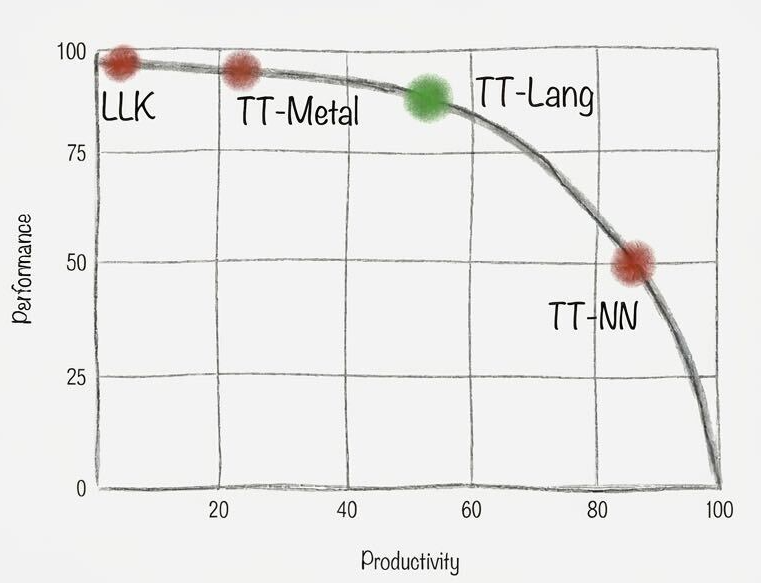
TT-Lang joins the Tenstorrent software ecosystem as an expressive yet ergonomic middle ground between TT-NN and TT-Metalium, aiming to provide a unified entrypoint with integrated simulation, performance analysis, and AI-assisted development tooling.
The language is designed to support generative AI workflows and a robust tooling ecosystem: Python as the host language enables AI tools to translate GPU DSL kernels (Triton, CUDA, cuTile, TileLang) to Tenstorrent hardware more reliably than direct TT-Metalium translation, while tight integration with functional simulation will allow AI agents to propose kernel implementations, validate correctness, and iterate on configurations autonomously. Developers should be able to catch errors and performance issues in their IDE rather than on hardware, with a functional simulator to surface bugs early. Line-by-line performance metrics and data flow graphs can guide both programmers and AI agents to easily spot bottle necks and optimization opportunities.
Tenstorrent developers today face a choice between TT-NN which provides high-level operations that are straightforward to use but lack the expressivity needed for custom kernels and TT-Metalium which provides full hardware control through explicit low-level management of memory and compute. This is not a shortcoming of TT-Metalium; it is designed to be low-level and expressive, providing direct access to hardware primitives without abstraction overhead, and it serves its purpose well for developers who need that level of control. The problem is that there is no middle ground where the compiler handles what it does best—resource management, validation, optimization—while maintaining high expressivity for application-level concerns.
TT-Lang bridges this gap through progressive disclosure: simple kernels require minimal specification where the compiler infers compute API operations, NOC addressing, DST register allocation and more from high-level abstractions, while complex kernels allow developers to open the hood and craft pipelining and synchronization details directly. The primary use case is kernel fusion for model deployment. Engineers porting models through TT-NN quickly encounter operations that need to be fused for performance or patterns that TT-NN cannot express, and today this requires rewriting in TT-Metalium which takes weeks and demands undivided attention and hardware debugging expertise. TT-Lang makes this transition fast and correct: a developer can take a sequence of TT-NN operations, express the fused equivalent with explicit control over intermediate results and memory layout, validate correctness through simulation, and integrate the result as a drop-in replacement in their TT-NN graph.
2. Quick Start
2.1 Install from PyPI
We provide two tt-lang packages: the tt-lang package includes the tt-lang compiler, Tenstorrent hardware support and depends on the ttnn, pytorch and several smaller python packages, while tt-lang-sim includes only the functional simulator (no compiler or hardware support) and does not depend on ttnn.
First, create an isolated Python environment (venv, conda, etc.) with Python 3.11 or later (python3.12 recommended). For example:
python3 -m venv --prompt ttlang ttlang-venv
source ttlang-venv/bin/activate
On linux machines with Tenstorrent hardware (Linux x86_64 / aarch64):
pip install tt-lang
tt-lang-setup                     # install matching sfpi runtime + copy tutorials
Functional simulator-only on Linux or MacOS, does not require Tenstorrent hardware:
pip install tt-lang-sim
tt-lang-setup                    # copy bundled tutorials to ./tutorials/
tt-lang-setup is idempotent (can be run multiple times without accumulating side effects).
It does two things, both inside the venv (no sudo):
- Downloads the sfpi compiler that pairs with the installed
ttnnand extracts it under<venv>/.../ttnn/runtime/sfpi/(fortt-langinstallation only). - Copies bundled tutorials (
elementwise,matmul,broadcast) to./tutorials/.
For finer control: tt-lang-setup-host runs only the sfpi step, tt-lang-setup-tutorials -t <DIR> only the tutorials copy.
Run a tutorial example:
ttlang-sim tutorials/elementwise/step_4_multinode_grid_auto.py    # simulated (no compilation, runs on CPU)
python tutorials/elementwise/step_4_multinode_grid_auto.py        # compiles and runs on hardware
To develop tt-lang itself or debug the compiler, use the Docker images below or build from source.
2.2 Pre-built Docker images
TT-Lang is also usable through Docker images for both users and developers. Two images are available:
| Image | Purpose | Preinstalled tt-lang (including ttlang-sim) |
Can clone/build tt-lang? |
|---|---|---|---|
 "dist" |
Run tt-lang programs using ttlang-sim or Tenstorrent hardware |
Yes | No |
 "ird" |
Develop and build tt-lang from source | No | Yes |
Both images can be used with ird reserve (see container build docs for details).
2.3  Pre-built tt-lang (for users)
Image: ghcr.io/tenstorrent/tt-lang/tt-lang-dist-ubuntu-22-04:latest (all versions)
The dist image contains a single, fully built tt-lang installation in /opt/ttlang-toolchain. Use it to compile and run any tt-lang program without building any of the prerequisites.
⚠️ Important: Do not attempt to build tt-lang inside a dist container — it has no build toolchain. To clone and build tt-lang yourself, use the ird image instead.
Create the container (one-time):
docker run -d --name $USER-dist \
  --device=/dev/tenstorrent/0:/dev/tenstorrent/0 \
  -v /dev/hugepages:/dev/hugepages \
  -v /dev/hugepages-1G:/dev/hugepages-1G \
  -v $HOME:$HOME \
  ghcr.io/tenstorrent/tt-lang/tt-lang-dist-ubuntu-22-04:latest \
  sleep infinity
Open a shell:
docker exec -it $USER-dist /bin/bash
The environment activates automatically on login. Run an example immediately:
python /opt/ttlang-toolchain/examples/elementwise-tutorial/step_4_multinode_grid_auto.py
To learn more, take a tour, explore the programming guide for compiler options, debugging, and performance tools, or use Claude Code with the built-in slash commands to translate kernels, profile, and optimize.
2.4  Development image (for building tt-lang)
Image: ghcr.io/tenstorrent/tt-lang/tt-lang-ird-ubuntu-22-04:latest (all versions)
The ird image has the pre-built toolchain (LLVM, tt-metal, Python venv) but does not include tt-lang itself. Clone the repository and build against the toolchain. You can maintain multiple clones or branches side by side, each with its own build directory.
To use directly with docker on your local linux machine, first create a container (one-time):
docker run -d --name $USER-ird \
  --device=/dev/tenstorrent/0:/dev/tenstorrent/0 \
  -v /dev/hugepages:/dev/hugepages \
  -v /dev/hugepages-1G:/dev/hugepages-1G \
  -v $HOME:$HOME \
  -v $SSH_AUTH_SOCK:/ssh-agent -e SSH_AUTH_SOCK=/ssh-agent \
  ghcr.io/tenstorrent/tt-lang/tt-lang-ird-ubuntu-22-04:latest \
  sleep infinity
Open a shell:
docker exec -it $USER-ird /bin/bash
Inside the container, clone and build:
git clone https://github.com/tenstorrent/tt-lang.git
cd tt-lang
cmake -G Ninja -B build -DTTLANG_USE_TOOLCHAIN=ON
source build/env/activate
cmake --build build
Verify the build:
ninja -C build check-ttlang-all
Run an example:
python examples/elementwise-tutorial/step_4_multinode_grid_auto.py
The -DTTLANG_USE_TOOLCHAIN=ON flag tells CMake to use the pre-built LLVM and tt-metal from /opt/ttlang-toolchain instead of building them from source, which saves significant build time.
Performance tracing (Tracy) is enabled by default. To disable it, add -DTTLANG_ENABLE_PERF_TRACE=OFF to the cmake configure command. See the programming guide for profiling usage.
2.5 Building without Docker
To build tt-lang directly on a host machine without Docker, see the build system documentation. It covers prerequisites, all supported build modes (from submodules, reusable toolchain, pre-built toolchain), and version compatibility.
2.6 Container Tips
To map a different TT device, change the --device argument (e.g., --device=/dev/tenstorrent/1:/dev/tenstorrent/0).
2.7 Functional Simulator
tt-lang includes a functional simulator that runs kernels as pure Python, without requiring Tenstorrent hardware or the full compiler stack. Use it to validate kernel logic and debug with any Python debugger:
ttlang-sim examples/eltwise_add.py
The simulator typically supports more language features than the compiler at any given point — see the functionality matrix for current coverage. See the programming guide for debugger setup and details.
3. Documentation
Full documentation is built with Sphinx. The source lives in docs/sphinx/ and covers:
- Tour of TT-Lang — an introduction to TT-Lang features
- Programming Guide — compiler options, print debugging, performance tools
- Functional Simulator — run kernels without hardware, debugging setup
- Claude Skills — AI-assisted kernel translation, profiling, and optimization via Claude Code
- Build System — build configuration, toolchain modes, and version compatibility
- Testing — how to write and run tests
- Contributor Guide — workflow, validation, adding new ops
To build and view the Sphinx docs locally:
cmake -G Ninja -B build -DTTLANG_ENABLE_DOCS=ON
cmake --build build --target ttlang-docs
python -m http.server 8000 -d build/docs/sphinx/_build/html
4. Contributing
We welcome contributions. Please see CONTRIBUTING.md for guidelines.
4.1 Developer Guidelines
See the Sphinx contributor guide and code style guidelines for coding standards, dialect design patterns, and testing practices.
4.2 Updating Submodule Versions
tt-mlir defines the compatible versions of LLVM and tt-metal. When updating tt-mlir, the other submodules should be updated to match.
Update tt-mlir (and read the versions it expects):
cd third-party/tt-mlir && git fetch && git checkout <commit> && cd ../..

# Read the LLVM and tt-metal commits that this tt-mlir version expects:
grep LLVM_PROJECT_VERSION third-party/tt-mlir/env/CMakeLists.txt
grep TT_METAL_VERSION third-party/tt-mlir/third_party/CMakeLists.txt
Update LLVM to the compatible version:
cd third-party/llvm-project && git fetch && git checkout <llvm-sha> && cd ../..
Update tt-metal to the compatible version. The canonical tt-metal version
lives in third-party/tt-metal-version (a tt-metal release tag, e.g.
v0.69.0); see build.md for the
full list of artifacts derived from it. Edit the file and run the verifier
in update mode to check out the submodule at the matching commit:
echo v0.69.0 > third-party/tt-metal-version
.github/scripts/check-tt-metal-version.sh --update
Commit all submodule updates together:
git add third-party/tt-mlir third-party/llvm-project third-party/tt-metal \
        third-party/tt-metal-version pyproject.toml
git commit -m "Update submodules to tt-mlir <commit>"
The build system verifies SHA compatibility during configure. If submodule versions are intentionally mismatched, pass -DTTLANG_ACCEPT_LLVM_MISMATCH=ON or -DTTLANG_ACCEPT_TTMETAL_MISMATCH=ON to suppress the check.
4.3 Code Formatting with Pre-commit
tt-lang uses pre-commit to format code and enforce style guidelines before commits.
Install and activate:
pip install pre-commit
cd /path/to/tt-lang
pre-commit install
Pre-commit runs automatically on git commit. It formats Python code with Black, C++ code with clang-format (LLVM style), removes trailing whitespace, and checks YAML/TOML syntax.
If pre-commit modifies files, the commit is stopped. Stage the changes and commit again:
git add -u
git commit -m "Your commit message"
To run manually on all files: pre-commit run --all-files
4.4 Code of Conduct
This project adheres to a Code of Conduct. By participating, you are expected to uphold this code and treat all community members with respect.
5. Support
- GitHub Issues — report bugs or request features
6. License
This project is licensed under the Apache License 2.0 — see the LICENSE file for details.
Third-party dependencies and their licenses are listed in the NOTICE file.
Project details
Verified details
These details have been verified by PyPIProject links
GitHub Statistics
Maintainers
Release history Release notifications | RSS feed

Download files
Download the file for your platform. If you're not sure which to choose, learn more about installing packages.
Source Distributions
Built Distribution
Filter files by name, interpreter, ABI, and platform.
If you're not sure about the file name format, learn more about wheel file names.
Copy a direct link to the current filters
File details
Details for the file tt_lang_sim-1.0.6-py3-none-any.whl.
File metadata
- Download URL: tt_lang_sim-1.0.6-py3-none-any.whl
- Upload date:
- Size: 158.4 kB
- Tags: Python 3
- Uploaded using Trusted Publishing? Yes
- Uploaded via: twine/6.1.0 CPython/3.13.12
File hashes
| Algorithm | Hash digest | |
|---|---|---|
| SHA256 |
422213664e938699c8e1c3ad331b1453fbb41b6e4475ff513820593c5643542c
|
|
| MD5 |
a6fb5d8bdc06c6fe38aeb781080a9ffe
|
|
| BLAKE2b-256 |
00a4fcff80031784cdc8ff42029cc868a08c3c2627053eb7d2c44088d69f9fb9
|
Provenance
The following attestation bundles were made for tt_lang_sim-1.0.6-py3-none-any.whl:
Publisher:
publish-pypi.yml on tenstorrent/tt-lang
-
Statement:
-
Statement type:
https://in-toto.io/Statement/v1 -
Predicate type:
https://docs.pypi.org/attestations/publish/v1 -
Subject name:
tt_lang_sim-1.0.6-py3-none-any.whl -
Subject digest:
422213664e938699c8e1c3ad331b1453fbb41b6e4475ff513820593c5643542c - Sigstore transparency entry: 1524422452
- Sigstore integration time:
-
Permalink:
tenstorrent/tt-lang@6946552f8ea42fff739f2c202223412ac4c94812 -
Branch / Tag:
refs/tags/v1.0.6 - Owner: https://github.com/tenstorrent
-
Access:
public
-
Token Issuer:
https://token.actions.githubusercontent.com -
Runner Environment:
github-hosted -
Publication workflow:
publish-pypi.yml@6946552f8ea42fff739f2c202223412ac4c94812 -
Trigger Event:
push
-
Statement type:






