







ttkbootstrap
Modern, themed tkinter — style any ttk widget with one keyword.
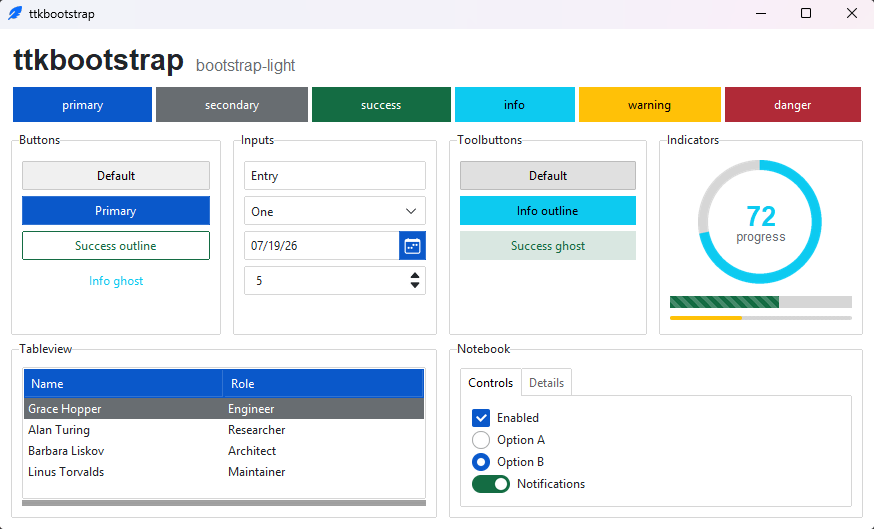
ttkbootstrap is a theming extension for tkinter. It generates flat,
Bootstrap-inspired light and dark themes on demand and adds a single bootstyle
keyword to every ttk widget, so you describe intent — "primary",
"success", "outline" — instead of hand-tuning colors or long ttk style
names.
Why ttkbootstrap
- 🎨 30 curated themes — fifteen families, each in a coordinated light and dark variant, that switch at runtime.
- ⌨️ One-keyword styling —
bootstyle="success",bootstyle="info outline",bootstyle="round toggle". The same keyword means the same thing on every widget. - 🧩 Batteries-included — styled ttk widgets plus a few extras (
Meter,DateEntry,Floodgauge,Tableview) and fully themed dialogs. - 🛠️ Your own themes & styles — a declarative
Theme(...)API and a public toolkit for building custom widget styles. - 🪶 Pure Python — one dependency (Pillow), Python 3.10+, no native extensions.
It's a styling layer for vanilla tkinter, not a new framework: the widgets stay tkinter's, and everything you already know about tkinter still applies.
Install
python -m pip install ttkbootstrap
Then see it running — this opens a window with every widget and a theme picker:
ttkb demo
Quickstart
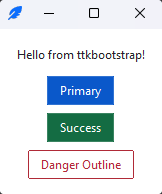
import ttkbootstrap as ttk

app = ttk.App(title="Hello")

ttk.Label(app, text="Hello from ttkbootstrap!").pack(padx=16, pady=(16, 8))
ttk.Button(app, text="Primary", bootstyle="primary").pack(padx=16, pady=4)
ttk.Button(app, text="Success", bootstyle="success").pack(padx=16, pady=4)
ttk.Button(app, text="Danger Outline", bootstyle="danger outline").pack(padx=16, pady=(4, 16))

app.mainloop()
The bootstyle keyword
A bootstyle value is a small grammar — a color, plus an optional modifier
and widget type — and the same keyword carries the same meaning across widgets:
ttk.Button(app, bootstyle="success")
ttk.Progressbar(app, bootstyle="success")
ttk.Entry(app, bootstyle="success")
Add a modifier or a type for variants: "info outline", "success round toggle",
"warning striped". The vocabulary is closed, so a typo fails loudly instead of
silently doing nothing. See the
bootstyle grammar
for the full reference.
Themes
Thirty curated light and dark themes, switchable at runtime:
app.theme_use("bootstrap-dark")   # any theme by name
app.toggle_theme()                # flip light <-> dark
Browse them in the themes gallery.
Design your own with the bundled editor — pick colors, preview them on live
widgets, and export a Theme(...) snippet for your app:
ttkb creator
Command line
Installing ttkbootstrap installs ttkb:
| Command | What it does |
|---|---|
ttkb version |
Print the installed version |
ttkb demo |
Open the widget demo |
ttkb convert-theme <file> |
Convert a 1.x theme file to the 2.x Theme(...) form |
ttkb creator |
Open ttkcreator, the theme designer |
See the command-line reference.
Documentation
- Documentation — guides, the widget catalog, and the API reference.
- Build your first app — a step-by-step walkthrough.
- Migrating to 2.0 — upgrading from 1.x.
- Release notes — what changed in each version.
Upgrading from 1.x
2.0 is a cleanup-and-consolidation release with some breaking changes — a canonical
bootstyle grammar, a new theme catalog, and App alongside Window. Most code
keeps working: legacy theme names and older spellings are accepted with a
deprecation warning. The
Migrating to 2.0
guide sorts every change into breaking / deprecated / notable / new.
Custom themes moved out of the package and into your own code. To bring one forward, convert the file 1.x saved:
ttkb convert-theme user.py -o brand.py
Icons
ttkbootstrap ships with the full Bootstrap Icons
set (2,000+ glyphs), rendered from a bundled font — theme-following, crisp at any
size, and no extra dependency. Add one with the icon= keyword:
ttk.Button(app, text="Settings", icon="gear-fill", bootstyle="primary")
Need other icon families — Font Awesome, Material, Lucide, and more? The tkinter-icons extension adds sixteen icon sets (61,000+ icons) alongside the built-in set.
Contributing
Contributions are welcome — please check out our contributing guidelines.
Support
This project is proudly developed with the support of the PyCharm IDE, generously provided by JetBrains.

© 2025 JetBrains s.r.o. JetBrains and the JetBrains logo are registered trademarks of JetBrains s.r.o.
1 maintainer

Metadata
1 maintainer
Release files for ttkbootstrap 2.2.4
For a detailed explanation of source distributions (sdists) and built distributions (wheels), please see the package formats documentation.
Source distribution (sdist)
| File | Size | Uploaded | Provenance | |
|---|---|---|---|---|
| ttkbootstrap-2.2.4.tar.gz | 604.6 kB | With provenance | Details |
Built distribution (wheel)
| File | Interpreter | ABI | Platform | Reset |
|---|---|---|---|---|
| ttkbootstrap-2.2.4-py3-none-any.whl | Python 3 | none | any | Details |
Total release size: 1.2 MB
Release files / ttkbootstrap-2.2.4.tar.gz
| Download URL | ttkbootstrap-2.2.4.tar.gz |
|---|---|
| Size | 604.6 kB |
| Tags | Source |
|
SHA-256 checksum How to use checksums |
3b45b6599a232e9392f56b25ea5304a4fc41ffcd3516d63cbcdd94601e87aa92
|
|
BLAKE2b-256 checksum How to use checksums |
a502c6c92e2a9c1f7b7c8c8304a63742bba1191bba3d143938992736b0758e37
|
| Upload date | |
|
Uploaded using Trusted Publishing? What is trusted publishing? |
Yes |
| Uploaded via |
twine/7.0.0 CPython/3.13.14
|
Provenance
Provenance describes where a file came from. On PyPI, provenance is shared via attestations, which provide a verifiable record of the build or publishing details. View details, limitations and caveats.


PyPI Publish Attestation
PyPI verified that this artifact, at this checksum, originated from the publisher listed below.
Signed by GitHub Actions, verified by PyPI on Oct 24, 2026.
Transparency logRelease files / ttkbootstrap-2.2.4-py3-none-any.whl
| Download URL | ttkbootstrap-2.2.4-py3-none-any.whl |
|---|---|
| Size | 553.5 kB |
| Tags | Python 3 |
|
SHA-256 checksum How to use checksums |
9fb4130012e615fa2b57d61807f76d634b50c1acf8382c13bae42b40bdd54758
|
|
BLAKE2b-256 checksum How to use checksums |
052bfc5df3cccdd5d1dff2c1b2aefe1980d557a886d5b86b6076aedb45bd7b84
|
| Upload date | |
|
Uploaded using Trusted Publishing? What is trusted publishing? |
Yes |
| Uploaded via |
twine/7.0.0 CPython/3.13.14
|
Provenance
Provenance describes where a file came from. On PyPI, provenance is shared via attestations, which provide a verifiable record of the build or publishing details. View details, limitations and caveats.
PyPI Publish Attestation
PyPI verified that this artifact, at this checksum, originated from the publisher listed below.
Signed by GitHub Actions, verified by PyPI on Oct 24, 2026.
Transparency logSecurity for ttkbootstrap 2.2.4
Provenance
Provenance describes where a file came from. On PyPI, provenance is shared via attestations, which provide a verifiable record of the build or publishing details. View details, limitations and caveats.
Full provenance
All 2 files in this release have been uploaded with provenance metadata.
Attestation for ttkbootstrap-2.2.4.tar.gz
PyPI Publish Attestation
PyPI verified that this artifact, at this checksum, originated from the publisher listed below.
Signed by GitHub Actions, verified by PyPI on Oct 24, 2026.
Transparency logA note on package security
PyPI is a repository for distributing packages, not a service for auditing them. While third-party security researchers and our staff do their best to detect and remove malicious packages, PyPI cannot guarantee the quality, security or suitability of any given package.
To learn more about protecting yourself from malicious actors, visit our package security documentation.














