
A Terminal-based Typing Test (TUI)

Project description
T.T. TUI - A Terminal Typing Test
T.T. TUI is a fast, lightweight, and feature-rich typing test application that runs entirely in your terminal. Inspired by the clean aesthetic and core functionality of Monkeytype, tttui provides a focused, distraction-free environment to practice your typing skills, track your progress, and compete against your own personal bests.
Features
- Multiple Test Modes: Practice with different challenges.
- Time: Type as much as you can in a set amount of time (15, 30, 60, 120 seconds).
- Words: Complete a specific number of words (10, 25, 50, 100).
- Quote: Type out a quote from the collection.
- High-Fidelity WPM Graph: Get a detailed, high-resolution line graph of your WPM over the course of the test, rendered beautifully with Unicode Braille.
- Personal Best Tracking:
tttuiautomatically saves your best score for every test combination (mode, duration, and language) and shows you how your current run compares. - Detailed Performance Stats: The results screen provides a clean, organized breakdown of your performance, including Net WPM, Raw WPM, accuracy, consistency, and character stats.
- Customization:
- Themes: Choose from a selection of built-in themes or easily create your own.
- Languages: Add new languages and wordlists simply by creating text files.
- Persistent Configuration: Your chosen theme, language, and all your personal bests are saved locally, so your experience is consistent every time you launch the app.
- Minimalist UI: A keyboard-driven, distraction-free interface that keeps you focused on the text.
Showcase
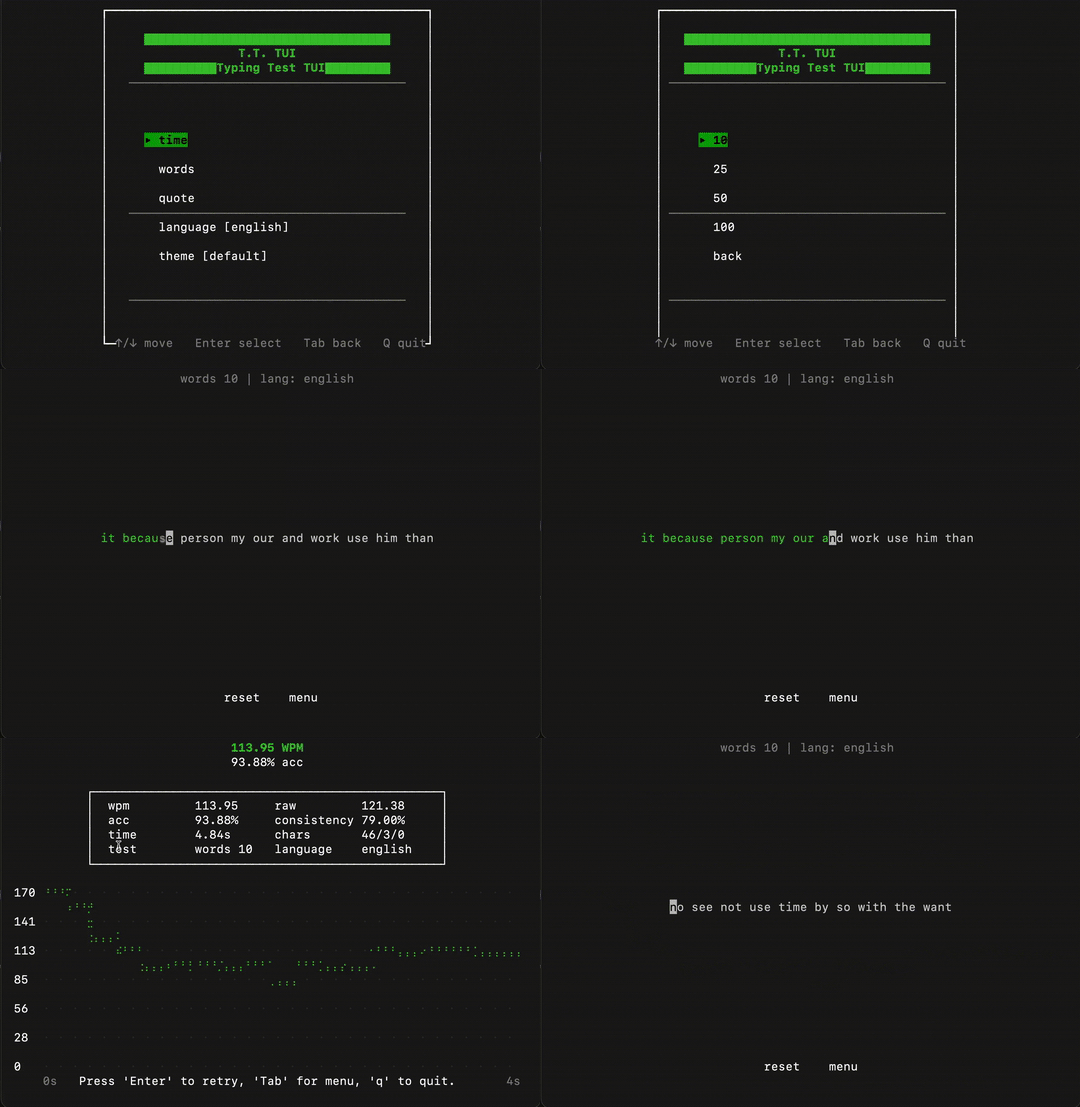
The Typing Interface
A clean and focused interface shows only what you need while typing. The text is displayed centrally, with minimal status information at the top.
https://github.com/user-attachments/assets/7af94392-fe44-4bfa-91f0-76f3f410ca1c
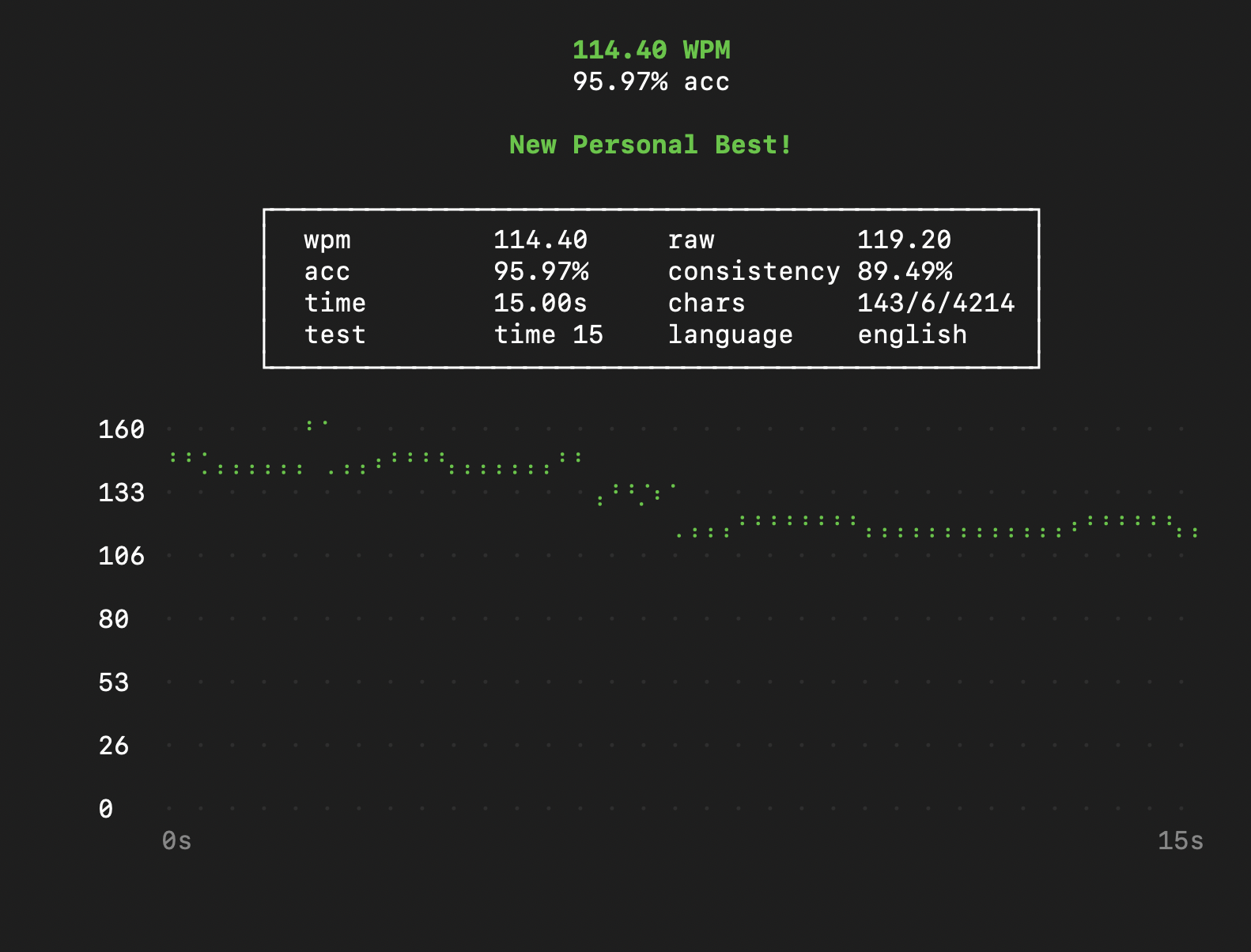
The Results Screen
After each test, you're presented with a detailed breakdown of your performance and a beautiful WPM graph. If you set a new record, you'll be celebrated!
Installation
tttui is designed to be simple to install and run.
Prerequisites
- Python 3
1. Clone the Repository
First, clone this repository to your local machine.
git clone https://github.com/reidoboss/tttui.git
cd tttui
2. Make the Script Executable
Give the launch script execute permissions.
chmod +x bin/tttui.sh
3. Run It!
You can now run the application directly.
./bin/tttui.sh
4. (Recommended) Install System-Wide
For the best experience, move the executable to a directory in your system's PATH. This allows you to run tttui from any terminal, anywhere on your system.
sudo mv bin/tttui.sh /usr/local/bin/tttui
Now you can simply open a terminal and type tttui to launch the application.
Usage
tttui is controlled entirely with the keyboard.
- Menu Navigation: Use the
UPandDOWNarrow keys orK/J(case-insensitive) to navigate menus andENTERto select. - Go Back: Press
TABto return to the main menu from a sub-menu. - In-Test Commands: During a test, press
TABto switch focus from the text area to the command bar at the bottom. Use the arrow keys andENTERtoresetthe test or return to themenu. - Quit: Press
qfrom the main menu or the results screen to quit the application.
Customization
You can easily add your own themes and languages.
Adding a Theme
-
Open
tttui/config.py. -
Add a new dictionary entry to the
THEMESdictionary. Follow the existing structure. You can use standard color names ("red","blue", etc.) or 256-color codes (integers0-255)."my_cool_theme": { "text_correct": ("green", -1), # (foreground, background) "text_incorrect": ("red", -1), "text_untyped": (244, -1), "caret": ("black", "white"), "menu_highlight": ("black", "cyan"), "menu_title": ("cyan", -1), },
A value of
-1for the background means it will be transparent. -
Launch
tttuiand select your new theme from the theme menu.
Adding a Language / Wordlist
- Find the
tttuiconfiguration directory on your system. The application will create it automatically on first run at~/.config/tttui/. - Inside that directory, you will find a
languagesfolder. - Simply add a new
.txtfile to this folder (e.g.,german.txt). The file should contain words separated by newlines. - The new language will automatically appear in the
languagemenu in the app.
Project Structure
tttui/
├── bin/
│   └── tttui.sh          # The main executable launch script.
├── tttui/
│   ├── __init__.py       # Main application loop and state management.
│   ├── __main__.py       # Entry point for running as a module.
│   ├── config.py         # Stores default themes and directory paths.
│   ├── game.py           # Core game logic, state resets, and result calculations.
│   ├── menu.py           # Handles menu navigation and logic.
│   ├── storage.py        # Manages loading/saving of configs, PBs, and language files.
│   └── ui.py             # All rendering logic (menus, test screen, results, graph).
└── README.md
License
This project is licensed under the MIT License.
Release history Release notifications | RSS feed

Download files
Download the file for your platform. If you're not sure which to choose, learn more about installing packages.
Source Distribution
Built Distribution
Filter files by name, interpreter, ABI, and platform.
If you're not sure about the file name format, learn more about wheel file names.
Copy a direct link to the current filters
File details
Details for the file tttui-1.0.3.tar.gz.
File metadata
- Download URL: tttui-1.0.3.tar.gz
- Upload date:
- Size: 18.4 kB
- Tags: Source
- Uploaded using Trusted Publishing? No
- Uploaded via: twine/6.2.0 CPython/3.14.0
File hashes
| Algorithm | Hash digest | |
|---|---|---|
| SHA256 |
7f5140e4f228a935658366404804e9df04e91d2b5d67ca0b8fd85ea3bc656972
|
|
| MD5 |
9f8034659d6c82afabacc823ef326a3b
|
|
| BLAKE2b-256 |
90e1e9fbf6a504594e241483f2bd1d6e39e912f9bbff1b9162550d913c4c32ed
|
File details
Details for the file tttui-1.0.3-py3-none-any.whl.
File metadata
- Download URL: tttui-1.0.3-py3-none-any.whl
- Upload date:
- Size: 18.0 kB
- Tags: Python 3
- Uploaded using Trusted Publishing? No
- Uploaded via: twine/6.2.0 CPython/3.14.0
File hashes
| Algorithm | Hash digest | |
|---|---|---|
| SHA256 |
aafae3cd85c09e263864952f45d01706ec0eb1bbecd36b6b517eac503e7f4e56
|
|
| MD5 |
644b412746c22852e83e0947bc669cb6
|
|
| BLAKE2b-256 |
0eff8c14da92690d98c41d5b5a06f9e2dae1af09092195cfdaebc066c4fc412e
|






