
[Pre]tty-HTML
[Pre]tty-html: (the logo reads as: 'pookie html') A minimalist python script to pretty print html docs to unix terminal. Pipe the output of html generators to tty-html, for a neat terminal render (than a hard to decode xml dump).


Usage
The program is intended to be just a simple Unix CLI utility. One can specify any html file as an input or pipe an html dump to the stdin of tty-html to get a readable pretty print.
# for detailed usage
$ tty-html --help
...

# format from an html file
$ tty-html index.html
...

# format from stdin
$ curl https://some-website.com/blog -s | tty-html
...
Installation
Easy! There're three ways
1. Compiled binary
head over to the release page and download the binary. make it executable. Thats it. (optionally add it to a bin path of your choice)
2. Using PIP
If you got pip, feel free to install using
pip install tty-html
3. Build from source
If you are nerdy enough, there is a Makefile :), get a c compiler, install python3 and cython, and go for the following commands in order
# transpile script to c
make

# compile the c
make compile
for detailed use case : make help :)
Usage Gallery
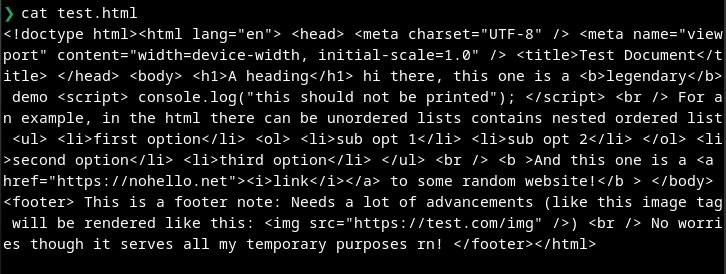
-
the raw html
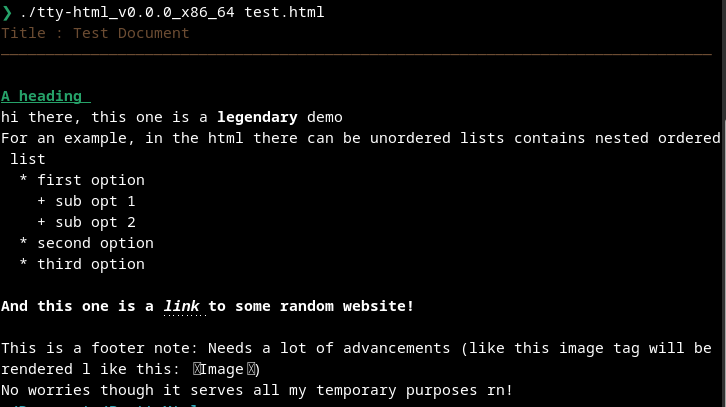
-
the formatted one
1 maintainer

Metadata
1 maintainer
Release files for tty-html 1.0.2
For a detailed explanation of source distributions (sdists) and built distributions (wheels), please see the package formats documentation.
Source distribution (sdist)
| File | Size | Uploaded | Provenance | Actions |
|---|---|---|---|---|
| tty_html-1.0.2.tar.gz | 43.4 kB | Without provenance | Details for tty_html-1.0.2.tar.gz |
Built distribution (wheel)
| File | Interpreter | ABI | Platform | Actions Reset |
|---|---|---|---|---|
| tty_html-1.0.2-py3-none-any.whl | Python 3 | none | any | Details for tty_html-1.0.2-py3-none-any.whl |
Total release size: 74.0 kB
Release files / tty_html-1.0.2.tar.gz
| Download URL | tty_html-1.0.2.tar.gz |
|---|---|
| Size | 43.4 kB |
| Tags | Source |
|
SHA-256 checksum How to use checksums |
1f83f59cdedf504d96ea76c781d6cc835ebb91a7af3a18dba3ab7f5e762f0a04
|
|
BLAKE2b-256 checksum How to use checksums |
124d8392d96d8882ba1b9ce3048216c467a8b9c3b11638de9857b7fd8da1a7f8
|
| Upload date | |
|
Uploaded using Trusted Publishing? What is trusted publishing? |
No |
| Uploaded via |
twine/6.0.1 CPython/3.11.11
|
Release files / tty_html-1.0.2-py3-none-any.whl
| Download URL | tty_html-1.0.2-py3-none-any.whl |
|---|---|
| Size | 30.6 kB |
| Tags | Python 3 |
|
SHA-256 checksum How to use checksums |
f11228766bda53d772de8aac893ea22b14186dfd6d55ecee17f18e9b761079fc
|
|
BLAKE2b-256 checksum How to use checksums |
6e7768f785dbf74243b8d5b45bcc07aa258c5e9c887766acd6e48201bf691495
|
| Upload date | |
|
Uploaded using Trusted Publishing? What is trusted publishing? |
No |
| Uploaded via |
twine/6.0.1 CPython/3.11.11
|
Security for tty-html 1.0.2
Provenance
Provenance describes where a file came from. On PyPI, provenance is shared via attestations, which provide a verifiable record of the build or publishing details. View details, limitations and caveats.
No provenance found
None of the files in this release were uploaded with provenance metadata.
A note on package security
PyPI is a repository for distributing packages, not a service for auditing them. While third-party security researchers and our staff do their best to detect and remove malicious packages, PyPI cannot guarantee the quality, security or suitability of any given package.
To learn more about protecting yourself from malicious actors, visit our package security documentation.













