
tuff-bird
Training logs as TensorBoard event files, and a live board that follows them.




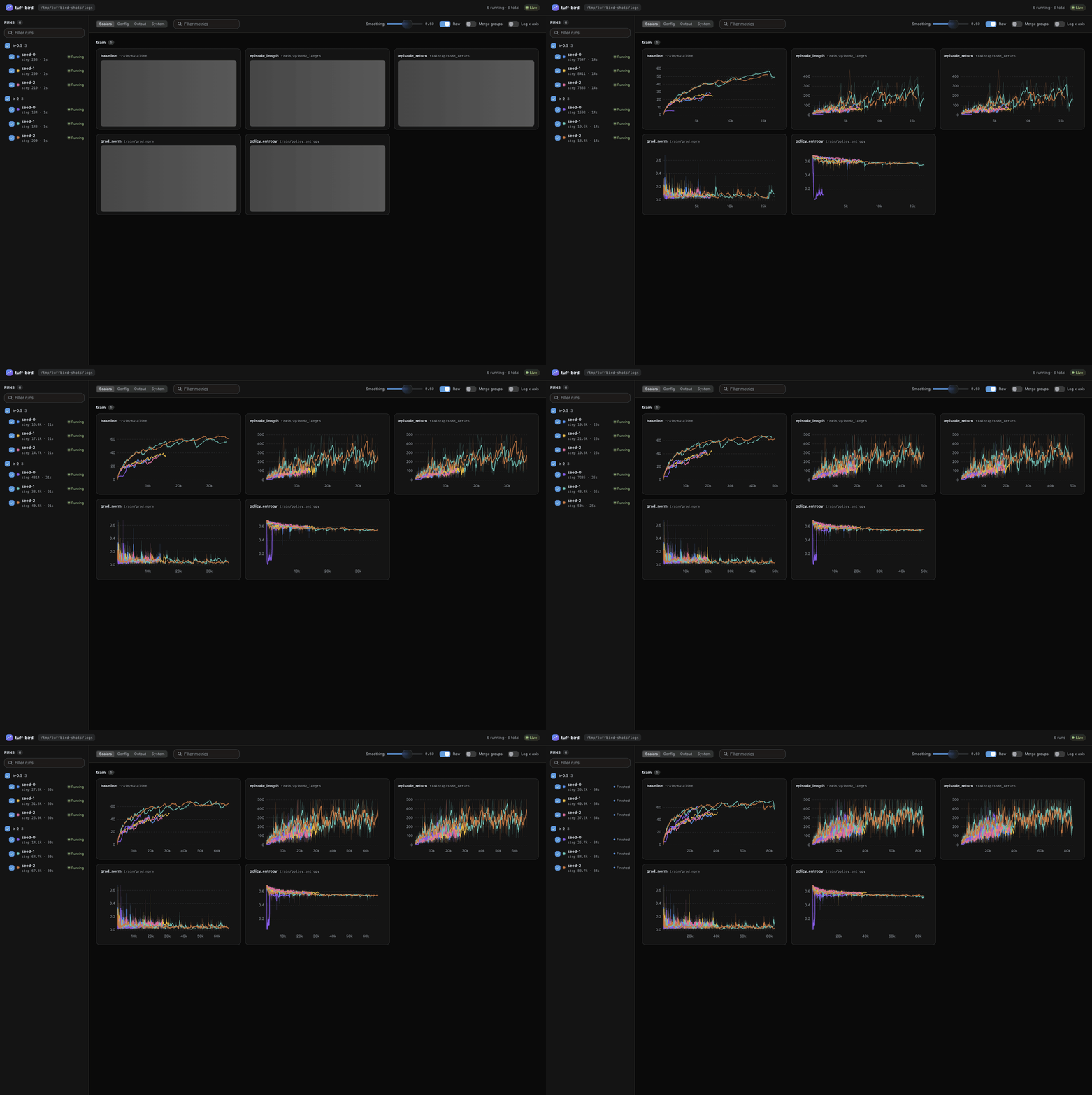
One call in a training script writes everything about the run into TensorBoard event files
under logs/: the metrics, the config, what the script prints, and the CPU, memory and GPU
it used. The same call starts a board in your browser that follows those files as they grow.
tensorboard --logdir logs opens the same files, and the board opens directories that
TensorBoard, tensorboardX or PyTorch wrote. The package has no dependencies.
Install
pip install tuff-bird
pip install "tuff-bird[system]"   # adds CPU and memory metrics, through psutil
Quick start
import tuffbird

run = tuffbird.init(logdir="logs", group="cartpole/lr-0.5", name="seed-0", config={"lr": 0.5, "gamma": 0.99})
for step in range(10_000):
    ...
    run.log({"train": {"loss": loss, "return": episode_return}}, step=step)
run.finish()
The first script to start opens the board at http://127.0.0.1:6066; scripts started later
join it, so a sweep of many processes shares one board. A run that ends with an exception is
marked failed, and one stopped with Ctrl-C is marked stopped. Under torch.distributed, only
rank 0 starts the board.
Code that already uses PyTorch's SummaryWriter changes only its import:
from tuffbird import SummaryWriter
The shim covers add_scalar, add_scalars, add_text, add_hparams, flush and close.
Try the demo
pip install "tuff-bird[system]"
curl -O https://raw.githubusercontent.com/talex-touch/tuff-bird/main/examples/cartpole.py
python cartpole.py
REINFORCE on CartPole in plain Python: two learning rates, three seeds each, six processes in parallel. It takes about 35 seconds.
The board
 |
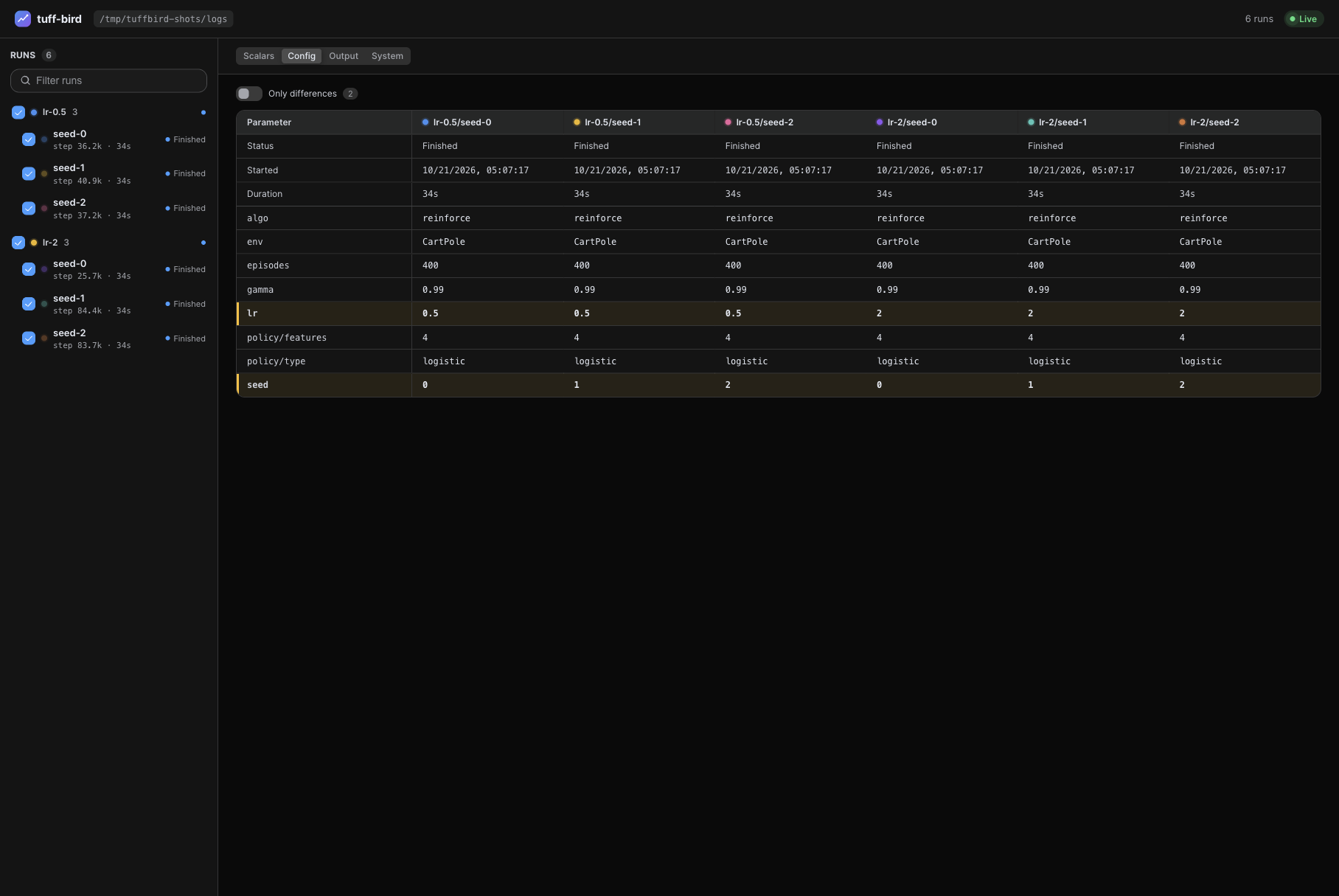 |
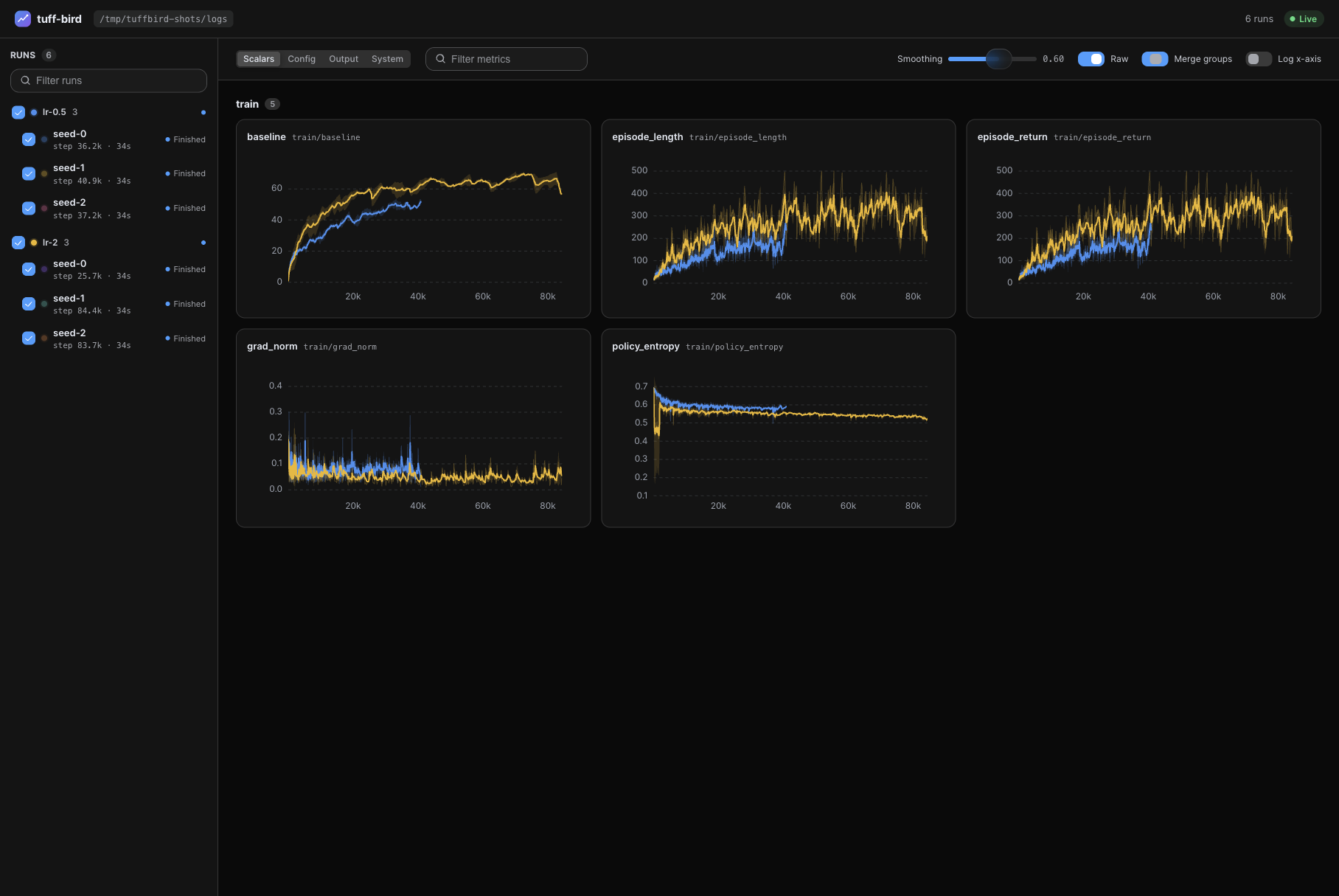
| Runs in one directory form a group. Merged, a group is drawn as its mean with a band for the spread of its runs. | The config of every run side by side, with the keys that differ marked. |
 |
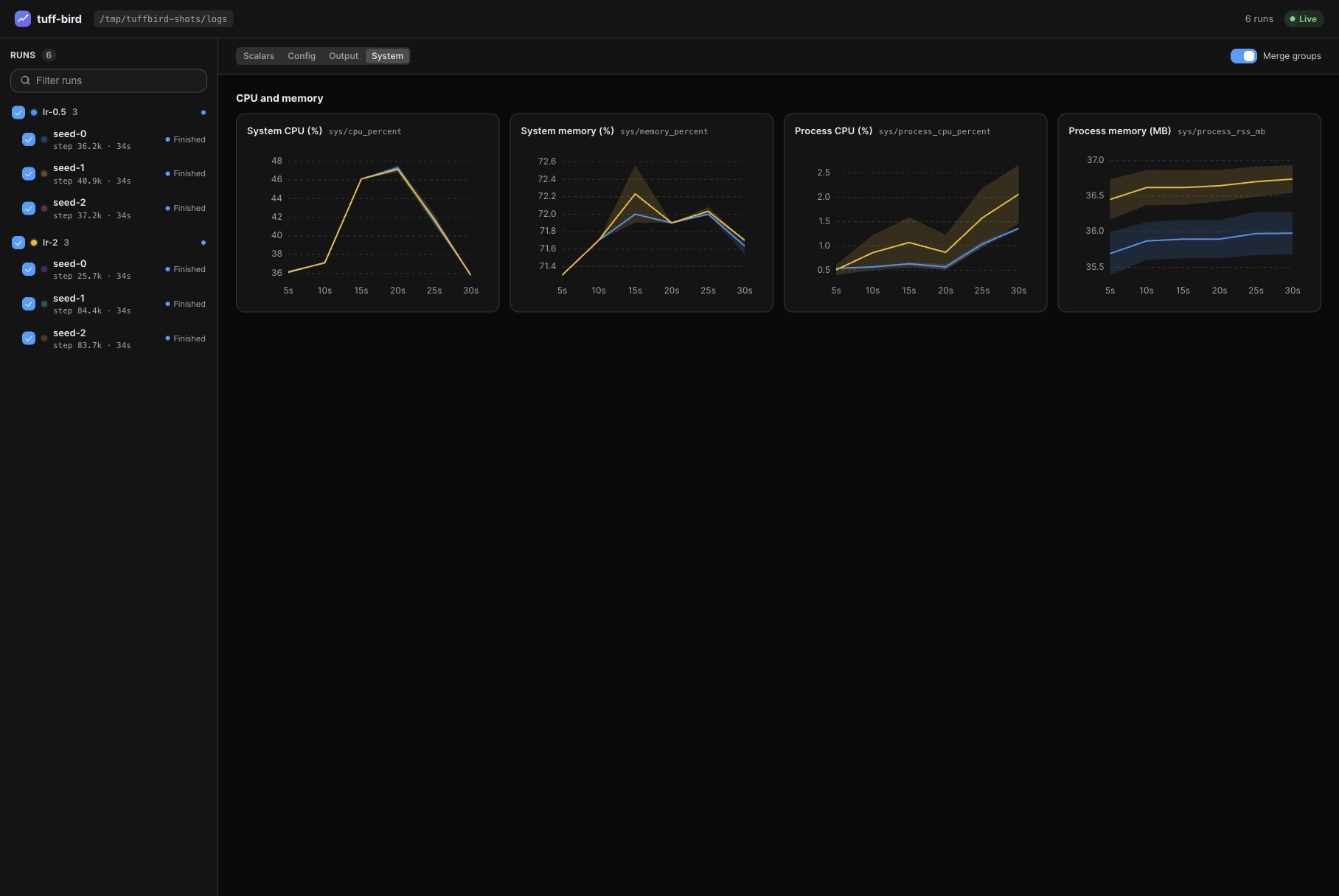 |
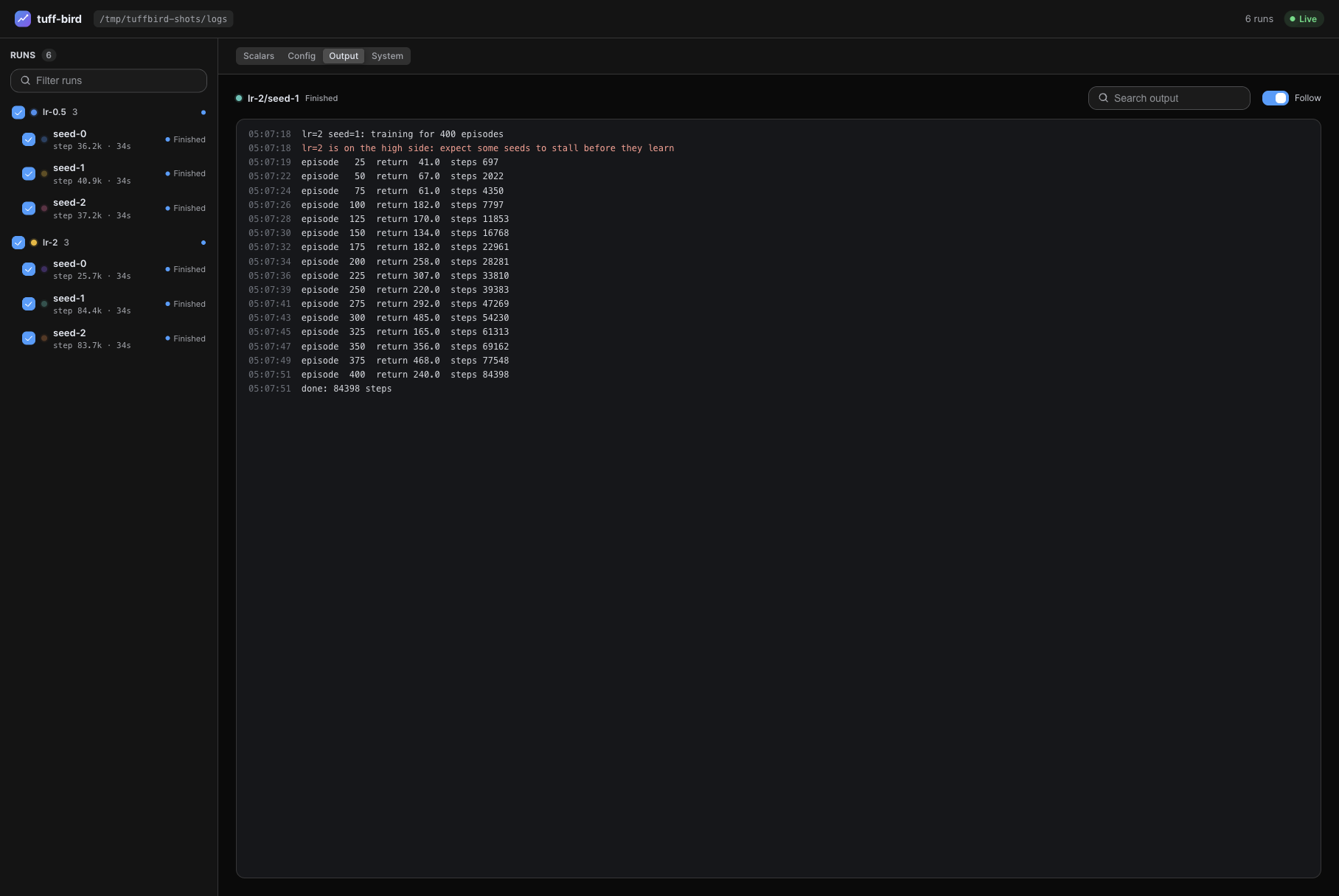
| What each run printed, stdout and stderr in order, searchable, following new lines. | CPU and memory of the training machine and process, and the GPUs that nvidia-smi reports. |
Charts smooth with an exponential moving average and can also show the raw values and a log x-axis. Drag across a chart to zoom in, and double-click it to zoom back out. The board follows the system's light or dark theme.
Training on another machine
Over SSH the board starts on the training machine and does not open a browser. Instead it prints the command that forwards its port to your own machine:
[tuffbird] board: http://127.0.0.1:6066  (logdir /data/logs)
[tuffbird] from your own machine: ssh -N -L 6066:127.0.0.1:6066 you@gpu-box  then open http://127.0.0.1:6066
The board has no login. It listens on 127.0.0.1 unless TUFFBIRD_BOARD_HOST says otherwise;
listening on another address shows your logs and config to anyone who can reach that port.
Command line and settings
tuff-bird board logs   # serve a log directory, including one TensorBoard wrote
tuff-bird stop logs    # stop the board serving it
| Variable | Effect |
|---|---|
TUFFBIRD_BOARD=0 |
Training scripts do not start the board. |
TUFFBIRD_OPEN_BROWSER=0 |
The board starts but no browser opens. |
TUFFBIRD_BOARD_PORT |
Port to try first (default 6066); the next free one is used when it is taken. |
TUFFBIRD_BOARD_HOST |
Address to listen on (default 127.0.0.1). |
How it works
- Event files. The writer frames records the way TFRecord does (length, CRC32C, data,
CRC32C) and encodes the
EventandSummaryprotobufs by hand, so neither TensorFlow nor protobuf is needed. Metrics are scalar summaries, printed output uses the text plugin, and the config is an HParams session, so TensorBoard's HParams tab lists the runs and groups them bygroup. - The board. A standard-library HTTP server reads each event file from where it stopped, and the page receives a snapshot followed by a stream of new points (server-sent events). The page is a Vue app built on TuffEx and ships inside the wheel.
- One board per log directory.
logs/.tuffbird/board.jsonrecords which board serves the directory. Scripts starting at the same moment agree on one of them to launch it, and the board keeps running after training ends untiltuff-bird stop.
Status
0.1 is an alpha. The board reads images and audio but does not show them yet; that and the rest of the plan are in the roadmap issues.
Development
cd web && pnpm install && pnpm build && cd ..   # builds the board page into src/tuffbird/board/static
pip install -e ".[dev,system]"
python -m pytest
uvx ruff check .
See CONTRIBUTING.md for the rest, including how a release is made.
License
1 maintainer

Metadata
1 maintainer
Release files for tuff-bird 0.1.1
For a detailed explanation of source distributions (sdists) and built distributions (wheels), please see the package formats documentation.
Source distribution (sdist)
| File | Size | Uploaded | Provenance | |
|---|---|---|---|---|
| tuff_bird-0.1.1.tar.gz | 238.3 kB | With provenance | Details |
Built distribution (wheel)
| File | Interpreter | ABI | Platform | Reset |
|---|---|---|---|---|
| tuff_bird-0.1.1-py3-none-any.whl | Python 3 | none | any | Details |
Total release size: 478.6 kB
Release files / tuff_bird-0.1.1.tar.gz
| Download URL | tuff_bird-0.1.1.tar.gz |
|---|---|
| Size | 238.3 kB |
| Tags | Source |
|
SHA-256 checksum How to use checksums |
b681d15f898fb56f7bdd7476c860e4d3cf6117378e7b482b6de814db287bc4b0
|
|
BLAKE2b-256 checksum How to use checksums |
7801400772cecbe99f0444218b2f142c3e87c31a207fb9c16930632b222ebcfb
|
| Upload date | |
|
Uploaded using Trusted Publishing? What is trusted publishing? |
Yes |
| Uploaded via |
twine/7.0.0 CPython/3.13.16
|
Provenance
Provenance describes where a file came from. On PyPI, provenance is shared via attestations, which provide a verifiable record of the build or publishing details. View details, limitations and caveats.


PyPI Publish Attestation
PyPI verified that this artifact, at this checksum, originated from the publisher listed below.
Signed by GitHub Actions, verified by PyPI on Oct 21, 2026.
Transparency logRelease files / tuff_bird-0.1.1-py3-none-any.whl
| Download URL | tuff_bird-0.1.1-py3-none-any.whl |
|---|---|
| Size | 240.2 kB |
| Tags | Python 3 |
|
SHA-256 checksum How to use checksums |
25bc4d81eb0caad65ec1ce5b4b3b6048ec9b3a0addc4e59be7df3527a6c386ce
|
|
BLAKE2b-256 checksum How to use checksums |
74272107a55ffc93d5b0cb86b11762569cb748524ecec6c0a205d62f7993f766
|
| Upload date | |
|
Uploaded using Trusted Publishing? What is trusted publishing? |
Yes |
| Uploaded via |
twine/7.0.0 CPython/3.13.16
|
Provenance
Provenance describes where a file came from. On PyPI, provenance is shared via attestations, which provide a verifiable record of the build or publishing details. View details, limitations and caveats.
PyPI Publish Attestation
PyPI verified that this artifact, at this checksum, originated from the publisher listed below.
Signed by GitHub Actions, verified by PyPI on Oct 21, 2026.
Transparency logSecurity for tuff-bird 0.1.1
Provenance
Provenance describes where a file came from. On PyPI, provenance is shared via attestations, which provide a verifiable record of the build or publishing details. View details, limitations and caveats.
Full provenance
All 2 files in this release have been uploaded with provenance metadata.
Attestation for tuff_bird-0.1.1.tar.gz
PyPI Publish Attestation
PyPI verified that this artifact, at this checksum, originated from the publisher listed below.
Signed by GitHub Actions, verified by PyPI on Oct 21, 2026.
Transparency logA note on package security
PyPI is a repository for distributing packages, not a service for auditing them. While third-party security researchers and our staff do their best to detect and remove malicious packages, PyPI cannot guarantee the quality, security or suitability of any given package.
To learn more about protecting yourself from malicious actors, visit our package security documentation.














