
tuieval
Find out which model you can trust with your work, on your own questions, in the terminal. Run the same eval packs against local models (llama.cpp GGUFs, LM Studio, Ollama, vLLM; tiny, dense or MoE) and against any frontier model on OpenRouter, side by side. tuieval measures accuracy, speed and token use together, and gives a PASS / FAIL / INCONCLUSIVE verdict per use case. Grading is automatic; there's no LLM judge.
Public benchmarks leak into training data and rarely look like your work, so tuieval ships with no built-in benchmark. Instead you build eval packs from what you actually do: questions with checkable answers, in your domain, with your rules. Then you get an answer to the questions that matter:
- Is this local model good enough to replace the API I'm paying for?
- Which frontier model is best for my domain, not on a leaderboard?
- Is a cheaper or faster model safe to use, or does it break my hard rules?
- Did the new release, fine-tune or quantization get better or worse at my tasks?
pipx install tuieval          # or: uv tool install tuieval, or pip install tuieval   (Python 3.11+)
tuieval init my-evals && cd my-evals
tuieval new-pack my-first-pack # a pack of example questions to edit
tuieval add ~/models/Some-Model-Q4_K_M.gguf
tuieval                        # open the TUI
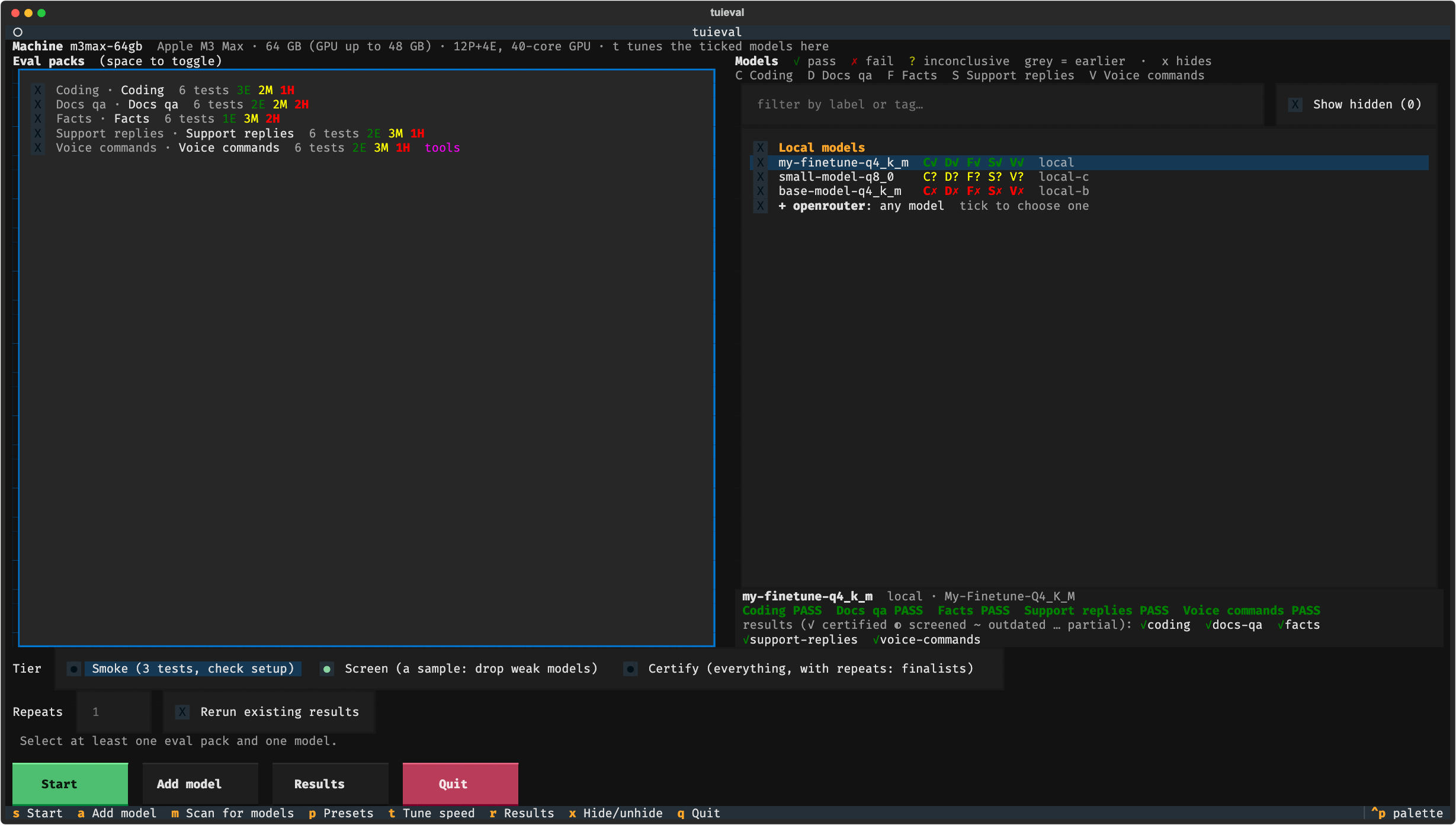
Once you've added your own packs and models, the setup screen looks like this (packs on the left, models with a verdict code per use case on the right, the highlighted model's details below):
What you get
- A TUI to pick packs and models, watch reasoning and answers stream live with TTFT, tokens/s, memory and a running score, and browse results.
- Verdicts you can act on. A pack passes only with zero critical failures over enough trials, and an accuracy whose 95% lower bound clears your bar. INCONCLUSIVE says what evidence is missing.
- Two tiers: Screen a sample of every pack to drop weak models fast, then Certify finalists on every test with repeats. Certification reuses the screening answers.
- Honest numbers: every request is a fresh single-turn conversation, with prompt caching off and repeat rounds in different orders. Each answer records what was sent, and the run warns about reused prompts or identical repeats.
- Per-machine speed. A fit check picks the largest context that fits your Mac's GPU memory,
tuieval tunefinds the fastest speed-only server flags (with a guard that rejects flags that change answers), and readiness includes a Fast enough? table per machine, measured or projected. - Tests that check themselves. Every test carries a reference answer and known-wrong answers, and
tuieval selftestchecks the grader accepts the first and rejects the second, and that each gate is reachable at all. - History. Verdict changes are appended to
results/verdicts.jsonl, and replaced results are moved tohistory/, never overwritten.
Where your questions come from
- From the model you trust most. Ask your best model to draft domain-specific questions with expected answers and the mistakes a weaker model would make, then save them as a pack (
tuieval new-packshows the format).tuieval selftestchecks every test's reference answer passes and every known-wrong answer fails, so a bad generated question is caught before it fails a good model. - From problems in your own workflow. Point the app you already use at
tuieval watch(a proxy in front of your model server), and every exchange is logged. When a model gets something wrong,tuieval capture <log> --pack <name>turns that exchange into a test skeleton, with the bad answer kept as a known-wrong answer. Fill in the expected answer, and that failure becomes a regression test for every model you try. - From what you already know. Policies, edge cases, past incidents, tricky customer questions: anything with an answer you can check.
Any model on OpenRouter runs with no setup beyond OPENROUTER_API_KEY, e.g. tuieval run --only openrouter:<model id>, or pick it in the TUI. Each model is pinned to one provider endpoint, so its answers aren't a mix of providers and quantizations. Frontier and local models get the same tests, gates and verdicts.
Eval packs
A pack is a folder in your workspace's packs/:
packs/support-bot/
  pack.toml       label, use case, grader, gate (what PASS means)
  system.txt      the system prompt
  tests.yaml      the questions, with expected answers, references and known-wrong answers
- id: refund-window
  difficulty: medium
  input: A customer bought shoes 20 days ago and wants a refund. Our policy allows 30 days. Can they get one?
  max_words: 40
  must_include: ["yes|can"]
  reference: "Yes, they're within the 30-day window, so they can get a refund."
  wrong: ["No, the refund window has passed."]
Built-in graders: answer (a number or word on an ANSWER: line, or a correct refusal when the data isn't there), rag (grounded answers with citations), reply (free-form replies against rules), tool_call (the right tool with the right arguments, or rightly none) and code (Python run against hidden tests). Your own grader is one Python file in the workspace's graders/ folder.
tuieval new-pack <name> --grader <grader> creates a pack with working examples for any grader. See docs/writing-packs.md for every field, gates, critical failures, difficulty labels, custom graders and how to write tests that separate good models from weak ones.
The workspace
Your packs, models and results live in a workspace folder, apart from the tool:
my-evals/
  models.toml      your servers and models
  packs/           your eval packs
  graders/         your own graders (optional)
  results/ logs/ tuning/ reports/ presets.toml     written by tuieval
tuieval uses the current folder, or --workspace DIR / TUIEVAL_HOME. Keep it in git or a synced folder: results from one machine count on another when the answer-changing settings match, so you can Certify on your fastest machine.
Models
tuieval add ~/models/Some-Model-Q4_K_M.gguf --tags 9b,dense,q4     # llama.cpp (llama-server on PATH)
tuieval add ~/models/VL-Q4.gguf --mmproj ~/models/VL-mmproj.gguf   # vision
tuieval add qwen3:8b --server local                                 # an already-running server (set its url)
tuieval run --tier smoke --only openrouter:qwen/qwen3-32b           # any OpenRouter model, no config needed
See docs/models.md for servers, OpenRouter endpoint pinning, machines, tuning and every option.
The TUI
- Pick packs and models (space ticks; type to filter models by label or tag). Each model shows a short code per use case, e.g.
C✓ S?(✓ pass, ✗ fail, ? inconclusive; grey = from earlier results). - Pick a tier (Smoke to check setup, Screen, Certify) and press
s. The line above the buttons shows how many answers that is and roughly how long it will take. For each model, tuieval starts its server (or uses a running one), checks the right model is loaded, runs every selected pack, then stops it. - Watch the run: progress with ETA, live score, tok/s, TTFT and memory, the current test with reasoning and answer side by side, recent results with the grader's reason.
kskips a model,ccancels (finished work is kept and resumes next time). Runs started while one is going are queued. - Press
rfor results: production readiness, verdict history, scorecard, speed & tokens (★ marks models nothing beats on both accuracy and time), per question, is the difference real?, tests that separate models, by difficulty, failures, and test quality.
Other keys: t tunes the ticked models' speed flags, a adds a model, m scans for GGUFs, p saves or loads a preset, x hides a model.
Command line
tuieval run                                   # Screen every model on every pack
tuieval run --tier certify --only a,b --packs support-bot,coding
tuieval run --dry-run                         # the plan and server commands
tuieval verdict                               # PASS / FAIL / INCONCLUSIVE per model and use case
tuieval report                                # the same with evidence, as a markdown file
tuieval history                               # every verdict change over time
tuieval compare --speed --pairwise --failures # scorecards
tuieval selftest                              # check every test's reference and wrong answers
tuieval items                                 # tests that don't separate models or look broken
tuieval capture logs/live/<file> --pack X     # turn a real failure into a new test
tuieval regrade                               # re-score stored answers after changing a grader
tuieval machines                              # this machine and others, fit and tuning per model
tuieval tune <model>                          # fastest speed flags for a model on this machine
tuieval watch --upstream http://localhost:8080   # show the reasoning of any app using your server
tuieval help
Reading results
- Start with Production readiness. A single critical failure already means FAIL, whatever the accuracy: a model that breaks a hard rule once in 300 answers will do it in production. The Failures tab and
tuieval reportlist exactly which answers failed. - INCONCLUSIVE is not "nearly passed". It says what's missing (usually a Certify run, or more trials).
- Trust "Is the difference real?" over raw percentages. Differences of one or two tests are usually noise.
- Read
truncbefore accuracy. A model that runs out of tokens isn't wrong; it's thinking too long for the budget. - Watch TTFT for interactive use. A model that is 5% more accurate but takes 3 s longer to start answering may be the worse choice.
Safety
⚠️ The code grader executes model-written code on your machine. Run code packs inside a container or VM with no credentials in the environment.
Development
git clone https://github.com/ashe-wb/tuieval && cd tuieval
python -m venv .venv && .venv/bin/pip install -e .
.venv/bin/python -m unittest discover -s tests    # uses a mock server; no model needed
License
MIT. See LICENSE.
1 maintainer

Metadata
1 maintainer
Release files for tuieval 0.1.3
For a detailed explanation of source distributions (sdists) and built distributions (wheels), please see the package formats documentation.
Source distribution (sdist)
| File | Size | Uploaded | |
|---|---|---|---|
| tuieval-0.1.3.tar.gz | 582.6 kB | Details |
Built distribution (wheel)
| File | Interpreter | ABI | Platform | Reset |
|---|---|---|---|---|
| tuieval-0.1.3-py3-none-any.whl | Python 3 | none | any | Details |
Total release size: 737.4 kB
Release files / tuieval-0.1.3.tar.gz
| Download URL | tuieval-0.1.3.tar.gz |
|---|---|
| Size | 582.6 kB |
| Tags | Source |
|
SHA-256 checksum How to use checksums |
34d3cc0e6c6eaf8aec909536d3b505168fa8db5577f4badae7d618ac1a2f829d
|
|
BLAKE2b-256 checksum How to use checksums |
197606864fee3a956dfe9c9421467cb5a43fde6a5ccdcb071edc94a29a09dce8
|
| Upload date | |
|
Uploaded using Trusted Publishing? What is trusted publishing? |
No |
| Uploaded via |
twine/7.0.0 CPython/3.12.14
|
Release files / tuieval-0.1.3-py3-none-any.whl
| Download URL | tuieval-0.1.3-py3-none-any.whl |
|---|---|
| Size | 154.8 kB |
| Tags | Python 3 |
|
SHA-256 checksum How to use checksums |
7e39e8d948dc139a15e8beb09281d8d01f6baa8f516f67deb8008e109c827f22
|
|
BLAKE2b-256 checksum How to use checksums |
7d1097c24c1660344da33c9e3f587ce72810fb0839a1cd31372e8a5a302989a3
|
| Upload date | |
|
Uploaded using Trusted Publishing? What is trusted publishing? |
No |
| Uploaded via |
twine/7.0.0 CPython/3.12.14
|














