
tuma250-mcp

An MCP server for the Tuma 250 grocery site (Kigali, Rwanda).
Gives any MCP-compatible AI client (Cursor, Claude Desktop, etc.) the ability to search products, manage a shopping cart, and browse order history on Tuma250 — using a headless Playwright browser under the hood.
Example uses
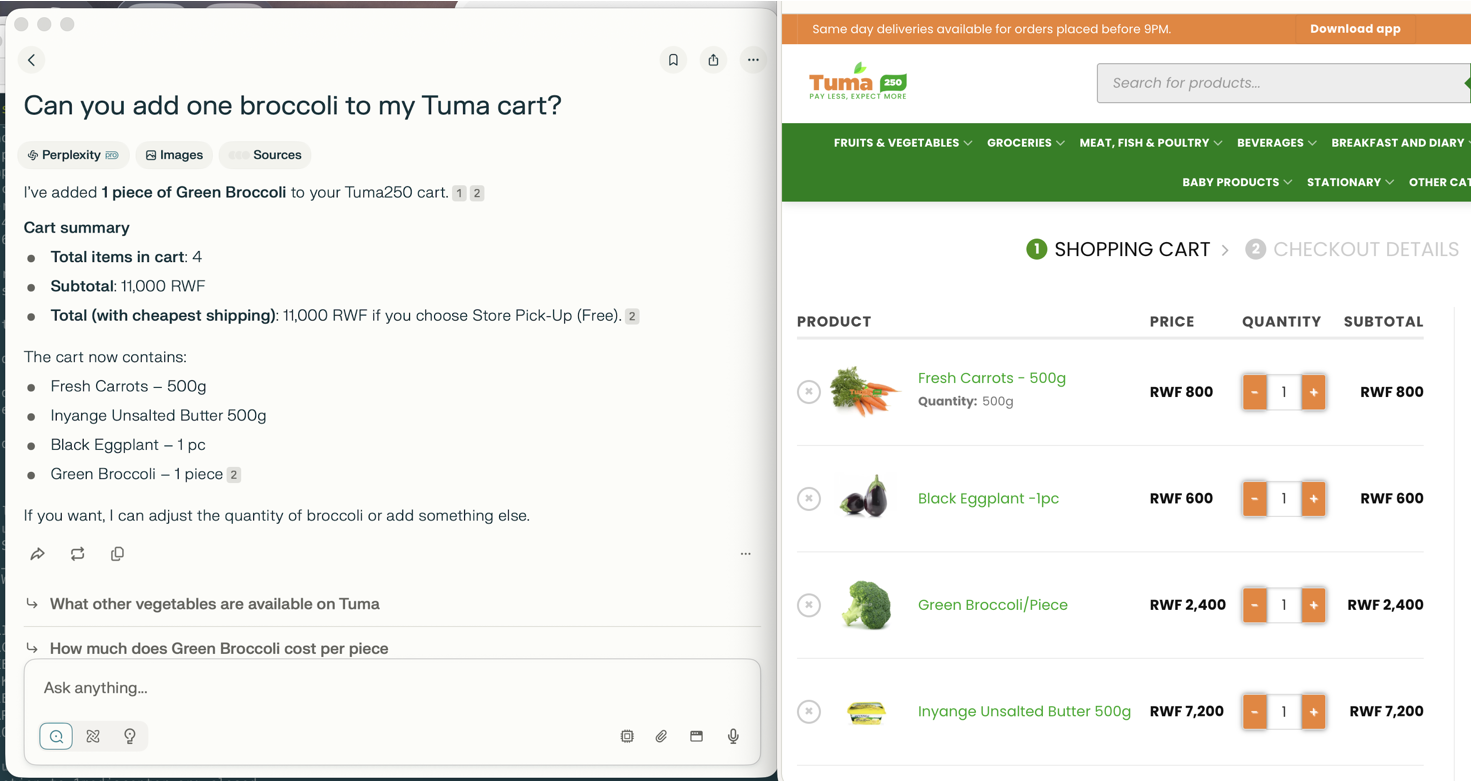
Imported as MCP server in Perplexity (or any other MCP-compatible client)
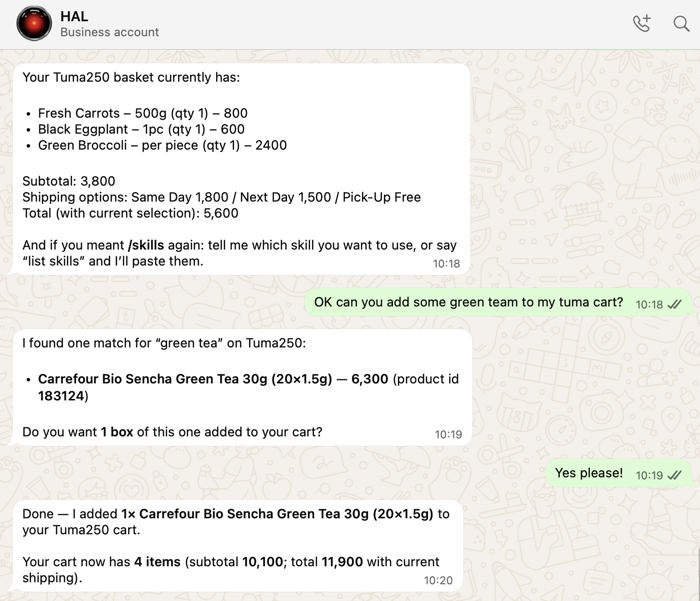
Imported as a skill in OpenClaw
The skill definition can be copied from skills/tuma250/SKILL.md (requires the mcporter skill to be enabled, and the MCP server added to its configuration)
Tools
| Tool | Description |
|---|---|
login |
Authenticate and persist the browser session |
search_products |
Search for products by keyword |
get_product_variations |
List available variants (size/weight) for a variable product |
add_to_cart |
Add a product (or specific variant) to the cart |
get_cart |
Retrieve cart contents with full cost breakdown |
list_recent_orders |
List recent orders from My Account |
get_order_details |
Fetch line items for a specific order |
Prerequisites
Playwright with one headless browser
npm i -g playwright
playwright install chromium
Configuration
The server reads credentials from environment variables (or a .env file):
TUMA250_BASE_URL=https://tuma250.com
TUMA250_USERNAME=your-email@example.com
TUMA250_PASSWORD=your-password

# Optional
TUMA250_SESSION_FILE=.tuma250_session.json  # persists login between runs
TUMA250_DEBUG=false                          # set true for headed browser
Usage
Cursor / Claude Desktop
Add to ~/.cursor/mcp.json / ~/Library/Application Support/Claude/claude_desktop_config.json:
{
  "mcpServers": {
    "tuma250": {
      "command": "uvx",
      "args": ["tuma250-mcp"],
      "env": {
        "TUMA250_BASE_URL": "https://tuma250.com",
        "TUMA250_USERNAME": "your-email@example.com",
        "TUMA250_PASSWORD": "your-password"
      }
    }
  }
}
Direct (stdio)
pip install tuma250-mcp
TUMA250_USERNAME=you@example.com TUMA250_PASSWORD=secret tuma250-mcp
Session persistence
After the first successful login, the browser session (cookies) is saved to TUMA250_SESSION_FILE (default: .tuma250_session.json). Subsequent runs reuse the saved session and skip the login step entirely.
Variable products
Some products on Tuma250 require a size/weight selection before they can be added to the cart. Pass the product slug (from search_products or get_order_details) and optionally variation_attributes:
1. search_products("fresh carrots")          → returns slug in each result
2. get_product_variations(product_url)       → lists 250g / 500g / 1kg variants
3. add_to_cart(product_slug, quantity=1, variation_attributes={"attribute_quantity": "500g"})
Development
# Clone and setup
uv venv
source .venv/bin/activate   # or: .venv\Scripts\activate on Windows
uv pip install -e ".[dev]"
playwright install chromium

# Run tests
pytest -v
Copy config-example.env to .env and fill in your Tuma250 credentials before running tests or the server locally.
To test from command line, you may use mcporter, e.g.:
npx mcporter call --stdio "uv run tuma250-mcp" get_cart
npx mcporter call --stdio "uv run tuma250-mcp" 'tuma250.get_order_details(order_id: "193457")'
npx mcporter call --stdio "uv run tuma250-mcp" 'tuma250.add_to_cart(product_slug: "ripe-mango-fruit-1kg")'
npx mcporter call --stdio "uv run tuma250-mcp" add_to_cart --args '{"product_slug": "viande-hachee-de-bouef-ordinaire-regular-ground-beef", "variation_attributes": {"attribute_weight":"1kg"}}'
License
MIT
1 maintainer

Metadata
1 maintainer
Release files for tuma250-mcp 0.1.14
For a detailed explanation of source distributions (sdists) and built distributions (wheels), please see the package formats documentation.
Source distribution (sdist)
| File | Size | Uploaded | Provenance | Actions |
|---|---|---|---|---|
| tuma250_mcp-0.1.14.tar.gz | 24.9 kB | Without provenance | Details for tuma250_mcp-0.1.14.tar.gz |
Built distribution (wheel)
| File | Interpreter | ABI | Platform | Actions Reset |
|---|---|---|---|---|
| tuma250_mcp-0.1.14-py3-none-any.whl | Python 3 | none | any | Details for tuma250_mcp-0.1.14-py3-none-any.whl |
Total release size: 43.4 kB
Release files / tuma250_mcp-0.1.14.tar.gz
| Download URL | tuma250_mcp-0.1.14.tar.gz |
|---|---|
| Size | 24.9 kB |
| Tags | Source |
|
SHA-256 checksum How to use checksums |
d467e37721d8358f7bd11cbc02f9a25a3b6eba2d3e8c351dc97abefb01aad4c6
|
|
BLAKE2b-256 checksum How to use checksums |
b4de2200de51de3891192d7c043ca4aec1e97428393beec6ccab02e799a20d6f
|
| Upload date | |
|
Uploaded using Trusted Publishing? What is trusted publishing? |
No |
| Uploaded via |
uv/0.12.15 {"installer":{"name":"uv","version":"0.12.15","subcommand":["publish"]},"python":null,"implementation":{"name":null,"version":null},"distro":{"name":"Ubuntu","version":"24.04","id":"noble","libc":null},"system":{"name":null,"release":null},"cpu":null,"openssl_version":null,"setuptools_version":null,"rustc_version":null,"ci":true}
|
Release files / tuma250_mcp-0.1.14-py3-none-any.whl
| Download URL | tuma250_mcp-0.1.14-py3-none-any.whl |
|---|---|
| Size | 18.5 kB |
| Tags | Python 3 |
|
SHA-256 checksum How to use checksums |
712176d9c38f54a8689608a24ba4e58388f50bd89bc76ffa4a6bc439bc723e3d
|
|
BLAKE2b-256 checksum How to use checksums |
42f1a4f2457c9d35f0c6c3a7a2b2fed61ba69998feadc0c482de870482e8fc63
|
| Upload date | |
|
Uploaded using Trusted Publishing? What is trusted publishing? |
No |
| Uploaded via |
uv/0.12.15 {"installer":{"name":"uv","version":"0.12.15","subcommand":["publish"]},"python":null,"implementation":{"name":null,"version":null},"distro":{"name":"Ubuntu","version":"24.04","id":"noble","libc":null},"system":{"name":null,"release":null},"cpu":null,"openssl_version":null,"setuptools_version":null,"rustc_version":null,"ci":true}
|
Security for tuma250-mcp 0.1.14
Provenance
Provenance describes where a file came from. On PyPI, provenance is shared via attestations, which provide a verifiable record of the build or publishing details. View details, limitations and caveats.
No provenance found
None of the files in this release were uploaded with provenance metadata.
A note on package security
PyPI is a repository for distributing packages, not a service for auditing them. While third-party security researchers and our staff do their best to detect and remove malicious packages, PyPI cannot guarantee the quality, security or suitability of any given package.
To learn more about protecting yourself from malicious actors, visit our package security documentation.














