

TuneGrab
Pick albums, playlists and songs from Spotify. Get a tidy, fully tagged music library on your own drive.



What it does
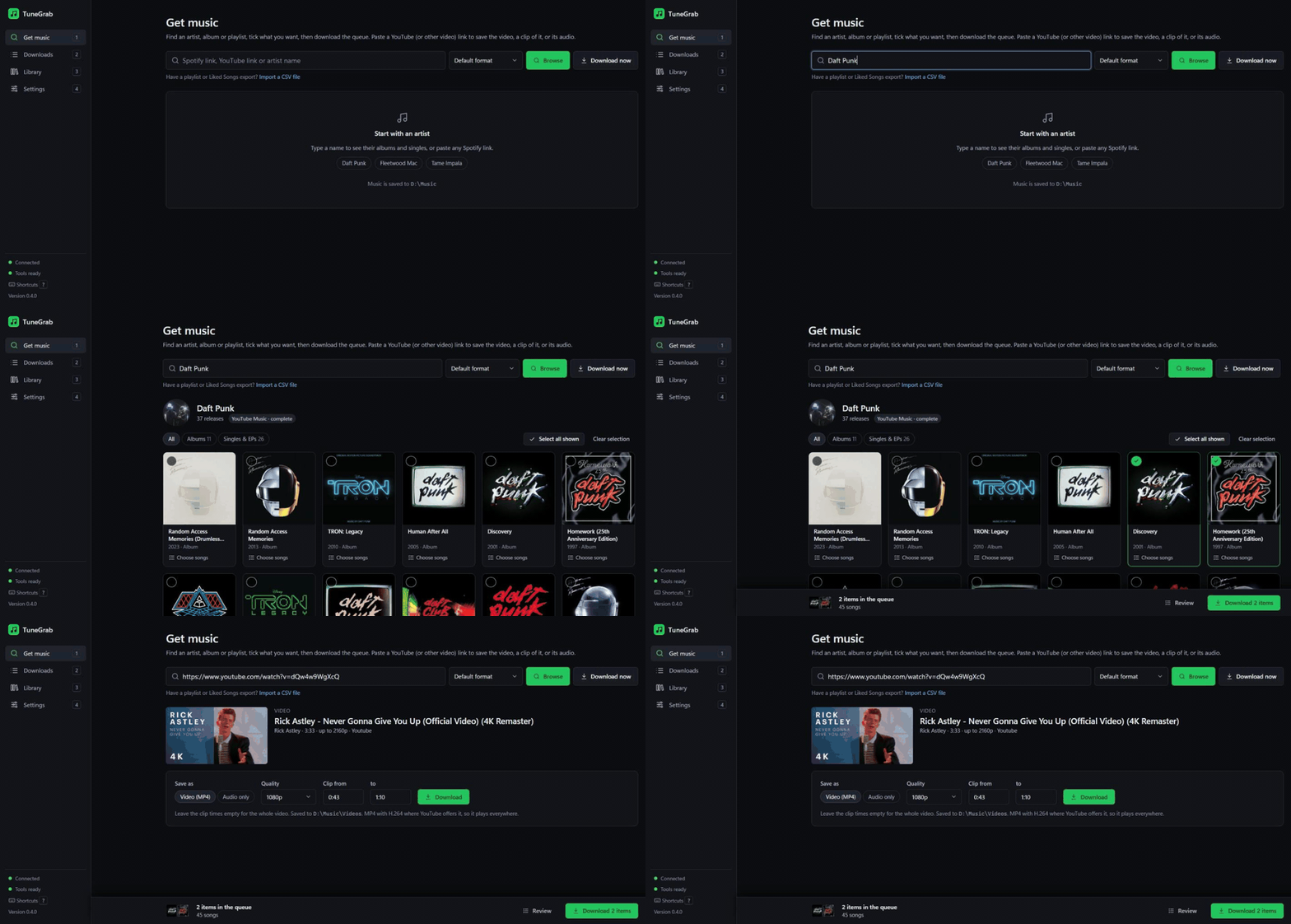
- Browse, then download. Type an artist or paste a Spotify link, tick the albums or songs you want.
- Tagged files, sorted for you.
Artist/Album (Year)/01 - Title.m4a, with cover art and lyrics. - Never twice. It remembers what you have, and checks matches it wasn't sure about.
- Videos too. Paste a YouTube link to save the video, a clip of it, or just the audio.
Everything runs on your computer. Spotify is only read for track details; the audio comes from YouTube.
Get started (Windows)
Open PowerShell and paste:
irm https://raw.githubusercontent.com/HAVEKAUTION/tunegrab/main/install.ps1 | iex
It installs what it needs, adds TuneGrab to the Start menu and opens it. Run the same line
again to update. On macOS or Linux, with uv, ffmpeg and Deno
installed: uv tool install tunegrab, then tunegrab serve. Details under Install below.
Then: type an artist → tick what you want → Download. That's it.
Everything else is folded away below. Open what you need.
How it works
 Spotify link or artist name
          │
          ▼
 ① Resolve   read the track list and details from Spotify (metadata only)
 ② Match     find each song on YouTube Music / YouTube and score the candidates
 ③ Download  fetch the audio with yt-dlp
 ④ Convert   M4A (original audio), Opus, MP3 or FLAC with ffmpeg
 ⑤ Tag       title, artists, album, track no., year, ISRC, cover art, lyrics
 ⑥ Archive   remember it, so it's never downloaded twice
          │
          ▼
 Artist/Album (Year)/01 - Title.m4a
Everything runs on your own computer. Spotify is used only for track information; the audio comes from YouTube. TuneGrab never touches Spotify's own audio streams.
Paste a YouTube (or other video) link instead and TuneGrab saves the video as an MP4, just a clip of it, or only its audio.
Features in detail
Browse before you download
- Type an artist's name or paste any Spotify artist, album, playlist or track link.
- Type anything else, like
Discovery Daft PunkorOne More Time, to see matching albums and songs from YouTube Music and tick the ones you want. - See an artist's albums and singles as a cover grid, with All / Albums / Singles & EPs filters.
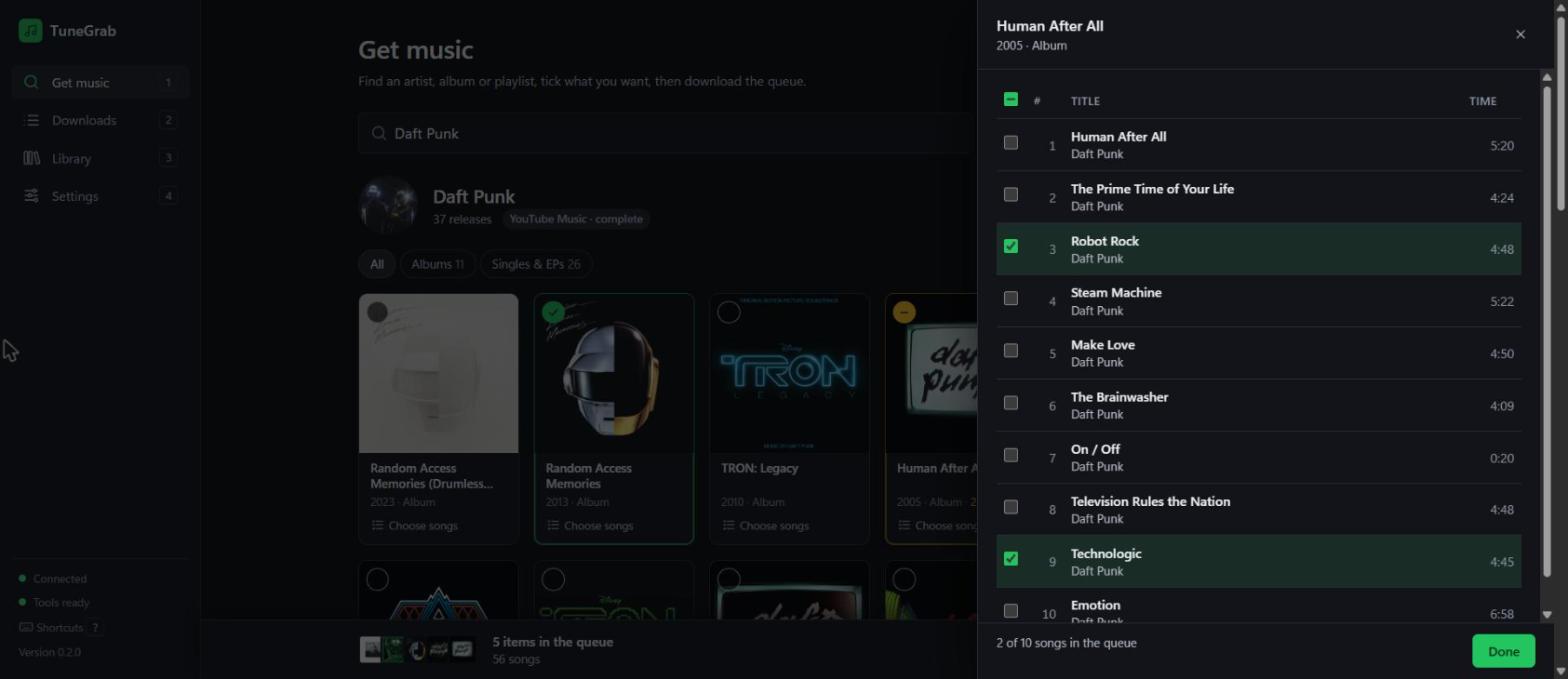
- Full discography: Spotify's public page lists only the newest 8 albums and 8 singles, so TuneGrab loads the complete list from YouTube Music.
- Click a cover to queue the whole release, or Choose songs to tick individual tracks.
One queue for everything
- Collect albums, songs and playlists from as many artists as you like into one queue.
- Import a CSV of a playlist or your Liked Songs (for example from Exportify). No Spotify login needed.
- The queue is kept if you close the page or restart your PC.
- Review shows everything queued; remove items or clear the lot, with Undo.
- Download (or
Ctrl+Enter) starts the whole queue in one go.
Live downloads you can trust
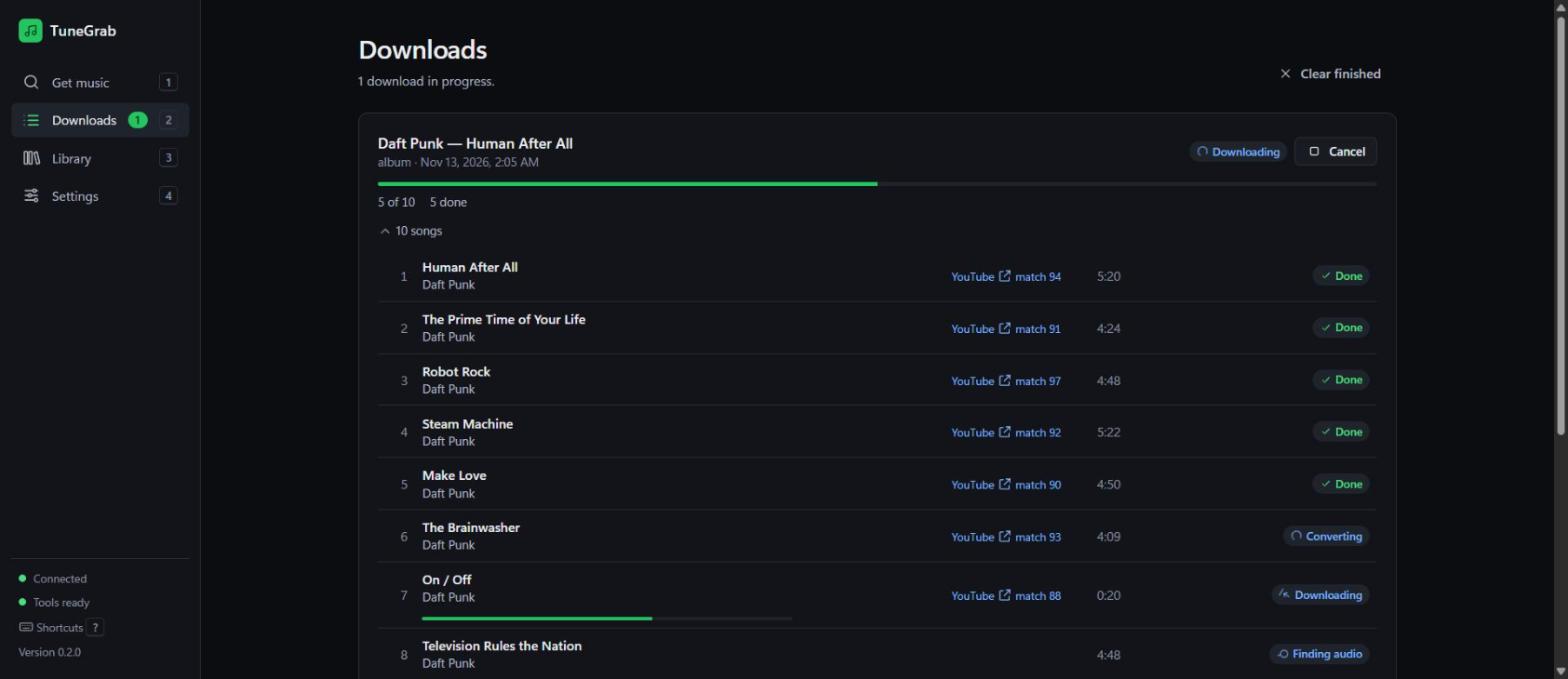
- Live progress for every song: finding audio → downloading → converting → done.
- Each song links to the YouTube video it used, with a match score (0–100) and the reason.
- Several songs download at once (you choose how many).
- Anything already in your library is skipped, so it's safe to stop and start again.
- Shows the source each song was made from (e.g. Opus 129 kbps). Unavailable videos fall back to the next-best match, and a YouTube "slow down" pauses the queue instead of failing it.
- Failed songs show why. Retry failed songs works even after a restart.
- TuneGrab couldn't find a song? Press Use a YouTube link next to it, paste the right video and it downloads that one, and remembers it for next time.
- Download history is kept between sessions.
Properly tagged files
- Title, artists, album, album artist, track and disc number, year, ISRC and genre where available.
- Embedded cover art.
- Lyrics from LRCLIB (free, no account), embedded in the file, plus an optional synced
.lrcfile. - M4A by default: YouTube's original audio, not re-encoded. Or Opus, MP3 (VBR V0 or 128–320 kbps) or FLAC.
- Windows-safe file names, with your own naming pattern if you want one.
- Playlists also get an
.m3u8playlist file (or their own folder).
Smart matching
- Searches YouTube Music first (official audio), then regular YouTube.
- Scores every candidate on title, artist, duration and album, and penalises live, cover, karaoke, sped-up, remix, extended, acoustic and demo versions you didn't ask for.
- Official music videos aren't thrown out just because their intro makes them longer.
- Titles are compared as written in any script (Japanese, Korean, Cyrillic, ...); only Latin accents are folded (Beyoncé = Beyonce).
- When two results score the same, YouTube's own ranking decides.
- Songs that score below the threshold (default 70) are flagged instead of downloaded wrongly.
- A match TuneGrab isn't sure about (score under 85, or a "live" / "remix" / "cover" video for a plain song) is downloaded but marked Check this match: open it to compare the other candidates, listen, and swap with one click. The old file is replaced only once the new one is ready.
- Fix a bad match once (Check this match or Use a YouTube link in the app, or
tunegrab fix) and TuneGrab remembers it.
Library
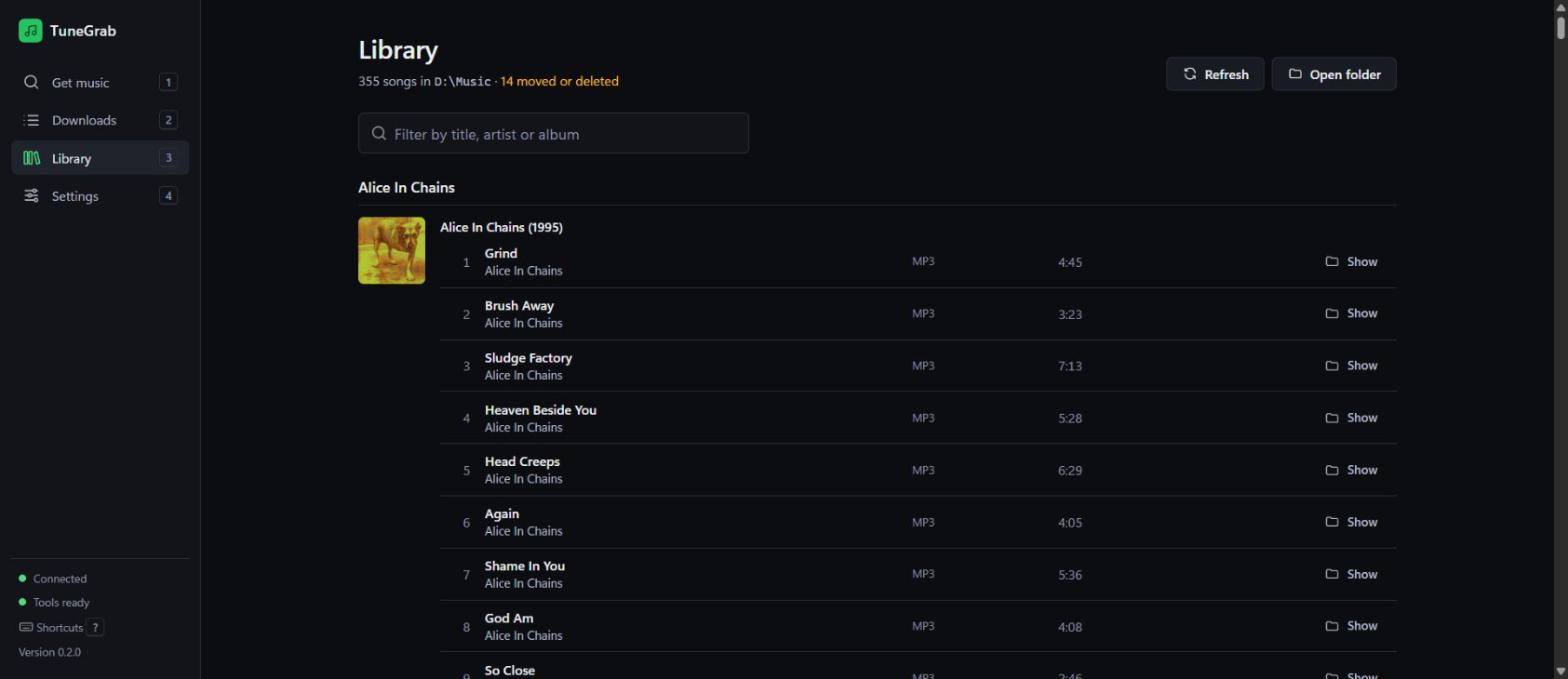
- Everything you've downloaded, grouped by artist and album, with covers.
- Instant filter by title, artist or album (fast even with thousands of songs).
- Show opens a song's folder; flags files you've moved or deleted.
- Each song shows what YouTube actually served ("MP3 · from Opus 129 kbps") and is marked when only a low-quality source existed.
- Check for new songs on a playlist downloads what was added and lists what left it. Files of songs that left are deleted only if you tick them and confirm a list of every file; songs another playlist still has are never deleted. For a CSV playlist, pick a newer export of it.
Private and safe by design
- Runs only on your PC and listens only on
127.0.0.1. Other websites can't talk to it. - No accounts, tracking, ads or crash reporting.
- Optional Spotify credentials are kept in a git-ignored
.envfile or your system keyring. TuneGrab reads.envonly from its settings folder and its install folder, never from the folder you happen to run it in. - Never decrypts Spotify audio.
Keyboard friendly
| Key | Does |
|---|---|
/ |
Jump to search |
1 2 3 4 |
Get music · Downloads · Library · Settings |
Space |
Tick the focused cover or song |
Ctrl+Enter |
Download the queue |
Esc |
Close a panel or dialog |
? |
Show all shortcuts |
Videos and clips
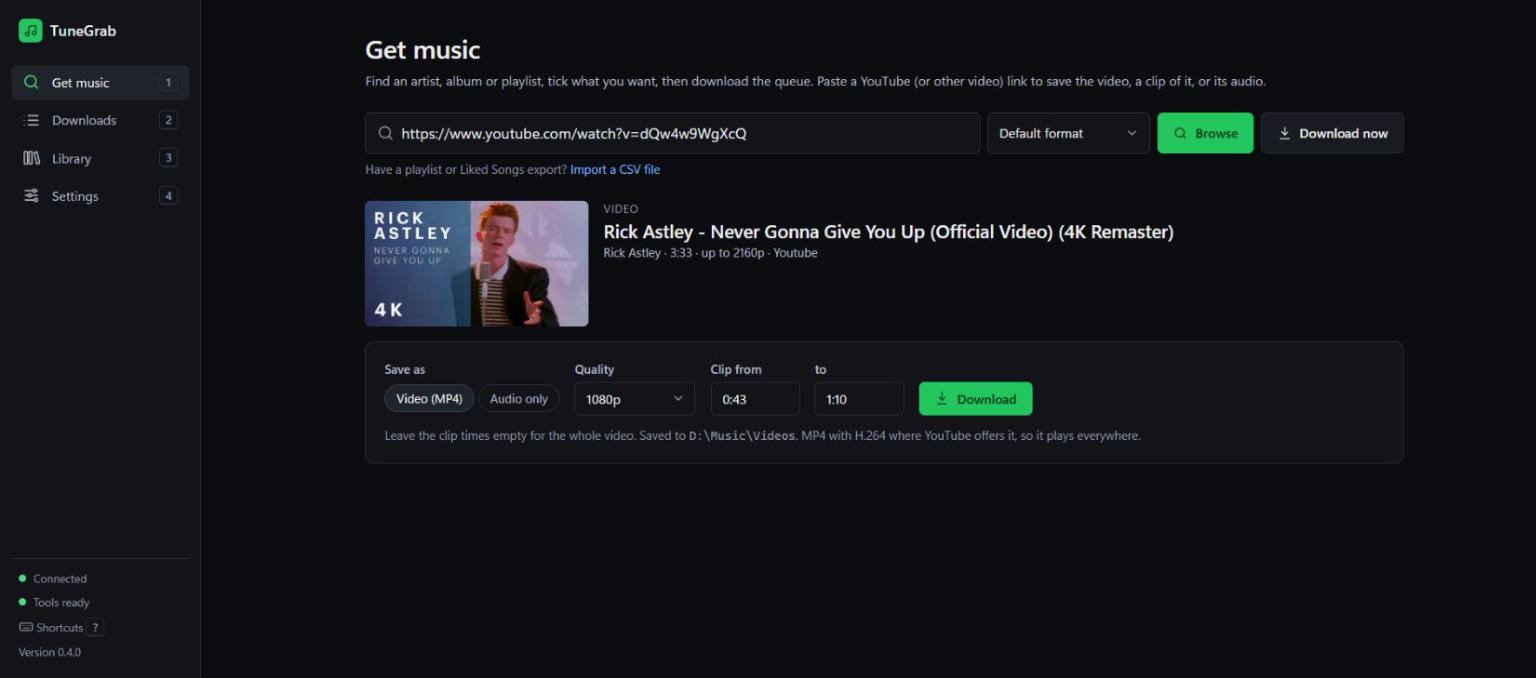
Paste a YouTube link (or one from any site yt-dlp supports) into Get music and press Browse. Save it as an MP4 (up to 4K), as audio only, or just a clip between two times. Playlists download every video.
Install: macOS, Linux, manual, updating, uninstalling
TuneGrab needs three free tools: uv (runs Python for you), ffmpeg (audio conversion) and Deno (YouTube needs it).
Windows (recommended: about 5 minutes)
Open PowerShell and paste:
irm https://raw.githubusercontent.com/HAVEKAUTION/tunegrab/main/install.ps1 | iex
It installs uv, ffmpeg and Deno if they're missing (with winget), puts the latest release in
%LOCALAPPDATA%\Programs\TuneGrab, adds TuneGrab to the Start menu and desktop, and opens it.
Run the same line again to update. Read the script first if you like: it's short.
Install by hand instead
winget install astral-sh.uv Gyan.FFmpeg DenoLand.Deno, then reopen PowerShell.git clone https://github.com/HAVEKAUTION/tunegrab.git(or Code → Download ZIP).- Double-click
TuneGrab.bat. The first start takes about a minute.
Keep the black launcher window open while you use TuneGrab: closing it stops TuneGrab. Opening the launcher again while TuneGrab is running just reopens the page.
macOS
brew install uv ffmpeg deno
uv tool install tunegrab            # from PyPI
tunegrab serve                      # opens http://127.0.0.1:8765 in your browser
Linux
curl -LsSf https://astral.sh/uv/install.sh | sh     # uv
sudo apt install ffmpeg                             # or your distro's package manager
curl -fsSL https://deno.land/install.sh | sh        # Deno
uv tool install tunegrab                            # from PyPI
tunegrab serve
Check everything is ready
In the app, open Settings → System: every row should be green. Or from a terminal:
uv run tunegrab doctor
It checks Python, ffmpeg, Deno (or Node.js 22+ / Bun / QuickJS), yt-dlp (warning when it's out of date), your music folder and any Spotify credentials, and says what to fix.
Install the command globally (optional)
To type tunegrab from any folder instead of uv run tunegrab:
uv tool install tunegrab # from PyPI; or `uv tool install .` inside a clone
pip install tunegrab works too (Python 3.11+); you still need ffmpeg and Deno.
Stop TuneGrab first if it's running (Windows locks the program file while it runs).
Updating
git pull                          # a clone: get the latest TuneGrab
uv tool upgrade tunegrab          # installed with `uv tool install`: TuneGrab and yt-dlp
uv run tunegrab doctor --update   # update yt-dlp (do this whenever YouTube downloads start failing)
Or in the app: Settings → System → Update yt-dlp, then restart TuneGrab. The launcher re-syncs everything else by itself on the next start. The app tells you when a new TuneGrab or yt-dlp is out (checked once a day; Settings → Updates turns it off).
Disk space and uninstalling
Besides your music, TuneGrab keeps the app folder (about 50 MB) and its settings, history
and logs in %LOCALAPPDATA%\tunegrab (a few MB). Settings → Storage → Free up space
(or tunegrab clean) clears leftovers; tunegrab clean --uv-cache also prunes uv's shared
package cache. Your music, settings and history stay.
Uninstall (installed with the one-liner):
& ([scriptblock]::Create((irm https://raw.githubusercontent.com/HAVEKAUTION/tunegrab/main/install.ps1))) -Uninstall
Otherwise delete the tunegrab folder. Settings and history live in
%LOCALAPPDATA%\tunegrab (on macOS
~/Library/Application Support/tunegrab and ~/Library/Logs/tunegrab; on Linux
~/.config/tunegrab, ~/.local/share/tunegrab and ~/.local/state/tunegrab); delete
those too if you want them gone. Your music folder is never touched.
Using the app: step-by-step guides
Download a few albums from an artist
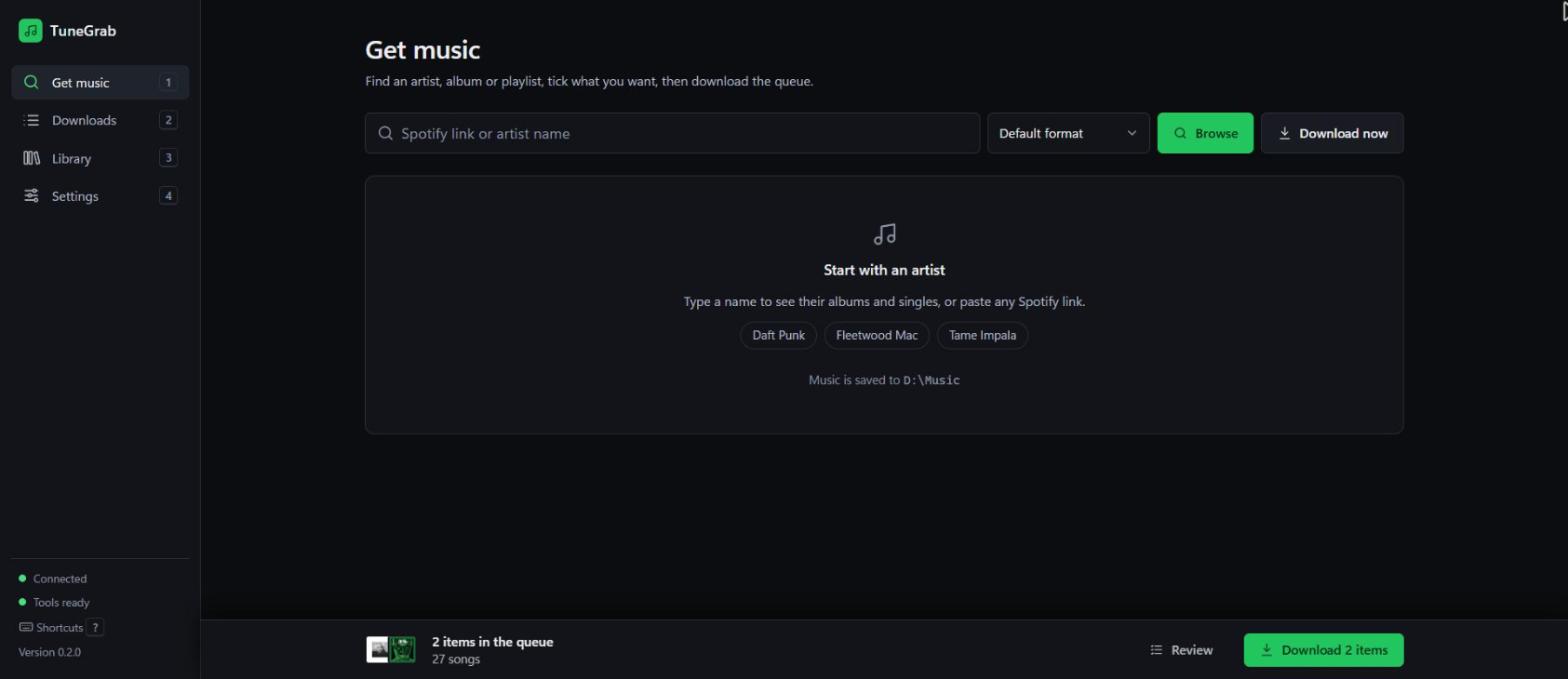
- On Get music, type the artist's name (or paste their Spotify link) and press Enter.
- Click Full discography if you want more than the newest releases.
- Click the covers you want; a green tick shows they're queued. Use Choose songs to pick individual tracks from a release.
- Repeat for as many artists as you like. The queue bar at the bottom keeps a running total.
- Press Download (or
Ctrl+Enter) and watch progress on Downloads.
Download a playlist, album or single song
Paste the Spotify link into Get music and press Download now to skip the preview, or
Browse to see and pick the tracks first. For one song you can also type its title
(or Artist - Title) and press Browse to pick it from the results, or Download now.
Download a video, a clip of one, or just its audio
- Paste the link into Get music and press Browse.
- Pick Video (MP4) and a quality, or Audio only. For a clip, fill in Clip from
and to (
1:23,83or1:02:03). - Press Download. Videos go to
Videos/Channel/Title [id].mp4in your music folder.
Download now on a video link saves just its audio into your music folder.
Download your Liked Songs (or any playlist) from a CSV
- Go to exportify.app, log in with Spotify and press Export
next to Liked Songs (or any playlist). You get a
.csvfile. - In TuneGrab, under the search box on Get music, click Import a CSV file and pick it.
- Everything downloads as one playlist named after the file, with its own
.m3u8.
Any CSV with Track Name and Artist Name(s) columns works (commas, semicolons or tabs),
and so does a single Track URI column of Spotify links. From a terminal:
tunegrab download --from-file Liked_Songs.csv.
Fix failed or wrong songs
- Failed: open Downloads and press Retry failed songs. Each failure shows its reason.
- Not found at all: press Use a YouTube link under the failed song, paste the right video (there's a search link right in the dialog) and press Download this one.
- Wrong version downloaded: songs TuneGrab had doubts about show Check this match in
Downloads and Library; pick another candidate there. For any other song, run
tunegrab match <spotify-link>to see the scores, thentunegrab fix <spotify-track-link> <youtube-link>to force the right video. TuneGrab remembers the fix for next time.
Change where music is saved and how it's named
Music is saved to Music\TuneGrab in your user folder unless you pick another one.
(If you used TuneGrab 0.4 or older, it keeps using the downloads folder it used before.)
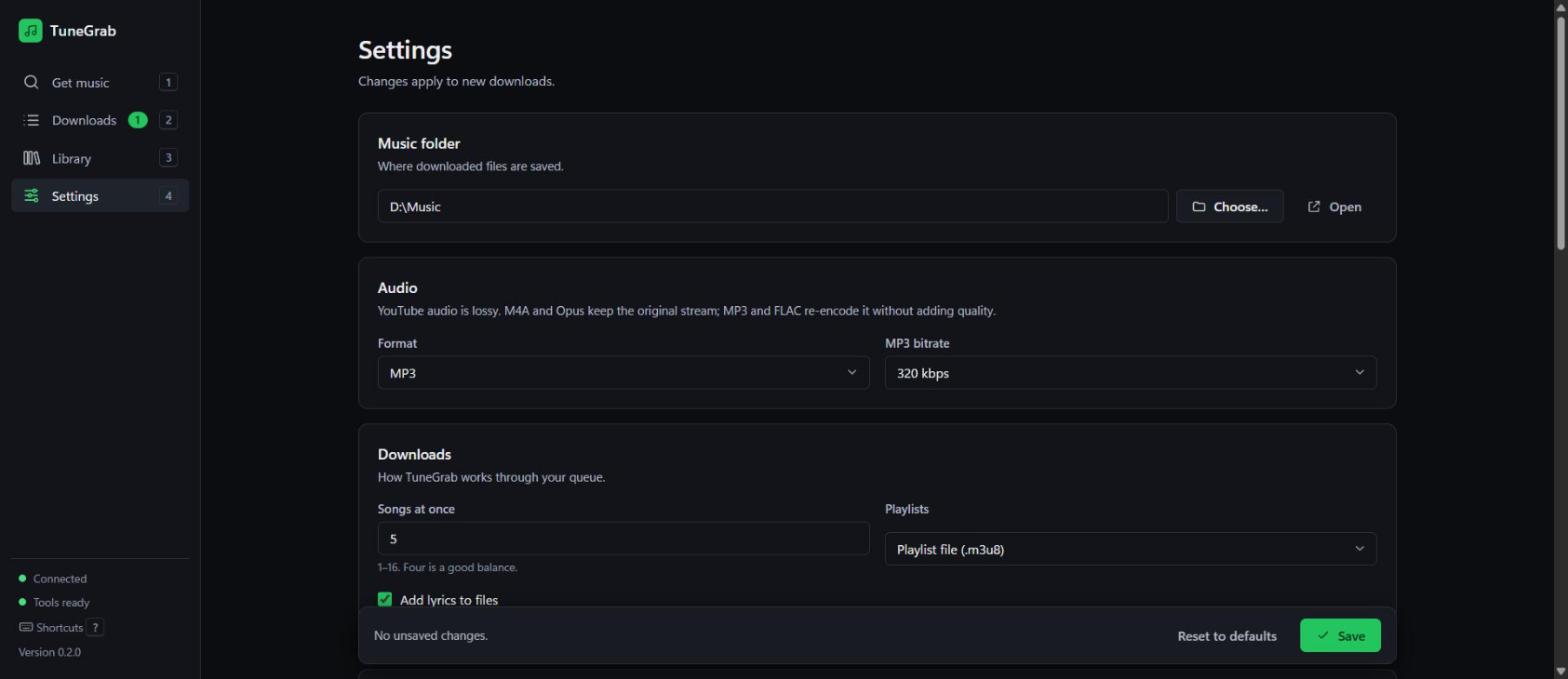
Settings → Music folder → Choose… opens a folder picker. Press Save. File naming,
format, quality, lyrics and how many songs download at once are on the same screen.
Command line
Everything in the app is also available from a terminal (prefix with uv run unless you
installed it globally).
tunegrab get "Daft Punk - One More Time"                        # one song, best match
tunegrab download https://open.spotify.com/album/2noRn2Aes5aoNVsU6iWThc
tunegrab download <playlist-url> -f m4a -o D:\Music             # choose format and folder
tunegrab download --from-file my-links.txt                      # one link per line
tunegrab download --from-file Liked_Songs.csv                   # an Exportify CSV
tunegrab video https://youtu.be/dQw4w9WgXcQ                     # the video, as MP4 (1080p)
tunegrab video <link> --start 0:43 --end 1:10 -q 720            # just a clip
tunegrab video <link> --audio -f opus                           # only the audio
tunegrab serve                                                  # start the app
All commands
| Command | What it does |
|---|---|
download <url-or-query>... [--from-file list.txt] |
The main command. Accepts several inputs; --from-file reads one per line (# comments OK), or a .csv export (Exportify etc.). Options: -f/--format mp3|m4a|opus|flac, -b/--bitrate, -o/--out, -t/--threads, --lyrics/--no-lyrics, --lrc (synced .lrc file), --playlist-mode m3u|folder. |
get "artist - title" |
Download the top search result. |
video <link> |
Download a video (MP4) from YouTube or another yt-dlp site, or a playlist of them. --audio for only the audio (-f format), -q/--quality best|2160|1440|1080|720|480|360, -s/--start and -e/--end for a clip, -o/--out for the folder. |
search "query" |
Show results and pick one interactively. |
info <url> |
List the tracks behind a link without downloading. |
match <url> [--threshold N] [--no-cache] |
Dry run: which YouTube video each track would use, its score and why. |
sync <playlist-url> [--remove] [--yes] |
Download new tracks in a playlist. Lists tracks that left it; --remove deletes them (asks first, keeps files used by another playlist). |
fix <spotify-track-url> <youtube-url-or-id> |
Override a wrong match, remember it and re-download (--no-download to only save the override). |
retry [--clear] |
Re-run every track that failed before, or forget them with --clear. |
status |
Library and archive statistics, plus open failures. |
config show | set <key> <value> | unset <key> | path |
View or change settings (set <key> none resets one). |
login / logout |
Optional Spotify login for private playlists and Liked Songs. |
serve [--host] [--port] [--no-open] |
Start the app on 127.0.0.1:8765. |
doctor [--update] |
Check everything is installed; --update upgrades yt-dlp. |
clean [--dry-run] [--uv-cache] |
Show what TuneGrab keeps on disk and free space (unfinished downloads, old logs, yt-dlp cache, compact the history). Never touches your music. |
Global flags: --version, -v/--verbose (logs always go to a rotating file too).
Settings
Where settings come from
From highest to lowest priority: command-line flags → TUNEGRAB_* environment variables →
.env (in the settings folder or the install folder) → system keyring → config file →
defaults. Run tunegrab config show to see every
setting and where its value came from.
| Setting | Default | Meaning |
|---|---|---|
output_dir |
~/Music/TuneGrab |
Music folder (installs from 0.4.x keep their downloads folder) |
format |
m4a |
m4a, opus, mp3 or flac. Profiles from before 0.5 keep mp3 |
bitrate |
— (V0) | MP3 only: unset is LAME VBR V0 (about 245 kbps); a number is constant kbps |
threads |
4 |
Songs downloaded at once (1–16) |
lyrics / lrc |
on / off | Embed lyrics / also write a synced .lrc |
playlist_mode |
m3u |
m3u playlist file, or folder per playlist |
match_threshold |
70 |
Minimum match score (0–100) |
cookies_from_browser |
— (off) | firefox, chrome, edge, …: YouTube sign-in for age-restricted videos. YouTube can restrict the account used |
video_quality |
1080 |
Highest video resolution: best, 2160 … 360 |
check_updates |
true |
Once a day, ask GitHub and PyPI whether a newer TuneGrab or yt-dlp is out |
video_dir |
<music folder>/Videos |
Where videos are saved |
track_template |
see below | File naming pattern |
File naming patterns
Default: {album_artist}/{album} ({year})/{track_number:02d} - {title}.{ext}
Available fields: {title} {artist} {artists} {album} {album_artist} {year} {date} {track_number} {disc_number} {total_tracks} {playlist} {position} {isrc} {ext}
Spotify developer credentials (optional)
Without credentials TuneGrab reads Spotify's public pages. That covers tracks, albums and playlists, with two limits: playlists stop at the first 100 tracks (you get a warning with the real count) and artist links give their top 10 tracks (use the app's artist browser or Full discography for everything).
To lift those limits:
- Create an app at developer.spotify.com/dashboard
(Development Mode needs the app owner to have Spotify Premium). Redirect URI:
http://127.0.0.1:8888/callback. - Copy
.env.exampleto.envand fill inSPOTIFY_CLIENT_IDandSPOTIFY_CLIENT_SECRET, or runtunegrab config set spotify_client_secret ...to store it in the system keyring. - Run
tunegrab loginonce if you also want private playlists or Liked Songs.
Full walkthrough: docs/SETUP.md.
FAQ
Do I need a Spotify account or Premium?
No. Public links and artist names work with no account. Premium is only needed if you want to create your own Spotify developer app (see Settings above).
Can I download my Liked Songs?
Yes. Export them with Exportify and use Import a CSV file on Get music. TuneGrab reads the song details straight from the file, so it doesn't need your Spotify login.
What audio quality do I get?
YouTube audio is lossy (typically around 128–160 kbps Opus/AAC; 256 kbps with YouTube Premium and Settings → YouTube sign-in). M4A (the default) and Opus keep the original stream untouched; M4A plays on phones, cars and Windows, Opus makes the smallest files. MP3 and FLAC re-encode it for old players, but can't add quality that isn't there. MP3 uses VBR V0 unless you pick a bitrate: it sounds the same as 320 kbps for YouTube audio and is smaller. If you used TuneGrab before 0.5, it stays on MP3 until you change it.
TuneGrab skips YouTube's volume-levelled "stable volume" copy, retries when YouTube only offers a low-quality one, and flags any song that had to settle for it.
What video quality do I get?
The best available up to the quality you pick (1080p by default), as H.264 + AAC MP4 that plays anywhere. Above 1080p YouTube only offers VP9/AV1. AI-upscaled copies are skipped.
Will it download the same song twice?
No. Every download is recorded in a small database, and anything already in your library is skipped. Re-running a big job only fetches what's missing.
Can I close the browser tab?
Yes. Downloads keep running as long as the launcher window is open. Reopen
http://127.0.0.1:8765 (or double-click the launcher again) to check progress.
What data leaves my computer?
Only requests to Spotify (track information), YouTube / YouTube Music (search and audio),
LRCLIB (lyrics) and the image servers for cover art. Once a day TuneGrab also asks GitHub
and PyPI for the newest TuneGrab and yt-dlp version numbers (turn it off in
Settings → Updates, or tunegrab config set check_updates false); nothing about you or
your music is sent. There's no tracking or crash reporting. Logs stay on your PC
(Settings → About shows where).
Who can use the app on my PC? The app has no password. Websites can't reach it, but any
program running on your computer (and any other user signed in to it) can talk to
127.0.0.1:8765 and start downloads, change settings or open a folder. That's normal for a
personal tool on your own computer; don't run it with --host 0.0.0.0 on a shared network.
Is the installer safe? From 0.6.0 each release carries a SHA256SUMS file, and the
installer refuses a download whose checksum doesn't match.
Is this legal?
It depends where you live. In Australia, downloading copyrighted music from YouTube without permission isn't covered by the format-shifting exception (which only applies to recordings you already legitimately own), and it's against YouTube's terms. Lots of people do it for personal use, but it's your call. The same goes for videos: only download ones you're allowed to. TuneGrab deliberately does not decrypt Spotify audio.
Isn't there already a tool like this?
Yes: spotDL is free, open source and works the same way. TuneGrab focuses on a visual "browse, tick and queue" app, and on picking a whole discography across several artists in one go.
Troubleshooting
YouTube downloads suddenly all fail
YouTube changes often and yt-dlp keeps up. In the app: Settings → System → Update yt-dlp, then restart TuneGrab. Or from a terminal:
uv run tunegrab doctor --update
Also check Deno is installed (deno --version).
"Sign in to confirm you're not a bot"
YouTube limits how many videos one connection can fetch (roughly 300 an hour without signing in). TuneGrab stays under that: big jobs start at full speed, then slow to about 250 songs an hour. If YouTube still says "slow down", TuneGrab waits a minute, then two; the third time in a job it pauses for an hour (YouTube's block lasts about that long) and shows when it will continue, with a Try now button. After five it stops and leaves the songs for Retry.
If it keeps happening, turn off any VPN. Signing in raises the limit, but YouTube can restrict the Google account used, so only do it with an account you can afford to lose access to: in Settings → YouTube sign-in, choose the browser you use YouTube in (Firefox works best; on Windows, Chromium browsers usually have to be closed and may not be readable). The same setting lets you download age-restricted videos. From the command line:
uv run tunegrab config set cookies_from_browser firefox
The launcher closes straight away or says "uv" is missing
Install uv (winget install astral-sh.uv), then reopen the launcher. If you moved the
TuneGrab folder, the launcher rebuilds its environment automatically; just wait for
"Setting up TuneGrab...".
"Port 8765 is already used by another program"
Something else is using that port. Start on another one:
uv run tunegrab serve --port 8766
A song matched the wrong version
If the song shows Check this match (Downloads or Library), open it and press Use this one on the right video. Otherwise:
uv run tunegrab match <spotify-link>                       # see the scores
uv run tunegrab fix <spotify-track-link> <youtube-link>    # force the right one
A playlist stops at 100 songs
That's the limit of Spotify's public pages. Add Spotify developer credentials (see Settings above) to get the full playlist.
Where are the logs?
Settings → About shows the log file path with a copy button. Run any command with -v to
also see details in the terminal.
For developers
Project layout, tests and tooling
Python 3.11+, managed with uv. Typer + Rich (CLI), httpx, pydantic, FastAPI (local app), ytmusicapi + rapidfuzz (matching), yt-dlp, mutagen, SQLite.
uv sync                         # install everything, including the developer tools
uv run pytest -q                # unit tests (network mocked)
uv run pytest -m live -q        # real-network smoke tests
uv run ruff check --fix . ; uv run ruff format . ; uv run mypy src
uv run python scripts/check_design.py   # UI colour-contrast check
| Path | What's there |
|---|---|
src/tunegrab/metadata/ |
Spotify Web API and public-page providers |
src/tunegrab/matching/ |
YouTube Music / YouTube search and scoring |
src/tunegrab/download/, tagging/ |
yt-dlp (with YouTube workarounds), ffmpeg and mutagen |
src/tunegrab/video.py |
Video, clip and audio-from-video downloads |
src/tunegrab/storage.py |
Disk usage report and tunegrab clean |
src/tunegrab/library/ |
SQLite archive, history, overrides |
src/tunegrab/web/ |
FastAPI app and the single-page UI |
docs/ARCHITECTURE.md |
Design |
Changes per version: CHANGELOG.md.
Project status
TuneGrab is a personal project, shared as-is. I fix what breaks for my own use and push those fixes here, but I don't take feature requests or offer support. Forks are welcome.
License
TuneGrab is free software under the GNU General Public License v3.0 or later. You can use, change and share it; if you share a changed version, it must stay under the same licence.
TuneGrab builds on yt-dlp, ytmusicapi, mutagen, LRCLIB and other open-source projects. It is not affiliated with Spotify or YouTube. Use it only for music you're allowed to download where you live.
1 maintainer

Metadata
1 maintainer
Release files for tunegrab 0.6.1
For a detailed explanation of source distributions (sdists) and built distributions (wheels), please see the package formats documentation.
Source distribution (sdist)
| File | Size | Uploaded | Provenance | Actions |
|---|---|---|---|---|
| tunegrab-0.6.1.tar.gz | 191.9 kB | With provenance | Details for tunegrab-0.6.1.tar.gz |
Built distribution (wheel)
| File | Interpreter | ABI | Platform | Actions Reset |
|---|---|---|---|---|
| tunegrab-0.6.1-py3-none-any.whl | Python 3 | none | any | Details for tunegrab-0.6.1-py3-none-any.whl |
Total release size: 392.3 kB
Release files / tunegrab-0.6.1.tar.gz
| Download URL | tunegrab-0.6.1.tar.gz |
|---|---|
| Size | 191.9 kB |
| Tags | Source |
|
SHA-256 checksum How to use checksums |
d2efbe1a688bb71e8101b9152a1e986a6dcb8312779506711902cc80d4eb33ff
|
|
BLAKE2b-256 checksum How to use checksums |
f1df81cc5439f9ee5afab5c1f582beabf61cb549e2a04557e85ef54babf5474e
|
| Upload date | |
|
Uploaded using Trusted Publishing? What is trusted publishing? |
Yes |
| Uploaded via |
twine/7.0.0 CPython/3.13.16
|
Provenance
Provenance describes where a file came from. On PyPI, provenance is shared via attestations, which provide a verifiable record of the build or publishing details. View details, limitations and caveats.


PyPI Publish Attestation
PyPI verified that this artifact, at this checksum, originated from the publisher listed below.
Signed by GitHub Actions, verified by PyPI on Nov 13, 2026.
Transparency logRelease files / tunegrab-0.6.1-py3-none-any.whl
| Download URL | tunegrab-0.6.1-py3-none-any.whl |
|---|---|
| Size | 200.4 kB |
| Tags | Python 3 |
|
SHA-256 checksum How to use checksums |
57dbfe3ca80438794971586e783df542bde1d7fb2a5783d95cbfa809589057ab
|
|
BLAKE2b-256 checksum How to use checksums |
da41b8e2b5c9be37101d7b746826167a0a164691bca46d098388121b83eda883
|
| Upload date | |
|
Uploaded using Trusted Publishing? What is trusted publishing? |
Yes |
| Uploaded via |
twine/7.0.0 CPython/3.13.16
|
Provenance
Provenance describes where a file came from. On PyPI, provenance is shared via attestations, which provide a verifiable record of the build or publishing details. View details, limitations and caveats.
PyPI Publish Attestation
PyPI verified that this artifact, at this checksum, originated from the publisher listed below.
Signed by GitHub Actions, verified by PyPI on Nov 13, 2026.
Transparency logSecurity for tunegrab 0.6.1
Provenance
Provenance describes where a file came from. On PyPI, provenance is shared via attestations, which provide a verifiable record of the build or publishing details. View details, limitations and caveats.
Full provenance
Both files in this release have been uploaded with provenance metadata.
Attestation for tunegrab-0.6.1.tar.gz
PyPI Publish Attestation
PyPI verified that this artifact, at this checksum, originated from the publisher listed below.
Signed by GitHub Actions, verified by PyPI on Nov 13, 2026.
Transparency logA note on package security
PyPI is a repository for distributing packages, not a service for auditing them. While third-party security researchers and our staff do their best to detect and remove malicious packages, PyPI cannot guarantee the quality, security or suitability of any given package.
To learn more about protecting yourself from malicious actors, visit our package security documentation.













