
Tungsten
A Filament-style admin panel for FastAPI. Describe a model once in Python and get list, create, edit and view pages, with search, filters, bulk actions, modals, dashboards, login and roles.
Tungsten renders HTML on the server (Jinja2) and uses HTMX + Alpine.js in the browser. You write no JavaScript. It works with SQLAlchemy 2.0 models (SQLModel models work too).

class ProductResource(Resource):
    model = Product
    icon = "package"

    @classmethod
    def form(cls, form):
        return form.schema([
            TextInput("name").required().max_length(150),
            Select("category_id").relationship("category", "name").searchable(),
            TextInput("price").numeric().prefix("₹"),
            Toggle("is_featured"),
        ])

    @classmethod
    def table(cls, table):
        return (
            table.columns([
                TextColumn("name").searchable().sortable(),
                TextColumn("category.name").badge(),
                TextColumn("price").money("INR").sortable(),
            ])
            .filters([SelectFilter("category").relationship("category", "name")])
            .actions([EditAction(), DeleteAction()])
            .bulk_actions([DeleteBulkAction()])
        )
Screenshots
| Dashboard | Dashboard (dark mode) |
|---|---|
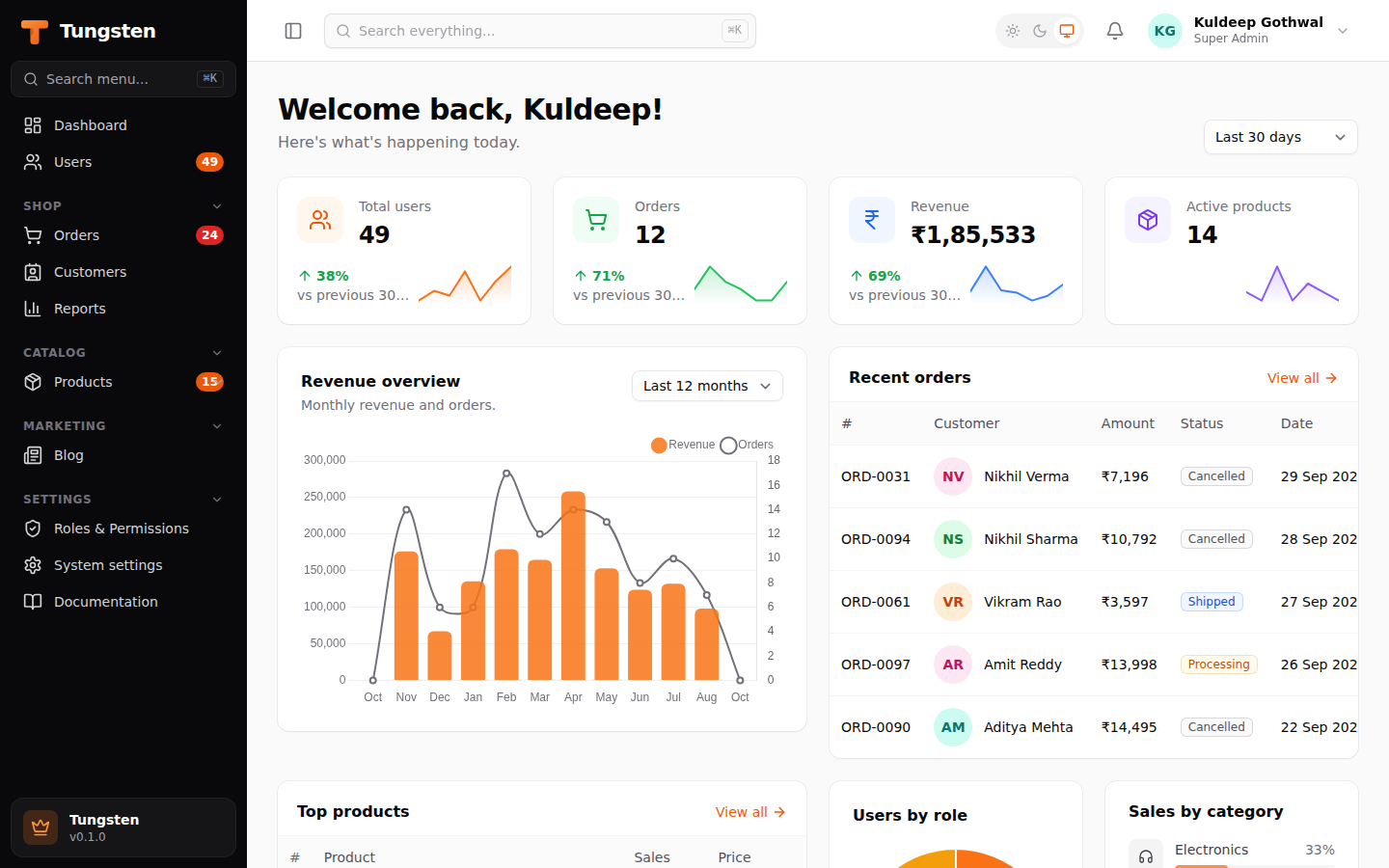 |
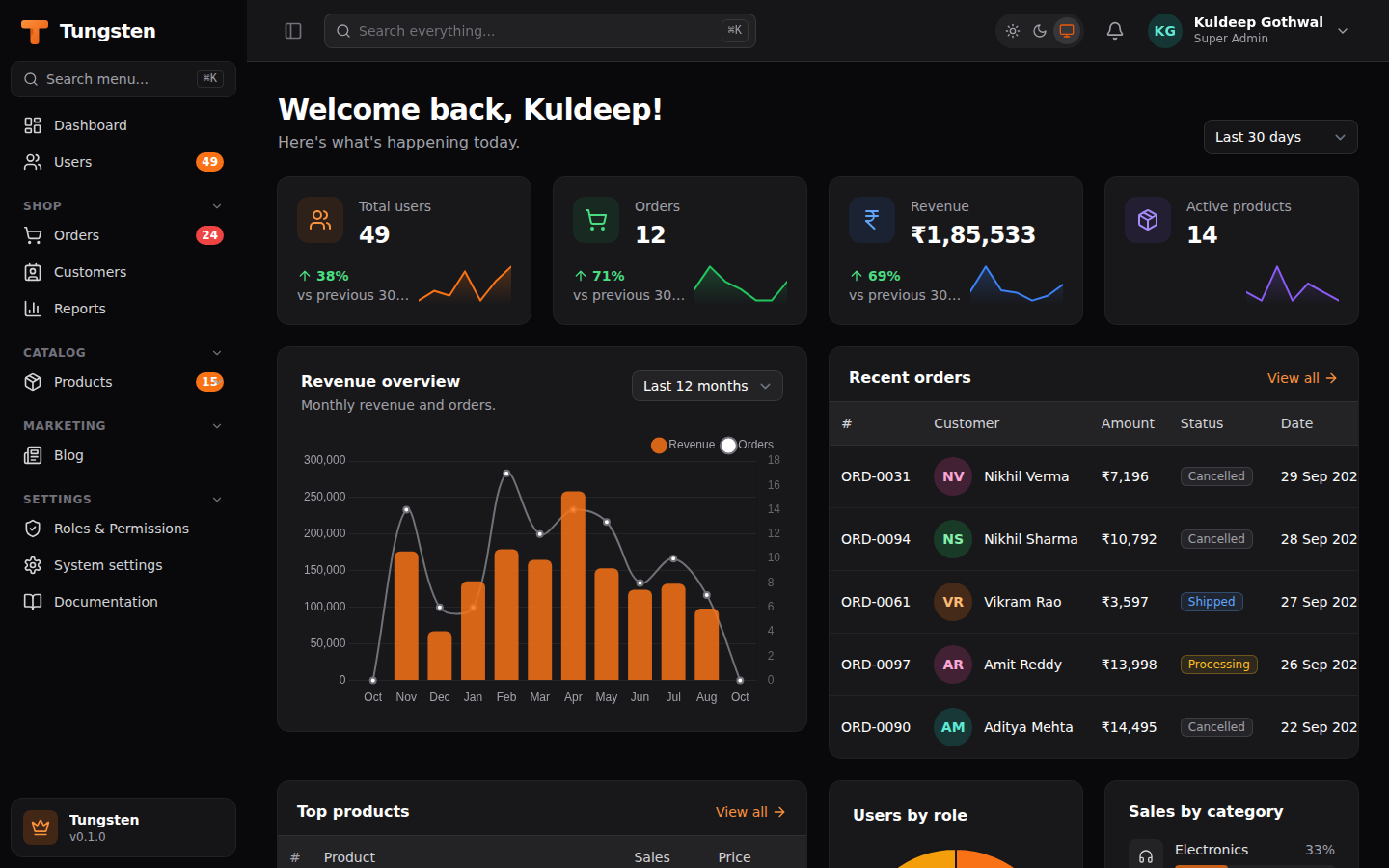 |
| Table with tabs, filters and search | Table (dark mode) |
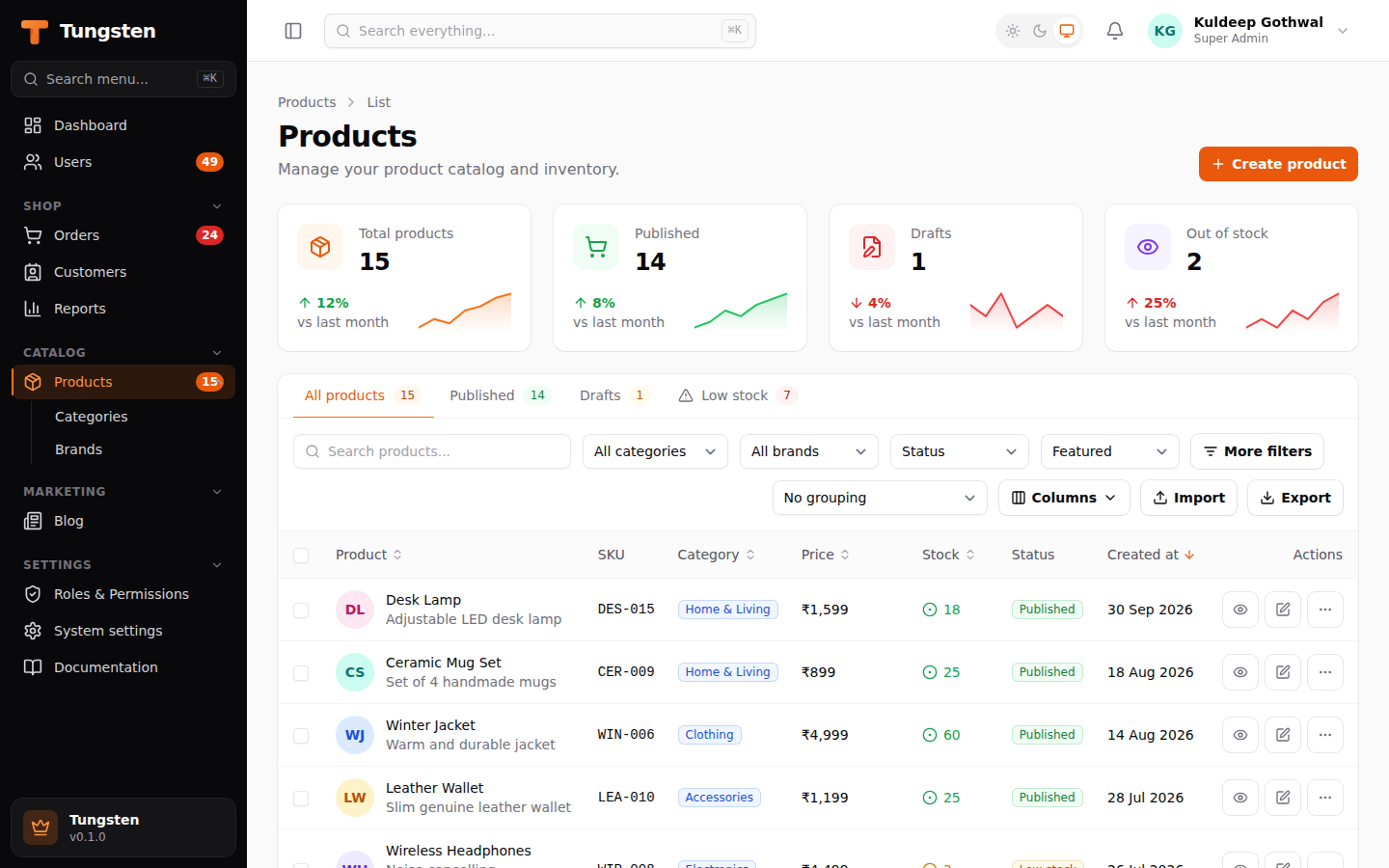 |
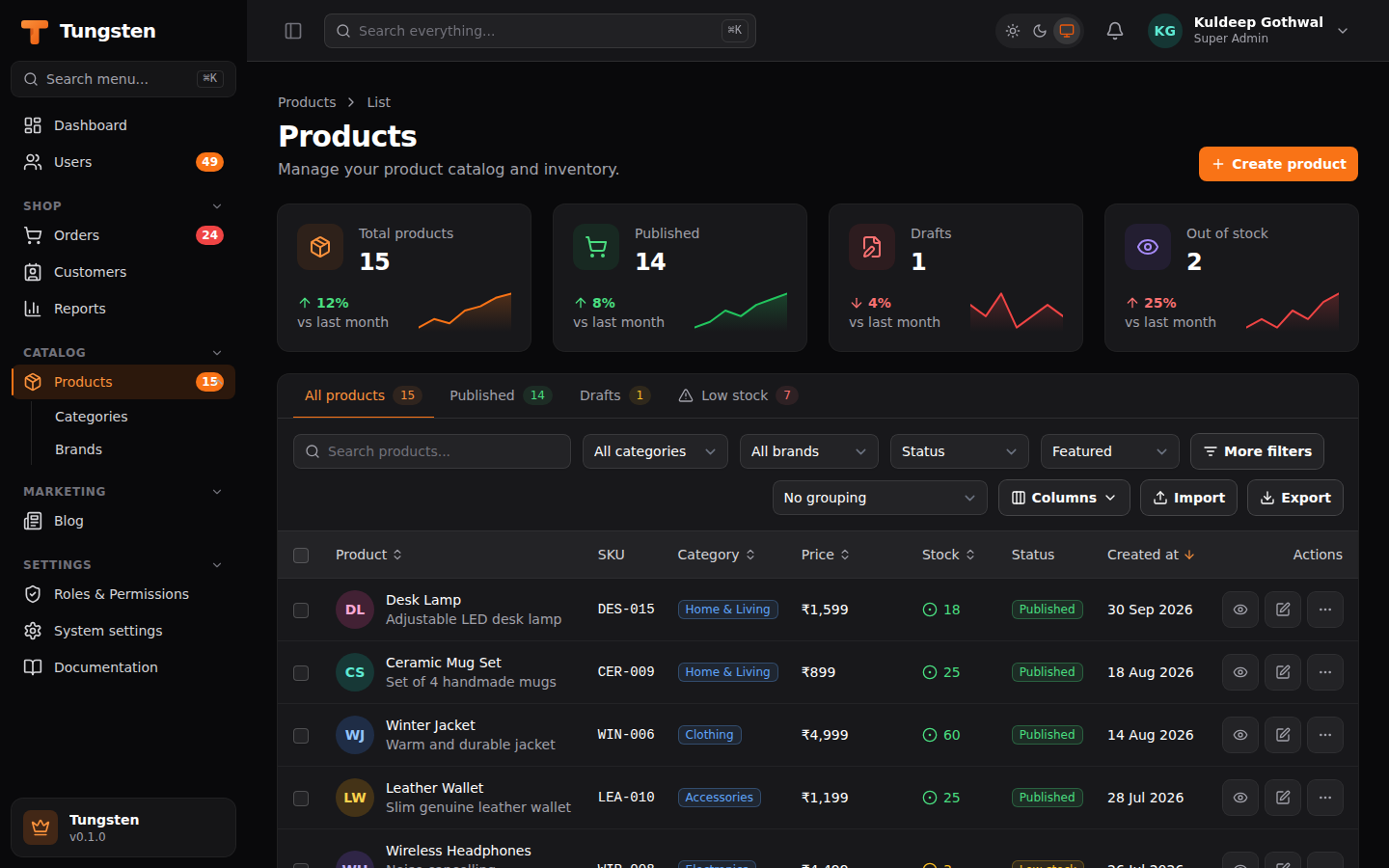 |
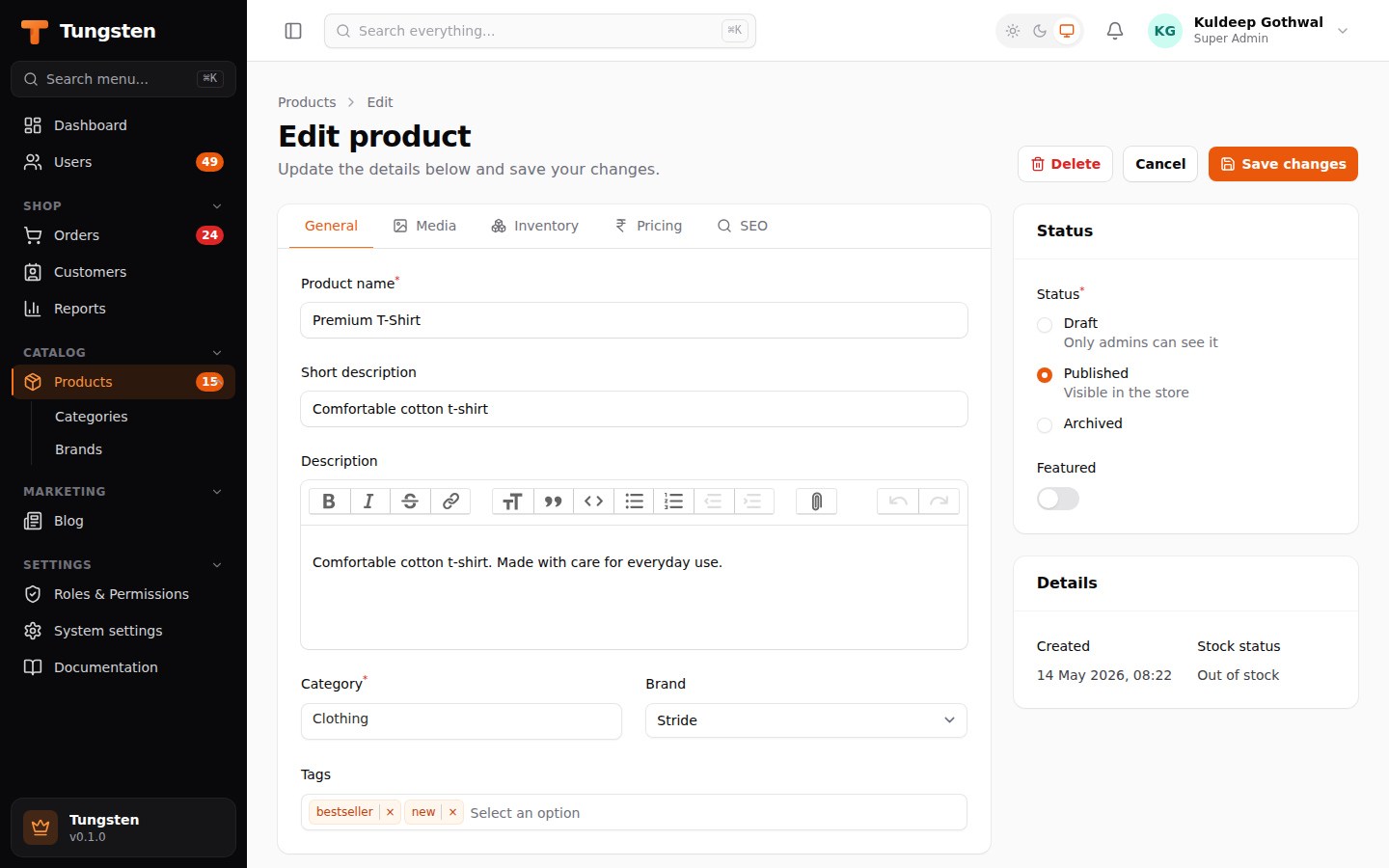
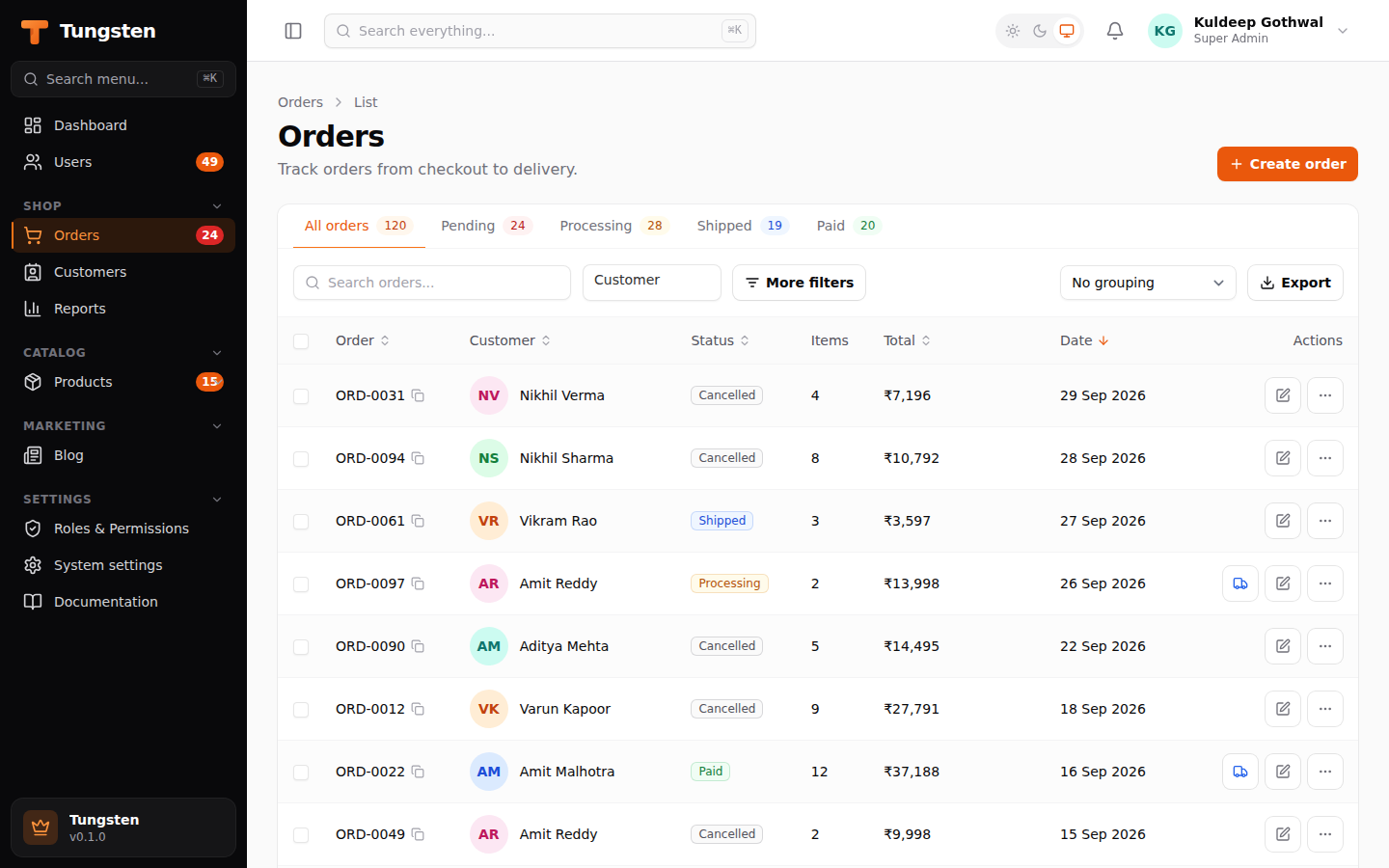
| Form with tabs and rich editor | Orders |
 |
 |
Features
| Area | What you get |
|---|---|
| Resources | List / create / edit / view pages from one class. Soft delete with restore and force delete. "Simple" resources that work fully in popups. |
| Infolists | Read-only view pages with entries (text, badge, icon, image, color, key-value, repeatable) in the same layouts as forms. |
| Forms | TextInput, Textarea, Select (searchable, multiple, relationship), CheckboxList, Checkbox, Toggle, ToggleButtons, Radio, DatePicker, DateTimePicker, TimePicker, FileUpload (images, multiple), RichEditor, ColorPicker, TagsInput, Repeater (JSON or related rows), Builder (content blocks), KeyValue, Hidden, Placeholder. |
| Layouts | Section (cards, collapsible, aside), Grid, Fieldset, Group, Tabs, Wizard (step-by-step, validates each step). |
| Validation | Required, length, min/max, email, URL, regex, unique, "same as", custom rules. Clear messages under each field. |
| Dependent fields | .live() fields re-render the form on the server: show/hide fields, change options, fill other fields. |
| Tables | Text, badge, image, icon, color columns, plus inline-editable toggle, checkbox, text input and select columns. Search (also through relations), sort, filters, a query builder (users build their own AND/OR rules), list tabs with counts, pagination, row and bulk actions, show/hide columns, grouping, totals, drag-to-reorder rows. |
| Actions | Buttons, confirm boxes and modal forms. Ready-made create, edit, view, delete, restore, replicate, attach and detach actions. |
| Relations | Relation managers: manage a customer's orders, or attach tags to a product, on the record page. |
| Widgets | Stats cards with trends and sparklines, charts (line, bar, pie, doughnut...), table widgets, progress lists. Loaded lazily, optional polling. Dashboard filters (e.g. "Last 30 days") passed to every widget. |
| Auth & roles | Login, sign-up, email verification, forgot/reset password, profile page, two-factor login (TOTP + recovery codes), role-based permissions with a Roles screen, policies or a custom gate. |
| Notifications | Toast messages and an in-app notification bell (stored in the database). |
| Navigation | Sidebar groups, icons, badge counts, nested items, ⌘K global search across records and pages. |
| Theming & UX | Brand colors (any Tailwind palette or a hex color), logo, dark mode, SPA mode (no full page reloads), unsaved-changes warning, collapsible sidebar, keyboard shortcuts (Ctrl/⌘+S saves). |
| Languages | Every screen can be translated. Hindi ships built in; add any language with a JSON file. Users switch language from the user menu or the login page. |
| Database | Works with a normal SQLAlchemy engine or an async one (create_async_engine). async def hooks work too. |
| Extras | CSV/Excel import and export, custom pages, multi-tenancy (teams/companies), plugins, render hooks, CLI generators. |
Install
pip install tungsten-admin # add [excel] for .xlsx import/export, [async] for async engines
Quick start
from fastapi import FastAPI
from sqlalchemy import create_engine
from sqlalchemy.orm import sessionmaker
from tungsten import Auth, Panel

engine = create_engine("sqlite:///app.db")
SessionLocal = sessionmaker(engine, expire_on_commit=False)

panel = Panel(
    path="/admin",
    session_factory=SessionLocal,
    secret_key="change-me",          # signs the session cookie
    auth=Auth(User),                 # needs email + password (hash) fields
    brand_name="Acme",
    colors={"primary": "orange"},    # or a hex color: "#ec5b1d"
)
panel.resources([ProductResource, OrderResource])
panel.widgets([StatsWidget, RevenueChart])
panel.rbac()                         # optional: roles & permissions
panel.create_tables(engine)          # Tungsten's own tables (roles, notifications...)

app = FastAPI()
panel.mount(app)
Create your first user:
tungsten make:user --panel app.admin:panel --role "Super Admin"
tungsten lang:extract hi --path app                      # collect text to translate into lang/hi.json
Passwords are hashed with PBKDF2-SHA256 (tungsten.hash_password). Pass hasher= to Auth to use your own.
Try the demo
git clone … && cd tungsten
pip install -e ".[dev]"
python -m examples.shop.seed
uvicorn examples.shop.app:app --reload
Open http://127.0.0.1:8000/admin and sign in with admin@example.com / password. The demo has users (wizard on create, tabs on edit), products (tabs, images, tags, import/export), orders (repeater with live prices), customers (dependent state → city, orders relation manager), roles, a settings page and a full dashboard. Switch to Hindi from the user menu, try the Custom filters query builder on Products, and set DATABASE_URL=sqlite+aiosqlite:///shop.db to run it on an async engine.
Guide
Closures get what they ask for
Almost every option takes a value or a function. Tungsten looks at the parameter names and passes what you ask for: get, set, state, record, operation ("create", "edit", "view"), user, ctx, db, request, tenant, data, records, query, model.
Select("city").options(lambda get: CITIES[get("state")]).visible(lambda get: bool(get("state")))
TextInput("password").required(lambda operation: operation == "create")
Resources
class OrderResource(Resource):
    model = Order
    icon = "shopping-cart"              # any Lucide icon name
    navigation_group = "Shop"
    navigation_sort = 3
    record_title_attribute = "number"
    global_search_attributes = ["number", "customer.name"]
    relations = [ItemsRelationManager]
    widgets = [OrderStats]              # shown above the list
    simple = False                      # True = create/edit in popups
    policy = None                       # object with view_any/update/delete(user, record) ...

    @classmethod
    def navigation_badge(cls, db):      # number next to the menu item
        return db.scalar(select(func.count()).where(Order.status == "pending"))

    @classmethod
    def query(cls, ctx):                # scope every page
        return select(Order).where(Order.archived.is_(False))

    # hooks
    @classmethod
    def after_create(cls, record, db, ctx): ...
    @classmethod
    def after_save(cls, record, db): ...
Other hooks: mutate_form_data_before_create, before_create, mutate_form_data_before_save, before_save, before_delete, after_delete. Soft deletes turn on by themselves when the model has a deleted_at column.
Change the header buttons with header_actions(cls, ctx, page, record).
Forms
form.columns(3).schema([
    Tabs().column_span(2).tabs([
        Tab("General").schema([
            TextInput("name").required(),
            RichEditor("description").column_span("full"),
            Select("tags").relationship("tags", "name").multiple(),
        ]),
        Tab("Media").icon("image").schema([
            FileUpload("images").image().multiple().max_size(2048).directory("products"),
        ]),
    ]),
    Section("Status").schema([
        Radio("status").options({"draft": "Draft", "published": "Published"}),
        Toggle("is_featured"),
    ]),
])
- Wizard:
Wizard([Step("Basic").schema([...]), Step("Review").schema([...])]).submit_label("Create") - Repeater:
Repeater("items").relationship("items", order_column="sort").table().schema([...]), or leave out.relationship()to save a JSON list. - Dependent fields: add
.live()to the field others depend on.after_state_updated(lambda state, set: set("slug", slugify(state)))fills other fields. - Saving tricks:
.dehydrated(False)(don't save),.dehydrate_state_using(fn)(e.g. hash a password),.save_relationships_using(fn),.format_state_using(fn). - Rules:
.rule(lambda value: value != "admin" or "That name is reserved.").
Tables
table.columns([
    TextColumn("name").avatar("photo").description(lambda record: record.email).searchable().sortable(),
    TextColumn("status").badge().colors({"success": "paid", "danger": ["failed", "refunded"]}),
    TextColumn("total").money("INR").summarize(Sum().money("INR")),
    ImageColumn("logo").circular(),
    IconColumn("is_active").boolean(),
    ToggleColumn("is_visible"),
    TextColumn("created_at").since().toggleable(hidden_by_default=True),
])
.filters([
    SelectFilter("status").options(Status).multiple(),
    TernaryFilter("is_active"),
    DateFilter("created_at"),
    Filter("big").label("Over ₹10,000").query(lambda query, model: query.where(model.total > 10000)),
    TrashedFilter(),
])
.groups(["status", "customer.name"])
.actions([EditAction(), ActionGroup([ViewAction(), DeleteAction()])])
.bulk_actions([DeleteBulkAction(), BulkActionGroup([ExportBulkAction()])])
.header_actions([ImportAction(ProductImporter), ExportAction()])
.default_sort("created_at", "desc")
.paginated([10, 25, 50])
.row_index()
.striped()
Table state (search, sort, filters, page) is kept in the URL, so you can bookmark and share it.
Query builder filter
Let users build their own conditions in the filter panel. Rules in a group must all match (AND); groups are joined with OR.
from tungsten.tables import (QueryBuilder, TextConstraint, NumberConstraint, DateConstraint,
                             BooleanConstraint, SelectConstraint, RelationshipConstraint)

table.filters([
    QueryBuilder().constraints([
        TextConstraint("name"),                        # contains, starts with, equals, is blank...
        NumberConstraint("price"),                     # =, >, <, between...
        NumberConstraint("stock").integer(),
        DateConstraint("created_at"),                  # on, before, after, between, in the last N days
        BooleanConstraint("is_featured"),
        SelectConstraint("status").options(Status),    # is, is not, is any of...
        TextConstraint("category.name").label("Category name"),   # through a relationship
        RelationshipConstraint("tags").selectable("name"),        # has any / none / at least N / which ones
    ]),
])
Example: Price is greater than 3000 and Tags has at least 1 — or — Featured is true. The rules live in the URL like other filters.
Actions
Action("ship").icon("truck").color("info")
    .visible(lambda record: record.status == "paid")
    .requires_confirmation()
    .action(lambda record, db: (setattr(record, "status", "shipped"), db.commit()))
    .success_notification_title("Order shipped")

Action("email").form([TextInput("subject").required(), Textarea("body")])
    .action(lambda record, data: send_mail(record.email, **data))
Use them in table rows, bulk (BulkAction, gets records), table headers, or page headers. Raise Halt to keep the popup open.
Infolists (view pages)
Give a resource an infolist() and its view page shows formatted values instead of a disabled form. Entries take every TextColumn option:
@classmethod
def infolist(cls, infolist):
    return infolist.columns(3).schema([
        Section("Product").column_span(2).schema([
            TextEntry("name").weight("semibold"),
            TextEntry("category.name").badge(),
            TextEntry("description").html().column_span("full"),
            ImageEntry("images").stacked(),
        ]),
        Section("Pricing").schema([
            TextEntry("price").money("INR"),
            IconEntry("is_featured").boolean(),
            KeyValueEntry("attributes"),
            TextEntry("created_at").datetime().inline_label(),
        ]),
    ])
RepeatableEntry("items").schema([...]) shows each related row (or JSON list item) with its own entries. Relation managers can have an infolist() too, used by their View popup.
More table features
table.tabs([                                   # tabs above the table, with counts
    ListTab("all").badge(),
    ListTab("active").badge(color="success").query(lambda query, model: query.where(model.is_active)),
])
table.reorderable("sort")                      # a "Reorder" button: drag rows, order saved to `sort`
TextInputColumn("stock").integer().configure(lambda field: field.min_value(0))   # edit in the table
SelectColumn("status").options({"draft": "Draft", "published": "Published"})
CheckboxColumn("is_featured")
Inline-edited values are checked with the same rules as form fields; a bad value shows an error toast and isn't saved.
Builder and ToggleButtons
Builder("content").blocks([
    Block("heading").icon("heading").schema([TextInput("text").required()]),
    Block("paragraph").icon("pilcrow").schema([RichEditor("body")]),
    Block("image").icon("image").schema([FileUpload("image").image()]),
])   # saved as [{"type": "heading", "data": {...}}, ...]

ToggleButtons("status").options({"draft": "Draft", "published": "Published"})
    .icons({"draft": "pencil", "published": "circle-check"})
    .colors({"draft": "gray", "published": "success"})
Relation managers
class OrdersRelationManager(RelationManager):
    relationship = "orders"

    @classmethod
    def form(cls, form): ...
    @classmethod
    def table(cls, table):
        return table.columns([...]).header_actions([CreateAction()]).actions([EditAction(), DeleteAction()])
For many-to-many use AttachAction(), DetachAction() and DetachBulkAction().
Widgets
class Stats(StatsOverviewWidget):
    @classmethod
    def stats(cls, db):
        return [Stat("Users", "1,248").icon("users").trend("12%", "up").chart([3, 5, 4, 8, 9])]

class Revenue(ChartWidget):
    heading = "Revenue"
    type = "bar"
    filters = {"12": "Last 12 months", "3": "Last 3 months"}

    @classmethod
    def data(cls, db, filter):
        return {"labels": [...], "datasets": [{"label": "Revenue", "data": [...], "color": "primary"}]}
Also TableWidget (with model, query(), table()), ProgressListWidget and AccountWidget. Set column_span, sort, lazy and polling_interval on any widget.
Dashboard filters. Give your dashboard a filters_form; the values show in the header and reach every widget as filters:
class MyDashboard(Dashboard):
    @classmethod
    def filters_form(cls, form):
        return form.schema([Select("period").options({"7": "Last 7 days", "30": "Last 30 days"}).default("30")])

class Stats(StatsOverviewWidget):
    @classmethod
    def stats(cls, db, filters):
        days = int(filters["period"])
        ...

Panel(..., dashboard=MyDashboard)
Roles & permissions
panel.rbac() adds a Roles & Permissions screen. Permissions are named <resource-slug>.<ability>: view_any, view, create, update, delete, delete_any, restore, force_delete… Wildcards work (products.*, *). Give users roles with RolesField() in your user form, auth.assign_role(db, user, "Admin"), or the CLI.
You can also use a policy on a resource, Auth(gate=lambda user, permission, record: ...), or Auth(can_access=lambda user: user.is_staff) to decide who can sign in.
Sign-up and two-factor login
Auth(User,
     registration=True,              # adds a "Create an account" page
     on_register=lambda user, db: ...,
     two_factor=True,                # users can turn on 2FA from their profile
     two_factor_required=False)      # True forces everyone to set it up
Two-factor uses 6-digit codes from any authenticator app (Google Authenticator, Microsoft Authenticator, 1Password…). Users scan a QR code, confirm one code, and get 8 one-time recovery codes. Each code works only once.
Email verification
Auth(User, email_verification=True) # needs a nullable datetime column: email_verified_at
New users get an email with a signed link (valid 60 minutes, verification_minutes= to change). Until they click it they only see a "Verify your email" page with a Resend button (once a minute). Changing the email on the profile page asks for verification again, and old links stop working. Emails go through Auth(mailer=...), which receives to, subject, body (and url, user, kind if it asks for them).
Translations
Panel(...,
      locale="en",                 # default language
      locales=["en", "hi"],        # languages users can pick (switcher appears when more than one)
      lang_dirs=["lang"])          # your own lang/<code>.json files
Text is looked up by its English wording. Tungsten ships Hindi (hi). For your own labels, add a JSON file:
// lang/hi.json
{"Products": "उत्पाद", "Low stock only": "सिर्फ़ कम स्टॉक", "Welcome, :name": "स्वागत है, :name"}
Labels, headings, buttons, options, notifications and validation messages are translated automatically. In your own code use __():
from tungsten import __
Notification(__("Order shipped")).send(ctx)
tungsten lang:extract hi --path app collects the text in your code into lang/hi.json, ready to fill in. The language comes from the user's pick, then the browser's language, then locale. Right-to-left languages (Arabic, Hebrew, Urdu, Persian) set dir="rtl".
Async database
Pass an async engine and everything else stays the same:
from sqlalchemy.ext.asyncio import create_async_engine

panel = Panel(engine=create_async_engine("postgresql+asyncpg://..."), ...)
await panel.acreate_tables()      # or panel.create_tables() outside an event loop
Handlers run on the event loop through SQLAlchemy's AsyncSession.run_sync, so your closures still get a normal db session and lazy loading keeps working. Password hashing and file uploads run in a worker thread so they don't block the loop. Any closure can also be async def — Tungsten awaits it. For scripts, panel.with_session(lambda db: ...) works with both engine types.
Notifications
Notification("Saved").body("The product was updated.").success().send(ctx)                  # toast
Notification("New order").body("#ORD-12").action("View", url).send_to_database(admins, db)   # bell
Custom pages
class Settings(Page):
    icon = "settings"
    navigation_group = "Settings"
    permission = "page.settings"

    @classmethod
    def form(cls, form): return form.schema([TextInput("site_name").required()])
    @classmethod
    def mount(cls, ctx): return load_settings()
    @classmethod
    def save(cls, ctx, data): store_settings(data)
Pages can also return content() HTML, use a content_template, and show widgets.
Import & export
ExportAction() downloads the current table (with its search and filters) as CSV or Excel. ExportBulkAction() exports the selected rows. For import, describe the columns:
class ProductImporter(Importer):
    model = Product
    unique_by = "sku"                    # update rows that already exist
    columns = [
        ImportColumn("name").required(),
        ImportColumn("price").numeric(),
        ImportColumn("category").relationship("category", "name"),
    ]
Rows that fail are skipped and offered as a "failed rows" CSV download.
Multi-tenancy
Panel(..., tenancy=Tenancy(Team, ownership="team_id", tenants=lambda user: user.teams))
Models with a team_id column are filtered to the current team, and new records get it set automatically. Users switch teams from the sidebar.
Plugins & render hooks
class BlogPlugin(Plugin):
    id = "blog"
    def register(self, panel): panel.resources([PostResource])
    def boot(self, panel): panel.render_hook("sidebar.footer", lambda: Markup("<p>Blog</p>"))

panel.plugin(BlogPlugin())
Hook names: head.end, body.start, body.end, sidebar.nav.start, sidebar.nav.end, sidebar.footer, topbar.start, topbar.end, content.start, content.end, user-menu.items, auth.login.form.after, resource.list.before-table.
Layout & UX options
Panel(...,
      spa=True,                     # move between pages without full reloads
      unsaved_changes_alerts=True,  # warn before leaving a changed form (default on)
      sidebar_collapsible=True)     # desktop sidebar can collapse to icons (default on)
Save buttons on record pages respond to Ctrl/⌘+S. Give any action a shortcut with .keyboard_shortcut("mod+e"). In global search, use the arrow keys to move through results.
Override any template by passing template_dirs=[...] and putting your own file at the same path (for example tungsten/components/brand.html).
CLI
tungsten init                                            # admin/panel.py
tungsten make:resource Product -m app.models:Product -g  # -g builds fields/columns from the model
tungsten make:resource Tag --simple
tungsten make:relation-manager Customer orders
tungsten make:page Settings --form
tungsten make:widget Sales --type chart                  # stats, chart, table, progress
tungsten make:plugin Blog
tungsten make:user --panel app.admin:panel --role "Super Admin"
tungsten lang:extract hi --path app                      # collect text to translate into lang/hi.json
Security notes
- Every POST checks a CSRF token. The session cookie is signed,
SameSite=Lax(sethttps_only_cookies=Truein production). - Login is rate-limited per IP and email.
- Rich text is cleaned to a safe allow-list of tags. Uploads of HTML, SVG and scripts are refused, and stored files are served with
nosniffand a sandbox CSP. - CSV exports escape spreadsheet formulas.
Development
pip install -e ".[dev]"
pytest                       # 91 tests
TUNGSTEN_TEST_ASYNC=1 pytest  # the same tests on an async engine (aiosqlite)

# rebuild CSS/JS assets after changing templates or classes
cd frontend && npm install && npm run build
The built assets (Tailwind CSS, HTMX, Alpine.js, Chart.js, Trix, Tom Select, SortableJS, a QR code generator and Lucide icons) ship inside the package. Nothing loads from a CDN, except the optional Google font (Panel(font=None) turns it off).
Roadmap
- Impersonation (sign in as another user)
- More built-in languages
License
MIT
1 maintainer

Metadata
1 maintainer
Release files for tungsten-admin 0.1.1
For a detailed explanation of source distributions (sdists) and built distributions (wheels), please see the package formats documentation.
Source distribution (sdist)
| File | Size | Uploaded | |
|---|---|---|---|
| tungsten_admin-0.1.1.tar.gz | 458.2 kB | Details |
Built distribution (wheel)
| File | Interpreter | ABI | Platform | Reset |
|---|---|---|---|---|
| tungsten_admin-0.1.1-py3-none-any.whl | Python 3 | none | any | Details |
Total release size: 982.5 kB
Release files / tungsten_admin-0.1.1.tar.gz
| Download URL | tungsten_admin-0.1.1.tar.gz |
|---|---|
| Size | 458.2 kB |
| Tags | Source |
|
SHA-256 checksum How to use checksums |
41aa4a6984d3fc6251850559fc2d95f22cc92e5f0dea8bde8188cc942d0ccf4d
|
|
BLAKE2b-256 checksum How to use checksums |
f97382ad19c0cfa96ab4f2e78a5c7bd4a2b2627c5f9edea1db54adf5a06343a9
|
| Upload date | |
|
Uploaded using Trusted Publishing? What is trusted publishing? |
No |
| Uploaded via |
twine/7.0.0 CPython/3.11.15
|
Release files / tungsten_admin-0.1.1-py3-none-any.whl
| Download URL | tungsten_admin-0.1.1-py3-none-any.whl |
|---|---|
| Size | 524.3 kB |
| Tags | Python 3 |
|
SHA-256 checksum How to use checksums |
7767088a27e2ee1aadcf6a1373cda293f7f338d0ab1ba8b34ad790b0f451049d
|
|
BLAKE2b-256 checksum How to use checksums |
6221d6247a36f1710b2a7266af135b044e18595faee704075205c7565f60e506
|
| Upload date | |
|
Uploaded using Trusted Publishing? What is trusted publishing? |
No |
| Uploaded via |
twine/7.0.0 CPython/3.11.15
|














