
A previous release had provenance metadata, but this release does not. View details.
Turbo Picard



Documentation · Command coverage · Evaluate on your data · MarkDuplicates slow or out of memory? · Research · Independent evaluations
Run your Picard task natively
Keep familiar Picard commands for duplicate marking, sorting, FASTQ conversion and QC. Check native support, compare the outputs your workflow needs, and improve one task at a time.
Turbo Picard is built for teams maintaining SAM/BAM/CRAM, VCF and sequencing-QC steps in Nextflow, WDL, Snakemake and shell workflows. Native commands avoid the JVM; the documented interface keeps migration local to the task you replace.
Start with one representative input. Native coverage is command- and option-specific; this is not the full upstream suite. Keep Picard for work outside the documented scope.
For coding agents and workflow generators, inspect the complete decision surface in one call:
turbo-picard capabilities --json
The schema-versioned response contains every Picard command's native/fallback
status and trial fit together with the checked-in parity-gated benchmark
evidence. Use turbo-picard trial --json <PicardCommand> ... for the exact task
being considered. See the agentic-coder guide for the
selection rule and safe substitution pattern.
Agents can also use the MCP server, which wraps the same reports plus a
guarded run tool (current source; first release after 0.1.17):
claude mcp add turbo-picard -- turbo-picard mcp
mcp-name: io.github.dnncha/turbo-picard
To make an agent pick this up on its own, install the
agent kit: a Claude Code skill and plugin
(/plugin install turbo-picard --marketplace dnncha/turbo-picard), a Codex AGENTS.md snippet
and a Cursor rule. Each tells the agent to run turbo-picard explain --json
first, run natively when in scope, and otherwise let turbo-picard delegate.
Compact, native-only automation
Version 0.1.17 repairs scientific correctness across duplicate marking, quality metrics, sorting, validation, mate repair, and VCF processing. Native workload parity now runs against Picard 3.4.0 and 3.5.0 with complete scientific comparison and independent mutation checks.
The retained 0.1.16 paired spill benchmarks measured 16–18% lower runtime and 8–13% lower peak memory in CI. These historical measurements are unchanged. See the release notes for exact conditions, competitor results, and the evidence limits.
Version 0.1.13 adds capabilities --json --command MarkDuplicates for compact
discovery, executable argument arrays in trial JSON, and the strict
TURBO_PICARD_REQUIRE_NATIVE=1 policy. See the
agentic-coder guide. Inspection reports describe
command scope, not proof that a particular input or option is validated.
Quick Start
Install from PyPI:
python3 -m pip install turbo-picard==0.1.18
For a containerized trial, use the published release image:
docker run --rm ghcr.io/dnncha/turbo-picard:0.1.18 --version
Cover every Picard command in one environment
turbo-picard runs a command natively only when the command and its options
are inside documented native scope. Everything else is delegated to upstream
Picard, if one is installed. Install both together so every Picard 3.4.0
command name works:
mamba create -n turbo-picard -c conda-forge -c bioconda \
  turbo-picard picard=3.4.0 openjdk
mamba activate turbo-picard
turbo-picard doctor
From the next release, doctor prints fallback_ready=true once upstream Picard
is found, and explain --json reports fallback_ready for each call; older
versions show the resolved fallback_command instead. With a pip install, point
PICARD_JAR at an upstream picard.jar and keep Java on PATH. The
turbo-picard-full recipe
pins the same three packages as one Bioconda metapackage; it has not been
submitted to Bioconda yet. See fallback behavior. Native
coverage is still command- and option-specific.
Installing from PyPI currently gives you both commands:
turbo-picard: the explicit command for evaluation and normal use.picard: a compatibility shim for environments where you deliberately want existingpicardcalls to resolve to this package.
Use the explicit turbo-picard command while testing. Add the shim to a
pipeline environment only after the specific commands you need have been
checked.
Check the install and print a trial contract before changing a workflow:
turbo-picard --version
turbo-picard MarkDuplicates --help
turbo-picard doctor
turbo-picard trial MarkDuplicates I=input.bam O=marked.bam M=metrics.txt
The trial command prints matching Picard and turbo-picard invocations, declared outputs, fallback state, and comparison notes. Then run the chosen command on a representative input:
turbo-picard MarkDuplicates I=input.bam O=marked.bam M=metrics.txt
From a repository checkout:
cargo install --locked --path crates/turbo-picard-cli --bin turbo-picard --bin picard
Compare before changing a workflow
The repository includes an evaluator that runs both implementations in separate output paths and records versions, timings and output digests. It does not upload your data. See the real-data evaluation guide for a copyable command and the interpretation of a match or mismatch.
The evaluator in this source checkout uses disk-backed sorting for large comparisons, preserves existing evaluation directories, and retains failed runs for diagnosis. The evaluator records command runtimes separately from comparison work; improvements to its sorting helper do not establish faster native commands.
When It Helps
- You already run Picard commands and want to trial one slow step first.
- You need Picard-style command names and
KEY=VALUEarguments to stay stable. - You want a command-by-command rollout with upstream Picard available for unsupported or unchecked behavior.
- You can compare outputs on a representative BAM, CRAM, FASTQ, VCF, or metrics file before changing the workflow.
Good first trials are usually MarkDuplicates, SortSam, SamToFastq,
FastqToSam, FixMateInformation, BuildBamIndex, and repeated metrics
commands.
Use turbo-picard trial <PicardCommand> ... to print a side-by-side Picard and
turbo-picard evaluation contract before changing a workflow.
When To Stay With Picard
- You need an option or command that is not inside the documented native scope and cannot use fallback.
- You require Picard-equivalent chart rendering rather than checked metrics text.
- You have not compared the exact command, input shape, sidecars, metrics, exit code, and error behavior your workflow depends on.
- You need broad cohort evidence before trying a representative shard.
Documentation
The full docs are on Read the Docs: installation, command scope, evaluation, and maintenance.
Useful starting points:
- Quickstart
- Agentic coder guide
- Is this for you?
- Choose your first command
- Evaluation playbook
- Command coverage
- Picard alternatives
- Trying it in a pipeline
- Parity guide
- Fallback to Picard
- Benchmarks
- Citation
- Packaging
- Troubleshooting
Starter workflow files live in packaging/workflows/.
The smallest trial shape is
packaging/workflows/one-command-trial.md.
Migration patterns that usually keep the surrounding workflow stable include
per-read-group SamToFastq, sequential-shard FastqToSam, and
mate-repair boundaries around FixMateInformation.
If you run a real one-command evaluation, share the result through the
trial report issue form;
successful matches, mismatches, and adoption blockers are all useful evidence.
If GitHub does not offer new-issue creation, add the same redacted report as a
comment on the public trial report thread.
From a repository checkout, tools/compare_real_data.py --shareable-report
can create a reviewed, privacy-conscious starting point for that report.
Benchmark evidence
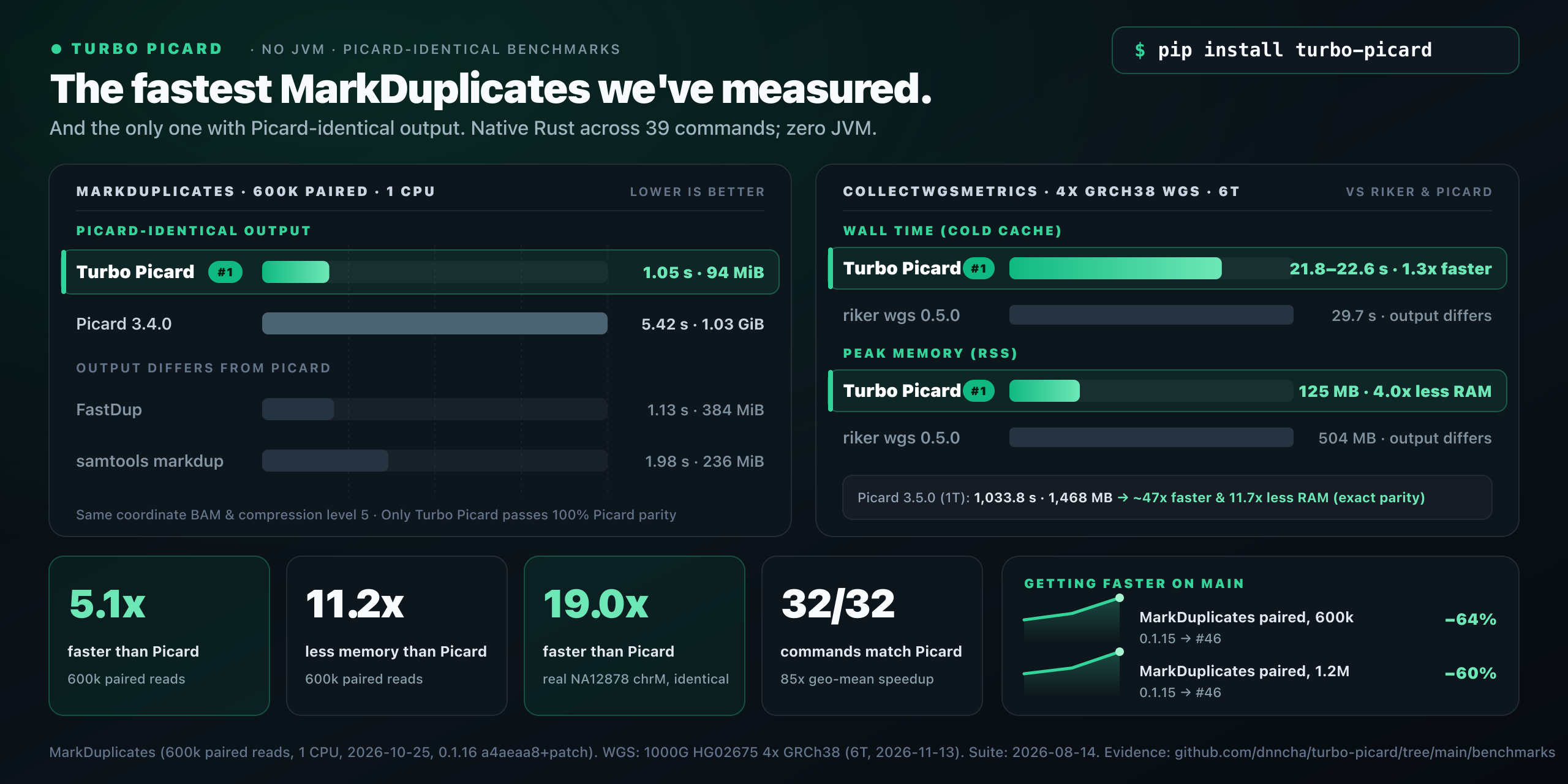
The saved suite records 32 command comparisons against Picard 3.4.0, each
checked against its specified output contract. These are small-fixture results:
startup overhead contributes substantially to the measured ratios. The saved
suite reports a 22.88x minimum, 84.52x geometric mean, and 272.12x maximum
speedup on those fixtures. In the saved
MarkDuplicates case, the generator used reads=50000; median wall times were
0.075464 seconds for Turbo Picard and 2.238986 seconds for Picard across three
runs. This is not a whole-genome performance estimate.
See the benchmark guide for methods and real-data scope, the saved record for all 32 measurements and reproduction commands, and the parity guide for what was compared. Metrics-text agreement does not establish Picard-equivalent charts.
Cheerful Duck Research publishes our broader bioinformatics software investigations, reproduction material, and corrections.
Saved benchmark record
Expand all measurements, input provenance, and reproduction commands
The saved public benchmark suite compares native turbo-picard commands against
Picard 3.4.0 and checks stable outputs before reporting speed. Current saved
results report 32/32 parity checks passing, with 272.12x top speedup:
NormalizeFasta, 22.88x floor speedup: SetNmMdAndUqTags, 99.51x
median speedup, and 84.52x geometric mean speedup.
Read these as small-fixture measurements, not whole-genome speedups.
For example, the saved MarkDuplicates case used the generator's reads=50000
setting, with median wall times of 0.075464 seconds for Turbo Picard and
2.238986 seconds for Picard across three runs. Startup overhead matters at
this scale. The reported speedup is the median of paired-run ratios, which need
not equal the ratio of those independent medians. The machine-readable evidence
now preserves timings, repeat counts and generator parameters alongside ratios.
Summary: 32/32 PASS; 272.12x top speedup: NormalizeFasta;
22.88x floor speedup: SetNmMdAndUqTags; 99.51x median speedup; 84.52x
geometric mean speedup.
Benchmark details, scope notes, real-data evidence, and reproduction commands
are in the benchmark docs.
The parity guide
explains what the comparisons do and do not prove.
For CollectBaseDistributionByCycle, CollectGcBiasMetrics,
CollectInsertSizeMetrics, MeanQualityByCycle, and
QualityScoreDistribution, metrics text is the parity target; chart outputs are
lightweight PDF summaries, not Picard-equivalent rendered plots.
Saved benchmark run:
- Date:
2026-08-14 - Command:
python3 tools/bench_suite.py --repeats 3 --skip-build - Raw log:
docs/site/assets/bench-suite-output.txt - benchmark exceptions:
AccelerationStatus,capabilities,doctor,explain,mcp, andtrialare utility commands, not Picard workload comparisons.CollectHsMetricshas separate ALL_READS and sidecar parity coverage, plus a real-data comparator path for pinned WES/capture intervals; representative capture-data performance evidence is still pending.
| Command | Speedup | Parity |
|---|---|---|
| NormalizeFasta | 272.12x | PASS |
| BuildBamIndex | 243.53x | PASS |
| UpdateVcfSequenceDictionary | 207.52x | PASS |
| CollectGcBiasMetrics | 196.45x | PASS |
| CreateSequenceDictionary | 152.62x | PASS |
| GatherVcfs | 130.70x | PASS |
| LiftoverVcf | 127.28x | PASS |
| CollectMultipleMetrics | 122.66x | PASS |
| CollectInsertSizeMetrics | 117.34x | PASS |
| CleanSam | 115.42x | PASS |
| MergeVcfs | 112.13x | PASS |
| MeanQualityByCycle | 108.66x | PASS |
| CollectQualityYieldMetrics | 108.64x | PASS |
| QualityScoreDistribution | 107.17x | PASS |
| ReplaceSamHeader | 101.84x | PASS |
| ValidateSamFile | 99.56x | PASS |
| IntervalListTools | 99.46x | PASS |
| CollectBaseDistributionByCycle | 98.01x | PASS |
| SortVcf | 89.01x | PASS |
| CollectAlignmentSummaryMetrics | 83.49x | PASS |
| BedToIntervalList | 79.78x | PASS |
| ViewSam | 79.58x | PASS |
| AddOrReplaceReadGroups | 77.78x | PASS |
| SamToFastq | 77.74x | PASS |
| CollectWgsMetrics | 50.81x | PASS |
| MergeSamFiles | 35.49x | PASS |
| SortSam | 35.15x | PASS |
| FixMateInformation | 31.98x | PASS |
| FastqToSam | 31.29x | PASS |
| MarkDuplicates | 28.70x | PASS |
| RevertSam | 24.19x | PASS |
| SetNmMdAndUqTags | 22.88x | PASS |
Release evidence checks:
python3 tools/update_real_data_manifest.py
python3 tools/verify_benchmark_log_evidence.py
python3 tools/verify_benchmark_suite_coverage.py
python3 tools/verify_benchmark_thresholds.py
python3 tools/verify_real_data_evidence.py
python3 tools/verify_real_data_evidence.py --release-ready
Real-data evidence lives in benchmarks/real-data/ and records pinned input
sources, command scopes, and input SHA-256 hashes. Current release-candidate
dataset IDs are gatk-na12878-mito, picard-snvq, and
gatk-na12878-mito-cram.
Check the saved real-data record
The benchmarks/real-data/ manifest records pinned inputs for
gatk-na12878-mito, picard-snvq, and gatk-na12878-mito-cram.
From a checkout, use the existing evidence tools:
python3 tools/update_real_data_manifest.py
python3 tools/verify_real_data_evidence.py
python3 tools/verify_real_data_evidence.py --release-ready
These commands check the repository's saved evidence. They do not validate a new input file or replace a comparison of your own workflow.
Workflow evaluation
The project publishes a workflow validation protocol, a compatibility contract, and a production-scale benchmark format. Use these before changing a workflow. The opt-in Nextflow process candidate is documented under packaging/nf-core.
A command-level speedup is not a universal replacement claim. Keep upstream Picard available until representative BAM/CRAM evidence, output parity, failure behaviour, and independent review pass for the exact workflow.
Packaging Status
The current source release is 0.1.18. Release builds target Linux x86_64 and
ARM64, macOS Intel and Apple Silicon, plus a source distribution. Publication
is gated on artifact validation and installation smoke tests; the
release page
and PyPI identify the published
artifacts. The Linux ARM64 wheel is cross-built and artifact-validated.
Read the release notes for the release scope and evidence boundaries.
Bioconda accepted the initial recipes
on 4 October 2026. The channel indexes checked on 25 October list 0.1.15
for the main package on Linux x86_64/ARM64 and macOS Intel/Apple Silicon.
The main package installs turbo-picard; a separate optional shim installs
picard. The main-package 0.1.16 update
and shim update remain
open. Use the pinned PyPI wheel or container above for 0.1.18.
See the dated channel receipt for
observed builds and checksums; a recipe update is not a published package.
Citation
Cite the archived turbo-picard release you used with CITATION.cff.
Benchmark and validation inputs should be cited separately with immutable source
URLs, commits or accessions, and input SHA-256 hashes.
Docs source lives in docs/. JOSS submission notes are tracked in
docs/joss-submission.rst.
Contributing
Bug reports, parity evidence, documentation fixes, and small command-coverage
improvements are welcome. Start with CONTRIBUTING.md and
the development docs.
Support: SUPPORT.md. Security: SECURITY.md.
1 maintainer

Metadata
1 maintainer
Release files for turbo-picard 0.1.18
For a detailed explanation of source distributions (sdists) and built distributions (wheels), please see the package formats documentation.
Loss of provenance
These files do not have provenance metadata, despite files in a prior release including this data.
We recommend further investigation before installing these files. View details.
Source distribution (sdist)
| File | Size | Uploaded | Provenance | Actions |
|---|---|---|---|---|
| turbo_picard-0.1.18.tar.gz | 299.7 kB | Without provenance | Details for turbo_picard-0.1.18.tar.gz |
Built distributions (wheels)
| File | Interpreter | ABI | Platform | Actions Reset |
|---|---|---|---|---|
| turbo_picard-0.1.18-py3-none-manylinux2014_x86_64.manylinux_2_17_x86_64.whl | Python 3 | none | Linux glibc 2.17+ x86-64 | Details for turbo_picard-0.1.18-py3-none-manylinux2014_x86_64.manylinux_2_17_x86_64.whl |
| turbo_picard-0.1.18-py3-none-macosx_11_0_arm64.whl | Python 3 | none | macOS 11.0+ ARM64 | Details for turbo_picard-0.1.18-py3-none-macosx_11_0_arm64.whl |
| turbo_picard-0.1.18-py3-none-macosx_10_12_x86_64.whl | Python 3 | none | macOS 10.12+ x86-64 | Details for turbo_picard-0.1.18-py3-none-macosx_10_12_x86_64.whl |
Total release size: 28.8 MB
Release files / turbo_picard-0.1.18.tar.gz
Loss of provenance
This file belongs to a release without provenance metadata, despite a prior release including this data.
We recommend further investigation before installing this file. View details.
| Download URL | turbo_picard-0.1.18.tar.gz |
|---|---|
| Size | 299.7 kB |
| Tags | Source |
|
SHA-256 checksum How to use checksums |
61b72e47265ac478366c59923f9f7950cca8b7785aaf688fe3b26ec6c310f7f2
|
|
BLAKE2b-256 checksum How to use checksums |
6f1cc88579a65967e11434e908c085bc877d4ef623bd3764c7ff3e9ea1b5efce
|
| Upload date | |
|
Uploaded using Trusted Publishing? What is trusted publishing? |
No |
| Uploaded via |
twine/7.0.0 CPython/3.13.15
|
Release files / turbo_picard-0.1.18-py3-none-manylinux2014_x86_64.manylinux_2_17_x86_64.whl
Loss of provenance
This file belongs to a release without provenance metadata, despite a prior release including this data.
We recommend further investigation before installing this file. View details.
| Download URL | turbo_picard-0.1.18-py3-none-manylinux2014_x86_64.manylinux_2_17_x86_64.whl |
|---|---|
| Size | 10.0 MB |
| Tags | Linux glibc 2.17+ x86-64 Python 3 |
|
SHA-256 checksum How to use checksums |
f978fc9cea75fc1457451463e785c7ffe875967843a9f24ed6b35d17b1521fc3
|
|
BLAKE2b-256 checksum How to use checksums |
5d049f18392767f58732bb37cf534b3fb55ce90877dc03c5702b1fd8b6b77cc5
|
| Upload date | |
|
Uploaded using Trusted Publishing? What is trusted publishing? |
No |
| Uploaded via |
twine/7.0.0 CPython/3.13.15
|
Release files / turbo_picard-0.1.18-py3-none-macosx_11_0_arm64.whl
Loss of provenance
This file belongs to a release without provenance metadata, despite a prior release including this data.
We recommend further investigation before installing this file. View details.
| Download URL | turbo_picard-0.1.18-py3-none-macosx_11_0_arm64.whl |
|---|---|
| Size | 9.4 MB |
| Tags | Python 3 macOS 11.0+ ARM64 |
|
SHA-256 checksum How to use checksums |
87d20cc53e82d99a5cfb7080ae93315b974929b7cfb4d3573bff0123b627b41e
|
|
BLAKE2b-256 checksum How to use checksums |
1710aae042e26c5c62c0976340e2feff584ba10f7678c27064907d49e81b58e9
|
| Upload date | |
|
Uploaded using Trusted Publishing? What is trusted publishing? |
No |
| Uploaded via |
twine/7.0.0 CPython/3.13.15
|
Release files / turbo_picard-0.1.18-py3-none-macosx_10_12_x86_64.whl
Loss of provenance
This file belongs to a release without provenance metadata, despite a prior release including this data.
We recommend further investigation before installing this file. View details.
| Download URL | turbo_picard-0.1.18-py3-none-macosx_10_12_x86_64.whl |
|---|---|
| Size | 9.1 MB |
| Tags | Python 3 macOS 10.12+ x86-64 |
|
SHA-256 checksum How to use checksums |
8c55fb1f0dce18d47b7e8d69defc5ef27fb37d1be7bb8a572621a78bebbb50b7
|
|
BLAKE2b-256 checksum How to use checksums |
2eeba60040c042930a718b0e9e23d5616589fb8c06d1eae90209de0be19790bf
|
| Upload date | |
|
Uploaded using Trusted Publishing? What is trusted publishing? |
No |
| Uploaded via |
twine/7.0.0 CPython/3.13.15
|
Security for turbo-picard 0.1.18
Provenance
Provenance describes where a file came from. On PyPI, provenance is shared via attestations, which provide a verifiable record of the build or publishing details. View details, limitations and caveats.
Loss of provenance
A previous release of these files had provenance metadata, but this release does not.
While this could reflect a routine change by the project maintainers, it may also indicate that the release files have been compromised.
Release comparison
- Removed 0.1.17 5 files With provenance
- Added 0.1.18 4 files Without provenance
A note on package security
PyPI is a repository for distributing packages, not a service for auditing them. While third-party security researchers and our staff do their best to detect and remove malicious packages, PyPI cannot guarantee the quality, security or suitability of any given package.
To learn more about protecting yourself from malicious actors, visit our package security documentation.














