

Turbot





A Discord bot for everything Animal Crossing: New Horizons.

📱 Using Turbot
Once you've connected the bot to your server, you can interact with it over Discord via the following commands in any of the authorized channels.
!about: Get information about Turbot!help: Provides detailed help about all of the following commands!export: Send a DM with all the data Turbot has associated with you
💸 Turnips
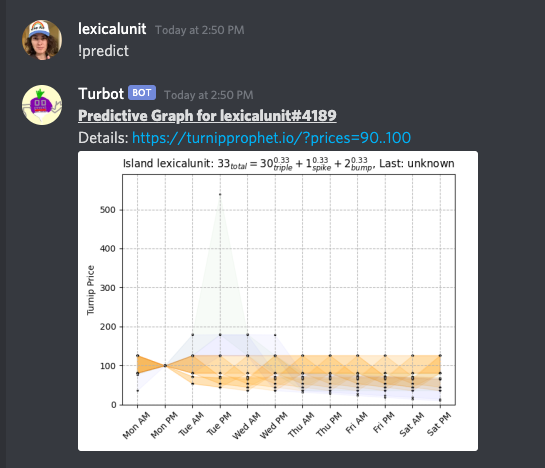
These commands help users buy low and sell high in the stalk market.
!best: Look for the current best sell or buy!buy: Save a buy price!clear: Clear your price data!graph: Graph price data!history: Get price history!lastweek: Get graph for last week's price data!oops: Undo the last price data!predict: Predict your price data for the rest of the week!reset: Reset all users' data!sell: Save a sell price
ℹ️ User Preferences
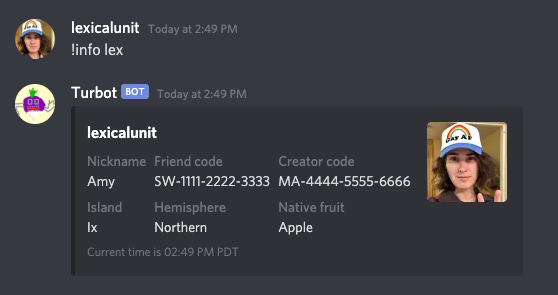
These commands allow users to set their preferences. These preferences are used to make other commands more relevant, for example by converting times to the user's preferred timezone.
!info: Get a user's information!pref: Set a user preference; use command to get a list of available options
📮 Collectables
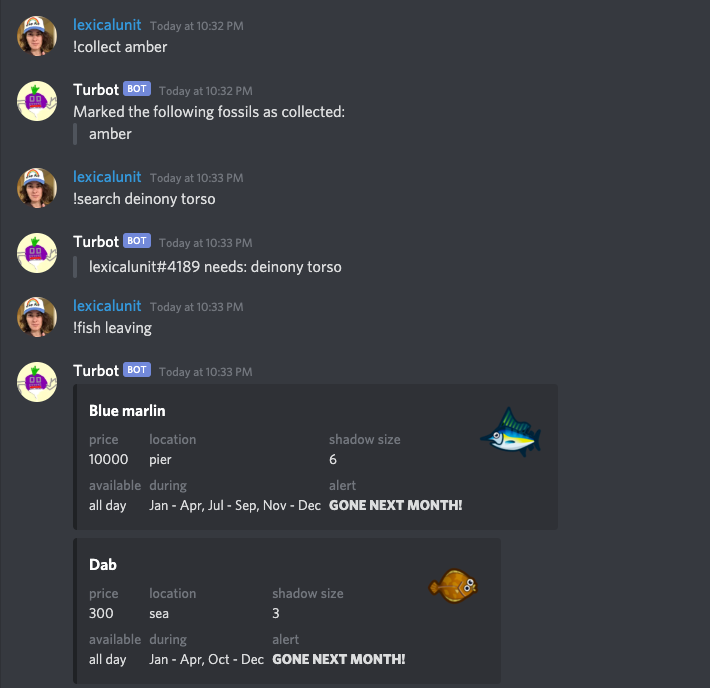
When a community of users tracks collectables and trades them between each other, everyone finishes collecting everything in the game so much more quickly than they would on their own. Turbot supports collecting:
- 🦴 Fossils
- 🐞 Bugs
- 🐟 Fish
- 🖼️ Art
- 🎶 Songs
📈 Managing your Collection
!collect: Mark something as collected!collected: Show the things you've collected so far!count: Count the number of collected things you have!needed: Find out what collectables are needed by you and others!search: Search for someone who needs something you're looking to give away!uncollect: Remove something from your collection!uncollected: Get a list of things that you haven't collected yet
🤔 Helper Utilities
Some collections require additional support such as the !art command that
helps users tell fake art from real art. The !bugs and !fish commands
tell users when and where to catch those critters. These commands also know what
you've already collected and will tailor their responses to the user.
!art: Get information on an art piece!bugs: Get information on bugs!fish: Get information on fish!new: Get information on newly available fish and bugs
👑 Administration
!authorize: Configure which channels Turbot can operate in
🤖 Running Turbot
First install turbot using pip:
pip install turbot
Then you must configure two things:
- Your Discord bot token.
- The list of channels you want
turbotto monitor. (Default: All channels)
To provide your Discord bot token either set an environment variable named
TURBOT_TOKEN to the token or paste it into a file named token.txt.
For the list of channels you can provide channel names on the command line using
any number of --channel "name" options. Alternatively you can create a file
named channels.txt where each line of the file is a channel name. You can
also specify them via the environment variable TURBOT_CHANNELS as a semicolon
delimited string, for example: export TURBOT_CHANNELS="some;channels;here".
You can also leave this unspecified and Turbot will operate within all channels,
then you can specify a smaller set of channels using the !authorize command.
By default Turbot will use sqlite3 as its database. You can however choose to
use another database by providing a SQLAlchemy Connection URL. This
can be done via the --database-url command line option or the environment
variable TURBOT_DB_URL. Note that, at the time of this writing, Turbot is only
tested against sqlite3 and PostgreSQL.
More usage help can be found by running turbot --help.
⚛️ Heroku Support
Turbot supports deployment to Heroku out of the box. All you need is your Discord bot token and you're ready to go! Just click the Deploy to Heroku button, below.

For more details see our documentation on Heroku support.
🐳 Docker Support
You can also run Turbot via docker. See our documentation on Docker Support for help.
❤️ Contributing
If you'd like to become a part of the Turbot development community please first know that we have a documented code of conduct and then see our documentation on how to contribute for details on how to get started.
MIT © TheAstropath, lexicalunit et al
1 maintainer

Metadata
1 maintainer
Release files for turbot 7.5.2
For a detailed explanation of source distributions (sdists) and built distributions (wheels), please see the package formats documentation.
Source distribution (sdist)
| File | Size | Uploaded | |
|---|---|---|---|
| turbot-7.5.2.tar.gz | 56.5 kB | Details |
Built distribution (wheel)
| File | Interpreter | ABI | Platform | Reset |
|---|---|---|---|---|
| turbot-7.5.2-py3-none-any.whl | Python 3 | none | any | Details |
Total release size: 116.6 kB
Release files / turbot-7.5.2.tar.gz
| Download URL | turbot-7.5.2.tar.gz |
|---|---|
| Size | 56.5 kB |
| Tags | Source |
|
SHA-256 checksum How to use checksums |
aefc0a6099ec3d43c8fd48c408df54de27366d930663e3aebde8df98635290e0
|
|
BLAKE2b-256 checksum How to use checksums |
66edbc27114f543fb1f0e954d6dff0488874d87cf28970d7154356ef38e246a7
|
| Upload date | |
|
Uploaded using Trusted Publishing? What is trusted publishing? |
No |
| Uploaded via |
poetry/1.0.5 CPython/3.7.7 Darwin/19.5.0
|
Release files / turbot-7.5.2-py3-none-any.whl
| Download URL | turbot-7.5.2-py3-none-any.whl |
|---|---|
| Size | 60.1 kB |
| Tags | Python 3 |
|
SHA-256 checksum How to use checksums |
5bcffe330a4749fe83645bd0f2db01e838bfa00b5142a98e53fa8a2cd67ba98f
|
|
BLAKE2b-256 checksum How to use checksums |
2945563975e44451a41d767990921abd7c95c4b9d96b34c88b730359fbe40436
|
| Upload date | |
|
Uploaded using Trusted Publishing? What is trusted publishing? |
No |
| Uploaded via |
poetry/1.0.5 CPython/3.7.7 Darwin/19.5.0
|














