
turm



A TUI for Slurm, which provides a convenient way to manage your cluster jobs.
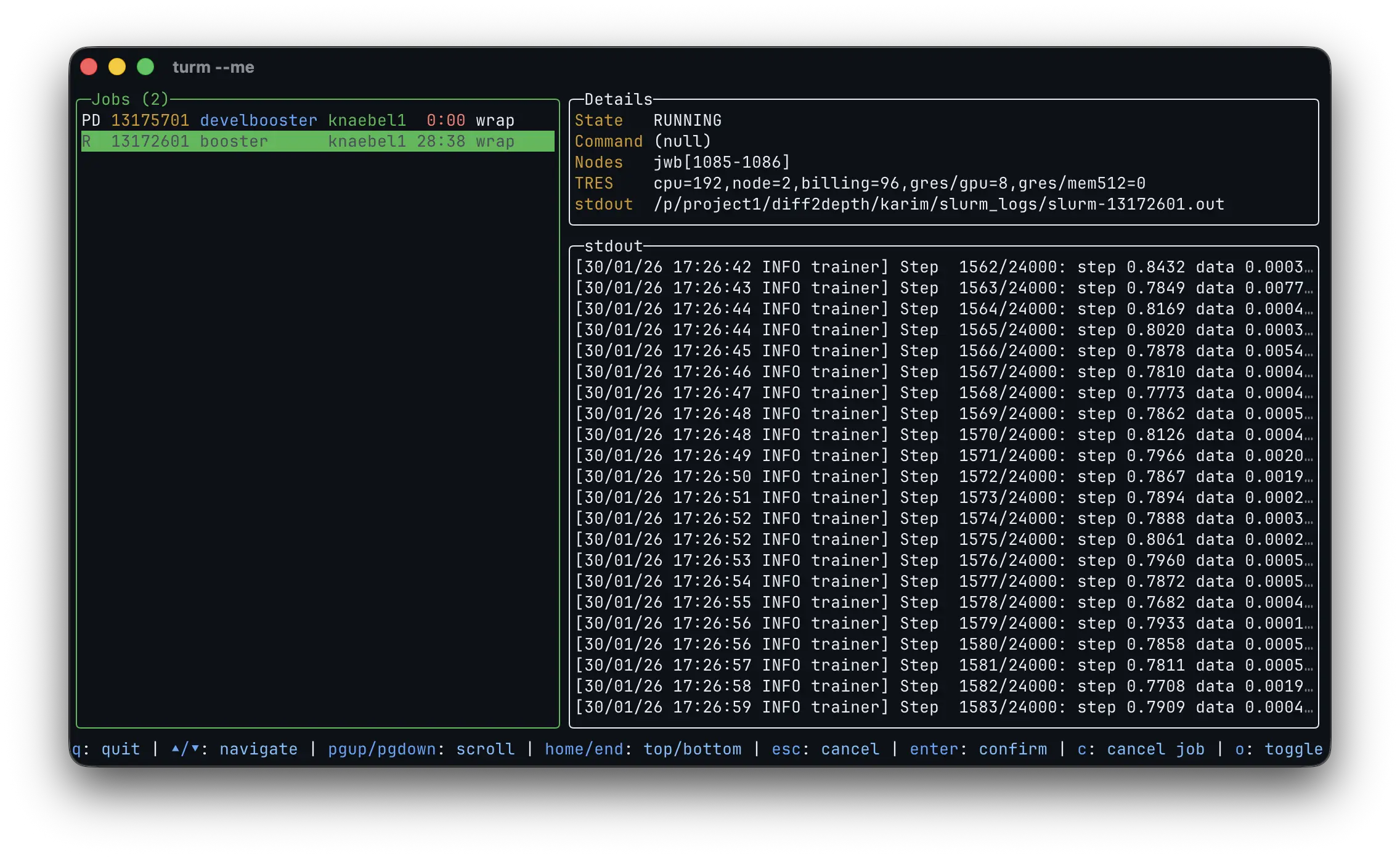
turm accepts the same options as squeue (see man squeue). Use turm --help to get a list of all available options. For example, to show only your own jobs, sorted by descending job ID, including all job states (i.e., including completed and failed jobs):
turm --me --sort=-id --states=ALL
Installation
turm is available on PyPI, crates.io, and conda-forge:
# With uv.
uv tool install turm

# With pip.
pip install turm

# With cargo.
cargo install turm

# With pixi.
pixi global install turm

# With conda.
conda install --channel conda-forge turm

# With wget. Make sure ~/.local/bin is in your $PATH.
wget https://github.com/karimknaebel/turm/releases/latest/download/turm-x86_64-unknown-linux-musl.tar.gz -O - | tar -xz -C ~/.local/bin/
The release page also contains precompiled binaries for Linux.
Shell Completion (optional)
Bash
In your .bashrc, add the following line:
eval "$(turm completion bash)"
Zsh
In your .zshrc, add the following line:
eval "$(turm completion zsh)"
Fish
In your config.fish or in a separate completions/turm.fish file, add the following line:
turm completion fish | source
Open in external pager
When pressing p to open the log in an external pager, the command is chosen in this order: --pager, $TURM_PAGER, $PAGER, then less (or more if less is not installed).
How it works
turm obtains information about jobs by parsing the output of squeue.
The reason for this is that squeue is available on all Slurm clusters, and running it periodically is not too expensive for the Slurm controller ( particularly when filtering by user).
In contrast, Slurm's C API is unstable, and Slurm's REST API is not always available and can be costly for the Slurm controller.
Another advantage is that we get free support for the exact same CLI flags as squeue, which users are already familiar with, for filtering and sorting the jobs.
Resource usage
TL;DR: turm ≈ watch -n2 squeue + tail -f slurm-log.out
Special care has been taken to ensure that turm is as lightweight as possible in terms of its impact on the Slurm controller and its file I/O operations.
The job queue is updated every two seconds by running squeue.
When there are many jobs in the queue, it is advisable to specify a single user to reduce the load on the Slurm controller (see squeue --user).
turm updates the currently displayed log file on every inotify modify notification, and it only reads the newly appended lines after the initial read.
However, since inotify notifications are not supported for remote file systems, such as NFS, turm also polls the file for newly appended bytes every two seconds.
Development without Slurm
For local UI testing, this repository includes mocks for squeue, scancel, and scontrol:
PATH=scripts/mock-slurm/bin:$PATH cargo run -- --me
The mock commands read/write files in scripts/mock-slurm/logs, so you can test log rendering and control actions without a Slurm install.
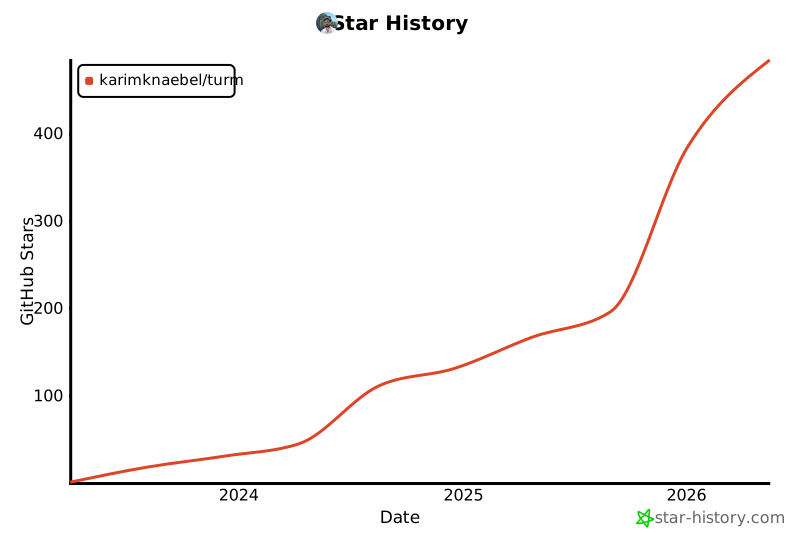
Star History
2 maintainers


Metadata
2 maintainers
Release files for turm 0.15.0
For a detailed explanation of source distributions (sdists) and built distributions (wheels), please see the package formats documentation.
Built distributions (wheels)
Total release size: 17.2 MB
Release files / turm-0.15.0-py3-none-musllinux_1_2_x86_64.whl
| Download URL | turm-0.15.0-py3-none-musllinux_1_2_x86_64.whl |
|---|---|
| Size | 1.8 MB |
| Tags | Linux musl 1.2+ x86-64 Python 3 |
|
SHA-256 checksum How to use checksums |
a1861f30f56d82daafc234a0cd48933614589ab297f05acfca9f6ef996fb6311
|
|
BLAKE2b-256 checksum How to use checksums |
df70bb1db70d11f153e13372db2ce01cbe25d99550b91fabcc7513fe36b2ecd1
|
| Upload date | |
|
Uploaded using Trusted Publishing? What is trusted publishing? |
No |
| Uploaded via |
maturin/1.15.0
|
Release files / turm-0.15.0-py3-none-musllinux_1_2_i686.whl
| Download URL | turm-0.15.0-py3-none-musllinux_1_2_i686.whl |
|---|---|
| Size | 1.7 MB |
| Tags | Linux musl 1.2+ x86-32 Python 3 |
|
SHA-256 checksum How to use checksums |
08729abd160fa79302d0f67705aac20777abef491ebb9b0263ac98aaf29b5725
|
|
BLAKE2b-256 checksum How to use checksums |
bed4bb407cf4905bf8308843345414e5deef844a21ec553d37833b1157c27b34
|
| Upload date | |
|
Uploaded using Trusted Publishing? What is trusted publishing? |
No |
| Uploaded via |
maturin/1.15.0
|
Release files / turm-0.15.0-py3-none-musllinux_1_2_armv7l.whl
| Download URL | turm-0.15.0-py3-none-musllinux_1_2_armv7l.whl |
|---|---|
| Size | 1.6 MB |
| Tags | Linux musl 1.2+ ARMv7l Python 3 |
|
SHA-256 checksum How to use checksums |
dbef3c45796823b5393a32951861a20c5af04e84d414804f22ca1f3e24324ff7
|
|
BLAKE2b-256 checksum How to use checksums |
002474788588f94d9c4a4834d9d15a3c4e16c858e523a23eae8d56cc3517ced0
|
| Upload date | |
|
Uploaded using Trusted Publishing? What is trusted publishing? |
No |
| Uploaded via |
maturin/1.15.0
|
Release files / turm-0.15.0-py3-none-musllinux_1_2_aarch64.whl
| Download URL | turm-0.15.0-py3-none-musllinux_1_2_aarch64.whl |
|---|---|
| Size | 1.7 MB |
| Tags | Linux musl 1.2+ ARM64 Python 3 |
|
SHA-256 checksum How to use checksums |
aebce5638b6ae0bceeb8e0a4515e6ab30eb094cb45679fe4a269fee72eee73d6
|
|
BLAKE2b-256 checksum How to use checksums |
5de983479f207ac9ac507a581777badd951c805f8c7a87a107aa3d9181ba7f18
|
| Upload date | |
|
Uploaded using Trusted Publishing? What is trusted publishing? |
No |
| Uploaded via |
maturin/1.15.0
|
Release files / turm-0.15.0-py3-none-manylinux_2_17_x86_64.manylinux2014_x86_64.whl
| Download URL | turm-0.15.0-py3-none-manylinux_2_17_x86_64.manylinux2014_x86_64.whl |
|---|---|
| Size | 1.7 MB |
| Tags | Linux glibc 2.17+ x86-64 Python 3 |
|
SHA-256 checksum How to use checksums |
dfe6078a5877f6c6043281c6f253d34434592ddd3d3ba98b03c2a5ca161dd8ae
|
|
BLAKE2b-256 checksum How to use checksums |
1cc456d4471a4132ab21aef39f44a5feaecb71689ca7807595d926da4d8fc379
|
| Upload date | |
|
Uploaded using Trusted Publishing? What is trusted publishing? |
No |
| Uploaded via |
maturin/1.15.0
|
Release files / turm-0.15.0-py3-none-manylinux_2_17_s390x.manylinux2014_s390x.whl
| Download URL | turm-0.15.0-py3-none-manylinux_2_17_s390x.manylinux2014_s390x.whl |
|---|---|
| Size | 1.7 MB |
| Tags | Linux glibc 2.17+ IBM System/390x Python 3 |
|
SHA-256 checksum How to use checksums |
345d77bf38a91d346a8bbfdf21bde3d15a38abf761be3969f129e09e73523845
|
|
BLAKE2b-256 checksum How to use checksums |
5924904339bb6550d5fdff03721e727bbe926dd747e5e46d0387aac63632ea5c
|
| Upload date | |
|
Uploaded using Trusted Publishing? What is trusted publishing? |
No |
| Uploaded via |
maturin/1.15.0
|
Release files / turm-0.15.0-py3-none-manylinux_2_17_ppc64le.manylinux2014_ppc64le.whl
| Download URL | turm-0.15.0-py3-none-manylinux_2_17_ppc64le.manylinux2014_ppc64le.whl |
|---|---|
| Size | 1.9 MB |
| Tags | Linux glibc 2.17+ PowerPC 64-le Python 3 |
|
SHA-256 checksum How to use checksums |
cf43d4b6abd45afcf0ad649a50bf335b8783e9aed1b01e3699ab925b5cc43e8a
|
|
BLAKE2b-256 checksum How to use checksums |
c841e4262cd9e1ca78ee3ca1057af4b89e169ee6a47d034a877fda3f6b17caba
|
| Upload date | |
|
Uploaded using Trusted Publishing? What is trusted publishing? |
No |
| Uploaded via |
maturin/1.15.0
|
Release files / turm-0.15.0-py3-none-manylinux_2_17_i686.manylinux2014_i686.whl
| Download URL | turm-0.15.0-py3-none-manylinux_2_17_i686.manylinux2014_i686.whl |
|---|---|
| Size | 1.8 MB |
| Tags | Linux glibc 2.17+ x86-32 Python 3 |
|
SHA-256 checksum How to use checksums |
c8c08122838b7534556a536944aedaf3cfab811a6b16e1d00169cd438e7c4e96
|
|
BLAKE2b-256 checksum How to use checksums |
c7bc65031c174d41655f9ff560dec348200f21b45e28af6c8befec9559d2af3b
|
| Upload date | |
|
Uploaded using Trusted Publishing? What is trusted publishing? |
No |
| Uploaded via |
maturin/1.15.0
|
Release files / turm-0.15.0-py3-none-manylinux_2_17_armv7l.manylinux2014_armv7l.whl
| Download URL | turm-0.15.0-py3-none-manylinux_2_17_armv7l.manylinux2014_armv7l.whl |
|---|---|
| Size | 1.6 MB |
| Tags | Linux glibc 2.17+ ARMv7l Python 3 |
|
SHA-256 checksum How to use checksums |
872817e044df7e3a3a90c2353701c799603da9560f8de693044318de753242c5
|
|
BLAKE2b-256 checksum How to use checksums |
6641e30bf32d6c511c1463e74615fb67d982a5645853053f6319d13220e6eece
|
| Upload date | |
|
Uploaded using Trusted Publishing? What is trusted publishing? |
No |
| Uploaded via |
maturin/1.15.0
|
Release files / turm-0.15.0-py3-none-manylinux_2_17_aarch64.manylinux2014_aarch64.whl
| Download URL | turm-0.15.0-py3-none-manylinux_2_17_aarch64.manylinux2014_aarch64.whl |
|---|---|
| Size | 1.7 MB |
| Tags | Linux glibc 2.17+ ARM64 Python 3 |
|
SHA-256 checksum How to use checksums |
8efee31deca346c2a65ed116de747cfe8245a4690f337f4e6c46a7ac4319c1c8
|
|
BLAKE2b-256 checksum How to use checksums |
2afa31426bf9c9baf0859b9bd6167a78a87db2075ef3510ee26c184ab71e571e
|
| Upload date | |
|
Uploaded using Trusted Publishing? What is trusted publishing? |
No |
| Uploaded via |
maturin/1.15.0
|
Security for turm 0.15.0
Provenance
Provenance describes where a file came from. On PyPI, provenance is shared via attestations, which provide a verifiable record of the build or publishing details. View details, limitations and caveats.
No provenance found
None of the files in this release were uploaded with provenance metadata.
A note on package security
PyPI is a repository for distributing packages, not a service for auditing them. While third-party security researchers and our staff do their best to detect and remove malicious packages, PyPI cannot guarantee the quality, security or suitability of any given package.
To learn more about protecting yourself from malicious actors, visit our package security documentation.














