

Turnloom is a coding agent for your terminal and desktop that shows you what it keeps in context and what each call costs. It reads and edits files, runs commands with your approval, and folds older tool output out of the prompt into a local archive that you and the model can read back at any time. Every edit is shown as a diff before it lands and can be undone afterwards. Every model call is metered.
It works with any OpenAI-compatible endpoint: hosted providers, OpenRouter, or a model on your own machine through Ollama, LM Studio, vLLM or llama.cpp. LiteLLM adds Anthropic, Bedrock, Vertex AI and Azure.
Install · Studio · Terminal · Staying in control · How context works · Works with · Security · Changelog
Install
Turnloom needs Python 3.11 or newer. The core has one dependency.
pipx install "git+https://github.com/bhaskargurram-ai/turnloom"
turnloom connect        # pick a provider and a model
turnloom chat           # start working in the current directory
uv tool install "git+https://github.com/bhaskargurram-ai/turnloom" and pip install work the same way. Each release also carries a wheel. On Windows you can instead clone the repository and double-click Open Turnloom Studio.cmd, which creates its own environment.
turnloom connect lists providers and their models. Choose OpenRouter to sign in through your browser, choose Ollama or LM Studio to use a local model, or pick any other provider and paste its key once. Keys go to your operating system's credential store, never to a file. turnloom doctor checks the setup. Provider guide
Studio
pipx install "turnloom[studio] @ git+https://github.com/bhaskargurram-ai/turnloom"
turnloom studio
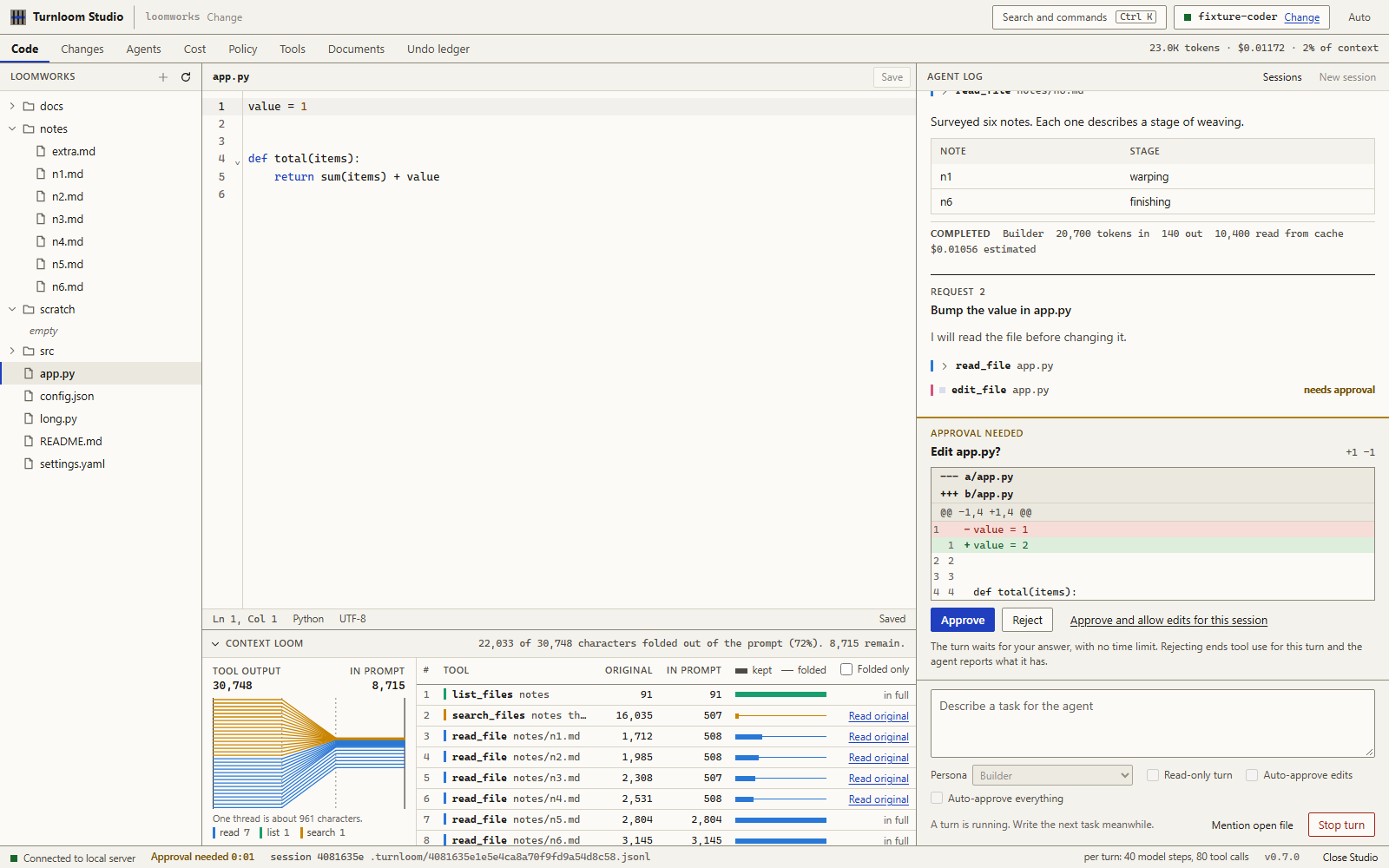
Studio is a workbench that opens in its own window, or in a browser tab with --browser. The base install runs it too; the studio extra adds the native window, the policy gate, exact token counts and document tools.
| View | Use it to |
|---|---|
| Code | Edit files beside the agent's work log. The reply streams in, each tool call shows what ran, and edits arrive as diffs to approve, reject, or allow for the session. After a turn, review every file it touched and revert the turn's edits. |
| Context Loom | See each tool result's original size and what the prompt still carries. Open any folded result to read the archived original without spending a model call. |
| Changes | Compare the working tree with the last commit. |
| Agents | Pick from 285 personas, or line several up as a team that plans, builds and reviews in stages. |
| Cost | See tokens and estimated cost per call, how full the context window is and what fills it, and set a budget per turn. |
| Policy | Gate every tool call with Provio: what was allowed, asked and denied, a tester for a command or path, and the ledger's integrity. |
| Tools | Turn MCP servers on for the agent and inspect the tools each one offers. |
| Documents | Extract fields from a document with VerifyDoc and see each value's confidence and where it was read. |
| Undo ledger | Review what Unwind recorded for MCP calls, set checkpoints and take actions back. |
Sessions are saved in the workspace; start a new one or resume an earlier one. Press Ctrl+K for the command palette.
Studio listens on 127.0.0.1 only and requires a per-launch token on every request. Details are in SECURITY.md. To ship it as a standalone app folder, see Desktop app.
Terminal
| Command | What it does |
|---|---|
turnloom chat |
Work across several turns. /diff, /undo, /new and /help are available inside. |
turnloom run "Fix the failing parser test" |
Run one task and exit with status 0 when it completes. |
turnloom run "Review the staged diff" --persona reviewer --read-only |
Explore and report without edits or commands. |
turnloom chat --resume |
Continue the most recent session. --resume ID picks one. |
turnloom sessions |
List saved sessions in this workspace. |
turnloom undo |
Restore the files edited by the last turn of a session. |
turnloom team "Add input validation" |
Plan, build and review in three stages that share one budget. Planning and review cannot edit. |
turnloom personas --search security |
Browse personas. Use one with --persona ID. |
turnloom proxy |
Fold and meter requests from another harness. |
turnloom replay PATH, turnloom atif TRANSCRIPT OUTPUT |
Print a saved session offline, or export it as an ATIF trajectory. |
turnloom studio, turnloom doctor |
Open the workbench. Report version, connection, optional features and workspace state. |
For scripts and CI, --json prints one result object and --events prints each session event as a JSON line while it happens.
Staying in control
Turnloom asks before it runs a command, edits a file or calls an MCP tool. Reading and searching files inside the workspace does not need approval, and those reads are sent to the model you connected.
| Mode | Flag | Behavior |
|---|---|---|
| Ask (default) | none | Approve each command and edit. Answer a to allow all later edits, or that exact command, for the session. |
| Auto-edit | --auto-edit |
Edits apply without asking. Commands still ask. |
| Allowlist | --allow "pytest*" |
Simple commands matching the pattern run without asking. A pattern never covers a command that chains, pipes, redirects or substitutes. |
| Read-only | --read-only |
No edits and no shell. The agent can only read, search and answer. |
| Unattended | --yes |
Everything is approved. Use it only inside a container or a disposable checkout. |
Other limits you can set per task: --budget 0.25 stops before the estimated cost passes that amount, --max-steps caps model calls (100 by default), and --deadline caps wall time. At the step limit the agent spends its last call writing up what it found. Three identical tool calls in a row end tool use the same way. The other limits stop the turn and say why.
Commands run with your user's permissions. Model API keys are removed from the environment that commands see. Files that usually hold secrets, such as .env, private keys and credential files, are closed to the file tools.
A policy under the agent
Provio checks each tool call against a provio.yaml in your repository before it runs, and writes every decision to a hash-chained ledger at .provio/ledger.jsonl. Turnloom turns the gate on whenever the workspace has that file and the guard extra is installed. Create a starter policy from Studio's Policy view or with provio init.
| Verdict | What happens |
|---|---|
| deny | The tool does not run. The model reads the rule and its reason, so it can correct course. |
| ask | You decide, and the approval shows the rule that asked. With --yes there is nobody to ask, so the call is refused. |
| allow | The call runs. By default you still confirm each call; in Studio choose the policy mode to be asked only when a rule says ask. |
| redact | The call runs and the model receives Provio's redacted output. |
The gate covers shell commands, file reads, file edits and MCP tool calls, and it fails closed: if Provio cannot answer, the tool does not run. Pass --no-gate to run once without the policy.
How context works
Long sessions fill the prompt with old tool output. Turnloom handles that without a summarizing model call:
- Fold. The three most recent tool results stay whole. Older results longer than 800 characters are replaced in the prompt by a short preview of their start and end and a reference. Results the model has not read yet are never folded.
- Archive. The full text stays in the session's archive. When a command prints more than fits, the prompt gets the head and tail and the archive keeps the rest.
- Recall. The model calls
recallwith a reference to read a slice or search inside an archived result. You can open the same reference in Studio. - Overflow. If the conversation still outgrows the model's window, the oldest exchanges move to the archive as a unit and their references are listed for the model. Nothing is dropped without a way back.
The transcript of every session is a JSON Lines file under .turnloom/ in the workspace, with a .gitignore that keeps traces out of version control. --resume rebuilds the conversation and its archive from that file. Studio and the proxy also append every model call to .turnloom/usage.jsonl.
Use --no-fold to compare a run with folding against one without. The receipt reports folded characters, input and output tokens, and cached tokens when the provider reports them; cached input is priced at the provider's cache rate when it lists one. Folding rewrites earlier messages, so on providers with prompt caching it trades some cache hits for a smaller prompt. Measure on your own tasks before relying on it. Design notes · Measuring it yourself
Works with
- Project instructions.
AGENTS.mdat the workspace root is added to the agent's instructions, withCLAUDE.mdas a fallback. - Agent Skills. Skills checked into
.agents/skillsor.claude/skillsare listed for the model, which reads one when a task calls for it. - Personas. Builder and Debugger are Turnloom's own. The other 283 come from Agency Agents, vendored at commit
8ae6164. Add your own as Markdown files in.turnloom/personas/. - MCP servers.
--mcp servers.json, or.turnloom/mcp.jsonin Studio, connects stdio and streamable HTTP servers. The model searches a server's tools and calls them with your approval. - Other agents, as a server.
turnloom serveis an MCP server: session receipts, archived tool results, a place to park long output, and with--allow-runtask delegation to Turnloom. - Other harnesses, as a layer.
turnloom proxyserves an OpenAI-compatible endpoint that folds and meters another harness's requests to your connected model. - Native provider APIs. With the
llmextra,turnloom connect litellm:anthropicand its siblings reach providers that are not OpenAI-compatible, through LiteLLM. - CI and containers. The repository is a GitHub Action (
uses: bhaskargurram-ai/turnloom@v0.7.0), and itsDockerfilebuilds an image for isolated, unattended runs. - Documents and undo for MCP. VerifyDoc scores extracted fields against their source. Unwind classifies MCP calls by reversibility and can take them back.
- Benchmarks.
turnloom-agentis a headless entry point with a Harbor adapter and ATIF export. Turnloom has not been run on a public leaderboard. Status and how to run it
Each of these is described with a working example in the integration guide.
What Turnloom is not
It is a small agent: one loop, a handful of tools, no background services and no telemetry. It does not sandbox commands at the operating system level or index your repository. If you need isolation, run it in the provided container. It has no published benchmark score; the evaluation tools are there so you can measure it on your own tasks.
Documentation
- Design: the agent loop and the context store
- Providers, model discovery and credentials
- Integrations: MCP, skills, proxy, CI, containers
- Desktop app
- Experiments: comparing two configurations
- Leaderboard status
- Security model and reporting
- Contributing
License
Turnloom is released under the MIT License. Vendored personas keep the Agency Agents license. Provider presets derive from Models.dev under its license. Studio bundles open-source JavaScript packages listed in THIRD-PARTY.txt.
1 maintainer

Metadata
1 maintainer
Release files for turnloom 0.7.0
For a detailed explanation of source distributions (sdists) and built distributions (wheels), please see the package formats documentation.
Source distribution (sdist)
| File | Size | Uploaded | Provenance | Actions |
|---|---|---|---|---|
| turnloom-0.7.0.tar.gz | 2.9 MB | Without provenance | Details for turnloom-0.7.0.tar.gz |
Built distribution (wheel)
| File | Interpreter | ABI | Platform | Actions Reset |
|---|---|---|---|---|
| turnloom-0.7.0-py3-none-any.whl | Python 3 | none | any | Details for turnloom-0.7.0-py3-none-any.whl |
Total release size: 5.2 MB
Release files / turnloom-0.7.0.tar.gz
| Download URL | turnloom-0.7.0.tar.gz |
|---|---|
| Size | 2.9 MB |
| Tags | Source |
|
SHA-256 checksum How to use checksums |
e81fa4231d84a31deaaf7cff39683cbdc5c317c34d7a9a8799c5e3081775d29a
|
|
BLAKE2b-256 checksum How to use checksums |
0bfef6f8f7e10fe15c61da1cbe4eceecd97a790b713c9c63fd5457d9de106ff2
|
| Upload date | |
|
Uploaded using Trusted Publishing? What is trusted publishing? |
No |
| Uploaded via |
twine/7.0.0 CPython/3.14.3
|
Release files / turnloom-0.7.0-py3-none-any.whl
| Download URL | turnloom-0.7.0-py3-none-any.whl |
|---|---|
| Size | 2.3 MB |
| Tags | Python 3 |
|
SHA-256 checksum How to use checksums |
fb2f4922a99ab65d4e00684f36022d7ec527428ad04d688574e1afa7892dc710
|
|
BLAKE2b-256 checksum How to use checksums |
6bfba1284ac69e0c562ab2ce5bd7603c202978982a20916d898908db98b0d4f7
|
| Upload date | |
|
Uploaded using Trusted Publishing? What is trusted publishing? |
No |
| Uploaded via |
twine/7.0.0 CPython/3.14.3
|
Security for turnloom 0.7.0
Provenance
Provenance describes where a file came from. On PyPI, provenance is shared via attestations, which provide a verifiable record of the build or publishing details. View details, limitations and caveats.
No provenance found
None of the files in this release were uploaded with provenance metadata.
A note on package security
PyPI is a repository for distributing packages, not a service for auditing them. While third-party security researchers and our staff do their best to detect and remove malicious packages, PyPI cannot guarantee the quality, security or suitability of any given package.
To learn more about protecting yourself from malicious actors, visit our package security documentation.














