
Turnstone






Self-hosted, local-first orchestration for tool-using AI agents. Give LLMs real tools — shell, files, search, web — and run them across your own cluster with direct HTTP routing and interactive interfaces. Your code, your models, your data stay on hardware you control: no telemetry, no phone-home.

Named after the Ruddy Turnstone (Arenaria interpres) — a shorebird that flips stones to discover what's hiding underneath.
What is a harness?
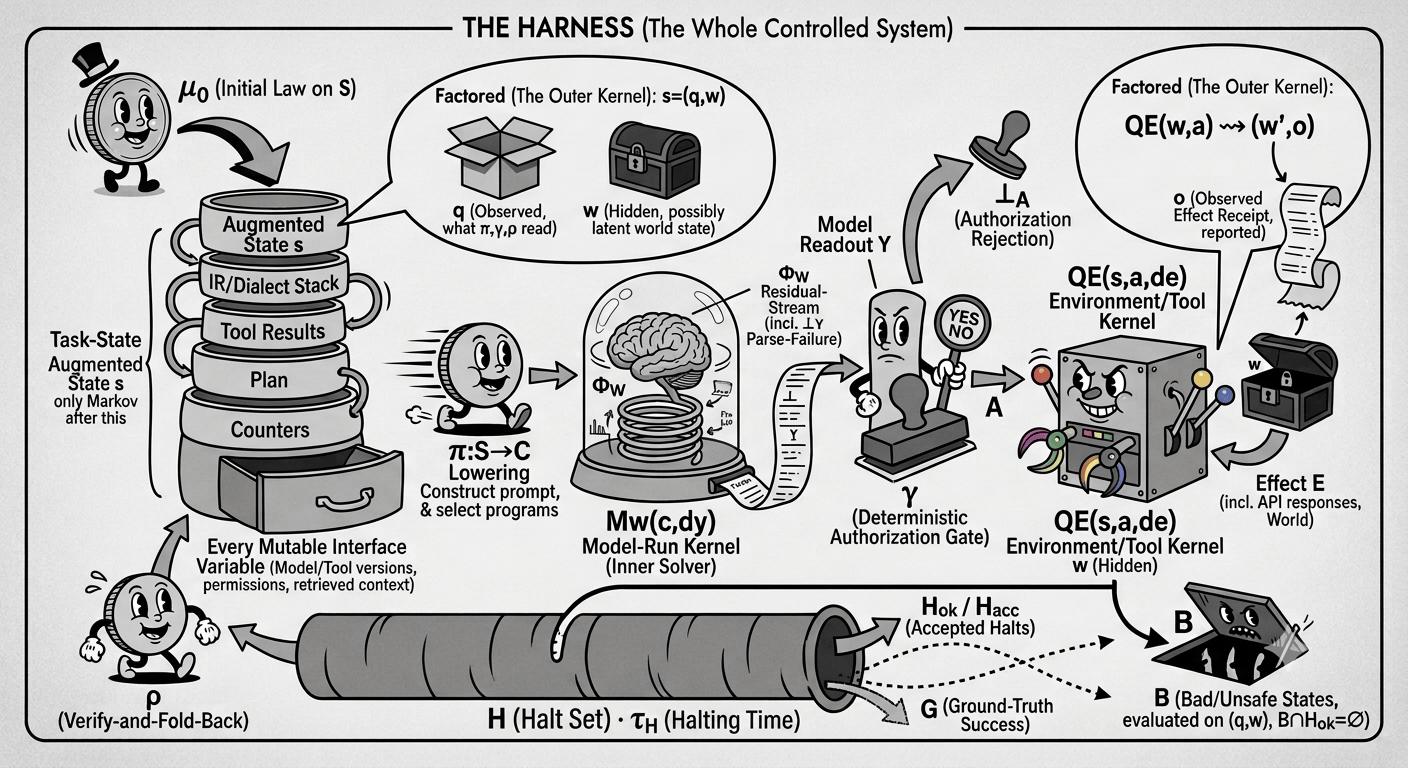
ℋ : s_{n+1} ~ T(s_n) for n < τ_H
the primer → · the formalism →
Release Tracks
| Track | Install | Docker | Description |
|---|---|---|---|
| Stable | pip install turnstone |
ghcr.io/turnstonelabs/turnstone:stable |
Production-grade. Bugfixes only. |
| Experimental | pip install turnstone --pre |
ghcr.io/turnstonelabs/turnstone:experimental |
New features. May have rough edges. |
Repository branches
Beginning with 1.8.0, stable releases and next-release development use distinct branches:
| Branch | Role | Pull requests |
|---|---|---|
main |
Current stable release and install source | Fixes that should ship on the current stable line |
dev |
Next release integration and GitHub default | Features, refactors, and development-only fixes |
stable/X.Y |
Maintained prior release line | Fixes for that supported older minor |
GitHub defaults to dev, so new pull requests and ordinary source clones start
on the development line. Stable-source install paths explicitly select main.
There is no independently writable stable/X.Y mirror for the minor currently
on main. Before main advances to the next stable minor, its current tip is
preserved as that minor's maintenance branch. Maintainers then merge fixes
forward (stable/X.Y → main → dev) so the branches retain shared ancestry
without recurring cherry-picks.
See docs/releasing.md for the full release process.
What it does
Turnstone gives LLMs tools — shell, files, search, web, planning — and orchestrates multi-turn conversations where the model investigates, acts, and reports.
- Local-first & private — runs entirely on hardware you control, with no telemetry and no phone-home. Point it at local models (vLLM, llama.cpp) or commercial APIs you hold the keys to — your prompts and data never transit a third party you didn't choose.
- Bring your own models — OpenAI-compatible APIs (vLLM, llama.cpp, NIM), the Anthropic Messages API, and Google Gemini, mixed freely per role
- Interactive sessions — terminal CLI or browser UI with parallel workstreams
- Cluster dashboard — real-time view of every node and workstream, with a rendezvous routing proxy
- Intent validation — an LLM judge (your model) grades every tool call with a risk assessment and evidence before it runs
- MCP support — external tool servers with native deferred loading (Anthropic/OpenAI) or BM25 fallback
- Team controls when you need them — optional RBAC, SSO, tool policies, and audit logs, all stored in your own database
The browser's Default / Compact control saves your transcript preference in that browser. Compact hides reasoning text and folds completed successful tool details. Both views show a Reasoning indicator with elapsed seconds while the model prepares its answer. The clock starts when the browser observes that phase and continues as reasoning tokens arrive; reconnecting to an existing phase starts a new clock if its start was not observed. Completed history has no estimated reasoning duration.

Quickstart
pip install turnstone

# Terminal REPL
turnstone --base-url http://localhost:8000/v1

# Browser UI — define models in the console Models tab, or in
# ~/.config/turnstone/config.toml:
#   [models.local]
#   base_url = "http://localhost:8000/v1"
#   model = "qwen3-32b"
turnstone-server --port 8080

# Cluster dashboard
turnstone-console --port 8090
For PostgreSQL (recommended for production):
export TURNSTONE_DB_BACKEND=postgresql
export TURNSTONE_DB_URL="postgresql+psycopg://user:pass@localhost:5432/turnstone"
turnstone-server --port 8080
Docker
One-line install — autodetects Ubuntu/Debian, Fedora/RHEL, Arch, and WSL, installs git + Docker if missing, generates secrets, and starts the stack:
curl -fsSL https://raw.githubusercontent.com/turnstonelabs/turnstone/main/run.sh | bash
Or, if you already have Docker, clone the stable source and run it yourself:
git clone --branch main https://github.com/turnstonelabs/turnstone
cd turnstone
docker compose up
That builds one image and brings up a full local cluster — PostgreSQL, console,
Caddy, channel gateway, and 10 server nodes — with no .env required (it ships
with insecure dev defaults). Open the dashboard at https://localhost:8443 (Caddy
serves it over TLS with its own local CA — trust it once). Nodes boot without an
LLM; add model backends from the console UI.
For production (released images from ghcr.io, real secrets required), use the
bundled stack: docker compose -f turnstone/deploy/compose.yaml up.
For optional SSO, per-user MCP OAuth, or model gateway authentication, the installer and both stacks support one shared authentication config. The default local-login setup needs no additional configuration.
See QUICKSTART.md for the install + troubleshooting walkthrough and docs/docker.md for Docker configuration.
Programmatic (SDK)
from turnstone.sdk import TurnstoneServer

with TurnstoneServer("http://localhost:8080", token="tok_xxx") as client:
    ws = client.create_workstream(name="demo")
    result = client.send_and_wait("Analyze the error logs", ws.ws_id, auto_approve=True)
    print(result.content)
Tools
Built-in tools for shell, files, search, web, memory, notifications, and autonomous sub-agents — plus external tools via MCP with native deferred loading. See docs/tools.md for the full reference, docs/mcp-registry.md for MCP configuration, and MCP authentication for auth choices and remote Docker/GitHub OAuth setup.
Architecture
Single-node: Client → Server (direct HTTP + SSE). No external dependencies beyond the database.
Multi-node: Client → Console (rendezvous routing proxy) → Server nodes. The console picks the target node for each workstream via rendezvous (HRW) hashing over the live service registry — pure function of (ws_id, live_nodes), no stored bucket state, deterministic across readers. A node join or drop only re-routes the keys that score highest on the affected node.
| Component | Purpose |
|---|---|
turnstone |
Terminal CLI (REPL) |
turnstone-server |
Web UI + REST API + SSE events |
turnstone-console |
Cluster dashboard + routing proxy + admin panel |
turnstone-channel |
Channel gateway (Discord and Slack adapters) |
turnstone-admin |
User/token management CLI |
turnstone-eval |
Headless measurement — scores tool-use against expected actions |
turnstone-optimizer |
Prompt/tool optimizer (UCB self-modify loop over the eval substrate) |
turnstone-doctor |
LLM-backed cluster diagnostics |
Diagrams
UML diagrams in docs/diagrams/:
| Diagram | Description |
|---|---|
| System Context | Components and external dependencies |
| Package Structure | Python modules and dependency graph |
| Core Engine | SessionUI, ChatSession, LLMProvider |
| Conversation Turn | Message lifecycle through the engine |
| Tool Pipeline | Prepare / approve / execute |
| Workstream States | State machine transitions |
| Console Data Flow | Dashboard data collection |
| Deployment | Docker Compose topology |
| Auth | JWT, scopes, login flows |
| Channels | Discord / Slack adapters + routing |
| Judge | Intent validation pipeline |
| OIDC | SSO authorization code flow |
Documentation
| Topic | Link |
|---|---|
| Configuration reference | docs/settings.md |
| API reference | docs/api-reference.md |
| Docker deployment | docs/docker.md |
| Intent validation (judge) | docs/judge.md |
| Governance & RBAC | docs/governance.md |
| OIDC SSO | docs/oidc.md |
| TLS / mTLS | docs/tls.md |
| Channel integrations | docs/channels.md |
| Console dashboard | docs/console.md |
| Eval harness | docs/eval.md |
| Tools reference | docs/tools.md |
| MCP integration | docs/mcp-registry.md |
| MCP authentication / OAuth | docs/mcp-oauth.md |
Requirements
- Python 3.11+
- An OpenAI-compatible API endpoint, Anthropic API key, or Google Gemini API key
- Optional: Discord / Slack channel integrations (
pip install turnstone[discord,slack]) - Git LFS for cloning (diagram PNGs)
Support
Turnstone is free, Apache-2.0, and self-hosted — no paid tier, no telemetry, no upsell. If it saves you time or you'd like to help keep development moving, you can sponsor the project:
❤ Sponsor Turnstone → · one-off via PayPal
Sponsorship is entirely optional and funds maintenance, new features, and infrastructure. Prefer to contribute in other ways? Filing issues, improving docs, and pull requests help just as much.
Community
Questions, ideas, or want to show what you're building? Join us on Discord: discord.gg/Nh3bWMacaq.
License
Apache License 2.0, as of version 1.6.0. Versions 1.5.x and earlier remain under the Business Source License 1.1 they shipped with.
1 maintainer

Release files for turnstone 1.8.4
For a detailed explanation of source distributions (sdists) and built distributions (wheels), please see the package formats documentation.
Source distribution (sdist)
| File | Size | Uploaded | |
|---|---|---|---|
| turnstone-1.8.4.tar.gz | 8.5 MB | Details |
Built distribution (wheel)
| File | Interpreter | ABI | Platform | Reset |
|---|---|---|---|---|
| turnstone-1.8.4-py3-none-any.whl | Python 3 | none | any | Details |
Total release size: 13.7 MB
Release files / turnstone-1.8.4.tar.gz
| Download URL | turnstone-1.8.4.tar.gz |
|---|---|
| Size | 8.5 MB |
| Tags | Source |
|
SHA-256 checksum How to use checksums |
3f8098ffea5dfbb57f8b977f0488a88da5347ecfa0d46b6d644d90cba022662e
|
|
BLAKE2b-256 checksum How to use checksums |
510243c1acc65d023fe6b1029514be1f9127886a4c01af885be8dbf2cdf2ad83
|
| Upload date | |
|
Uploaded using Trusted Publishing? What is trusted publishing? |
Yes |
| Uploaded via |
twine/7.0.0 CPython/3.13.14
|
Provenance
Provenance describes where a file came from. On PyPI, provenance is shared via attestations, which provide a verifiable record of the build or publishing details. View details, limitations and caveats.


PyPI Publish Attestation
PyPI verified that this artifact, at this checksum, originated from the publisher listed below.
Signed by GitHub Actions, verified by PyPI on Sep 9, 2026.
Transparency logRelease files / turnstone-1.8.4-py3-none-any.whl
| Download URL | turnstone-1.8.4-py3-none-any.whl |
|---|---|
| Size | 5.3 MB |
| Tags | Python 3 |
|
SHA-256 checksum How to use checksums |
795d6ee78605a351d46e346e1165701d3f20959f4227177885824de62e85672c
|
|
BLAKE2b-256 checksum How to use checksums |
0198e343fd90e95c0ccf07fe0486fd0af0f8734e9742dc42e361e7e86c216510
|
| Upload date | |
|
Uploaded using Trusted Publishing? What is trusted publishing? |
Yes |
| Uploaded via |
twine/7.0.0 CPython/3.13.14
|
Provenance
Provenance describes where a file came from. On PyPI, provenance is shared via attestations, which provide a verifiable record of the build or publishing details. View details, limitations and caveats.
PyPI Publish Attestation
PyPI verified that this artifact, at this checksum, originated from the publisher listed below.
Signed by GitHub Actions, verified by PyPI on Sep 9, 2026.
Transparency log
















