
tux-gpt
tux-gpt is an interactive command-line assistant (not a background AI agent) that leverages GPT-based language models to provide intelligent, conversational help directly in your terminal. It enables on-the-fly code generation, debugging support, technical explanations, and more—all without leaving the command-line environment.
Designed for developers and tech enthusiasts, tux-gpt streamlines workflows by integrating AI assistance seamlessly into terminal sessions, making complex tasks easier and faster to accomplish via intuitive, context-aware command-line interactions. On startup the tool gathers details about the host operating system (distribution, architecture, etc.) so responses and suggested commands are tailored to your environment.
Prerequisites
- Python 3.7+
- Pip (Python package manager)
- An OpenAI API key (see next section)
Setup and Configuration
-
Install: From PyPI (for most platforms):
pip install tux-gpt
On newer Debian/Ubuntu releases where
piptargets the system Python, preferpipxto keep the install isolated:pipx install tux-gpt
From source:
git clone https://github.com/fberbert/tux-gpt.git
cd tux-gpt
pip install -r requirements.txt
pip install .
-
Get your OpenAI API key:
- Sign up or log in at https://platform.openai.com.
- Navigate to API Keys and create a new key.
- Copy the generated key.
-
Configure your environment variable:
- Linux/macOS (bash/zsh):
echo 'export OPENAI_API_KEY="<your_api_key>"' >> ~/.bashrc
source ~/.bashrc
- Windows (PowerShell):
[Environment]::SetEnvironmentVariable('OPENAI_API_KEY', '<your_api_key>', 'User')
- Linux/macOS (bash/zsh):
Note: On first run, tux-gpt will create the directory ~/.config/tux-gpt/ (or %APPDATA%\tux-gpt\ on Windows) containing:
config.json: CLI configuration (e.g., default model);history.json: persistence of the last 20 messages (user + assistant);input_history: command history for navigation with ↑/↓ arrow keys.
Usage
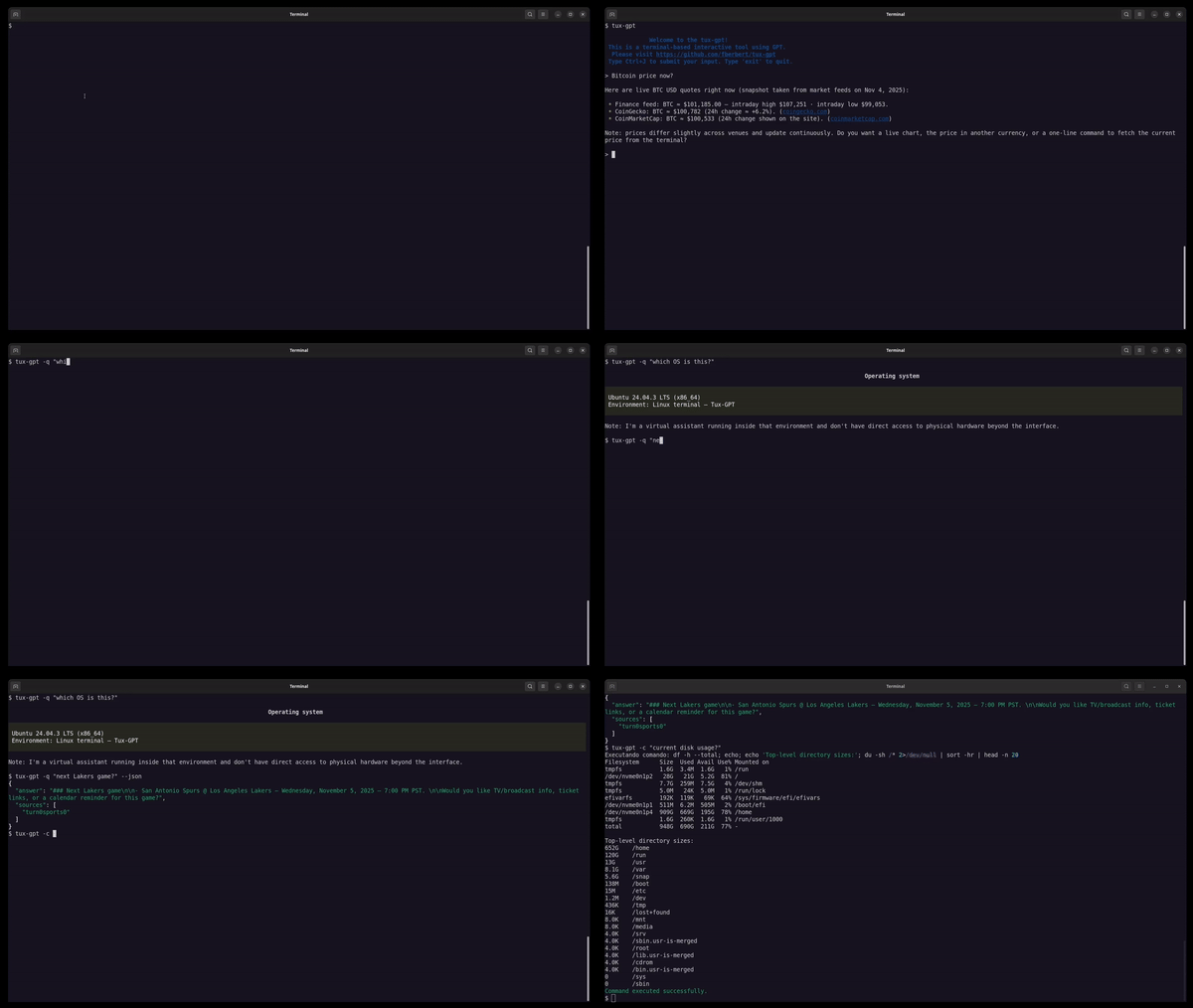
Start the interactive session:
tux-gpt
Press Ctrl+J to send your message (Enter only inserts a new line).
Example commands
-
Search the web for current news:
> Find the latest headlines about OpenAI -
Look up technical documentation:
> What is the syntax for Python's list comprehensions? -
Fetch real-time data (e.g., stock price):
> What's the current stock price of AAPL? -
Summarize a web article:
> Summarize the top result for "machine learning trends 2025" -
Run a single prompt from the shell:
tux-gpt -q "What's the weather forecast for Rio das Ostras today?"
-
Request JSON output for scripting:
tux-gpt --json -q "Summarize the latest news about OpenAI"
The response is a JSON object in the form:
{
  "answer": "Short summary text...",
  "sources": ["https://example.com/article", "..."]
}
-
Generate and execute commands directly:
tux-gpt -c "create a zip archive with every jpg or png in this folder"
-c/--commandasks Tux-GPT for a shell command. The assistant returns a JSON payload with the command plus a safety flag. Ifdangerisfalse, the command runs immediately and the CLI printsExecutando comando: .... Ifdangeristrue, the CLI shows the command and waits for confirmation before executing.
Memory & Command History
tux-gpt now persists your conversation and command history locally in the ~/.config/tux-gpt/ directory (or %APPDATA%\tux-gpt\ on Windows). The files created are:
config.json: CLI configuration, such as the default model.history.json: stores the last 20 messages (user + assistant) to maintain context between sessions and limit token usage.input_history: command history used byreadlinefor navigation with ↑/↓ arrow keys.
Features:
- On startup, the conversation history is automatically reloaded from
history.json, limited to the last 20 messages to prevent token overload. - You can navigate previous commands using the ↑ and ↓ arrow keys at the prompt.
- To reset the conversation or command history, simply remove the corresponding files in that directory (
~/.config/tux-gpt/or%APPDATA%\tux-gpt\).
Customization
You can configure the default model or terminal spinner settings by editing the configuration file at ~/.config/tux-gpt/config.json. Example:
{
  "model": "gpt-4o-mini"
}
Troubleshooting
- "OPENAI_API_KEY not set": Ensure you exported the variable correctly and restarted your shell.
- Slow responses: Check your internet connection or change to a faster model in the config.
License
MIT © 2025 tux-gpt contributors
Configuration File (~/.config/tux-gpt/config.json)
On the first run, tux-gpt will create a configuration file at ~/.config/tux-gpt/config.json (or %APPDATA%\tux-gpt\config.json on Windows). This file contains settings for the default model. You can customize the behavior of tux-gpt by editing the configuration file located at ~/.config/tux-gpt/config.json. This file allows you to set the default model and other preferences.
Example config file to set the model:
{
  "model": "gpt-5-mini"
}
The default model is gpt-5-mini.
Model Compatibility
Important: The model you choose must support web search capability. Currently, only the following models support the web search tool:
- gpt-5-mini
- gpt-4.1
- gpt-4.1-mini
For more details, see the official OpenAI documentation on web search tools and limitations:
https://platform.openai.com/docs/guides/tools-web-search?api-mode=responses#limitations
Author
Fábio Berbert de Paula
- Email: fberbert@gmail.com
- Website: https://fabio.automatizando.dev
- Founder of www.vivaolinux.com.br
- Over 25 years of experience as a developer
Official Repository
1 maintainer

Metadata
1 maintainer
Release files for tux-gpt 0.2.8
For a detailed explanation of source distributions (sdists) and built distributions (wheels), please see the package formats documentation.
Source distribution (sdist)
| File | Size | Uploaded | |
|---|---|---|---|
| tux_gpt-0.2.8.tar.gz | 11.7 kB | Details |
Built distribution (wheel)
| File | Interpreter | ABI | Platform | Reset |
|---|---|---|---|---|
| tux_gpt-0.2.8-py3-none-any.whl | Python 3 | none | any | Details |
Total release size: 21.3 kB
Release files / tux_gpt-0.2.8.tar.gz
| Download URL | tux_gpt-0.2.8.tar.gz |
|---|---|
| Size | 11.7 kB |
| Tags | Source |
|
SHA-256 checksum How to use checksums |
8f792c087ec1515642f91d7db2309f959fc8e783c5a1602ee0f868e346100f1d
|
|
BLAKE2b-256 checksum How to use checksums |
352793b59a89cee72a618a937a562f7b61f5853903f1cdf296480a088ca34ee6
|
| Upload date | |
|
Uploaded using Trusted Publishing? What is trusted publishing? |
No |
| Uploaded via |
twine/6.2.0 CPython/3.10.19
|
Release files / tux_gpt-0.2.8-py3-none-any.whl
| Download URL | tux_gpt-0.2.8-py3-none-any.whl |
|---|---|
| Size | 9.6 kB |
| Tags | Python 3 |
|
SHA-256 checksum How to use checksums |
03f1f274a068e45215fb8e6c0d79e1060ca16f2e0572bd8eedd752499d32d7da
|
|
BLAKE2b-256 checksum How to use checksums |
c0c4e51ccf3a182d5d52dd4e1440f77cdd15f587e8ae77106016a9272945c530
|
| Upload date | |
|
Uploaded using Trusted Publishing? What is trusted publishing? |
No |
| Uploaded via |
twine/6.2.0 CPython/3.10.19
|














