
TuxWhisper
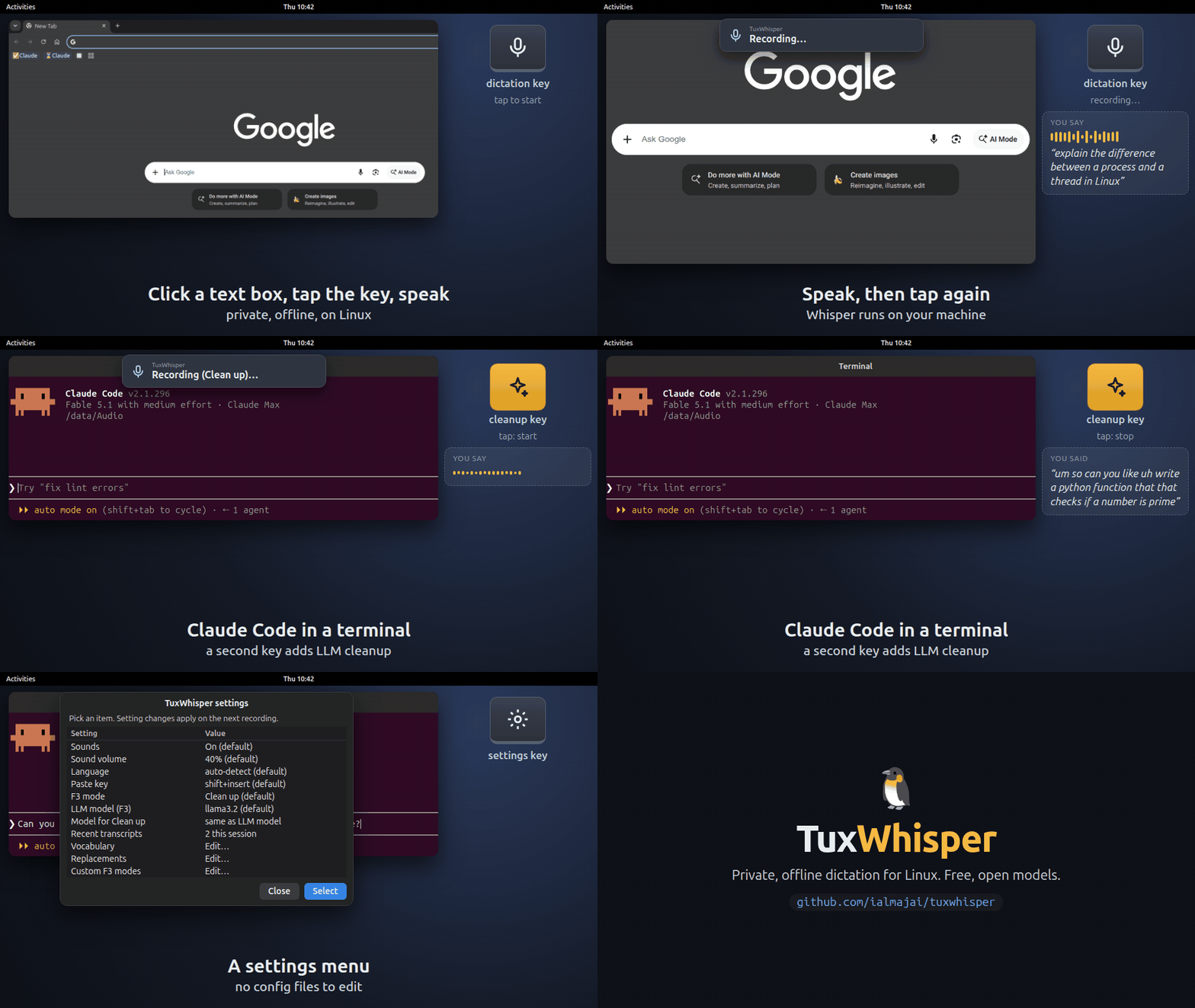
Private, offline dictation for Linux. Press a key, speak, and your words are typed wherever your cursor is: a browser text box, an LLM chat prompt, your editor or your terminal. Speech recognition (faster-whisper) and the optional LLM cleanup (Ollama) run on your own machine with free, open models.
Install
uv tool install tuxwhisper        # NVIDIA GPU: uv tool install 'tuxwhisper[cuda]'
tuxwhisper setup
tuxwhisper setup installs the system packages it needs (Debian, Ubuntu, Fedora, Arch and
openSUSE), sets up the background service and, on GNOME, binds the keys. It says what each step
does and asks before anything that needs your password. On an AMD or Intel GPU, it builds the
Vulkan engine for you.
Then click into any text box, press the dictation key, wait for the start sound, speak, and press it again.
| Key | Action |
|---|---|
| Dictation key | Tap to start and stop, or hold to talk |
| Cleanup key | The same, with local LLM cleanup |
| Save key | Save the last recording for fine-tuning |
| Settings key | Settings menu |
On GNOME, setup binds them to F5, F3, F4 and Alt+F9; change them under Keys in the settings menu.
Documentation, other desktops and troubleshooting: https://github.com/ialmajai/tuxwhisper
1 maintainer

Metadata
1 maintainer
Release files for tuxwhisper 0.2.5
For a detailed explanation of source distributions (sdists) and built distributions (wheels), please see the package formats documentation.
Source distribution (sdist)
| File | Size | Uploaded | |
|---|---|---|---|
| tuxwhisper-0.2.5.tar.gz | 31.5 kB | Details |
Built distribution (wheel)
| File | Interpreter | ABI | Platform | Reset |
|---|---|---|---|---|
| tuxwhisper-0.2.5-py3-none-any.whl | Python 3 | none | any | Details |
Total release size: 63.4 kB
Release files / tuxwhisper-0.2.5.tar.gz
| Download URL | tuxwhisper-0.2.5.tar.gz |
|---|---|
| Size | 31.5 kB |
| Tags | Source |
|
SHA-256 checksum How to use checksums |
0aff5aa1740a60ce5ea283828bfb7b6bf8ccc07438bc7c33ff61cc54e2caaf57
|
|
BLAKE2b-256 checksum How to use checksums |
5f5d018e7676017e08629aea8a8d47eea84e7638a632977ed5c46209d148d7bd
|
| Upload date | |
|
Uploaded using Trusted Publishing? What is trusted publishing? |
Yes |
| Uploaded via |
uv/0.13.1 {"installer":{"name":"uv","version":"0.13.1","subcommand":["publish"]},"python":null,"implementation":{"name":null,"version":null},"distro":{"name":"Ubuntu","version":"24.04","id":"noble","libc":null},"system":{"name":null,"release":null},"cpu":null,"openssl_version":null,"setuptools_version":null,"rustc_version":null,"ci":true}
|
Release files / tuxwhisper-0.2.5-py3-none-any.whl
| Download URL | tuxwhisper-0.2.5-py3-none-any.whl |
|---|---|
| Size | 31.8 kB |
| Tags | Python 3 |
|
SHA-256 checksum How to use checksums |
ddef1b21b21613e2bcd92728d30a57a17d020ec831737f514ecc1173c28dec94
|
|
BLAKE2b-256 checksum How to use checksums |
9d04cd2d39572303c26397d99d841a20a835bcc33337e4f6ab5417a34d83432e
|
| Upload date | |
|
Uploaded using Trusted Publishing? What is trusted publishing? |
Yes |
| Uploaded via |
uv/0.13.1 {"installer":{"name":"uv","version":"0.13.1","subcommand":["publish"]},"python":null,"implementation":{"name":null,"version":null},"distro":{"name":"Ubuntu","version":"24.04","id":"noble","libc":null},"system":{"name":null,"release":null},"cpu":null,"openssl_version":null,"setuptools_version":null,"rustc_version":null,"ci":true}
|














