
TvDatafeed Enhanced



A powerful TradingView historical and live data downloader for Python. Download up to 5000 bars of historical data on any supported timeframe, with support for both basic historical data retrieval and advanced live streaming with callback architecture.
✨ Features
- 📊 Historical Data: Download up to 5000 bars of OHLCV data
- 🔴 Live Data Streaming: Real-time data feed with callback architecture
- 🔐 Smart Authentication: Token caching with automatic validation
- 🤖 CAPTCHA Handling: Browser-based authentication fallback
- 📈 Multiple Timeframes: Support for 16 different intervals (1m to 12M)
- 🌍 Multi-Exchange: Works with stocks, crypto, forex, futures, and more
- 🎯 Easy to Use: Simple and intuitive API
🚀 Quick Start
See QUICKSTART.md for a 2-minute getting started guide!
Installation
From PyPI (recommended)
pip install tvdatafeed-enhanced
From GitHub
pip install --upgrade --no-cache-dir git+https://github.com/rongardF/tvdatafeed.git
Optional: For automatic CAPTCHA handling
pip install tvdatafeed-enhanced[captcha]
📝 What's New in v2.2.0
- ⚡ Async Operations: Concurrent data fetching for multiple symbols (10-50x faster!)
- ✅ Token Caching: Automatic token persistence and validation
- ✅ JWT Validation: Smart expiration checking without API calls
- ✅ CAPTCHA Support: Browser-based fallback for manual authentication
- ✅ New Intervals: Added 3M, 6M, and 12M timeframes
- ✅ Helper Script: Interactive
token_helper.pyfor easy setup - ✅ Better Error Handling: Improved connection reliability
- ✅ Python 3.10+: Modern Python with type hints and pattern matching
See TOKEN_SETUP_GUIDE.md for detailed authentication setup.
📺 Video Tutorials
v1.2 tutorial with installation and backtrader usage:

Full tutorial:

Usage
Import the packages and initialize with your tradingview username and password.
from tvDatafeed import TvDatafeed, Interval

username = 'YourTradingViewUsername'
password = 'YourTradingViewPassword'

tv = TvDatafeed(username, password)
You may use without logging in, but in some cases tradingview may limit the symbols and some symbols might not be available.
To use it without logging in
tv = TvDatafeed()
when using without login, following warning will be shown you are using nologin method, data you access may be limited
Getting Data
To download the data use tv.get_hist method.
It accepts following arguments and returns pandas dataframe
(symbol: str, exchange: str = 'NSE', interval: Interval = Interval.in_daily, n_bars: int = 10, fut_contract: int | None = None, extended_session: bool = False) -> DataFrame)
for example-
# index
nifty_index_data = tv.get_hist(symbol='NIFTY',exchange='NSE',interval=Interval.in_1_hour,n_bars=1000)

# futures continuous contract
nifty_futures_data = tv.get_hist(symbol='NIFTY',exchange='NSE',interval=Interval.in_1_hour,n_bars=1000,fut_contract=1)

# crudeoil
crudeoil_data = tv.get_hist(symbol='CRUDEOIL',exchange='MCX',interval=Interval.in_1_hour,n_bars=5000,fut_contract=1)

# downloading data for extended market hours
extended_price_data = tv.get_hist(symbol="EICHERMOT",exchange="NSE",interval=Interval.in_1_hour,n_bars=500, extended_session=False)
⚡ Getting Data for Multiple Symbols (Async)
NEW in v2.2.0: Fetch data for multiple symbols concurrently with dramatically improved performance!
Performance Comparison
| Symbols | Sequential (old) | Concurrent (new) | Speedup |
|---|---|---|---|
| 5 symbols | ~5-10 sec | ~1-2 sec | 5-10x faster |
| 10 symbols | ~10-20 sec | ~1-2 sec | 10-20x faster |
| 50 symbols | ~50-100 sec | ~2-5 sec | 25-50x faster |
Usage
Use get_hist_multi() method to fetch multiple symbols concurrently:
from tvDatafeed import TvDatafeed, Interval

tv = TvDatafeed()

# Fetch multiple symbols concurrently (FAST!)
symbols = ['AAPL', 'GOOGL', 'MSFT', 'TSLA', 'AMZN']
data = tv.get_hist_multi(
    symbols,
    exchange='NASDAQ',
    interval=Interval.in_1_hour,
    n_bars=100
)

# Returns a dictionary: {'AAPL': DataFrame, 'GOOGL': DataFrame, ...}
for symbol, df in data.items():
    print(f"{symbol}: {len(df)} bars")
    print(df.head())
Return Format Options
# Return as DataFrames (default)
data = tv.get_hist_multi(symbols, 'NASDAQ', n_bars=100, dataFrame=True)
# Returns: {'AAPL': DataFrame, 'GOOGL': DataFrame, ...}

# Return as lists (for custom processing)
data = tv.get_hist_multi(symbols, 'NASDAQ', n_bars=100, dataFrame=False)
# Returns: {'AAPL': [[timestamp, o, h, l, c, v], ...], 'GOOGL': [...], ...}
Single Symbol (also works)
# get_hist_multi() works with single symbols too
data = tv.get_hist_multi('AAPL', 'NASDAQ', n_bars=100)
# Returns: DataFrame (not a dict)
For Advanced Users: Direct Async API
import asyncio
from tvDatafeed import TvDatafeed, Interval

tv = TvDatafeed()

# Use async/await directly
async def fetch_data():
    symbols = ['AAPL', 'GOOGL', 'MSFT', 'TSLA', 'AMZN']
    data = await tv.get_hist_async(symbols, 'NASDAQ', n_bars=100)
    return data

# Run the async function
data = asyncio.run(fetch_data())
Note for Jupyter Notebooks: If you're using Jupyter/IPython and encounter event loop issues, install and use nest_asyncio:
import nest_asyncio
nest_asyncio.apply()

# Now you can use get_hist_multi() in notebooks
data = tv.get_hist_multi(symbols, 'NASDAQ', n_bars=100)
Rate Limiting
NEW in v2.2.0: Built-in rate limiting prevents overwhelming TradingView's API and getting blocked.
The max_concurrent parameter controls how many WebSocket connections can run simultaneously:
from tvDatafeed import TvDatafeed, Interval

tv = TvDatafeed()
symbols = [f'SYMBOL{i}' for i in range(100)]

# Conservative (recommended for large batches): 10-15 concurrent
data = tv.get_hist_multi(
    symbols,
    'NASDAQ',
    n_bars=500,
    max_concurrent=15  # Safest, unlikely to hit limits
)

# Moderate (default): 20 concurrent - balanced for most use cases
data = tv.get_hist_multi(symbols, 'NASDAQ', n_bars=500)  # Uses 20 by default

# Aggressive: 40-50 concurrent - faster but higher risk
data = tv.get_hist_multi(symbols, 'NASDAQ', n_bars=500, max_concurrent=40)
Recommended Settings:
| Use Case | max_concurrent |
When to Use |
|---|---|---|
| Conservative | 10-15 | Large batches (100+ symbols), production systems, avoiding rate limits |
| Moderate (Default) | 20-30 | Most use cases, good balance between speed and safety |
| Aggressive | 40-50 | Small batches, one-off scripts, when speed is critical |
Pro Tips:
- Start with 20 (default) and adjust based on results
- If you get errors or timeouts, reduce to 10-15
- For premium TradingView accounts, you may be able to use higher values
Search Symbol
To find the exact symbols for an instrument you can use tv.search_symbol method.
You need to provide search text and optional exchange. This will return a list of macthing instruments and their symbol.
tv.search_symbol('CRUDE','MCX')
Calculating Indicators
Indicators data is not downloaded from tradingview. For that you can use TA-Lib. Check out this video for installation and usage instructions-

Live feed (TvDatafeedLive)
Description
TvDatafeedLive is a sub-class of TvDatafeed to extend the functionality and provide live data feed feature. The live data feed feature means that the user can specify symbol, exchange and interval set (also called as seis) for which they want the new data bar to be retrieved from TradingView whenever it is produced. The user can then provide any number of callback functions for that seis which will be called with the newly retrieved data bar. Callback functions and retrieving data from TradingView is implemented in threads so live data is as close to realtime as possible, but it does not provide realtime data samples!
Usage
Import the packages and initialize with your tradingview username and password. As TvDatafeedLive is an extension of TvDatafeed class then all the rules about initialization are the same.
from tvDatafeed import TvDatafeedLive, Interval

username = 'YourTradingViewUsername'
password = 'YourTradingViewPassword'

tvl = TvDatafeedLive(username, password)
Creating new seis
TvDatafeedLive works with Seis and Consumer objects. Seis is short for symbol-exchange-interval-set. It is a class to contain a unique combination of symbol, exchange and interval values together with methods to make managing and using various symbols easier for the user.
User can create a new Seis by calling tvl.new_seis method.
seis = tvl.new_seis('ETHUSDT', 'BINANCE', Interval.in_1_hour)
seis2 = tvl.new_seis('ETHUSDT', 'BINANCE', Interval.in_2_hour)
The interface for this method is similar to the get_hist method as it accepts the same three arguments - symbol, exchange and interval. Once the seis is created
it will automatically be added into live feed of tvl. This means that a thread will be created which will continously wait until new data bar is
produced for this symbol in TradingView and will retrieve it. If no consumer instances are added to seis then nothing will be done with the retrieved data
sample and it will be discarded.
All TvDatafeedLive method calls have an optional timeout parameter. TvDatafeedLive uses threading so method calls are blocking if the resources are in use. The user can specify maximum amount to wait before aborting the call and returning. This parameter defaults to -1 which means no timeout.
seis = tvl.new_seis('ETHUSDT', 'BINANCE', Interval.in_1_hour, timeout=10)
seis2 = tvl.new_seis('ETHUSDT', 'BINANCE', Interval.in_2_hour, timeout=10)
Removing seis
The user can remove the seis from tvl using the tvl.del_seis(seis) or seis.del_seis method. In the former case the method must have the
seis to be deleted provided as an argument to reference a specific seis instance.
tvl.del_seis(seis)
seis2.del_seis()
Creating new consumer
The user can consume/use retrieved data by registering callback functions to seis. The tvl.new_consumer method accepts seis and a function as an argument
and returns a consumer object. The seis.new_consumer method simply needs the function as an argument. The function provided must follow the prototype function shown below:
def consumer_func1(seis, data):
	print("Open price for "+seis.symbol+" on "+seis.exchange+" exchange with "+seis.interval.name+" interval was "+str(data.open[0]))

def consumer_func2(seis, data):
	print("Volume of "+seis.symbol+" on "+seis.exchange+" exchange with "+seis.interval.name+" interval was "+str(data.volume[0]))

def consumer_func3(seis, data):
	print("Close price for "+seis.symbol+" on "+seis.exchange+" exchange with "+seis.interval.name+" interval was "+str(data.close[0]))

consumer1=tvl.new_consumer(seis, consumer_func1)
consumer2=seis.new_consumer(consumer_func2)
consumer3=seis.new_consumer(consumer_func3)
When there is new data produced and retrieved from TradingView for this seis then the provided function will
be called with seis and pandas DataFrame as arguments. The user can add one or many callback functions to seis - each of them will create a new
consumer.
Removing consumer
The user can remove a consumer from seis by using the tvl.del_consumer, seis.del_consumer or consumer.del_consumer methods.
tvl.del_consumer(consumer1)
seis.del_consumer(consumer2)
consumer3.del_consumer()
Getting Data
TvDatafeedLive supports retrieving historic data in addition to retrieving live data. The user can use the tvl.get_hist or seis.get_hist method.
The former method has the same API as the TvDatafeed get_hist method, except it accepts one additional optional argument - timeout. This parameter
defaults to -1 which means no timeout. The seis.get_hist method only accepts two arguments - n_bars and timeout. Both of these parameters are
optional and default to 10 bars and no timeout.
data=tvl.get_hist(symbol, exchange, interval=tvDatafeed.Interval.in_daily, n_bars=10, fut_contract=None, extended_session=False, timeout=-1)
data=seis.get_hist(n_bars=10, timeout=-1)
Supported Time Intervals
The following timeframe intervals are supported:
| Interval | Description |
|---|---|
Interval.in_1_minute |
1 minute |
Interval.in_3_minute |
3 minutes |
Interval.in_5_minute |
5 minutes |
Interval.in_15_minute |
15 minutes |
Interval.in_30_minute |
30 minutes |
Interval.in_45_minute |
45 minutes |
Interval.in_1_hour |
1 hour |
Interval.in_2_hour |
2 hours |
Interval.in_3_hour |
3 hours |
Interval.in_4_hour |
4 hours |
Interval.in_daily |
Daily |
Interval.in_weekly |
Weekly |
Interval.in_monthly |
Monthly |
Interval.in_3_monthly |
3 months (new in v2.2.0) |
Interval.in_6_monthly |
6 months (new in v2.2.0) |
Interval.in_yearly |
12 months / Yearly (new in v2.2.0) |
Read this before creating an issue
Before creating an issue in this library, please follow the following steps.
-
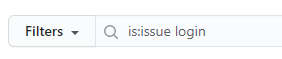
Search the problem you are facing is already asked by someone else. There might be some issues already there, either solved/unsolved related to your problem. Go to issues page, use
is:issueas filter and search your problem. -
If you feel your problem is not asked by anyone or no issues are related to your problem, then create a new issue.
-
Describe your problem in detail while creating the issue. If you don't have time to detail/describe the problem you are facing, assume that I also won't be having time to respond to your problem.
-
Post a sample code of the problem you are facing. If I copy paste the code directly from issue, I should be able to reproduce the problem you are facing.
-
Before posting the sample code, test your sample code yourself once. Only sample code should be tested, no other addition should be there while you are testing.
-
Have some print() function calls to display the values of some variables related to your problem.
-
Post the results of print() functions also in the issue.
-
Use the insert code feature of github to inset code and print outputs, so that the code is displyed neat. !
-
If you have multiple lines of code, use tripple grave accent ( ``` ) to insert multiple lines of code.

📚 Additional Documentation
- QUICKSTART.md - Get started in 2 minutes
- TOKEN_SETUP_GUIDE.md - Detailed authentication setup
- token_helper.py - Interactive token management script
🙏 Credits
This project is a fork of the original TvDatafeed by StreamAlpha.
Key Contributors:
- StreamAlpha - Original creator
- rongardF - Live data streaming feature
- stefanomorni - Selenium dependency removal (v2.0.0)
If you find this project useful, consider supporting the original creator:

📄 License
MIT License - see LICENSE file for details.
1 maintainer

Release files for tvdatafeed-enhanced 2.2.1
For a detailed explanation of source distributions (sdists) and built distributions (wheels), please see the package formats documentation.
Source distribution (sdist)
| File | Size | Uploaded | |
|---|---|---|---|
| tvdatafeed_enhanced-2.2.1.tar.gz | 51.9 kB | Details |
Built distribution (wheel)
| File | Interpreter | ABI | Platform | Reset |
|---|---|---|---|---|
| tvdatafeed_enhanced-2.2.1-py3-none-any.whl | Python 3 | none | any | Details |
Total release size: 79.0 kB
Release files / tvdatafeed_enhanced-2.2.1.tar.gz
| Download URL | tvdatafeed_enhanced-2.2.1.tar.gz |
|---|---|
| Size | 51.9 kB |
| Tags | Source |
|
SHA-256 checksum How to use checksums |
474545f640fd68d9c8df9c7b750e7a8cd072bfcaa06968f101dc168562417564
|
|
BLAKE2b-256 checksum How to use checksums |
61a0ee52e065a644ba2873d1a98ea7cf10e13d1308225e36e9726dd499d9dcfb
|
| Upload date | |
|
Uploaded using Trusted Publishing? What is trusted publishing? |
No |
| Uploaded via |
twine/6.1.0 CPython/3.11.12
|
Release files / tvdatafeed_enhanced-2.2.1-py3-none-any.whl
| Download URL | tvdatafeed_enhanced-2.2.1-py3-none-any.whl |
|---|---|
| Size | 27.0 kB |
| Tags | Python 3 |
|
SHA-256 checksum How to use checksums |
50372c578af9e2a1b0418de46b88cf4e9258bd3fdcd07d89d3c457715ebb37d3
|
|
BLAKE2b-256 checksum How to use checksums |
ff45eaa9689fbbcecb41aa4abf6759dd20cb5d518e5d3e23d7e3d07cb7431f08
|
| Upload date | |
|
Uploaded using Trusted Publishing? What is trusted publishing? |
No |
| Uploaded via |
twine/6.1.0 CPython/3.11.12
|














