
Extract plotlines from TV series synopses using LLM

Project description
tvplot



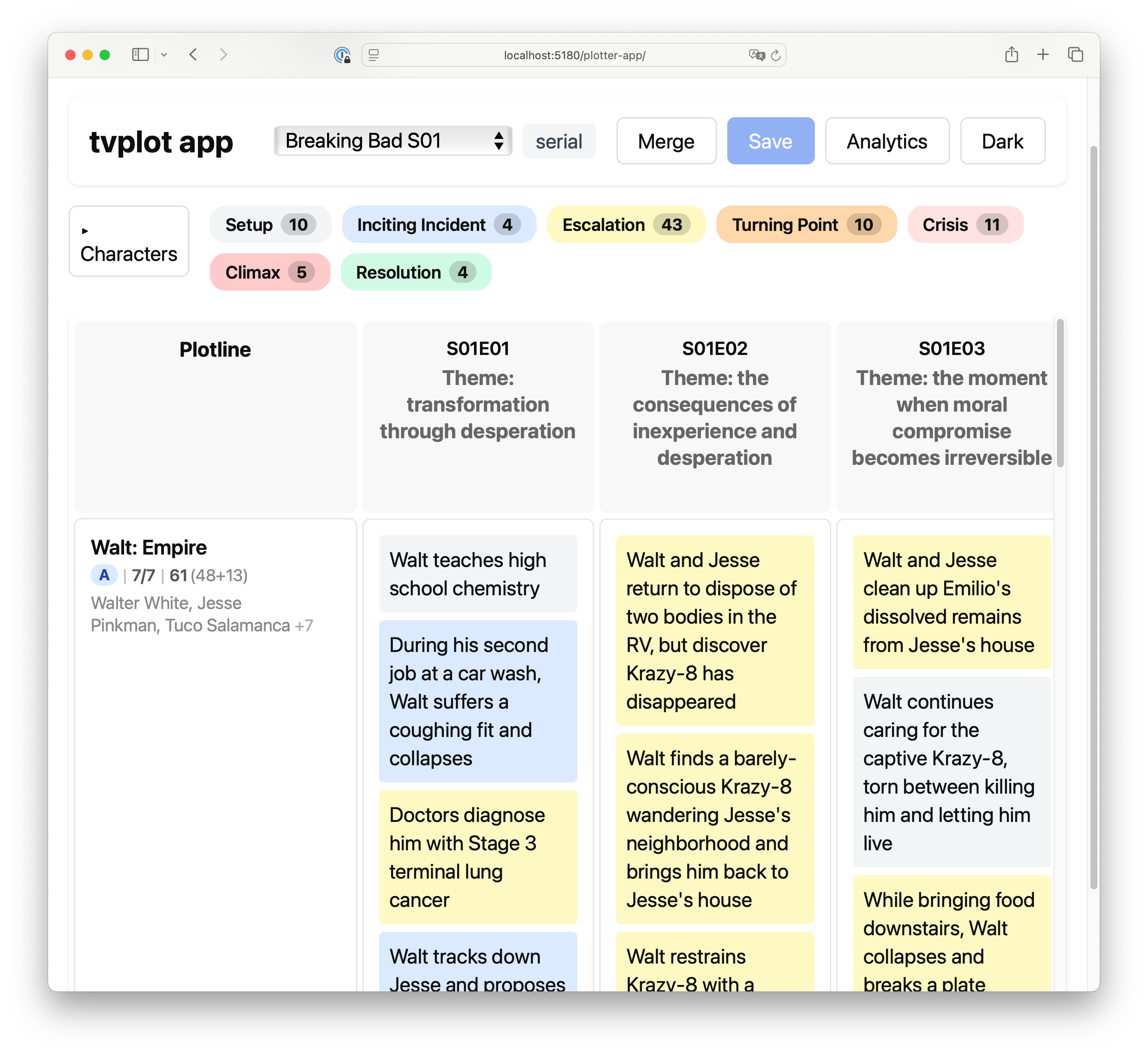
Turn episode synopses into a writers' room corkboard — story engine, plotlines with their story DNA and arcs (see glossary) — in one function call.
For TV researchers, screenwriters, and anyone building narrative analysis tools or a tv series.
A naive LLM prompt covers 5–12% of a season's source material. tvplot covers 78–91% — by separating what the model looks for (narrative theory) from how it calculates the results (code).
Two ways to use it
Library / CLI — pip install tvplot, point it at synopsis files, get JSON.
Standalone HTML viewer — one self-contained .html file that runs the whole pipeline in your browser. Type a show name, the viewer asks the LLM for synopses, runs the analysis, and renders the grid. No server, no dependencies — download the file and it works.
Quick start (CLI)
pip install tvplot
export ANTHROPIC_API_KEY=sk-ant-…
Working on your own series? Point it at your synopses — one .txt file per episode (see Input format):
tvplot run my-series/
Want to analyze an existing show? The optional writer extension generates synopses from online sources:
pip install 'tvplot[writer]'
tvplot write-synopses "Mad Men" --season 1
tvplot run mad-men/
Generate a standalone HTML viewer alongside the JSON:
tvplot run mad-men/ --html              # writes mad-men.json + mad-men.html
tvplot run mad-men/ --html-output viewer.html
Multiple seasons are supported — plotline continuity is tracked across seasons (see Python API).
Pre-computed results are in examples/results/ — explore the output without spending API credits.
Quick start (standalone viewer)
python -m tvplot.html.build --output tvplot.html
open tvplot.html
Then in the browser:
- Click LLM in the toolbar, paste your Anthropic or OpenAI key, pick an analysis system.
- On the welcome screen, type a show name and season → click Analyze.
- The viewer asks the model for episode synopses, lets you preview/edit them, and runs the pipeline.
- Export the result as JSON, CSV, Final Draft (
.fdx), or PDF.
If the model doesn't know the show, drop your own .txt synopsis files via the + Load button.
What you get
One JSON file per season. Each contains:
- Cast — characters with aliases
- Plotlines — with A/B/C ranking, Story DNA (hero, goal, obstacle, stakes), and episode span
- Events — per-episode, assigned to plotlines with episode-level function and season-level arc function
Example: Breaking Bad S01 (truncated)
{
  "context": {
    "format": "serial",
    "story_engine": "A high school teacher builds a drug empire, testing how far he'll go for family and survival"
  },
  "cast": [
    {"id": "walt", "name": "Walter White", "aliases": ["Walt", "Heisenberg", "Mr. White"]},
    {"id": "jesse", "name": "Jesse Pinkman", "aliases": ["Jesse"]}
  ],
  "plotlines": [
    {
      "id": "empire",
      "name": "Walt: Empire",
      "hero": "walt",
      "goal": "build a drug business to secure his family's financial future",
      "obstacle": "inexperience with criminal world, violent dealers like Tuco, moral boundaries",
      "stakes": "death, loss of family, imprisonment",
      "rank": "A",
      "span": ["S01E01", "S01E02", "...", "S01E07"]
    }
  ],
  "episodes": [
    {
      "episode": "S01E01",
      "theme": "transformation through desperation",
      "events": [
        {
          "event": "During the meth lab raid, Walt spots his former student Jesse escaping through a window",
          "plotline_id": "empire",
          "function": "inciting_incident",
          "plot_fn": "inciting_incident",
          "characters": ["walt", "jesse"]
        }
      ]
    }
  ]
}
How it works
You pick an analysis system with --system (CLI) or the LLM Settings dialog (viewer). Both systems share the same input format and output the same TVPlotlinesResult shape, so the viewer renders either one.
Hollywood — screenwriting model (default)
Story DNA — hero, goal, obstacle, stakes — and Freytag's seven dramatic functions. Five LLM passes:
| Pass | Role | Output | Calls |
|---|---|---|---|
| 0 | Context detection | Format (serial/procedural/ensemble), genre, story engine | 1 |
| 1 | Plotline extraction | Cast + plotlines with Story DNA | 3 (majority vote) |
| 2 | Event assignment | Events mapped to plotlines with narrative functions | 1 per episode |
| 3 | Structural review | Verdicts: merge, reassign, create, drop, refunction | 1 |
| 4 | Arc functions | Season-level arc function for each event (per plotline) | 1 per plotline |
Pass 1 runs 3× in parallel and picks the most common plotline set. Pass 3 sees the full picture no earlier pass had and corrects structural problems. Pass 4 assigns arc-level functions — an event that was a climax in episode 3 might be an escalation in the season-long arc.
Narratology — structuralist model
Bal's three layers, Greimas's actant model (subject/object/helper/opponent/power/receiver), Bremond's narrative cycle, Labov's reportability. Six LLM passes:
| Pass | Role | Output | Calls |
|---|---|---|---|
| 1 context | Format, story schema, breach, protagonists | Show-level context | 1 |
| 2 fabula | Per-episode events as state transitions, with stable ids | Bare events + cast | 1 per episode |
| 3 actants | Plotlines via the actant model (anti-subject test) | Plotlines | 1 |
| 4 story | Per-event episode function and direction; theme | Story-level event tags | 1 per episode |
| 5 arc | Season arc function, drive vs texture, MRE per plotline | Season-level event tags | 1 per plotline |
| 6 review | Verdicts and ranks | Structural corrections | 1 |
The actant fields (who_chases, what_they_chase, stands_in_the_way, who_wins_if_it_works) map onto the same hero / goal / obstacle / stakes slots, so existing tools that consume TVPlotlinesResult see no schema change.
The schema document at docs/layered-schema.md describes a richer base + layers JSON form for keeping multiple systems' analyses of the same season side by side.
Synopsis generation (write-synopses)
The writer extension collects raw episode data from online sources, then rewrites each episode into a full synopsis via LLM — ensuring every sentence is a beat (conflict or change), with explicit causality and character names.
Tested with Claude Sonnet (default). OpenAI and Ollama supported for both pipelines and both analysis systems. Ollama defaults to Qwen 2.5 14B — chosen to run on CPU without a GPU. Quality is noticeably lower than cloud models but works for experimentation.
Input format
One .txt file per episode. Include S01E01, S01E02, etc. in the filename. Each file is a plain-text synopsis — 150–500 words covering the main events.
breaking-bad/
├── S01E01.txt
├── S01E02.txt
└── S01E07.txt
The folder name becomes the show title. Override with --show:
tvplot run got/ --show "Game of Thrones"
Python API
from tvplot import get_plotlines

s01 = get_plotlines("Breaking Bad", season=1, episodes=season_1_synopses)
s02 = get_plotlines("Breaking Bad", season=2, episodes=season_2_synopses, prior=s01)

# Or pick the analysis system explicitly
result = get_plotlines(
    "Mad Men", season=1, episodes=synopses, system="narratology",
)
Pass prior to track plotline continuity across seasons.
LLM providers
tvplot run breaking-bad/                          # Anthropic (default)
tvplot run breaking-bad/ --provider openai        # OpenAI
tvplot run breaking-bad/ --provider ollama        # Ollama (local, free)
tvplot run breaking-bad/ --system narratology     # narratology pipeline
See docs/api.md for full API reference.
Key concepts
- Plotline — a narrative thread across episodes (e.g. "Walt: Empire")
- Story DNA — hero, goal, obstacle, stakes (hollywood) ↔ subject, object, opponent, receiver (narratology)
- A/B/C ranking — plotline weight (A = main, B = secondary, C = tertiary, runner = minor thread)
- Format — procedural (House), serial (Breaking Bad), hybrid (X-Files), ensemble (Game of Thrones)
- Story engine — one sentence capturing the show's core dramatic mechanism
- Function — episode-level role in a plotline arc (setup, inciting_incident, escalation, turning_point, crisis, climax, resolution; narratology adds
recognition) - Arc function — season-level role of the same event
How this uses AI
tvplot calls either Claude (Anthropic) or GPT (OpenAI) — you pick one per run — to produce its analyses. If your application surfaces this library's output to end users, you're responsible for disclosing the AI involvement to them (EU AI Act Art. 50; Anthropic AUP; OpenAI Usage Policies). The standalone HTML viewer shipped here carries that notice in its footer.
docs/ai-disclosure.md— what gets sent where, and to whom. Alpine Animation (Switzerland) publishes the library and collects no data; your API key and inputs travel directly from your machine to the LLM vendor you pick.docs/methodology.md— plain-language description of how the pipeline decides, what it can't do, and where to find the code for each step.
Outputs are AI-generated and can contain hallucinations. Treat them as a starting point for your own analysis, not a verified source.
Citation
@software{tvplot2026,
  author = {Vashko, N.},
  title = {tvplot: LLM-Driven Plotline Extraction from Episode Synopses},
  year = {2026},
  url = {https://github.com/BirdInTheTree/tvplot}
}
License
MIT
Release history Release notifications | RSS feed

Download files
Download the file for your platform. If you're not sure which to choose, learn more about installing packages.
Source Distribution
Built Distribution
Filter files by name, interpreter, ABI, and platform.
If you're not sure about the file name format, learn more about wheel file names.
Copy a direct link to the current filters
File details
Details for the file tvplot-0.2.0.tar.gz.
File metadata
- Download URL: tvplot-0.2.0.tar.gz
- Upload date:
- Size: 199.1 kB
- Tags: Source
- Uploaded using Trusted Publishing? No
- Uploaded via: twine/6.2.0 CPython/3.13.13
File hashes
| Algorithm | Hash digest | |
|---|---|---|
| SHA256 |
c41cb945d057b68d970501c48806269d4dc7c4f36820c28ed5a4fe90c50b33db
|
|
| MD5 |
b79d9f47cc34ead6c300986b8fe9ddb6
|
|
| BLAKE2b-256 |
bdf7daf5113c0f10667bd33725fc24efda234ed03959ebbc701b6ee688c0dfef
|
File details
Details for the file tvplot-0.2.0-py3-none-any.whl.
File metadata
- Download URL: tvplot-0.2.0-py3-none-any.whl
- Upload date:
- Size: 132.5 kB
- Tags: Python 3
- Uploaded using Trusted Publishing? No
- Uploaded via: twine/6.2.0 CPython/3.13.13
File hashes
| Algorithm | Hash digest | |
|---|---|---|
| SHA256 |
899e4fdff62b5ca9babf6e02aefbf2b293ec3199737004dce4f92b1d1e136342
|
|
| MD5 |
c0590313f65a6aa30d4b10c26f0faa26
|
|
| BLAKE2b-256 |
6a2ecaf9c6f79ea1b78d7cf57aec35e28cab4680a685441d354974d4830d7eb3
|






