
TradingView Screener API
Verified details
These details have been verified by PyPIProject links
GitHub Statistics
Maintainers

Project description

TradingView™ Screener API
TradingView™ Screener API: simple Python library to retrieve data from TradingView™ Screener



🚀 Try the Code Generator
Build screener queries visually and get Python code instantly!

The Code Generator lets you:
- Select from 6 screener types (Stock, Crypto, Forex, Bond, Futures, Coin)
- Build filters visually with 13,000+ fields
- Generate ready-to-use Python code
- Copy and run in your environment
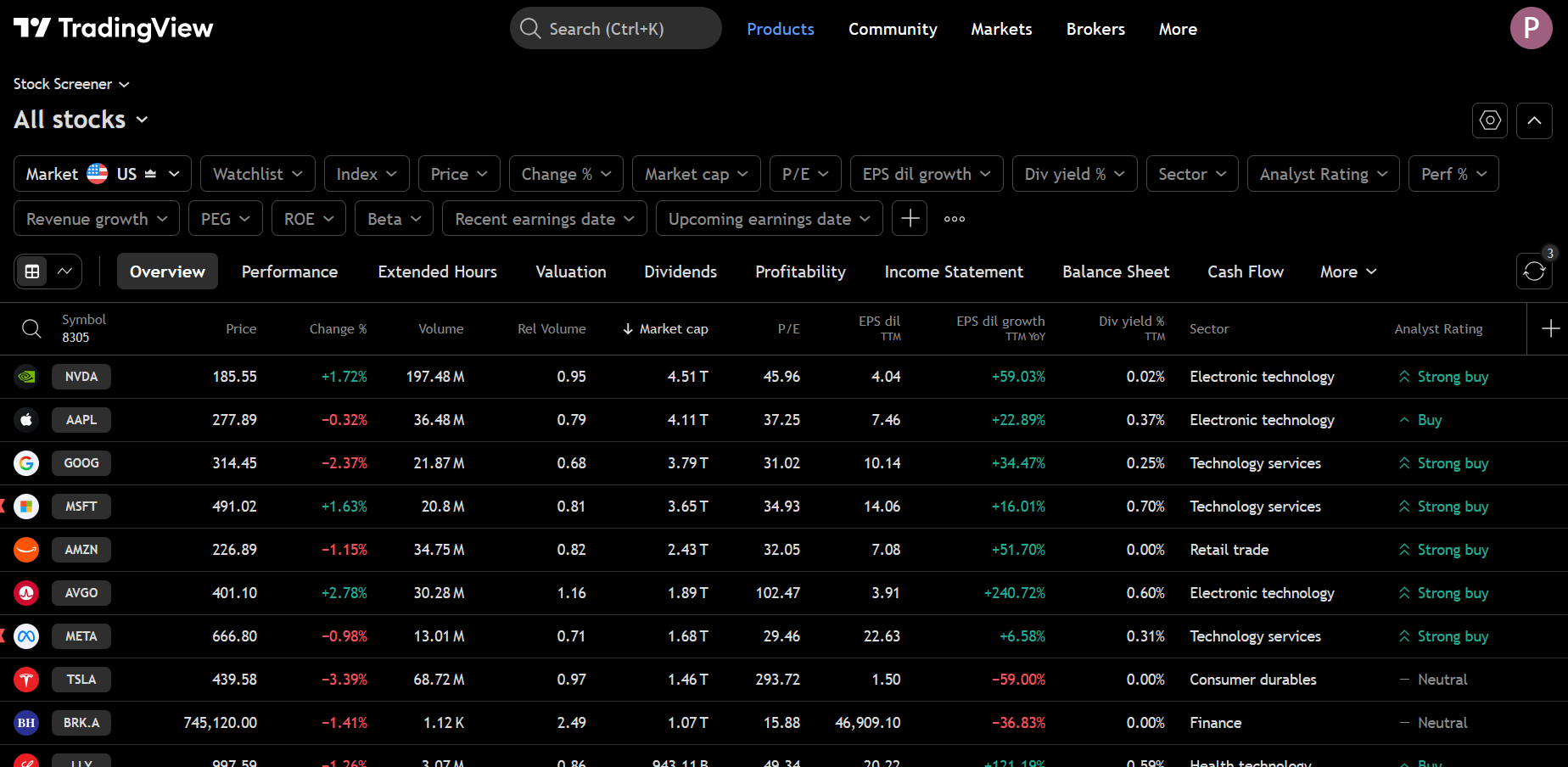
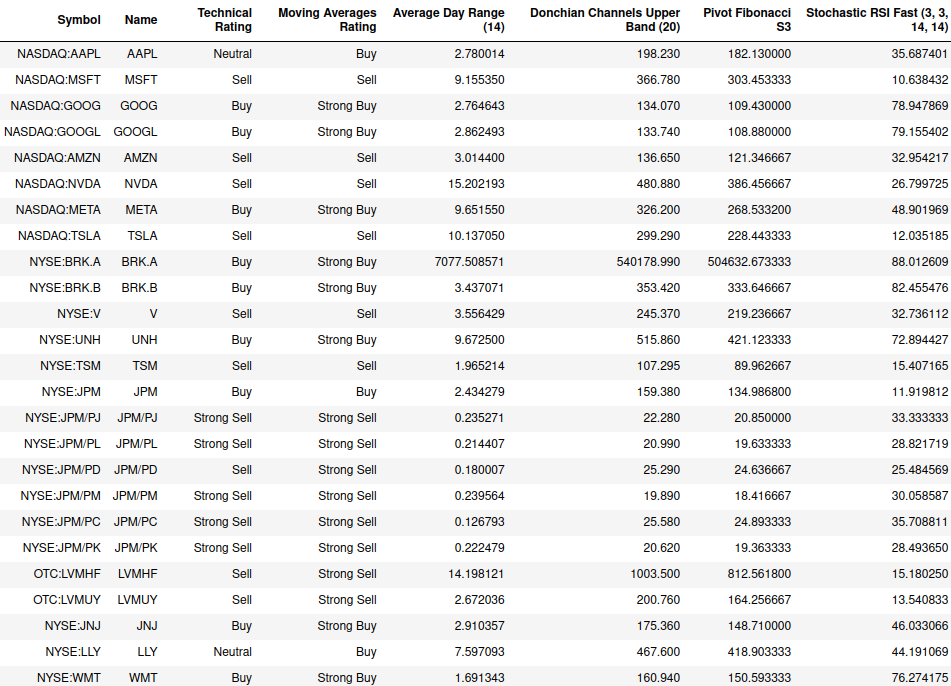
Get the results as a Pandas Dataframe
Disclaimer
This is an unofficial, third-party library and is not affiliated with, endorsed by, or connected to TradingView™ in any way. TradingView™ is a trademark of TradingView™, Inc. This independent project provides a Python interface to publicly available data from TradingView's screener. Use of this library is at your own risk and subject to TradingView's terms of service.
What's New in v0.2.0
MCP Server Integration - This release adds Model Context Protocol (MCP) support, enabling AI assistants like Claude to query market data directly.
MCP Server for AI Assistants
# Install with MCP support
pip install tvscreener[mcp]

# Run MCP server
tvscreener-mcp

# Register with Claude Code
claude mcp add tvscreener -- tvscreener-mcp
MCP Tools:
discover_fields- Search 3500+ available fields by keywordcustom_query- Flexible queries with any fields and filterssearch_stocks/search_crypto/search_forex- Simplified screenersget_top_movers- Get top gainers/losers
What's New in v0.1.0
Major API Enhancement Release - This release significantly expands the library with new screeners, 13,000+ fields, and a more intuitive API.
New Screeners
- BondScreener - Query government and corporate bonds
- FuturesScreener - Query futures contracts
- CoinScreener - Query coins from CEX and DEX exchanges
Expanded Field Coverage
- 13,000+ fields across all screener types (up from ~300)
- Complete technical indicator coverage with all time intervals
- Fields organized by category with search and discovery methods
Pythonic Comparison Syntax
from tvscreener import StockScreener, StockField

ss = StockScreener()
ss.where(StockField.PRICE > 50)
ss.where(StockField.VOLUME >= 1_000_000)
ss.where(StockField.MARKET_CAPITALIZATION.between(1e9, 50e9))
ss.where(StockField.SECTOR.isin(['Technology', 'Healthcare']))
df = ss.get()
Fluent API
# Chain methods for cleaner code
ss = StockScreener()
ss.select(StockField.NAME, StockField.PRICE, StockField.CHANGE_PERCENT)
ss.where(StockField.PRICE > 100)
df = ss.get()
Field Presets
from tvscreener import StockScreener, STOCK_VALUATION_FIELDS, STOCK_DIVIDEND_FIELDS

ss = StockScreener()
ss.specific_fields = STOCK_VALUATION_FIELDS + STOCK_DIVIDEND_FIELDS
Type-Safe Validation
The library now validates that you're using the correct field types with each screener, catching errors early.
Main Features
- Query Stock, Forex, Crypto, Bond, Futures, and Coin Screeners
- All the fields available: 13,000+ fields across all screener types
- Any time interval (
no need to be a registered user- 1D, 5m, 1h, etc.) - Fluent API with
select()andwhere()methods for cleaner code - Field discovery - search fields by name, get technicals, filter by category
- Field presets - curated field groups for common use cases
- Type-safe validation - catches field/screener mismatches
- Filters by any fields, symbols, markets, countries, etc.
- Get the results as a Pandas Dataframe
- Styled output with TradingView-like colors and formatting
- Streaming/Auto-update - continuously fetch data at specified intervals
Installation
The source code is currently hosted on GitHub at: https://github.com/deepentropy/tvscreener
Binary installers for the latest released version are available at the Python Package Index (PyPI)
# or PyPI
pip install tvscreener
From pip + GitHub:
$ pip install git+https://github.com/deepentropy/tvscreener.git
Usage
Basic Screeners
import tvscreener as tvs

# Stock Screener
ss = tvs.StockScreener()
df = ss.get()  # returns a dataframe with 150 rows by default

# Forex Screener
fs = tvs.ForexScreener()
df = fs.get()

# Crypto Screener
cs = tvs.CryptoScreener()
df = cs.get()

# Bond Screener (NEW)
bs = tvs.BondScreener()
df = bs.get()

# Futures Screener (NEW)
futs = tvs.FuturesScreener()
df = futs.get()

# Coin Screener (NEW) - CEX and DEX coins
coins = tvs.CoinScreener()
df = coins.get()
Fluent API
Use select() and where() for cleaner, chainable code:
from tvscreener import StockScreener, StockField

ss = StockScreener()
ss.select(
    StockField.NAME,
    StockField.PRICE,
    StockField.CHANGE_PERCENT,
    StockField.VOLUME,
    StockField.MARKET_CAPITALIZATION
)
ss.where(StockField.MARKET_CAPITALIZATION > 1e9)
ss.where(StockField.CHANGE_PERCENT > 5)
df = ss.get()
Field Discovery
Search and explore the 13,000+ available fields:
from tvscreener import StockField

# Search fields by name or label
rsi_fields = StockField.search("rsi")
print(f"Found {len(rsi_fields)} RSI-related fields")

# Get all technical indicator fields
technicals = StockField.technicals()
print(f"Found {len(technicals)} technical fields")

# Get recommendation fields
recommendations = StockField.recommendations()
Field Presets
Use curated field groups for common analysis needs:
from tvscreener import (
    StockScreener, get_preset, list_presets,
    STOCK_PRICE_FIELDS, STOCK_VALUATION_FIELDS, STOCK_DIVIDEND_FIELDS,
    STOCK_PERFORMANCE_FIELDS, STOCK_OSCILLATOR_FIELDS
)

# See all available presets
print(list_presets())
# ['stock_price', 'stock_volume', 'stock_valuation', 'stock_dividend', ...]

# Use presets directly
ss = StockScreener()
ss.specific_fields = STOCK_VALUATION_FIELDS + STOCK_DIVIDEND_FIELDS
df = ss.get()

# Or get preset by name
fields = get_preset('stock_performance')
Available Presets:
| Category | Presets |
|---|---|
| Stock | stock_price, stock_volume, stock_valuation, stock_dividend, stock_profitability, stock_performance, stock_oscillators, stock_moving_averages, stock_earnings |
| Crypto | crypto_price, crypto_volume, crypto_performance, crypto_technical |
| Forex | forex_price, forex_performance, forex_technical |
| Bond | bond_basic, bond_yield, bond_maturity |
| Futures | futures_price, futures_technical |
| Coin | coin_price, coin_market |
Time Intervals for Technical Fields
Apply different time intervals to technical indicators:
from tvscreener import StockScreener, StockField

ss = StockScreener()

# Get RSI with 1-hour interval
rsi_1h = StockField.RELATIVE_STRENGTH_INDEX_14.with_interval("60")

# Available intervals: 1, 5, 15, 30, 60, 120, 240, 1D, 1W, 1M
ss.specific_fields = [
    StockField.NAME,
    StockField.PRICE,
    rsi_1h,
    StockField.MACD_LEVEL_12_26.with_interval("240"),  # 4-hour MACD
]
df = ss.get()
Parameters
For detailed usage examples, see the documentation and notebooks below.
Styled Output
You can apply TradingView-style formatting to your screener results using the beautify function. This adds colored text for ratings and percent changes, formatted numbers with K/M/B suffixes, and visual indicators for buy/sell/neutral recommendations.
import tvscreener as tvs

# Get raw data
ss = tvs.StockScreener()
df = ss.get()

# Apply TradingView styling
styled = tvs.beautify(df, tvs.StockField)

# Display in Jupyter/IPython (shows colored output)
styled
The styled output includes:
- Rating columns with colored text and directional arrows:
- Buy signals: Blue color with up arrow (↑)
- Sell signals: Red color with down arrow (↓)
- Neutral: Gray color with dash (-)
- Percent change columns: Green for positive, Red for negative
- Number formatting: K, M, B, T suffixes for large numbers
- Missing values: Displayed as "--"
Streaming / Auto-Update
You can use the stream() method to continuously fetch screener data at specified intervals. This is useful for monitoring real-time market data.
import tvscreener as tvs

# Basic streaming with iteration limit
ss = tvs.StockScreener()
for df in ss.stream(interval=10, max_iterations=5):
    print(f"Got {len(df)} rows")

# Streaming with callback
from datetime import datetime

def on_update(df):
    print(f"Updated at {datetime.now()}: {len(df)} rows")

ss = tvs.StockScreener()
try:
    for df in ss.stream(interval=5, on_update=on_update):
        # Process data
        pass
except KeyboardInterrupt:
    print("Stopped streaming")

# Stream with filters
ss = tvs.StockScreener()
ss.set_markets(tvs.Market.AMERICA)
for df in ss.stream(interval=30, max_iterations=10):
    print(df.head())
Parameters:
interval: Refresh interval in seconds (minimum 1.0 to avoid rate limiting)max_iterations: Maximum number of refreshes (None = infinite)on_update: Optional callback function called with each DataFrame
Documentation
📖 Full Documentation - Complete guides, API reference, and examples.
Quick Links
| Guide | Description |
|---|---|
| Quick Start | Get up and running in 5 minutes |
| Filtering | Complete filtering reference |
| Stock Screening | Value, momentum, dividend strategies |
| Technical Analysis | RSI, MACD, multi-timeframe |
| API Reference | Screeners, Fields, Enums |
Jupyter Notebooks
Interactive examples organized by use case:
| Notebook | Description |
|---|---|
| 01-quickstart.ipynb | Overview of all 6 screeners |
| 02-stocks.ipynb | Stock screening strategies |
| 03-crypto.ipynb | Crypto analysis |
| 04-forex.ipynb | Forex pairs screening |
| 05-bonds-futures.ipynb | Bonds and futures |
Project details
Verified details
These details have been verified by PyPIProject links
GitHub Statistics
Maintainers
Release history Release notifications | RSS feed


Download files
Download the file for your platform. If you're not sure which to choose, learn more about installing packages.
Source Distribution
Built Distribution
Filter files by name, interpreter, ABI, and platform.
If you're not sure about the file name format, learn more about wheel file names.
Copy a direct link to the current filters
File details
Details for the file tvscreener-0.2.2.tar.gz.
File metadata
- Download URL: tvscreener-0.2.2.tar.gz
- Upload date:
- Size: 197.9 kB
- Tags: Source
- Uploaded using Trusted Publishing? Yes
- Uploaded via: twine/6.1.0 CPython/3.13.7
File hashes
| Algorithm | Hash digest | |
|---|---|---|
| SHA256 |
0e1e18ae73d4bda0796b3d2b5e2080c3acc6e3b3dcd69cab979f8e69e83f6674
|
|
| MD5 |
122145cbcf0e8ce062630f798f2734d5
|
|
| BLAKE2b-256 |
b65ff0ea028340a29cfd6da85ac0cce8912733e45db29a1f336d2c1937c6b867
|
Provenance
The following attestation bundles were made for tvscreener-0.2.2.tar.gz:
Publisher:
pip-publish.yml on deepentropy/tvscreener
-
Statement:
-
Statement type:
https://in-toto.io/Statement/v1 -
Predicate type:
https://docs.pypi.org/attestations/publish/v1 -
Subject name:
tvscreener-0.2.2.tar.gz -
Subject digest:
0e1e18ae73d4bda0796b3d2b5e2080c3acc6e3b3dcd69cab979f8e69e83f6674 - Sigstore transparency entry: 1188385304
- Sigstore integration time:
-
Permalink:
deepentropy/tvscreener@8c3c0b9567b6155358f5d19719061ffb49a35828 -
Branch / Tag:
refs/tags/v0.2.2 - Owner: https://github.com/deepentropy
-
Access:
public
-
Token Issuer:
https://token.actions.githubusercontent.com -
Runner Environment:
github-hosted -
Publication workflow:
pip-publish.yml@8c3c0b9567b6155358f5d19719061ffb49a35828 -
Trigger Event:
push
-
Statement type:
File details
Details for the file tvscreener-0.2.2-py3-none-any.whl.
File metadata
- Download URL: tvscreener-0.2.2-py3-none-any.whl
- Upload date:
- Size: 204.6 kB
- Tags: Python 3
- Uploaded using Trusted Publishing? Yes
- Uploaded via: twine/6.1.0 CPython/3.13.7
File hashes
| Algorithm | Hash digest | |
|---|---|---|
| SHA256 |
36e5e89ec1529f399cadc47e8de76bf396db0d50367aaaf9e494138d1e489898
|
|
| MD5 |
92f2bb5a5200cd530dfcfad4c52cf79f
|
|
| BLAKE2b-256 |
bbbd63170825d199c7c63315bd0fff37ad8cb339a2ae3e6f702fa788211f8d3c
|
Provenance
The following attestation bundles were made for tvscreener-0.2.2-py3-none-any.whl:
Publisher:
pip-publish.yml on deepentropy/tvscreener
-
Statement:
-
Statement type:
https://in-toto.io/Statement/v1 -
Predicate type:
https://docs.pypi.org/attestations/publish/v1 -
Subject name:
tvscreener-0.2.2-py3-none-any.whl -
Subject digest:
36e5e89ec1529f399cadc47e8de76bf396db0d50367aaaf9e494138d1e489898 - Sigstore transparency entry: 1188385307
- Sigstore integration time:
-
Permalink:
deepentropy/tvscreener@8c3c0b9567b6155358f5d19719061ffb49a35828 -
Branch / Tag:
refs/tags/v0.2.2 - Owner: https://github.com/deepentropy
-
Access:
public
-
Token Issuer:
https://token.actions.githubusercontent.com -
Runner Environment:
github-hosted -
Publication workflow:
pip-publish.yml@8c3c0b9567b6155358f5d19719061ffb49a35828 -
Trigger Event:
push
-
Statement type:






