
Twitter aggregator for market-relevant signals

Project description
twag 📊
Twitter/X market-signal aggregation with LLM-powered triage, enrichment, and digest generation.
twag pulls tweets from your timeline, scores them for market relevance using LLMs, enriches high-signal content, and generates daily digests. It's designed for traders and investors who want signal without the noise.
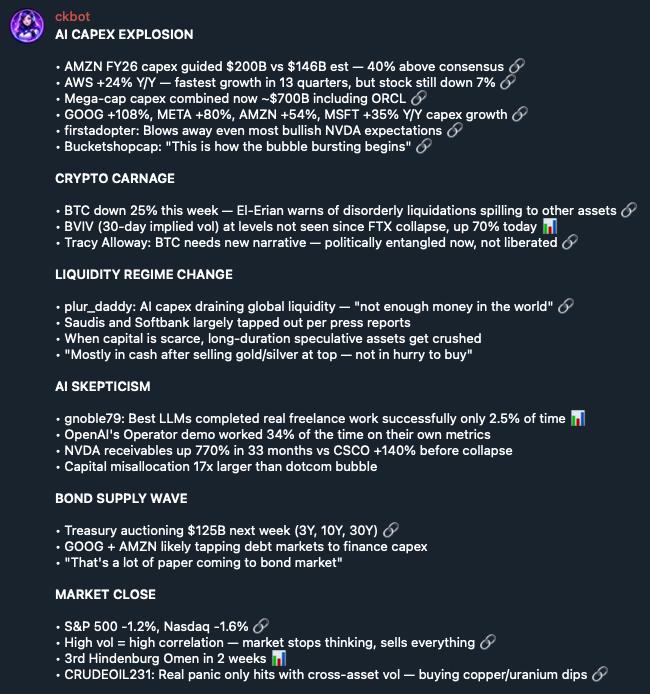
Example telegram notification. Chart emojis are links to tweets that have charts:
Features
- Smart Scoring — LLM-powered triage (0-10) with category tagging
- Full-Text Search — SQLite FTS5 with boolean queries and filters
- X Article Summaries — Extracts key points and action items from long-form posts
- Telegram Alerts — Real-time notifications for high-signal tweets
- Web Feed — FastAPI + React UI for browsing processed tweets
- OpenClaw Skill — Native integration with OpenClaw agents
Prerequisites
uv (Required)
twag uses uv for installation and development environments. Install uv, then verify it is available:
curl -LsSf https://astral.sh/uv/install.sh | sh
uv --version
bird CLI (Required)
twag uses bird to access Twitter/X. Install it first:
# npm (recommended)
npm install -g @steipete/bird

# or pnpm/bun
pnpm add -g @steipete/bird
bun add -g @steipete/bird

# or Homebrew (macOS)
brew install steipete/tap/bird
Verify installation:
bird --version
Twitter Authentication
bird uses cookie-based auth. You need two cookies from your browser:
- AUTH_TOKEN — Your
auth_tokencookie - CT0 — Your
ct0cookie
Getting Your Cookies
- Log into x.com in your browser
- Open DevTools (F12) → Application → Cookies →
https://x.com - Copy the values of
auth_tokenandct0
Set them as environment variables:
export AUTH_TOKEN="your_auth_token_here"
export CT0="your_ct0_here"
Or add to ~/.env (twag will source this automatically):
echo 'export AUTH_TOKEN="..."' >> ~/.env
echo 'export CT0="..."' >> ~/.env
Verify auth works:
bird whoami
LLM API Keys
Required:
GEMINI_API_KEY— Google AI Studio (free tier available)
Optional:
ANTHROPIC_API_KEY— For higher-quality enrichment on high-signal tweetsDEEPSEEK_API_KEY— For DeepSeek text triage/enrichment models
export GEMINI_API_KEY="your_gemini_key"
export ANTHROPIC_API_KEY="your_anthropic_key"  # optional
export DEEPSEEK_API_KEY="your_deepseek_key"    # optional
Installation
Global CLI from PyPI (Recommended)
uv tool install twag
If twag is not on PATH, run uv tool update-shell and restart the shell. Upgrade later with
uv tool upgrade twag.
From Source
git clone https://github.com/clifton/twag.git
cd twag
uv tool install --editable .
uv tool install creates the global twag launcher in uv's tool environment, so normal user and automation commands
remain twag ... while dependency and Python management stay with uv. Inside a source checkout, use uv run twag ...
when you want the checkout's locked development environment instead of the global tool.
Reinstall an editable source tool after dependency or entry-point changes with uv tool install --force --editable ..
Quick Start
# 1. Initialize config and database
twag init

# 2. Verify dependencies and environment
twag doctor

# 3. Fetch tweets from your timeline
twag fetch

# 4. Score and process tweets
twag process

# 5. Generate today's digest
twag digest --stdout

# 6. Search for specific topics
twag search "fed rate" --today
Core Workflow
FETCH → PROCESS → DIGEST
- Fetch — Pull tweets from home timeline, tier-1 accounts, bookmarks
- Process — Score tweets with LLM, categorize, enrich high-signal content
- Digest — Generate markdown summaries grouped by theme
CLI Reference
Setup Commands
twag init              # Initialize config and database
twag init --force      # Overwrite existing config file
twag doctor            # Check dependencies and environment
Fetch Commands
# Default: home timeline + tier-1 accounts + bookmarks
twag fetch

# Single tweet (ID or URL)
twag fetch 1234567890123456789
twag fetch https://x.com/user/status/1234567890123456789

# User timeline
twag fetch --source user --handle @NickTimiraos --count 50

# Search
twag fetch --source search --query "Fed Powell rate" --count 30

# Control sources
twag fetch --no-tier1 --no-bookmarks

# Tier-1 rotation and pacing
twag fetch --stagger 5          # Only fetch 5 least-recent tier-1 accounts
twag fetch --delay 5.0          # 5s delay between tier-1 fetches (default: 3s)
Process Commands
twag process                    # Process unscored tweets (no alerts by default)
twag process --limit 100        # Limit batch size
twag process --dry-run          # Preview only
twag process --notify           # Send Telegram alerts

# Quote/reply reprocessing
twag process --no-reprocess-quotes       # Skip reprocessing dependency tweets
twag process --reprocess-min-score 5     # Min score for reprocessing (default: 3)

# Process specific tweet
twag process 1234567890123456789

# Shared signal ledger and scoring calibration
twag spine emit
twag eval run
Search Commands
# Basic search
twag search "inflation fed"

# Query fresh public X results through authenticated bird
twag search "NVIDIA" --live --time 1h

# Explicit cache-only behavior (--cached is the default)
twag search "inflation fed" --cached

# With filters
twag search "rate hike" --category fed_policy
twag search "NVDA" --author zerohedge
twag search "earnings" --ticker AAPL

# Time filters
twag search "breaking" --today              # Since last market close
twag search "fed" --time 7d                 # Last 7 days
twag search "macro" --since 2026-01-15      # From specific date

# Output formats
twag search "fed" --format brief            # Compact output
twag search "fed" --format full             # Digest-style
twag search "fed" --format json             # JSON output

# Score threshold
twag search "market" --min-score 7          # High-signal only

# Cashtag query: single quotes prevent the shell from expanding $BLND
twag search '$BLND OR "Blend Labs"' --live --time 30d --min-score 4

# Additional filters
twag search --bookmarks                     # Only bookmarked tweets
twag search "fed" --tier 1                  # Filter by signal tier
twag search "fed" --order score             # Sort by: rank, score, or time
Query syntax:
- Simple:
inflation fed(matches both) - Phrase:
"rate hike"(exact match) - Boolean:
inflation AND fed,fed NOT fomc - Prefix:
infla*(wildcard) - Cashtags:
'$BLND OR "Blend Labs"'(cashtags are normalized for FTS5; single-quote the whole query in the shell) - Column:
author_handle:zerohedge
Query searches use the local FTS5 index by default. Pass --live to query fresh
public X results through authenticated bird search; twag stores only the
current bird result set inside the requested time range and restricts output to
those IDs. New live rows are classified only when score, category, tier, ticker,
or score ordering needs model metadata. The bird call is capped at 30 seconds,
and classification has a killable 120-second overall timeout (adjustable with
--classification-timeout). Live syntax supports X terms, phrases, OR, and
cashtags; FTS-only prefix and column expressions are cache-only syntax. A local
empty result recommends --live, while a bird or classification failure exits
nonzero with a separate credential-safe error.
Narrative Commands
twag narratives list # List active narratives with mention counts
Analyze Commands
twag analyze 1234567890123456789              # Analyze by ID
twag analyze https://x.com/user/status/123    # Analyze by URL
twag analyze 1234567890123456789 --reprocess  # Force re-analyze
twag analyze 1234567890123456789 -m gemini-2.0-flash  # Override model
twag analyze 1234567890123456789 --thread              # Persist the full conversation thread
twag analyze 1234567890123456789 --replies --reply-depth 2  # Persist target replies + one nested level
twag analyze 1234567890123456789 --thread --replies \
  --reply-depth 2 --max-reply-nodes 25 --max-pages 5
By default, twag analyze retains its original target-only behavior. --thread adds the conversation returned by
bird thread; --replies performs a breadth-first reply traversal seeded by the target, or by every fetched thread
status when combined with --thread. --reply-depth 1 means direct replies only, while 2 adds one nested level.
--max-reply-nodes is a global cap on both reply statuses stored and reply-source requests visited. --max-pages
caps every Bird thread/replies request; without it, explicitly requested context uses all available pages.
The target, thread statuses, and replies use the same storage path, so reply relationships, conversation IDs, links, media, and X Article fields are persisted consistently. Only the requested target is classified/reprocessed and printed; context is stored for downstream extraction and research. An explicit context-fetch failure exits nonzero instead of silently continuing with target-only data.
Digest Commands
twag digest                     # Generate today's digest
twag digest --date 2026-02-06   # Specific date
twag digest --stdout            # Output to terminal
twag digest --min-score 6       # Custom threshold
Account Management
twag accounts list              # All tracked accounts
twag accounts list --tier 1     # Tier-1 only
twag accounts add @handle       # Add account
twag accounts add @handle -t 1  # Add as tier-1
twag accounts promote @handle   # Promote to tier-1
twag accounts demote @handle    # Demote to tier-2
twag accounts mute @handle      # Mute account
twag accounts boost @handle --amount 10  # Boost weight
twag accounts decay             # Apply daily decay
twag accounts import            # Import from following.txt
Stats & Maintenance
twag stats                      # All-time stats
twag stats --today              # Today's stats

twag inference usage            # LLM token/cost report for last 30 days
twag inference usage --all-time # Include all logged inference usage

twag prune --days 14            # Delete old tweets
twag prune --dry-run            # Preview prune

twag export --days 7            # Export recent data
Narratives
twag narratives list # List active narratives
Database Commands
twag db path                    # Show database location
twag db shell                   # Open SQLite shell
twag db init                    # Initialize/reset database
twag db rebuild-fts             # Rebuild search index
twag db dump                    # Backup database (auto-named file)
twag db dump --stdout           # Backup to stdout
twag db restore backup.sql      # Restore from backup
twag db restore backup.sql --force  # Restore without confirmation
Web Interface
twag web                        # Start web UI (localhost:5173)
twag web --host 127.0.0.1       # Bind to localhost only
twag web --port 8080            # Custom port
twag web --dev                  # Dev mode (Vite + hot reload)
twag web --no-reload            # Disable auto-reload on code changes
⚠️ Security: The web interface has no authentication. Only run on trusted networks or bind to localhost.
Configuration
twag config show                # Show current config
twag config path                # Show config file path
twag config set llm.triage_model gemini-2.0-flash
twag config set scoring.alert_threshold 8
twag config set scoring.min_score_for_analysis 6
twag config set scoring.max_article_summary_chars 20000
Data Paths
twag follows XDG defaults:
| Path | Purpose |
|---|---|
~/.config/twag/config.json |
Configuration |
~/.local/share/twag/twag.db |
SQLite database |
~/.local/share/twag/digests/ |
Generated digests |
~/.local/share/twag/following.txt |
Followed accounts |
~/clawd/state/registry/twag-context.md |
Spine-owned scoring context (must be fresh within 48h) |
~/clawd/state/signals/YYYY-MM.jsonl |
Shared append-only signal ledger |
Override with TWAG_DATA_DIR environment variable.
Scoring System
Tweets are scored 0-10:
| Score | Signal Level | Behavior |
|---|---|---|
| 8-10 | Alert | Real-time alert (if configured) |
| 7 | High signal | Enriched, included in digests |
| 5-6 | Market relevant | Included in digests |
| 3-4 | News/context | Searchable, not in digests |
| 0-2 | Noise | Stored but filtered out |
Categories
The coarse filter taxonomy is single-sourced in twag/taxonomy.py.
Automation
Data Collection (systemd timer)
Create ~/.config/systemd/user/twag-aggregator.service:
[Unit]
Description=TWAG Twitter Aggregator
After=network.target

[Service]
Type=oneshot
ExecStart=/bin/bash -lc '%h/.local/bin/twag fetch && %h/.local/bin/twag process'
WorkingDirectory=%h
EnvironmentFile=%h/.env
Create ~/.config/systemd/user/twag-aggregator.timer:
[Unit]
Description=Run TWAG every 15 minutes

[Timer]
OnBootSec=5min
OnUnitActiveSec=15min
Persistent=true

[Install]
WantedBy=timers.target
Enable:
systemctl --user daemon-reload
systemctl --user enable --now twag-aggregator.timer
macOS (launchd)
See SUGGESTED_CRON_SCHEDULE.md for launchd plist examples.
Telegram Alerts
- Create a bot via @BotFather
- Get your chat ID by messaging the bot
- Set environment variables:
export TELEGRAM_BOT_TOKEN="your_bot_token"
export TELEGRAM_CHAT_ID="your_chat_id"
twag process --notify alerts on score >= 8, score >= 7 surprises, score >= 6 playbook triggers, and score >= 6 catalyst resolutions. Delivery goes through a bounded ron announce turn, with direct Telegram fallback if ron is unavailable. Configure notifications.telegram_chat_id (or TELEGRAM_CHAT_ID) and TELEGRAM_BOT_TOKEN.
The repository cron wrapper enables notifications, emits signal-event v1 records with twag spine emit, checks fund-context and signal-directory health daily, and runs decay/prune at most once per day.
twag spine emit requires the fund's spine CLI in PATH; twag doctor verifies it before scheduled use.
OpenClaw Integration
twag is an OpenClaw skill. Once installed, agents can:
# Search for market-relevant tweets
twag search "fed rate" --today -s 7

# Generate digests
twag digest --stdout

# Analyze specific tweets
twag analyze https://x.com/user/status/123
Skill Installation
The skill is auto-discovered if twag is in PATH. For manual setup:
# Link skill to OpenClaw
ln -s /path/to/twag ~/.openclaw/skills/twag
Scheduled Digests
See SUGGESTED_CRON_SCHEDULE.md for OpenClaw cron job examples that deliver digests to Telegram.
Environment Variables
| Variable | Required | Purpose |
|---|---|---|
AUTH_TOKEN |
Yes | Twitter auth cookie |
CT0 |
Yes | Twitter ct0 cookie |
GEMINI_API_KEY |
Yes | LLM triage/vision |
ANTHROPIC_API_KEY |
No | Enhanced enrichment |
DEEPSEEK_API_KEY |
No | DeepSeek text triage/enrichment |
TELEGRAM_BOT_TOKEN |
No | Alert delivery |
TELEGRAM_CHAT_ID |
No | Alert destination |
TWAG_DATA_DIR |
No | Override data directory |
Troubleshooting
"bird not found"
# Check if bird is installed
which bird

# Install if missing
npm install -g @steipete/bird
"Authentication failed" / 401 errors
# Verify cookies are set
echo $AUTH_TOKEN
echo $CT0

# Test bird auth
bird whoami

# If expired, get fresh cookies from browser
"Query IDs stale" / 404 errors
# Refresh GraphQL query cache
bird query-ids --fresh
"GEMINI_API_KEY not set"
# Verify key is exported
echo $GEMINI_API_KEY

# Test with curl
curl "https://generativelanguage.googleapis.com/v1/models?key=$GEMINI_API_KEY"
Database issues
# Check database location
twag db path

# Rebuild search index
twag db rebuild-fts

# Backup and restore
twag db dump backup.sql
twag db restore backup.sql --force
Development
# Install the locked project and dev dependencies
uv sync --group dev

# Run the checkout's CLI
uv run twag --version

# Run tests
uv run pytest

# Lint and format
uv run ruff check .
uv run ruff format .

# Frontend development
cd twag/web/frontend
npm install
npm run dev
License
MIT. See LICENSE.
Links
- Repository: https://github.com/clifton/twag
- Issues: https://github.com/clifton/twag/issues
- bird CLI: https://github.com/steipete/bird
- OpenClaw: https://github.com/openclaw/openclaw
Release history Release notifications | RSS feed


Download files
Download the file for your platform. If you're not sure which to choose, learn more about installing packages.
Source Distribution
Built Distribution
Filter files by name, interpreter, ABI, and platform.
If you're not sure about the file name format, learn more about wheel file names.
Copy a direct link to the current filters
File details
Details for the file twag-0.1.41.tar.gz.
File metadata
- Download URL: twag-0.1.41.tar.gz
- Upload date:
- Size: 382.7 kB
- Tags: Source
- Uploaded using Trusted Publishing? No
- Uploaded via: twine/6.1.0 CPython/3.13.12
File hashes
| Algorithm | Hash digest | |
|---|---|---|
| SHA256 |
acb35af6a0e849b8d9a4ec9a4eb060e9b435c65b8ba1a82b5fcf07ccbf3c4cb0
|
|
| MD5 |
46d073fee32785523f86d351bd72b1ec
|
|
| BLAKE2b-256 |
f8bc2f0eb1069dca710750c4c8d8bf1fd9b684aa884007d9892237b6595efc46
|
File details
Details for the file twag-0.1.41-py3-none-any.whl.
File metadata
- Download URL: twag-0.1.41-py3-none-any.whl
- Upload date:
- Size: 240.8 kB
- Tags: Python 3
- Uploaded using Trusted Publishing? No
- Uploaded via: twine/6.1.0 CPython/3.13.12
File hashes
| Algorithm | Hash digest | |
|---|---|---|
| SHA256 |
ee584118341ddfc24c4e909b674da517bd4fb4666c5727615eaa7efb1718c7fb
|
|
| MD5 |
be4c108d34f0e331b1d787f1ee16ad1f
|
|
| BLAKE2b-256 |
077266252ed2d2c5708a6aff034d0dbe737d0a3fae53bb79aa414fcf40713fb1
|






