
Python SDK for Dynamic Web TWAIN Service
This repository provides a Python wrapper around the Dynamic Web TWAIN Service REST API for scanner discovery, job control, page capture, document storage, and document processing.
Supported scanner backends:
- TWAIN and TWAIN x64 on Windows
- WIA on Windows
- ICA on macOS
- SANE on Linux
- eSCL and other network-capable devices supported by the service
Install the service
Dynamic Web TWAIN Service must be installed on the machine that can physically access the scanner.
- Windows: Dynamsoft-Service-Setup.msi
- macOS: Dynamsoft-Service-Setup.pkg
- Linux:
Get a trial license here:
https://www.dynamsoft.com/customer/license/trialLicense/?product=dcv&package=cross-platform
Install the Python package
pip install twain-wia-sane-scanner
Or install from source:
pip install -e .
Configure the REST host
Open http://127.0.0.1:18625/ after installing the service to configure the listen address and port.
By default the REST API is available on http://127.0.0.1:18622/api and https://127.0.0.1:18623/api.
If you want other machines on the local network to reach the service, bind it to the gateway machine IP instead of 127.0.0.1.
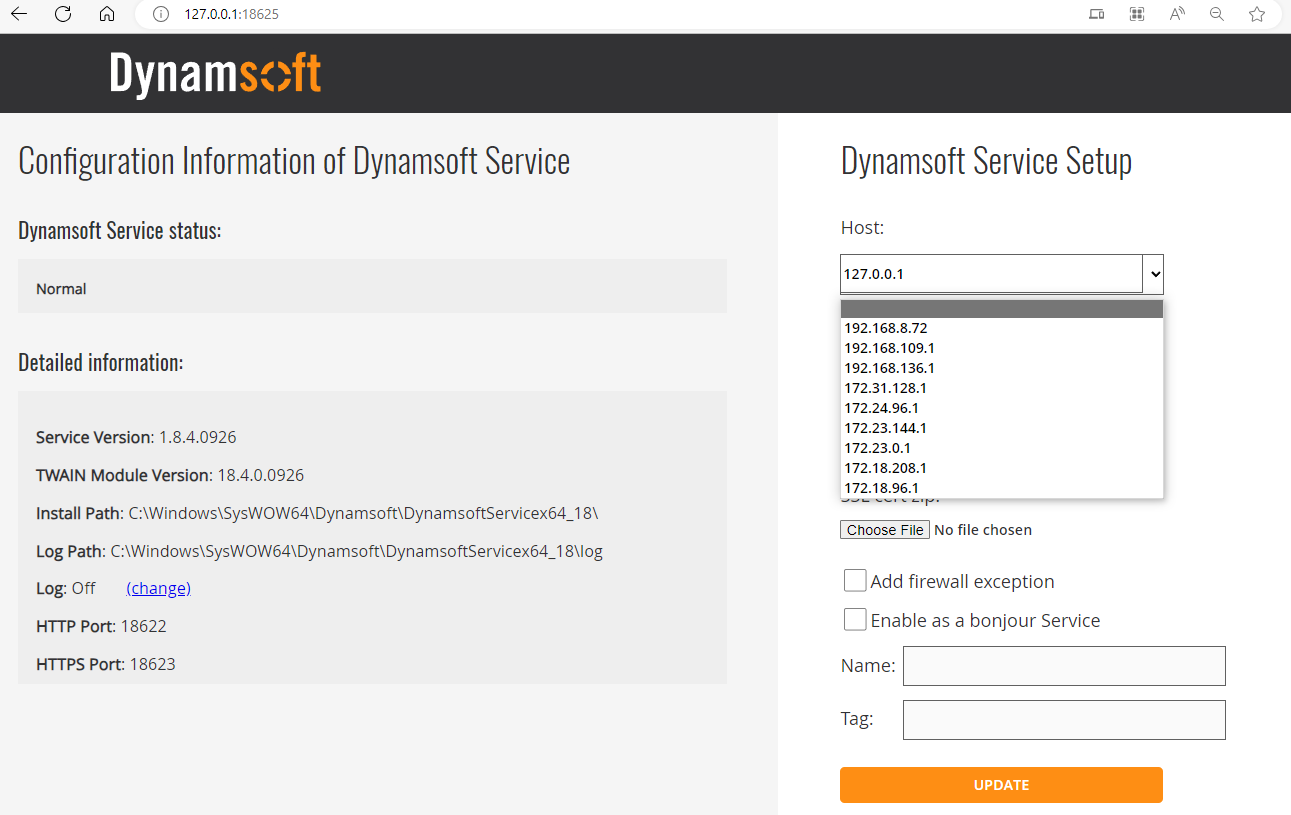
Official REST reference:
https://www.dynamsoft.com/web-twain/docs/info/api/restful.html
Quick start
Discover scanners and stream pages in memory
from dynamsoftservice import JobStatus, ScannerController, ScannerServiceError, ScannerType

LICENSE_KEY = "LICENSE-KEY"
HOST = "http://127.0.0.1:18622"

controller = ScannerController(timeout=120, raise_errors=True)

try:
    scanners = controller.getDevices(
        HOST,
        ScannerType.TWAINSCANNER | ScannerType.TWAINX64SCANNER,
    )
    if not scanners:
        raise RuntimeError("No scanners were returned by the Dynamic Web TWAIN Service.")

    job = controller.createJob(
        HOST,
        {
            "license": LICENSE_KEY,
            "device": scanners[0]["device"],
            "autoRun": False,
            "jobTimeout": 180,
            "scannerFailureTimeout": 90,
            "config": {
                "IfShowUI": False,
                "PixelType": 2,
                "Resolution": 200,
                "IfFeederEnabled": True,
                "IfDuplexEnabled": False,
            },
        },
    )

    job_id = job["jobuid"]
    controller.updateJob(HOST, job_id, {"status": JobStatus.RUNNING})

    page_index = 1
    while True:
        page_bytes = controller.getImageStream(HOST, job_id, imageType="image/png")
        if page_bytes is None:
            break
        print(f"Captured page {page_index}: {len(page_bytes)} bytes")
        page_index += 1
except ScannerServiceError as error:
    print(error.details)
    raise
finally:
    if 'job_id' in locals():
        controller.deleteJob(HOST, job_id)
    controller.close()
Save all pages to disk
from dynamsoftservice import ScannerController, ScannerType

controller = ScannerController()
host = "http://127.0.0.1:18622"
scanners = controller.getDevices(host, ScannerType.TWAINSCANNER | ScannerType.TWAINX64SCANNER)

job = controller.createJob(
    host,
    {
        "license": "LICENSE-KEY",
        "device": scanners[0]["device"],
        "config": {
            "IfShowUI": False,
            "PixelType": 2,
            "Resolution": 200,
            "IfFeederEnabled": True,
            "IfDuplexEnabled": False,
        },
    },
)

files = controller.getImageFiles(host, job["jobuid"], "./output", imageType="image/jpeg")
print(files)
controller.deleteJob(host, job["jobuid"])
API reference
Controller lifecycle
| Method | Description |
|---|---|
ScannerController(timeout=30, verify=True, session=None, raise_errors=False) |
Create a controller with reusable HTTP settings. |
close() |
Close the underlying requests.Session. |
last_error |
Holds the last normalized error payload when raise_errors=False. |
Server APIs
| Method | Description |
|---|---|
getServerInfo(host) |
Get API version compatibility information. |
getServerSettings(host) |
Get Dynamic Web TWAIN Service runtime settings. |
updateServerSettings(host, parameters) |
Update service settings such as logLevel. |
Scanner APIs
| Method | Description |
|---|---|
getDevices(host, scannerType=None) |
List scanners exposed by the service. |
createJob(host, parameters) |
Create a scan job. license is sent as the DWT-PRODUCT-KEY header. |
checkJob(host, jobId) |
Check job state and result metadata. |
updateJob(host, jobId, parameters) |
Move a pending job to running or cancel a running job. |
deleteJob(host, jobId) |
Delete a job and release the scanner lock. Returns True on success. |
getImageStream(host, jobId, imageType='image/png') |
Download the next scanned page as bytes. Returns None when no pages remain. |
getImageStreams(host, jobId, imageType='image/png') |
Drain the job and return all page streams. |
getImageFile(host, jobId, directory, imageType='image/png', filename=None) |
Save the next page to disk. |
getImageFiles(host, jobId, directory, imageType='image/png') |
Save every page from a job to disk. |
getImageInfo(host, jobId) |
Get the next page metadata object returned by next-page-info. |
getScannerCapabilities(host, jobId, caps=None) |
Query scanner capabilities for a pending job. |
getScannerSettings(host, jobId, showUI=True) |
Retrieve TWAIN settings for a pending job. |
getStreamFromUrl(url) |
Download a binary page stream from an absolute Dynamic Web TWAIN source URL. |
Document storage APIs
| Method | Description |
|---|---|
createDocument(host, parameters) |
Create a storage document, optionally password protected. |
getDocumentInfo(host, docId, password='') |
Get document metadata. |
deleteDocument(host, docId, password='') |
Delete a document. Returns True on success. |
getDocumentStream(host, docId, parameters=None, documentPassword='') |
Download document content as bytes. Supports the query options documented in the REST reference. |
getDocumentFile(host, docId, directory, parameters=None, documentPassword='', filename=None) |
Save document content to disk. |
insertPage(host, docId, parameters) |
Insert a scanned page into a stored document. password is sent as DWT-DOC-PASSWORD. |
deletePage(host, docId, pageId, password='') |
Delete a page from a stored document. |
Processing APIs
| Method | Description |
|---|---|
readBarcode(host, parameters) |
Call /process/read-barcode on a scanned source URL. |
checkBlank(host, parameters) |
Call /process/check-blank on a scanned source URL. |
Error handling
If you want exceptions instead of fallback values, create the controller like this:
from dynamsoftservice import ScannerController, ScannerServiceError

controller = ScannerController(raise_errors=True)

try:
    info = controller.getServerInfo("http://127.0.0.1:18622")
except ScannerServiceError as error:
    print(error.status_code)
    print(error.details)
Examples
- Flet desktop example: example
- Secure FastAPI web gateway with user registration and scanner locking: webexample
The webexample folder shows how to expose a shared TWAIN scanner to other machines on a trusted network while enforcing per-user registration, JWT-protected access, and scanner locking.
Build the package
python setup.py sdist
python setup.py bdist_wheel
1 maintainer

Metadata
1 maintainer
Release files for twain-wia-sane-scanner 2.0.3
For a detailed explanation of source distributions (sdists) and built distributions (wheels), please see the package formats documentation.
Source distribution (sdist)
| File | Size | Uploaded | |
|---|---|---|---|
| twain_wia_sane_scanner-2.0.3.tar.gz | 11.8 kB | Details |
Built distribution (wheel)
| File | Interpreter | ABI | Platform | Reset |
|---|---|---|---|---|
| twain_wia_sane_scanner-2.0.3-py3-none-any.whl | Python 3 | none | any | Details |
Total release size: 21.0 kB
Release files / twain_wia_sane_scanner-2.0.3.tar.gz
| Download URL | twain_wia_sane_scanner-2.0.3.tar.gz |
|---|---|
| Size | 11.8 kB |
| Tags | Source |
|
SHA-256 checksum How to use checksums |
20f5858690988acdb7f8b9acc2350e35d4141ccdc6e6038326a5a88640d7f801
|
|
BLAKE2b-256 checksum How to use checksums |
0c30483d9c5c9a64f9fce2ebdf7a763ce599fe292da4fbf1f42367239859514a
|
| Upload date | |
|
Uploaded using Trusted Publishing? What is trusted publishing? |
No |
| Uploaded via |
twine/6.2.0 CPython/3.9.25
|
Release files / twain_wia_sane_scanner-2.0.3-py3-none-any.whl
| Download URL | twain_wia_sane_scanner-2.0.3-py3-none-any.whl |
|---|---|
| Size | 9.2 kB |
| Tags | Python 3 |
|
SHA-256 checksum How to use checksums |
fe935dd3c7211d8bc712a0422f1f36152e946061b9e8aa34ffd65821e21f9220
|
|
BLAKE2b-256 checksum How to use checksums |
64a726ce9048b6f41306b621870968aed38dd3ac9c43875c54ba651ea67e9623
|
| Upload date | |
|
Uploaded using Trusted Publishing? What is trusted publishing? |
No |
| Uploaded via |
twine/6.2.0 CPython/3.9.25
|














