
A Python package for digitizing documents from TWAIN, WIA, SANE, ICA and eSCL compatible scanners.

Project description
🐍 Python Document Scanner for TWAIN, WIA, SANE, ICA, and eSCL
This package provides Python bindings to access the Dynamic Web TWAIN Service REST API, enabling document scanning across platforms using:
- TWAIN (32-bit / 64-bit)
- WIA (Windows Image Acquisition)
- SANE (Linux)
- ICA (macOS)
- eSCL (AirScan / Mopria)
⚙️ Prerequisites
✅ Install Dynamic Web TWAIN Service
- Windows: Dynamsoft-Service-Setup.msi
- macOS: Dynamsoft-Service-Setup.pkg
- Linux:
🔑 Get a License
Request a free trial license.
🧩 Configuration
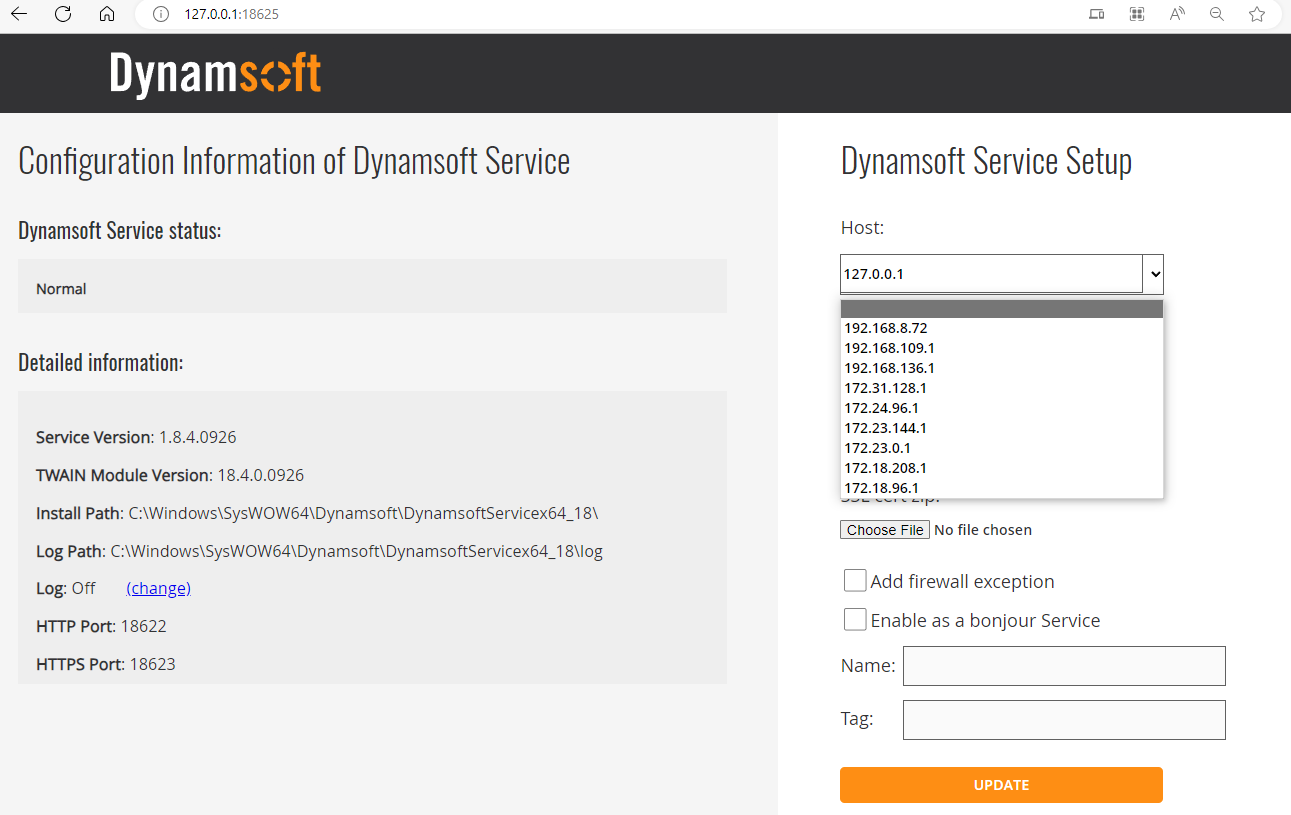
After installation, open http://127.0.0.1:18625/ in your browser to configure the host and port settings.
By default, the service is bound to
127.0.0.1. To access it across the LAN, change the host to your local IP (e.g.,192.168.8.72).
📡 REST API Endpoints
https://www.dynamsoft.com/web-twain/docs/info/api/restful.html
🚀 Quick Start
Replace LICENSE-KEY with your actual license and run:
from dynamsoftservice import ScannerController, ScannerType

license_key = "LICENSE-KEY"
scannerController = ScannerController()
devices = []
host = "http://127.0.0.1:18622"

questions = """
Please select an operation:
1. Get scanners
2. Acquire documents by scanner index
3. Quit
"""


def ask_question():
    while True:
        print(".............................................")
        answer = input(questions)

        if answer == '3':
            break
        elif answer == '1':
            scanners = scannerController.getDevices(
                host, ScannerType.TWAINSCANNER | ScannerType.TWAINX64SCANNER)
            devices.clear()
            for i, scanner in enumerate(scanners):
                devices.append(scanner)
                print(f"\nIndex: {i}, Name: {scanner['name']}")
        elif answer == '2':
            if len(devices) == 0:
                print("Please get scanners first!\n")
                continue

            index = input(f"\nSelect an index (<= {len(devices) - 1}): ")
            index = int(index)

            if index < 0 or index >= len(devices):
                print("It is out of range.")
                continue

            parameters = {
                "license": license_key,
                "device": devices[index]["device"],
            }

            parameters["config"] = {
                "IfShowUI": False,
                "PixelType": 2,
                "Resolution": 200,
                "IfFeederEnabled": False,
                "IfDuplexEnabled": False,
            }

            job = scannerController.createJob(host, parameters)
            job_id = job["jobuid"]
            if job_id != "":
                images = scannerController.getImageFiles(host, job_id, "./")
                for i, image in enumerate(images):
                    print(f"Image {i}: {image}")

                scannerController.deleteJob(host, job_id)
        else:
            continue


if __name__ == "__main__":
    ask_question()
🧪 Examples
-
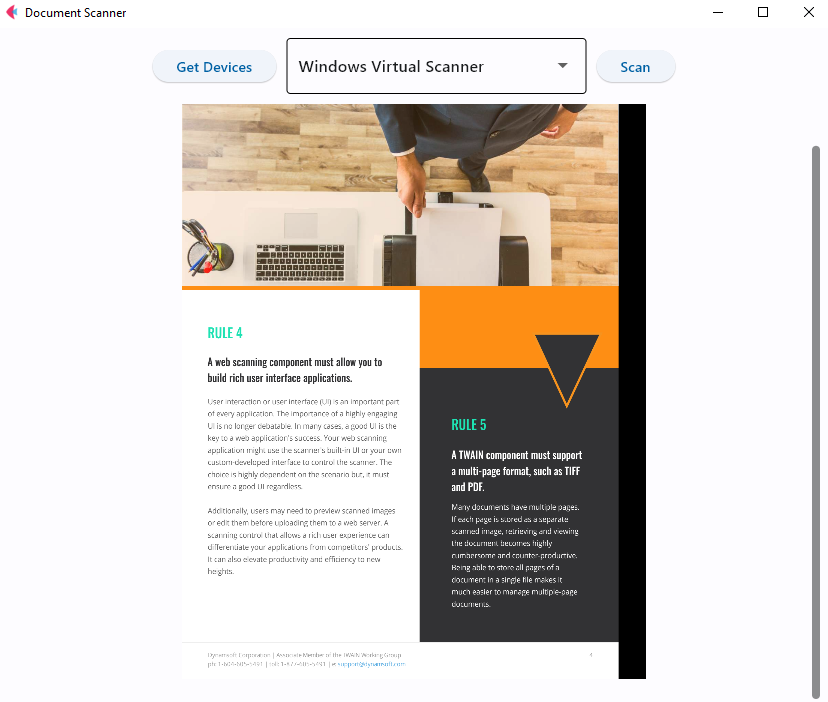
📦 Flet App
📚 Python API Reference
Scanner Functions
| Method | Description |
|---|---|
getDevices(host, scannerType=None) |
Get available scanning devices |
createJob(host, parameters) |
Create a scanning job |
checkJob(host, jobId) |
Check job status |
updateJob(host, jobId, parameters) |
Update job status |
deleteJob(host, jobId) |
Delete a scanning job |
getImageFile(host, jobId, directory) |
Get a single scanned image |
getImageFiles(host, jobId, directory) |
Get multiple scanned images |
getImageStreams(host, jobId) |
Get scanned images as byte streams |
getImageInfo(host, jobId) |
Get metadata about next scanned page |
getScannerCapabilities(host, jobId) |
Get scanner settings and capabilities |
Document Functions
| Method | Description |
|---|---|
createDocument(host, parameters) |
Create a new document |
getDocumentInfo(host, docId) |
Retrieve document metadata |
deleteDocument(host, docId) |
Delete an existing document |
getDocumentFile(host, docId, directory) |
Download document as PDF file |
getDocumentStream(host, docId) |
Get document as byte stream |
insertPage(host, docId, parameters) |
Insert a page into a document |
deletePage(host, docId, pageId) |
Delete a specific page from a document |
📦 Build the Package
To build and distribute the package locally:
-
Source distribution:
python setup.py sdist
-
Wheel Distribution:
pip wheel . --verbose
# Or
python setup.py bdist_wheel


Download files
Download the file for your platform. If you're not sure which to choose, learn more about installing packages.
Source Distribution
Built Distribution
Filter files by name, interpreter, ABI, and platform.
If you're not sure about the file name format, learn more about wheel file names.
Copy a direct link to the current filters
File details
Details for the file twain_wia_sane_scanner-2.0.2.tar.gz.
File metadata
- Download URL: twain_wia_sane_scanner-2.0.2.tar.gz
- Upload date:
- Size: 6.4 kB
- Tags: Source
- Uploaded using Trusted Publishing? No
- Uploaded via: twine/6.1.0 CPython/3.9.22
File hashes
| Algorithm | Hash digest | |
|---|---|---|
| SHA256 |
d7cf1852e0e7fc1c58ffacf760549a68b69a4a6b81eccd25099ed38ee8e52a6d
|
|
| MD5 |
685f43b6b2a24b43561a88bc269f3dc0
|
|
| BLAKE2b-256 |
13ea60fb7bb56853770cf4899f5259770005dd567bbdb5ad65c3e66f36e0a05f
|
File details
Details for the file twain_wia_sane_scanner-2.0.2-py3-none-any.whl.
File metadata
- Download URL: twain_wia_sane_scanner-2.0.2-py3-none-any.whl
- Upload date:
- Size: 6.3 kB
- Tags: Python 3
- Uploaded using Trusted Publishing? No
- Uploaded via: twine/6.1.0 CPython/3.9.22
File hashes
| Algorithm | Hash digest | |
|---|---|---|
| SHA256 |
c2e03d3e32a8c7fe058f8cc9ade6cc650a101e91bfcc7eaae5f7c0447f3e770a
|
|
| MD5 |
302a2ad169276f96acc5fd7eb2d1ef13
|
|
| BLAKE2b-256 |
167056541357d60131831f93dd82d161683dd6068009e818e17b4ca3d0c295e2
|






