
Export X bookmarks, likes, and authored tweets into a local archive.

Project description
tweetxvault
A Python CLI tool for archiving your Twitter/X bookmarks, likes, and authored tweets into a local LanceDB database. Runs unattended via cron, supports incremental sync with crash-safe resume, and preserves raw API responses so you never lose data.
Features
- Incremental sync — fetches only new items by default; resumes interrupted backfills automatically
- Raw capture preservation — every API response page is stored verbatim alongside parsed tweet records
- Secondary object extraction — archives canonical tweet objects, attached-tweet relations, media metadata, URL refs, and article payloads alongside collection memberships
- Crash-safe checkpoints — sync state advances atomically with data writes; safe to kill mid-run
- Full-text and semantic search — built-in FTS (tantivy) and optional ONNX-based vector embeddings for hybrid search
- Automatic query ID discovery — scrapes Twitter's JS bundles to stay current with GraphQL endpoint changes
- Browser cookie extraction — reads session cookies from Firefox plus Chromium-family browsers like Chrome, Chromium, Brave, Edge, Opera, Opera GX, Vivaldi, and Arc
- Rate limit handling — exponential backoff, cooldown periods, and configurable retry limits
- Export — export your archive to JSON or a self-contained HTML viewer
Requirements
- Python 3.12+
- uv (recommended) or pip
- Unix-like runtime only today (Linux/macOS). Windows is not supported yet because the CLI currently depends on
fcntl,resource, andstrftime("%-d"). - A Twitter/X account logged in via Firefox or a supported Chromium-family browser, or session cookies obtained manually
Installation
Install from PyPI:
pip install tweetxvault
To enable semantic search (vector embeddings):
pip install "tweetxvault[embed]"
Install from source:
git clone https://github.com/lhl/tweetxvault.git
cd tweetxvault
uv sync
To enable semantic search from source:
uv sync --extra embed
This installs onnxruntime, tokenizers, and huggingface-hub. GPU acceleration (CUDA/ROCm) is used automatically when available; CPU works fine too (~150-200 tweets/s).
Authentication
tweetxvault needs your auth_token and ct0 session cookies from Twitter/X. There are three ways to provide them (checked in this order):
1. Environment variables (simplest)
export TWEETXVAULT_AUTH_TOKEN="your_auth_token"
export TWEETXVAULT_CT0="your_ct0_token"
export TWEETXVAULT_USER_ID="your_numeric_user_id"  # required for likes and own-tweet sync
2. Config file
Create ~/.config/tweetxvault/config.toml:
[auth]
auth_token = "your_auth_token"
ct0 = "your_ct0_token"
user_id = "your_numeric_user_id"
3. Browser auto-extraction
If you're logged into x.com in Firefox, Chrome, Chromium, Brave, Edge, Opera, Opera GX, Vivaldi, or Arc, tweetxvault will try them in that order and stop after the first browser profile that yields valid X cookies.
Firefox is read from its profile database directly. Chromium-family browsers use browser-cookie3 for cookie decryption and OS keyring access.
To force a specific browser or profile for one command:
uv run tweetxvault auth check --browser chrome
uv run tweetxvault sync all --browser brave --profile "Profile 2"
uv run tweetxvault sync all --browser firefox --profile-path /path/to/profile
How --browser behaves:
--browser,--profile, and--profile-pathforce tweetxvault to takeauth_tokenandct0from that browser/profile.user_idstill uses the normal precedence order:TWEETXVAULT_USER_ID->auth.user_id-> browsertwid.- That means you can still pin
user_idexplicitly for likes or authored-tweet sync if needed, even while forcing cookies from a specific browser profile. - If you do not set
user_idexplicitly, tweetxvault will use the browser profile'stwidcookie when available.
For example, this uses Firefox cookies from the selected profile, but still pins user_id from the environment:
export TWEETXVAULT_USER_ID="123456789"
uv run tweetxvault sync likes --browser firefox --profile my-profile
This matters most if you use multiple X accounts. Make sure the selected browser profile and resolved user_id belong to the same account. If you mix cookies from one account with a user_id from another, likes/authored-tweet sync may fail, and tweetxvault's archive-owner guardrail will refuse writes if the local archive already belongs to a different user.
Run uv run tweetxvault auth check --browser ... first if you want to verify which sources are being used before a sync.
To persist a browser preference in the environment or config:
export TWEETXVAULT_BROWSER="chrome"
export TWEETXVAULT_BROWSER_PROFILE="Profile 2"
export TWEETXVAULT_BROWSER_PROFILE_PATH="/path/to/profile"
Legacy Firefox-only override is still supported:
export TWEETXVAULT_FIREFOX_PROFILE_PATH="/path/to/your/firefox/profile"
Verify your setup
uv run tweetxvault auth check
uv run tweetxvault auth check --interactive
This probes the API without writing any data and reports credential status and endpoint readiness. --interactive opens a picker over discovered browser profiles with valid X cookies.
Usage
Syncing
# Sync everything (incremental by default)
uv run tweetxvault sync all

# Sync just bookmarks, likes, or your own authored tweets
uv run tweetxvault sync bookmarks
uv run tweetxvault sync likes
uv run tweetxvault sync tweets

# Force a specific browser profile for this run
uv run tweetxvault sync all --browser chrome --profile "Profile 2"

# Full re-sync from scratch (resets sync state, does not delete existing data)
uv run tweetxvault sync all --full

# Continue past duplicates without resetting state
uv run tweetxvault sync all --backfill

# Rewalk existing pages to refresh article-bearing tweets after article fields change
uv run tweetxvault sync bookmarks --article-backfill

# Limit to N pages per collection
uv run tweetxvault sync all --limit 5
If the [embed] extra is installed, new tweets are automatically embedded after each sync on a best-effort basis; if embedding fails, sync still succeeds and you can retry later with tweetxvault embed.
--article-backfill updates stored raw_json and normalized secondary rows inline, so it does not require a follow-up tweetxvault rehydrate.
tweetxvault sync all still covers bookmarks + likes only; authored tweets stay opt-in via tweetxvault sync tweets.
Viewing your archive
# View recent bookmarks in a terminal table
uv run tweetxvault view bookmarks

# View likes, oldest first
uv run tweetxvault view likes --sort oldest

# View your authored tweets
uv run tweetxvault view tweets

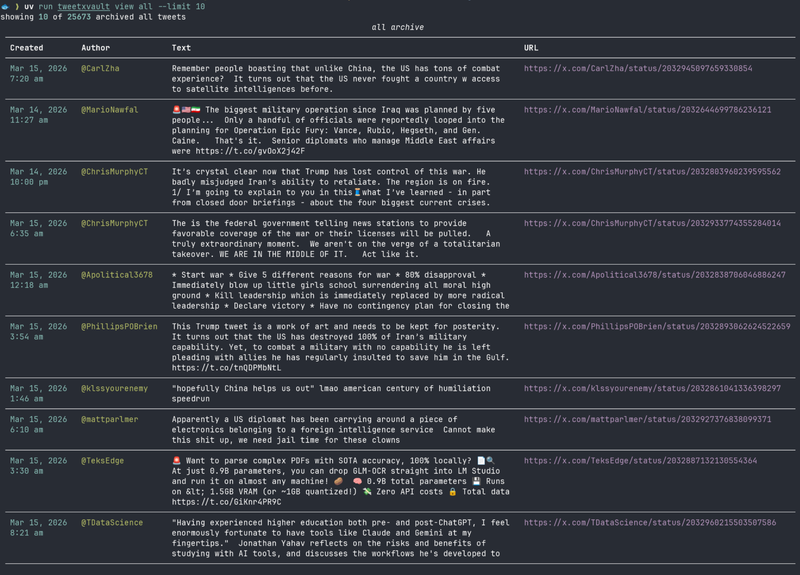
# View all archived tweets
uv run tweetxvault view all --limit 50
Searching
# Search tweets (auto-selects hybrid mode if embeddings exist, otherwise FTS)
uv run tweetxvault search "machine learning"

# Force a specific search mode
uv run tweetxvault search "llama" --mode fts
uv run tweetxvault search "llama" --mode vector
uv run tweetxvault search "llama" --mode hybrid

# Adjust result count
uv run tweetxvault search "transformer architecture" --limit 50
Search modes:
- fts — keyword matching via full-text search (always available)
- vector — semantic similarity via embeddings (requires
uv sync --extra embed+tweetxvault embed) - hybrid — combines FTS and vector results with reranking (best quality)
- auto (default) — uses hybrid if embeddings exist, otherwise falls back to FTS
Embeddings
# Generate embeddings for all archived tweets (resumes if interrupted)
uv run tweetxvault embed

# Regenerate all embeddings from scratch
uv run tweetxvault embed --regen
Uses the all-MiniLM-L6-v2 model (384 dimensions) via ONNX Runtime. The model is downloaded automatically from Hugging Face Hub on first run.
If you already generated embeddings with an older tweetxvault version, run uv run tweetxvault embed --regen once after upgrading so stored vectors are rebuilt with the current normalized cosine-search setup.
Exporting
# Export all archived tweets to JSON
uv run tweetxvault export json

# Export a specific collection
uv run tweetxvault export json --collection bookmarks
uv run tweetxvault export json --collection tweets

# Export to a specific path
uv run tweetxvault export json --out ~/exports/my-bookmarks.json

# Export as a self-contained HTML viewer
uv run tweetxvault export html
uv run tweetxvault export html --collection likes --out ~/exports/likes.html
JSON exports now include normalized media, urls, and article sections alongside each exported tweet row.
HTML exports now render tweet media, URL metadata, and full article bodies when those rows exist in the archive.
Media + URL Enrichment
# Download all pending archived media files into the local data dir
uv run tweetxvault media download

# Only download photos
uv run tweetxvault media download --photos-only

# Fetch final URL, canonical URL, title, and description metadata
uv run tweetxvault unfurl

# Retry previously failed URL unfurls
uv run tweetxvault unfurl --retry-failed
Thread Expansion
# Expand archived tweets through TweetDetail to capture parents/context rows
uv run tweetxvault threads expand

# Expand a specific thread target by URL or ID
uv run tweetxvault threads expand https://x.com/dimitrispapail/status/2026531440414925307
uv run tweetxvault threads expand 2026531440414925307

# Re-fetch an explicit target even if it was already expanded before
uv run tweetxvault threads expand --refresh 2026531440414925307
Explicit thread targets are idempotent by default: previously expanded targets are skipped unless you pass --refresh. Linked status-URL targets are attempted at most once per run, even if the same target appears in multiple archived URL refs.
Article Refresh
# Refresh preview-only archived article rows via TweetDetail
uv run tweetxvault articles refresh

# Refresh every archived article row, not just preview-only ones
uv run tweetxvault articles refresh --all

# Refresh a specific article-bearing tweet by URL or ID
uv run tweetxvault articles refresh https://x.com/dimitrispapail/status/2026531440414925307
uv run tweetxvault articles refresh 2026531440414925307
Maintenance
# Compact the LanceDB archive (reduces file count after many syncs)
uv run tweetxvault optimize

# Rebuild normalized tweet fields and secondary objects from stored raw JSON,
# including any previously captured TweetDetail/thread-expansion payloads
uv run tweetxvault rehydrate

# Force-refresh query IDs from Twitter's JS bundles
uv run tweetxvault auth refresh-ids
Unattended sync via cron
# Sync bookmarks and likes every 6 hours
0 */6 * * * cd /path/to/tweetxvault && uv run tweetxvault sync all 2>> /tmp/tweetxvault.log
A process lock prevents overlapping runs.
Configuration
All configuration is optional. Defaults work out of the box with browser cookie extraction.
Sync tuning (config.toml or env vars)
| Setting | Default | Env var |
|---|---|---|
sync.page_delay |
2.0 s |
TWEETXVAULT_PAGE_DELAY |
sync.max_retries |
3 |
TWEETXVAULT_MAX_RETRIES |
sync.backoff_base |
2.0 s |
TWEETXVAULT_BACKOFF_BASE |
sync.cooldown_threshold |
3 consecutive 429s |
TWEETXVAULT_COOLDOWN_THRESHOLD |
sync.cooldown_duration |
300.0 s |
TWEETXVAULT_COOLDOWN_DURATION |
sync.timeout |
30.0 s |
TWEETXVAULT_TIMEOUT |
Data storage
Data paths are resolved by platformdirs so they follow OS conventions, but the current runtime target is Unix-like systems only. On Linux the defaults are:
| Purpose | Default path |
|---|---|
| Config | ~/.config/tweetxvault/ |
| Archive (LanceDB) | ~/.local/share/tweetxvault/archive.lancedb/ |
| Cache (query IDs) | ~/.cache/tweetxvault/ |
Override with XDG_CONFIG_HOME, XDG_DATA_HOME, XDG_CACHE_HOME.
How it works
tweetxvault calls Twitter's internal GraphQL API — the same endpoints the web app uses. It:
- Resolves session cookies (env/config/browser extraction)
- Discovers current GraphQL query IDs by parsing Twitter's JS bundles (with a 24h TTL cache and static fallbacks)
- Fetches timeline pages with the proper headers, feature flags, and cursor pagination
- Stores raw API responses + collection tweet rows + normalized secondary objects in a single LanceDB table
- Tracks sync state per collection so the next run picks up where it left off
Development
uv sync --extra embed

# Run tests
uv run pytest

# Lint and format
uv run ruff check
uv run ruff format --check
See docs/ for architecture docs, the implementation plan, and research notes.
Similar projects
- twitter-web-exporter — Browser extension (Tampermonkey/Violentmonkey) that intercepts Twitter's GraphQL responses in-page; exports bookmarks, likes, tweets, followers, and DMs to JSON/CSV/HTML with bulk media download
- tweethoarder — Python CLI archiver for likes, bookmarks, tweets, reposts, and home feed into SQLite with JSON/Markdown/CSV/HTML export
- Siftly — Self-hosted AI bookmark manager (Next.js + SQLite + Anthropic API) with entity extraction, vision analysis, and mindmap visualization
- TweetVault (helioLJ) — Self-hosted bookmark archive (Go + Next.js + PostgreSQL) with tag management; imports via twitter-web-exporter ZIP
- twitter-likes-export — Minimal Python scripts to export likes via Twitter's GraphQL API with optional media download
- download_twitter_likes — Playwright-based media downloader that scrolls your likes page and saves images/GIFs/videos
License
Apache 2.0


Download files
Download the file for your platform. If you're not sure which to choose, learn more about installing packages.
Source Distribution
Built Distribution
Filter files by name, interpreter, ABI, and platform.
If you're not sure about the file name format, learn more about wheel file names.
Copy a direct link to the current filters
File details
Details for the file tweetxvault-0.1.1.tar.gz.
File metadata
- Download URL: tweetxvault-0.1.1.tar.gz
- Upload date:
- Size: 65.0 kB
- Tags: Source
- Uploaded using Trusted Publishing? No
- Uploaded via: twine/6.2.0 CPython/3.12.11
File hashes
| Algorithm | Hash digest | |
|---|---|---|
| SHA256 |
aa0d09725320f559a80a30ad0ad30ec29c4777edc22a7e4f047afb123e716f91
|
|
| MD5 |
ae91f057de897e2b990aa5b767b874cd
|
|
| BLAKE2b-256 |
23b7c53d3bcce224ebce959457274fa3bd6bcb60e1ad3ce11dc2d3103ca4fb34
|
File details
Details for the file tweetxvault-0.1.1-py3-none-any.whl.
File metadata
- Download URL: tweetxvault-0.1.1-py3-none-any.whl
- Upload date:
- Size: 78.4 kB
- Tags: Python 3
- Uploaded using Trusted Publishing? No
- Uploaded via: twine/6.2.0 CPython/3.12.11
File hashes
| Algorithm | Hash digest | |
|---|---|---|
| SHA256 |
44d6252e2074459eb433f0fbf1b3bcb5d69410158045dc828774bfa927999e2e
|
|
| MD5 |
8a89d90be68b90f3d4b400d1af58b7de
|
|
| BLAKE2b-256 |
61824e17233049883a1d36b79e5f375086d3bd812259eb60daaa596ee943fde4
|






