
Toolchain for designing and validating entire Temporal systems in .twf — CLI, language server, and MCP server.

Project description
twf-cli
Design, visualize, and implement entire Temporal systems — namespaces, workers, workflows, and Nexus — as a validated, visual source of truth.
Write your architecture in .twf and a real parser, language server, and visualizer give you (and your AI agent) compiler-grade feedback on the whole system before you write a line of SDK code — then generate the workers and provision the infra from the same design.
- Catch design errors before code. A real parser and language server validate the whole system — undefined activities, broken Nexus routing, misplaced determinism — while it's still a design, not a production incident.
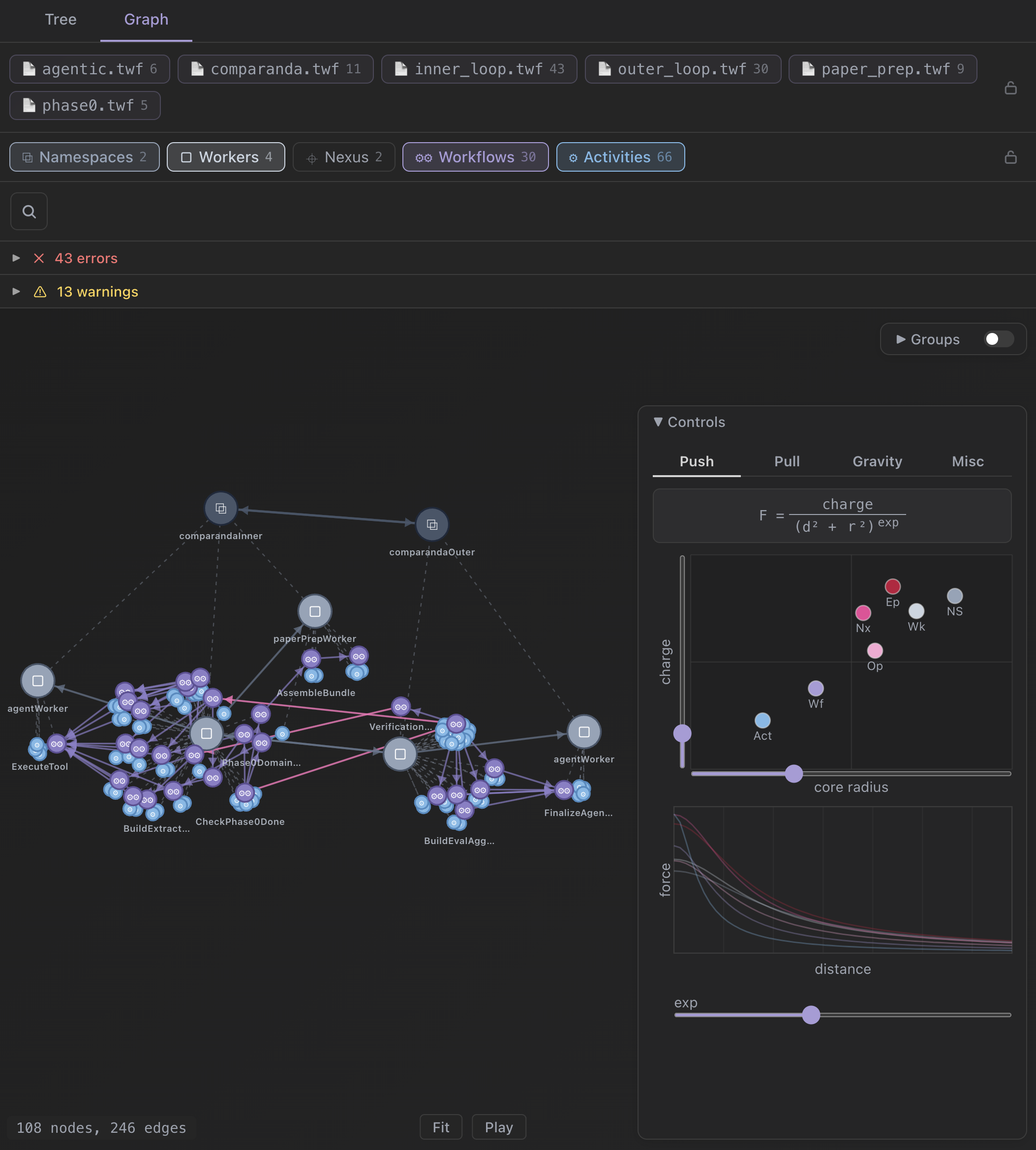
- See the whole deployment. An interactive graph of namespaces → workers → workflows, plus a tree view that expands calls inline. Architecture you can actually look at.
- One parseable source of truth.
.twfis a file every teammate and every tool reads and validates — not architecture prose buried in a prompt. - Design → running system. Generate Temporal Go SDK code and provision control-plane infra from the same
.twf— or recover a deployment graph straight from production history withtwf graph --history.
activity ReserveFunds(amount: Money) -> (Hold):
    reserve(amount)

activity CaptureFunds(hold: Hold) -> (Receipt):
    capture(hold)

workflow ChargeOrder(order: Order) -> (Receipt):
    signal Cancel():
        close fail("cancelled")

    activity ReserveFunds(order.amount) -> hold
        options:
            start_to_close_timeout: 30s
    activity CaptureFunds(hold) -> receipt
    close complete(receipt)

worker billing:
    workflow ChargeOrder
    activity ReserveFunds
    activity CaptureFunds

namespace payments:
    worker billing
        options:
            task_queue: "billing"
Workflow logic, the worker that hosts it, and the namespace topology — one readable file.
twf-cli is a thin wrapper around the bundled platform binary — same tool, same flags, same output as the standalone twf distribution, installable via pip.
Install
pip install twf-cli
twf --help
The wheel for your platform ships the matching twf binary. Supported platforms (one wheel each): macosx_11_0_arm64, macosx_10_15_x86_64, manylinux2014_x86_64, manylinux2014_aarch64, win_amd64.
The twf CLI
A single Go binary: parser, validator, deployment-graph extractor, and a full LSP server. Every command and flag is discoverable via twf --help and twf <command> --help.
| Command | Description |
|---|---|
twf check <file...> |
Parse and validate .twf files, reporting errors |
twf parse <file...> |
Output the AST as JSON (partial AST even with errors) |
twf symbols <file...> |
List workflows and activities with their signatures |
twf graph <file...> |
Emit the resolved deployment graph (nodes are deployments, edges are dispatches) |
twf graph chunks <file...> |
Decompose a design into independently-implementable chunks at contract boundaries |
twf graph --history <dir> |
Recover a deployment graph from sampled production histories — no .twf required |
twf spec [--list | <slug>] |
Print the embedded TWF language specification |
twf mcp |
Start the MCP server over stdio (agent entry point) |
twf lsp |
Start the language server over stdio |
Common options: --json (structured output) and --lenient (continue past resolve errors). The language server adds real-time diagnostics, completions, hover, go-to-definition, references, rename, code actions, folding, inlay hints, semantic tokens, and signature help.
Use as an MCP server
twf mcp runs a Model Context Protocol server over stdio — the agent entry point. Point any MCP client (Claude Desktop, Cursor, Continue, Windsurf, Zed) at it:
{
  "mcpServers": {
    "twf": {
      "command": "npx",
      "args": ["-y", "@temporal-architect/twf", "mcp"]
    }
  }
}
The tools (twf_check, twf_parse, twf_symbols, twf_graph, twf_graph_chunks, twf_spec_list, twf_spec_get) are thin wrappers over the same parser pipeline as the CLI, so their JSON is identical. The embedded language specification is exposed as resources at twf://spec and twf://spec/<slug>.
Subprocess use from Python
import subprocess, json

result = subprocess.run(
    ["twf", "parse", "workflow.twf"],
    capture_output=True, text=True, check=True,
)
ast = json.loads(result.stdout)
Versioning
Versions track the upstream temporal-architect Git tag, so 0.3.x of this package corresponds to v0.3.x of the toolchain.
License
MIT. See LICENSE.


Download files
Download the file for your platform. If you're not sure which to choose, learn more about installing packages.
Source Distributions
Built Distributions
Filter files by name, interpreter, ABI, and platform.
If you're not sure about the file name format, learn more about wheel file names.
Copy a direct link to the current filters
File details
Details for the file twf_cli-0.10.2-py3-none-win_amd64.whl.
File metadata
- Download URL: twf_cli-0.10.2-py3-none-win_amd64.whl
- Upload date:
- Size: 10.0 MB
- Tags: Python 3, Windows x86-64
- Uploaded using Trusted Publishing? No
- Uploaded via: twine/6.2.0 CPython/3.14.6
File hashes
| Algorithm | Hash digest | |
|---|---|---|
| SHA256 |
b792f058e2ffd18b72dad122116083ac6e891dc62a0e006ac2f52a579967a614
|
|
| MD5 |
0f2331c8483a2d77540f64bfc8064ba7
|
|
| BLAKE2b-256 |
1501f6f972c7480ed18ab1cf0fd2043bc1be1fdf0ebfc31e33c560e2be359d9c
|
File details
Details for the file twf_cli-0.10.2-py3-none-manylinux2014_x86_64.whl.
File metadata
- Download URL: twf_cli-0.10.2-py3-none-manylinux2014_x86_64.whl
- Upload date:
- Size: 9.9 MB
- Tags: Python 3
- Uploaded using Trusted Publishing? No
- Uploaded via: twine/6.2.0 CPython/3.14.6
File hashes
| Algorithm | Hash digest | |
|---|---|---|
| SHA256 |
ef927e3fbfd2455d33a927c85a2e4614ac2ba5396aa8e015a72a8a26dbadf1d1
|
|
| MD5 |
c28766357975f3b5f114d8e84f0d5171
|
|
| BLAKE2b-256 |
24ab282c9cd2ef4f88efa365d90b5837d8870361eded5c13db9186d3704c0ba8
|
File details
Details for the file twf_cli-0.10.2-py3-none-manylinux2014_aarch64.whl.
File metadata
- Download URL: twf_cli-0.10.2-py3-none-manylinux2014_aarch64.whl
- Upload date:
- Size: 9.1 MB
- Tags: Python 3
- Uploaded using Trusted Publishing? No
- Uploaded via: twine/6.2.0 CPython/3.14.6
File hashes
| Algorithm | Hash digest | |
|---|---|---|
| SHA256 |
5c3b8d1a0e57bef7dade12371cabad4df801e9f674d7690e91752022d4dc97db
|
|
| MD5 |
07ab7a260e631bdae71fa595ee232963
|
|
| BLAKE2b-256 |
f157921e83714cca2b66f176148c9c2009a0c798fa64b3b5a04d6e6067f2aa43
|
File details
Details for the file twf_cli-0.10.2-py3-none-macosx_11_0_arm64.whl.
File metadata
- Download URL: twf_cli-0.10.2-py3-none-macosx_11_0_arm64.whl
- Upload date:
- Size: 9.6 MB
- Tags: Python 3, macOS 11.0+ ARM64
- Uploaded using Trusted Publishing? No
- Uploaded via: twine/6.2.0 CPython/3.14.6
File hashes
| Algorithm | Hash digest | |
|---|---|---|
| SHA256 |
82c0756c20a6d0af87a5fcad37695cfaef66a5a2d784a98b7495f58dfba64c0a
|
|
| MD5 |
fe52658f51cb0d1e39be4ea38c11d091
|
|
| BLAKE2b-256 |
840e62ba6e999d9b2fd15aa2c21bc80126e2cdc9ea48c96d681256f56eff55fe
|
File details
Details for the file twf_cli-0.10.2-py3-none-macosx_10_15_x86_64.whl.
File metadata
- Download URL: twf_cli-0.10.2-py3-none-macosx_10_15_x86_64.whl
- Upload date:
- Size: 10.2 MB
- Tags: Python 3, macOS 10.15+ x86-64
- Uploaded using Trusted Publishing? No
- Uploaded via: twine/6.2.0 CPython/3.14.6
File hashes
| Algorithm | Hash digest | |
|---|---|---|
| SHA256 |
c0f610baae552b1e9c403c3ecd3d731bfc2825cd2407f16e38949f8e00054e50
|
|
| MD5 |
3f1f161851e4a8549cc5b6e2b02c79be
|
|
| BLAKE2b-256 |
0ab364e6634ecffa80ae85cccc5f1e82fc3e33f3ec14fed6792eaee4dae5ea54
|






