
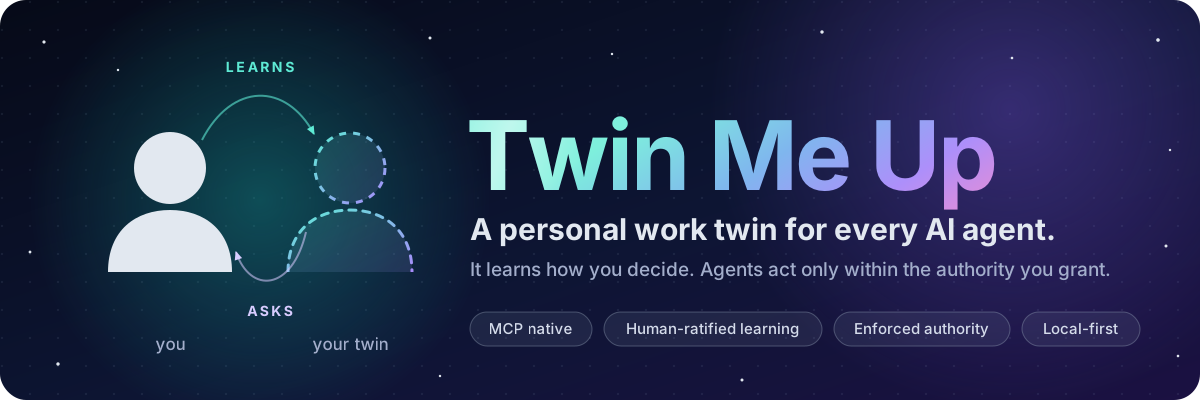






Teach it once. Every agent you use works the way you would, and asks before it acts.
Quick start · One-prompt install · How it works · Works with · The research · Safety
Why
You probably use more than one AI agent. Each one starts from zero. It does not know what you care about, which corners you never cut, or which decisions you always want to make yourself. So you repeat yourself, correct the same mistakes, and hope nothing consequential happens before you look.
Twin Me Up is a small, local, open-source service that gives every agent the same answers to three questions:
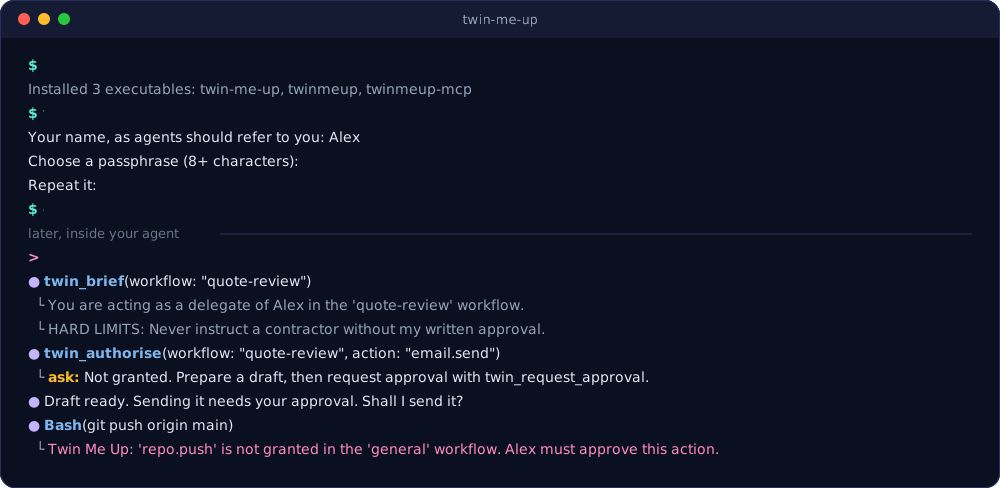
- How does this person want this kind of work done? Your confirmed guidance, criteria, exceptions and red lines, briefed to the agent at the start of work.
- Am I allowed to do this? Explicit grants, scoped to a workflow and a set of actions, with
optional expiry. Anything not granted returns
ask. Optional hooks enforce that outside the model. - What did I just learn? Your decisions and corrections become candidate lessons. Only you can confirm them.
It is not a chatbot of you, a personality clone or an autonomous replacement for you. The evidence does not support those claims, and the research explains why.
What makes it different
| Learning you ratify | Agents propose lessons. Only you confirm, revise, reject or retire them. Every lesson keeps its origin, sources and history. |
| Authority you grant | Agents act on explicit grants for a workflow and named actions, optionally expiring. Actions in the reserved twin. namespace can never be granted to anyone. |
| Enforcement outside the model | Pre-action hooks for Hermes, Claude Code and pi block or escalate ungranted tool calls. They fail closed. |
| Evidence, not vibes | Freeze held-out decisions, then test the twin against a generic assistant and a rules-only baseline. Results come with sample-size warnings. |
| One twin, every agent | One MCP server, a native pi extension, a CLI bridge and function-calling schemas. Thirteen agent systems and frameworks documented, ten verified live. |
| Yours | Local SQLite with owner-only files, a tamper-evident audit log, portable export, and erasure that removes everything derived from a record. No telemetry. |
Compared with what you might use today
| A rules file or system prompt | Built-in agent memory | Twin Me Up | |
|---|---|---|---|
| Works across every agent you use | Copied into each one | Within one product | One twin, over MCP |
| Learns from your corrections | No | Often, automatically | Yes, as proposals |
| You approve what it learns | You write all of it | Usually after the fact | Always, before it counts |
| Stops actions you have not allowed | No | No | Yes: grants, ask and hooks |
| Shows whether it actually helps | No | No | Held-out tests against baselines |
| Where your data lives | Your files | The vendor | Your machine |
Quick start
You need Python 3.11 or later and uv (or pipx). macOS and Linux are tested. Windows should work but is untested.
uv tool install twin-me-up        # or: pipx install twin-me-up
twinmeup init                     # your name and a passphrase, in your own terminal
twinmeup connect --list           # every supported agent system
twinmeup connect claude-code      # the exact steps for one of them, with your paths
twinmeup doctor                   # check everything, including a live MCP handshake
twinmeup init asks for your name and a passphrase. The passphrase guards everything only you
should do: confirming lessons, granting authority, exporting and erasing. Agents are never
given it, and those commands refuse to run without it.
Only need the MCP server? After twinmeup init, any MCP client can start it with
uvx twin-me-up. Prefer the latest code? uv tool install git+https://github.com/GitDakky/twin-me-up.
Using Claude Desktop? After twinmeup init, download the .mcpb desktop extension from the
latest release and open it. One bundle
works on macOS, Windows and Linux.
Install with one prompt
Already working inside an agent? Paste this into it.
Copy-paste install prompt
Install Twin Me Up for me and connect it to yourself. Twin Me Up is a local, open-source
work twin: it learns how I make decisions, briefs you at the start of work and tells you when
you need my approval. Repository: https://github.com/GitDakky/twin-me-up

Work step by step and show me each command you run.

1. Install it. Prefer uv:
     uv tool install twin-me-up
   If uv is not available, use pipx:
     pipx install twin-me-up
   If PyPI cannot be reached, install from GitHub instead:
     uv tool install git+https://github.com/GitDakky/twin-me-up
   Then check with: twinmeup version

2. Ask me to run `twinmeup init` myself, in my own terminal, and wait until I say it is done.
   It sets my name and a passphrase that only I know. Do not run it for me, do not ask me for
   the passphrase, and never type a passphrase anywhere.

3. Run `twinmeup connect --list`, pick the entry that matches you (or `generic`), then run
   `twinmeup connect <entry>` and carry out the steps it prints to register the MCP server and
   install the skill. If it offers optional enforcement hooks, show me the action map and the
   hook configuration first, and install them only if I agree.

4. Run `twinmeup doctor` and report the result.

5. If your system needs a new session to load MCP tools, tell me. Otherwise call twin_brief
   for workflow "general" and summarise what it says.

While you work with my twin:
- Call twin_brief at the start of a piece of work.
- Call twin_authorise before anything consequential: sending, paying, publishing, deleting or
  committing on my behalf. If the answer is "ask", stop and ask me.
- When I correct you, record it with twin_record_correction.
- Never try to confirm lessons, grant authority, export or erase. Those are mine, and the twin
  will refuse you anyway.
The agent installs the package, connects itself and checks the result. The two steps that matter stay with you: choosing the passphrase, and approving any enforcement hooks. The prompt is also in docs/install-prompt.md.
How it works
flowchart LR
    you([You])
    twin[("Your twin<br/>local store")]
    agent["Any agent"]
    hook{{"Pre-action hook"}}
    you -- "confirm lessons<br/>grant authority" --> twin
    twin -- "candidate lessons<br/>to review" --> you
    agent -- "twin_brief<br/>twin_authorise" --> twin
    agent -- "record decisions<br/>and corrections" --> twin
    agent -. "every governed tool call" .-> hook
    hook -- "ungranted: block or ask" --> agent
    hook -- "checks grants" --> twin
The loop
- Orient. At the start of work the agent calls
twin_brief. It gets your confirmed guidance for the workflow, with boundaries and escalation rules always included, and a list of what it is authorised to do. - Check. Before anything consequential it calls
twin_authorise. The answer isallowonly when a live grant covers the action. Otherwise it isask, and the agent stops to ask you. - Learn. When you make a decision or correct the agent, it records the decision or the correction and proposes lessons from it.
- Ratify. You review the queue and confirm, revise or reject each lesson. Only confirmed lessons reach future briefs.
- Prove. You freeze held-out decisions and test the twin against two baselines before trusting it with more.
Tools your agents get
| Tool | What it does |
|---|---|
twin_brief |
Your confirmed guidance and current authority for a workflow. Call it at the start of work. |
twin_authorise |
May I do this now? Returns allow with the covering grant, or ask. |
twin_request_approval |
Ask you to approve one action. You decide in your own terminal. |
twin_approval_status |
Has the request been approved, declined or not yet decided? |
twin_search |
Find confirmed guidance relevant to a question. |
twin_review_queue |
Unconfirmed lessons to show you for review. |
twin_track_record |
Evidence and stage for a workflow: learning, corrections, evaluations and grants. |
twin_next_questions |
The most valuable unanswered questions about a recorded decision. |
twin_record_decision |
Capture a real decision: situation, options, choice, reasons. |
twin_amend_decision |
Merge your answers to follow-up questions into a recorded decision. |
twin_record_correction |
Record when you edit, override or reject the agent's work. |
twin_propose_lesson |
Propose a lesson. It has no authority until you confirm it. |
What only you can do
These commands need your passphrase, so agents cannot run them.
| Command | Purpose |
|---|---|
twinmeup init |
Set your name and passphrase |
twinmeup lesson confirm, reject, revise, retire |
Decide what your twin has learned |
twinmeup grant add, revoke |
Give or withdraw authority |
twinmeup approvals approve, decline |
Decide what agents have asked to do |
twinmeup eval create, add-case, from-episode, freeze |
Build held-out evaluation sets |
twinmeup export |
Write a portable bundle of your twin |
twinmeup erase episode |
Erase a decision and everything derived from it |
Approvals
An agent that needs an action it has not been granted asks for it, then waits:
twin_authorisesaysask. The agent prepares a draft and callstwin_request_approvalwith a one-line summary of what and why.- You see the request with
twinmeup approvals listand decide in your own terminal:twinmeup approvals approve <id>, ortwinmeup approvals decline <id> --note "why". - The agent checks
twin_approval_statusand acts only once it saysapproved.
An approval grants exactly the action requested, once and for an hour, unless you say otherwise
(--uses 3, --for 1d). Where a hook enforces, the tool call that acts spends it, so another
attempt needs another request. Every approval and decline is also recorded as a decision, so
your twin learns where your lines are. Requests survive restarts, and an agent that asks twice
gets its first request back.
Write tools also take an optional request_id. A retry with the same id, after a dropped
connection or a crash, returns the first result instead of recording twice.
Works with
twinmeup connect <system> prints the exact steps for each of these, using the paths on your
machine. All the guides are also in docs/integrations.md.
| System | How it connects | Verified live |
|---|---|---|
| Hermes Agent | MCP server, skill, pre_tool_call hook |
Connected, all tools discovered |
| pi | Native extension: brief injection, tools, enforcement | Brief injected, tool called, git push blocked |
| Claude Code | MCP server, skill, PreToolUse hook |
Connected |
| OpenAI Codex CLI | MCP server | Configuration accepted |
| Gemini CLI | MCP server | Connected |
| Cursor and Cursor Agent | MCP server | All tools listed |
| OpenCode | MCP server | Connected |
| Pi Durable 1.2.0 | Extension (experimental) | Ungranted push blocked; one approval allowed exactly one push; a wait survived a crash and restart |
| VS Code (Copilot agent mode) | MCP server | Documented, not yet run |
| Goose | MCP extension | Documented, not yet run |
| Microsoft Agent Framework | MCP stdio tool | Tools listed and called |
| OpenAI Agents SDK | MCP stdio server | Tools listed and called |
| LangChain and LangGraph | langchain-mcp-adapters |
Tools listed and called |
| Anything else | MCP, or OpenAI and Anthropic function schemas with a CLI bridge |
Checked in October 2026 against current releases. The host checks ran on 0.1.0; 0.2.0 adds
two tools to the same MCP server, and the Pi Durable check ran on 0.2.0. The framework checks are reproducible with
scripts/interop/frameworks.py. Got it working
somewhere marked "not yet run"? Tell us how.
No MCP? Export function-calling schemas and dispatch calls through the CLI:
twinmeup tools schema --format openai > twin-tools.json
twinmeup --actor agent:my-bot tools call twin_authorise '{"workflow": "general", "action": "email.send"}'
Teach your twin
Start small: one workflow you repeat often, such as reviewing quotes or triaging requests.
1. Write down the red lines. These are carried into every brief and never ranked out.
twinmeup probes onboarding      # questions worth answering for a new workflow
twinmeup lesson propose --workflow quote-review --kind boundary \
  --statement "Never instruct a contractor without my written approval." \
  --origin written_rule --confirm
2. Record real decisions. Agents do this with twin_record_decision as you work. You can
also add them yourself from JSON (see examples/); records you add
yourself ask for your passphrase, because they carry your name.
twinmeup episode add examples/episode.quote-review.json
twinmeup episode gaps <episode-id>      # what the record does not yet explain
3. Review what it proposes. Nothing an agent proposes has authority until you say so.
twinmeup lesson list --status candidate
twinmeup lesson confirm <lesson-id> --note "Yes, always"
twinmeup lesson revise <lesson-id> --statement "Only for quotes over budget"
4. Grant authority narrowly, and let it expire.
twinmeup grant add --workflow quote-review --action draft.prepare --expires 2026-12-31
twinmeup grant list
Lessons come in seven kinds: fact, criterion, exception, escalation, procedure,
boundary and preference. Each records whether it was a written rule, elicited from you,
inferred by a model or learned from a correction.
Measure it
Do not trust a twin because it sounds like you. Test it on decisions it has not seen.
twinmeup eval create --name holdout --workflow quote-review
twinmeup eval from-episode <set-id> <episode-id>     # or: eval add-case <set-id> case.json
twinmeup eval freeze <set-id>

export OPENROUTER_API_KEY=...                         # or use endpoint: with a local model
for arm in generic rules twin; do
  twinmeup --actor agent:eval eval run <set-id> --arm $arm --responder openrouter:<model>
done
twinmeup eval report <run-id>
Each case is answered three ways with the same model:
| Arm | What the model is given |
|---|---|
generic |
The task and the options |
rules |
Plus the rules you wrote down explicitly |
twin |
Plus everything you have confirmed and your past decisions, excluding held-out cases |
The twin has earned its keep only if it beats the rules arm. Reports show agreement with
your choices and how often the twin correctly escalated, with warnings when the sample is too
small to mean much. twin_track_record moves a workflow from observe to draft to
supervised as evidence accumulates. A stage is advice, not authority: more autonomy still
needs an explicit grant from you.
docs/pilot-guide.md describes a six-week pilot for one workflow.
Safety model
- Human-only operations need your passphrase. It is stored as a salted scrypt hash and read from your terminal, never from an agent's arguments.
- Agents cannot set themselves up as you. Setting up an unprotected twin has to be done from a real terminal.
- Reserved actions. Anything under
twin.can never be granted, so no grant can hand an agent control of the twin itself. - Enforcement fails closed. If a hook cannot reach a decision, the tool call is blocked. The example action maps also stop agents running human-only commands, writing to the twin's store or editing the host configuration that registers the hook.
- Tamper-evident audit. Every write is appended to a hash chain.
twinmeup audit verifychecks it. - Signed, reproducible releases. Packages are built in GitHub Actions and published to PyPI with trusted publishing and attestations. No long-lived tokens exist.
- Honest limits. Twin Me Up runs as you. Any program running as your user can read your files. The passphrase stops agents using the twin's own commands to act as you, and hooks stop governed tool calls, but neither is a sandbox. For hard isolation, run agents as a different user or in a container.
See SECURITY.md for the threat model and how to report a vulnerability.
Where it can still fail
Twin Me Up narrows what agents may do. It does not make an agent safe on its own.
- Without a hook, the twin advises. Over MCP alone it tells an agent what it may do, and nothing stops an agent that ignores it. Enforcement needs a pre-action hook: Hermes, Claude Code, Cursor, pi or Pi Durable.
- Hooks govern only mapped calls. A tool or command your action map does not match is left to the host's own permissions.
- Without a hook, an approval is time-boxed, not single-use. The hook is what spends it, so over MCP alone an approved action stays allowed until it expires.
- A grant is not a sandbox. An allowed action runs with the agent's full permissions.
- Retries are safe only with a
request_id. A write retried without one can be recorded twice. - Your passphrase is the boundary. Anyone with it and your terminal can confirm lessons and approve requests. Agents never receive it, and a compromised machine is out of scope.
- Files are private, not encrypted. The store and settings are readable only by your user account. Encryption at rest is not built in yet.
- A prediction is not consent. The twin learns how you decide, and never treats a forecast of your answer as your approval.
Your data
- Everything lives in
~/.twinmeup(setTWINMEUP_HOMEto move it). Files are readable by you only. twinmeup export twin.bundle.jsonwrites a portable bundle. Held-out evaluation answers stay sealed unless you ask for them.twinmeup erase episode <id> --reason "..."removes a decision and every lesson, handoff and evaluation case derived from it, and redacts it from the audit log while keeping the chain valid.- The twin itself never calls a model and sends nothing anywhere. The only network calls are the evaluation responders you choose to configure.
The research
Before writing code we reviewed the primary research on digital twins of people, expertise transfer and AI assistance. The headline results:
| Finding | Source |
|---|---|
| Interview-based agents reach 65.67% raw accuracy on held-out survey items, against 79.53% consistency for the people themselves | Park et al., arXiv:2411.10109v3 |
| Predicting an individual's own new answers is far harder: 0.300 exact accuracy against 0.446 for the same people answering twice | arXiv:2603.29890v1 |
| Experts described 44% of a procedure's steps unprompted and 66% when prompted | PubMed 24667500 |
| AI assistance raised productivity by 15% on average, with large differences between workers | arXiv:2304.11771v2 |
| Unrestricted AI assistance left students 17% below control once it was removed | PNAS, Bastani et al. |
That is why the twin never infers authority, why learning needs your confirmation, why it asks follow-up questions about omitted reasons, and why it is tested against baselines instead of trusted on feel. The full review, with every source and the regulatory lines it draws (including the EU AI Act's prohibition on workplace emotion inference), is in docs/research.md.
Command reference
All commands
| Command | Purpose |
|---|---|
twinmeup init |
Set up your twin: your name and your passphrase |
twinmeup doctor |
Check settings, passphrase, store, audit chain and a live MCP handshake |
twinmeup status |
Record counts and audit-chain health |
twinmeup connect <system> |
Exact steps to connect an agent system (--list for all) |
twinmeup brief |
The operating instructions an agent embeds in its prompt |
twinmeup handoff |
A handoff packet for a receiving agent or colleague |
twinmeup authorise |
Check authority; exits 0 when allowed and 3 when approval is needed |
twinmeup episode add, amend, list, show, gaps |
Recorded decisions |
twinmeup lesson propose, list, confirm, reject, revise, retire, history |
Learned guidance |
twinmeup grant add, list, revoke |
Authority |
twinmeup approvals list, show, approve, decline |
Requests from agents; approve and decline are human only |
twinmeup eval create, add-case, from-episode, freeze, list, run, report |
Held-out evaluation |
twinmeup probes onboarding |
Interview questions for a new workflow |
twinmeup tools list, schema, call |
The agent protocol without MCP |
twinmeup hook pre-tool-call |
Enforcement for host hooks |
twinmeup action-map example, matcher, check |
Build and test enforcement maps |
twinmeup skill export, show |
The agent skill that teaches the loop |
twinmeup extension export pi, pi-durable |
Native extensions for pi and Pi Durable (experimental) |
twinmeup audit verify, log |
The tamper-evident audit log |
twinmeup export |
Portable bundle (human only) |
twinmeup erase episode |
Erasure with derived records (human only) |
twin-me-up |
The MCP server, under the package's own name, for uvx twin-me-up |
Every command has --help. Global options: --home, --actor, --principal and
--passphrase-stdin (for scripts you run yourself).
FAQ
Does Twin Me Up need an LLM?
No. The twin is deterministic: storage, retrieval, authority and audit. Your agents bring the
model. Only eval run with a model responder calls one.
Is this a clone of me?
No. It holds the guidance you have confirmed and the decisions you have recorded, and it tells agents what they may do. It does not imitate your voice or personality, and it does not model emotions.
What if an agent ignores the twin?
Without hooks the twin is advisory: well-behaved agents follow the skill, but nothing forces them. With hooks (Hermes, Claude Code, pi), governed tool calls are checked outside the model, and ungranted ones are blocked or escalated to you.
Can I use it at work?
Yes, as your own tool. If an organisation deploys twins for its staff, it needs its own assessment of lawful basis, notices and retention, and clear rules on who owns and can revoke each twin. Consent is rarely a sound basis for workplace monitoring. See docs/research.md.
Can several people share a machine?
Give each person their own TWINMEUP_HOME. One twin belongs to one person.
Roadmap
- Enforcement hooks for more hosts as their hook interfaces allow
- Encryption at rest for the store
- Signed bundles for moving a twin between machines
- A small local review app for the lesson queue
- Verified guides for VS Code, Goose and Windows
Follow along, or pick something up, in issues and discussions.
Contributing
Contributions are very welcome, from a typo fix to a new agent integration. Good first issues are a gentle start, and CONTRIBUTING.md explains the setup, the one-command check and how reviews work. Please report security issues privately, as described in SECURITY.md.
Credit and licence
Twin Me Up was created by GitDakky and is released under the Apache License 2.0. If you redistribute it or build on it, the licence requires you to keep the NOTICE file, which credits the original author. Using it in research? GitHub's "Cite this repository" button gives you a ready-made citation.
If Twin Me Up is useful to you, a star helps other people find it.
Built on the Model Context Protocol.
1 maintainer

Metadata
1 maintainer
Release files for twin-me-up 0.2.0
For a detailed explanation of source distributions (sdists) and built distributions (wheels), please see the package formats documentation.
Source distribution (sdist)
| File | Size | Uploaded | |
|---|---|---|---|
| twin_me_up-0.2.0.tar.gz | 626.4 kB | Details |
Built distribution (wheel)
| File | Interpreter | ABI | Platform | Reset |
|---|---|---|---|---|
| twin_me_up-0.2.0-py3-none-any.whl | Python 3 | none | any | Details |
Total release size: 711.9 kB
Release files / twin_me_up-0.2.0.tar.gz
| Download URL | twin_me_up-0.2.0.tar.gz |
|---|---|
| Size | 626.4 kB |
| Tags | Source |
|
SHA-256 checksum How to use checksums |
15610641978e2cff31be38e9a096c133e718ac9ec871a3f0b05406e2cc9eddfe
|
|
BLAKE2b-256 checksum How to use checksums |
a2e5dee6535de76ae8b7503ae5a3e955c6f749468227288fc789a25c8b20c7a2
|
| Upload date | |
|
Uploaded using Trusted Publishing? What is trusted publishing? |
Yes |
| Uploaded via |
twine/7.0.0 CPython/3.13.14
|
Provenance
Provenance describes where a file came from. On PyPI, provenance is shared via attestations, which provide a verifiable record of the build or publishing details. View details, limitations and caveats.


PyPI Publish Attestation
PyPI verified that this artifact, at this checksum, originated from the publisher listed below.
Signed by GitHub Actions, verified by PyPI on Oct 14, 2026.
Transparency logRelease files / twin_me_up-0.2.0-py3-none-any.whl
| Download URL | twin_me_up-0.2.0-py3-none-any.whl |
|---|---|
| Size | 85.4 kB |
| Tags | Python 3 |
|
SHA-256 checksum How to use checksums |
85db2f4cfc264da4d55e7d5d8a13d481d9f7ceedd8cf42979bd76867cd5ee435
|
|
BLAKE2b-256 checksum How to use checksums |
fcd511b79c66ec2ff3711d9a8a10c62b795bdda7e1d5b65c32c6eb21f5674c4f
|
| Upload date | |
|
Uploaded using Trusted Publishing? What is trusted publishing? |
Yes |
| Uploaded via |
twine/7.0.0 CPython/3.13.14
|
Provenance
Provenance describes where a file came from. On PyPI, provenance is shared via attestations, which provide a verifiable record of the build or publishing details. View details, limitations and caveats.
PyPI Publish Attestation
PyPI verified that this artifact, at this checksum, originated from the publisher listed below.
Signed by GitHub Actions, verified by PyPI on Oct 14, 2026.
Transparency log













