



Python Twitch Bot
(Q: What is a "python"??)
A: Go to python.org and download and install the latest version of python.
During installation, where it gives you the option to "include in PATH", tick the box! This allows you to run python by just typing python in a console window (just type Command Prompt or Windows PowerShell into your Windows search bar if you're using Windows, look for your Terminal on Mac and Linux).
You just installed an interpreter that translates from python to a language your computer speaks. This will be used to run the bot.
Don't worry, it's two lines of code that you can just copy and paste!
P.S.: When I tell you to "run something in a directory" (directory = folder), it means you should run that command in your Terminal after navigating to that directory.
To navigate to a directory in a terminal, use the cd path/to/directory command, where "path/to/directory" is replaced by wherever you wanna go (for example "C:\Users". When you're already in C:\, you can just type cd Users).
The cd command works on Windows, Mac and Linux.
Quick setup
To get the bot up and running immediately, you have to do the following:
pip install twitchat(orpython -m pip install twitchatif that doesn't work for you)- Create a directory for the bot
- Inside this directory, run
twitchat-settings
Here, you will have to enter the following:
- The name of your bot account
- A client ID for that account
- A corresponding oauth token (This can easily be acquired from here; exclude the "oauth:" part)
- The channel you want the bot to connect to
If you don't know what any of this means, I have a guide prepared for you.
Finally, create a script in the bot directory (or just run python):
from twitchat.twitchbot import main
main()
Your bot should now be connecting to your Twitch chat and saying "I am here now :)". Try using !ping to see him reply!
Refer to the full documentation for further configuration of your bot, including all your commands.
How to set up your bot account
If you don't have a bot account yet, go ahead and create one right now.
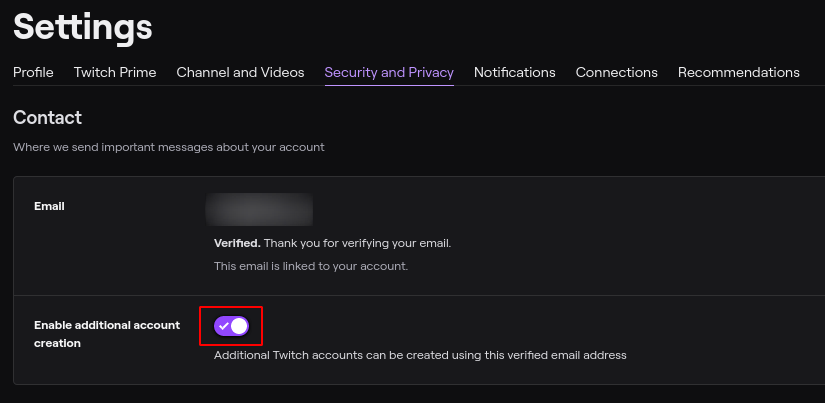
Before doing so, you may also go to your settings and "Enable additional account creation"
When you're done, head over to Twitch's developer website and hit "Log in with Twitch" on the top right.
In your dashboard's "Applications" tab, you hit the "Register Your Applicatoin" button on the right.
Put whatever you want into the "Name" field, and put "https://localhost" into the "OAuth Redirect URLs" field, since these fields are not strictly relevant for us.
Finally, you chose "Chat Bot" as the category and hit "Create".
You will now see your chat bot in the list of Applications, where you click "Manage".
Here you will see that here is a new field called "Client ID", which you will need in the next step. Keep this secret!
For the final step, head over to this site and connect it to your Twitch bot account to obtain your oauth token (remove the "oauth:" part).

Full documentation
The full documentation for the bot is available here
1 maintainer

Metadata
1 maintainer
Release files for twitchat 1.4.3
For a detailed explanation of source distributions (sdists) and built distributions (wheels), please see the package formats documentation.
Source distribution (sdist)
| File | Size | Uploaded | |
|---|---|---|---|
| twitchat-1.4.3.tar.gz | 173.6 kB | Details |
Built distribution (wheel)
| File | Interpreter | ABI | Platform | Reset |
|---|---|---|---|---|
| twitchat-1.4.3-py3-none-any.whl | Python 3 | none | any | Details |
Total release size: 185.8 kB
Release files / twitchat-1.4.3.tar.gz
| Download URL | twitchat-1.4.3.tar.gz |
|---|---|
| Size | 173.6 kB |
| Tags | Source |
|
SHA-256 checksum How to use checksums |
bbc22535278d7b0a575e2b120ce932e1b7defc0484b76f06618e2af723e7a826
|
|
BLAKE2b-256 checksum How to use checksums |
3c5bfd7c448685c2fab1a832fd2b68c2f28b76a76dbacfe1958bb5ff0c5036d3
|
| Upload date | |
|
Uploaded using Trusted Publishing? What is trusted publishing? |
No |
| Uploaded via |
python-requests/2.26.0
|
Release files / twitchat-1.4.3-py3-none-any.whl
| Download URL | twitchat-1.4.3-py3-none-any.whl |
|---|---|
| Size | 12.2 kB |
| Tags | Python 3 |
|
SHA-256 checksum How to use checksums |
32dc1f87a6389a7cee5707da12a70369fa2c47d5bb79878c36096a5181949ea8
|
|
BLAKE2b-256 checksum How to use checksums |
e53611b004f38ff056285a6754f070c65e249195a3df1786d2e3be1ea6e9a033
|
| Upload date | |
|
Uploaded using Trusted Publishing? What is trusted publishing? |
No |
| Uploaded via |
python-requests/2.26.0
|














