
twitter_openapi_python
Twitter scraping with data validation by pydantic.
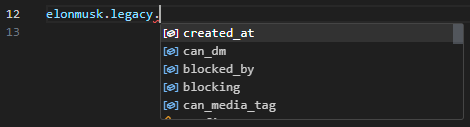
Setup
pip install twitter-openapi-python
Usage
import json
import datetime
from pathlib import Path
from tweepy_authlib import CookieSessionUserHandler
from twitter_openapi_python import TwitterOpenapiPython
# login by tweepy_authlib
if Path("cookie.json").exists():
with open("cookie.json", "r") as f:
cookies_dict = json.load(f)
if isinstance(cookies_dict, list):
cookies_dict = {k["name"]: k["value"] for k in cookies_dict}
else:
auth_handler = CookieSessionUserHandler(
screen_name=input("screen_name: "),
password=input("password: "),
)
cookies_dict = auth_handler.get_cookies().get_dict()
# To extract cookies from Windows (Linux by default)
# If you use tweepy_authlib, you must be on Windows
client = TwitterOpenapiPython()
client.additional_api_headers = {
"sec-ch-ua-platform": '"Windows"',
}
client.additional_browser_headers = {
"sec-ch-ua-platform": '"Windows"',
}
# get client from cookies
撫 = client.get_client_from_cookies(cookies=cookies_dict)
# tweet "Hello World!!" with current time
time = datetime.datetime.now().strftime("%Y-%m-%dT%H:%M:%SZ")
撫.get_post_api().post_create_tweet(tweet_text=f"Hello World!!{time}")
# get user info
response = 撫.get_user_api().get_user_by_screen_name("elonmusk")
Login
from twitter_openapi_python import TwitterOpenapiPython
# guest client
撫 = TwitterOpenapiPython().get_guest_client()
tweet = 撫.get_default_api().get_tweet_result_by_rest_id("1349129669258448897")
assert tweet.data is not None
assert tweet.data.tweet.legacy is not None
print(tweet.data.tweet.legacy.full_text)
Multiple OS
The Token can only be used on the same OS that issued the Token In other words, if the sec-ch-ua-platform does not match, the Token cannot be used. This library uses the Linux Chrome header by default. To use Token issued by Windows, do the following.
client = TwitterOpenapiPython()
client.additional_api_headers = {
  "sec-ch-ua-platform": '"Windows"',
};
License
This project is dual licensed. You can choose one of the following licenses:
1 maintainer

Metadata
1 maintainer
Release files for twitter-openapi-python 0.0.44
For a detailed explanation of source distributions (sdists) and built distributions (wheels), please see the package formats documentation.
Source distribution (sdist)
| File | Size | Uploaded | |
|---|---|---|---|
| twitter_openapi_python-0.0.44.tar.gz | 27.5 kB | Details |
Built distribution (wheel)
| File | Interpreter | ABI | Platform | Reset |
|---|---|---|---|---|
| twitter_openapi_python-0.0.44-py3-none-any.whl | Python 3 | none | any | Details |
Total release size: 62.5 kB
Release files / twitter_openapi_python-0.0.44.tar.gz
| Download URL | twitter_openapi_python-0.0.44.tar.gz |
|---|---|
| Size | 27.5 kB |
| Tags | Source |
|
SHA-256 checksum How to use checksums |
323bb831edeb56ed6c5cd56cec5688d7b607489b456e4741ab18523d0456bd55
|
|
BLAKE2b-256 checksum How to use checksums |
c08ff6dd42b513e237ded3a45e35b686b65c5806d7457ffe62386a401f3420eb
|
| Upload date | |
|
Uploaded using Trusted Publishing? What is trusted publishing? |
No |
| Uploaded via |
twine/6.2.0 CPython/3.14.5
|
Release files / twitter_openapi_python-0.0.44-py3-none-any.whl
| Download URL | twitter_openapi_python-0.0.44-py3-none-any.whl |
|---|---|
| Size | 34.9 kB |
| Tags | Python 3 |
|
SHA-256 checksum How to use checksums |
ce74e8ac7b3a4207b9c4a746853fb1b90f3083f7ce3a0161f3253e4003eb0dc8
|
|
BLAKE2b-256 checksum How to use checksums |
46fbe0d10023025b58e89db3c5f61ba85d52bdc7aed34278e0e57d84543d2356
|
| Upload date | |
|
Uploaded using Trusted Publishing? What is trusted publishing? |
No |
| Uploaded via |
twine/6.2.0 CPython/3.14.5
|














