
Compatibility for Logging with Easy and Simple

Project description
twlog
A lightweight and colorful logging utility for Python, designed to enhance your console output for debugging and general information. twlog provides an intuitive interface similar to Python's standard logging module, with a focus on immediate, human-readable, and visually engaging console messages.
Features
- Direct to Standard Output: Unlike Python's standard
loggingmodule,twlogdefaults tosys.stdoutfor all messages, making console log management straightforward and compatible with typical shell redirection. - Automatic Array Disassembly: Seamlessly handles and converts numerical array objects (like NumPy
ndarray, PyTorchTensor, JAXArray, etc.) into readable string representations for clearer debugging in data science and machine learning workflows. - Built-in ANSI Color Support: Achieve rich, colorful, and styled console output without needing external libraries like
Rich.twlogleverages direct ANSI escape codes for enhanced readability. - Fun Print Functions: A collection of unique, emoji-enhanced, and color-coded print-like functions (
pixie,prain,prank, and more) to make your debugging experience more interactive and enjoyable.
Installation
You can install twlog directly from PyPI:
pip install twlog
Quick Start
Get started with twlog in just a few lines of code:
import twlog
import numpy as np # Example for array disassembly

# Get a logger instance
logger = twlog.getLogger(__name__)

# Output a simple info message
logger.info("Application started successfully!")

# Output a debug message with a custom title
logger.debug("Debug mode is ON", title="Configuration")

# Demonstrate array disassembly
my_array = np.array([[1.23, 4.56], [7.89, 0.12]])
logger.info(my_array, title="Metrics")

# Use a fun print function
twlog.pixie("Status", "Data processing complete!")
Basic Usage
Impremented Features.
Compatible Imprements
- root(RootLogger): ...
- BasicConfig: ...
- LogRecord: ...
Handlers
- NullHandler: Null handler.
- ANSIHandler(Defaults): sys.stdout, coloring with ANSI code
- RichHandler(Defaults): sys.stdout, coloring with ANSI code(rich Like)
- StreamHandler: sys.stdin, sys.stderr
- FileHandler: filehandle
- BufferedFileHandler: filehandle, write on last(destruction).
- NullHandler: Null handler.
- ChatGpt.SysLogHandler: (Nothing) Output for Syslog, Yet Another Direction?
Compatible Imprements (Yet Another)
- Formatter: Default Formatter.
- ANSIFormatter: ANSI Formatter (Colorful, Use on ANSIHandler)
- RichFormatter: Rich Formatter (Colorful, Use on RichHandler)
Compatible Imprements (Yet Another)
- Filter: Empty template yet, Working from now on...? (or appending yourself)
Logging Messages
The primary logging method is logger.logging(), but twlog also provides convenience methods like info(), debug(), warning(), error(), and critical() which automatically set the level argument.
logger = twlog.getLogger(__name__)

# Logging with a custom title
# The title will default to the uppercase version of the logger's name if not provided.
logger.info("User 'admin' logged in.", title="Security")
logger.debug("Variable X: 123", title="Debugger")
Using Error Codes
from twlog.util.Code import *

NOTSET   = 0
DEBUG    = 10
INFO     = 20
WARN     = 30
WARNING  = 30
ERROR    = 40
CRITICAL = 50
NOTICE   = 60
ISSUE    = 70
MATTER   = 80
Obtaining a Logger
Use twlog.getLogger() to obtain a Logger instance. If no name is provided, the root logger is returned.
import twlog

# Get the root logger
root_logger = twlog.getLogger()
root_logger.info("This is a message from the root logger.")

# Get a named logger
my_specific_logger = twlog.getLogger("DataProcessor")
my_specific_logger.debug("Starting data ingestion...", level=twlog.DEBUG) # Using imported level constant
Setting Log Levels
You can set the minimum log level for your logger using setLevel(). twlog follows standard logging levels. The level constants (DEBUG, INFO, WARNING, ERROR, CRITICAL) are directly importable from the twlog package.
import twlog

logger = twlog.getLogger("MyLogger")
logger.setLevel(twlog.DEBUG)
logger.debug("This debug message will now appear.")
logger.info("This info message will also appear.")

logger.setLevel(twlog.INFO)
logger.debug("This debug message will NOT appear now.")
logger.info("This info message WILL appear.")
Using Fun Print Functions (Top-Level)
twlog provides a set of highly visual, emoji-enhanced functions directly accessible from the twlog package. These are ideal for making specific debug messages or status updates stand out in your console.
Logger Builtins
logger = twlog.getLogger(__name__)

# for Priny {ansi.start}...m
logger.first            = "🌟 \x1b[94;1m"
# ?{ansi.reset}
logger.title_structure  = ":\x1b[0m"
# e.g. -> {ansi.start}{ansi.fore_light_red};{ansi.text_on_bold}m->{ansi.reset}
logger.middle_structure = ""
logger.split            = " "

# 🌟 priny: priny
logger.priny("priny", "priny")

# 🍑 peach: peach
logger.peach("peach", "peach")

# Other Fun Print Functions

🧚✨✨✨ pixie ✨✨ ...
🌈 prain: ...
🎨 paint 🖌️ ...
🌬️ plume 🌬️ ...
🤡 prank -> ...
🍤 prown: ...
🍄 pinok: ...
🍑 peach: ...

# Multi Line Fun Print Functions

🪩 prism:
        ...
twlog.util
twlog.util import *

# for Priny {ansi.start}...m
twlog.util.first            = "🌠 \x1b[94;1m"
# ?{ansi.reset}
twlog.util.title_structure  = ":\x1b[0m"
# e.g. -> {ansi.start}{ansi.fore_light_red};{ansi.text_on_bold}m->{ansi.reset}
twlog.util.middle_structure = ""
twlog.util.split            = " "

# Free-style message with a star emoji and blue bold title
twlog.priny("System Boot", "Checking dependencies", "Loading modules")

# 🌠 priny: priny
logger.priny("priny", "priny")

# 🍑 peach: peach
logger.peach("peach", "peach")
popts, psolo
twlog.util import *

# Prints options as key-value pairs
popts("Settings", "verbose=True", "cache_enabled=False")

# Prints a message without a newline (useful for progress bars)
import time
psolo("Progress: ")
for i in range(5):
    psolo(f"{i*20}% ")
    time.sleep(0.1)
psolo("\n") # Add a newline at the end
Command Line Usage
twlog includes a simple command-line interface for testing its console output capabilities.
To run the test, simply execute:
python -m twlog
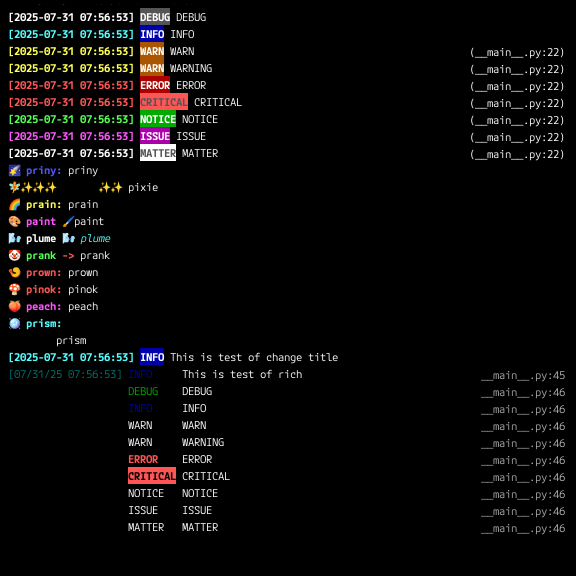
This will output a series of test messages demonstrating various logging levels and fun print functions.
Why twlog instead of standard logging?
Python's built-in logging module is powerful and highly configurable, but it often defaults to sys.stderr for console output, which can be less convenient for general application logs that are not strictly error-related. twlog addresses this by:
- Defaulting to
sys.stdout: This aligns with the common practice of sending general application output to standard output, making it easier to pipe logs to other tools, redirect to files, or display directly in the console without mixing with separate error streams. - Simplifying Console Output: For many scripts and applications, the full complexity of the standard
loggingmodule (multiple handlers, formatters, filters, etc.) can be an overkill.twlogstreamlines the process, focusing on clear, immediate, and visually appealing console output. - Enhancing Debugging Experience: The automatic handling of numerical array types eliminates the need for manual
str()or.tolist()conversions, providing cleaner debug logs for scientific computing. The unique ANSI color support withoutRichdependency and the collection of emoji-enhanced "fun print" functions further maketwloga delightful tool for development and debugging, adding a layer of personality and clarity to your console.
API Reference
twlog.getLogger(name: str = None) -> Logger
Returns a Logger instance.
name(str, optional): The name of the logger. IfNone, the root logger is returned.
Logger Class
The Logger class provides methods for logging messages at different severity levels and controlling their presentation.
Logger.logging(message: Any, level: int = 20, title: str = None, datefmt: str = None, msgfmt: str = None)
The core method for emitting a log message.
message(Any): The message to be logged. It can be a string, a number, or a numerical array-like object (e.g.,numpy.ndarray,torch.Tensor), which will be automatically converted to a string.level(int, optional): The severity level of the message.twlog.DEBUG(10): Detailed information, typically of interest only when diagnosing problems.twlog.INFO(20): Confirmation that things are working as expected. (Default)twlog.WARNING(30): An indication that something unexpected happened, or indicative of some problem in the near future (e.g. 'disk space low'). The software is still working as expected.twlog.ERROR(40): Due to a more serious problem, the software has not been able to perform some function.twlog.CRITICAL(50): A serious error, indicating that the program itself may be unable to continue running.
title(str, optional): A custom title displayed before the message. IfNone, the logger's name (in uppercase) is used as the default.datefmt(str, optional): A format string for the timestamp (e.g.,"%Y-%m-%d %H:%M:%S"). IfNone, a default format is used.msgfmt(str, optional): A format string for the entire log message (e.g.,"{date} [{level}] {title}: {message}"). IfNone, a default format is used.
Convenience Methods (e.g., Logger.info(), Logger.debug())
These methods are shortcuts for logging() with the level argument pre-set.
Logger.debug(message: Any, title: str = None, datefmt: str = None, msgfmt: str = None)Logger.info(message: Any, title: str = None, datefmt: str = None, msgfmt: str = None)Logger.warning(message: Any, title: str = None, datefmt: str = None, msgfmt: str = None)Logger.error(message: Any, title: str = None, datefmt: str = None, msgfmt: str = None)Logger.critical(message: Any, title: str = None, datefmt: str = None, msgfmt: str = None)
Logger.setLevel(level: int)
Sets the threshold for the logger. Messages with a level lower than this will be ignored.
level(int): The minimum severity level to log.
Fun Print Functions (Top-Level)
These functions are designed for visually distinct console output, leveraging ANSI escape codes and emojis for enhanced readability and fun during development/debugging. They are directly importable from the twlog package.
-
popts(b: Any, *t: Any)- Description: Prints options as key-value pairs, with a bold key.
- Usage:
popts("Options", "verbose=True", "debug_mode=False")
-
psolo(m: Any)- Description: Prints a single value without including a line break at the end. Useful for building progress indicators on a single line.
- Usage:
psolo("Progress: "); for i in range(5): psolo(f"{i*20}% "); time.sleep(0.1)
-
priny(b: Any, *t: Any)- Description: Prints a free-style message with a leading star emoji (
🌠), blue bold title, and a customizable structure. - Usage:
priny("System Boot", "Checking dependencies", "Loading modules")
- Description: Prints a free-style message with a leading star emoji (
Other Fun Print Functions (Top-Level)
-
pixieprainpaintplumeprankprownpinokpeach- Arguments:
(b: Any, *t: Any) - Description: Prints a colorful message with a some emoji and some color bold title.
- Usage:
pixie("Success!", "Model training complete!", "Accuracy: 99.1%")
- Arguments:
-
prism(b: Any, *t: Any)- Description: Prints a multi-line, structured message with a disco ball emoji (
🪩) and cyan bold title. Ideal for displaying summaries or structured data that benefits from line breaks. Each*targument appears on a new line, indented. - Usage:
prism("Summary Report", "Total Users: 5000", "New Signups: 150", "Active Sessions: 1200")
Note: All
bandtarguments are automatically converted to strings internally before being printed. - Description: Prints a multi-line, structured message with a disco ball emoji (
Contributing
We welcome contributions to twlog! If you find a bug, have a feature request, or would like to contribute code, please check out our GitHub repository and open an issue or pull request.
License
twlog is licensed under the GPLv3 AND LicenseRef-RPTv1.
Release history Release notifications | RSS feed


Download files
Download the file for your platform. If you're not sure which to choose, learn more about installing packages.
Source Distribution
Built Distribution
Filter files by name, interpreter, ABI, and platform.
If you're not sure about the file name format, learn more about wheel file names.
Copy a direct link to the current filters
File details
Details for the file twlog-0.61.0.tar.gz.
File metadata
- Download URL: twlog-0.61.0.tar.gz
- Upload date:
- Size: 38.2 kB
- Tags: Source
- Uploaded using Trusted Publishing? No
- Uploaded via: twine/6.1.0 CPython/3.11.2
File hashes
| Algorithm | Hash digest | |
|---|---|---|
| SHA256 |
238597c7267c9941c396337728af08e7372221e0cc5210d03470cc98ce53b87f
|
|
| MD5 |
1a0d6c11a8a27e275a0661de5dcac90f
|
|
| BLAKE2b-256 |
70e64482861ecfea30f781cde25dc80bc49fce08a8ebb9c38c0e87818058a678
|
File details
Details for the file twlog-0.61.0-py3-none-any.whl.
File metadata
- Download URL: twlog-0.61.0-py3-none-any.whl
- Upload date:
- Size: 44.1 kB
- Tags: Python 3
- Uploaded using Trusted Publishing? No
- Uploaded via: twine/6.1.0 CPython/3.11.2
File hashes
| Algorithm | Hash digest | |
|---|---|---|
| SHA256 |
487a2ce50b43101fa6851138c02e0baeb2d957207e1e0ed87b09c870cd848539
|
|
| MD5 |
84178dca19a8967bf66fb8aea92d3f3f
|
|
| BLAKE2b-256 |
aeecd2868ccfa8fc867585f0de184ae534bfabacb9899092654b5555e142725b
|






