
TX2




Welcome to TX2! This library is intended to aid in the explorability and explainability of transformer classification networks, or transformer language models with sequence classification heads. The basic function of this library is to take a trained transformer and test/train dataset and produce an ipywidget dashboard as seen in the screenshot below, which can be displayed in a jupyter notebook or jupyter lab.
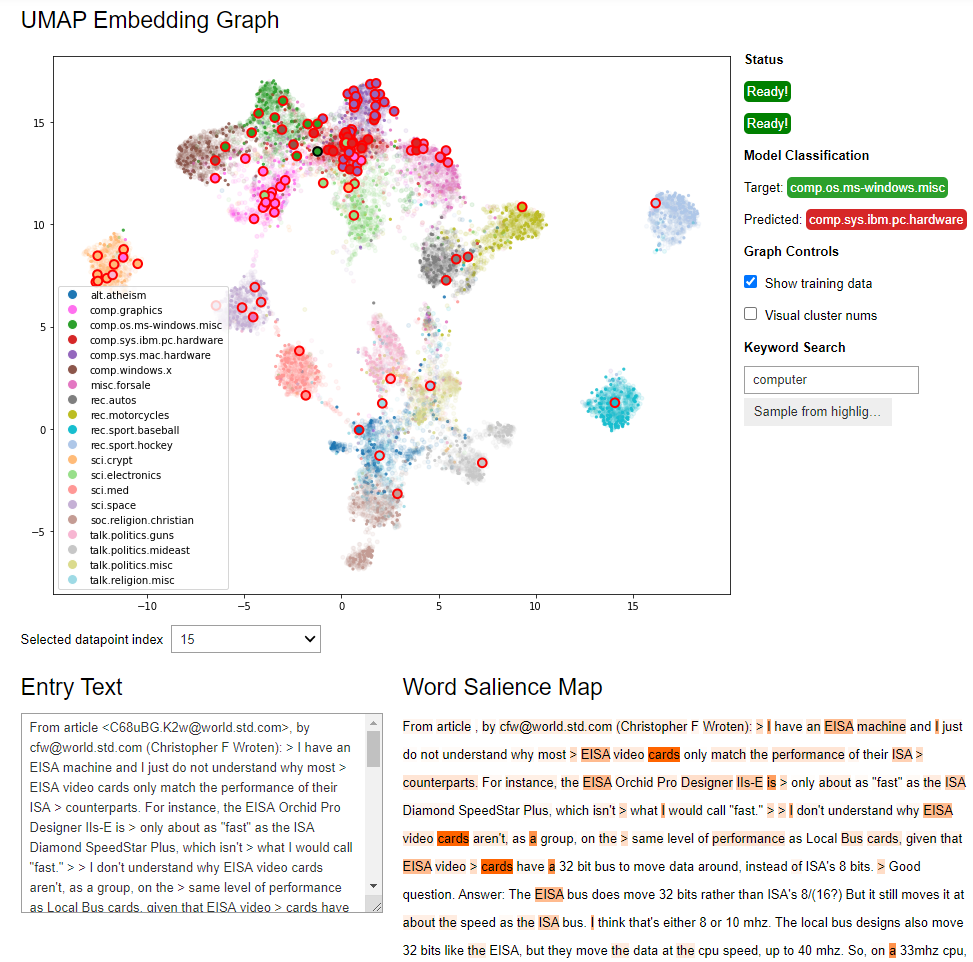
NOTE: Currently this library's implementation is partially torch-dependent, and so will not work with tensorflow/keras models - we hope to address this limitation in the future!
Installation
You can install this package from pypi:
pip install tx2
NOTE: depending on the environment, it may be better to install some of the dependencies separately before pip installing tx2, e.g. in conda:
conda install pytorch pandas scikit-learn=1.1 numpy=1.22 -c conda-forge
Examples
Example jupyter notebooks demonstrating and testing the usage of this library can be found in the examples folder.
Note that these notebooks can take a while to run the first time, especially if a GPU is not in use.
Packages you'll need to install for the notebooks to work (in addition to the conda installs above):
pip install tqdm transformers==4.21 datasets==2.4
Running through each full notebook will produce the ipywidget dashboard near the end.
The tests in this repository do not depend on transformers, so raw library
functionality can be tested by running pytest in the project root.
Documentation
The documentation can be viewed at https://ornl.github.io/tx2/.
The documentation can also be built from scratch with sphinx as needed.
Install all required dependencies:
pip install -r requirements.txt
Build documentation:
cd docs
make html
The docs/build/html folder will now contain an index.html
Two notebooks demonstrating the dashboard and how to use TX2 are included
in the examples folder, highlighting the default and custom approaches
as discussed in the Basic Usage page of the documentation.
Citation
To cite usage of TX2 in a publication, the DOI for this code is https://doi.org/10.21105/joss.03652
bibtex:
@article{Martindale2021,
  doi = {10.21105/joss.03652},
  url = {https://doi.org/10.21105/joss.03652},
  year = {2021},
  publisher = {The Open Journal},
  volume = {6},
  number = {68},
  pages = {3652},
  author = {Nathan Martindale and Scott L. Stewart},
  title = {TX$^2$: Transformer eXplainability and eXploration},
  journal = {Journal of Open Source Software}
}
2 maintainers


Metadata
2 maintainers
Release files for tx2 1.3.1
For a detailed explanation of source distributions (sdists) and built distributions (wheels), please see the package formats documentation.
Source distribution (sdist)
| File | Size | Uploaded | Provenance | Actions |
|---|---|---|---|---|
| tx2-1.3.1.tar.gz | 32.1 kB | Without provenance | Details for tx2-1.3.1.tar.gz |
Built distribution (wheel)
| File | Interpreter | ABI | Platform | Actions Reset |
|---|---|---|---|---|
| tx2-1.3.1-py3-none-any.whl | Python 3 | none | any | Details for tx2-1.3.1-py3-none-any.whl |
Total release size: 62.1 kB
Release files / tx2-1.3.1.tar.gz
| Download URL | tx2-1.3.1.tar.gz |
|---|---|
| Size | 32.1 kB |
| Tags | Source |
|
SHA-256 checksum How to use checksums |
7fa82e35cf9af368871238b5b2bd62d7f9f374d9ecca2deee9ecf1801187f0c3
|
|
BLAKE2b-256 checksum How to use checksums |
3fc45eb18d890b1e60e47b53a0c15ed5cc1262a6844d37b8aaccba41328dbbfa
|
| Upload date | |
|
Uploaded using Trusted Publishing? What is trusted publishing? |
No |
| Uploaded via |
twine/5.1.1 CPython/3.12.7
|
Release files / tx2-1.3.1-py3-none-any.whl
| Download URL | tx2-1.3.1-py3-none-any.whl |
|---|---|
| Size | 30.1 kB |
| Tags | Python 3 |
|
SHA-256 checksum How to use checksums |
9e862aabd8625a4a391aa6139efa72cf39bbe4d862359fae3631c531b0c42707
|
|
BLAKE2b-256 checksum How to use checksums |
94fb6a13cc726190e641b1d1f97ab68f78d2c5d965bf0ccb359bdb0994be2845
|
| Upload date | |
|
Uploaded using Trusted Publishing? What is trusted publishing? |
No |
| Uploaded via |
twine/5.1.1 CPython/3.12.7
|
Security for tx2 1.3.1
Provenance
Provenance describes where a file came from. On PyPI, provenance is shared via attestations, which provide a verifiable record of the build or publishing details. View details, limitations and caveats.
No provenance found
None of the files in this release were uploaded with provenance metadata.
A note on package security
PyPI is a repository for distributing packages, not a service for auditing them. While third-party security researchers and our staff do their best to detect and remove malicious packages, PyPI cannot guarantee the quality, security or suitability of any given package.
To learn more about protecting yourself from malicious actors, visit our package security documentation.














